Leaderboard




Popular Content
Showing content with the highest reputation on 07/21/22 in Posts
-
When I click on a person to load their page, it shows me the posters for the movies they were in. Under each poster is the title of the film. What it doesn't have is the name of the character they played. On the movie page, the cast all have pictures below which are two lines: actor name and character name. I'd like to see a similar arrangement on people pages, with the film name and the character name.2 points
-
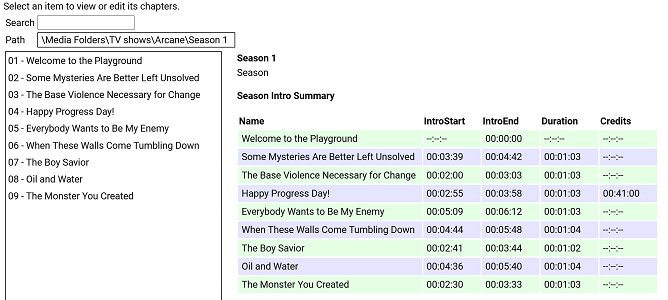
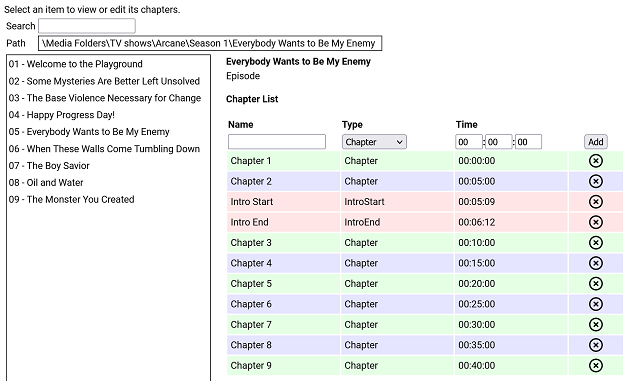
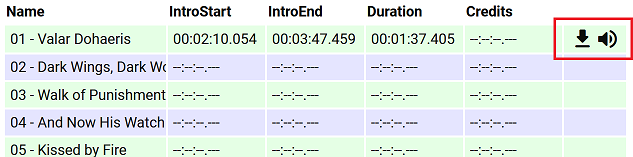
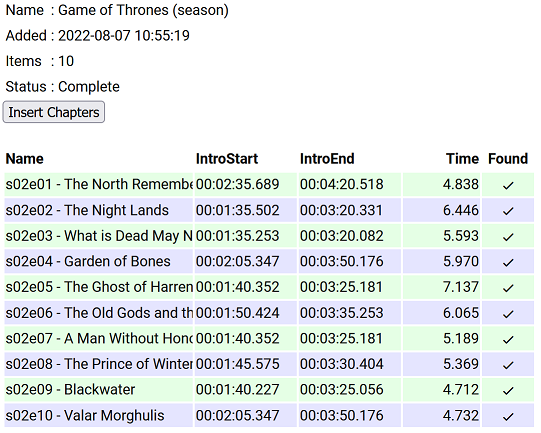
I have put together a simple chapter viewer and editor plugin. The plugin is now in the plugin catalogue. As always, here is the source: https://github.com/faush01/ChapterApi/tree/main/ChapterApi It is very simple and allows you to view chapters for an item (Movie, Season or Episode), remove chapters and add them. It supports all the different chapter marker types. It also has a season Intro summary page, select a season to see if it has intros detected for each episode. Note: All chapters are wiped and reset when you do a metadata refresh on an item. If you spend any time setting up or editing your chapters, keep this in mind. There is no current way of locking chapters. Chapter List Season Intro summary Intro Detection (CTRL-F for Intros) I have added a new way of detecting intros based on theme audio, this is using a very different approach than the core approach, it is using some of the ideas I posted over there: https://emby.media/community/index.php?/topic/107878-audio-fringerprinting-chromaprint-segment-detection/ With this approach, you need the Into Chromaprint info, this is a simple audio fingerprint of the theme song/music/audio. The plugin looks for this and can create chapters based on the results of the search. So where do you get the Chromaprint Intro info file, you can create one yourself for a series, season or episode by adding chapter info for one episode and then extracting that as a Chromaprint Info file. The new icons on the season summary page lets you extract the info file, if you just want to check you have the chapter offsets correct you can extract the audio of the chapter to play back and confirm it. A Chormaprint info file looks like this: { "series":"Game of Thrones", "season":2, "tvdb":"121361", "imdb":"tt0944947", "tmdb":"1399", "duration":107, "extract":10, "cp_data":"ThXy/E4hsdxOIZDdziWA3c9lgNnd/YDI3NyAyNyYwMzcuFHc1L0V3dS1F1/E8xJexOISXsfyMl72UzZe5lM13uZlNN/m7FDddvyT3Hack9xWjJDdR52Q3USWkN0EkvHfFJJz3zT2d98s53ffJO1n/yR8Z/4lTCf+Hgwn/k40N/pOJHH63iBR+/4xUfnuEdP47hXDeH1XgXgcd4B4DP/AeAzf0FkM/VBZDO0QWTzkEFkt9BN7bdASet3RUnqP0UJaj9dFe57WRH2u/kR977pEfO++RXw/vlb8D5Ze/Q+GfvcNgn32TdI99m/iPfbvYjj37jUZ/+4FX73uBN+9fhSfvV40vf1eELT9XjCU3V4hlN1fIZfcfzHW3C0FU9w9DRPYHTkTWA0pElgMLVNYBDVBWARRQBgUcUEYNHFRGCR3ARhk7gAY5e4BGdd+AxqGU0IahkHCCo5AwwreUMEKblDACipwwAsrbIMIGemCCAjKgggIipIYCI7QGBiWUBg4kjAbGIIxGvmDEhqrsQFequAAXq4gAF6uIABevjBDTq8Qwk2vEYLM/wKCxA8Og8QPHpDEH36QxDfe8MQ213HEFtUxxAfFdsTX0XbEt/H2xKPzdcSS0zXAgsI3wYLCJ8KSwyXCprXlwqakpcLnrLTC5ay0wlW09MMFsDXDBZE1wwXTJ8FV0ibB5eJm0e1v9lOta/dTrXn1Up0ZdVKNGXdSjwV1Up8BdFLvEGRS7yBgUusgYFLvIPAS72XwEt1d8wLF2fIDxNlyA8TbcgJ0/3ECZK9wAmSncQJEvyJCBZ4iQweOJwE3iiEAJpphACa74xE2qaMTNryjEia8oBInrGASJ6wgM0W4IjHFmCIwxIgmMJTIJjC0SCcwpVw3MeVtNTHnb3QxY270MXJWtTECRrEwAtKhMALjs3QS47N0I+XxdCPv0Hwh+1B8EfsRfAH7EnwB6xJ9EO9Tf3D1U37wxcN+8cXDfpXFQX6V90F/l+ZAfbfuQX337kN959dDf+dVwH7vVcB+//XQds3103fN91J1Tf5SfV3OUn0vz3N9L93wfy/00H4/5NB+H+RQfg/0En4P9BZ+P0U2f29Hdn/vRvd/nxL3dZ4S9XWOMvV0nzL1fJ8iVVyeIlVcvgLzXO4G8VxvFrFcPy6wXA0ukFgNKpAYDWqQCAz+0AgM11AIHPdRCDXzEQg18wMIVdMCCPfHAgm39wMKsuNBCpLzQwqCUUMKkkFBCqZQwAqmIMAJ5myBCGZogggH+YIIBdmCCASP0ggEh1AINIMwCSSzEAoksxEKZKcTSuWnAUqjYwBKkjEASpIwAU6yEMPOphCCz+YQgs1WAYLFFgWRxTZ1kIUn/dCFN8UwhRfHN4QPxzaEHeZ2xF3m1sTd5pXE3fbUxP1GFMT1RjXExQc2xMUXNkTXNRdEZyXVRGct1EQzLdREAz1VRANVNkQDQTYEA8FnAFPBbwDy8e0BoqHvAaKtbwOzuW8Ck4lvApOJZQKTjWUCkZFlArGxZQKhoWVCoaF0QqGldALhrXACxflzAcTbMgDE2yMA9P8lEOTtIRDk5WFR5fVjUXXfZ1FXjmVRFo5gUBaOYFA2nmBRNq3hUybso1Im7KNSJ/yhUmVc8FLVWHNShBgyE4QZMhCECyYQlA4nELQCZxDlM+cQZSOlEDUjpBAXIqQAFxLkABZO5AQWWuEEFtqmBAb6pgwG6rcMF+6wCBfnUAgF0xcLBcMXCjTTBRrl4QQbpeEEG6XlRBmt/UUZv/1FGZd/RRuOf0cbzlVHGV5VRxkuRMEbL1TBGz9lwRofdcMaD/XDGh3Twxp100Aa5fFAGuXhABmlsUEYrbFDGKe/wxinv8Bct7rAXIa+Q1yGn0Jcx5VCXNeF0l1nhfFfJYXwXzWn8F4Vo/NeBfNyXgfzMl4XUTJeJ0ExX2YcMFzmOFBctinRXIYpw1yGL8NdjhfCXY4Dw1+vA9Nf50HRX2Xhkd014bBdNaGwXTSl8F00n/BdFJ9xWRTtcls1bTJaNTUyWjURMlv1ARJb9QNTWbVTQFi1Y0BYteFAWLXhQFj39UNYV7XCWUadwllGmdJbRtnTW1bZ01pW3VNaXtVRWl7QVV5/QFde/0F2X/9Tdl/3ZnZdpiZU3aYmVN2mZ8TfpuHE3+bwgd/WsILXVoSS1zeFkJc3hZCXNYfQhhfXV4YX0TaHF3E2hSYRMoRmYXecZmXXnOZt15z3XZWUx93UlMffVcXF31fFRY82x1WPftV1/3/VZe181WX1dNUx8XXVEdF21AHBftRBQX7U0BN91OAnfNSgL33QoWt/1aFb/9aTS//Wg0v30oLF5VLCwORS86DkUmOgZFJl4GRSZfQ1cnX8NXIk/DZzNH12cVVpdnBVL3xw/y98cO8vfHHvHn9z7w5fU/9O3VNfztxTXc6UU02+lNMNr5XTDa230xettdNnrbXTZ53d02fLH9Imyx7SZkk+0nY5PtJXLH/SxyTvUscg71LXEH9R1wM+VNcCNlRXAnZUTRJ1VB029BQdavQcPOrwHDzq8Bwc6lAcDO8RGQz1EhsM0RYZHUEXGS1AVRgtZVQYb2XXGG/n1xnO8scbztLHGs7Sxxqew8EbrpVBWa+9QFnvqUBY/7lBWc+9Q1vNlUZbTdFGWg3BV1s9wFZZLdB3WS1hdVgv53dYL+bXWR521ltOUtdaztLFWt/CwFvv1cBb79zA2e/8wNnf/MPZzvzD3c7wQ9/O0EPf3sFT33/BVt1391bd9W/23fVp99/1OXXflT913pUzE96FE1Pe3wNTXu8T0V4vM9BeKyOQXzkjkF85dtBfKUbQXyhXUF84N1B/GCUQewh1ET8JXBM92dwDPbnYQTSZ2EA0iZhANImMRDCJhEUxmYDHM7nQ1jL54dYy6ePWMuuj1nLvo3dy54d0c+WPdHHVjVRxhY1Xc4WPVnPVz1Zz519Xc2YvV3NmL3ZzJiVncSYkY3cuFOF3PkDxdw5QsH8P4PB/DeDQPwz1UzkMrRI5DO0SORztAjk8/QE5PVVBON1TQziPU0IYj1LCGI8Cwxi9AkBYrCZAWKwmwVjcP8JYzF+CSExNg0kNRZBPDdWUT17XtU/+t/VN7pf0TK6XdEyut1VFnvVWx47xUsaG0VLGh0FTVrcBUVbvMVBWbSNQVikj8VYpI/FWKDfwUzge8FMYHnBTCFcwVwjXMVcI1TFXCIVwV9mFYXW5jXF1mZ1zdJi9c3SIvXF1mLRwd7iQMHb4sDP2eLAy9jigMvYsoTL2JeMm9yZiZvQmMmb0Igbv9CIN7PwiCOz8Yhjs/MI4/v2CPP5fghT+XoIRf16GE3delhJ3X7cy912vIrVc7SaUWG0ukEhpaoBIGGqASAjqgEhN/tFITddSSF1DM0hdQzNM/UFxTO9lU0znbdNM9m3ST4Zl0k6GwVJOhsETTpaBEU7ns1BO56PQT2WjwE0lp8BNJK/QTRT/Uk0E9xJNBdcSTRVDE0hlUVBIZWVQSHVt0UhVfdFJ1X3VSdd3VUvXU1dL19NWS9fDd0v3wXdLd+XVSTft1Ek3rVRJN7lXWVe9Fl1G3RdfRsUxX9bFM16mUVNetjFTXrYxU162MUFepjHBXuchgV7lIYFePTGRXz0TkF8sU5BdKFfQGSjfUBkY31AZGP8TGxjtExsZbQEZWfVDGZnVRxiZlUcYmZ1FHbi/RB24v0RfuK9Ed5y3R3ack0Z2nJJGcryy1nK14t5y5/L/cubWfXLmxmxy5sds8ubFbPNW1W3zRtVv8QbVbXEW/W1wFnltcDZ5ZXEmeGdxJmhmdzZs5lYWcOZWBtDiXgfQ814FkHMeBbBSGgWkAhsMrAIZTLwCGdzdAhndzUYZvVUHGb0RBRmfEwUY3xNFGP8yRVh9ModYLRaHWD0GhVg9NpRMXW6UTE3ulEzPntVMzofXTZ6F1U+uldVOrpVVTv7BVU7+0XdO/mFyTv5hc15vMXFeaTNxXigj0V44I9FeODZBXigWQF44FkBeGBdAHwhFUB8IwREdGYAQPXmAMD3ZhTQ9m4V0PbuPd327nnJ9m75yfZmuU3+ZrhF+uLc3/rixNv7o8Tb+6OE2/mkhdvZtIXbXLyF+1DYxftQ2Af/UJgy91HYYrcTWKK3ExiivxIY5r8SGT6XFhsPkx7bC5Me28vTHpuN1xebjNcTm8xDMZ+cQzFXvEEwV71BNBfVTTQRxVk8EUVZPFEF2TxRFd09VXfdNfXn1T+1t1E//ZVVOz3FXTk/BU05/wVBfL5HQXy+l0F8trdBfPanBXg25Q14Nt0JeDZICXk3CAl/dQgZc7QYHXK0vRVSvK8RUrivFVJ4vh9WONcfXhgDH1rYAwda+ENFGniDTQr4hkEOuFZBDrh2QQ68tsEKtZbBCvOXjQtjxYULYsSBD+LEgU1ixIFMYsyFTGbIjVRmyI3U5siF1ObZjdTi+Y3QY/mJ0GF5ifBhfY3wYTWN8WA1jfFgFY3lZRXF7GXX1ehvh93ob4fd6", "cp_data_length":3372, "cp_data_md5":"DDF936E4FD29A02CDA178EBFF37AD2E8" } It's just a JSON file with some info and the Chromaprint data. This can then be used in the Intro Detection tab to create a job against a series/season/episode list. Once complete, you can import the job results into your items. This is a semi auto way of detecting chapters for series that are having issues, because you are supply a good well-known chromaprint of the audio you want to target your results are much more predictable. Sharing intro theme cp data The sharded intro theme cp data is now hosted on GitHub https://github.com/faush01/ThemeCpData To use the hosted data in auto detection in the ChapterApi plugin, you can use the following URL in the "Intro Data External Url" on the options tab of the plugin: https://github.com/faush01/ThemeCpData/archive/refs/heads/main.zip Add the URL, hit download intro data, hit reload intro data and the intro cp data will be loaded for all the series you have that there is cp data for in the shared repository. If you want to add more the to the shared repo, clone it, add your new into cp json items and do a pull request to have your new items merged in and available to others.
 2 points
 -
Sorry, I'm generally a noob with emby, I've used it off and on for the last couple of years, but just decided to make the complete switch from Plex, so forgive me if I'm using the wrong terminology. Just wondering if anyone is working on a project to get images from theposterdb. They have a lot of Collection artwork that can't be found anywhere else, and lots of themed artwork within those collections. Would be nice to have an agent that handles the downloading of those. For some reason, I don't seem to get all of the poster artwork from Emby that Plex seems to get, for instance, my Garden of Sinners posters all looked similar in Plex, but there's 2 of them that aren't getting the poster images that Plex seemed to be able to find. So having a single source repository for Poster art would be awesome. I am also having the same issue with my Hana to Hebi Live Action movies, both the ones from the late 70's and early 80's as well as the ones from the Early 2000's. The posters just aren't showing up despite them being matched appropriately.1 point
-
Yes, you may be right, I won't deny that. It's often the case that when you fixate on a "problem" you make it bigger than it actually is. Ok, I'll wait for a fix then. In any case, I am infinitely grateful for your efforts, that you took care of the problem and didn't give up so quickly1 point
-
@NeverExists Here you go. You will want the emby-android-google-arm64-v8a-release.apk for the shield pro. https://github.com/MediaBrowser/Emby.Releases/tree/master/android1 point
-
BANG - and once again, Sherlock Softworkz solved one of the toughest cases in media processing history1 point
-
I will share my results here after trying it out, thanks.1 point
-
I have a Zidoo Z9X and it works fantastic by itself with It's Home Theater app, but it is not meant for emby. Honestly I find the shield is the best with Emby, but I use Emby exclusively for Anime because of the Shields AI upscaling. It makes anime look better then on any other device I've tried. I use my Zidoo Z9X for everything else like all my Dolby vision content, TV Shows and Movies. Dolby Vision support on the Z9X is miles ahead of any other Android box, cause it supports every Dolby Vision format. Even Dolby Vision Profile 8 Which is used when A Blu-ray release has no Dolby Vision, Instead they take the Dolby Vision RPU metadata from a Web release and add it to the 4k hdr Blu-ray release making Blu-ray quality with Dolby Vision.1 point
-
Sorry I misread. Then to answer your question, yes, I suppose in theory, but this has never been tried before.1 point
-
Intel themselves already lists "Handbrake" as tool with support for their "Advanced Xe Media Engine", so I guess SDKs will come and ffmpeg-support too. Also, AV1 is just another option, not a path to commit to. If emby gets an upgrade to support HEVC for live-transcoding, then AV1 should be kept in mind too. Taking sides isn't necessary and wouldn't be smart, because of course, there will be lots of devices without AV1-hw-decoders, but there will be a growing amount of them in the coming future. And why not support that too?1 point
-
I guess the best way to test it, is to use a news programme. It's unlikely that wouldn't be on every day1 point
-
Suspected known bug Chrome on Mac. See: https://stackoverflow.com/questions/59336762/chrome-drop-down-menu-bug-closing-automatically Possible steps to fix based on similar FB issue: https://techwiser.com/facebook-not-loading-chrome/ I would not test with Chrome on Mac. It's generally not supported browser combination. The Web dev industry typically does not test with this. If you want to use Chrome, use the Windows version. I would expect you to run into constant issues using that browser OS combination. Safari & Mac is not much better for odd bugs but it is supported more for web testing online. Hope that helps.1 point
-
I have tried Shield, Roku, and multiple other "budget" players such as Tivo and Chromecast. I tried the budget players in the bedroom thinking "don't need much there as it isn't used very much". But after using the Shield pro on the main TV the budget players were so annoying I ended up getting a shield tube for the bedroom. I haven't tried, or to be honest ever heard of, Zidoo or Dune, but I can tell you if you go shield pro you will not be disappointed.1 point
-
Tracked down my issue.. I forgot to delete the NFO files after I renamed the directory to include the tmdbid in the name...1 point
-
Hi there, please attach the emby server log. Thanks.1 point
-
Yes it will be in the next server release. Thanks.1 point
-
As has been said above - DDNS is the answer - but the first port of call is to look in your router and see which DDNS services it 'supports'. Something has to keep it updated - and while this can be done from any machine that is on the LAN (the emby server for example) it is usually better to let the router handle this - assuming it has the capability. Then sign up to the supported DDNS provider (most are free for a single domain name) and then use that fqdn instead of the public IP address when connecting to emby.1 point
-
No issues after my Windows Server rebuild. The buffer issue has disappeared. I did hardwire my ROKU instead of using WiFi. Jack1 point
-
You can use afraid DDNS1 point
-
Just a quick update in case anyone else is having similar issues. It turned out the m3u was so large it was causing emby server to freeze, I did manage to get it downloaded but it took an age to connect and it was over 85mb. I edited to make it much smaller and all worked as expected. Apologies for the thread hijack1 point
-
thanks for your reply Happy2Play. just a sidenote.. It would be great to see how much space all the downloads are taken on the phone so you can decide what show/movies you will remove1 point
-
Probably wouldn’t do anything useful here. You would know that the scene changed, but that doesn’t really tell you what’s in the scene. Is it another scene in the show, or was that the start of the commercials? It wouldn’t be able to differentiate them.1 point
-
Worked perfectly, thanks!1 point
-
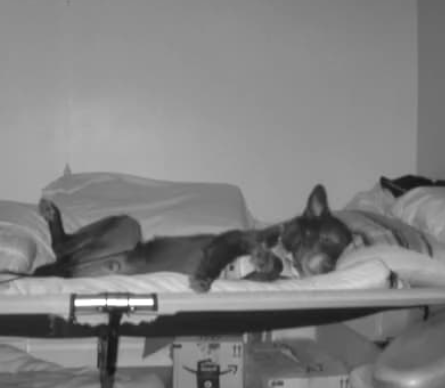
I came home to him still calmly watching TV on the bed. Worked like a charm. Thanks a ton Luke! Here he is on the nightvision cam watching stargate reruns.
 1 point
 -
This kind of custom update is challenging, but fun. Did you try to click a media card all the way on the right of the row. What happens? Does the row scroll to allow the expanded iframe to fit on the screen? It's worth thinking about the user experience. In this case the user interacts and chooses to play a trailer or not, per content. If they like the media poster, they can hover and click to play a trailer. They are basing the choice only on the media poster. Maybe they recognize the movie name or see an actor / actress they like in the poster image. Maybe the rating, if they are showing, are very high, so they can want to see a trailer. That's it. There is no other info to review with your click on the poster scroll. The current user experience is to open the media card, see more info about the story. See ratings, genres, actors by name and portrait. They can also see if the media is included in any collection, the length of the content and then they can click trailer, if they want. This is one click difference. I would tend to prefer the current setup that gives the user much more info before they decide to watch a trailer. That's just me. === A related user experience that is online is the either automatically or the admin chooses a collection of trailers or related content to present one after another to the user to get them interested in watching something, or in many social media sites to just watch, so they can send you ads. We can already do this with a playlist of trailers. The question then becomes how do you suggest this playlist. An example online would be imdb.com, that has a built in player that cycles through a series of videos. How to show this playlist? Add a clickable button to the main index page upper header area with some graphic + text that tells the user it's a collection of current featured movie trailers. user clicks and the admin's playlist starts. This can work, but there is no obvious way to move from trailer to start playing the actual full content, because you have to actually make a collection of the trailers in a trailer library. The user is inside the trailer playback media. I just thought of another option. You can create a playlist of trailers you would like to highlight and embed this at the top of the index page, perhaps with an optional click here to see featured trailers. This allows trailers to be played in the site, without going to the trouble of collecting them into their own library. As the admin, you can update this playlist in Youtube as often as you want. See: https://smashballoon.com/how-to-embed-youtube-playlist-in-wordpress/ Anyway, this is my random brainstorming. User experience is rather important to consider.1 point
-
Lan, Encoding in media streaming is an actual profession. There are a couple of things that affect encoding. TV's and various software playback combinations can handle some audio / video compression formats (codecs) and just play back without encoding, but some audio / video codecs cannot be played directly. When that happens Emby kicks in and starts encoding the media into the audio / video codecs that the player needs. I hope that make sense. So, this means that some audio / video codecs are direct playable and need no encoding at all. If you have media like that, it just starts to play. Otherwise, it needs to encode first and then play. Audio / video codec that works on any Internet Browser and also directly playback to TV. Video Mpeg4 AVC h.264 (or x.264) - All browsers Video Mpeg4 4CC h2.64 - All new browsers Audio AAC (FDK) LC up to 128 kbps - All browsers Audio AAC (FDK) HE-AAC up to 640 kbps - All browsers Only a few browsers handle h.265 HEVC video codec, or each user needs to purchase a plugin for their own computer. But even if the user's browser is set to handle HEVC video codec, Emby may not recognize that you can direct play it. With audio any media with AC3 will probably need to be reencoded for browser playback. Smart TV's can handle Hevc video and AC3 audio if it's fed to them, but most browsers cannot. Getting TV or browser playback some of these codec needs to be setup just right. In most case, any user will not bother any extra setup. I don't use Emby encoding myself. Instead, I pre encode all content to Mpeg4 AVC x264 and Audio AAC (FDK) HE-AAC 640 kbps. Then my content never needs encoding. I am not working with live TV. When I pre encode my content I use a very high quality setting but at a reasonable bit rate for each video size. This is not practical for live media, because my 3rd party encoding typically takes 5 to 10 times longer than the content for 1080P on a decent i7 Intel notebook. 5 times the length of a movie to encode has no practical use for a media server that needs to encode. But remember, I pre encode everything, so encoding on the fly never needs to happen. Another point is that most all media you see play in a browser online is already in this codec combination. so any copy of online media doesn't need reencoding to be included in a media server. The power of Emby encoding is that it doesn't matter what source you pull from, Emby will automatically encode it and make it work in playback. You still might have damaged video that plays locally on some player but has too many internal errors to encode correctly. That is why it's important to test any process with a master test quality video. If something is not working, it is often the fault of damaged media. Playing media back on some other player does not confirm the media is good. That's a lot of detail. Hopefully that makes some sense and helps.1 point
-
Hi, yes I can see how this would happen. We're going to have to add something to the mutli-select list to clear or reset the current selections.1 point
-
The storage mechanism of the live tv schedules is in line for a revamp and once that happens it will have an easier backup process. Thanks guys.1 point
-
Thanks. not planning on going down that route for now1 point
-
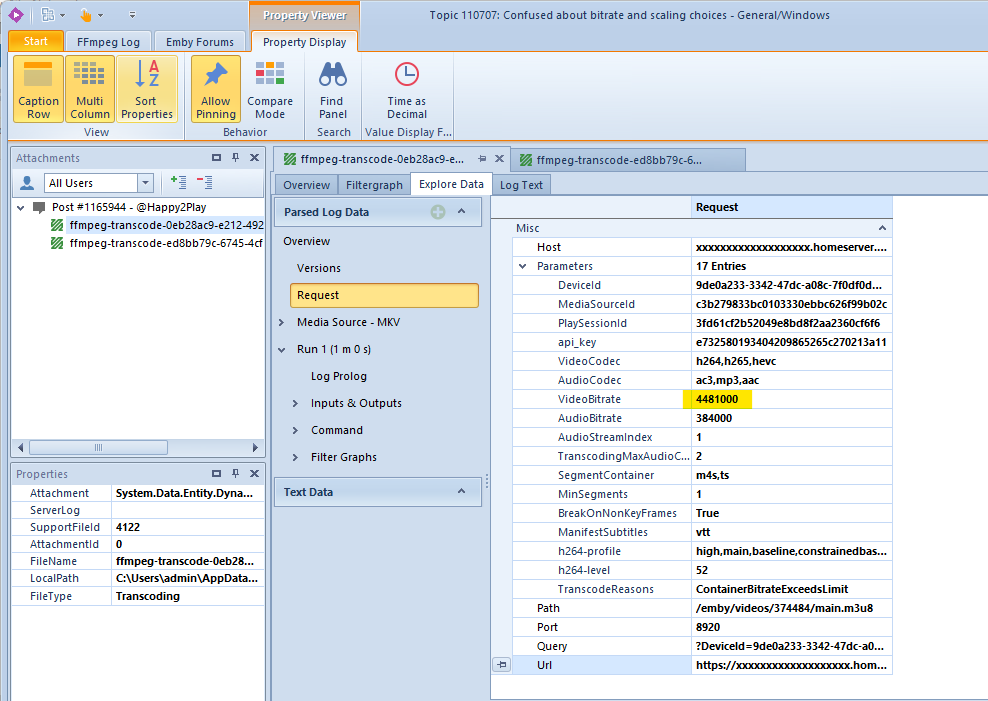
The client does this, when you choose "Auto": That value should actually be based on some bandwidth measurement, it was broken for a long time. Don't know the current status of it... @Luke?
 1 point
 -
Solution: 1- in UNRAID, install the Nvidia plugin called "Nvidia driver" 2- stop then restart the "docker service" located in the "settings tab" 3- On "docker tab", click the blue link "EmbyServer", settings appear 4- right on top, go to "AVANCED VIEW" 5- Found the line called "Extra Parameters", and enter --runtime=nvidia 6- Click APPLY, DONE 7- Open Emby, go to settings 8- At "Transcoding Tab", choose "Advanced" in the drop-down 9- select coding and decoding you want, then "SAVE" YOU DONE ! Here is a quick video of 4k H265 120Mbps video playback on 1GB ethernet LAN.1 point
-
@samuelqwe thank you soooo much, problem solved !!!! The video tuto is a bit outdated, but still working fine.1 point
-
Emby Connect or your own DDNS. This is only going to treat them as a Local user instead of Remote and run into the similar situation if their address changes and someone else gets their IP address. Emby Connect automatically update your WAN address but do not know the exact interval.1 point
-
That fixed it, thanks!1 point
-
Let us know how you get on. Thanks.1 point
-
So an update, I got it all working on my main install, first I tried resetting the database and starting from scratch, nothing worked no library, I had about 4 TV shows and 2 Movies that just wouldn't clear at all even with ALL kodi sources removed. looks like my Kodi database file got corrupted I deleted it from the video folder in app data (and the emby DB file that was there) Reset DB from inside Kodi again, and everything works and delete works as well.. Huzzah ! Thanks for your time, This was an annoying problem1 point
-
Please try Emby for iOS 2.1.9 once available. Thanks.1 point
-
Agree - it's still far too early to take sides, but AV1 has a lot more going for it than HEVC. Just because Apple doesn't support something doesn't mean much now, they haven't innovated for years. It's the 'streamers' that will dictate the next major codec - youtube, prime, google, netflix, disney+ etc - they have already started to use it and it's gaining traction - Primarily because it's royalty free. Most recent hardware seems to have AV1 decode support - so it's just the AV1 encode that needs to catch up. I suspect Nvdia 4000 will have AV1 encode - I think they would be crazy not to have it given Intel do and AMD (RDNA3) appear to be almost confirmed. At the end of the day - it's also ffmpeg that largely dictates the emby codec 'strategy' - so if it supports AV1 well, then emby will have the option to follow. If they don't - and remain using h264 then they will be left behind ..1 point
-
I "guess" you are using FireFox. There are many threads about this issue. It is a known FireFox problem. In many of the other threads there is a temporary fix until the next FireFox release. You can also access the menu by right clicking on the poster.1 point
-
I would love to offer more direct help, but I don't use an Nvidia GPU on my Unraid system. I only use my Intel iGPU for HW transcoding. However, this video by SpaceInvaderOne (he makes awesome videos on Unraid) is a pretty good breakdown of what you need to do to get it working. Obviously, ignore the parts about Plex and Jellyfin. He does use the LinuxServer container for Emby, but this method would also work for the official Emby container, albeit with some slight differences in the container configuration.1 point
-
It will be interesting to see if Intel release an sdk or work with ffmpeg on this .. unless the hardware gets software support - then it will be of limited use.1 point
-
To answer the question: The Roku application is giving the server a capabilities profile of what it detects the Roku can direct play and direct stream. The Roku application is in charge of reading the device and reporting those capabilities to the server. The server then checks the media item against those reported capabilities. If the server finds anything out in that media item is not within the specification of the capabilities the Roku reported then it will enforce transcoding. The video, audio, and subtitles may need transcoding for the Roku. Rather than you having to work to figure out exactly how you can get the best performance out of your Roku that is what Emby is for. Emby will provide the best performance and experience on your Roku device because it is intimately familiar with what your Roku device can do. We are in the process of updating those capabilities to better match what Roku can do today. This is to make it easier for you without having to understand what codecs or containers even are. You can just press play. Everything else is up to us. If the playback fails we failed you. At that point you come here and make a post and we do exactly as we are doing now. We solve the problem. :0)1 point
-
The Roku does not understand the MPG extension. You can through drag and drop these onto MKVToolNix GUI. Tell it repackage them into MKV from MPG. Just remux. Do not change the video codec from mpeg1video. Remux takes a few seconds. The Roku can direct play MPEG1 VIDEO inside MKV and direct play. The information that other fellow is giving you is outdated, wrong, and not accurate. The containers that can direct play are MOV, MKV, and MP4. The codecs, at present, that direct play can be any of these: mpeg1, mpeg2, h263 (xvid/divx), mpeg4 (avc), h264, vp8, vp9, hevc, av1. The specific Roku device you own determines which codecs can direct play. A brand new Roku will of course play all of the above being brand new. Your mileage will vary with older Roku units. We read supported codecs directly from the device. It is device specific. That is why it is hard to give you a list or give you more information. Without knowing which Roku you are using that is impossible. Hope you understand. TS/M2TS can direct play but do not produce a seekable stream. You cannot fast-forward or rewind. We do not direct play TS or M2TS. We REMUX them into a directstream. We need to update our capabilities profile inside the Roku application. Once that update happens you will have everything mentioned above. We are working on it.1 point
-
+1 for a request to be able to pull posters from theposterdb.com. This site is always my go-to for poster artwork. I've stopped using Emby's built-in poster search entirely at this point, as theposterdb has far superior poster selection than Tmdb. It's more manual work, but I'm able to get posters that all follow a consistent theme (e.g. all title logos centered at the bottom of the poster, etc) much more easily via theposterdb given their sheer volume of posters and large number of consistent artwork contributors.1 point
-
I wrote an intermediary plugin called "DecompressAndCopy" This plugin actually watches a DL folder and will look for '.rar' files as well as files with typical media extensions. If it finds one, it will either copy the file, or unzip it into the auto organize watched folder for processing. This way, the auto organize folder will only ever have the media file in it, and the Decompress plugin will leave everything else in the DL folder. might be a topic for another thread. PM me if you are interested. Otherwise, back to programming I go. LOL1 point