
Leaderboard




Popular Content
Showing content with the highest reputation on 07/20/22 in Posts
-
I have a ds920 and its proving great so far if you have emby premiere to take advantage of hardware3 points
-
new build in the first post with sort title and index number.2 points
-
moving my old custom metadata folder ( /config/config/KevMetadata/metadata) to /config/metadata fixed the artwork issue I was also having with the upgrade to Emby 4.7 . Thanks a bunch! I had put countless hours into custom artwork for my collection and would have been devastated if I lost all of it!2 points
-
Oh, and you have to enable the advanced option to append m3u8 to the playlist streams to get it working for Emby.2 points
-
@cayarsin Telerising there's an option to get a Zattoo lineup without an account. That gives you only a handful channels, but it's enough for testing.2 points
-
Yes it might be possible to support directly in future updates. Thanks.2 points
-
Hey Everyone, My journey from Plex to Emby has been pretty smooth with the exception of setting up SSL encryption. There are lots of great posts on this forum and elsewhere on how to do this, and I consider myself pretty computer literate. But I'll be honest, this was a bit overwhelming for me as I have no experience at all in hosting web servers, DNS, or encryption certificates. After many hours, I've got it all working, so I thought I'd share what I've learned. I'm going to try to write this for the newbie, so don't be offended if it seems like I'm explaining lots of simple stuff. That's really what I needed a week ago, so maybe it'll help someone else in my shoes. Also, this is for Windows, although most of it applies to any OS. There's lots of text, but it's really very easy. Let me also say, I understand that a reverse proxy gives you lots of benefits and flexibility for securing your server. But that was a step too far for me. If you want a reverse proxy this post is not for you, but there are many posts in this forum to help you. If you want to access your Emby server from outside your home network you will want to require secure connection mode for all remote connections (see "Network" tab in Emby server configuration). To do this you need an SSL certificate. To get an SSL certificate you must have your own registered domain name. Here's a step-by-step. Domain Name Registration A domain name is the readable text part of a web address. So emby.media, or google.com, or media.yourdomain.net. Most home users don't have one, but you need one to get an encryption certificate. While (Edit:)There are many options for purchasing a domain (godaddy.com being very popular), I chose to buy my domain from domains.google. It cost me $12/year, and this is the only cost to getting your Emby server working with encryption. Go to https://domains.google, pick a domain, pay your money, and you're ready to go. For the rest of this discussion let's say you registered the domain name yourdomain.net. Now you need to associate your new domain with your home IP address. Most home users get their IP address assigned to them by their internet provider and it is "dynamic," meaning it can change. So you need to be able to tell your domain provider what your address is and update it when it changes. This can be done automatically, and is called dynamic DNS (DDNS). (Edit:) Before obtaining a domain, ensure the provider supports Dynamic DNS. Google domains supports this easily, here is the help page explaining how to set it up. Fortunately, my ASUS router has this capability built in so it was easy, but it's easy even if your router doesn't (follow google's directions). (Edit:) In case you have a static IP (obtained from your ISP), DDNS support is not mandatory. That's it for domain name registration. Now yourdomain.net points to your home network IP address. SSL Certificate Now you need to get an SSL certificate. This has the encryption keys you need, and must be issued by a recognized certificate authority or it gets blocked by your browser. Lets Encrypt will give you a free SSL certificate but it has to be renewed every 90 days. This was the part I was most confused by, but it's actually really easy. The part to understand is that Lets Encrypt must have some way of proving you own your domain name before they can issue you a certificate. There are two options, 1) they give you a little text file to place on your web server in a certain location. I don't have a web server so this is a no-go. 2) They give you a text string to add to your DNS registration in what is called a "TXT Record." You do this with google domains, it's very easy. To get a certificate you need an ACME client program that knows how to talk to the lets encrypt server. They recommend certbot, but it doesn't work in windows. Dig enough and you'll find ZeroSSL, they have a nice downloadable program that does it all and is really easy. Download here. Make a directory on your computer (I used c:\ZeroSSL). Put the le64 (or 32) exe in this directory. A single command will create your certificate. I think the easiest way to do this is create a text file in the same folder as the program, call it "get_cert.bat" and put the following three lines of text in the file. Edit the second line to have your actual domain name (instead of "yourdomain.net"), and to have your actual password for your PFX file (whatever you want it to be, just replace "yourpasswordhere" in the code below. @[member="Echo"] off le64 --key account.key --csr domain.csr --csr-key domain.key --crt certificate.csr --domains "yourdomain.net" --generate-missing --handle-as dns --export-pfx “yourpasswordhere” --live pause Save the text file as get_cert.BAT and then double click it to run. This runs the le64 program, creates the public/private key pair, asks lets encrypt to generate a certificate, saves that certificate, and converts it to a PFX file format that Emby requires. All in one command! When you run this, a command window will appear and you can see what it's doing. After a few seconds it'll pause and ask you to place the TXT record in your domain. It gives you a name and value, the name will be something like _acme-challenge.yourdomain.net, and the value will be a bunch of random letters and numbers. The program pauses here for you to put this into your domain. So now you just log in to your google domain again, go to "DNS" on the left menu, scroll all the way down and enter a "Custom Resource Record." The type is TXT, the name and value are what le64 gave you. Put them in, wait a few minutes for the change to take effect (took just a couple of minutes for me). Then go back to the command window where le64 is running and press enter to continue. It'll then verify your TXT record is there and issue your certificate. You'll find a file certificate.pfx in the le64 directory, that's it! Emby Setup Now log in to your Emby server setup. Go to "Network," in the field "External Domain" you put your domain name, so yourdomain.net or whatever you chose. For "Custom SSL certificate path," browse to the .pfx file that was created by the le64 program. In the "Certificate Password" field put whatever password you used in the .BAT file above when you created your certificate. Then for "Secure Connection Mode" I recommend you choose "Required for all remote connections." You also have to log in to your home router and forward port 8920 to the computer running your Emby server. I'm not going to give directions on how to do this, it depends on your router, but it's super easy. That's it. You need to restart your Emby Server, and then you're done! You can now access your server remotely and securely at https://yourdomain.net:8920. Certificate Renewal Now, I mentioned before that the Lets Encrypt certificates are only good for 90 days. So every 90 days you have to renew the certificate. Take that "get_cert.bat" file you made earlier and make a copy of it called renew_cert.bat. At the end of the second line, just add the text "--renew 20" (without the double quotes). When you are within 20 days of your expiration date run this file, it'll renew your certificate. I believe it'll ask you to place a new TXT record in your domain, so certificate renewal cannot be made fully automatic. You'll have to run it manually and add this TXT record into your google domain just like when you created the certificate in the first place. But it takes just a few minutes and then your certificate is renewed. You'll have to restart your Emby server for it to take. The file locations all stay the same, so you don't have to update anything in the Emby setup, just restart Emby. That's it! Well, I hope this helps someone. Sorry for the long post. I would have benefited from this level of detail a week ago, so maybe it'll be good for someone. If anyone sees something wrong here, feel free to correct me.1 point
-
Hi guys. I was wondering if there could be an option to disable individual plugins as well as an option to disable ALL plugins and reboot the server in a "safe mode", much like the Firefox option to reboot disabling addons. I think this could help trouble shoot and help diagnose. Just a thought. Thank you guys!1 point
-
After it gets requested the first time, from that point onwards it's stored locally.1 point
-
You can always change image via provider/url/or download file. Well metadata is saved in the database but not positive if people are only on demand. @Luke1 point
-
If you have a series folder, the season folders can be optional so long as the episodes are unambiguously named. If they are omitted, there may be a delay before the seasons show on the main series page after scanning (it won't be too long, though). However, if you are using a Mixed Content library (i.e. both series and movies) then the season folders are likely to be necessary to prevent Emby being confused between series and movies. Paul1 point
-
I don't have an ETA, sorry, but it's possible for future updates. Thanks.1 point
-
Nice work! When you do target.InnerHTML iFrame update and the mouseover is a media card on the right side of the screen, what happens? Does the enlarged video player div push scroll the row to the right so you can see the entire player width or does it go off the right edge of the screen? Do you need a listener to reposition the row for this situation? Maybe it works automatically, but probably not. Also, how much of this breaks with smaller browser screen widths? I know that mobile previews have a lot of issues. Some are fixed to work with the standard unchanged theme, but my custom css needs mobile style adjustments that I have not yet tweaked. Do you even want to bother making it work for mobile? You should probably, at least, see what happens with your custom work for mobile portrait and landscape. Since you are in control of the video size, why not make it a little larger than exactly 3 card widths and make it position obviously on top and overlapping other cards. Then the user will know that this is an extra overlay effect. Otherwise, they could think the two card that are hidden are no longer a choice in the row after the trailer finishes. It's a minor issue, but I think it's more user friendly to make it obvious that the player is a layer on top. Auto dimming of the surrounding media cards? Option to go full screen. I don't think youtube has a visible full screen button option for embedded videos. You might be able to add a div button that might work. I think it's complex and maybe not worth it.1 point
-
Hi, you may want to ask this question here : in order to ensure that @Anthony Musgrove will see it. Thanks.1 point
-
I have both the 918+ and the 920+ going in two locations. Both solid units. Would not hesitate to buy the 920+ again.1 point
-
It could if there is sufficient demand. However, any feature we put behind an option that is defaulted "off" (which this certainly would be) makes the cost/benefit equation very difficult because probably < 10% of users will ever use it. The reality is that people don't go looking for options and rarely turn them on unless they just happen to stumble on them (and many times turn them on not knowing what they are, then forget about it and wonder why the system is behaving the way it is). That means a lot of work for very little payback.1 point
-
Carlos, The start of the video appears to be missing a keyframe. At some point a compressed copy had some part of the start edited out, which means the first frames have no keyframe. Your ffmpeg direct stream file: 15:24:58.324 [h264 @ 000000fbed545a80] decode_slice_header error 15:24:58.325 [h264 @ 000000fbed545a80] no frame! 15:24:58.868 [h264 @ 000000fbed545a80] non-existing PPS 0 referenced Some players have built in ability to ignore this and some will have a problem. Usually this causes random pixelation for a few seconds, but it could be harsh enough to cancel playback on some software players. If you had a properly made test video and ran it through this process, you would possibly see that there is no issue. Did you try that? It's an important step to do so you can pinpoint where you problem lies. There is no sense trying to solve a encoding issue when the problem is the original video. Just playing a video back with some other player does not confirm that the video is good. You need to work with test master videos of high quality.1 point
-
That's just theme videos with the trailer as the theme. Certainly do-able. This particular technique is an attempt to engage you in order to "sell" you on watching the content. That's why the streaming providers do it. The longer they can keep you engaged the better and more moving parts that might grab your attention increase that potential engagement. In a personal media server, however, I feel these gimmicks are just that - mildly interesting the first time you see them building to really annoying as time goes on. But, if enough users really want this type of thing, we could certainly do it.1 point
-
Covid and chip shortage changed a lot of plans. If anything, there might be a 923+, but who knows if it will have a GPU or not. Personally I have a 2nd hand 918+ and it's working great (with R/W SSD cache and more RAM, which help a lot).1 point
-
The network layers in use are different.1 point
-
Could you write a code for local trailers? My collection has like 4,000 of them.1 point
-
I assume that's why: "2022-07-20 17:14:56.338 T:154572 INFO <general>: INFO: EMBY.database.library: [ worker remove sync paused ]" So the remove job was paused. This happens when playback is in progress. If you play content (or paused) all jobs are postponed. I assume you removed the episode while still playing content. You can disable sync delay in plugins options. This should fix the problem, actually if I'm right this is on purpose.1 point
-
I am an old guy with declining eyesight and I find the guide plenty "big" and pretty easy to read. If it was bigger there would be less info on the screen and therefore it would be harder to choose shows. I do understand that "bigger" is often seen as "better" but I do not think it would be in this case. Besides everyone knows that "size does not matter." If Emby were to choose to provide an adjustable guide size I would not object, unless it adversely effected performance. I just do not see enough advantage to warrant the time and effort that providing this would entail. There are a rather large number of "features" that are more needed than this. Emby's resources are limited so they need to prioritize carefully and this should be quite low on the list.1 point
-
Episode ID should be: "115624" It was deleted here: 2022-07-20 17:15:17.940 T:181544 INFO <general>: INFO: EMBY.core.tvshows: DELETE episode [827/828] 115624 This record was removed after you played it and Kodi reported not available. So far this makes sense, question is why it was removed after. I'll re-review it1 point
-
Ok, After restarting the FRESH Kodi install, everything is working, deleted videos go away everytime when using native playback mode I tested the Aeon Nox Silvo Skin on the fresh install, all good there as well. So there must be something wrong with my existing set up. Don't spend any more time on it, i'll report back if i can fixed it (really don't want to do fresh re-installs on that one )1 point
-
The log shows deleted. I'll perform another test with your skin and episode (not movie).1 point
-
Aeon Nox Silvo v8.0.1 It's removed from Emby, (and deleted) If go Emby on a web browser or app, it's gone. But it hangs around in Kodi.1 point
-
Which skin. Actually the log shows the episode was removed at "2022-07-20 16:29:39.031"1 point
-
What version of FireFox? But can say I do not see this issue in v102.0.1 or 104.0a1 (2022-07-20).1 point
-
Ah, I am using native playback mode. I deleted an episode of The Apprentice titled "fishing" Edit: it happens every-time, easy for me to replicate kodi.log1 point
-
Something like the DS920+ will have a gpu for hardware assisted transcoding DS920+ | Synology Inc. Intel Celeron Processor J4125 4M Cache up to 2.70 GHz Product Specifications1 point
-
I tested and movie was removed instantly from Kodi library. When it happens again, send me the kodi.log (don't restart Kodi, this would clear the log). I used addon mode.1 point
-
OK, I created a second Movies library called 'Movies 1' and guess what - it works. And....now the original Movies library, also works. I've attached log file of this instance for your perusal. I will now delete the original Movies library file and then see if it will affect the second one I just created 'Movies2' embyserver (2).txt1 point
-
latest version in the first post now has a play button for the chapters so you can check the chapter start point against the video. if there are no bug reports in the next few days I might put this up in the plugin catalogue.1 point
-
It should be removed from Kodi library too. Sounds like a bug, I'll review the code.1 point
-
I "guess" you are using FireFox. There are many threads about this issue. It is a known FireFox problem. In many of the other threads there is a temporary fix until the next FireFox release. You can also access the menu by right clicking on the poster.1 point
-
Hi, yes casting downloaded media is not supported at this time, but is planned for the future. Thanks.1 point
-
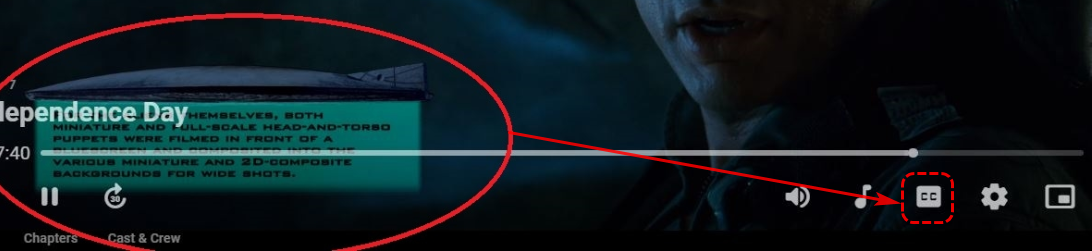
They look like graphical subtitles of PGS format or similar. Try clicking this icon to see if you can toggle them on/off
 1 point
 -
I was curious to see if any of you tackled it in an elegant way. Last year was I was playing with this I had 6 or 7 IPTV providers I could generate streams from. That's on top of 20K+ movies and 100K+ episodes in my libraries. Ideally this could be found out using the Emby API with a call for each movie/episode but that would be a lot of hits. This is a one-off for my system but what I did was Generate the strm files including normal folder paths naming. 2 of the providers had pretty bad naming of movies so results were always questionable. So I'd generate everything based on the naming in the m3u files. Each provider had it's own local working space. I set this up so it didn't overwrite files that already exist. That allows me to then pull only files with a newer timestamp for further processing. Anything new would get ran through a file renamer util so regardless of source would have the same naming. I'd then load them by preference of provider. First run would load everything. I'd then scan it into Emby along with my other media. Once done loading I'd shut down, grab a copy of the library.db and restart Emby. With some SQL I could then find dupes IDs and would write these out to a text file file. The text file was actually a batch file that when ran would delete the strm files getting rid of dupes. I wrote a little app that would remove folders that were empty to keep things a bit more tidy. I'd just work down the line until I've loaded everything and deduped it. A bit of work but it worked quite nicely. Round 2. Instead of processing files separately I setup a database and imported each m3u file including tv channels and vod content. With everything in one DB I made a small util that would test each channel and VOD channel and record the resolution, bitrates, audio languages and other similar info I could get. With all providers and channels in the DB I had to handle renaming and identification of movies and shows in the db vs file system but wasn't hard. I could cleanup TV channel names as well using a standardized naming convention. I could then filter out channels I have via OTA or cable. So now with 3 10 or 50 providers the job isn't really harder. Besides the information I 've loaded from the m3u files I've also imported list of movies and episodes from my Emby system which I'd import roughly once a month. This added additional features as well. I could for example do everything as mentioned above with the export tailored to Emby Server use. I could also ignore or forget I have any of my own content and just get a combined deduped list of all channels and vod back out as one m3u file which could be used conventionally from a phone or other device. My daughter for example does a lot of traveling and takes a small MiBox (vs Amazon Firestick) with her. Now anywhere with Internet she has a really nice collection of VOD as well as full channel list of TV channels by way of the Live Channels app (not available I don't think on Fire TV) which does it's own guide loading so one less thing to worry about. Back to Emby... Few of you would need anything as elaborate and probably have a single provider or two. I've not tried this yet but imagine it would work well and that is using Chef's version of Auto-Organize to load the VOD content. This should be able to filter out existing content so it doesn't get loaded. First pass might take a while to load but after the first export/import into Emby you can now process only new content moving forward. That assumes you setup your m3u2strm export to not overwrite existing files. You simply grab content with new file timestamps for processing which is easy to do on Windows and Linux. Which can identify items that exist already. Then as a backup you could also try the following plugin that combines "duplicate" versions of movies (caution if you want 4K and 1080 separate). Emby should handle merging TV shows on it's own. So that's the different options I've played with. Having the custom database with the ability to validate and pick the best version (resolution, bitrate) does expand abilities a lot especilally if selection and export is automated like I had it. Any one provider having issues or dead channels/vod would be found and not used. The ideal way to do that is using a "redirection" plugin that Emby calls. So you feed Emby "fake URLs pointing to your own app". The apps get the vod or channel number, dynamically pulls the best real URL to use and returns it to Emby as a redirect which Emby follows. So the app needs to run but isn't involved in the transport of the thread. It's just a traffic cop. Since it's testing channels throughout the day it can note when channels are down or find resolution changes, etc and deal with them real-time as Emby is about to use the stream. With a slight modification the backend program could poll Emby via API to see what channels/streams are in use and act on that info. If for example you can only get 2 streams per subscription you could have 2 or 3 subs from the same provider with different username/passwords. The backend would know 2 streams are in use from the provider so any new use would use the stream (username,passcode) from the 2 sub... Poor man's m3u bonding if you want to call it that. But unlike XTeVe it's not sitting in the middle processing the stream just doing some quick traffic direction at the start of stream use which basically uses no additional system resources in a meaningful way. Carlo1 point
-
It sounds like you do not save images and metadata with media so it is expected that two servers would/could have different information. If nfo and images were written with media, then both servers would present the same information. That is what edit metadata or Refresh metadata does from item card, item details or metadata manager.1 point
-
Hi, using the latest 6.2.20. Kodi 19 When i delete something (Context Menu - Emby Options - Delete from emby) It still remains in the Kodi library, i either have to select it and Kodi says "This file is no longer available, would you like to remove it" and press yes. Or clean the library (which takes a few minutes) Not really an issue if I'm deleting one or two things but deleting a whole series is time consuming. Is it possible to have emby/Kodi auto remove the files i delete from the library?1 point
-
Thanks mate, that's all I needed to hear. @Cheesegeezer Yep the good old days.. Definitely will take a look at this. Cheers Is this it? Not to sure how this will go with Linux in a container environment but there has to be a solution..1 point
-
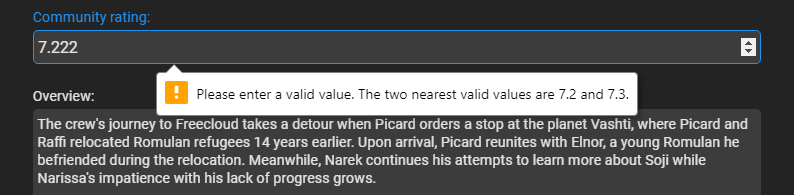
Starting to see this also. nfo <rating>7.222</rating> file created 6/22/2022 But Refreshing the metadata resolved the issue now showing 7.2. Was this fixed in a plugin update and previous items need Refreshed?
 1 point
 -
Hi, as soon as it is sufficiently tested and we feel that it is ready for release. Thanks.1 point
-
Their plugins are built using NET5 as well, so its a no-go on many levels. However their plugins should all be open source. So if there is one you like, it should not be a monumental effort to port it to Emby.1 point
-
Further update - Manually copy/paste from /config/metadata/metadata/collections ---> /config/metadata/collections brought back all my images except any posters that have a auto_poster.jpg. After manually deleting the auto_poster.jpg from the folder I then had to do a Scan Library Files on the collection with the missing poster for the custom poster to show up (after deleting the auto_poster from the folder). This is all despite having the ADMIN>Library>Advanced>Metadata Path set to /config/metadata.1 point
-
Nice! Can you share your css setting for login screen? Thanks1 point
-
Modification of playlist. I'll try that as well, but I don't wanna query the server for Video-info. This causes delays.1 point
-
Have you wiped your kodi database before you installed the alpha version? Actually, I had an issue updating the 4.X to 5.0 so I started from zero and then it worked perfectly. Not sure if uninstall kodi app also removes the kodi user folder.1 point






















_svg.thumb.png.85e4ee6291ddd76347269c05175b5dda.png)