Leaderboard




Popular Content
Showing content with the highest reputation on 07/19/22 in Posts
-
I hit "play all" on a collection and it doesn't show the next film in "Next Up" after I quit out of it. This is apparently intended behaviour, and the same applies to playlists. This is absurd. Why even have the "play all" option? Who's sitting down to watch a full collection's worth of films, or a full playlist? I have playlists for The Prisoner for its various episode orders, and there's no way I'm getting through them in one sitting. I was going to make that my next show to watch but if I'm going to have to keep track manually of my progress through the playlist it makes the playlist fairly pointless TBH. There's no reason playlists or collections shouldn't show up in Next Up.2 points
-
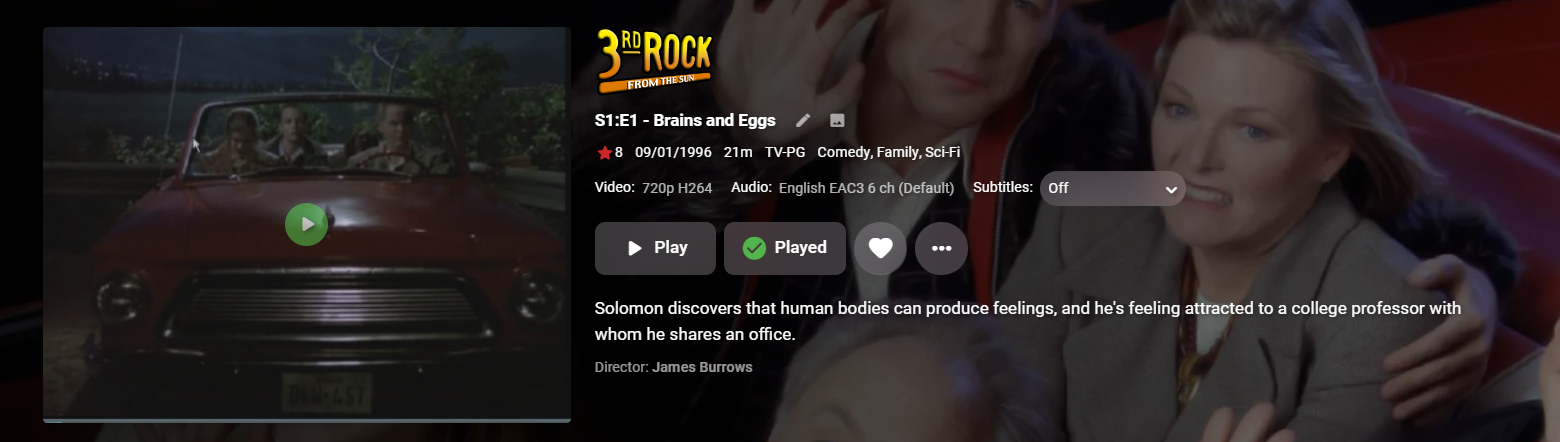
I moved from Plex to Emby and even though I think Emby is superior in its flexibility there are some things I like better with Plex, especially in terms of its looks. This theme is trying to fix that by making it a bit more similar to Plex but with some, in my opinion, improvements. The CSS is attached to this post for anyone interested and below are some screens to show it off Good to know I only use Chrome so I can't guarantee this CSS works as expected in other browsers. If you want the sidebar menu to look like in the screens, make sure to pin the sidebar. Watched badge/banderoll is inverted which means that the badge will not be shown if media have been watched, like in Plex. For desired look, please use the "Dark" theme for both Theme & Settings theme in the display settings. Emby-Stable-style-v3.6.txt





 1 point
 -
Overwrites the parental rating of every episode with the parental rating of the show. requested by @Oxide notes Requires Powershell 7+ Review config.psd1, add admin credentials, change $testmode to $false when ready to make changes as always test thoroughly on a backed up database. changes -07/06/2026 depreciated in favour of plugin . recommend use plugin instead (after testing) v0.0.0.7 fixed incompatible endpoint in recent Emby versions. v0.0.0.6 amended some of the screen and logfile logging to improve clarity. download Parental Rating Copier v0.0.0.7.zip issues suggestions welcome.1 point
-
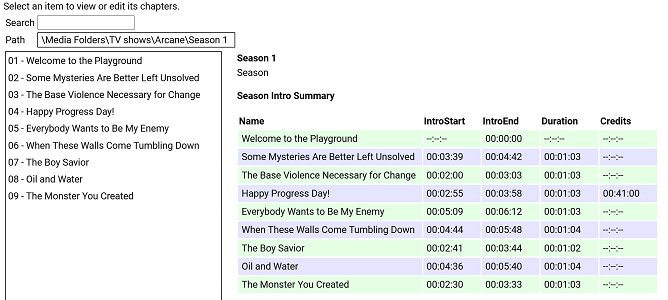
I have put together a simple chapter viewer and editor plugin. The plugin is now in the plugin catalogue. As always, here is the source: https://github.com/faush01/ChapterApi/tree/main/ChapterApi It is very simple and allows you to view chapters for an item (Movie, Season or Episode), remove chapters and add them. It supports all the different chapter marker types. It also has a season Intro summary page, select a season to see if it has intros detected for each episode. Note: All chapters are wiped and reset when you do a metadata refresh on an item. If you spend any time setting up or editing your chapters, keep this in mind. There is no current way of locking chapters. Chapter List Season Intro summary Intro Detection (CTRL-F for Intros) I have added a new way of detecting intros based on theme audio, this is using a very different approach than the core approach, it is using some of the ideas I posted over there: https://emby.media/community/index.php?/topic/107878-audio-fringerprinting-chromaprint-segment-detection/ With this approach, you need the Into Chromaprint info, this is a simple audio fingerprint of the theme song/music/audio. The plugin looks for this and can create chapters based on the results of the search. So where do you get the Chromaprint Intro info file, you can create one yourself for a series, season or episode by adding chapter info for one episode and then extracting that as a Chromaprint Info file. The new icons on the season summary page lets you extract the info file, if you just want to check you have the chapter offsets correct you can extract the audio of the chapter to play back and confirm it. A Chormaprint info file looks like this: { "series":"Game of Thrones", "season":2, "tvdb":"121361", "imdb":"tt0944947", "tmdb":"1399", "duration":107, "extract":10, "cp_data":"ThXy/E4hsdxOIZDdziWA3c9lgNnd/YDI3NyAyNyYwMzcuFHc1L0V3dS1F1/E8xJexOISXsfyMl72UzZe5lM13uZlNN/m7FDddvyT3Hack9xWjJDdR52Q3USWkN0EkvHfFJJz3zT2d98s53ffJO1n/yR8Z/4lTCf+Hgwn/k40N/pOJHH63iBR+/4xUfnuEdP47hXDeH1XgXgcd4B4DP/AeAzf0FkM/VBZDO0QWTzkEFkt9BN7bdASet3RUnqP0UJaj9dFe57WRH2u/kR977pEfO++RXw/vlb8D5Ze/Q+GfvcNgn32TdI99m/iPfbvYjj37jUZ/+4FX73uBN+9fhSfvV40vf1eELT9XjCU3V4hlN1fIZfcfzHW3C0FU9w9DRPYHTkTWA0pElgMLVNYBDVBWARRQBgUcUEYNHFRGCR3ARhk7gAY5e4BGdd+AxqGU0IahkHCCo5AwwreUMEKblDACipwwAsrbIMIGemCCAjKgggIipIYCI7QGBiWUBg4kjAbGIIxGvmDEhqrsQFequAAXq4gAF6uIABevjBDTq8Qwk2vEYLM/wKCxA8Og8QPHpDEH36QxDfe8MQ213HEFtUxxAfFdsTX0XbEt/H2xKPzdcSS0zXAgsI3wYLCJ8KSwyXCprXlwqakpcLnrLTC5ay0wlW09MMFsDXDBZE1wwXTJ8FV0ibB5eJm0e1v9lOta/dTrXn1Up0ZdVKNGXdSjwV1Up8BdFLvEGRS7yBgUusgYFLvIPAS72XwEt1d8wLF2fIDxNlyA8TbcgJ0/3ECZK9wAmSncQJEvyJCBZ4iQweOJwE3iiEAJpphACa74xE2qaMTNryjEia8oBInrGASJ6wgM0W4IjHFmCIwxIgmMJTIJjC0SCcwpVw3MeVtNTHnb3QxY270MXJWtTECRrEwAtKhMALjs3QS47N0I+XxdCPv0Hwh+1B8EfsRfAH7EnwB6xJ9EO9Tf3D1U37wxcN+8cXDfpXFQX6V90F/l+ZAfbfuQX337kN959dDf+dVwH7vVcB+//XQds3103fN91J1Tf5SfV3OUn0vz3N9L93wfy/00H4/5NB+H+RQfg/0En4P9BZ+P0U2f29Hdn/vRvd/nxL3dZ4S9XWOMvV0nzL1fJ8iVVyeIlVcvgLzXO4G8VxvFrFcPy6wXA0ukFgNKpAYDWqQCAz+0AgM11AIHPdRCDXzEQg18wMIVdMCCPfHAgm39wMKsuNBCpLzQwqCUUMKkkFBCqZQwAqmIMAJ5myBCGZogggH+YIIBdmCCASP0ggEh1AINIMwCSSzEAoksxEKZKcTSuWnAUqjYwBKkjEASpIwAU6yEMPOphCCz+YQgs1WAYLFFgWRxTZ1kIUn/dCFN8UwhRfHN4QPxzaEHeZ2xF3m1sTd5pXE3fbUxP1GFMT1RjXExQc2xMUXNkTXNRdEZyXVRGct1EQzLdREAz1VRANVNkQDQTYEA8FnAFPBbwDy8e0BoqHvAaKtbwOzuW8Ck4lvApOJZQKTjWUCkZFlArGxZQKhoWVCoaF0QqGldALhrXACxflzAcTbMgDE2yMA9P8lEOTtIRDk5WFR5fVjUXXfZ1FXjmVRFo5gUBaOYFA2nmBRNq3hUybso1Im7KNSJ/yhUmVc8FLVWHNShBgyE4QZMhCECyYQlA4nELQCZxDlM+cQZSOlEDUjpBAXIqQAFxLkABZO5AQWWuEEFtqmBAb6pgwG6rcMF+6wCBfnUAgF0xcLBcMXCjTTBRrl4QQbpeEEG6XlRBmt/UUZv/1FGZd/RRuOf0cbzlVHGV5VRxkuRMEbL1TBGz9lwRofdcMaD/XDGh3Twxp100Aa5fFAGuXhABmlsUEYrbFDGKe/wxinv8Bct7rAXIa+Q1yGn0Jcx5VCXNeF0l1nhfFfJYXwXzWn8F4Vo/NeBfNyXgfzMl4XUTJeJ0ExX2YcMFzmOFBctinRXIYpw1yGL8NdjhfCXY4Dw1+vA9Nf50HRX2Xhkd014bBdNaGwXTSl8F00n/BdFJ9xWRTtcls1bTJaNTUyWjURMlv1ARJb9QNTWbVTQFi1Y0BYteFAWLXhQFj39UNYV7XCWUadwllGmdJbRtnTW1bZ01pW3VNaXtVRWl7QVV5/QFde/0F2X/9Tdl/3ZnZdpiZU3aYmVN2mZ8TfpuHE3+bwgd/WsILXVoSS1zeFkJc3hZCXNYfQhhfXV4YX0TaHF3E2hSYRMoRmYXecZmXXnOZt15z3XZWUx93UlMffVcXF31fFRY82x1WPftV1/3/VZe181WX1dNUx8XXVEdF21AHBftRBQX7U0BN91OAnfNSgL33QoWt/1aFb/9aTS//Wg0v30oLF5VLCwORS86DkUmOgZFJl4GRSZfQ1cnX8NXIk/DZzNH12cVVpdnBVL3xw/y98cO8vfHHvHn9z7w5fU/9O3VNfztxTXc6UU02+lNMNr5XTDa230xettdNnrbXTZ53d02fLH9Imyx7SZkk+0nY5PtJXLH/SxyTvUscg71LXEH9R1wM+VNcCNlRXAnZUTRJ1VB029BQdavQcPOrwHDzq8Bwc6lAcDO8RGQz1EhsM0RYZHUEXGS1AVRgtZVQYb2XXGG/n1xnO8scbztLHGs7Sxxqew8EbrpVBWa+9QFnvqUBY/7lBWc+9Q1vNlUZbTdFGWg3BV1s9wFZZLdB3WS1hdVgv53dYL+bXWR521ltOUtdaztLFWt/CwFvv1cBb79zA2e/8wNnf/MPZzvzD3c7wQ9/O0EPf3sFT33/BVt1391bd9W/23fVp99/1OXXflT913pUzE96FE1Pe3wNTXu8T0V4vM9BeKyOQXzkjkF85dtBfKUbQXyhXUF84N1B/GCUQewh1ET8JXBM92dwDPbnYQTSZ2EA0iZhANImMRDCJhEUxmYDHM7nQ1jL54dYy6ePWMuuj1nLvo3dy54d0c+WPdHHVjVRxhY1Xc4WPVnPVz1Zz519Xc2YvV3NmL3ZzJiVncSYkY3cuFOF3PkDxdw5QsH8P4PB/DeDQPwz1UzkMrRI5DO0SORztAjk8/QE5PVVBON1TQziPU0IYj1LCGI8Cwxi9AkBYrCZAWKwmwVjcP8JYzF+CSExNg0kNRZBPDdWUT17XtU/+t/VN7pf0TK6XdEyut1VFnvVWx47xUsaG0VLGh0FTVrcBUVbvMVBWbSNQVikj8VYpI/FWKDfwUzge8FMYHnBTCFcwVwjXMVcI1TFXCIVwV9mFYXW5jXF1mZ1zdJi9c3SIvXF1mLRwd7iQMHb4sDP2eLAy9jigMvYsoTL2JeMm9yZiZvQmMmb0Igbv9CIN7PwiCOz8Yhjs/MI4/v2CPP5fghT+XoIRf16GE3delhJ3X7cy912vIrVc7SaUWG0ukEhpaoBIGGqASAjqgEhN/tFITddSSF1DM0hdQzNM/UFxTO9lU0znbdNM9m3ST4Zl0k6GwVJOhsETTpaBEU7ns1BO56PQT2WjwE0lp8BNJK/QTRT/Uk0E9xJNBdcSTRVDE0hlUVBIZWVQSHVt0UhVfdFJ1X3VSdd3VUvXU1dL19NWS9fDd0v3wXdLd+XVSTft1Ek3rVRJN7lXWVe9Fl1G3RdfRsUxX9bFM16mUVNetjFTXrYxU162MUFepjHBXuchgV7lIYFePTGRXz0TkF8sU5BdKFfQGSjfUBkY31AZGP8TGxjtExsZbQEZWfVDGZnVRxiZlUcYmZ1FHbi/RB24v0RfuK9Ed5y3R3ack0Z2nJJGcryy1nK14t5y5/L/cubWfXLmxmxy5sds8ubFbPNW1W3zRtVv8QbVbXEW/W1wFnltcDZ5ZXEmeGdxJmhmdzZs5lYWcOZWBtDiXgfQ814FkHMeBbBSGgWkAhsMrAIZTLwCGdzdAhndzUYZvVUHGb0RBRmfEwUY3xNFGP8yRVh9ModYLRaHWD0GhVg9NpRMXW6UTE3ulEzPntVMzofXTZ6F1U+uldVOrpVVTv7BVU7+0XdO/mFyTv5hc15vMXFeaTNxXigj0V44I9FeODZBXigWQF44FkBeGBdAHwhFUB8IwREdGYAQPXmAMD3ZhTQ9m4V0PbuPd327nnJ9m75yfZmuU3+ZrhF+uLc3/rixNv7o8Tb+6OE2/mkhdvZtIXbXLyF+1DYxftQ2Af/UJgy91HYYrcTWKK3ExiivxIY5r8SGT6XFhsPkx7bC5Me28vTHpuN1xebjNcTm8xDMZ+cQzFXvEEwV71BNBfVTTQRxVk8EUVZPFEF2TxRFd09VXfdNfXn1T+1t1E//ZVVOz3FXTk/BU05/wVBfL5HQXy+l0F8trdBfPanBXg25Q14Nt0JeDZICXk3CAl/dQgZc7QYHXK0vRVSvK8RUrivFVJ4vh9WONcfXhgDH1rYAwda+ENFGniDTQr4hkEOuFZBDrh2QQ68tsEKtZbBCvOXjQtjxYULYsSBD+LEgU1ixIFMYsyFTGbIjVRmyI3U5siF1ObZjdTi+Y3QY/mJ0GF5ifBhfY3wYTWN8WA1jfFgFY3lZRXF7GXX1ehvh93ob4fd6", "cp_data_length":3372, "cp_data_md5":"DDF936E4FD29A02CDA178EBFF37AD2E8" } It's just a JSON file with some info and the Chromaprint data. This can then be used in the Intro Detection tab to create a job against a series/season/episode list. Once complete, you can import the job results into your items. This is a semi auto way of detecting chapters for series that are having issues, because you are supply a good well-known chromaprint of the audio you want to target your results are much more predictable. Sharing intro theme cp data The sharded intro theme cp data is now hosted on GitHub https://github.com/faush01/ThemeCpData To use the hosted data in auto detection in the ChapterApi plugin, you can use the following URL in the "Intro Data External Url" on the options tab of the plugin: https://github.com/faush01/ThemeCpData/archive/refs/heads/main.zip Add the URL, hit download intro data, hit reload intro data and the intro cp data will be loaded for all the series you have that there is cp data for in the shared repository. If you want to add more the to the shared repo, clone it, add your new into cp json items and do a pull request to have your new items merged in and available to others.
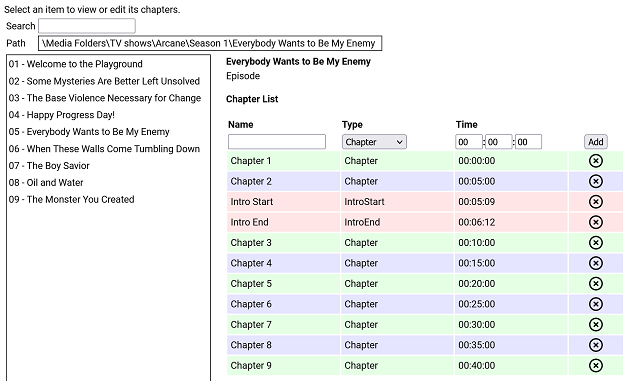
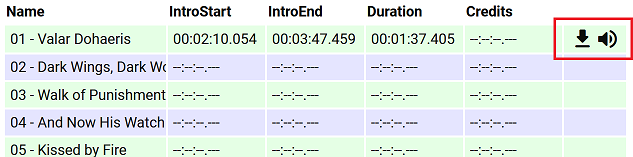
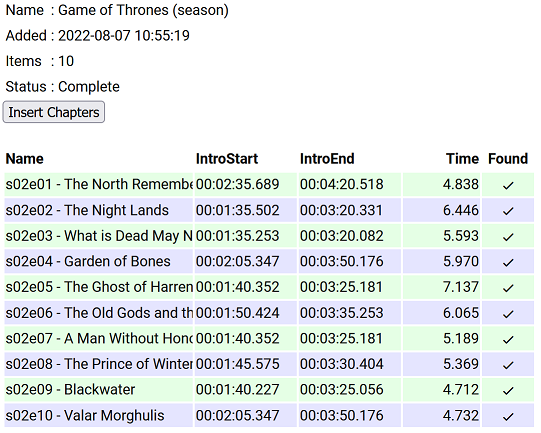 1 point
 -
... as I was tired of manually grouping all my movie versions into groups after each recreation of the db, I created a plugin to help with that. The use case is having movies, that belong together spread around and not being able to easily match the emby naming conventions, but still having the desire to present them as one item with multiple versions. The plugin works similar to the auto boxsets, but does the "movie versions grouping" - it will group all movies based on their TMDB id into one item, regardless of where they're placed and how they're named. I made that for myself - however, if anybody is interested, attached is a plugin that solves this issue. Attached version is for current 3.6.0.49 beta Server, do NOT use it with stable release! Plugin is alpha state, you should only use it, if you are willing to backup your db (there is no way to revert the changes otherwise!) and manually put the dll in the server plugin directory. Do not use it in your production environment before having tested in a test environment that you're fine with what it does - seriously! ;-). Note: There is a known bug in the web GUI presentation which is described here, which needs to be fixed on emby side. Edit: the mentioned display bug in BoxSets is fixed in Emby now, thanks Luke. AutoCollections-for3-6-0-49-betaServer.zip AutoCollections-for3-6-0-75-betaServer.zip AutoCollections-for-4.1.0.15-betaServer.zip AutoCollections-for-4.2.0.17-betaServer.zip (4.6.0.10 and before) 4.6.4.0 and above (does not require beta server as version number has been surpassed) AutoCollections-for-4.6.0.22-betaServer.zip Note: Original version will cause issue with other new plugins like Top Picks. Updates by community members: v.1.0.0.4 New update thanks to @Cheesegeezer Looks like we've managed to update the plugin, to be current Emby Server 4.7.7 (minimum). Some Changes to be aware of Automatic Library scan and updates are disabled, too many things are triggering library scans at the moment and entering into an endless loop which will crash the server. Moved to a Scheduled task now. Fully Locked item Metadata can be ignored in the Plugin Settings for grouping. (Partial field may have worked before but you need to Lock the item itself now) ".strm" files are ignored from any processing New plugin Graphics with a big nod to MikePlanet This is always Mikes plugin and the work he has done is fantastic. - We only did essential maintenance to keep this alive for you peeps. AutoCollections_1.0.0.4.zip v1.0.0.5 Removed Top Pick Items from the available item list re introduced the auto scanning... this will take place 1 min after an item event is detected re introduced auto run after a library scan tested against top pick plugin and there is no endless looping... but please test fixed the locked items bug. Good luck and let me know how the testing goes. AutoCollections.v1.0.0.5.zip v.1.0.0.9 New update thanks to @Hoptional Added option whether to Merge items across different libraries Compatible with nested folder structures, the "Top Picks", and the "New Releases" plugin Improved logging AutoCollections_1.0.0.9-libraryoption.dll1 point
-
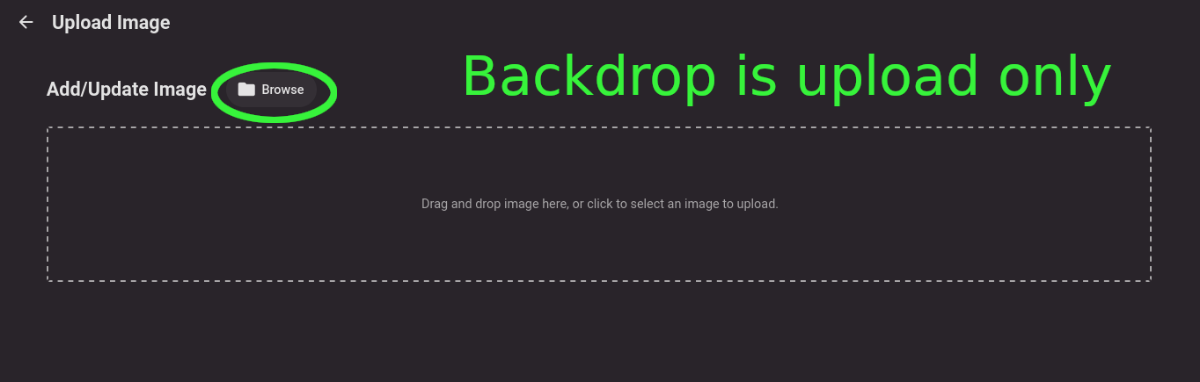
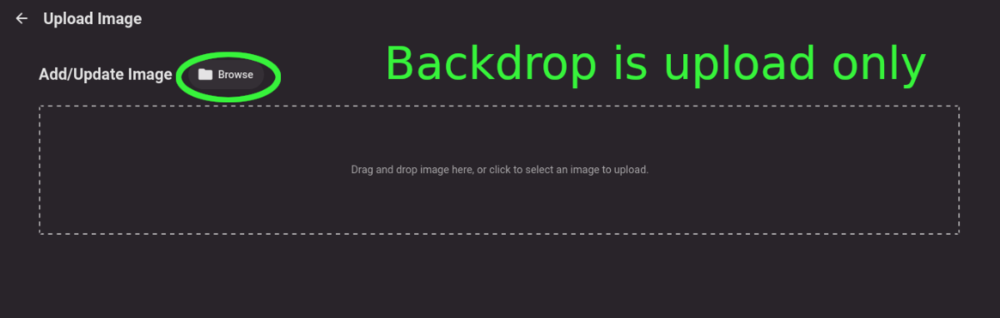
Title describes what I want but also here are some web app screenshots: The Image editor for all the types under 'Images' has a wonderful selector that includes a 'Set Image from URL' option: The Backdrops section only allows for adding images by file upload: I'd like to add Backdrops from URLs please.
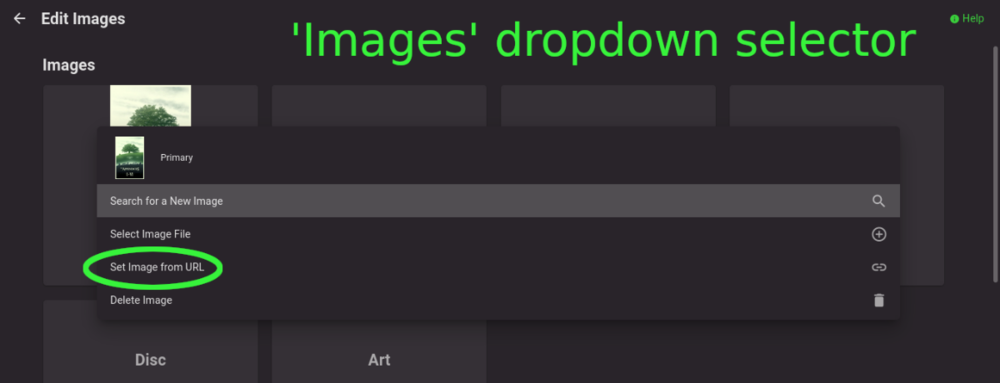
 1 point
 -
I have some large boxsets (upwards of 66 discs) and it would be massively convenient if multi disc albums had the option to be treated more like collections (so select boxset, then album, then track) rather than one massive album (select boxset, scroll..., select track). If each disc could be titled it would be even better. All this info (disc names etc) is already available of musicbrainz.1 point
-
I have noticed that the episode intro detection is not working on strm files. The log file has error messages like following: I was wondering if it is possible to implement episode intro detection for the strm files in the future release.1 point
-
In this video (at about 22 seconds in) while showcasing the new amazon prime interface a cool trick happens. The folder image (while highlighted) expands to a thumb image, and about a second later the trailer starts to play. That is a cool trick. Possible maybe with some JavaScript and css in the web app? Maybe.1 point
-
@Luke For sure a mistake from me. I will mark as resolve (kind off)1 point
-
Yes it might be possible to support directly in future updates. Thanks.1 point
-
The detection mechanism is different.1 point
-
All working now. Thanks again for your help, very much appreciated! Its nice for you guys to follow up!1 point
-
That's interesting, thanks for the feedback.1 point
-
These hls segments are fragmented mp4. Our built-in support without ffmpeg is only for mpegts, so that's why ffmpeg gets used here.1 point
-
Thank YOU very much, @Luke, for your support! Happy to hear it's going to work again, soon.1 point
-
That's helpful, I find the information out there a bit confusing. This card should be plenty for me then for the rare times I need to transcode. My goal was mainly to free up the server resources as I sometimes run other things that are CPU intensive.1 point
-
I'm late to this thread but I'd been having the same issue where fast forwarding in Emby on a Fire stick would hang and force exiting and resuming the video. Clearing the cache and the data for the Emby app on the Fire fixed it for me. Works well now. Whether that will be required periodically is to be seen. My config has the Fire and my Emby server connected via Ethernet to my LAN. No software/proxies in between.1 point
-
This is were DVBViewer comes into play. The hls stream is muxed into a single ts stream by DVBViewer's own source filter that is much faster than ffmpeg. This way you get direct play with Emby Theater on Windows and the standard Android app. With the Android TV app the stream gets transcoded, which must be a bug and i'll still have to create an issue report for this. But even the transcoding of the single ts stream by ffmpeg is faster than with the hls source.1 point
-
oohps sorry didn't see that you already mentioned that @cayars1 point
-
@Elmo299 Please give the latest beta a try, we've dialed back the kernel requirements for all mono packages.1 point
-
@popy if you setup DVBViewer between Telerising and Emby you can reduce channel switching times by 1 to 3 seconds dependent on the Emby client.1 point
-
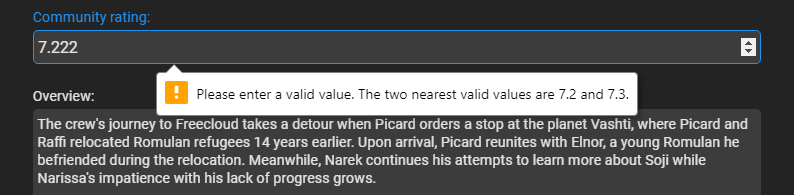
Starting to see this also. nfo <rating>7.222</rating> file created 6/22/2022 But Refreshing the metadata resolved the issue now showing 7.2. Was this fixed in a plugin update and previous items need Refreshed?
 1 point
 -
HI, thanks for following up. Let us know how you continue to get on.1 point
-
Thanks for the feedback.1 point
-
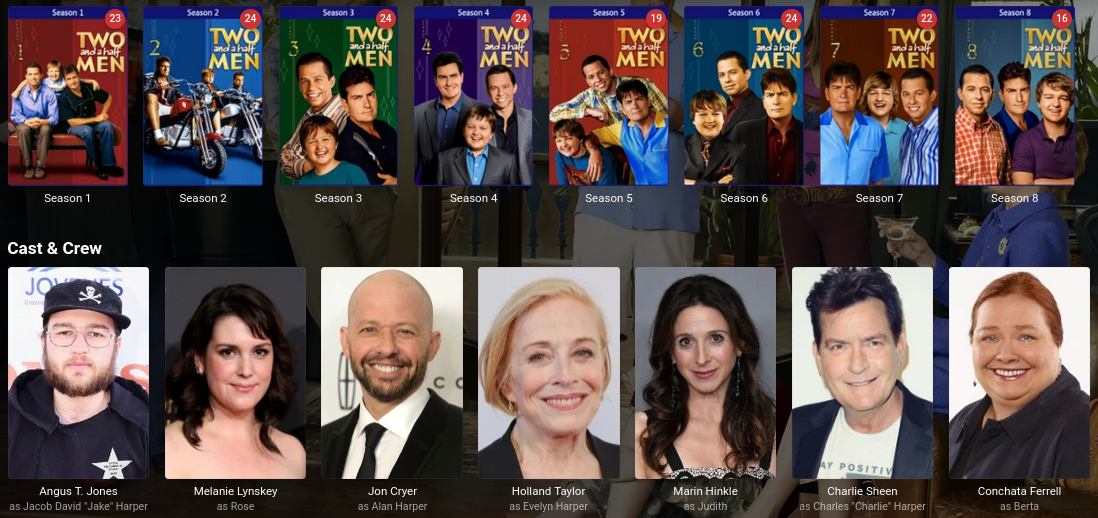
So I switched TV libraries to the TVDB and it pulls in everything much better. I get complete permanent cast on the series page, and guest star information in the episodes. I guess The Movie Database isn't as mature for TV. I was hoping to switch away from the TVDB because of some strange behavior in the past. For example, the show Family Guy would show Seth McFarlane's picture as Peter Griffin (the character he voices). This also showed as the Family Guy character for other shows he voices characters for. Very frustrating, but I provided feedback to the TVDB about that. Actor photos should be of the actors, not the characters. Much better though... Thanks, Steven
 1 point
 -
Thanks @GrimReaper this was a huge help. I'm able to get ~10-12 streams now out of these cards. It would be nice to be able to use the 2nd GPU though... In the meantime I configured it so that one card is dedicated to decoding, and the other for encoding.1 point
-
Yes this is the key as rapidly updating an item does not always do what you expect it to.1 point
-
Hi @Luke, I think I'm all good again, I tried my above example and this time it worked. Basically seems like I just need to give it more time, trying to do refresh/replace multiple times in a row causes it to not take. I tried a couple other seemingly stubborn ones after a day or so and they all updated. Fine by me! Thank you for the help.1 point
-
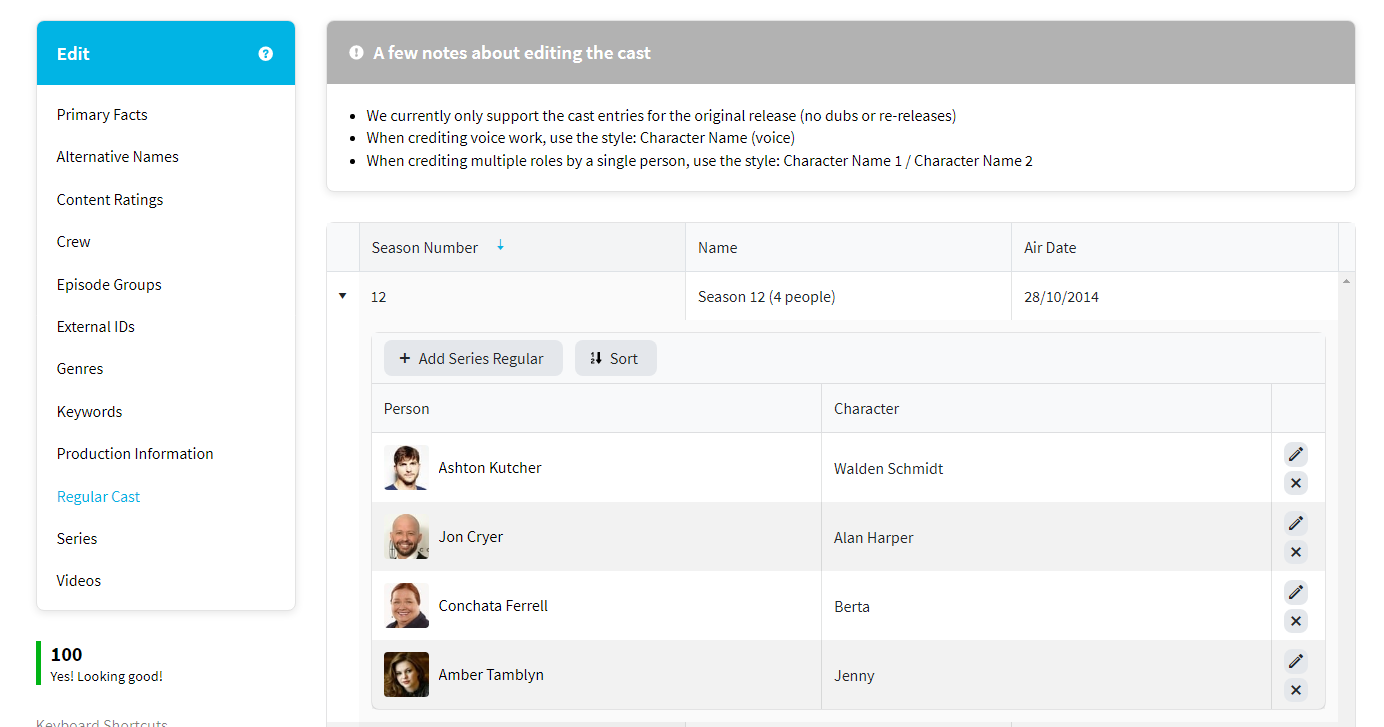
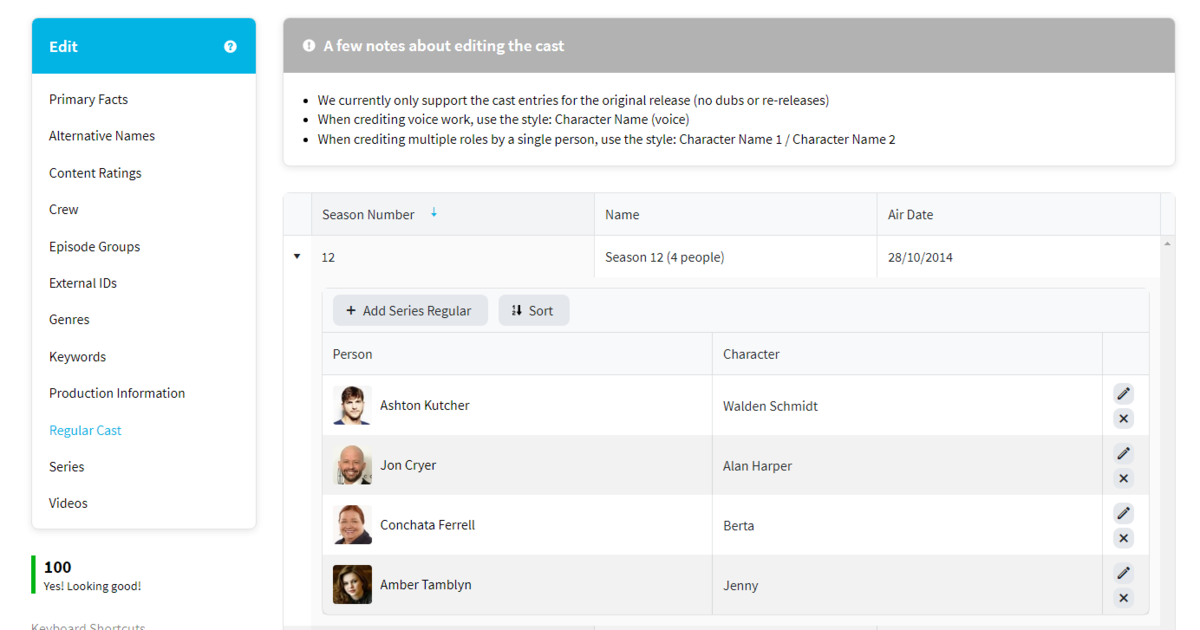
Their web page is deceiving as Series cast isn't really correct, but in the end you get the Cast for the last/current season. Cast returned for Series via the api query shown in your log. "cast": [{ "adult": false, "gender": 2, "id": 18976, "known_for_department": "Acting", "name": "Ashton Kutcher", "original_name": "Ashton Kutcher", "popularity": 17.102, "profile_path": "/ekMdWqUBajsLy0fyBcGaPFb4of8.jpg", "cast_id": 0, "character": "Walden Schmidt", "credit_id": "5257414a760ee36aaa0a86f1", "order": 0 }, { "adult": false, "gender": 2, "id": 69718, "known_for_department": "Acting", "name": "Jon Cryer", "original_name": "Jon Cryer", "popularity": 24.927, "profile_path": "/z2LPFc4oLDaDOYipKTAzZ9rARQ5.jpg", "cast_id": 0, "character": "Alan Harper", "credit_id": "5257414a760ee36aaa0a8421", "order": 1 }, { "adult": false, "gender": 1, "id": 1909, "known_for_department": "Acting", "name": "Conchata Ferrell", "original_name": "Conchata Ferrell", "popularity": 9.941, "profile_path": "/1CuSudlDbvrhFSpXPckzlMfzLiJ.jpg", "cast_id": 0, "character": "Berta", "credit_id": "5257414a760ee36aaa0a8555", "order": 2 }, { "adult": false, "gender": 1, "id": 20354, "known_for_department": "Acting", "name": "Amber Tamblyn", "original_name": "Amber Tamblyn", "popularity": 12.169, "profile_path": "/bzw0lxvtbEnYT7fZ8fn6NeSzMn9.jpg", "cast_id": 0, "character": "Jenny", "credit_id": "5257414b760ee36aaa0a87ab", "order": 3 } ],
 1 point
 -
seems to , why is there a known gotcha to look out for with parental ratings?
 1 point
 -
The latest client worked for me. I did not have to restart the transfers.1 point
-
I know about the metadata hacking that is being done, as I did point someone to the thread on doom9 about it. As for my content, I'm not sure, as the new Disney+ stuff is the only one I noticed (I actually went out of my way to grab it as I wanted to test to save space) as I have separate libraries for DV and HDR, except in my TV shows (but shows are labelled as to what they are). I am sure I have some UHD blurays that are both, but as we know, UHD DV profiles will not play on any devices other than the Shield (I believe). I hope once this gets all sorted out a wiki entry or even a forum entry can be made so that the confusion that is DV and the supported containers and supported profiles, can be made forthcoming.1 point
-
No, i'm in 1.2.9. I will do it today and I'll post about it.1 point
-
Great. Similar issue on Actors, when only year is tagged and not full birthdate.1 point
-
yes correct, the core needs to manage storage, how it is backed up, how you store the data and how you can migrate the data. This is all core functionality, trying to force this to a plugin is just asking for issues. This plugin is just an viewer/editor of chapter data.1 point
-
I think this would be a useful feature - in particular with series that do not air things in order / air sequels as specials or as not the original media type. For example Steven Universe is a TV series with a sequel that is a Movie. Another one is with Anime where the same (or opposite) is true. I was also recently made aware that Star Wars (which I haven't been keeping up with, please don't judge) has 1 (or more?) TV series as of late. Perhaps a dedicated "Continue watching <playlist>" instead? For example "Continue watching Steven Universe Playlist".1 point
-
Hi, yes it's a good idea. Thanks.1 point
-
Same here. Plex is totally dead..Emby rocks. And...KODI is king...but don't tell any one here ;O)1 point
-
Hi, recommendations would be mp4/mkv with either h264/hevc and aac/mp3/aac. Any of Roku's supported formats should be fine: https://developer.roku.com/docs/specs/media/streaming-specifications.md Please let us know if this helps. Thanks.1 point
-
Yes we should add this for backdrops. Thanks.1 point
-
Also not working for me (MAC OS)1 point
-
@Happy2Play Ah ok, that looks to depend on the OS file browser happening to support it. Available on Windows Explorer, not on Ubuntu's Files.1 point
-
Before I retired I was a network administrator for a couple of decades... There are many articles on the web that talk about this, e.g.: https://www.pdfblog.at/2011/06/windows-service-access-to-network-resources-what-to-consider/ or https://stackoverflow.com/questions/13268559/network-access-to-windows-service. Note there are some details to get right. Note in particular that @Luke's advice doesn't apply to a service - a service cannot use a mapped drive letter, but requires the UNC path. Paul1 point
-
I'm surely not the only one for whom this would be helpful?1 point
-
It's a big project with many users and many feature requests from those users. Requests that get lots of support from many users, especially when they've been around a while (the requests and the users), take priority over month-old requests from a single user. It can be frustrating, but patience is a virtue. That said, I support the idea. It could be nice to be able to resume a playlist/collection, maybe have the whole playlist display as a single item in 'next up' similar to how youtube displays playlists alongside videos just with an overlay showing the item count.1 point
-
'Sounds like...', 'Could be...'. Both carefully qualified. At the very least, 'fully tag-driven' should improve identification of media/artists. I'm curious... what tool did you use to write all that tag detail to a 60-disc boxset? My experience with Picard is that it's fairly easy to choke/overwhelm it.1 point
-
Tags would actually work very well, but emby would need comprehensive album & track metadata (composer, conductor, players, yr recorded, yr released etc etc) for it to work. Its completely possible (with musicbrainz). I know they're small groups, but emby would have classical and jazz lovers interested because music players with extensive tagging are few and far between.1 point
-
Yes, that's exactly how mine are displayed, and that's the problem, it displays it like the discs are part of a single massive album, but for boxsets like Satchmo or The Complete Works of Fritz Reiner, it's not a single massive album, it's a collection - often separated on disc thematically or chronologically. Often the disc names (which aren't in Emby's metadata - and should be) also help sort out what is on a disc. For those reasons, it would be helpful if multidisc boxsets displayed as separate albums (within the boxset - similar to movie collections) - and not lists of tracks. And actually, collapsible discs isn't a bad compromise...1 point
-
Curious if there is a way to do this: Display a custom text on the Server Home Screen to update users on server stuff (new content, restarts, etc.)1 point