Leaderboard




Popular Content
Showing content with the highest reputation on 07/08/22 in Posts
-
ANNOUNCEMENT: WE WILL be removing the IntroSkip plugin from the catalogue. This will help us facilitate a lot of rework to align us with the core but still provide an editor and focus on end credits. Please use the core intro detection task in order to process your intros. As of now - no further support will be provided for IntroSkip Plugin. It will resurface soon - so all is not lost - we really need to force this to align with the core. Thanks everyone and we'll see you soon3 points
-
When the Emby server is exposed to the public net, then every item image is accessible without authentication or api key! This is especially critical if someone has private photo libraries in Emby. With a simple brute force attack to http://{public domain}/emby/items/{increment number}/images/primary it's possible to compromise every piece of someone's private life. This has to be fixed immediately!2 points
-
No, the saved sort title in the database does not need any special casing. That is an improvement that came along in 4.6.2 points
-
Actually I lied. Looks like there is a fix to make. For something so fundamental I'm surprised it's been like this all these years without being noticed before.2 points
-
I changed the plugin server requirement to sever >=4.7.3.02 points
-
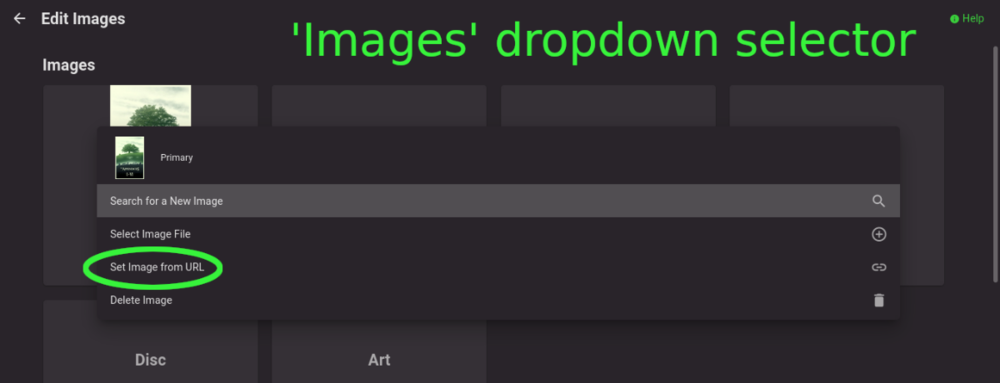
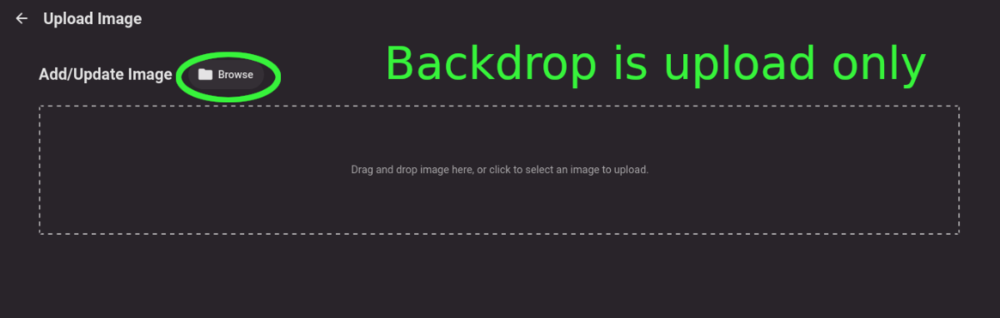
Title describes what I want but also here are some web app screenshots: The Image editor for all the types under 'Images' has a wonderful selector that includes a 'Set Image from URL' option: The Backdrops section only allows for adding images by file upload: I'd like to add Backdrops from URLs please.
 1 point
 -
Emby for Apple TV 1.6.1 is currently rolling out. Thanks guys.1 point
-
@alucryd The 4.8 beta is working for me. The server started up and everything is working normally (so far). Thanks.1 point
-
Some sorting is case sensitive which it should never have been.1 point
-
Glad to hear! I am on travel for the next couple of weeks but will test any new point released when I return.1 point
-
I am not home at the moment… I will try to do it tomorrow.1 point
-
I just tried it and I'm getting the same thing. When I try to play a video or music, I either get a black screen which I have to press the back key to get out of or it just flickers and goes back to the "press play" screen. Here is the log file you requested: 19a9d72f-2b5f-445b-a881-8b6a1af9fe5a.log1 point
-
OK we'll take a look at it. Thanks.1 point
-
I use the 64bit arm v8 one on my Shield pro. Tube users should use the 32bit v7a one. However, the 32bit one will run on both.1 point
-
Good, now I'm at work, but when I get home I'll check out the new plugins!1 point
-
Haven't used it but you could check this plugin.1 point
-
Have a look at Vantage Point in the Plugins - it's the Cinema Intro feature on steroids and can probably do exactly what you want and more ... @Cheesegeezer1 point
-
Well, then it works !!! I was able to match each studio intro to his film. Thank you so much everyone luke and happy2play1 point
-
@cayars can improve the help article but you don't tag the intro, you tag the library item, and then the intro file name just matches the tag.1 point
-
@lLuke appreciate your support and fast response. I will look into it and keep I posted.1 point
-
It's something that will be reviewed in future updates. Thanks.1 point
-
For some reason, I never tried to log connected outside of my LAN (I swear it worked when I accessed my external IP from inside the LAN when I had it set up on my desktop). I just tried login through the App on my phone connected only to my mobile data, and it worked This can be closed. I'm sorry for the pointless post.1 point
-
I'm trying to play audio files (in this case an MP3, but I've also tried it with M4B and AAC) on my NVIDIA Shield; however, they won't play when my Shield is connected to a different network than my media server. The problem does not occur when accessing Emby through my web browser or the Emby app on my phone. It also never occurs when playing video files, regardless of what device or what network I am playing them on. NOTES: Media Server (running Win10, with Emby Server 4.7.5) is connected to my home network/router. NVIDIA Shield (running Shield Experience 9.1, with Emby app 2.0.77g) is connected to a different network/router. STEPS TAKEN IN THE ENCLOSED LOGFILE: -Opened Emby on NVIDIA Shield; tried to play the song "Blinding Lights." Playback is stuck at on 0:00 on my Shield, with no sound coming out; however, according to my server's dashboard, the song was playing. See the enclosed pictures for what the Shield and the server dashboard look like. -At this point I connected my NVIDIA Shield to my home network/router. -Re-opened Emby on NVIDIA Shield; again tried to play song "Blinding Lights." Same result as before, as seen in the images. -In Emby app on NVIDIA Shield, clicked "Switch Server" then re-selected the same server. Tried to play the same song again. This time, the song works just fine. I hope I've provided enough information; please let me know if I need to give more. EDIT: finally solved this myself 15 minutes after posting it...after waiting 2-3 months to post it to these forums. Go figure. Apparently my Emby server config was pointed at my old security certificate rather than my new one. Not sure why this only affected audio files, and not video files, but it seems to be resolved. Mods, feel free to delete/close/whatever.1 point
-
Hi. We'll have to invite you once we have tried this change.1 point
-
Nobody said to include an api key in URL. It's about the security issue that images are accessible without any authentication.1 point
-
Hi. The first image is treated by CoverArt - which made it larger due to the "frame" around the original image.1 point
-
Hi. To me, that seems awfully redundant (and potentially confusing). You are telling the recording exactly when you want it to start and end. Why not just put that in the start/end times?1 point
-
What software do you use to join files? Paul1 point
-
I have an update. I have removed the (Optional) shared network folder from the library definition on the server; works! I then went back to 3.0.15 and that works too. I assume that there was a problem with my definitions which I am trying to figure out now but odd that all the other clients were OK aside from Ubuntu. I understood that Emby Theater would only use the path if it was available (i.e. works).1 point
-
Understand that answers given here are to help the community - not just you.1 point
-
solved! looks like nolock was missing from the cifs mount options. popped that in and all is well now1 point
-
hii!! yes, i contacted the server owner and they gave enter server manually- code and port thingy and it worked1 point
-
Hi, had the same problem but I found out what was causing it for me. Im using no-ip dns and when I have "Mask URL" checked then it wont go fullscreen. Unchecked this box and working fine. Cheers.1 point
-
nps, I will give it a go shortly.1 point
-
To answer the question, Emby Server has never enlarged your original images, so I'm not sure what happened.1 point
-
Hi, we'll look at making them consistent. Thanks for reporting. @ebr1 point
-
HI, sorry to hear about this. Can you please try this version: https://www.dropbox.com/s/u1obwrckg4lkjc8/emby-android-google-armeabi-v7a-release.apk?dl=0 And then provide a log from the android app by following these instructions: Thanks.1 point
-
Not in the plugins I tested. @eosol is there a specific plugin you are having issues with? Can you screen capture a specific example. Only tested the iOS app.1 point
-
Thanks for the feedback !1 point
-
Technically you can search and multi-select/group them from any library. But yes the plugin will do this automatically for you no matter the location. These options have been around as long as this topic.@damienseidel1 point
-
That has been supported for quite some time, depending on your folder structure and/or libraries, you can either: 1) Multi-select and select "Group Versions" in three-dot menu if within same library or 2) Use community-made Auto-Grouping plugin which works across libraries1 point
-
it's most definitely not that, but thanks for the feedback. The frozen frames are coming out from the stations having a malformed mpeg2 packet. Roku doesn't handle it AT ALL and it freezes on the frame. It's been a problem with Roku and they just don't acknowledge it. I had things set so EVERYTHING would get encoded to be transcoded and not be mpeg2 but something happened over time with updating that it just doesn't seem to do that anymore and I re-encounter the frozen frame problem. I'm getting more time now so maybe I'll get down to what the hell changed to make it so it was the way I had it, it's probably something with the video card drivers changing in my linux environment, so I will start there.1 point
-
Ok, thanks! I think that does confirm what I was gathering, so I'll consider that the answer I needed. I think I'll have to investigate the script/path remap angle more fully.1 point
-
I can confirm that it also doesn't work for me and I have the correct TVDBID, IMDBID, TraktID, and TMDBID for the episode. Trakt also has the right IDs for that episode, so that doesn't seem to be the issue. I also have other episodes that are of a different order than what is on Trakt and those still work if you have the proper IDs. There seems to be something about the fact that this episode is listed as a Special on Trakt/TMDB, but as part of Season 4 on TVDB.1 point
-
Hi, yes it's just a first pass but I think ultimately we'll end up doing something like this.1 point
-
resolved it - took a bit of messing about but now seems to be up and running with correct version. not sure if it was anything due to getting the camera upload activated as the initial 45 image uploads were corrupted but the rest were fine.1 point
-
I requested here. We already have 3 whole votes:1 point
-
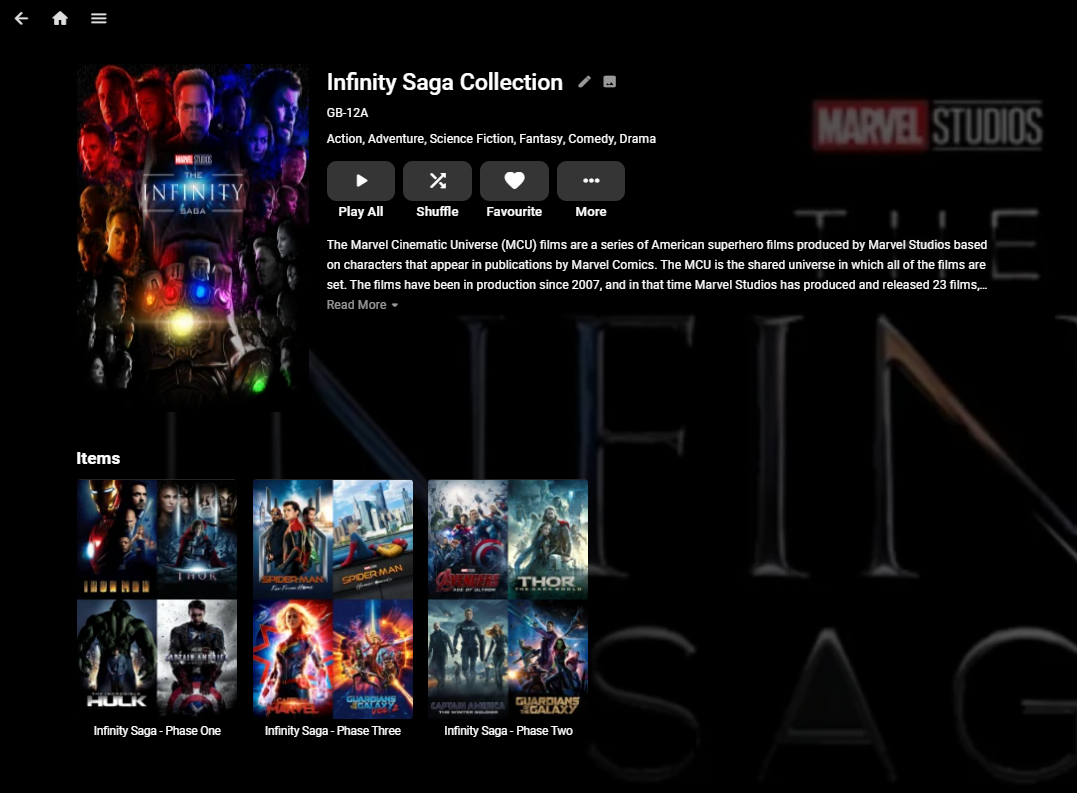
I've been running with Nested Collections for a while now and have not seen any issues. Creating them involves creating the links directly in the database which is strictly unsupported, so if you do not want to wait for the official support, then ping me a PM and I'll share the document I wrote on how to do it. edit 2nd Feb 2024 - This no longer works ... As an example - This is the Infinity Saga Collection comprising of the Phase 1,2 & 3 (Collections).
 1 point
 -
Hi. We have that kind of thing planned for the future at a system-wide level.1 point
-
So absolutely pointless compared to what you used to be able to do with it then. I liked to be able to see if parental ratings were missing etc. I needed to select a whole bunch of movies that had corrupt or broken images (I had a RAID break and a messy data recovery) so I could do a mass metadata refresh and replace images. This used to be easy to do. Even in the normal library I had to do it in batches because of the 100 item per page restriction. You may as well remove it from the product in its current state, or put it back to how it used to be ... useful.1 point