Leaderboard




Popular Content
Showing content with the highest reputation on 06/30/22 in Posts
-
Shield Experience 9.1 has been released. It is the same as the 3rd ebeta installment. https://www.nvidia.com/en-us/geforce/forums/shield-tv/9/496476/shield-experience-upgrade-91-released-63022/ Today we released SHIELD Experience Upgrade v9.1 (33.2.0.125) for all SHIELD and SHIELD Pro units. This update is based on SHIELD Experience Upgrade 9.0 and includes the following fixes: Enhancements: Adds support to automatically enable game mode on supported TVs (ALLM) Adds night listening mode (HDMI audio only) Adds option specify network workgroup when connecting to SHIELD over local network Adds option to create your own password when connecting to SHIELD over local network [SHIELD Pro 2019] Adds AI upscaling support for 60Hz HDR10 video [SHIELD Remote 2019] Adds option to only wake SHIELD with power button or NETFLIX button [Game Controllers] Adds option to only wake SHIELD with logo button Adds option to match uncompressed audio with Dolby reference volume levels Adds option to disable displaying HDR/Dolby Vision content Adds notification when app uses microphone Bug Fixes: Display Fixes bug where Dolby Vision mode would become re-enabled after reboot Network Resolves issue where link speed was not reported when connecting ethernet cable Resolves issue where “Restart Wi-fi” in Quick Settings was not working properly Audio Resolve audio pops heard after hotplug of USB audio devices Fixes bug where some apps would only play through headphones after “Match content audio resolution” is enabled Resolves issue where HDMI fixed volume required disable-enable cycle to work properly Fixes bug where stereo upmix would not become enabled after playing multichannel discrete audio [SHIELD 2019] Disables comfort noise feature when Dolby Audio Processing is enabled Storage Improves file transfer speeds to attached storage Resolves issues where NAS would not reconnect after SHIELD restart Accessories Fixes bug where SHIELD Controller 2017 or SHIELD Remote 2015 would not auto pair after taking upgrade SHIELD TV app Fixes bug where SHIELD TV app would not send keyboard entries while streaming GeForce NOW Resolves SHIELD TV app issue where user could not copy/paste text (passwords, URL, etc) Other Resolves issue connecting to GeForce NOW servers while NVIDIA Share is active Improves stream to twitch duration indefinitely Resolves issue where system would become unresponsive after enabling Dolby Audio Processing from quick menu Resolves issue where SHIELD would wake up unexpectedly Improved HDMI-CEC compatibility with other HDMI connected devices Resolves issue where app switcher (double tap home) would not show most recent screenshot properly Resolves adb connection issue where host PC would need to be re-authorized after 7 days Fixes bug where D-pad "up" and "down" would not function after upgrade2 points
-
Make sure to enable mlock on the jail.2 points
-
Previous discussion Currently you can add them, change them, but not completely remove them once added from a nfo file. Complete removal requires UI intervention. Have not tested tags at every possible level though.2 points
-
Response today from Samsung: and now we wait... Please let me know if you see new firmware updates for your TV, then we will have to work out how to test this.2 points
-
Ideally, I'd like an option with the Android TV app so that when I click on an something which is currently playing, that it starts playing immediately rather than going to the "Tune To Channel" pop up. I realise that I can do the same thing by pressing play, but the Shield remote implementation of play/pause is not very intuitive and not something my other half will ever use! Hope this is okay and I've put this in the right area. Thank you.1 point
-
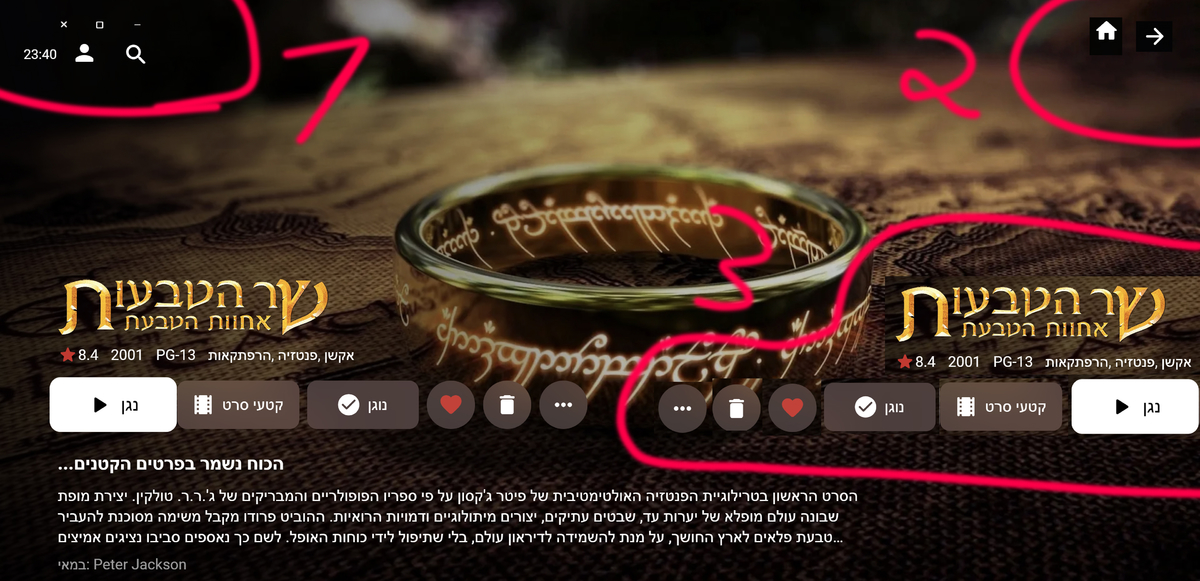
Here are 3 lists. Definitely important points. I made changes in Photoshop to illustrate this better. If it is not well explained please tell me
 1 point
 -
Find instructions here: https://emby.media/open-media-vault-server.html, both options assume you are familiar with using Linux from the command line. Today most folks would recommend running Emby in a docker container. But you could also install it directly on your Debian OMV system (use the package labeled Ubuntu): Ubuntu X64 Download emby-server-deb_4.7.5.0_amd64.deb (you could use # wget https://github.com/MediaBrowser/Emby.Releases/releases/download/4.7.5.0/emby-server-deb_4.7.5.0_amd64.deb) dpkg -i emby-server-deb_4.7.5.0_amd64.deb Open a web browser to http://localhost:8096 I'm running Emby with OMV 6 with no issues.1 point
-
Of course I will do it! Happily! I start working on it right away1 point
-
Me again with a naming convention issue. I am looking at Portals To Hell S03E09 currently TVDB and download sites are labelling it as S04E09 however my naming of the file is Portals To Hell S03E09.mkv and Emby is reading it as a Special no matter how many times i try different naming conventions. Any suggestions? FORGET THE ABOVE I FOUND MY PROBLEM - dirty glasses and one missing 31 point
-
Luke, to answer your question about the delimiter, I don't know what they are doing on the backend. I do know that when you enter the information into the musicbrainz database you follow these guidelines: https://musicbrainz.org/doc/Artist_Credits I haven't seen a semicolin there, just comma, &, feat. , etc.1 point
-
I guess it depends on what you're doing with that. If you're only using it internally for database index purposes that's one thing, but if you're for some reason forwarding that on to Listenbrainz as the track artist that's another. The plex code as you know is closed, so I don't know what they are doing, but here are some projects that are handling it fine: https://github.com/mariusor/mpris-scrobbler/ https://github.com/InputUsername/rescrobbled/ https://github.com/kawaiiDango/pScrobbler Or, you could simply ask them: https://community.metabrainz.org/c/listenbrainz/ You'd be better prepared to ask the question rather than me because you are (of course) familiar with exactly what your code is doing. They are good people and typically respond quickly.1 point
-
Thanks already fixed..1 point
-
Right now it looks like LG is not making the function available to third party apps. At least the ones that aren't LG partners.1 point
-
Okay, I think we've identified the issue. Thanks.1 point
-
not immediately before, but in the past, yes it was played...as well as many of the 1,000+ other tracks/albums that were dropped, that were tagged xVarious Artistx as the AlbumArtist, but with the actual artist name as the Artist1 point
-
Ok thanks. I haven't gotten a chance to take a second look at the code yet for a fix, but will as soon as I can. In the meantime, try putting a space between the episode numbers and the tilde symbol ('S01E01 ~').1 point
-
Hi. Same thing. According to freshports, at 4.7.4.0_1 they moved from mono to .Net. I tried fresh jail (13.1) with [pkg install embyserver], it wont try to start:" service start emby-server" produce no pid /var/db/emby-server is not populated. Atm rolled back to daily snapshot, maybe will try to troubleshoot later1 point
-
Can you try an episode without the '-' in the filename?1 point
-
Thanks all for the info on scheduled tasks and disabling the language for automatic downloads - think that should sort it. I would still suggest that the options be reworked some to consolidate subtitle behavior together in an intuitive way (even if that screen links out to library settings, tasks, etc).1 point
-
No inconvenience at all. No hurry what so ever. Enjoy your vacation.1 point
-
Ah sorry about that if that is the case. Unfortunately I am away on vacation two weeks so won't be able to take a look at it until then. Sorry for the inconvenience!1 point
-
These scripts do just about anything DV related, and tutorial videos are good. I don't use MP4, but there is an option for that. The guy who created them has a C2 so I'm sure MP4 works. Dolby-Vision-Tools - Google Drive The guy hangs out on the Makemkv forum if you wish to communicate with him.1 point
-
Yes i have multiple versions of the boys it'q maybe the reason and since i update my windows the problem is solved and the app does'nt bug anymore thanks for the answer1 point
-
The problem is that i shut down the nas during the night, and when it start in the mornig, the results are not present. I must run the scan and then they appear.1 point
-
Are you guys waiting for the library scan to finish and for emby to do its thang ? Results won;t be instant - they take a little while to 'come though' even after a library scan - this is normal. I don't use the real time monitor - but I have zero issues with this plugin on a schedule (every 2 hrs).1 point
-
HI! I have the same problem. I'm running TrueNAS-13.0-RELEASE Emby not auto-start after update to 4.7.4.0_1 I'm install second plugin emby2 but clear install does't help! And i REALLY do not want to loose all those hours of tweaking and personnalization on movies metadata TOO.1 point
-
All those settings are applied to a particular task: So go to Scheduled Tasks -Library - Download subtitles There should be a daily trigger established there, just delete the trigger if you don't want the automation.1 point
-
Thanks for the heads up. I submitted a ticket and they re-enabled my account on Monday. I sure wish the would have notified me. The basically said that between Emby and Plex, too many API calls were happening and I ended up with a lot of duplicate "stuff". They de-duped it for me. Again, would have nice if they would have notified me, especially since I have paid them for VIP for the last 10 years.1 point
-
After many days cant figure out why this problem happens to my friend but only with MKV files, I found your answer on google and tried it and it works. I just registered on this forum to say thank you very much for your information. Saved my friend life1 point
-
@arrbee99 I guess add something like this div.topDetailsMain .virtualItemsContainer.vertical-list.padded-left, div.topDetailsMain .virtualItemsContainer.vertical-wrap.padded-left { margin-left: 0; padding-left: 3.4%; } div.topDetailsMain .virtualItemsContainer.vertical-list.padded-right, div.topDetailsMain .virtualItemsContainer.vertical-wrap.padded-right { margin-right: 0; padding-right: 0%; } div.topDetailsMain .virtualScrollItem.dataGridItem, div.topDetailsMain .virtualScrollItem.listItem { width: 93.5%; }1 point
-
OK there was a topic in the testing area about this a couple months ago. It's something that needs to be looked at when importing existing metadata. When something is missing, the server doesn't really know if the metadata is just incomplete or if it's actually intended to not be there, so that's why this currently happens.1 point
-
First I think this topic is more appropriate for the Non-Emby General Discussion section as it is not intended to be about Emby at all. As far as the actual question goes I did a rather intensive search for "convert ac3 file to true-hd" and all it returned was results about converting True-hd to ac3 or just about any other format. However there was not one result about converting ac3 to true-hd. I guess the people that said there were restrictions that prevented such conversion were right. If there was a tool to do it I believe that there would be a number of hits on my searches but there was almost nothing related at all. The only exception was one software product that costs over $10.00/month and did not exactly say that it would work for the task you are describing. However if you want to go the other way there are, quite literally, 100s of choices and a simple internet search will give you more choices than you could possibly evaluate. Convert: true-hd to ac3 = easy ac3 to true-hd = nearly impossible1 point
-
That was it! Didn't realize that the onUserDataSaved exposed that stuff. Works perfectly. Thank you.1 point
-
yes, it's ONLY the items that have tags where Artist tag is not the same as the AlbumArtist tag....all other tracks that are tagged with Artist the same as AlbumArtist (majority of my library) never have a problem....and this issue is only with the plug-in, Emby Server never drops these items1 point
-
Can you try with the standard Android app on the same device?1 point
-
+1 for a request to be able to pull posters from theposterdb.com. This site is always my go-to for poster artwork. I've stopped using Emby's built-in poster search entirely at this point, as theposterdb has far superior poster selection than Tmdb. It's more manual work, but I'm able to get posters that all follow a consistent theme (e.g. all title logos centered at the bottom of the poster, etc) much more easily via theposterdb given their sheer volume of posters and large number of consistent artwork contributors.1 point
-
Thats normal, as you didn't specify the datadirectory it should use to start up, can you copy paste the start-up script that's installed? (/usr/local/etc/rc.d/emby-server) Does it look like this: emby-server.in « files « emby-server « multimedia - ports - FreeBSD ports tree You can add the command line options, and see if it also runs by keep adding them, eg "./EmbyServer -os freebsd -programdata /var/db/emby-server" Try adding "ip6 = inherit;" to the jail config too1 point
-
Hi, yes it is1 point
-
Hi! i resolved the issue changing the port to 7777, restarting emby and then changing the port again to 8920 and restarting the server.1 point
-
Emby Server 4.7 - In Depth (Part 1) Emby Server 4.7 and it's point releases provide some very cool new functionality. This is the first or introduction blog post in a new series we're doing to show you some of this new cool functionality. We're going to try and publish 1 or 2 blog posts in this series each week but will depend on other releases. Let's kick this off with a cool new feature from the recent 4.7.4 release. Add new table view option The next blog post will cover the following bullet point that just doesn't do it justice: Add Episode Intro Detection and Skipping feature NOTE: if you have a request for something you would like to see covered sooner than later make sure to comment below and let us know your preference. The new Table View Option is available everywhere in the library views but we'll be showing this using a TV Library using the show names and a couple examples of episodes. You could use the table view for movies, music albums, songs or any other part of your library. Share with us your favorite use. Let's start by showing how you change the view. The first thing we want to do is click the 3 dot menu circled in yellow in the pic above which will open the following settings: Change the view from (likely) Primary to Table and you'll have a set of fields you can choose to display. For now click the top left back arrow and you'll see a new table view that looks similar to below. Now that we have an idea what it looks, like click back on the 3 dot menu and select other columns to display. Below I added a few more columns. You no longer need to use the 3 dot menu as the table has a built in way to add/remove columns quickly. Click the icon shown in the yellow square top left in the picture above. Yep, much more convenient to use. Select a few more columns to display (or select them all) and let's see what we get. If the table scrolls off the screen you can use the scroll bar at the bottom of the screen, gestures or two finger trackpad slide to scroll the grid. You can right click on any row and bring up the action menu which should look familiar. Most of the headers can be clicked to quickly sort by that column. A second click on the header reverses the sort order. The picture below shows the table is using the Community Ratings and it's sorted in a reversed order to find the highest ratings. Tip: Use the Keyboard to Jump to sections closer to your Media. You can type up to 3 characters to jump media starting with those letters. If you have a keyboard you can type up to 3 characters to jump to media starting with those same letters. This jump will ignore the commons words like "a", "the", etc f I type BON it jumps to media starting with "bon" which is helpful if you want to watch "Bones". If I wanted to quickly jump to the show "The Rookie" or "The Big Bang Theory" I would use ROO or BIG to get these results: You could use a single character like "S" to jump to media starting with "S". Typing "TR" would make it easy to access Training Day or Treadstone. Just like the Primary view you can apply filters (tab up top). This came in handy as I was trying to think of a show name my son and I watched together but couldn't think of the name. I remembered it was a Science Fiction show so I tried this filter knowing the show had been played. This filter produced the following results which had the show name I couldn't remember "Terra Nova". Looking at the Genres I could have used a couple different Genres in my search. The table view expands the viewing flexibility of Emby a great deal and we think it's going to be an instant hit! Try it in different situations, like remote use on a small screen when you want the most media showing with it's additional information while having fast loading screens since all the media graphics don't have to load. Please share with us your favorite use of the new Table View and any tips or tricks you discover! View the full article1 point
-
Just started playing with this feature on Emby (Roku) and its great on DVR content! I notice however it will not generate on an in progress recording (or I assume a LiveTV stream that you have paused and thus are timeshifted). Is it possible to enable the thumbnails to be generated in more 'real time' so that in progress recordings could also benefit from easy commercial skipping/timeshifting? Thanks!1 point
-
Check with Trakt support. They may have disabled your account due to too many API calls. They'll usually reset the call count and get you working again. This has happened to a few of us. Just know Trakt support could take a month to get back to you. In that time I just created a new trakt account, ran the sync task and never thought of it again.1 point
-
Is there any update to this? I have been experiencing the same problem for the past week now. Black screen with spinning circle and only audio. Disabling MPV also works on "some" of the videos but has unusual video glitching going on every few seconds. Frame skips or redraws or something.0 points