Leaderboard




Popular Content
Showing content with the highest reputation on 06/23/22 in Posts
-
Something to help those wanting to use removable storage for database. Its for PMS, but perhaps it will work with emby. The 3rd installment of the eBeta for the next release has deployed today as version 33.2.0.125. • Fix for PMS Stop issue when moving database to removable storage • Fix Connection Lost Error when using Volume buttons in SHIELD TV App • Load SHIELD TV App icons properly • Mount using IP address of the saved storage on device reboot • Correct helper text when disabling ALLM • Fixed missing Android Volume Bar when connecting BT headset or headset to SHIELD Controller • Added One Touch Play control support for Power on https://www.nvidia.com/en-us/geforce/forums/shield-tv/9/493462/shield-experience-upgrade-ebeta-may-2022-signup/3260957/4 points
-
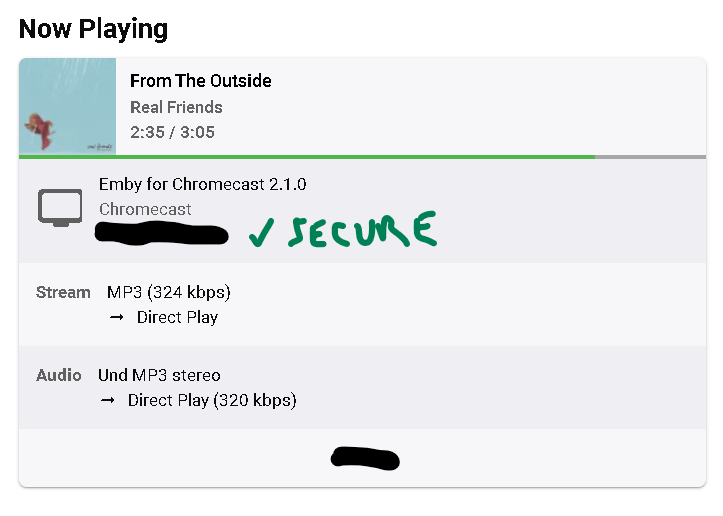
Show some kind of indicator if secure connection is used for streaming and watching content for particular media server.3 points
-
Just opt-in for the beta in the google play store, give it a few hours, and update the app. It'll automatically put the beta over the stable. And on a side note, I'm absolutely loving the skip into! I don't know how I lived without it for so long.3 points
-
Sorry it took a bit to get back to you (life issues), your suggestions worked perfectly and my Family thanks you!!! Great job....2 points
-
I dunno if something like this is possible in the Emby environment (maybe it's even already there and I'm not recognizing it)... but something I kinda liked with Plex was that I could see that users were connected to my server/share securely (https) in the Now Playing/Current Activity area. I mean, I guess I should know if they were initially setup using the https but there'd just be peace of mind seeing an indicator clarifying it, or that I need to take action if someone isn't connecting securely that I assumed would be. Would something like this be possible?
 2 points
 -
Hey All, new release just for bug fixes, I am in the process of adding some new suggested features, watch this space. I have only tested this on the latest release of Emby (4.7.4.0) but don't foresee any issues on older versions, let me know. Version 2.3.0.2 Feature Removed "Sort newly added items" if the playlist is in "Live" mode Disabled "Execute" on management ui if the playlist/collection is in "Live" mode Bug Fixed bug when limit cache clear check is failing as limit is null. Fixed bug when updating a collection: Error Method not found: 'Void MediaBrowser.Controller.Library.ILibraryManager.UpdateItems(System.Collections.Generic.List`1<MediaBrowser.Controller.Entities.BaseItem>, MediaBrowser.Controller.Entities.BaseItem, MediaBrowser.Controller.Library.ItemUpdateType, System.Threading.CancellationToken)'. SmartPlaylist-2.3.0.2.zip2 points
-
I've been dying to know if this has garnered enough interest to be worked on. I found Emby (MediaBrowser 3 at the time) and its bookshelf plugin while I was searching for something that was like Plex for comics. Plex doesn't do this (and probably never will), Kodi doesn't have what I'm looking for either, and ComicRack seems to be dead at the moment. Unfortunately the bookshelf plugin doesn't work the way I had hoped. I was dissappointed to see it only offer a download to the file to which I can open it to the program of my choosing. Even browsing through the books I only had the option of going through folder-like directories and couldn't browse by author like the people section in the other media types. I would love for it to be fully integrated into Emby where I can open and read a comic right on my phone and tablet or even my web browser as I could with my movies and tv shows. Also, I hope to god somone is working on the "Games launching in android" feature you mentioned on your up-for-grabs blog post. That would be awesome!1 point
-
I'm a plex life time member, but I have been using Emby for over six years continuously, but there is a feature which I have always thought is missing in Emby which I would like and encourage the developer to consider including especially in this dispensation where families can social or commingle due to COVID 19. Today, I received a notification from Plex about it new feature titled Watch together you can read about it here https://support.plex.tv/articles/watch-together/ The feature allows friends and families at distance to watch same movies together instantly, you simply invite all your buddy, once they signed to the system which can be seeing in the server then play and pause as needed, this I think is cool feature should be added to emby. Let's here your though if Emby developer should consider adding this feature to our beloved Emby Media https://www.bing.com/news/search?q=Plex+Watch+Together&qpvt=plex+watch+together&FORM=EWRE1 point
-
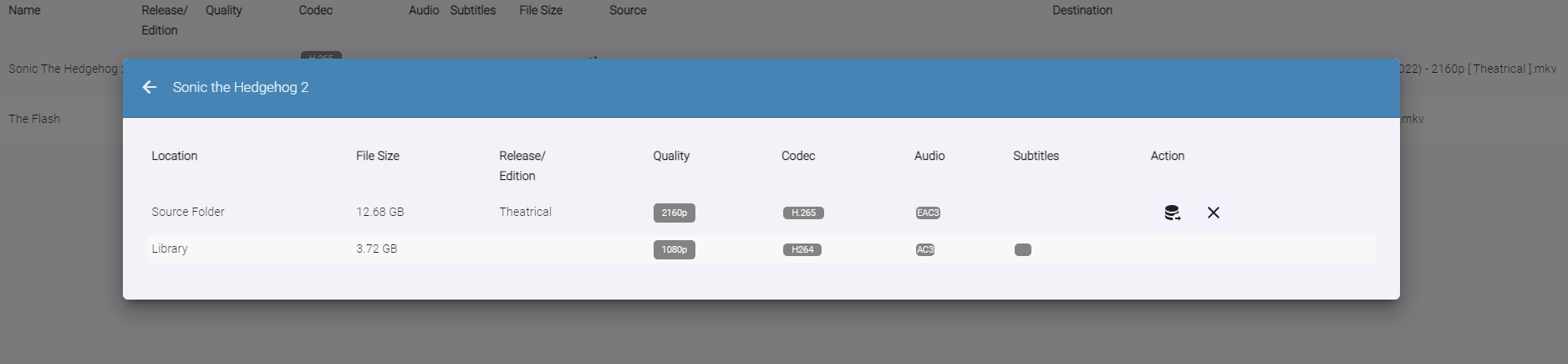
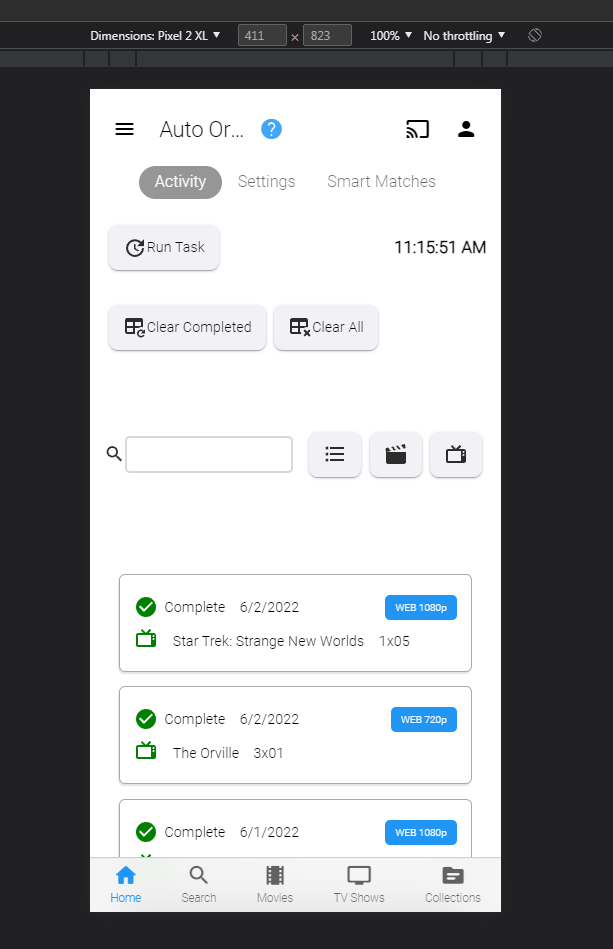
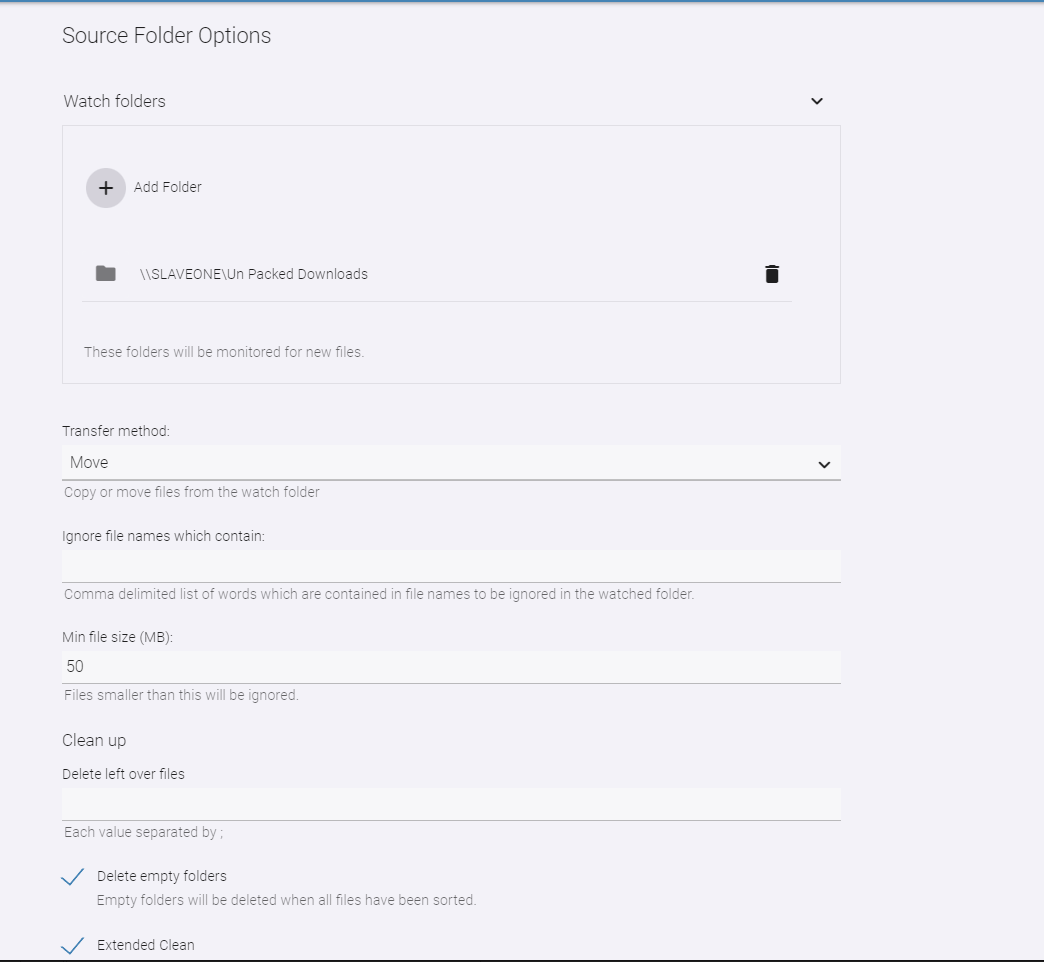
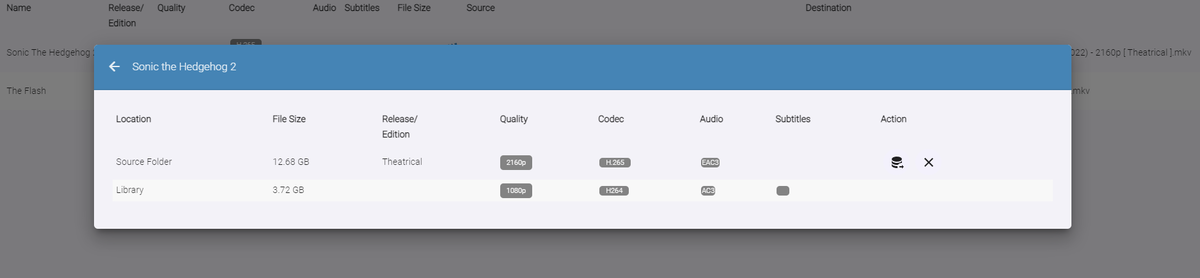
Auto-Organize PLUS - public beta Built upon the Original Auto Organize plugin, Auto-Organize PLUS is a new version which has some enhancements to help sort new media files into the Emby library. Mobile View: Enhanced Table Layout: with Media Info about the files in the watch folder. Multiple Watch Folder Settings: Existing Library Item/Watch Folder Item Media Info Comparisons: File Status/States: Files in the Watched folder can be in several states depending on user settings. Existing Item Existing Items are items that exist both in the watched folder, and also already exist in the Emby library. Users can click the existing item icon to compare the two items, and help decide if the file should copy over into the library folder, or not. New Resolution New resolutions are items that exist in the library, but may not have the same quality as the item in the watched folder. For example: 1080p, and 2160p. The "New Resolution" status will happen, when "Smart Auto Detection" is turned off for a certain media type. Processing The Processing status will happen when a file is being copied, or moved into the library folder. Success Success happens when a file has completely moved into the library folder with it's new name Failure Failure happens when a file name can not be fully parsed, and the media can not be understood by Auto Organize 2.0 User Input Required (Pending...) If a particular TV Show spans multiple folders within the Emby library, Auto Organize 2.0 will wait for user input to decide where to place the file. This state will may happen with "Smart Auto Detection" turned off, or on. Not Enough Disk Space If a file hasn't enough room to copy into the library folder, because it is full. In Use When a file is being copied into the monitored folder from another source, or is being used by another process. When the file becomes available the status will change. New Media When a file has been added to the monitored folder, and it doesn't exist in the Emby library, but "Smart Auto Detection" has been turned off. The file will enter the "New Item" state if all applicable metadata can be obtained to name it. This will allow the user to sort it when they are ready to. New Edition New Edition will happen if the media item in the watched folder has a different release parsed in it's name. For example: "Theatrical", and "UnCut". Table Sorting: Sort the files by stripping out certain types of media, and only showing others. Also, filter the current displayed items by "Name", "Date", and "Status" Current Issues, and on-going development Plugin configuration Page Headers are currently having issues in Emby. Options are not hidden behind the Header on scroll. This is a core issue that is currently being fixed Smart Matches are currently being enhanced, and the experience with smart matches is currently not what the end result will be. Installation notes: Please shut down the server Remove the "fileorganizer.db" file found in Emby's data folder. Place the plugin DLL in the plugins folder Re-start the server. Clear browsing data DOWNLOAD (stable server only): Emby.AutoOrganize_v1.6.41.43.zip Beta server: Emby.AutoOrganize_v1.6.41.23b.zip (Not updated recently)




 1 point
 -
Please support right-to-left text display To be compatible with the Hebrew language. I know thousands of people who use emby and are really desperate for this support.1 point
-
Ideally, I'd like an option with the Android TV app so that when I click on an something which is currently playing, that it starts playing immediately rather than going to the "Tune To Channel" pop up. I realise that I can do the same thing by pressing play, but the Shield remote implementation of play/pause is not very intuitive and not something my other half will ever use! Hope this is okay and I've put this in the right area. Thank you.1 point
-
Yes, it's ok now, thanks!1 point
-
I think that was it, now I'm updating some anime and it's not closing anymore, thanks!1 point
-
Yes. That fixed it for me. Thanks!1 point
-
OK please try restarting the app and let me know if the issue is resolved. Thanks.1 point
-
Ah, it's related to the horizonal home screen, and now I can reproduce. Thanks !1 point
-
OK so if you locate the install folder, you'll see an electronapp subfolder, then main.js under that. Near the top of the file, can you change these two lines from: var enableDevTools = false; var enableDevToolsOnStartup = false; to: var enableDevTools = true; var enableDevToolsOnStartup = true; Then start the app. There will be a dev console. Are there any errors in the console?1 point
-
Hi Luke, Don't see any errors, just Info Server log that reports it's playing. I'll let it play and check back the logs in a few.1 point
-
I have the same problem. I guess it happened after ET updated itself (without any notification as usual). I also tried to restart, uninstall/re-install ET, remove the Roaming\Emby-Theater and Roaming\Electron before re-installing. Still not working.1 point
-
I've installed what @Luke posted above and it does appear to fix the problem; I've been running Live TV for about 90 minutes and so far everything is still in sync. I'll update this post if I see any issues.1 point
-
Hi, this is resolved for the next update to the Emby iOS app. Thanks.1 point
-
Hi, there is currently no option for this but it looks like something we could add.1 point
-
I guess start with all of them or just the video transcoding one.1 point
-
Hi, you have to enable it in library options first.1 point
-
I've definitely had issues in the past trying to play/shuffle large playlists while casting. I think I hit a wall around 200 items maybe? In this case I don't really have anything in particular that I'd like to listen to, or else I'd make/use a more curated list. Would enjoy the ability to hit my entire library, while casting. Even if Chromecast has a limit, truncating the queue it receives (maybe cap it at 200) seems better than not playing anything. Though probably easier said than done.1 point
-
Also, the next version of the app will correct the guide being produced from the menu button when not watching live TV.1 point
-
I added date pickers for release date and date added. I also added a year picked for production year. The code is below. Vic emby_new_tool_30.html1 point
-
Yeah the apk file of 2.0.70 wasnt replaced in the file manager as the name for both file was matching Deleted the old apk and 2.0.77 has been installed1 point
-
OK, my bad... fixed the SSL issue as well. I'd put /var/lib/emby/ssl/ in the web gui instead of /config/ssl/ I should have done this later in the day and on more coffee. The Libaries are all there, the Users are all there, my progress is all there, so ... ... all good so far! A huge thanks to all who helped and this is now making my server upgrade a lot easier. I'll watch a few things tonight and report back for a final verdict. Regards, Paully1 point
-
HI; all correct, these are audio files (album in mp3 format), at each update the .nfo files are updated with the latest changes (Italian translations), We confirmed that currently if you reinstall the metadata are not read on the local .nfo files but are always taken from the external server (and everything has to be re-translated). Thanks I will wait for the new version (and I will take the opportunity to go to premiere even if I do not think I will have any advantages, but the software deserves it). Greetings1 point
-
Hey up, as asked above: since that is the number of unwatched episodes, have you checked within any season itself are there more episodes present, as watched status will be retained even if you move the series out of your library and put it back again, maybe sometime in the past you did actually watch that series, as the "Played" indicator on your screenshot suggests? You can also press/untick that "Played" and see how does that compare, does the unwatched counter change?1 point
-
Version 1.4.5 Added: Add new setting to tweak UPnP flags for the rare devices that requires it. Add new experimental settings for Hi-Res local renderer. Add new Subsonic provider settings to force artist metadata gathering. Fixed: Workaround for Jellyfin not returning the m3u playlists if there’s not at least one database playlist. Fix possible Plex authentication error when trying to locate the new server IP. Subsonic transcoding no more tries to support seeking it’s too unstable. Fix Plex connection to friends server when using web auth.1 point
-
It must not have any chapter data embedded then. We do plan to add chapter editing to the Emby UI in upcoming updates.1 point
-
@Luke Continued testing for another 45 minutes, and it has been working great, no additional flukes. This test version seems definitely better.1 point
-
Yeah lol I was just being lazy and try to see if there was a faster solution than splitting the .mp4 files into 3. Thanks for the reply!1 point
-
Have you had a look here? MediaBrowser/ListenBrainz (github.com)1 point
-
figure anything out? tried using my guest login on my server? see if you see the same issue?1 point
-
Will remove the address from first post but port is open and can see login page.1 point
-
@GloriousPandaWe pushed an official image in the scale main repository about a month ago, there shouldn't be any more need for truecharts. Probably needs to be updated for our latest release, will need to check if truenas didn't already update it, but did you give it a try?1 point
-
It sounds like you just installed the stable version again. How did you install the apk once you downloaded it from the link? Did you use X-plore or some other file manager to open it? I just redownloaded and install it right now and it's showing version .77 BTW, you shouldn't need to uninstall an older version, it will upgrade your current.1 point
-
It's not in the store yet but can be sidelaoded. https://emby.media/emby-for-android.html1 point
-
Press Down on your remote, it brings-up OSD menu, same menu you're using Guide button for.1 point
-
@Lukeupdated the addon to address this last week.1 point
-
Emby Server 4.7.4 - Point Release: Round 3 Fixes This is the latest point release of Emby Server containing fixes for identified issues. Add Episode Intro Detection and Skipping feature Add new table view option Add more fields for selection in poster views Add new theme options Fixes for downloads automatically redownloading Remember subtitle selections even when user option is set to None Fix graphic subtitle position when burning in subtitles with transcoding Fix sporadic cases of errors when reordering live tv channels Improve automatic channel mapping with xml tv Support sort by composer Fix glibc errors on certain NAS devices Image processing fixes on FreeBSD/TrueNAS Original Blog posts for the 4.7 release: Emby Server 4.7 Release: Many New Features, Improvements and Fixes Emby Server 4.7.1 - Point Release: Round 1 Fixes Emby Server 4.7.1 - Point Release: Round 2 Fixes Please report any issues you may have in the General/Windows section of our Community Forums: Emby Community General/Windows Forum View the full article1 point
-
it should be back, its still the same version, I still need to update it.1 point
-
Hi, we'll look at improving it. Thanks for the feedback.1 point
-
I just started this. Very intriguing. Reminds me in character of "Devs".1 point
-
I'm not sure how to word this request, but when selecting a show in the live TV guide, a popup presents options to record or play. Is it possible to have a show play immediately whenever it is selected from the TV guide without asking to record? I have looked through the setting both on the server side and client side to no avail.1 point
-
This preferably, or as well as subtitles and audio, it would be nice if it is remembered for the rest of that show/series or movie.1 point
-
Adding another interest to above 2x speed.1 point