Leaderboard




Popular Content
Showing content with the highest reputation on 06/21/22 in Posts
-
When something just works and works well there's not much to say about it... ...okay...good job, well done! I wouldn't have noticed it's gone except that I couldn't find it after a fresh install on a VM. It's a keeper and worth maintaining.4 points
-
Emby Server 4.7.4 - Point Release: Round 3 Fixes This is the latest point release of Emby Server containing fixes for identified issues. Add Episode Intro Detection and Skipping feature Add new table view option Add more fields for selection in poster views Add new theme options Fixes for downloads automatically redownloading Remember subtitle selections even when user option is set to None Fix graphic subtitle position when burning in subtitles with transcoding Fix sporadic cases of errors when reordering live tv channels Improve automatic channel mapping with xml tv Support sort by composer Fix glibc errors on certain NAS devices Image processing fixes on FreeBSD/TrueNAS Original Blog posts for the 4.7 release: Emby Server 4.7 Release: Many New Features, Improvements and Fixes Emby Server 4.7.1 - Point Release: Round 1 Fixes Emby Server 4.7.1 - Point Release: Round 2 Fixes Please report any issues you may have in the General/Windows section of our Community Forums: Emby Community General/Windows Forum View the full article3 points
-
it should be back, its still the same version, I still need to update it.3 points
-
Some times I forget where are all the settings are and 'are they related to this or that?', 'user level or system level (or both!)?' I'd like to be able to search for a setting then go to that section. Right now I'm trying to find the poster stuff and can't find it. I thought "I'll click this magnifying glass here in Settings!" but no, that searches my libraries. (This would seem to be a problem within itself - context, context!)
 2 points
 -
@Luke, As per my access issue with the Android Server on Shield. Please accept this Feature Request for a WebView UI on the Android Server. Hopefully this will enable Direct (localhost) Web App access to the server on Shield - WITHOUT Internet Access. Making a truly Stand-Alone media player. This would be perfect for RV travelers who go where there is no Internet Access - and I am sure there are many... Thanks Jordy2 points
-
Maybe a little late to this discussion, but I had the same in Edge, and it was just that caret browsing was turned on. pressing F7 turned it off and it was fixed for me2 points
-
I have solved the problem... Here is what I've found.. I was connecting to the server using the Apps with these settings.. https://media.myserver.com and port 443, or https://media.myserver.com and no port number,... these would both work with the app without any issues but no chromecast.. I found that ONLY if i have the server settings as http://media.myserver.com port 80 will the chromecast work properly.. 443 works on the app, 80 works on the app, 80 works for chrome and app.. I'm going to try to use a lets encrypt certificate now and see if chrome is still happy.. Thanks everyone..2 points
-
Hi @Luke, following up on this for the Apple Silicon users2 points
-
It looks like we can support this possibly, but only on certain models. We can also possibly also allow the volume-up and volume-down commands as well as volume-mute. Stay tuned.2 points
-
My request is to be able to chose to add items to the home screen. Specifically in my case, I am thinking of playlists and collections. Here's some reasons I'd like to see this: The home screen is the first piece of the user interface a person will see when they pull up Emby. I often places movies in bulk into my media library. This sometimes means people never see the new movie I've made available. Happens a lot, actually. While all movies are searchable or can be found by sorting, I believe the interface would benefit from having the customization option. I have created a "Justin Recommends" collection and would LOVE to be able to put that on the home screen. By keeping this optional, no one is forced to use it. If you don't have a use-case, then it's just a feature. If you look at things like Netflix, many movies and shows get "featured" and by doing that, a lot of people end up watching that wouldn't otherwise (imagine if The Tiger King was just another buried documentary you had to hunt for, no one would have heard of it). I appreciate your time. If you've considered this before and decided against for reasons other than difficulty implementing the feature, I'd ask you to reconsider. I believe that being able to customize our servers helps us personalize and tailor them to our audience and our needs, and that helps promote a feeling of ownership. I also truly believe that this small change could lead to some powerful results. In my case, I know that it would be of huge benefit to accomplishing what I would like to do with my Emby server. Thank you.1 point
-
Ideally, I'd like an option with the Android TV app so that when I click on an something which is currently playing, that it starts playing immediately rather than going to the "Tune To Channel" pop up. I realise that I can do the same thing by pressing play, but the Shield remote implementation of play/pause is not very intuitive and not something my other half will ever use! Hope this is okay and I've put this in the right area. Thank you.1 point
-
Selecting either "Blue Radiance" or "Windows Media Center" on an Xbox ends up in it looking like "Dark". It used to work. Other themes look to work. I've tried it on both an OG Xbox One and a Series X. Server is 4.7.4.0 on Qnap.1 point
-
HI, yes it will.1 point
-
HI, yes I agree it would be nice.1 point
-
So many applications (web or otherwise) have added search capabilities to their configuration screens...this would be super nice!1 point
-
If you mean an option to always show the poster, yes, that's on the to do list.1 point
-
Gotcha, thanks @Luke. I'll update to 4.7 and continue to monitor.1 point
-
Yes, I can confirm the Fast Forward works a treat. Keep that! The left and right arrows on the remote for a 10 second jump in either direction is fine too. Keep that! Thanks for putting me in the “right” direction (see what I did there?) Paully1 point
-
Hi, thanks for following up.1 point
-
Helo! Currently large downloads are not working for me with this configuration, if i add the next line to the config it works perfectly: proxy_max_temp_file_size 0;1 point
-
UPDATE: To anyone having this issue, you have to add proxy_max_temp_file_size 0; to your NGINX config file. This is not present in the forums NGINX guide here, im guessing it should be added?1 point
-
Nelle impostazioni del tuner m3u prova impostare la user agent metti quello di VLC e VLC/3.0.9 LibVLC/3.0.9 il reffer http Mozilla/5.0 (Windows NT 10.0; Win64; x64) AppleWebKit/537.36 (KHTML, like Gecko) Chrome/102.0.0.0 Safari/537.36 Salva riavvia il server aggiorna la guida... Se anche così non và allora ci sono errori di scrittura nel file m3u che emby magari non digerisce facilmente,e VLC ed altri prog fatti per le IPTV saltano...di default1 point
-
Looks like this is fixed in 4.7.4.0 for me. Re-ordering channels seemed to work and for the strange situation on Android Phone (ONLY) where one channel was shown above another incorrectly (but correctly in all the other Emby apps I use including web app), I simply jiggled 2 or 3 of the channels around it, and the sort order was correct again on Android Phone. Thanks Luke.1 point
-
So I've been working on this, this weekend, and there seems to be a change on the latest version, I have implemented it but now collections items seem to lose their images, so been battling to try figure that out. Still on it, will keep you posted.1 point
-
Ok, I create thumbnails which are 10 secs apart. Both Android apps allow you to press FF and it scrolls. Maybe it doesn't work as well without the thumbs, not sure.1 point
-
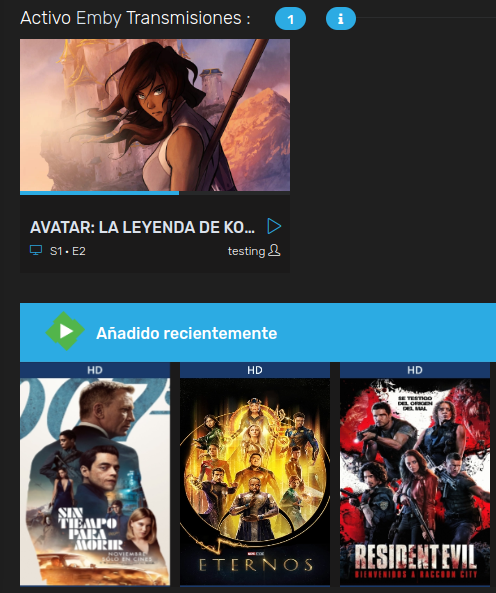
You could try using Organizr https://organizr.app There you can setup the homepage to show whats currently playing on the server and you can even setup if you want the user name to show. And even better you can setup Emby as the login agent so your users can use the same credentials in emby and Organizr.
 1 point
 -
I shall and report back.1 point
-
Not really sure about the arrangement there, since trailer does have internet access, do you want to access your home server remotely or have another server in the trailer (which would then be completely unrelated to your home server, you can share Premiere key but that is the only sharing point, you'll still have to provide likely local media)? If former, you don't need additional server, just your Firestick sticked into trailer TV. If latter, Nvidia Shield (or any other MiniPC) would do the job nicely as you'll have both server and client on the same machine connected via HDMI to your trailer TV. Combine it with external HDD and you're good to do, you'll have to verify Premiere license every few weeks (three at the most, AFAIK) but that shouldn't be a problem seeing trailer does have internet access.1 point
-
Hello There is the "smart" subtitle option, but this doesn't enable "forced" subtitles which doesn't make sense to me. Would you consider adding another option like "smart and forced" so this would apply: preferred language is German - audio is German - video has no German forced subtitles = no subtitles are enabled preferred language is German - audio is German - video has German forced subtitles = German forced subtitles are enabled preferred language is German - audio is English - video has no German forced subtitles = German full subtitles are enabled preferred language is German - audio is English - video has German forced subtitles = German full subtitles are enabled Wouldn't that make sense or am I missing something here? Best regards1 point
-
The only thing keeping me from paying for Emby and ditching Jellyfin is the inability to immediately play live TV programs when viewing the guide without getting the popup asking to record. I understand a lot of folks are reluctant to UI changes, so I am asking for an option in the settings to disable the record popup when selecting a programs from the live TV guide. The option could default to the existing behavior, but allow end user's to disable it if they so choose. My request is specifically for the Android TV client. I have a few Nvidia Shields which have very few buttons on the remotes - directional and a select button in the center. Every live TV app I've used so far: Jellyfin, Channels, Android Live TV, Kodi, and Sparkle all play the selected program from the live TV guide immediately (without prompting to record) when the select button is pressed. Emby is the only app that forces a prompt to record before being able to select play. Thanks1 point
-
Yeah, that makes sense.1 point
-
understood, but what I'd like to see is "smart" + "forced subtitles in the preferred language". Will open a feature request for adding that option.1 point
-
"Smart" doesn't know if there are or there are not foreign parts within the movie, it only compares audio track with your preferred language. Maybe an example for "Smart" mode: if your preferred audio language is German, and you watch movie with German audio - it is considered you DO understand that language and no subtitles are needed; but if you watch a movie with Spanish audio, it is assumed you DON'T understand that language hence your preferred language subtitles will be pre-selected. If you want forced or default subtitles to show, there are separate modes for that.1 point
-
Hey I was seeing the issue with the file name rule. Seems to be resolved with the beta, thank you very much!1 point
-
The next update to the app will have a gray color option.1 point
-
I'm been on SE8 since the original build was release and was briefly on SE9 but due to the constant issues with it in the early release cycle and removal of Direct File Access (DFA) by Emby, I rolled back to SE8 and have not had an issue since on file playback or any form of DTS navigation (as it was previously on SE8). DFA has always been faultless for me. If network access.mounts work for other Apps (VLC, Xplore etc) then they will work for Emby. The Guide that Frosybyte has posted above looks VERY comprehensive, good job by the author - yes there is a slim chance something could go wrong, but just prep everything first (read though the entire guide before starting and ensure you get all the apps/images etc before hand), then take your time and go through each step. They also include the steps necessary to disable any future upgrade nagging.1 point
-
It seems to be indeed that "glibc errors on certain NAS devices" which triggered the unaccessible error on certain QNAP systems. A manual update to 4.7.3.0 from CLI brought-up: [/share/CACHEDEV1_DATA/Public] # ./emby-server-qnap_4.7.3.0_x86_64.qpkg Install QNAP package on TS-NAS... ./ ./built_info ./qinstall.sh ./qpkg.cfg ./package_routines 6575+1 records in 6575+1 records out 162912026 bytes (155.4MB) copied, 0.788365 seconds, 197.1MB/s 159093+1 records in 159093+1 records out 162912026 bytes (155.4MB) copied, 0.793730 seconds, 195.7MB/s EmbyServer 4.7.2.0 is already installed. Setup will now perform package upgrading. Firmware check is fine. EmbyServer is not running. Link service start/stop script: emby-server.sh Set QPKG information in /etc/config/qpkg.conf /share/CACHEDEV1_DATA/.qpkg/EmbyServer/system/EmbyServer: /share/CACHEDEV1_DATA/.qpkg/EmbyServer/lib/libc.so.6: version `GLIBC_2.18' not found (required by /share/CACHEDEV1_DATA/.qpkg/EmbyServer/lib/libstdc++.so.6) While doing the upgrade to 4.7.3.0 version 4.7.4.0 popped-up on GitHub. I upgraded to 4.7.4.0 and the upgrade process went smooth without any errors. The Emby Server is accessible again through web browser and from my devices (SmartTV etc.). At least for the QNAP TVS-473 (x86_64) the problem seems to be solved. Thank you for the swift upgrade to 4.7.4.01 point
-
No, sorry.. Let me clarify. I have a Fibre connection with a public IP.. when i connect to emby with my phone and play something, under the video that is playing will show the clients IP address and what they are watching. I'll try to add the email address to the config file.. maybe chromecast is rejecting the SSL certificate if there is no email associated with it.. I hope this works.. It's been hours of 'tweaking'.. I even started to install Nginx but it got too full on and went back to Caddy. Thanks for your reply's.. good to know others are on the ball with these things.1 point
-
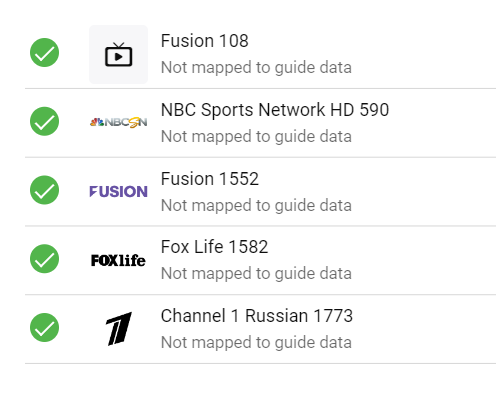
I appreciate it, but please report all missing channels. Here they are:
 1 point
 -
Essential features: iOS support Smart playlists and ability to download them offline Sync ratings. Essential for sorting through new albums and then deleting disliked tracks file via Emby server. Easy access to like/dislike. A combo of dislike and play next would be great.1 point
-
I also had this error after rebuilding everything. Here is my setup: OpenMediaVault (bare metal) sharing video library with NFS Storage is ZFS with sync=disabled Emby running in docker on an Ubuntu 22.04 VM hosted on Proxmox (not the same machine as OpenMediaVault) 10Gb network Using volumes for NFS Here is part of the docker compose: emby: container_name: emby image: emby/embyserver:latest restart: unless-stopped ports: - 8096:8096 environment: - VIRTUAL_HOST=<REDACTED> - VIRTUAL_PORT=8096 - UID=1000 - GID=100 - UMASK=002 volumes: - /etc/timezone:/etc/timezone:ro - /etc/localtime:/etc/localtime:ro - ${PWD}/emby/config:/config - ${PWD}/emby/backup:/mnt/backup - video:/mnt/video volumes: video: driver: local driver_opts: type: nfs o: nfsvers=3,addr=<REDACTED_DNS_NAME>,rw,tcp,noatime,rsize=1048576,wsize=1048576 device: ":/export/cache" This configuration would cause exactly 30 seconds of "buffering" or whatever. Kodi as a client, the official Emby Android TV client, web browers, etc, always 30 seconds. After changing the volume, videos play instantly: volumes: video: driver: local driver_opts: type: nfs o: nfsvers=4,addr=<REDACTED_IP>,rw,tcp,noatime device: ":/video" I changed from NFSv3 to NFSv4 and changed from using the DNS name to the IP address and dropped the rsize, wsize arguments. I may try adding rsize/wsize back to see if that was it. So it was one of those 3 changes that fixed my issue. Edit: Added back the rsize and wsize and that wasn't the problem. I changed to nfsvers=4.2 and it continues to work, so I'm guessing it was the change from NFS v3 to v4.1 point
-
It's released Thanks again everyone
 1 point
 -
Hi, now that we have lyrics it could be a next step for music.1 point
-
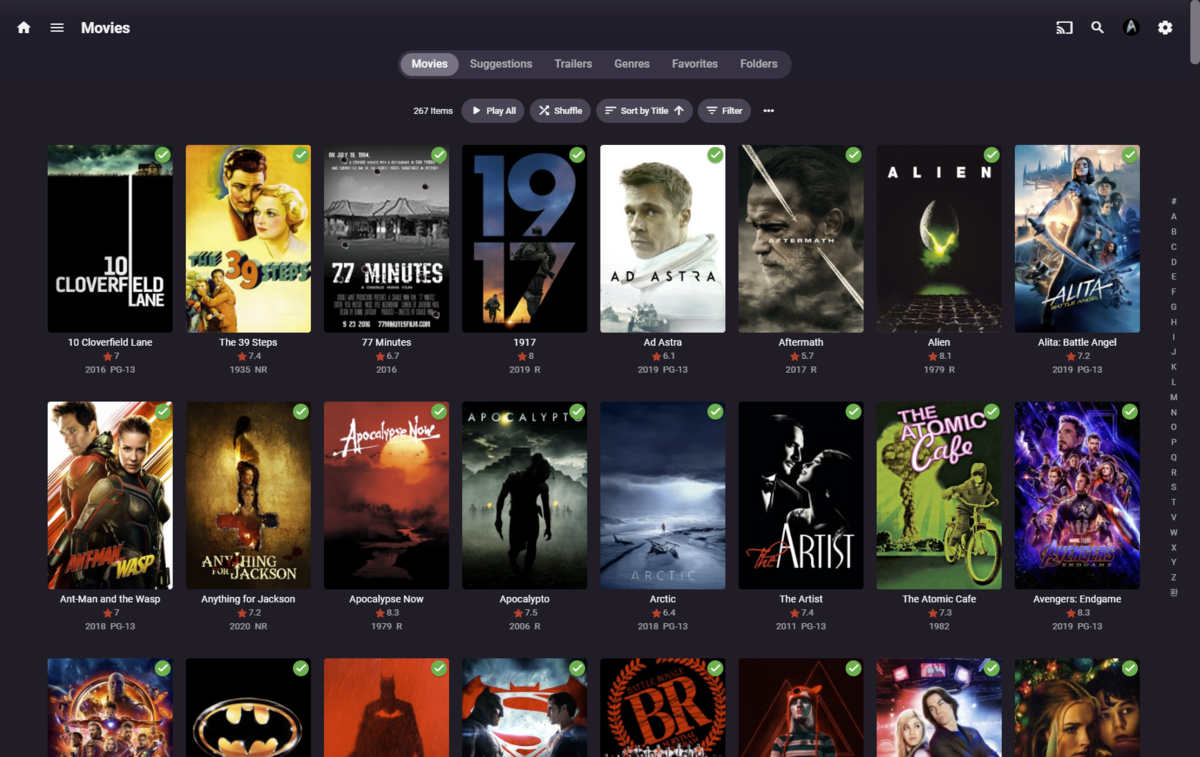
I am super busy most days and I usually end up with some free time late at night, so it was great to see in Plex at a glance how many mins long each movie is, even when sorting by duration there are no time markers. I'd rather have it over ratings showing in the library view if we had to sacrifice something. Thanks for the consideration.
 1 point
 -
Hey @BaiGanJia, great idea, and seems quite doable.. I'll see the effort involved, might need be the next release, but the following.1 point
-
Take a look at this link if you're interested in reverting back to SE8. @Audiomixer , @rbjtech and myself all have done it at least once. Audiomixer probably more times. Downgrade NVIDIA Shield TV (Pro) 2019 to v8.2.3 (full) (florisse.nl)1 point
-
Emby Server is now a TrueNAS Scale Official Application. Very few applications ever get to have that privilege! Emby Server has been available in the community catalog. Emby is now forefront on the first screen when entering the Applications Menu. This is where Official Apps are shown. https://emby.media/truenas-scale-server.html To learn more about TrueNAS Scale: https://www.truenas.com/truenas-scale/ Overview of Hardware Packages: https://www.truenas.com/systems-overview/ Customer Support : https://www.ixsystems.com/support/ View the full article1 point
-
This is purely an oversight. We do not want you to press more keys. We want to mimic the native Roku experience. You will not have to retrain your fingers. Please give us some time to adjust to feedback. We listen to you guys. Thanks for giving us clues where we need to do better. We want you to be happy because it makes us happy. Thank for choosing Emby. Any other concerns? Did we drop the ball anywhere else? Do not feel the need to pull punches. We want honest feedback. Thank you.1 point
-
Apologies for the disruption. New builds of 4.7.3 are on the way up and should be finished uploading within the next hour. Additionally we're going to tag a 4.7.4 after that just to ensure that everyone gets notified that there is an update/resolution available.0 points