Leaderboard




Popular Content
Showing content with the highest reputation on 06/09/22 in Posts
-
Likely when you scream a bit more, that will surely go a long way towards getting your issue resolved. Compared with your Karen mentality - it's a winning combo. Came into this topic (too) late. Maybe @ebr is too polite to react to your entitled attitude - I'm not. You've embarrassed yourself enough times already, it is time to tone-down and start acting like decent hunan being or I'll start slapping your Warning points just because I feel like it. You've made your issue known, you have received Dev's response on multiple occassions - now you'll have to be patient as numerous other users, including myself, are until their issues get resolved in the order of priority. Yeah, surprise, they are not all 1st World problems, just as your ain't. And yeah, it might take years sometimes. Live with it.3 points
-
HI, I think all of these options work just fine. The issue is that in Emby Server, tracks and albums have their own images, and changing one will not always flow through to the other. I think that's the part that we need to look at making a little easier and more obvious.2 points
-
Lets get Introskip all wrapped up and working in the Core (with editor blah blah) - and then we may be able to add new capabilities such as adding markers for Recaps (manual edit) and even Commercials (from EDL imports from ComSkip?) if there is sufficient interest for it. Movie End credit markers are also starting to be discussed. Things are moving relatively quickly on Introskip so I think it's really just a matter of waiting until it all comes together.2 points
-
Items are tracked by providerids, not resolution, so as far as Emby is concerned that is 'same' item, hence duplication (or triplication or x-plication, depending on how many versions one has in their collection). You should use multi-versioning feature, which will result in single item in Continue Watching row and multi-version dropdown selector in item detail view, in either of three ways: 1) Put all different files in same folder and follow naming convention for multi-version movies https://support.emby.media/support/solutions/articles/44001159102-movie-naming 2) Multi-select and select "Group Versions" in three-dot menu 3) Use community-made Auto-Grouping plugin which works across folders Edit: Note that only method 3) works across multiple folders/libraries.2 points
-
running the OS on an nvme drive will likely give you your biggest bang for buck in terms of lag in the interface from my experience2 points
-
Thanks Sean! I followed the naming convention above on all the files in that folder and now I see a dropdown menu that shows the versions! Thanks!2 points
-
The likely reason the multi-version didn't work is because each file version needs to follow the parent folder name, appended by the "- version info" So in your case: Sexy Beast (2000) all versions\ Sexy Beast (2000) all versions - HD MKV x264.mkv Sexy Beast (2000) all versions - HD HEVC x265.mkv Sexy Beast (2000) all versions - HD MP4 x264.mp4 ...or something similar. Your screenshot above will only affect the way the movie is displayed in the library, not the version names.2 points
-
Only by Editing Metadata in the UI as metadata Title is presented. The question is do you want to see multiple items or one item with a drop-down to select version? As there is three ways to multi-version in Emby Manually multi-select and group version Automatic via stucture and naming scheme Multi-version movies Or community plugin that will group by providerid no matter location. automatic-version-grouping-for-movies2 points
-
I finally updated my main server to 4.7, and I'm seeing some very tenacious app side image caching in multiple apps. Pre 4.7, once Iconic triggered a change to the image cache key, you would see the image start to regenerate in the apps almost immediately. Now, the old images are hanging on for much longer, even though the new image has already been created and placed in the server side image cache. The updated image might show up in the Library view within a few minutes (or not), but the old image might stick around indefinitely in the Latest Movies view before finally updating. I'm also seeing the opposite, where the image in the Library view refuses to update while the same image in Latest Movies is already updated. Also, an old image can take back over after navigating away from a view and then back again. So far, of the apps I'm running, the Android app is the worst offender (not even restarting the app helps) while the Roku app updates faster, but still much slower relative to 4.6 and lower. With the web app, I can at least disable the browser cache to get the image updates right away and verify that Iconic has already done its thing on the images. If there's anything I can do about this from the plugin side, please let me know, but this is a huge issue for Iconic.1 point
-
FYI: for those of you still having trouble with metadata on files with long path names even when using the UNC path (e.g. - \\?\C:\...) there is another potential solution. I've discovered that pointing the library to a fully-qualified UNC path using the unique volume ID instead of the drive letter (e.g. - \\?\Volume{aab78429-72f5-4788-8931-acad196c2835}\...) seems to solve all of the issues related to long path names. In my case, specifying a UNC path took care of the issues with ffprobe grabbing metadata from audiobook files with long titles but it still left a problem with ffmpeg not pulling the embedded cover art. Pointing to the volume ID cures the ills of both ffprobe and ffmpeg and gets all of the embedded metadata into Emby. This even works for volumes mounted on an NTFS folder instead of a drive letter which makes it very useful for large installs with lots of disks. I've been running my libraries with this path convention for several days now without any sign of problems. There are several ways to get the unique volume ID. The easiest, IMHO, is to just open a PowerShell window and issue 'get-volume | select filesystemlabel,uniqueid'. That should give you all of the info you need. Hope this helps out others as well. Cheers.1 point
-
But it also fails for me with the series.xml from @pju and i think i understand what's happening. The series.xml has IMDB and TVDB ids but no TMDB id. But because it has already a TVDB id, Emby skips the lookup at TheMovieDB and just grabs the data from TVDB. TVDB doesn't return a proper id for the people folder and also doesn't have an image for Adam Godley for the show Fallet! That's why there isn't a person image in Emby at all.1 point
-
Right click item and select Identify. Entire library scan via Settings-Library or Scheduled tasks.1 point
-
I suppose that's something that could be affected by the SE. The standard app FF smooth though and I believe they are on the same Exoplayer now. Only one way to fine out for sure. @Audiomixeryou're going to have to fall back again j/k1 point
-
1 point
-
There is some sort of error being thrown by the audio decoder on the device that, I guess, is locking everything up.1 point
-
You know what'm gonna say on my post .. I have no issues what-so-ever on A Fistfull.. 4K Remux - Tried both HD-MA 5.1 and HD-MA 2.0 - ff/rw work perfectly - I can't make it error. Tried both http and dfa to make it a direct comparison. ATV 2.0.75 Why did you chaps go back to Android 11 again ?1 point
-
Fsck me! I’m getting old. So many times I have thought that I should offer to do that. When I get home I will add one.1 point
-
Mine is not a powerhouse of a server, and I have not had much trouble. Mine is an i3-4130. I have transcode throttling turned on as well as Hardware transcoding. I have in the past has 3 recordings and 2 streams going all at the same time. It does rev the processor to almost 100%, but it pulls it off. Also, mine is writing to an External USB drive. Not the optimum of set-ups, but trying to keep the costs down by using leftover equipment.1 point
-
It would happen regardless because it's a new file, unless there is an nfo file containing the value.1 point
-
Can you provide a sample track for testing? Thanks.1 point
-
Hi, we'll take a look at it. Thanks.1 point
-
HDHomerun works great as OTA option. I don't know about the DVR+storage option as I do not have that option. I am currently using HDHomerun Quatro. I have it attached to the network, and the recoding path points to a library in Emby called "Live TV\Recordings". It is set as 'mixed content". I allow family members to schedule recordings and delete content. If you have the guide data configured properly, it will populate the folder with the correct information. It will get artwork and set-up Seasons and Episode structure. If you turn on the option for Video Preview Thumbnails it makes skipping commercials a breeze. Suggest pre/post recording for a few minutes to avoid missing early starts and long runs.1 point
-
Hi I've noticed I can filter photos within a folder (when using a library set up as home movies and photos with the photos option enabled) If I go to the Folders view / select a folder and filter for played or unplayed, unplayed shows everything but if I 'Play' a photo it doesn't set this played flag. I assume there isn't the feature for played/unplayed against Photo's so though I'd log the request though the filter does have the options. ps i did a search but didn't find any topics for this request already.1 point
-
Hi. It isn't really a "bug" but the way we handle pausing will change in the next release so that, I think, it will do what you expect. Thanks.1 point
-
Ok i understand. I can also confirm your theory. when i switch the output of my m3u to MPEG-TS(.ts) it works via the kodi emby-next-gen app.1 point
-
Which "same CPU"? If the cost of electricity is part of the equation and you want a dedicated 24/7 media server then ditch the GPU and get a recent generation (8+) Intel CPU. It's the simplest, best supported and cheapest approach in the long term. Don't bother with Xeon if your goal is to lower electric bills unless you have other heavy workloads that benefit from server grade hardware. If you plan to use the same machine as a workstation then that changes things and you have to account for that. It really doesn't take much to build a very capable box. As stated by others - fast SSD storage for the software, database, metadata, cache and transcoding. Big HDD storage for the media. A recent Intel i3 or higher can do multiple 4k transcodes and a lot of (F)HD.1 point
-
Stream will show you the original media container and its bitrate (mkv 15,2 mbps), but also what the client is requesting from Emby (hls 6,8 mbps). From your log file this is requested by the client: VideoBitrate=6022000&AudioBitrate=768000 => 6,8 mbps But because you do not allow transcoding it falls back to remuxing and that is what you see for Video and Audio. You can be very lucky that it works for you, because normally Emby even doesn't allow hevc for hls but only h264. So playback should have failed normally.1 point
-
personally i exclusively use TBS devices. i currently have 2 PCIE cards in my server, a TBS6984 and a 6909. The first is a quad tuner and the second is an octo tuner and they are both fantastic in terms of what they do. the main issue is emby does not yet support BDA tuner cards and so you would need to use some back end software with them. my personal preference is dvbviewer which then provides a m3u which i combine with an iptv m3u in some software called xteve and then provide an m3u onto emby for recording / live tv management there. other free software can do exactly the same - mediaportal, nextpvr for example. and you can also use any of these softwares as the recording engine themselves and let emby leverage them. but i understand that emby has severely deprecated the ability to do this in the current version. the m3u method continues to work brilliantly but as indicated there are a couple more steps to configure. also i prefer to pay for epg data separately from emby and combine that with the m3u in xteve so that everything is provided to emby fully configured as i still really do not like emby's channel to epg matching if you have a decent number of channels (100+) TBS also does USB dvbs tuners https://www.tbsdtv.com/products/tbs-dvb-s2-tv-turner-usb.html i have a couple but i've never used them as i have been happy with the internal cards, but given how well the cards work i wouldnt hesitate to recommend them still. it all depends on how complex you want to get. i don't have access to an aerial but i do have a dish so for me hdhr isnt an option. what i have described above is a bit of work to set up but it is set and forget once done. emby has been promising BDA support for some time now and even had it in a proof of concept version so maybe we will see it in the next year or so. if we get native support for BDA tuners then the complexity drops away completely.1 point
-
According to the reason the available bandwith being detected as not enough, in this case means below ~15Mbit. Possible reasons: 1. Bandwith is set to Auto => Long known issue that Auto doesn't work quite well, I for example set all my TV clients at home manually to 50Mbit as that is enough for every file I have. Letting it at Auto sometimes leads to transcoding due to "lack of bandwith" - well, at least according to what Emby measures.. whatever that is... There are topics out there regarding this... Edit: Here is one I just found quickly -> https://emby.media/community/index.php?/topic/104197-transcoding-when-playback-set-to-auto/#comment-1130850 2. Bandwith is set manually to below ~15Mbit => Amend according to the actual available bandwith (if that is known) I am not quite sure that is correct, the dashboard says so but the logs show clearly there is no transcoding happening - the user doesn't even have the permissions to do so. Might just be some sort of display bug?!1 point
-
Do you need to use DLNA on the Emby Server ? if not - then Turn it off ! LG TV's have a nasty habit of FLOODING the network with DLNA traffic - this may be simply swamping your wifi connection and killing the http session. 2022-06-05 03:09:46.288 Info Dlna: DLNA Session created for [LG] webOS TV NANO86VPA - LG TV. Description url: http://10.0.0.6:1448/1 point
-
Wenn man mir unterstellt, es läge an meiner Hardware, wo es mit anderer Software problemlos geht, oder ich wäre evtl. zu blöd, meine Konfiguration anzupassen, dann werde ich eben nun mal unbeherrscht. Verkauft Eure zahlenden Mitglieder bitte nicht für dumm! Nur weil Ihr vielleicht lediglich mit einer Soundbar bestückt seid, heißt das noch lange nicht, dass das Maß aller Dinge ist.1 point
-
No it's for TV Shows only. Credits for movies is a very different concept - as chromaprint cannot be used to even estimate where the credits start on a movie. There is some movement in this space however, with combinations of OCR and Black Frame Detection - but there are no ETA's - it's all proof of concept stuff atm.1 point
-
Thanks Grim - lets hope that does the trick !1 point
-
Hello, I'm new to this forum. I'm thinking of switching from my private edited Kodi completely to the Emby App. And I'm really interested in Game Streaming, i thought it would be a good Feature to have the ability to have my own personal game library integrated to Emby. Like a Parsec Addon such the market competitor is testing.1 point
-
Probably doesn't matter anyway, just grasping at straws. I just tried Firefox, Chrome and Edge btw, and I still only get that header appearing (or rather not disappearing) on Firefox when I scroll down slowly.1 point
-
Hi, it's in both. You may just have to case the BaseItem to Episode.1 point
-
Problem fixed. Everything is working fine. My paypal email was diferent of my Emby subscripcion. The plugin team was very kind and helpme with that. Now the plugin es working excelent. I love it. Nice day !1 point
-
OK just tracked them down.1 point
-
I sent them in a PM.1 point
-
This is correct, DV5 in mkv produces wrong colors in the LG emby-app. It's a very special case though, so it shouldn't hold you back from offering the feature. But maybe seperate DV5 from the ones with HDR10-fallback in the options? One simple option in that dialogue could be to only keep the default track, or tracks with certain languages, maybe even just the best quality-track per language? One thing to keep in mind is, that changing the filename(extension) will result in tools like radarr/sonarr getting out of sync... Not sure what the solution for that might be.1 point
-
Just (painfully) recreated your folder structure, Folders view in Home videos & photos-type library will give desired results, as if in filesystem browsing. You can even set List view (three-dot menu).1 point
-
Great. Thanks again1 point
-
HI, yes this is something we're interested in for future updates. Thanks.1 point
-
Ok, that narrows it down quite a bit. I'll take a closer look at that code and will probably end up creating another debug build for you to run. Thanks. Also, I just upgraded my server to 4.7 and am seeing issues with the client side apps caching images way more aggressively than before, which matches the other problem you were/are experiencing. Hopefully, that can get resolved soon too:1 point
-
Emby Server 4.7.2 - Point Release: Round 2 Fixes This is the latest point release of Emby Server containing fixes for identified issues. Add episode intro detection feature to library options Add user profile options for episode intro skipping Fix regression with episode number parsing from file names Fix file names of home videos being truncated after last dot in the file name Fix downloads redownloading on deletion Remember subtitle selections if enabled, even when user subtitle mode is set to default to None Original Blog posts for the 4.7 release: Emby Server 4.7 Release: Many New Features, Improvements and Fixes Emby Server 4.7.1 - Point Release: Round 1 Fixes Please report any issues you may have in the General/Windows section of our Community Forums: Emby Community General/Windows Forum View the full article1 point
-
Même soucis concernant l'URL: S1.pixel4k.vision celui ci a semble il cesse de fonctionner. Si quelqu'un a trouvé un Host alternatif fonctionnant avec les même identifiants ça serait cool . Merci à tous...1 point
-
It's tagged as 'Original Release Date' (year-month) and 'Original Year' (year). They're all tagged with MusicBrainz Picard.1 point
-
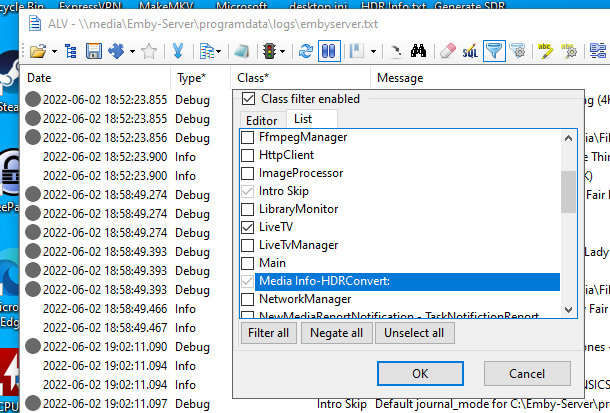
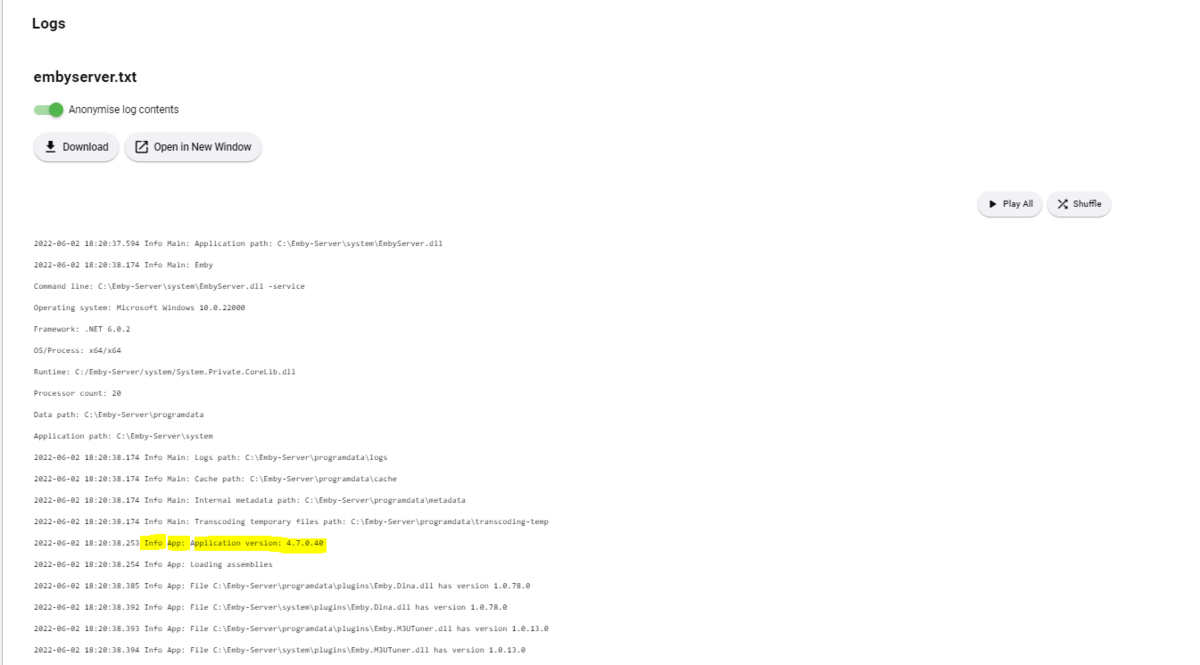
@softworkz Thanks for taking the time once again to expand on thoughts and ideas - it good to get these out for possible discussion and understanding. One item that may help users solve their problems is for the user to actually look at the log for themselves. Lets be honest here, system logs are not user friendly at the best of times - and without some form of class or message filters, their use is very limited and frankly scary to somebody not used to seeing reams and reams of meaningless text. I know you guys have developed tools to combat this from an external support perspective - but maybe include some of the real basic filtering in the web logview itself ? I personally use an external log viewer that allows filtering on the log class, message etc - making it so much easier to filter output - if this basic filtering could be included for the user, then it may cut down on a % of support posts. For example a user could filter by 'LiveTV' if they are having live TV issues (as an example)... Maybe add simple filters here in the web view to allow filtering by Date/Time, Class, Message etc - making a meaningless 10,000 row log into something more useful ?
 1 point
 -
The Emby Music interface should be more like Spotify, with Metadata pulled for songs and scores from Spotify API if possible, otherwise from other good source. Nothing wrong in copying the interface from a really good contender.1 point
-
Plex has been doing this for years.1 point