Leaderboard




Popular Content
Showing content with the highest reputation on 06/08/22 in Posts
-
@FrostByte Should be able to chime in here as I don't personally use the .MP4 container but my understanding is certain apps with certain DV 'layers' only work with .MP4 This 'may' have changed now and the MKV container is a valid container for all DV types (5, 7 & 8 ) - but I still believe there are some restrictions on apps being able to play MKV with DV - the LG App for example.3 points
-
The clients display the Cast & Crew in the order that they appear in the xml file. Sometimes the order that they are in is not what I want and so I would like to change it. Therefore within the metadata editor could a simple up/down arrow be added to each actor so that the order they appear in can be controlled.2 points
-
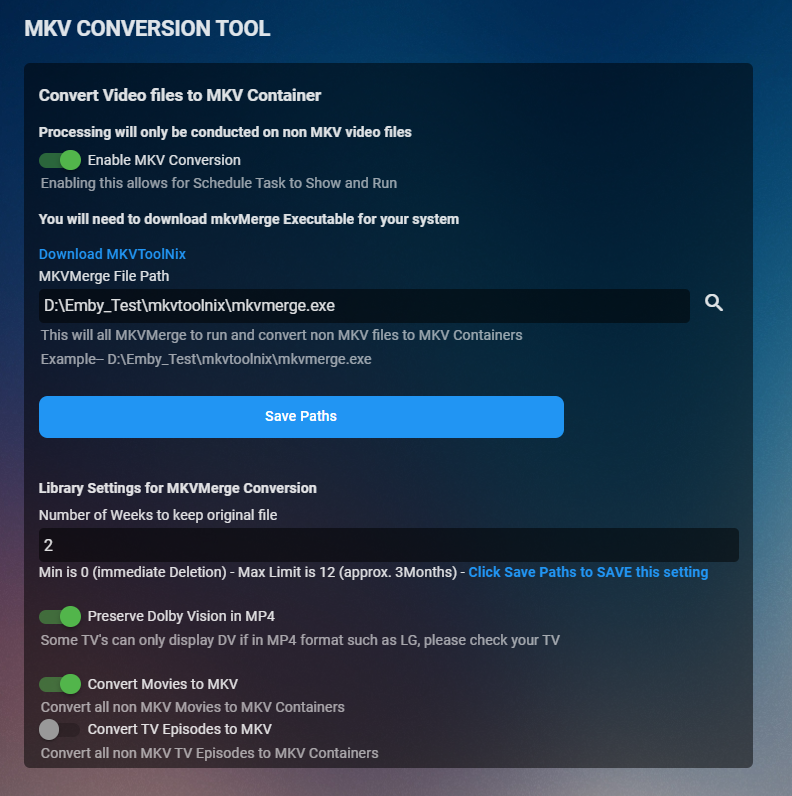
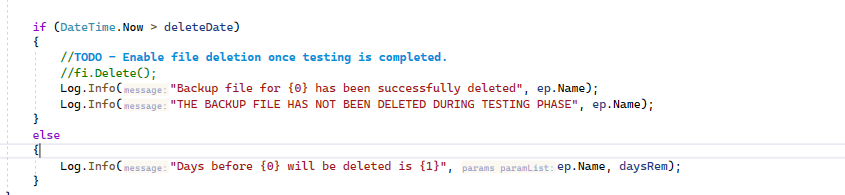
So i've been working on this today to make it really robust During testing nothing will be deleted. The log will warn of days remaining before deletion Original files have the new extension of "orig-" plus the original extension in case you need to revert back, you know what the original extension should be Example: movie.mp4 will be renamed to movie.orig-mp4 The new mkv file creation date will be the same as when you added the orignal file (this is to keep your emby library organised) Preserve Dolby Vision in MP4 - this will check your media using mediaInfo and check if there is a Dolby Vision Layer. if so and you have this selected it will ignore the file, otherwise it will continue converting. Any other special scenarios you can think of. Cheers everyone
 2 points
 -
I was a little qukck with that, I did another run over my complete lib over night, and there are still movies that don't get the tags. There is no other difference than this one tag. Doing another run with the current dll, as i'm not sure if was a build behind. Yes, 0.0.2.1 populated them all with tags. Nice work!2 points
-
Hmm. Quickest support request. I solved it. I just though I would reboot the TV:) Unplugging it from the power seems to clear what ever the issue was with it. Cleared some memory or something. Launching the app after plugging it back in, and it asked for the server details so all good.2 points
-
不好意思,我找到了问题的原因。 我不知道什么时候不小心取消了证书所在路径EMBY的读取权限。谢谢你们。 Happy2Play 提醒了我权限的问题,现在已经可以正常使用8920访问了。2 points
-
It'd be nice if there was an option to hide individual library items depending on the user. Use case would be two people using the same library and one of them does not like violent movies and images. They could hide those from appearing when they browse the library. I guess it would also need a menu in the server management to manage hidden items so you could restore them later if needed.1 point
-
I finally updated my main server to 4.7, and I'm seeing some very tenacious app side image caching in multiple apps. Pre 4.7, once Iconic triggered a change to the image cache key, you would see the image start to regenerate in the apps almost immediately. Now, the old images are hanging on for much longer, even though the new image has already been created and placed in the server side image cache. The updated image might show up in the Library view within a few minutes (or not), but the old image might stick around indefinitely in the Latest Movies view before finally updating. I'm also seeing the opposite, where the image in the Library view refuses to update while the same image in Latest Movies is already updated. Also, an old image can take back over after navigating away from a view and then back again. So far, of the apps I'm running, the Android app is the worst offender (not even restarting the app helps) while the Roku app updates faster, but still much slower relative to 4.6 and lower. With the web app, I can at least disable the browser cache to get the image updates right away and verify that Iconic has already done its thing on the images. If there's anything I can do about this from the plugin side, please let me know, but this is a huge issue for Iconic.1 point
-
Rumor: Roku could be bought out by Netflix, and that could be great for Google TV While this does not directly impact Emby it does have a potential large impact as Netflix has never exhibited any real friendliness to any streaming service. They have gone so far as to prevent any app except for their own to play their content regardless of safeguards or protections built in. In other words Netflix is the bully of the streaming world and Roku is the number one streaming device. The combo of the two could well put Netflix in position to forbid other streaming apps from the Roku. It is kind of strange that the current incarnation of Roku started life as "The Netflix Player" with the N1000 and now Roku could end up as "The Netflix Player" once again. This possibility worries me more than a little mainly due to the way both Netflix and Roku have behaved in recent times.1 point
-
Well nobody said the entire nfo is not being read. His comment is only about watch state.1 point
-
Because it is slow and you have to move the mouse always a bit on top horizontally otherwise it‘s not moving any further.1 point
-
@FrostByte im seeing some strange behavior with ff on dts-hd ma files as well where a long ff might take a good 15 secs to resume playback or completely lock up my shield needing a reboot. maybe @ebr can look at my log submitted 1:12 pdt s-diskstation is user.1 point
-
Hi, there is currently no way to do this, although having a way is not a bad idea.1 point
-
Emby can only record one channel per tuner. Most mainstream PVR backend supports multiple recordings per digital tuner if they are on the same frequency. If you still want both DVB-T and DVB-S I don't know if a quad HDHR gives you that. Martin1 point
-
Emby can record/view one channel per tuner available. So, in the above example, it is a quad tuner device so 4 at once.1 point
-
I have a Quad HDHomerun, and its great, I recorded two programmes that other day (BBC3 HD TopGear and DMAX SD) and watched the the football in HD on Channel 4 and my server hit the 8% in load, and 0.5% on HDD latency...... it was perfect in other words (AMD 3100, NAS mechanical HDD) I use Xteve to be honest, as it allows me control on channel organising and logos amongst other things, but I have xteve in "pass the url mode" so Xteve is not doing anything other then ordering. I dont think I really need xteve, as the management of the cannels in the HDhomerun in Emby is AWESOME! Tip : Remove the unwanted channels in the webui of the HDHomerun first, THEN scan the device in emby, prevents you getting loads of pointless channels in Emby.1 point
-
as was posted in another thread you asked in, there is no ability to stream multiple channels from the same mux which is pretty standard with any other live tv software. other than that no issues. it very easily matches with the epg that is included with emby which is another benefit.1 point
-
I wouldn't say there is a definitive answer to this because Emby still doesn't support recording from multiple muxes. Also for dvb outside the UK (not your case) it doesn't support OTA EPG either. So until Emby gives a clear roadmap for this development I am not sure the HDHR, is the clearest answer. Martin.1 point
-
@roaku Looks like it just crashes https://gist.github.com/Ribesg/43e0001f1c088f2755ec19c30ff2a20e This show is in the series folder and its metadata says its Continuing. It should match HD - Continuing and SDR - Continuing rules.1 point
-
Hi. We recommend the HD Homerun if that is an option for your sources.1 point
-
Hello, I bought the 4 plugins 2 days ago and everything is working fine, excellent job ! However, what can I do in case of error on some movie theme videos (ex. Star Wars Ep 9 has the theme of Star Wars Ep 5 on my server) )? Is there a place to download the correct theme?1 point
-
I hope admin or developer can solve this for you1 point
-
It's been Big Bang Theory, but I think it's because the Metadata Refresh and rescan of Intros by core intro skip was still working. It would be really nice if there was a progress bar for Refresh Metadata as it seems to keep working even though the splash message is gone. I did watch a show last night (Kenan) that auto skipped perfectly so hopefully I'm good now, but I'll give it a few days and see how it goes.1 point
-
Also.... woran liegt es nun? Ist die Lizenz zu teuer für DTS-HD HighResolution? Müssen wir in Zukunft mit weiteren Abschnitten rechnen? Seid ihr überfordert und könnt es nicht? Fehlt Euch selbst die Hardware, um Eure eigene Software zu testen? Wäre mal echt schön, wenn Ihr mal die Fehler und Bugs richtig behebt, statt an gewissen Schnickschnack wie "Skip Intro" rumbastelt.1 point
-
Thats good (and quick). If it helps, if you replace the html bit at the beginning - this html:root { --theme-primary-color: var(--mycolour); --theme-accent-text-color: var(--mycolour); --theme-primary-color-lightened: var(--mycolour); --theme-icon-focus-background: rgba(120, 120, 120, 0.2); } with this html:root { --theme-primary-color-hue: 0 !important; --theme-primary-color-saturation: 100% !important; --theme-primary-color-lightness: 32% !important; --theme-accent-text-color: var(--mycolour); --theme-primary-color-lightened: var(--mycolour); --theme-icon-focus-background: rgba(120, 120, 120, 0.2); } That seems to work (as per Happy2play) I think the values for the first three numbers (0,100,32) are for dark red and so need changing if you fancy orange or something) Hope I've found the right stuff and copied and pasted correctly...1 point
-
To hopefully clarify things a bit, I'm talking about app side caching. The image API is still updating the server side image cache as soon as Iconic updates the cache key. The apps just aren't retrieving/displaying the updated images quickly/consistently anymore.1 point
-
I know it is the endless to do list but can we get these into the /metadata folder with a one time get from online?1 point
-
kodi.log I have a problem with my movie list being duplicated, it was normal and after a new boot it simply duplicated during synchronization. Follow the log to help resolve this. Corelec 9.2.8 + Emby Next Gen 6.2.171 point
-
Looks like maybe "DateLastActivity" { "Name": "My Desktop", "Id": "863aca3b-5db9-4b7f-a4c3-2d282603fa91", "LastUserName": "Media", "AppName": "Emby Web", "AppVersion": "4.7.0.25", "LastUserId": "5a53fdc26e094dfeb5b768xxxxxxxxxx", "DateLastActivity": "2022-02-25T01:28:12.0000000Z", "IconUrl": "https://github.com/MediaBrowser/Emby.Resources/raw/master/images/devices/chrome.png" }1 point
-
You would need to do a Library level Refresh Metadata as that image shows broken links to your metadata/people folder, assume your log is flooded with can not find paths as all the paths are recorded in the database so /metadata relocations can become problematic. You can try the "Scan Metadata Folder" task if you have relocate these items. The topics suggest the dev stopped updating the plugin and hasn't been online in awhile, but you should look throw the plugin topic for options. Would need to see another server log after restart to see if anything else stands out.1 point
-
I installed Emby Server 4.7.2 release as per @Luke advice and Emby is working again. Thanks.1 point
-
Here is a workaround, in case someone else runs into this. I had three series being recorded, one was complete and it is the one I wanted to restrict. I moved the other two series folders to another folder, and I changed the recording location to this new folder. In the library I added the new parent folder of the other two. Now in the user access list for the "Recorded Shows" library there are two folder locations, and I can uncheck the restricted folder. I'm glad Emby allows this level of control!1 point
-
Well it is defiantly NOT the TV. My audio never goes into or through the TV. It is split off by an HDMI audio extractor that has no "features at all" and then sent to my receiver. While it could be the receiver it is highly unlikely as the receiver is almost 20 years old and only process audio. I suspect it is something Roku has done in their settings that handle audio. I do have my volume mode set to "Night" and that might be the cause. It is quite pleasant to have the audio ramp up for the first 5 seconds or so. There are some shows, particularly some older ones, that start with a quite loud audio in a scene to set up the show and it can be quite jarring if it starts at full volume but this makes those shows more pleasant to watch. I actually wish it was Emby that made this change because, if it were, then any problem with this new feature could be reported and fixed or improved. Since Roku introduced the Roku 2XS (just as a time reference) they have become nearly impossible to deal with or even talk to. I think Roku and Plex use the same people and directions for customer support. I am always amazed that Roku could have the best, IMO, video streamer and some of the worst customer relations in the world.1 point
-
Hell yeah, I'm very interested. Cool idea.1 point
-
OK I've got an update for this so that plugin pages using the window scroll will always have the header background applied. Thanks.1 point
-
Yes, but that shouldn't make any difference. The ones I've been watching are season 8 and 9. All dead-on. I'll check my season 5...1 point
-
Season 5 and it was 2 minutes after the end of the intro. Season 6 and the Skip Intro started right after the intro. I tried using the standard android app. Are you using Android TV?1 point
-
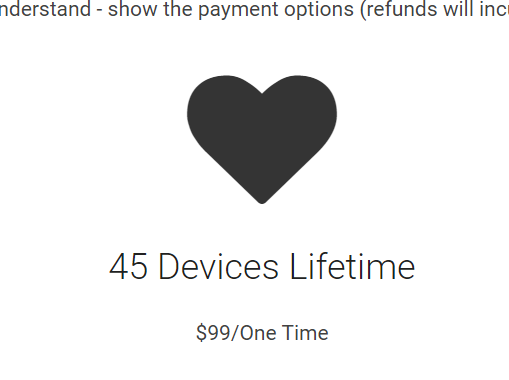
Hi. This purchase is for 45 devices, not 75. Your key is valid for 45 devices and you are currently under that limit. If you are still having a problem, please email billingsupport@emby.media. Thanks.
 1 point
 -
BBT has been dead-on for me. Which season(s) have you tried?
 1 point
 -
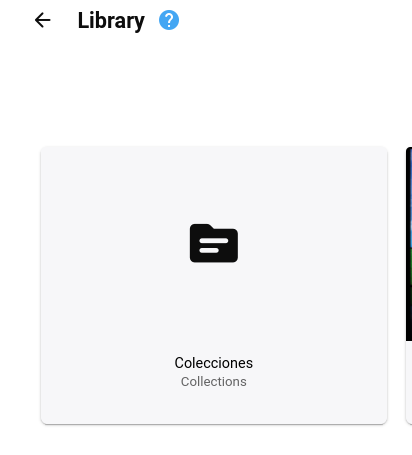
Emby server v4.7.2.0 Why can't I delete "Collections" from my library? I have not created this folder.
 1 point
 -
Sorry for german, now in English : Dear Emby development team, since the EMBY app was made available on the US and UK versions of the SmartHub, I (and probably some others in this forum as well) would very much appreciate it if the app could also be uploaded to the German SmartHub. I had contacted Samsung Support regarding this, which referred me to the EMBY development team. Samsung itself does not provide Apos, that is up to the developers. Answer from Samsung attached: " Have a nice good morning sir [...] , Thank you very much for your message. I would be happy to help you further. You miss the EMBY app in the smart hub. Good that you are contacting us. Unfortunately, we have no influence on the existing apps. With the Smart-Hub we only offer the platform, like the App Store or Google Play Store on smartphones. Accordingly, I ask you to contact the provider of the app and ask whether an upload of the app is planned in the near future. If you have any further questions, I will be happy to continue to be at your disposal. Have a nice day and stay healthy! Kind regards from Schwalbach Franziska Bortchard"1 point
-
Awesome. Thanks Luke. I’d edit the xml file, but as mentioned above it would probably be a pain. I’m not that advanced with docker yet unfortunately. Thank you for the update.1 point
-
OK my mistake, you're right. There's an issue in 4.7.2 with the task not showing up. You can still enable the feature and the task will run, you just can't configure the schedule of the task at this time. It will be resolved in 4.7.3. Thanks.1 point
-
Don't purchase Emby Premiere from anyone other than Emby There are some unscrupulous individuals out there selling Emby Premiere keys through Ebay or other such marketplaces in other countries. ALL of these are a scam and you will eventually lose whatever money you pay them and not have a working key. The only way to purchase Emby Premiere is directly through our web site or through one of our official apps (Android or Apple). Please help us stop these people by reporting any listings you see by sending a direct message to "ebr" and don't get taken by one of them. Thanks! View the full article1 point
-
thanks so much @DarKni8, I promise I won't let it die, Things are just very hectic with work at the moment, we are pushing out a rather large feature for public preview, so don't even wanna see code on the weekends :D, things will die down soon enough and I'll be able to dedicate the time I need to this project, I really enjoy it, and wanna make it super kick ass!1 point
-
After trying a lot of things, testing hardware acceleration and so on, I wondered, what will happen, if I remove all the installed graphic libraries installed within /opt/emby-theater/extra/ and moved the folder lib. I started emby-theater without any error, and ... now every content is playing: video, music, Live-TV ... all three linux devices ...1 point
-
And how do we get mismatched movie theme songs to be fixed? Lion King (live action) has been wrong since I installed it a year ago.1 point
-
Download & Install: https://emby.media/emby-for-android.html Changelog: 3.5.36 -05/10/2026 Subtitle rendering fixes 3.5.35 -05/05/2026 Add additional options under force transcoding section 3.5.34 -04/10/2026 Fix regression causing ass subtitles to be stretched 3.5.32 -04/10/2026 Support compressed embedded ass/ssa subtitles 3.5.31 -03/24/2026 Fix cases of text subtitles rendering off screen Updates to new home screen features 3.5.30 -02/26/2026 Support new home screen options in 4.10 server 3.5.29 -02/10/2026 Various fixes related to handling of playback stop 3.5.28 -01/21/2026 Various fixes related to handling of playback stop 3.5.27 -01/20/2026 Subtitle sizing fixes 3.5.26 -01/18/2026 Various fixes related to handling of playback stop 3.5.25 -01/18/2026 Resolve sporadic cases of video stuttering 3.5.24 -01/11/2026 Fix sporadic post playback crashes 3.5.23 -01/06/2026 Fixes for SSL certificates with no common name 3.5.21 -12/15/2025 Fixes for picture in picture 3.5.17 -11/21/2025 Fixes for launching books Fixes for live tv guide rendering on older devices 3.5.16 -11/04/2025 flac decoding fixes Update app exit menu 3.5.15 -10/31/2025 Fix youtube playback 3.5.13 -10/25/2025 Change video player up option from Chapters to Chapters / Guide Fix sporadic app crashes with flac playback 3.5.12 -10/07/2025 Fix playback error on older versions of android 3.5.11 -10/04/2025 Fix lyrics display layout in TV mode Fix video remote control layout Update live tv recordings tab layout 3.5.10 -10/01/2025 Restore home screen backdrop 3.5.09 -09/29/2025 Support pinch gesture for fullscreen video 3.5.06 -09/27/2025 Show age of person Fixes for next/previous episode button in video player Add explicit direct stream live tv option 3.5.04 -09/19/2025 Fix new spoiler feature causing movie chapter thumbnails to be hidden 3.5.03 -09/17/2025 Update now playing indicator 3.5.02 -09/11/2025 Fix background video option 3.5.01 -09/09/2025 Updates to new option to hide episode spoilers 3.5.00 -09/07/2025 Add option to hide spoiler information from episodes Support experimental hevc transcoding with 4.9 server 3.4.98 -09/04/2025 Group recordings under live tv recordings tab (with 4.9 server) 3.4.97 -09/04/2025 Allow video playback to extend into the notch Navigation fixes 3.4.94 -09/02/2025 Fixes for horizontal home screen 3.4.92 -08/30/2025 Fixes for horizontal home screen 3.4.91 -08/27/2025 Improve DV to HDR fallback for Zidoo devices 3.4.90 -08/24/2025 Fit detail screen regressions with collections and actors 3.4.89 -08/22/2025 Improve horizontal home screen 3.4.88 -08/20/2025 Improve DV to HDR fallback Fix multi-select list focus color Fix various home screen regressions 3.4.85 -08/18/2025 Fix various home screen regressions Show three items with add to collection/playlist 3.4.84 -08/17/2025 Fix various home screen regressions 3.4.83 -08/14/2025 Updates for server maintenance mode feature 3.4.82 -08/07/2025 Add option to control whether back button exits the app when clicking back on the exit menu 3.4.80 -07/25/2025 Fix metadata editor regression 3.4.79 -07/23/2025 Fixes related to Dolby Vision to HDR fallback General performance improvements 3.4.77 -07/07/2025 Up/down arrow key fixes 3.4.76 -06/26/2025 Up/down arrow key fixes 3.4.75 -06/17/2025 Resolve loss of arrow key input after playing from guide 3.4.74 -06/10/2025 Fix date added missing from list of sort orders 3.4.72 -06/04/2025 Support keyboard input on search screen in tv layouts 3.4.71 -05/28/2025 Various fast-forward/rewind bug fixes 3.4.70 -05/20/2025 Various UI bug fixes 3.4.69 -05/10/2025 Support sleep timer in the audio player 3.4.67 -05/02/2025 Fixes for av1 playback Various download fixes 3.4.66 -05/01/2025 Add folder view option to automatically jump through folders containing a single item Increase timeout length when downloading Various download fixes Various camera upload fixes 3.4.65 -04/29/2025 Fixes for external subtitles over https 3.4.64 -04/25/2025 Fixes related to rapid back button presses 3.4.62 -04/24/2025 Fix regression with light themes in portrait orientation 3.4.60 -04/23/2025 Fix regression with subtitle appearance options 3.4.59 -04/19/2025 Fixes related to video player long press action Add text size setting for TV display mode 3.4.58 -04/17/2025 Fixes related to video player long press action 3.4.57 -04/17/2025 Add option to control video player long press action 3.4.56 -04/11/2025 Update embedded libass for subtitle rendering 3.4.55 -04/07/2025 Fixes related to dialog sizing within the guide 3.4.54 -04/06/2025 Fixes related to superman theme 3.4.53 -04/05/2025 Fixes related to play next option Improve performance 3.4.52 -04/02/2025 Improve performance 3.4.50 -03/27/2025 Add video screen up action option to control up button press behavior 3.4.49 -03/25/2025 Fixes related to autoplay episodes options 3.4.48 -03/19/2025 Fixes for closed caption rendering 3.4.47 -03/12/2025 Add a-z picker to add to collection/playlist 3.4.46 -03/07/2025 Support playback correction 3.4.45 -03/05/2025 Play vtt subtitles directly without conversion from the server 3.4.44 -03/03/2025 Fix some of the quality settings not saving 3.4.43 -02/28/2025 Add convert unsupported audio option 3.4.42 -02/26/2025 Fixes related to login options Fix video rotation on Fire TV devices when direct playing 3.4.40 -02/23/2025 Add option to configure to login as specific user on startup 3.4.39 -02/18/2025 Add playback option to disable direct play of mpegts 3.4.38 -02/11/2025 Fix errant "left" popup 3.4.37 -02/07/2025 Fixes for gamepad input 3.4.36 -01/30/2025 Fixes for playback of downloaded content 3.4.35 -01/27/2025 Fixes for playback of downloaded content 3.4.34 -01/24/2025 Fix crash on older versions of android when returning from PiP 3.4.33 -01/20/2025 Fix theme songs playing in the background after force closing the app 3.4.32 -01/08/2025 Update to exoplayer 1.5.1 3.4.31 -12/30/2024 Fix person content not displaying correctly 3.4.30 -12/19/2024 Fix downloaded books not being displayed 3.4.28 -12/12/2024 Split remote and cellular quality into two values Support passing subtitles to mxplayer 3.4.27 -12/01/2024 Fix regression when clicking manage server 3.4.26 -11/22/2024 Add emby://play/{serverID}/{ItemID} intent 3.4.24 -10/20/2024 Fix tag screen empty for certain media types 3.4.23 -10/07/2024 Updates for newer play store requirements 3.4.21 - 08/26/2024 Fix screen being kept on when video is paused 3.4.19 - 08/07/2024 Shuffle fixes Android Auto fixes 3.4.15 - 07/27/2024 Now playing screen layout fixes 3.4.14 - 07/26/2024 Fixes based on google play crash reports Fix guide category scrolling 3.4.12 - 07/17/2024 Fixes based on google play crash reports 3.4.11 - 07/04/2024 Shuffle play fixes 3.4.10 - 07/02/2024 Fix video osd bottom tabs not refreshing between items 3.4.09 - 06/28/2024 Fix rare PIP crash on Samsung devices Add channel group filters above the live tv guide in mobile and desktop layouts 3.4.08 - 06/24/2024 Fix multi-select regression 3.4.07 - 06/21/2024 Add theme song volume setting Fix downloads failing due to % in file name 3.4.06 - 06/18/2024 Live TV guide scroll fixes 3.4.05 - 06/16/2024 Samsung DEX fixes Improve support for chapters with multi-version videos (with server version 4.9.0.25+). 3.4.04 - 06/12/2024 Fix regression on audio play queue screen 3.4.03 - 06/07/2024 Fixes for horizontal home screen 3.4.01 - 06/05/2024 Improve performance Updates for set shuffle Add a pleasing background to the subtitle preview on the subtitle settings screen 3.4.0 - 06/05/2024 Improve performance Fix repeat handling when holding down ff/rew 3.3.99 - 05/30/2024 Improve performance Add Continue Watching channel to Shield home screen 3.3.97 - 05/25/2024 Support shuffle state in the audio player 3.3.95 - 05/23/2024 Auto-scroll live tv guide based on last played channel Show more guide rows in the video OSD Performance improvements Support launching video from photo slideshow 3.3.94 - 05/18/2024 Prompt user to ask how to play when playing a channel that is actively recording 3.3.93 - 05/16/2024 Adjust base osd seek speed 3.3.92 - 05/16/2024 Support variable fast forward/rewind speed 3.3.91 - 05/13/2024 Mobile layout fixes for video screen 3.3.90 - 05/10/2024 Subtitle offset fixes 3.3.88 - 05/09/2024 Change subtitle offset overlay to use a slider 3.3.87 - 05/04/2024 Add Up Next tab to video OSD to see playback queue 3.3.86 - 04/25/2024 Quicker access to chapters in video osd Support drag and drop library order Support drag and drop order for genres, tags, studios and people in the metadata editor 3.3.83 - 04/22/2024 Fix error message not displayed on user stream limit being reached 3.3.82 - 04/21/2024 Support drag and drop with server transcoding settings Add video OSD tab animation 3.3.80 - 04/09/2024 Add text shadow to clock when focus preview is active 3.3.79- 03/28/2024 Group collection items by media type Support app screensaver for tv devices 3.3.77- 03/19/2024 Android auto fixes 3.3.76- 03/15/2024 Fix add to play queue missing from menu 3.3.74- 03/11/2024 Picture in picture fixes 3.3.73- 03/08/2024 Fix reported album name with camera upload feature 3.3.72- 03/01/2024 Fixes based on google play crash reports 3.3.71- 02/29/2024 Fix screen staying on after video playback Redesign music genre screen 3.3.70- 02/22/2024 Fix reverting refresh rate change after playback 3.3.69- 02/16/2024 Audiobook playback fixes with Android Auto Increase delay after refresh rate display mode change 3.3.68- 02/13/2024 Audio passthrough fixes when refresh rate switching is enabled Add Missing Episodes section to metadata manager 3.3.67- 02/08/2024 Fix layout of program dialog in guide 3.3.66- 02/07/2024 Manifest changes for releasing to the play store on TV devices 3.3.64- 02/01/2024 Resolve back screen on playback on some devices after advancing from one episode to the next 3.3.63- 01/30/2024 Improve home videos display in horizontal home screen 3.3.62- 01/18/2024 Improve live tv seek display Improve display of dialogs from guide 3.3.61- 01/18/2024 Improve live tv seek display 3.3.60- 01/15/2024 Fixes for playback on secondary screens Version 3.3.58- 01/04/2024 Support resume and capturing progress from mx player as an external player, as well as other players that use the same parameters. Version 3.3.57- 12/29/2023 Improvements relating to putting the app in the background with video playing and then returning Version 3.3.56- 12/26/2023 Various user interface bug fixes Version 3.3.54- 12/21/2023 Add in-app access to app log files Support channel up/down to change channels during live tv playback Version 3.3.52- 12/15/2023 Various layout fixes Version 3.3.50- 12/11/2023 Fix camera upload regression on Android 14 Update TV mode select menus Version 3.3.48- 11/29/2023 Update exoplayer to 2.19.1 Version 3.3.46- 11/16/2023 Add series context menu option to view missing episodes Version 3.3.44- 11/09/2023 Fix missing 3D icon Add release date to playlist and collection sort orders Version 3.3.42- 11/01/2023 Show full program details when clicking on a program within the guide Support left and right swipe actions on lists Improve Korean subtitle font Version 3.3.41- 10/24/2023 Add option to control display of posters on detail screens Add option to control the number of genres displayed on detail screens Version 3.3.39- 10/18/2023 Support adaptive launcher icon Version 3.3.38- 10/13/2023 Camera upload compatibility updates for android 14 Fix android chat bubbles showing on top of video playback Version 3.3.37- 10/11/2023 Support subtitle position options Version 3.3.36- 10/06/2023 Fix audio playback regression General performance improvements Version 3.3.35- 10/04/2023 Support multi-user login General performance improvements Version 3.3.34- 10/02/2023 Support new profile pin feature Version 3.3.32- 09/17/2023 Support swipe down to dismiss/cancel any dialog that appeared by sliding up Version 3.3.31- 09/13/2023 Make more fields selectable to display in lists Update to new android requirements regarding notifications Version 3.3.29 - 08/28/2023 Make more fields selectable to display in lists Version 3.3.26 - 08/24/2023 Fix regression with delete function Version 3.3.25 - 08/22/2023 Fix regression with external subtitles Version 3.3.24 - 08/20/2023 Fix regression with add to favorites Version 3.3.21 - 08/17/2023 Right to left fixes Fix directional keys repeating with flirc input Version 3.3.20 - 08/03/2023 Various fixes for settings screens Mobile layout list view fixes Version 3.3.19 - 07/19/2023 Fix startup error on android 6.0 Add display option to control visibility of Media Info section on detail screens Version 3.3.18 - 07/12/2023 Try to fix double back press problem Version 3.3.16 - 07/11/2023 Try to fix double back press problem Version 3.3.15 - 07/07/2023 Android auto search fixes Update exoplayer to 2.18.7 Support dvdsub in mp4 container Version 3.3.14 - 06/29/2023 Downsize downloads section in left nav Various user interface fixes Version 3.3.13 - 06/28/2023 Separate refresh rate and resolution switching into two options Version 3.3.12 - 06/23/2023 Various performance improvements Add option to control screen orientation during video playback Update episode list highlights Ease up on text brightness Make clock larger Show detail screen for extras Version 3.3.11 - 06/16/2023 Various performance improvements Version 3.3.10 - 06/15/2023 Rework app exit menu Support left nav in TV layouts Version 3.3.08 - 05/23/2023 Various fixes related to theme song playback Version 3.3.07 - 05/19/2023 Various fixes related to recording indicators Version 3.3.05 - 05/11/2023 Fix series display regression with older servers Version 3.3.04 - 05/08/2023 Fix hardware back button regression with dialogs on the home screen Version 3.3.02 - 05/02/2023 Support flattening series in TV layouts Version 3.3.01 - 04/28/2023 Various scroll fixes Always show exit menu when clicking back on home screen Version 3.2.99 - 04/26/2023 Various scroll fixes Version 3.2.98 - 04/25/2023 Focus preview fixes Version 3.2.97 - 04/24/2023 Improve orientation handling during video playback Version 3.2.96 - 04/22/2023 Improve cast display during video playback Version 3.2.95 - 04/17/2023 Add series display option Improve user interface performance Version 3.2.94 - 03/30/2023 Fix navigation regression Version 3.2.93 - 03/29/2023 Add View Lyrics context menu option for songs with lyrics Add option to keep playing video in background after pressing back Version 3.2.92 - 01/20/2023 Fix regression with some videos with 2ch eac3 Version 3.2.91 - 01/18/2023 Update ExoPlayer to latest version Various video OSD fixes Version 3.2.90 - 12/15/2022 Various video OSD fixes Version 3.2.89 - 12/072022 Add a guide option to control display of channel numbers Version 3.2.88 - 12/062022 Add a guide option to control display of channel names Version 3.2.87 - 12/2/2022 Version 3.2.86 - 11/18/2022 New: The current chapter is now auto selected during navigation Version 3.2.85 - 11/17/2022 Version 3.2.84 - 11/04/2022 Fixed a display issue with expanded info screens Fixed a navigational issue with My Media Version 3.2.83 - 11/02/2022 Support sorting Playlists and Collections (requires Emby Server 4.8+). Navigational changes in LiveTV Additional items added to queue when shuffling playlist Added the number of items within a collection Version 3.2.82 - 10/18/2022 Update subtitle font Version 3.2.81 - 10/12/2022 Fix scroll regression causing jumpiness Version 3.2.80 - 10/12/2022 Improve seeking of .ts files Support separate image sizes for lists Various user interface bug fixes Version 3.2.79 - 10/06/2022 Fixed an issue when clicking Back while playing music Improved handling of Zidoo devices and TV mode Version 3.2.78 - 10/05/2022 LiveTV changes Version 3.2.77 - 09/28/2022 Added setting to switch between different size posters Added episode details under Next Up legacy posters Version 3.2.76 - 09/23/2022 Add three way toggle nav menu (may require beta server?) Added transparency to buttons and menus Version 3.2.75 - 09/21/2022 Version 3.2.74 - 09/20/2022 Added backdrop to the enhanced My Media ? Version 3.2.72 - 09/15/2022 Added visual to timeline when in focus Added option to turn off rating when video playback begins Updated now playing design for music in the background Version 3.2.71 - 09/14/2022 Version 3.2.70 - 09/07/2022 Fixed some small issues Added brightness control to mobile devices Added a lock screen feature during video playback for mobile devices Version 3.2.69 - 09/03/2022 Version 3.2.68 - 09/01/2022 Added shortcut keys Add filter, sort, settings icons to Live TV Guide and move enhanced image and info to the top Move subtitle timing from cog wheel to the CC menu Add Google voice integration Add more media info to the playback OSD Add more media info to the Info screen Change navigation to OSD so there are less clicks Version 3.2.67 - 08/30/2022 Add view series to 3-dot menu for episodes and seasons Add larger bitrate options Add EHS option for the home screen (it is worded differently to spell out exactly what it does - focus previews) Make play from beginning always visible Update thumbnail bubble animation Update detail screen runtime on version selection Version 3.2.66 - 08/29/2022 Version 3.2.65 - 8/25/2022 Fixed a playback issue with DTS-HD HRA 4.8 kHz sampling rate Version 3.2.64 - 8/20/2022 Version 3.2.63 - 8/17/2022 Version 3.2.62 - 8/5/2022 Various video playback fixes Version 3.2.61 - 7/28/2022 Resolve the issue of certain remotes triggering multiple presses on arrow keys General UI performance improvements Version 3.2.59 - 7/27/2022 Added enhanced details for Suggestions and Favorites within TV Shows and Movies libraries Version 3.2.58 - 7/24/2022 Version 3.2.57 - 7/20/2022 Version 3.2.56 - 7/15/2022 Various video playback fixes Version 3.2.55 - 7/13/2022 Various video playback fixes Initial RTL support Version 3.2.54 - 7/08/2022 Version 3.2.53 - 7/06/2022 Version 3.2.52 - 6/23/2022 Various fixes for new table view Version 3.2.51 - 6/17/2022 Add new field options for display Add new theme options Version 3.2.50 - 6/6/2022 Fixes for wma playback Fix sporadic playback errors when playing downloaded content Updates to audio now playing screen. There's also a new Now Playing tab on the home screen when content is playing Use series backdrop on episode detail screens Version 3.2.48 - 5/4/2022 Updated TV mode detail screen Fix on screen keyboard not showing on some Amazon devices Version 3.2.47 - 4/27/2022 Fix aiff playback Fix now playing item not showing on shield home screen Support play/pause during video playback using OK button (when osd is hidden) Add Cast & Crew to video osd Fix SFN not closing Fix an issue with "On Now" in the video OSD Version 3.2.46 - 4/18/2022 Fixed miscellaneous playback issues Version 3.2.45 - 4/9/2022 New updated video OSD dialogs Version 3.2.44 - 3/22/2022 Fixed an issue where music Artists and Album Artists weren't being displayed Version 3.2.43 - 3/17/2022 Fixed an issue where thumbnails weren't showing while scrolling timeline Version 3.2.42 - 3/17/2022 Fixed issue where DV files wouldn't play correctly Version 3.2.41 - 3/9/2022 Version 3.2.40 - 2/28/2022 Added timeline scrolling to OSD Version 3.2.38 - 2/8/2022 Version 3.2.37 - 1/26/2022 Version 3.2.36 - 1//2022 Version 3.2.35 - 1/13/2022 Various audio playback fixes Version 3.2.34 - 12/30/2021 Now direct plays all audio formats, including DTS-WAV Version 3.2.24 - 10/27/2021 Numerous small TV layout improvements from top tabs to popups to video OSD Support long press context menus with Android TV remotes Version 3.2.17 - 10/6/2021 Various bug fixes and performance improvements Version 3.2.14 - 9/20/2021 Various fixes based on user submitted crash reports Version 3.2.11 - 9/13/2021 Add subtitle background color option Version 3.2.08 - 8/26/2021 Bug Fixes Version 3.2.07 - 8/11/2021 Bug Fixes Version 3.2.06 - 8/9/2021 Add Info, Chapters, On Now and Guide sections to video OSD Minor adjustment of detail screen buttons Improve performance of playlist detail screen Add sort by track number option to folder views Version 3.2.05 - 7/9/2021 Various download fixes Fix aiff music playback Fix direct play/transcoding status display for music playback Version 3.2 - 6/19/2021 Support subtitle offset for downloaded videos Fix camera upload regressions on older versions of android Version 3.1.96 - 5/18/2021 Android auto reconnection fixes Music playback started in android auto is now reported to Emby Server The new live tv channel management UI is now available Version 3.1.94 - 4/30/2021 Fix erroneous error message when playing certain music formats Various subtitle fixes Version 3.1.92 - 4/22/2021 Version 3.1.91 - 4/20/2021 Various fixes for av1 video playback Version 3.1.90 - 4/14/2021 Remember play queue when using Android Auto resume feature Support marking favorites from android auto Fix Chromecast add to play queue Version 3.1.88 - 4/10/2021 Save play queue when using Android Auto resume feature Version 3.1.86 - 4/8/2021 Support marking favorites from android auto now playing screen Support a-z picker with users Add favorites to context menu Add mark played to context menu Version 3.1.85 - 4/1/2021 Improve Android Auto browsing Various av1 video playback improvements Version 3.1.84 - 3/28/2021 Fix crash on Shield TV Version 3.1.83 - 3/26/2021 Support device equalizer with audio file playback Add option to download to public downloads folder Various subtitle fixes Various fixes for playback of anamorphic video Improve single channel program list display Support multi-select in list views Add more field options for display in lists Version 3.1.80 - 3/9/2021 Improve dynamic list refreshing Version 3.1.79 - 3/5/2021 Support sorting by filename Version 3.1.77 - 3/2/2021 Various additional subtitle fixes Various mpegts format improvements Version 3.1.76 - 2/20/2021 Honor Android Auto auto-resume setting Fix media notification duration for remote playback Fix subtitles not displaying on secondary screen Support multi-select filtering Version 3.1.75 - 1/20/2021 Support high-res flac playback Various Dolby Vision improvements and fixes Specific DV/HDR fixes for Sony TV's Fix for direct playback of mpeg4 DX-50 Various fixes for Chromecast volume control Various fixes for downloaded subtitles Display content on Android TV home screen Support clicking individual text items in list items Support add to play queue with drag and drop Support add to playlists and collections with drag and drop Support remove from continue watching and next up (requires Emby Server 4.6+) Add new tabs under libraries (requires Emby Server 4.6+)1 point
-
This new OS Layer appears to be blocking "non partner" apps. On all other Android TV devices, this works as you expect and we also have the ability to have our own "channels" on the home screen.1 point
-
Just thought I would bump this because I think this would be an awesome addition. I recently discovered the plugins for theme songs and videos, and man I think that they are awesome when I am browsing on my PC. On my Nvidia Shield, I can get the theme songs, but it would be nice to get the theme videos. Thanks guys!1 point