Leaderboard




Popular Content
Showing content with the highest reputation on 06/03/22 in Posts
-
Hey so the whole verbage of "Delete" content when downloaded to a device is scary (and potentially misleading) in that it makes me worry it is also _deleting it from the server_. And I think it would be more effective to instead have "Remove from this device" as the language used. Can we get this verbiage changed at some point please?3 points
-
no point debating with you. you'd argue black was white if it were for team plex. sorry emby you would indeed see them IF you searched for them and followed them. even if you did you wouldnt be able to edit them. two fairly significant differences please stop arguing the indefensible3 points
-
Yes and so what? You do not provide even the option to do so. What is this bringing to the discussion? At the end of the day, you are developing a home media server and I would like to notice that most "homes" consist of more than one person, hence the userbase is asking for features that help organise the content so that my 100 playlists don't clutter and mix with my sister's 100 playlists. Savvy?3 points
-
Hi, This has been talked about a lot on the Apple TV forums, but there is no formal request for it. So I do it here, please add support for MKV HEVC HDR playback using Apple TV (without tone mapping). I don't care what technique you use. Either adding HLS fPM4 support to the server or improving the MPV player. I anticipate that I am not satisfied with you saying that Apple TV does not support that, since most players on the market support it. Thanks2 points
-
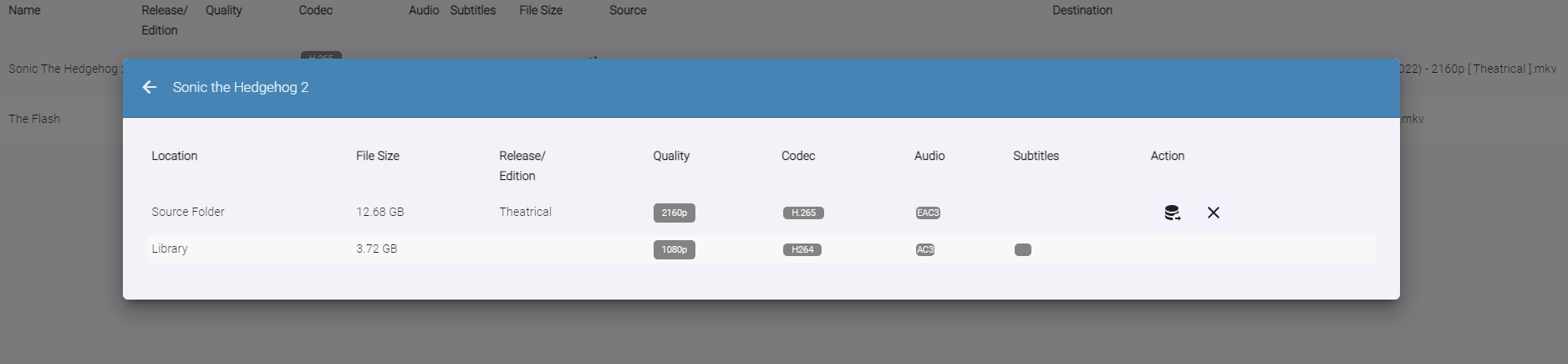
Auto-Organize PLUS - public beta Built upon the Original Auto Organize plugin, Auto-Organize PLUS is a new version which has some enhancements to help sort new media files into the Emby library. Mobile View: Enhanced Table Layout: with Media Info about the files in the watch folder. Multiple Watch Folder Settings: Existing Library Item/Watch Folder Item Media Info Comparisons: File Status/States: Files in the Watched folder can be in several states depending on user settings. Existing Item Existing Items are items that exist both in the watched folder, and also already exist in the Emby library. Users can click the existing item icon to compare the two items, and help decide if the file should copy over into the library folder, or not. New Resolution New resolutions are items that exist in the library, but may not have the same quality as the item in the watched folder. For example: 1080p, and 2160p. The "New Resolution" status will happen, when "Smart Auto Detection" is turned off for a certain media type. Processing The Processing status will happen when a file is being copied, or moved into the library folder. Success Success happens when a file has completely moved into the library folder with it's new name Failure Failure happens when a file name can not be fully parsed, and the media can not be understood by Auto Organize 2.0 User Input Required (Pending...) If a particular TV Show spans multiple folders within the Emby library, Auto Organize 2.0 will wait for user input to decide where to place the file. This state will may happen with "Smart Auto Detection" turned off, or on. Not Enough Disk Space If a file hasn't enough room to copy into the library folder, because it is full. In Use When a file is being copied into the monitored folder from another source, or is being used by another process. When the file becomes available the status will change. New Media When a file has been added to the monitored folder, and it doesn't exist in the Emby library, but "Smart Auto Detection" has been turned off. The file will enter the "New Item" state if all applicable metadata can be obtained to name it. This will allow the user to sort it when they are ready to. New Edition New Edition will happen if the media item in the watched folder has a different release parsed in it's name. For example: "Theatrical", and "UnCut". Table Sorting: Sort the files by stripping out certain types of media, and only showing others. Also, filter the current displayed items by "Name", "Date", and "Status" Current Issues, and on-going development Plugin configuration Page Headers are currently having issues in Emby. Options are not hidden behind the Header on scroll. This is a core issue that is currently being fixed Smart Matches are currently being enhanced, and the experience with smart matches is currently not what the end result will be. Installation notes: Please shut down the server Remove the "fileorganizer.db" file found in Emby's data folder. Place the plugin DLL in the plugins folder Re-start the server. Clear browsing data DOWNLOAD (stable server only): Emby.AutoOrganize_v1.6.41.43.zip Beta server: Emby.AutoOrganize_v1.6.41.23b.zip (Not updated recently)

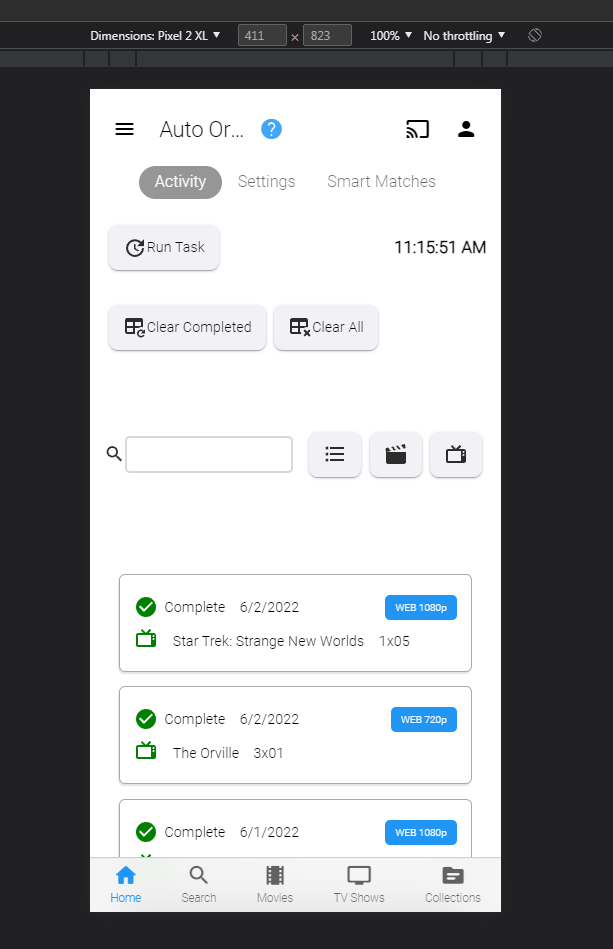

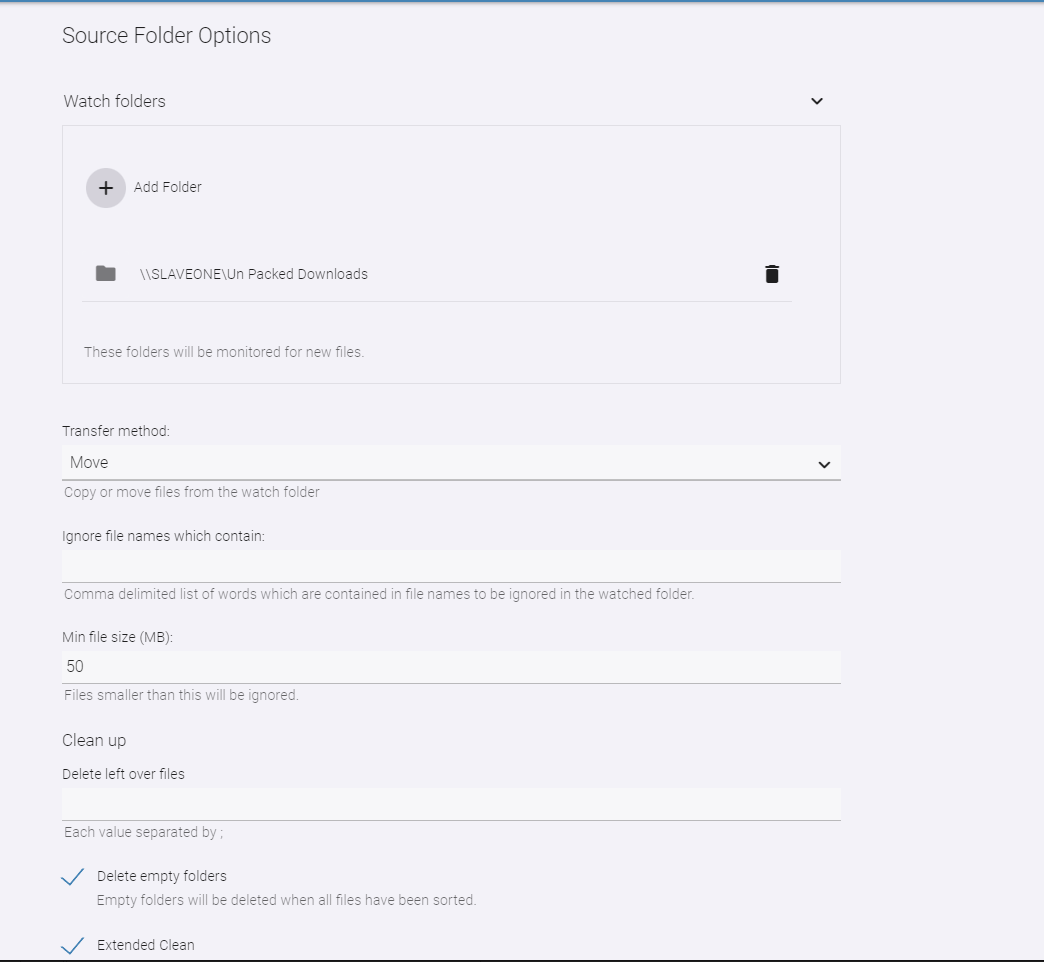
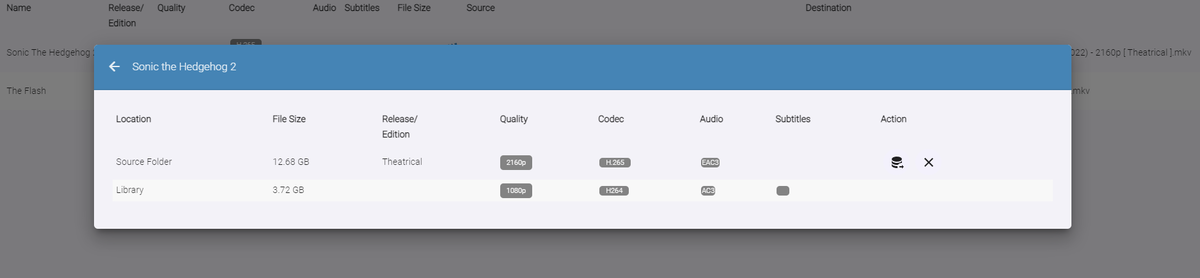


 2 points
 -
I have a fairly large movie collection (5k+) starting with films from the 1920's and in the absence of "smart" playlists how about a filter by decade option? Filtering by year works, but if I want to watch something from say the 1950's I have to start navigating from the 1930's and work my up to the 1950's which is quite a few number of pages. Another option might be to have Years running vertically much like the alphabet when viewing by title.2 points
-
I can see what is happening.Sure.2 points
-
Crusher, this is not something that would be developed specifically for you.... this is the whole point of requesting feature requests. I'm well aware you would happily spend 6 weeks adding in these end points. But as a developer, the idea of software development and plugins is to provide an intelligent solution to a hugely experienced dream or issue. Workarounds simply aren't worth development time. So with one click of a button, you can forget about it and move on. If i was to release this as you want.... my inbox would fill up with so many feature requests bugs and issues, because it needs constant attention. I will test my OCR program on a few movies and see what the stats are like for time, CPU, Memory and network resources.... But you are missing the point!!! TV shows can be detected on sound comparisons (it fails on those that have different end credit music) because there is a chance for several or all to be the same. Black screen detection is also added into the mix, which is a fairly reliable fallback. OCR is probably the only real 100% reliable detection on TV shows and also would work for Movies.2 points
-
Hi there, recent Plex refugee (6+ years with Lifetime sub) and I just wanted to pass along a few random, specific things that irritated me with Plex and I've found to be standout improvements in Emby, for others who might be considering it. A big thank you to the development team for getting these things right! Installing a custom SSL cert on Linux - painless and simple, requires voodoo on Plex. Multi-episode files - what witchcraft is this that Emby properly understands and treats these as multiple episodes but a single playback item! In-season specials sorted correctly within seasons - Examples include the Battlestar Galactica Miniseries and movies, and Babylon 5 - Thirdspace. This is a big improvement for us, we seem to have a number of these shows. Everything subtitles - my wife prefers subtitles on all the time, and for whatever reason I could not get this working 100% reliably with all of our media on her Roku. Subtitles in general on Plex felt clunky outside of the web app. Emby has already passed the wife test on this - simple to use on the fly, and the "Always show" per-user setting does what it says. User management and licensing - comprehensive and flexible. Everything Plex user management is not. Ability to simply give one of the kids their login information without them needing to either go create a plex account or call me to authorize a new device as a managed user. Combined with the "the server you are connect to has paid, you're good" licensing option for the mobile apps it's not a contest with Plex. Same with restricting content for the little ones in a situation where you can't count on content rating metadata (or where you disagree with the rating), I found it far easier and faster to define exactly what their user profiles could and couldn't access than on Plex. The various options to hide users on login screens - brilliant and massively useful. Those are probably the biggest unexpected things that I found to be unequivocal upgrades over Plex, that had I known about a few in particular I wouldn't have waited for Plex to annoy me with their bad behavior to switch.2 points
-
Is there development for this feature? I really miss the decade filter, filter year by year is useless for me. Thank you to consider adding it.2 points
-
No there isn't. I'd tried adding &output=ts and simply changing the extension from .m3u8 to .ts and they won't return anything.2 points
-
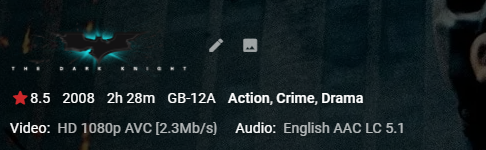
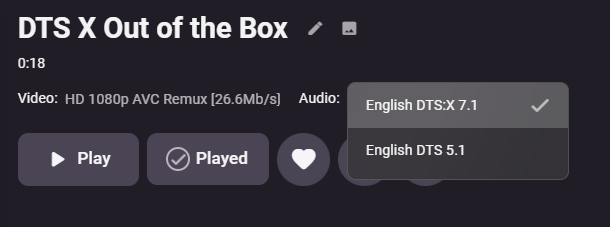
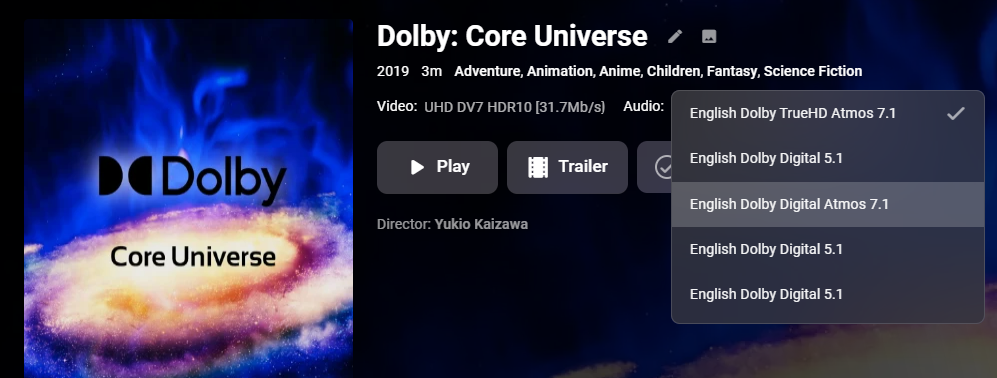
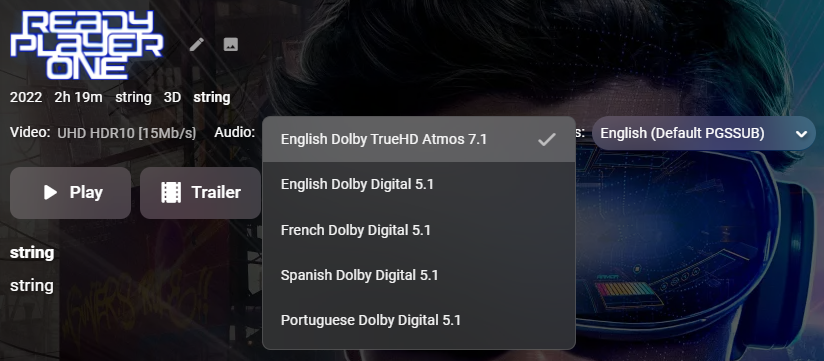
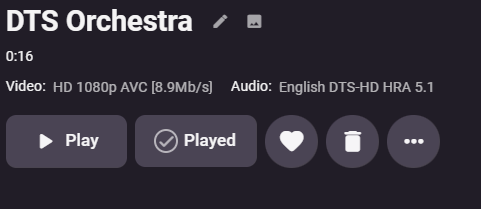
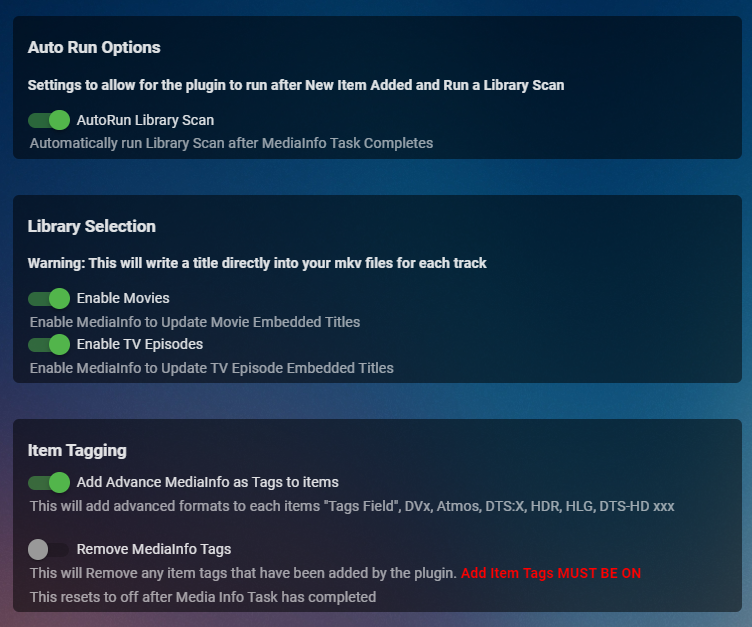
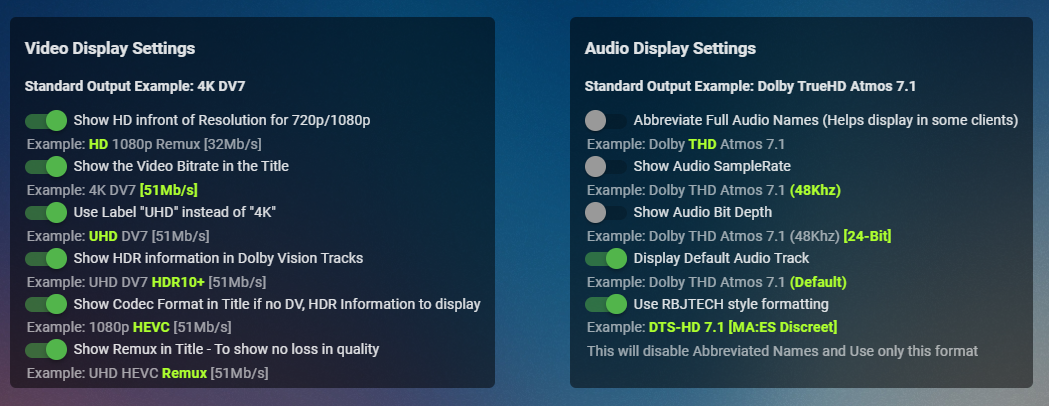
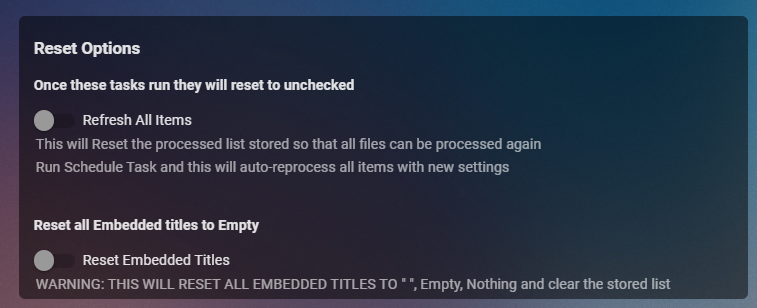
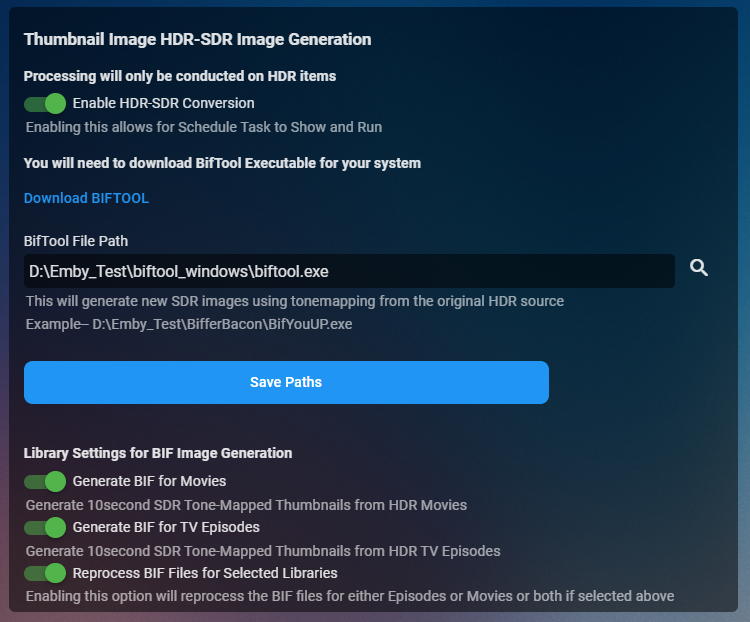
Cheesey Productions brings you MediaInfo for Emby Bringing your Media Info Formats up to Date (including HDR, Vision, Atmos, HLG, DTS:X, DVx, etc) And HDR-SDR Image Extraction using tone mapping for clearer seek images Available from the plugin store A huge shout out to @rbjtech for all his help with this. He was my knowledge base. Thanks Rich Please read the wiki page available that will help you get set up. MEDIAiNFO WIKI PAGE PLEASE NOTE THIS PLUGIN WILL MODIFY YOUR MKV EMBEDDED TRACK TITLES Some examples Also you can add tags to your items Enable the options in the settings and this will only add the tags for the unique formats the emby doesn't already take care of. There are plently of options for you to chose from to get your media looking how you want New Feature Added ---- HDR - SDR BIF File Creation using Mobius Algorithm for ToneMapping This generates larger and crisper images for Chapters and 10Sec ThumbnailSets WE URGE YOU TO READ THE WIKI PAGE 2 SO YOU UNDERSTAND FULLY WHAT'S INVOLVED HDR-SDR IMAGE GENERATOR WIKI Settings can be found at the bottom of the media info page. Feed back is always good. After replacing the dll always remember to clear your browser cache and restart it, to load new changes in the UI.

 1 point
 -
This is for Emby Theater for Tizen and iOS. It seems all these recent updates are to “clean up” the OSD etc. Well, there is tons of room now that you have removed the poster from the video details screen, so can we please get the “Ends at” time back on details? Makes absolutely no sense that that it was removed in the first place. I realize it can be seen after the video is playing by pressing down to get to video info but the whole point is to see if you have time to watch the video BEFORE you start it! Seems pretty straightforward. thx!1 point
-
Hi all, would be nice to see the following for movie-collections: 1. add the time range automatically under the cover (1950 - 1977) for example. Should be changed automatically also when a new movie is added. 2. add the amount of unseen movies from the collection, same what is displayed by series. 3. add the next movie from collection to "Continue Watching" would be nice aslo.1 point
-
Subtitles are in the same folder. Quite often, the subtitle name is in the language it uses. It would be far better and easier if Emby simply allowed you to select it manualy instead of forcing rules upon the user.1 point
-
Turning out to be a huge issue format. Lol I’ll take a look later but got some shiz to do1 point
-
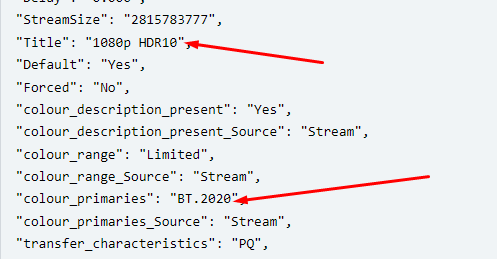
SDR is not shown in anything less than 4k, HDR is shown if it their because it's in the correct color primaries class and is extremely uncommon, so you would expect all 1080's to be SDR unless it says otherwise.... same with 4K, you assume HDR unless it's SDR so that's the approach we've taken.
 1 point
 -
I made a few cosmetic changes and added "Latest Media Added" to the main Library page. I did this just to learn how to do it. It actually took only a few lines of code, once I learned how to do it from the Emby Web Client. I did this just for fun. Let me know if you find it useful. Vic emby_new_tool_28.html1 point
-
Whats your problem ?1 point
-
Got it.. So Dep is an extension of AC3 for "Plus" JOC is and extension for anything that has an Atmos Layer.... Everyday is a school day hahaha - keep an eye on you PM's .... one shooting there shortly
 1 point
 -
hold tight don't do it yet1 point
-
HI, we are working on improving it. Thanks.1 point
-
I'll test some more first and get back to this, now that I knows Emby can see both tuners, thanks1 point
-
https://github.com/MediaBrowser/Emby.Releases/releases/tag/4.7.0.601 point
-
@FrostByte check your PM's sir.1 point
-
That would probably need to be improved by multiple orders of magnitude to become viable...1 point
-
I will put another plug here for implementing Album Artist as a universally available filter/sort option. Going into music collection by Genre but with no ability to sort/scroll by Album Artist is a big limitation and frustration.1 point
-
Actually, turns out the remote login was toggled off. Hopefully it works now that it's on. Won't know that for sure until I'm out later. Thanks!1 point
-
Hi. I don't feel my comments convey either of those sentiments. I apologize if came off that way.1 point
-
Thanks Frosty!! I'm just wrapping up these new bugs now. I have DD+ 7.1 & 5.1 with atmos too and these will be picked up with DEP JOC features or just JOC (can't remember) but I didn't cater for just the DEP extension so that should catch it. It's a crazy minefield of data field and properties hahahahaha1 point
-
btw - as you would have noticed, we only add the SDR flag if it's 4K/UHD SDR - we don't for all the other resolutions as that's a given.1 point
-
In a lab project for something new, we have three-level IDs which look like this D3EFF_4A4CB_66D2E. This is about a common operation which can be used by multiple sub-operations ni parallel and each of them can have multiple sub-sub-operations. The top level operation has Id D3EFF only, second-level D3EFF_4A4CB for example. The filtering will need a slight adaption, so that when filtering for D3EFF_4A4CB_66D2E, you get the third-level entries plus D3EFF_4A4CB plus D3EFF but not other sub-levels. I think that's really the best option for users who want this, it would require some huge effort to make it as good in the web UI as those applications can do.1 point
-
I love the idea of a context or 'thread' ID to match all the items related to that action - that would be very handy. wrt a plugin - it's easy enough to just point log viewers to the embyserver.txt now that it conforms to industry logging standards. I use ALV which is open source, so maybe that could be forked onto a plugin .. not sure .. something to put on the never ending to do list .. haha1 point
-
Yes indeed, these are affected too. They show up as "UHD SDRHEVC".1 point
-
Found another bug. DD+ 7.1 is being named "Dolby Digital 7.1 " and not including the Plus. As you know there is no such thing as DD 7.1. There looks to be an extra space at the end also. DD+ 5.1 is good. { "@type": "Audio", "@typeorder": "2", "StreamOrder": "2", "ID": "3", "UniqueID": "5134773871594612934", "Format": "AC-3", "Format_Commercial_IfAny": "Dolby Digital Plus", "Format_Profile": "Blu-ray Disc", "Format_Settings_Endianness": "Big", "Format_AdditionalFeatures": "Dep", "CodecID": "A_EAC3", "Duration": "7139.488000000", "BitRate_Mode": "CBR", "BitRate": "1536000", "Channels": "8", "ChannelPositions": "Front: L C R, Side: L R, Back: L R, LFE", "ChannelLayout": "L R C LFE Ls Rs Lb Rb", "SamplesPerFrame": "1536", "SamplingRate": "48000", "SamplingCount": "342695424", "FrameRate": "31.250", "FrameCount": "223109", "Compression_Mode": "Lossy", "Delay": "0.000", "Delay_Source": "Container", "StreamSize": "1370781696", "StreamSize_Proportion": "0.01855", "Title": "Dolby Digital 7.1 ", "Language": "en", "ServiceKind": "CM", "Default": "No", "Forced": "No", "extra": { "bsid": "16", "dialnorm": "-31", "compr": "-0.28", "acmod": "7 / 5", "lfeon": "1 / 0", "dialnorm_Average": "-31", "dialnorm_Minimum": "-31" }1 point
-
Lots of choices. Home consumer models usually use USB3, Firewire, eSATA or 1Gb Networking. Typically only support SATA Drives Enterprise/Commercial uses SAS, InfiniBand, Fiber SAS, SATA, Fiber You can probably get used Enterprise stuff off eBay cheaper than new consumer equipment. Built like a tank but really wants to be in a rack. For home use you may want to checkout a USB3 DAS unit with 4 to 6 drive bays. You want JBOD (just a bunch of disks), not RAID, MIRROR or other features.1 point
-
You seem to be moving backwards. 8 months ago it was planned for a future release of the app. Now you're back to looking into it? Can you at the very least prioritize this at the top of the next release? Or will that release instead include some minor junk as opposed to a major UI flaw that's existed for...*checks thread date*... 4 years now? This is pretty embarrassing.1 point
-
A prerequisite for this would be to have a decent grid control in the client UI for presentation. We're about to adopt one for a different purpose, but it could be used for log display as well in the future (maybe). Also this won't work well without some kind of database backend, because with larger log sizes (like dozens of MB), you can't filter effectively by scanning through the full log text each time. To be honest - I'm not sure whether we will want to spend that much effort on this subject. It's a bit more effort than it seems at first sight. Maybe a good idea for a plugin? The problem is that a filter like this doesn''t give you the full story you need to see. E.g., when there's transcoding involved, you won't see it with this filter and you won't see http log entries related to that. Also, filtering by 'LiveTV' would get you "everything" from LiveTV, like all recordings all playback sessions, etc. The one thing that I am thinking about adding is an additional "column" with a certain context id which provides an additional filtering dimension, and would allow you to get all log messages related to - for example - a certain playback session, so you would get all log entries relating to exactly that single playback operation but from all kinds of "message classes" (your naming ). Another adjustment will be a shortening of IDs. It's in no way necessary to have full GUIDs for transcode or other session ids, so for example: ffmpeg-transcode-10df6e86-74a0-4a16-8f5f-78e197801376_1.txt can become something like ffmpeg-transcode-10df6e_1.txt which makes it look much more friendly and readable and there's still just a 1:16 Million chance to hit a duplicate when generating a new random id. Maybe ffmpeg-transcode-10DF6E_1.txt would be even better because it will make characters appear more evenly sized.1 point
-
A fairer comparison would be having a family account on Spotify and what I expect from Emby. No need to tell you that I can’t see my partners Spotify playlists even though we share a family account1 point
-
Hi @ebr Thanks for your reply. You have pointed out the major issue. In my opinion the composer/writer credits, should only show up under the "Composer" view. Album Artist, artist credits are different things. In the types of music I listen to, a composer credit is not really part of their collective "work" and never would show up on a display or in a shuffle of the album artist. "Tracks by Lennon" is not the same as "Tracks written by Lennon." "Tracks by Lennon" is base functionality that any music player provides. Simple Album Artist = Lennon. "Tracks written by Lennon." was what I was hoping for when emby recently added composer support (I even asked that writers be included. ) This current mixture of both doesn't work well for either. -vicpa1 point
-
I've been using Plex for over a year now as unfortunately I got really tired of talking to a wall here. Unfortunately, I'm shocked to say that nothing has really changed when it comes to Emby on the AppleTV. All settings for adjusting the GUI are missing and DTS-HD playing movies is still like a toothache. There are still a lot of bugs in the interface. Doesn't any coder use their own version? I will now post a few more errors in the hope that something will ever change. I'm using "Infuse" with Emby Server now and I'm very satisfied.1 point
-
Have you created a series recording for friends? Check the Series tab in Live TV. I just saw that there were 4 entries under the series tab which I've just removed. I'm not sure how, but my wife sometimes accidently creates a scheduled recording. She said she didn't realize that they were scheduled.1 point
-
Emby Server is now a TrueNAS Scale Official Application. Very few applications ever get to have that privilege! Emby Server has been available in the community catalog. Emby is now forefront on the first screen when entering the Applications Menu. This is where Official Apps are shown. https://emby.media/truenas-scale-server.html To learn more about TrueNAS Scale: https://www.truenas.com/truenas-scale/ Overview of Hardware Packages: https://www.truenas.com/systems-overview/ Customer Support : https://www.ixsystems.com/support/ View the full article1 point
-
Yes, please select this option in the app playback settings.1 point
-
I’m very excited to try the native M1 server software on my Mac mini. The Rosetta version works fine but I’m super curious about possible performance improvements.1 point
-
Sooooooo excited to see this. You always made the best themes. Your work is what I would do if I could. Anything I can do to help get this finished let me know.1 point
-
The Roku sort of does its own setting in some areas. Enter the library and hit the star key, you will see options.1 point
-
Hi,you can add the screen locking function ,refer to the Android player MX player . Another solution is to add the option of opening gesture in the Android client. After all, the best way to solve the problem is not to delete convenience1 point
-
+1 (x10000000000000.........) I do prefer the native Apple TV player over MPV - it seems to have better image quality (besides also allowing for frame rate matcing ).1 point
-
i recently switched to Emby from Plex and this is one of the few features that I really miss. It would be great if it was added!1 point








_svg.thumb.png.85e4ee6291ddd76347269c05175b5dda.png)