Leaderboard




Popular Content
Showing content with the highest reputation on 05/28/22 in Posts
-
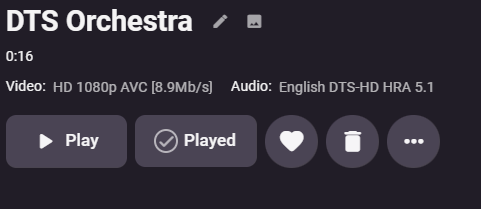
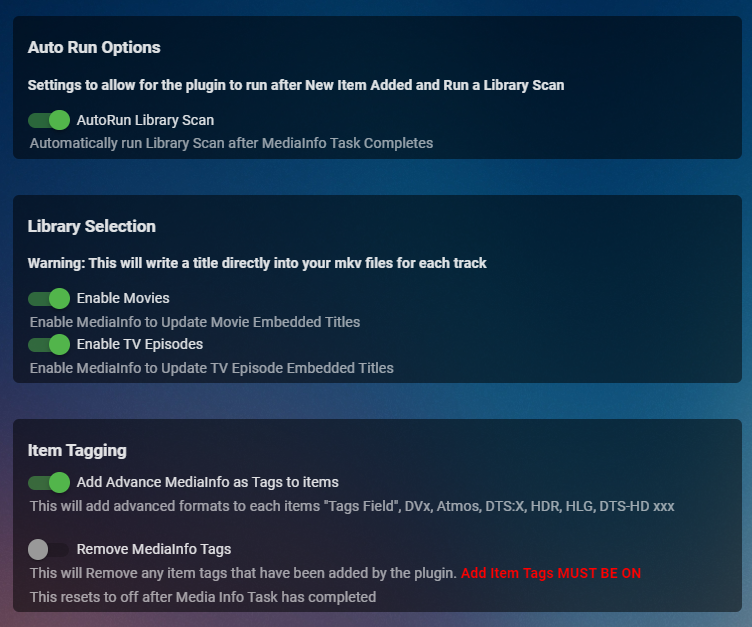
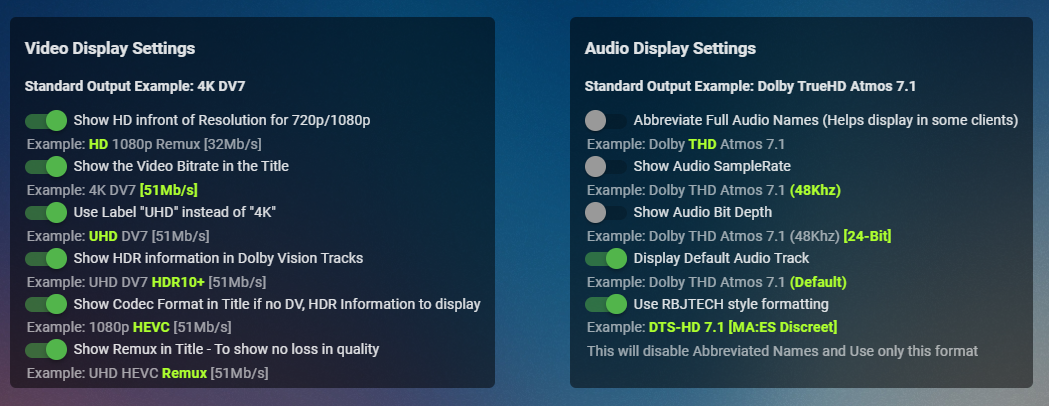
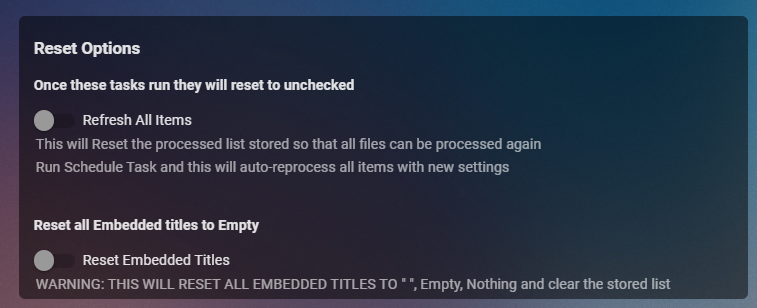
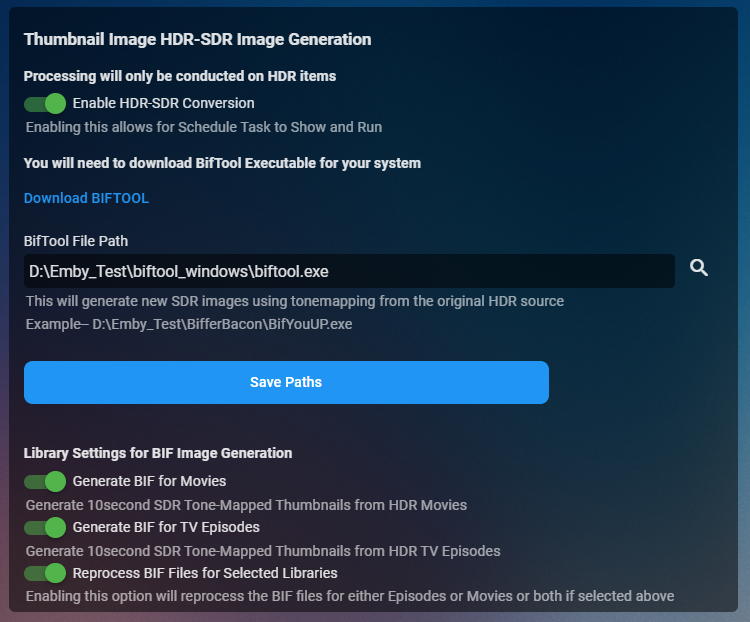
Cheesey Productions brings you MediaInfo for Emby Bringing your Media Info Formats up to Date (including HDR, Vision, Atmos, HLG, DTS:X, DVx, etc) And HDR-SDR Image Extraction using tone mapping for clearer seek images Available from the plugin store A huge shout out to @rbjtech for all his help with this. He was my knowledge base. Thanks Rich Please read the wiki page available that will help you get set up. MEDIAiNFO WIKI PAGE PLEASE NOTE THIS PLUGIN WILL MODIFY YOUR MKV EMBEDDED TRACK TITLES Some examples Also you can add tags to your items Enable the options in the settings and this will only add the tags for the unique formats the emby doesn't already take care of. There are plently of options for you to chose from to get your media looking how you want New Feature Added ---- HDR - SDR BIF File Creation using Mobius Algorithm for ToneMapping This generates larger and crisper images for Chapters and 10Sec ThumbnailSets WE URGE YOU TO READ THE WIKI PAGE 2 SO YOU UNDERSTAND FULLY WHAT'S INVOLVED HDR-SDR IMAGE GENERATOR WIKI Settings can be found at the bottom of the media info page. Feed back is always good. After replacing the dll always remember to clear your browser cache and restart it, to load new changes in the UI.
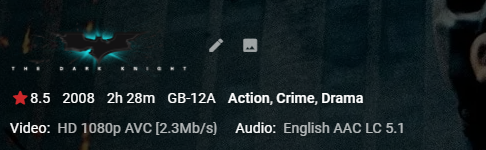
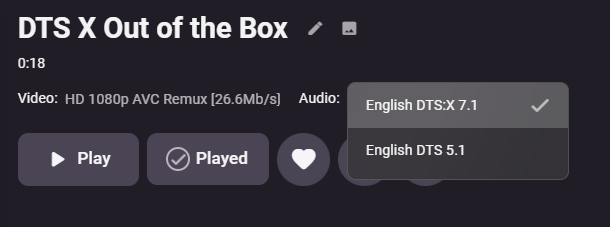
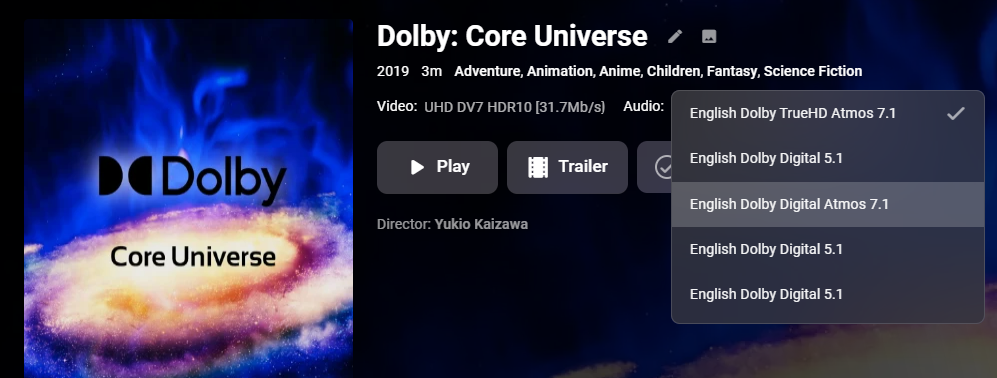
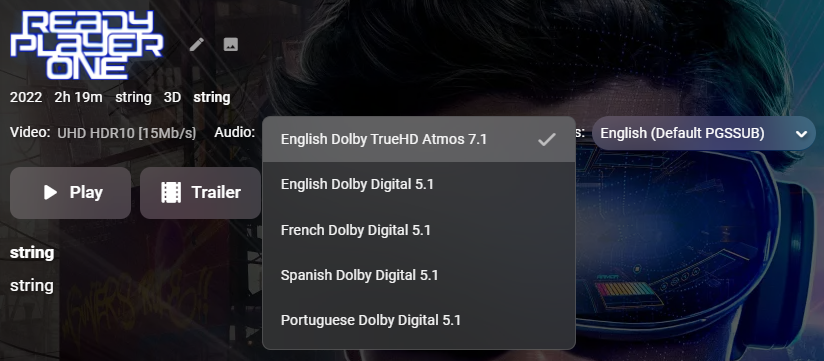

 2 points
 -
@Ferwin29 @wolong_zb I managed to sneak in while the missus was in the shower. This will now let you select the appropriate file. Luke gave me the heads up with one line of code and it works like a charm. Test this and please let me know how you got on I also updated the first post with the new dll file for emby server. Emby.MediaInfo.dll2 points
-
This Hotfix has just been released to those who have signed up.2 points
-
DSM7 Upgrade for Emby.mkvEDIT: The instructions assume default Synology install volume of /volume1. If your location is different use that instead! This is based on the release version of Emby which at the time of writing/video creation was 4.6.3. The video will become dated so just use the latest DSM 6 Emby version from the website https://emby.media/synology-server.html. If you happen to be running a beta version update to the latest beta version before the DSM 7 update. The idea is to do any updates on DSM 6 first before installing DSM 7. Since the creation of the video Emby Server is now availing in the Emby Package store (release version) so you can install Emby on DSM 7 now from that. ----------------------------------------------------------------------------------------------------------------------------- Attached is a quick video of upgrading DSM 6 to DSM 7 with Emby Updates. The video will show only browser items and not the PUTTY/SSH commands but everything done in browser is recorded. The SSH commands are included below. I converted this to MKV/H.265 to make it small enough to download and view offline. DMS7 Upgrade for Emby.mkv21.57 MB · 78 downloads Instructions used were: Download and have ready DSM 7 package for update. https://www.synology.com/en-us/DSM70 (I will be downloading both a virtualDSM 7 & for 920+) Download and have ready Emby Server 4.6.3 for both DSM 6 & DSM 7 https://emby.media/download.html - update Emby Server to current release of 4.6.3. - restart Emby Server and verify your on the latest release version. - uninstall Emby - update DSM to v7 - install Emby 4.6.3 (or same version that was running above (dsm7 version) - You can now install the DSM 7 version directly from the Synology Package store! (still on our website too) - stop Emby - remove emby_pkg user and video group - enable admin account if needed - enable ssh in Synology settings (Terminal & SSH menu) Not shown in video: - connect with Putty to Synology, login with admin user and get root rights with: sudo -i - copy files from old Emby share to new data location: cp -rv /volume1/Emby/* /volume1/@appdata/EmbyServer - adjust owner from copied files: chown -R emby:emby /volume1/@appdata/EmbyServer - close putty Shown again in video: - From Control Panel go to Shared Folder and edit each share that is used by Emby Server. Click the share, then EDIT, go to permission tab, select System internal user from drop down, grant emby user read/write access. - start Emby Notes: You can now disable the default admin account as well as SSH. You may also want to rename /volume1/Emby to /volume1/Emby6 as well. This will help make sure you don't have anything referencing the old directory. If you don't notice any issues in a week or two you can delete this old folder/share to free up space. DSM7 Upgrade for Emby.mkvDSM7 Upgrade for Emby.mkv1 point
-
You've grown up with watching live tv but on television only runs garbage? You have a big library but don't know what to watch next? Then this for you: "VirtualTV" - my new live tv plugin that allows you to create custom channels based on conditions of your Emby library content. What's missing: Maybe codec conditions Known problems: Needs Emby Premier to work (Playback) Emby's live tv and playback api is very limited, so i've had to make some detours to get things working. The plugin has two general playback modes: "continous" and "playlist" playback. With "continous" mode you can also choose between "live", which bahaves like real live tv or "archive", which plays the videos from the start. In "Continuous" mode multiple videos are queued and concatenated to one big file with the help of ffmpeg. To make this happen every video in the queue has to have some common features (video and audio codec). That's why it often happens that the video also has to be transcoded by ffmpeg. For transcoding the plugin relies on Emby's internal transcoding engine. If there's a problem, not uncommon with hardware acceleration enabled, the plugin also has a problem. Nothing i can do about it. The availability of subtitle tracks is mostly dependant of the Emby user playback settings. In continous playback mode only one (the default) subtitle track can be used and this one has to be burnded into the video (transcoding takes place). In "Playlist" playback mode the videos are pushed as a playlist to the Emby clients. It's like you would play your videos directly from your libraries. This way you get all the features you are used to. Audio and subtitle selection, pause, skipping around and similar things. "Native" playback method was created by the Emby Devs. Similar to Playlist playback it will play the real library videos, but with the big difference that playback is purely initiated by the client app, without any remote command execution. This is why it also works for Roku devices on a WAN network. And although the real videos are played, the whole thing is treated like live TV. This means that channel zapping is possible and no dialogs for playing the next episode are displayed. Unfortunately, the new playback method does not yet support all features. As the name "Archive" suggests, it will currently always start all videos from the beginning. In addition, only very few Emby apps automatically advance to the next video. If you want it to be improved even further, each of you should raise your voice in this thread. To get things started install the plugin via Emby's plugin catalog and restart Emby. Setup your channels with a name and number and choose your playback mode. In the channel conditions you'll have to select an Emby account. This account is used to get library access, respect parental rating, reading watched states and selecting the stream language. At least one textual input field of the conditions has to be filled to get some program data. Fields with an asterisk are either evaluated with an "AND" or "OR" condition among each other. Finally, if you've chosen "Continous Playback" for one of you channels, take a look at the transcoding settings. Save your channel line up and manually trigger a "Guide Refresh". Now have fun! Version History: After a plugin update, always clear your browser cache. If your settings still don't load in the config screen, you have to move the "VirtualTV.xml" out of ...\plugins\configurations and restart Emby. Start from scratch. 2.0.0.0 Unlimited number of channels; New playback method "Native (Archive)"; New security concept for the Export API 2.0.2.0 Performance improvements to Guide Refresh; Preview for Add/Edit Channels; Option to disable Program indicators 2.0.3.0 Fixed missing Playlist sort order for some Content Types; Added support for Seasons with Content Source Collections 2.1.0.0 Selectively enable channels for specific users; Create copies of existing channels; Ordered unwatched episode playback 2.1.5.0 Added option to (auto)enable channels on a specific date range; Bug fixing1 point
-
当我们热爱的emby,随着的功能越来越多,支持的模块也越来越多,目前有(电影,音乐,电视直播,电视剧集)后期也许会有有声读物。而且功能也是越做越好,我是一个爱音乐爱好者,经常收藏一些金典好听的歌曲,现在正在使用测试版,歌词的支持让我越来越喜欢这款软件,感谢emby所有团队人员没日没夜工作,为我们客户提供功能上帮助和产品维护。 希望emby团队能把搜索引擎升级为模糊搜索,在使用搜索时我觉得电影名为英文时会比较好些,但对电影名为中文时就很糟糕。 列如:当有500部影片中收索“美女与野兽” 这部影片,只需输入“美女与野兽”中任一个字或者词就能搜到,并且这个功能扩展到所有库(音乐,电影,电视剧集,电视直播,有声读物)而不是一定要输入影片名全名或者影片名前两个字才能搜到。 针对成人影片内容不希望在搜索搜到问题,我觉得可以在媒体库→新建媒体库中设置一个搜索可选项,在不在主页搜索中搜到这个库中影片就把搜索选项前面钩钩去掉。(这个功能应该之前就有提到)。1 point
-
Mostly pertains to m4b but I have seen tags on mp3 files that have time stamps you can jump around in too. Can pm if example needed.1 point
-
This is for Emby Theater for Tizen and iOS. It seems all these recent updates are to “clean up” the OSD etc. Well, there is tons of room now that you have removed the poster from the video details screen, so can we please get the “Ends at” time back on details? Makes absolutely no sense that that it was removed in the first place. I realize it can be seen after the video is playing by pressing down to get to video info but the whole point is to see if you have time to watch the video BEFORE you start it! Seems pretty straightforward. thx!1 point
-
Can we have an option to flatten series if there are XX episodes or less. Just provides the ability to eliminate one frustrating click. I wouldn't want it on my 1,000+ episode Looney Tunes series. However, when you only have one or two seasons in a series, it helps drill down easier.1 point
-
I am not sure if this is a server or client request It would would be great if there was a zoom option for SD recordings that made it fill the screen on HD / 4K tvs. If it's client related - I am a roku user1 point
-
@MrMackeyIch habe Ihre DTS-HD MA 2.0-Datei erhalten und konnte ein sehr starkes Stottern beim Zurückspulen reproduzieren, bei dem manchmal auch mein Schild vollständig einfrierte. Plex hat das auch gemacht. Es scheint jedoch nur DTS-HD MA 2.0-Audio betroffen zu sein. Logs habe ich auch an Nvidia geschickt. Bitte senden Sie Logs an NVIDIA, insbesondere wenn Sie sich für den neuen Hotfix angemeldet haben. @ebr I sent logs to nvidia on this and to you as well. User S-Diskstation time 2:18pdt. Logs.zip1 point
-
Thanks, let me know how it goes please1 point
-
Das ist eine gute Frage. Mein Kodi, Kodinerds, Plex funktionieren auch gut. Übrigens, ich verwende die interne App. Mein Denon ist der x4500. Ich habe einen deiner Filme mit 2.0 DTS-HD MA gefunden. Ich werde es demnächst versuchen.1 point
-
Nice timing... I just installed the other version and didn't get it working, came back to the forum, and now it's doing its thing and runs through the lib.1 point
-
1 point
-
I figured it out. I updated my post above. I ended up restarting the jail and poof... it showed 4.7.1 on the dashboard.1 point
-
No. but I fixed it. Totaly uninstalled from docker and reinstalled. …but I dont know what the problem was…1 point
-
Eigentlich beides. Welche Titel konkret? Ich habe über den alten installiert und Cache und Daten so gelassen wie sie sind.1 point
-
Thank you, Paul. Your suggestion worked perfectly. Much appreciated!1 point
-
Du musst dich bei nvidia dafür anmelden um es jetzt schon zu bekommen, es ist noch eine beta. https://www.nvidia.com/en-us/geforce/forums/shield-tv/9/493462/shield-experience-upgrade-ebeta-may-2022-signup/1 point
-
Hi Luke, here is the lates log, directly after the issue. Hope it helpes… embyserver.txt1 point
-
Recent docker compose instructions on Ubuntu 20 (Docker v20) This assumes you have the NVIDIA drivers installed. https://docs.nvidia.com/datacenter/cloud-native/container-toolkit/install-guide.html#docker 1. Follow instructions to install docker-ce 2. Paste the code under "Setup the package repository and the GPG key" 3. DO NOT install nvidia-docker2, it is deprecated. Instead, install nvidia-container-toolkit: apt install nvidia-container-toolkit 4. Install docker-compose-plugin apt install docker-compose-plugin 5. Restart docker systemctl restart docker 6. Configure your docker-compose.yml. Example: version: '3.8' services: emby: container_name: emby image: emby/embyserver:latest # Obviously you'll need to update these environment: - UID=1002 - GID=1002 network_mode: 'host' ports: - '8096:8096' volumes: - "./config:/config" restart: unless-stopped # This is how GPU support is configured with recent docker/docker compose: deploy: resources: reservations: devices: - driver: nvidia count: 1 capabilities: [gpu] 7. Start your container docker compose up (notice NO HYPEN. `docker-compose` coming from the Ubuntu 20 repos is outdated, so you can't use the device reservations above. Instead, we're using the compose plugin from the docker command)1 point
-
Yes, that is a new signup that went live earlier in the week. This May ‘22 ebeta was released late friday.1 point
-
Hi, It would be really cool to get a function to jump or scroll in playlists. Actually you have to hold the Remote for 1-2 mins depending on the songs in your list but with about 700+ songs in a playlist it is a pain to reach the end if you wanna listen to the last 20-30 songs. Maybe we could get a way to speed this up in a future update of the Emby Tizen App. thanks a lot1 point
-
You simply replace the "system" subfolder with that in the 7z file. All configuration and information is held in the separate folders alongside that folder. I usually just rename system (e.g. system.old or system.4.6.7) for ease of rolling back. Paul1 point
-
No problem, thank you for your work1 point
-
Hi Luke Sorry for the late response. Yes the issue persist, even with emby server 4.8.0 beta. I found a workaround on a different level though. I use an edge router onto which I installed wireguard. This allows me to connect to the internal network via wireguard vpn. So, I can live with that, but it is not solution to the issue with emby theater. I'm still not able to establish an ssl connection between the theater app on windows and the server. So I'm testing further if you like me to because it might be interesting to finally finding out what the problem is. Cheers, Rafael1 point
-
yes - emby automatically merges media from the same tv show that is held in different folders/disks1 point
-
not sure. i only use stable. i havent seen any reports that it doesnt work with beta though1 point
-
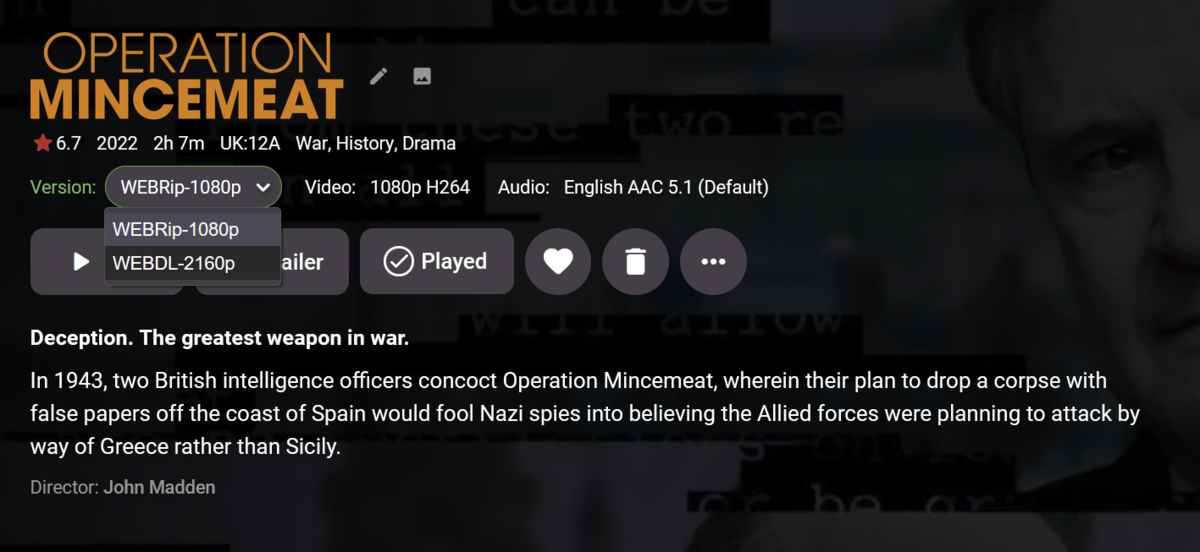
i prefer option 3. you can keep your 4k and 1080p media in separate root folders which is compatible with the use of sonarr and / or radarr. if you use either of these and put the multi version media in the same folders then sonarr and radarr removes the lower quality version when it adds a higher quality version (as it is designed to). emby naturally combines tv series in different root folders so nothing to be done there the Auto Movie Version Grouping plugin will do the same for movies multi version selection presented like so
 1 point
 -
Unless you mean Emily Litella ? https://tenor.com/view/nevermind-ignore-it-gilda-radner-chevy-chase-dont-bother-gif-12458637 oh well, that's different then, ... "Never mind".1 point
-
You should use multi-versioning feature, which will result in single item in Continue Watching row and multi-version dropdown selector in item detail view, in either of three ways: 1) Put all different files in same folder and follow naming convention for multi-version movies https://support.emby.media/support/solutions/articles/44001159102-movie-naming 2) Multi-select and select "Group Versions" in three-dot menu 3) Use community-made Auto-Grouping plugin which works across folders1 point
-
Thanks for that recommendation! Got everything set up and working correctly, I appreciate you helping with my issue Cheers!1 point
-
Hi Luke, thanks for the clarification. It would be nice if such option could be added. all the best, Emby_fan1 point
-
but it's not really the term "Various Artists" that is causing the problem...i've been tagging the mp3s of compilation albums as well as misc mp3s with the ArtistAlbum tag of "zVariousz", specifically so as not to cause potential issues with Kodi/Emby if the term "Various Artist" is handled differently than other generic terms, plus i use the "z" prefix to make this miscellaneous folder last in my library...i should also note i intentionally do not have any audio files tagged with more than one Artist i think the same problem of disappearing folders would also occur if i used any generic AlbumArtist tag like for example "Junk"....i believe the files eventually disappear because i have AlbumArtist = zVariousz, but the Artist = the actual artist of the particular audio file...i think this discrepancy between the Artist and AlbumArtist tags is what's causing the add-on to drop these files from the library...the plug-in seems to choke with this scenario, but this scenario never causes a problem in Emby server nor in Kodi when i add the Music source manually without using the plug-in and my West Side Story OST also disappears, which has the tags of Artist = Leonard Bernstein, AlbumArtist= West Side Story ST and fyi, when i search Emby server for Various Artists, i get 0 results...but like i said, i no longer use that term as a tag for any files, nor do i have any files with more than a single Artist tag, so i wouldn't expect that search to find anything1 point
-
Isn't that a violation of Emby's ToS?1 point
-
Ok it's actually port 9096 in the log but look at your router port forwarding.1 point
-
thanks for answer. I just asked if there is an option, it's not necessary. It's a smal website with not many subscribers so we have to do it on our own and contact the users. Greetings1 point
-
It doesn't work because it is a part of the video. Where ever you got that video from, it was recorded off of something like Netflix (or some other streaming service).1 point
-
Those need to be separate libraries in order to be shown as separate Home Screen sections. Edit: Further on, it would be more advisable to post questions in the appropriate forum sections, as it is likely that answers will somewhat differ based on your client app/server platform, so you'd get your queries answered in a more relevant manner.1 point
-
Let see how some of the guys testing this initial release do. I think it's almost there Ferwin found a bug, so i can hopefully do a file picker. Then it will go in the catalogue1 point
-
I was able to solve the "problem" with the widget by using the hide option & popup on focus.1 point
-
try this one , its at 7:10am ,also 21:37. embyserver-63789200472.txt1 point
-
@Luke previously said this could be an option, i'd like to think so. this looks poor on my 65" TV the background is too blurry looks a mess.1 point
-
Hi, as soon as it's ready. We're working hard on it.1 point
-
HI, I think this will be improved in the upcoming 4.7 release, but yes, more options are possible for future updates. Thanks.1 point
-
work like a charm don't forget to change custom cache, temp sync folder etc, I got a shared folder called Emby and the migration process deleted it from the share folder list1 point
-
I've taken up some web site development as a side job during the pandemic, while all the restaurants are shut down. It is way more monotonous then what I expected. LOL But, I also wrote this. ItemTagEditor.zip Goodness knows its not perfect.1 point
-
Well then, in the words of Rosanne Rosanadanna...1 point