Leaderboard




Popular Content
Showing content with the highest reputation on 04/04/22 in Posts
-
There is movement in this area. Just very recently I had began to work on a "Test Video Factory" for generating various kinds of uncopyrighted videos for testing. Here's an example: Emby_TestVideo_x264_r25_g75_3840x2160_r1.zip One advantage of these is that the content can be compressed pretty well, which results in small file sizes. With regards, to benchmarking, the simple content shouldn't affect processing performance, I'm not sure about encoding and decoding performance, though. Maybe you could do some tests to see how this compares to "normal" videos? Should it turn out that this content would cause distorted performance results, we'd need to see whether we can find something different (e.g. morphing fractals or similar). Finally, there are also plans for having some automated execution of transcoding, probably delivered as a plugin. While the primary purpose is performing system tests on various platforms, the results would also be suitable for measuring performance.3 points
-
Hi, we are working on it and will let you know as soon as it is back up.3 points
-
Hi guys, interesting conversation - a few remarks: 1. Don't trust any 0-100% indicator Whether it is CPU usage in task manager, disk usage in performance monitor or any of those weird GPU metrics: The only truth you can gather from those is like a tristate "low", "average", "high". Beyond these, you can't take those values as for what we all would like them to look at. Due to the way how modern CPUs are managing their own clock rates, switching certain cores on and off, applying boost clock rates to increase single-core performance (but in reality not applying this to a specific core, but circulating this over all instead)). Disk I/O is highly dependent on the kind of access patterns being made, it's practically impossible to even define what "100%" would actually mean. And for the GPU metrics: those are telling just about nothing. You can't know what these are measuring at all: Seeing one value at 30% could mean anything. It could mean that the operation is already at the maximum, because the limiting factor sits elsewhere and in the current scenario, it's just from internal processing relations that value A is 30% when value D is at 100% (a value that might not even be shown there). So those 30%, don't necessarily mean that there's capacity for doing three of those executions in parallel. The opposite is possible as well: a value could be at 100% because that single operation is done in a - maybe super-fast or super-energy-saving - way, and the GPU does that as long as it can "afford" to do so, but as soon as the processing demand grows, it might choose a different method with higher throughput (but other downsides).. So: 100% doesn't even necessarily mean that you're running at the max. capacity already. 2. Don't underestimate the effect of throttling There have been mentions of throttling in a way that it can allow more simultaneous transcodings at a time, but there's a multiple times stronger effect and benefit involved when using throttling. Many of the considerations above were about system power input taken at a point in time, while the actual concern is this: Energy by time (e.g. 'Wh'). The time is equally (proportionally) important in this calculation and throttling can have a huge effect on that: When you have decent transcoding speeds, let's say 6.0x, and you have a video of 120 minutes, the video will be fully transcoded after 20 minutes. Now, assume you start watching 10 of such videos, and you'd watch each of them for 20 minutes, then your system will have transcoded each video to the end, which means, it has transcoded 1200 minutes of video. With throttling switched on, it will only transcode up to 2 or 4 minutes going forward from your playback position. After watching those 10 videos in the same way as above, we got (20 + 4) * 10 = 240 minutes => This is what's saving energy (unlike below) 3. Never mess around with thread affinity of thread priority settings! I can only assure you: whatever you try - it will just make things worse. Limiting cores for use by a certain process doesn't save energy, it costs energy. 4. Low TDP is not what you want TDP doesn't tell anything about the efficiency of a CPU. It's nothing more but telling system integrators about the amount of heat that needs to be conducted away. 5. A "weak" CPU doesn't necessarily save power Letting a CPU run at 100%is usually less effective than on average load. When there's high pressure and queues for execution are loaded, the CPU needs to make compromises in a different way which involves more frequent and less optimized context switches for example. Finally I wouldn't rely on anything or anyone and would rather set up a test scenario over like 12h, connect a power meter between the wall plug and the cable and try different scenarios. The number of influencing factors is just too high for good predictions to be made.3 points
-
Say I have a custom collection of 56 Christmas movies. During the Holiday Season, I would like to show this on the main page as a Library. Now, I could make a drive folder called "Christmas" and put these movies in that folder. However, now we're getting away from using metadata for organization and moving back to using folders for organization. Something you've spent the last few years trying to get away from. So each collection should have a toggle to show it as a library on the Home Page. Then people can make collections for Christmas, Halloween, Summer Romance, Summer Slasher Films, whatever and show them on the front page where they are easily accessible. Don't want to show it anymore, switch the toggle off.2 points
-
Okay, Ill check. When. I moved everything into one configuration, if messed a bunch of stuff up.2 points
-
Yes, this is rbjtech's script modified. I did use it on a folder with two subfolders with movies and it seemed to work, and the output play fine for me. If this is the original FGT release though you will still need to remove all the unused subtitles. Samsung TVs do not like that many tracks. I still think you will be happier with a Shield2 points
-
yes there was one i change it and it was working and now i removed it2 points
-
Thanks for taking the time to put these notes together @softworkz I think it would be a great feature in the Advanced Transcoding section to have some sort of 'Benchmark' function that gives a transcoding metric ('EmbyMark') for your system. This would need to download various short copyright free media files to keep the test consistent (hosted on emby.media ?) - when a few of the guys and I talked about this a while back - this was the main hurdle - where to host the files ...2 points
-
I think that as long as you are presenting a list to pick the correct show, then that would also take care of shows that are remakes. I.e Doctor Who, Charmed etc etc. the first runs don’t have a year, the new runs tend to have a year. So you are covered. For the rare times this occurs, I would be happy to keep manually selecting the correct library, as if you do a remember, then one for an old show pops in, it could replace a new one. ie. charmed s01e01. It’s the new one so need to pick the new one, but if remembered, then another charmed s01e01 comes in which is the old original one, it would remember from before and replace the new one not the original one.1 point
-
You need to cover channels, and schedule tasks. Maybe Library mgnt like collections1 point
-
Excellent! thank you. I made a global value, and didn't change the UI to reflect that. I have fixed it now.1 point
-
No stress, look forward to the update Just here helping fine tune this puppy!1 point
-
Hi @chef not sure if i am doing anything wrong but i cannot seem to get the "Overwrite existing library files" working". if i set it to on and hit save it will just revert back to off1 point
-
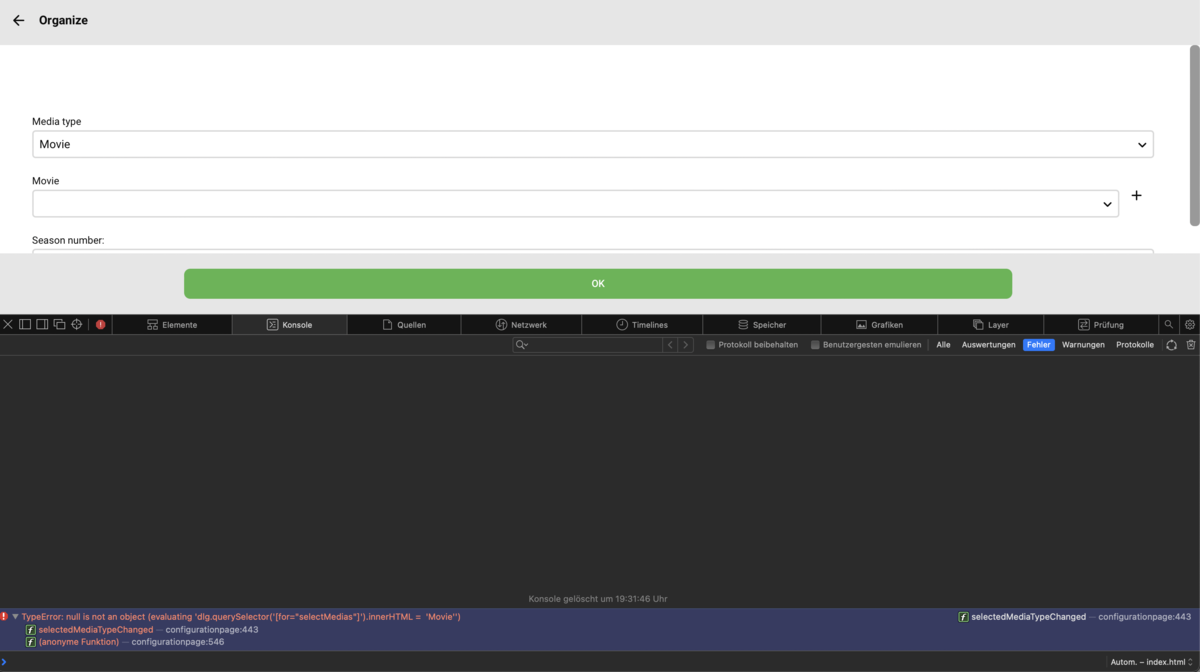
This is the only thing I could find
 1 point
 -
Smart TV's are designed to stream 4K Media at low 'streaming' bitrates and play non HD Audio (EAC3) If you want to play UHD Remux's with HD Audio - you need to either play them in a UHD Hardware Blu-ray Player, or use a streaming client capable of playing them. Yes you can convert the HD Audio to EAC3, but during the conversion process will lose quality/Atmos/channels. The batch script above looks like it came from me originally but modified for EAC3 - so I'm not 100% if EAC3 works ok in ffmpeg at the chosen bitrate. The bitrate should probably be reduced anyway as it's 5.1, not 7.1 and EAC3 has a better compression ratio than AC3. ie a 640K EAC3 track will sound 'better' than a 640K AC3 track converted from the same source, but unless you are using top end AVR and speakers, I highly suspect you would not be able to tell the difference. Once the script is in a .bat file - then just use a command prompt to run it - if you called the file 'myfile.bat' - then just type 'myfile' and hit enter. Have a play with just the single version first, then once it does what you want - then move that config into the recursive version which then converts all the files and adds the EAC3 track. There is unfortunately no magic solution here - emby will convert on the fly to AC3, but to Direct Play - you need to modify the source files.1 point
-
Hi, we'll let you know when it is back in the store. For now you can follow along in the topic above. Thanks.1 point
-
Normally what you reads at the notify list should not be in bold as new, but let me see if I find something, sinc the forum core do not have this option.1 point
-
I just test it and did not face the same issue. I mark site read, refresh the browser, go as test to emby server forum, it all read there, also refresh within the forum section as well, all read to me. What browser you using for this?1 point
-
Yep - a perfectly valid 640Kb AC3 is available on the original source. Quality wise, it will likely be better than anything converted with ffmpeg (even at 'just' AC3 max bitrates) as it was professionally created. Also remember than ffmpeg still cannot convert to eac3 7.1, only 5.1 and of course you'll be losing Atmos anyway. Personally, if you want to fully utilise your high end soundbar, then you need to get a high end client that can play HD Audio natively.1 point
-
You can't, until current Google Play issues are resolved.1 point
-
You can un-check that option and set your Shield to 4K display mode.1 point
-
No, these are not "unlocked". However, for the TV app, I have just reset everyone's trial period so it will behave as if unlocked for the next week.1 point
-
Yes, in order to test that one line you would need to change "input.mkv" to the actual filename of your movie. However, you could also paste the following into your bat file. @echo off FOR /F "delims=" %%x in ('dir /a-s /b /s *.mkv') DO ( ffmpeg.exe -i "%%x" -map 0:v -map 0:a:0 -map 0:a -c:s copy -c:v copy -c:a copy -c:a:0 eac3 -b:a 1536k -disposition:a:0 default -disposition:a:1 0 -f matroska "%%~dx%%~px%%~nx-EAC3.mkv" rem del /q "%%~dx%%~px%%~nx.mkv" ) Place the batch file in a folder with one movie and execute it. Do NOT place it in your root movie folder yet until you tested it out on one movie first. It searches for all mkv files in the current folder and all subfolders.1 point
-
Yes, that should fix it!1 point
-
Hey @deiniol39, If there is metadata for this, I can add the criteria. But I'll investigate where this data is stored and how it's related and will let you know. @thisismytrial It seems that you need to have multiple sorts here... i.e. sort by series then by episode, I'll see the overhead of adding this in the new sort job functionality. This might take awhile though @Ninko and @Tremas, thanks for finding a solution to this, I will see what I need to do to add this the the Emby official plugin list and that should make deployment allot easier. @Ninko Did you figure out why it's not finding your items? Can you have a look at the metadata for one item you expect to see and see if the 'Last Played' has the correct value? @horstepipe OH NO! This seems to be related to the old caching code which I might need to be revisited. We can get to the bottom of it and will make sure you don't have to start from scratch. Did you change a 'limit' on any of the playlists? I think I should also extend the old error handling to at least spit out a bit more detail of what playlist is failing. We can continue via DM to get to the bottom of this...1 point
-
Excellent - so was there an incorrect entry in the hosts file for opensubtitles.org ? If there was, then it would be better to remove it alltogether as the correct DNS resolution is working using your external DNS provider. (what nslookup is using)1 point
-
No, the log posted yesterday is from after a reboot on the client. The issue was present before, I tried to restart Kodi and reboot the client but the error was persistent. I've only seen this issue appear after the server has been down/restarted. It doesn't happen straight away after a restart of the server, it happens after a while. Only solution was a db reset.1 point
-
Thanks, I'll check it. Did a Kodi restart fix the issue?1 point
-
Yes, first thing tomorrow, I have a fix for all of this. It took the entire day, but I got it sorted.1 point
-
I modified the ffmpeg line I posted above and changed it to output eac3 at 1536k. Try it out on a movie and see what you get. It worked for me1 point
-
@MonKaiju it could be that Traefik is rejecting the cors preflight options requests. I saw this with another user recently. Can you please look into this and configure Traefik not to do this? I think there is a good chance that will resolve your issue. Thanks !1 point
-
You definitely have something resolving locally to the wrong IP address. It's not Emby. The nslookup command queries your DNS server and the result is correct. The ping command is using the IP your machine thinks belongs to that domain. You should check your hosts file. Or someone else more familiar with Windows could point to what else might be doing this. Typically it's the hosts file (C:\Windows\System32\drivers\etc\hosts) but possibly something else like software, etc.1 point
-
Got an error after the reboots/restarts of the docker container earlier today, I experienced the same error on the previous build as well but thought the db caved in. It doesn't seem to like the LastPlayedDate? Edit: This makes the "Processing updates" spinner get stuck at 0%1 point
-
Once we see how the final integrated version looks, there will most likely be opportunities to recreate the editor with some functionalities like this. It's the request for the stream that is the problem. It definitely needs some work. Sounds like perhaps it was a browser cache issue actually... Maybe...1 point
-
Black frame detection likely wouldn’t be accurate enough. We would have to find another technique, like OCR, or even a combination of multiple techniques to try and pinpoint the credits. It’s definitely not impossible, just much harder to do than on shows. But maybe we’ll get there at some point.1 point
-
It works OK for me. Could you try it again? Vic1 point
-
There is, this is how I did it for my new Philips 55OLED706/12, requires Android phone though. Install Send files to TV - Apps on Google Play into your TV and Android Phone Download Emby APK from here: Emby for Android TV - Emby (into your Phone) Send Emby APK from your phone to your TV, via Send files to TV app. Choose open APK on your TV from Send files to TV app and you will see prompt to "allow installation from untrusted sources". Allow Send files to TV as an source and install Emby APK. (Optional) Download Total Commander APK, from developer website: Total Commander - Android (ghisler.com) (direct link to universal APK) into your phone (Optional) Send Total Commander APK from your phone to your TV via Send files to TV app. (Optional) Choose open TC APK, you just sent on your TV, from Send files to TV app and install Total Commander (Optional) Feel free to install/copy/delete whatever you wish, from now on via Total Commander from various storage devices. (optional) You can uninstall Send files to TV from your devices, you no longer need it after you have installed Total Commander. I basically Installed Total Commander + LAN plugin for Total Commander via Send files to TV app, uninstalled Send files to TV app (as I no longer need it) and sideloaded all other APK's from my NAS SMB share via Total Commander. Downside is, that you do need somesort of an Android phone, to get going. I used my old backup phone for that, switched to iPhones 4 years ago.1 point
-
glad you registered to share this insight1 point
-
Hi. if you are talking about Luke or me, I'm sorry but, as we've pointed out many times, this is simply incorrect. WE are the original contributors. We were just giving away all our work for a fairly long period of time. It is the other guys that wouldn't have anything if we hadn't created it and given it to them (which we did so nothing wrong with what they are doing other than removing attribution from the code).1 point
-
Hi, we'll take a look at this !1 point
-
This feature is awesome, why hasn't it been implemented1 point
-
+1 I am surprised this isn't an option already.1 point
-
Yeah, those devs suck. Introducing an issue in a beta line... who ever heard of such a thing?1 point
-
It would also be nice, that a downloaded audiobook will not be mixed up with downloaded music. Especially while the music download ability is more or less useless.1 point
-
I would like to add my support behind this feature! My post requesting, and EBR tagging this original request: https://emby.media/community/index.php?/topic/77407-allow-collections-to-populate-home-screen-section/1 point
-
It's a nice idea.1 point
-
this is a great idea.. i would also have sort of "temporary uses" for promoting a subset of media easily on/off1 point
-
+1. This would help so much w/ kids stuff too.1 point