Leaderboard




Popular Content
Showing content with the highest reputation on 03/30/22 in Posts
-
Say I have a custom collection of 56 Christmas movies. During the Holiday Season, I would like to show this on the main page as a Library. Now, I could make a drive folder called "Christmas" and put these movies in that folder. However, now we're getting away from using metadata for organization and moving back to using folders for organization. Something you've spent the last few years trying to get away from. So each collection should have a toggle to show it as a library on the Home Page. Then people can make collections for Christmas, Halloween, Summer Romance, Summer Slasher Films, whatever and show them on the front page where they are easily accessible. Don't want to show it anymore, switch the toggle off.1 point
-
https://pro-bravia.sony.net/guides/references/prosettings/android_latest/1_actions/1-7_install_apk/1 point
-
Does anyone know how to load the apk onto a current gen Sony via USB? I dropped the apk onto a stick, plugged it in....and now I'm not sure what to do. Edit: Nevermind - I followed @Edrock200's excellent instructions above and was able to sideload via Downloader.1 point
-
Can we get an ETA on an Android app that doesn't have broken background videos? (Basically, they play OVERTOP the interface right now, like opening the movie, and getting a trailer playing that you need to back out of). thanks!1 point
-
I will only ever be doing one folder though. The stuff I put in the auto organise monitor folder is only ever going to be hd and sd tv shows and hence I only want one folder.1 point
-
Hi, the logs section in the server dashboard has a download button to allow you to download the log file.1 point
-
Please post a server log to show the exact SQL error.1 point
-
Its not operational yet, its part of my ideas in the testing stages, but I hope to get it working at some point. scheduled tasks are on my radar ! (or roadmap). Im just not there yet. I'm still converting things to log to my logs rather than fill embyserver.txt with junk (still lots of old code in the plugin). I'm still trying to figure out a good layout of pages. I'm still coding for new issues I come accross, and of course still being side tracked by my own needs etc .... Dev road map is all over the place! Still very busy although it may seem progress is slow. Yesterdays code makes my audio fingerprinter work well, but its not implimented in general code yet. Also added Restore Albums to restore tab (not tested that yet). Also figured out a bit more of skia (that might not mean anything, but its to do with cross platform image manipulation). Today's code or sidetrack diversion adds the ability to remove LiveTV Channel logos, so a guide refresh will correct them (incase you have wrong logos on LieTV channels) - I have just finished testing it and it works just fine!, it doesn't tamper with anything else. I suggested this as a feature request but I don't think its going to happen so I just coded it myself. (Suprised myself actually how well it works - no errors at all on first test!). Now unfortunatelly its back off to work - Feels like I live there!1 point
-
Hi, everything that we do is driven by user feedback. I can see this one has a lot of support and I would expect that we'll have something for it in future updates. Thanks.1 point
-
have added new files, deleted and re-added others, updated metadata, and have done quite a few library updates, both manual and automatic, and am happy to report the problem folders have not disappeared...looks like you solved the issue with Album Artist view1 point
-
iOS 2.1.5 Has Been Released This is a follow up release to the recent Emby For iOS 2.1.3. Released, Featuring: Timeline Seeking & Thumbnails release. We wanted to get this out to you as quickly as possible. This release features a resolution to: An Intermittent Loss of Audio Issue that Manifests When Audio is Transcoded. This release also contains a minor fix for: Problem with Scrolling on Certain Server Management Screens. You can now scroll fluently from top to bottom of management screens found on the Emby Server Tab. Please install this maintenance release at your earliest convenience. You can follow Emby iOS development as well as report any issues on our community forum site: https://emby.media/community/index.php?/forum/94-ios/ View the full article1 point
-
I do a lot of side loading of apps on my Android devices. I made a simple video on how to easily install apps that are not on the Play store, using a Windows machine and an app that is in the app store. I download the app on my PC and use X-plore running the Android device to install the app. Very quick and simple.1 point
-
All appears to be working well Files are moving and being re-cognised. Great work chef!1 point
-
TV works great. I created a folder and put a series (with 4 episodes) and a movie in it. Series he has super recognized. thank you.1 point
-
version 1.6.1.1 fixes all those issues up. need a null coalescence on the new config options. Ops! Emby.AutoOrganize_v1.6.1.1.zip1 point
-
I think there are two issue. One no all nodes are translated, the other. Node is not working. I'll check both.1 point
-
Ah! I didn't change the tabs on smart match. Ops! I have a fix here. Thanks @GiGo Brb1 point
-
That is strange. Why is the element showing as a select box. I'll be right back!!1 point
-
If I may barge in, I had same issue a while back. 1) You might have more of those than you think; look at "date added" (to Emby), then check other movies around that date. 2) Once you have identified all dupes, remove them (temporarily) from parent folder, scan libray and move them back in.1 point
-
That has nothing to do with anything. And even if you were right about the law, which you aren't, your request has nothing to do with Emby.1 point
-
If you have problems sharing your download folder, you can also use cloud storage, such as OneDrive, Google Drive... Copy the APK to your favorite provider and using X-plore you can install it. Just mount your cloud storage in X-plore.1 point
-
I create a new folder "Photos" And it's ok ! Thanks1 point
-
Cool, version 1.6.1.0 does that. Currently only for TV episodes. I'll have to write the code for movies next. But I have to jump over to IntroSkip for a bit. LOL!1 point
-
Yes, I like it. Makes it clear.1 point
-
Yes, exactly.1 point
-
I best not comment on this - I have no idea what this is for. I have simple requirements, but the tools direction is to be an all singing all dancing thing - great for the people that ONLY use this for media movement/management, but sonarr/radarr does > 95% of my media naming/moving/management, this tool is only for the limited download of obscure UK TV Shows I have to get from other sources. My only requirements over the base autoorganize in emby are : 1)- name the file correctly if > 9 seasons 2)- move the file into the correct target folder, not pick one that is finds that it has seen before My operation of it is thus - 1) download the file 2) copy it to the embyautoorganise folder (on my server) 3) run the autoorganise process In the last run of this, as I reported - two issues - Googlebox went to the RecordedTVSSD folder/library instead of the TVShows linrary (as it has been in both), and Dynasties wento to 4KTVShows instead of TVShows (as it exists in both). I think you are onto that issue with the version process you plan for.1 point
-
And a catch all if none of those are present.1 point
-
I don't think you even need an option toggle. An empty field would mean it's off.1 point
-
In Metabrowser there was a field where you enter a semi-colon separated list of words that would allow overwriting. If the field was empty then nothing would be overwritten. Then it's up to the user what words to use.1 point
-
@Luke @ebr Do you really care about what users really want? Products should try to cater to users, so as to retain users, but now users put forward so many valuable suggestions, you don't take it seriously, I doubt whether you are really working hard in the direction of giving us a better emby.1 point
-
I've been clicking on the wrong places. Both worked. Thanks.1 point
-
dm me the url, no login needed just curious what i see.1 point
-
Hopefully soon. We're working hard on it.1 point
-
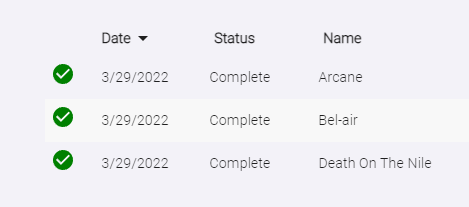
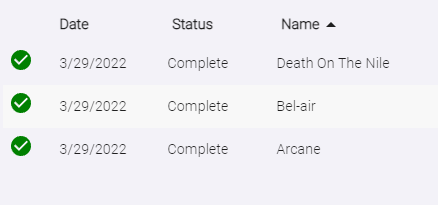
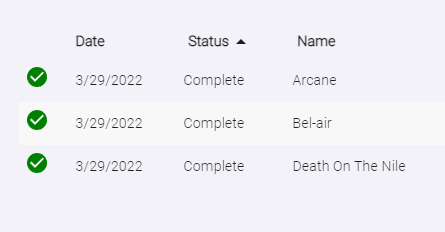
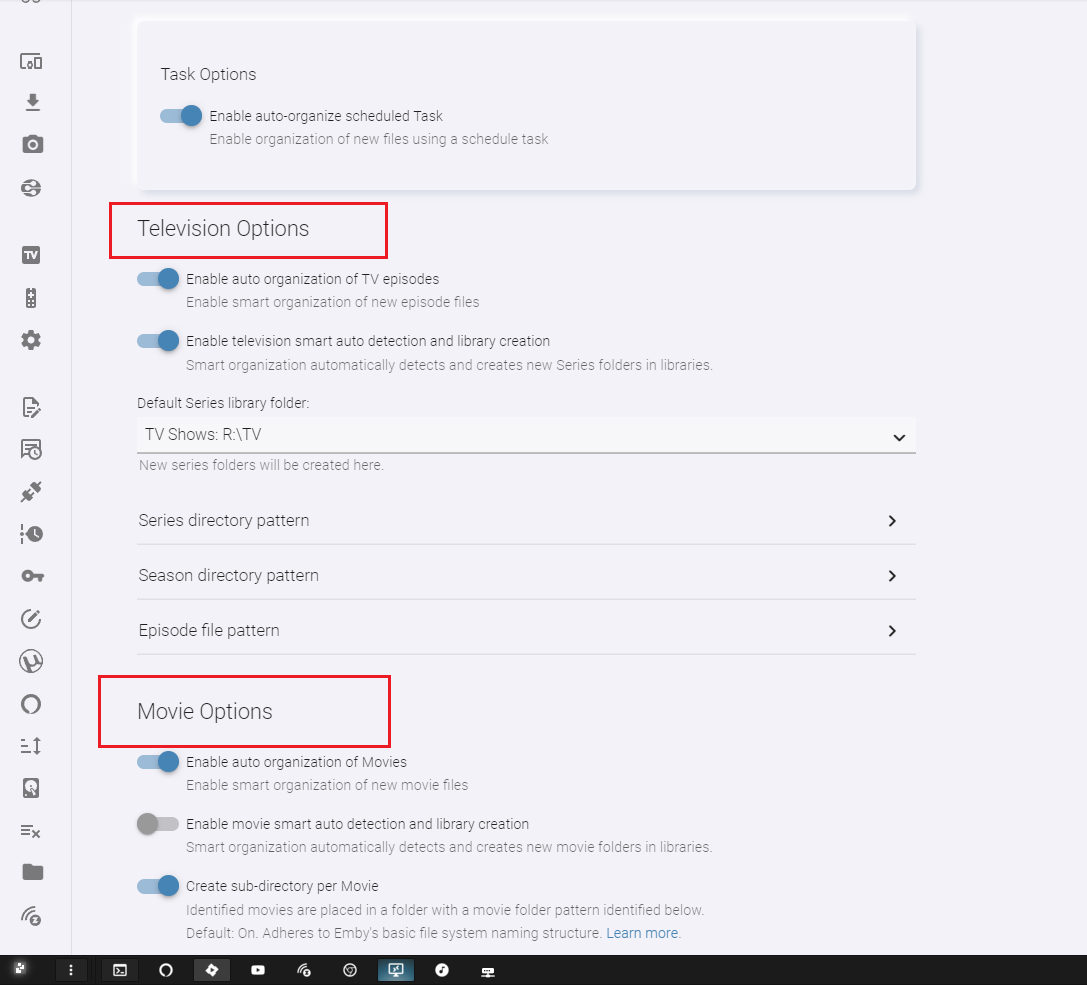
Here is: 1.6.0.9 Sorting options can be accessed by selecting "Date", "Name" or "Status" at the top of the table column. clicking the column header swaps the direction. Sort by date (ascending/descending) Sort by name (ascending/descending) Group by Status Organization now starts off by attempting to determine the media type of the file by name, then accessing the appropriate organizer method. Example: This is a TV episode: AwesomeSeries.S01E01.1080p.WEB.mkv This also is a TV episode: AwesomeSeries.2022.S01E01.1080p.WEB.mkv This is a Movie: AwesomeMovie.2022.1080p.mkv Extra logging just in case. UI changes One "Settings" tab Settings page Item lookup now request localized results. We should see better lookup results in the proper language. However, if this isn't the case there are other lookup methods that need attention. It is possible that by consolidating the configuration, you will most likely have to re-enter your settings data. Double check that before attempting to sort new items. DOWNLOAD: I don't think I missed anything. Next I'll try and get multiple watched folders working properly, and see about removing the enable options for the organizer. They are pointless to have.

 1 point
 -
For those struggling to sideload. here's the basic steps if you want to do it all direct from your Shield/android device: (I have no affiliation with these sites, just referencing them for the screenshots, if this violates any rules, feel free to edit/delete) Grab the "Downloader App" from the play store, launch it, then start at step 1.4 here: https://cordcuttersanonymous.com/iptv-smarters/#install-iptv-smarters (just referencing for the downloader app screenshots. Everything else on here is for the firestick platform, which is different from android TV, and, as far as I know, emby is not blocked on the FireOS platform, so ignore the stuff before and after the downloader app.) When you get to the step to enter the URL, enter the apk URL. Most people will want arm7, but if you have x86, you can use that link instead: https://github.com/MediaBrowser/Emby.Releases/raw/master/android/emby-android-google-armeabi-v7a-release.apk That's a lot to type with a remote, so here's a tinyurl if you prefer. In general, don't trust tinyurls, but for any tiny url, you can plug in everything after the / at the end of this preview URL to ensure that it's redirecting to the above link and not something malicious https://tinyurl.com/preview.php?num= or, alternatively, create your own at tinyurl.com to be extra safe. https://tinyurl.com/3wd67kyn (non-malicious redirect proof: https://tinyurl.com/preview.php?num=3wd67kyn) In the off chance you have a x86 client, you can use either of these URLs, if you aren't sure, try the above URL's first: https://github.com/MediaBrowser/Emby.Releases/raw/master/android/emby-android-google-x86-release.apk or https://tinyurl.com/y8xkktrx (non-malicious redirect proof: https://tinyurl.com/preview.php?num=y8xkktrx) Click "Go." When the apk finishes downloading, click Open/Install (can't recall off the top if it's one or both.) You will then get a security warning about authorizing the app to allow apk installations with a link to your settings, open settings and allow "Downloader App" to intall apk's (will say something scary like allow this app to install from untrusted sources.) Once you enable, go back to the downloader app, and either down to files on the left hand side and reopen the apk you downloaded and install, or, just enter the URL again and install. Once complete, I recommend you uninstall the downloader app. If you already have a version of emby from the playstore, you *might* need to uninstall it, however, I would recommend just keeping it until this issue is resolved. Reason being, if you run into an issue with this process and you've uninstalled, you have no recourse to reinstall it. Again, no affiliation with the site above nor the downloader app. Just posting to help others. I like this method because it can all be done direct from the client vs needing a thumbdrive or some other "sneakernet" or manual transfer from device to client. Hope this helps others out there. The only thing I'm not sure about is if you have an emby premiere or unlock license via the play store, if it will be respected via a sideloaded app. Maybe official Emby team can chime in on this.1 point
-
It works as intended, at least for me it blocks content with the Mexican rating system according their equivalent to the US rating, although i remember having problems with some titles that in the end resulted to be a problem with the metadata on TMDB that had slight variations on the rating. I.E some movies had "MX-B-15" and others had "MX-B15" notice the extra "-" on the first one. So emby had the equivalency to "PG13 = MX-B-15" and when "MX-B15" was found it was unrecognized what it meant that it wasn't filtered with the according rating. That might explain why if you set to filter unrecognized worked. The only solution that i found is to edit every title on TMDB with the normalized version, you can do that in Emby too, but keep in mind that if you do it in TMDB you are helping others with that same problem plus it works like a cloud backup for your metadata.1 point
-
Yep! I'm actually about to work on it right now. I've just gotta mock up some series with 10 seasons to try and sort. Then I'll smack out an update like Will Smith Smacked Chris Rock and the Oscars... .. too soon?1 point
-
Is the 1.1.408.70 (3/24/22) update the “fixed” version because its just as bad as it ever was with shuttering 4k for me on both my xsx and xss. Both with local and remote content. all other emby clients work without issue but i dont have earc apart from with the xsx. So really need to use that device for streaming.1 point
-
@softworkz will be looking at this. Thanks.1 point
-
same here, no problems at the moment1 point
-
Updated to DSM 7.1 RC earlier today on my DS-918+ NAS. So far no issues with anything Emby related. No issues with Non-Emby related stuff either. I'll post back if that changes.1 point
-
@letterman - I'm afraid, but most of what has been said here is wrong. When you add a library folder to Emby, you need to add the "magic prefix" \\?\ and your dreams will become true. That means, when you media is under c:\mymedia You'll add this folder as: \\?\c:\mymedia ffmpeg and ffprobe can deal with it. Disclaimer: We can't guarantee that it will work everywhere in Emby. It is basically working, but you may encounter situations where you could run into problems. Also, you need to have at least Windows 10, version 1607 for this to work.1 point