Leaderboard




Popular Content
Showing content with the highest reputation on 03/29/22 in Posts
-
You can through the command line as it's just Linux after all. I tested using two 1 TB Samsung NVMes in every way I could think of to find the absolute best use of these for Emby. Turns out using it as a standard volume setup to hold all of Emby's data (cache, metadata, transcoding, DVR) was best by a lot! You can even take it further than I documented using symlinks to move the database to NVMe but I don't think that's really needed with little additional benefit if any as you can tune Emby's memory use of SQLite. I've got another surprise for some people coming up as well for uses of the NVMe slots which might be even better use of those slots. I've learned how to work around the artificial limits that Synology puts on the box with their software layer that sits over the core Linux system. With that said there is only so much you can do with a "non expandable" 4 core Celeron. They really aren't the right hardware to use for a media server to be honest. But Synology has some really good software to use for other purposes like backup, online office, photos, video camera recording, etc... A used mini desktop or Full Tower off eBay for $100 or less will give you a lot more freedom with expansion and upgrades if building you want a system that's built for media serving. Much cheaper and 5 to 10 times the horsepower or 20x if you have an Nvidia GPU to use with it.3 points
-
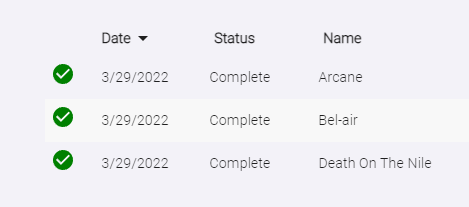
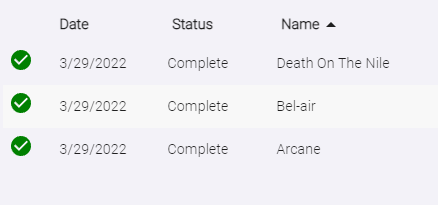
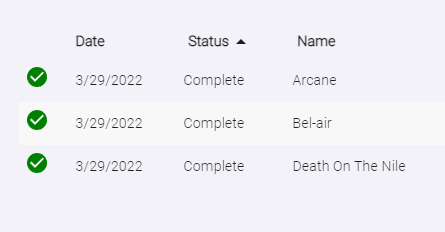
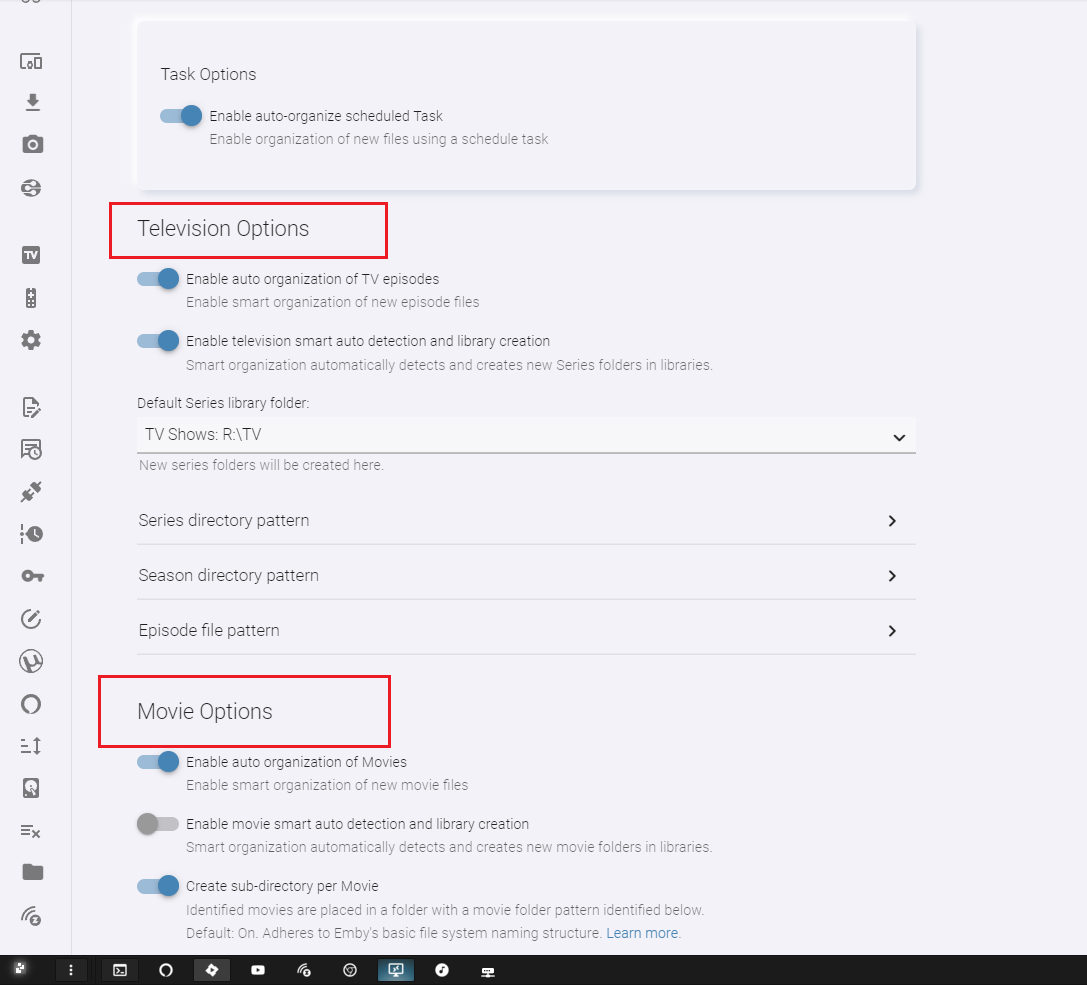
Here is: 1.6.0.9 Sorting options can be accessed by selecting "Date", "Name" or "Status" at the top of the table column. clicking the column header swaps the direction. Sort by date (ascending/descending) Sort by name (ascending/descending) Group by Status Organization now starts off by attempting to determine the media type of the file by name, then accessing the appropriate organizer method. Example: This is a TV episode: AwesomeSeries.S01E01.1080p.WEB.mkv This also is a TV episode: AwesomeSeries.2022.S01E01.1080p.WEB.mkv This is a Movie: AwesomeMovie.2022.1080p.mkv Extra logging just in case. UI changes One "Settings" tab Settings page Item lookup now request localized results. We should see better lookup results in the proper language. However, if this isn't the case there are other lookup methods that need attention. It is possible that by consolidating the configuration, you will most likely have to re-enter your settings data. Double check that before attempting to sort new items. DOWNLOAD: I don't think I missed anything. Next I'll try and get multiple watched folders working properly, and see about removing the enable options for the organizer. They are pointless to have.

 2 points
 -
I sent a feedback note to Google Play saying I am a happy Emby user, the software is completely legit, and they should reinstate it right now. No idea if that'll make any difference, but maybe others want to take a minute to do the same.2 points
-
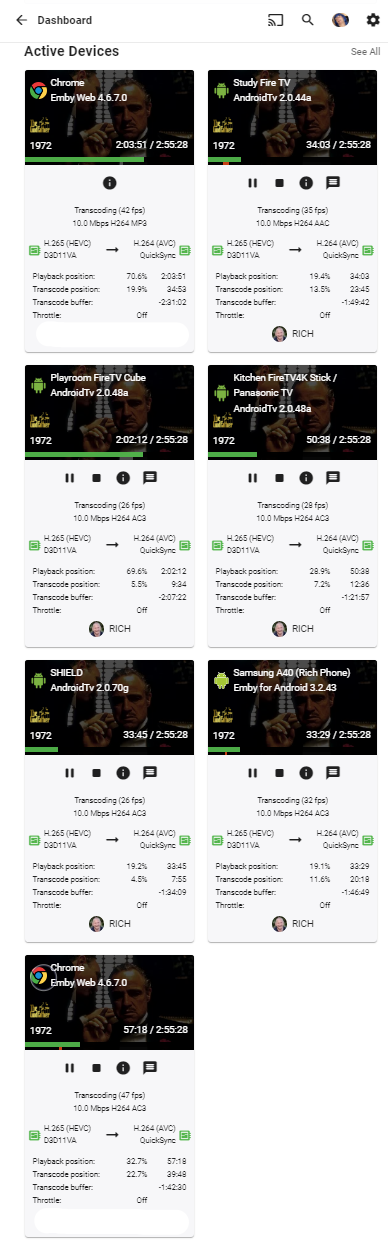
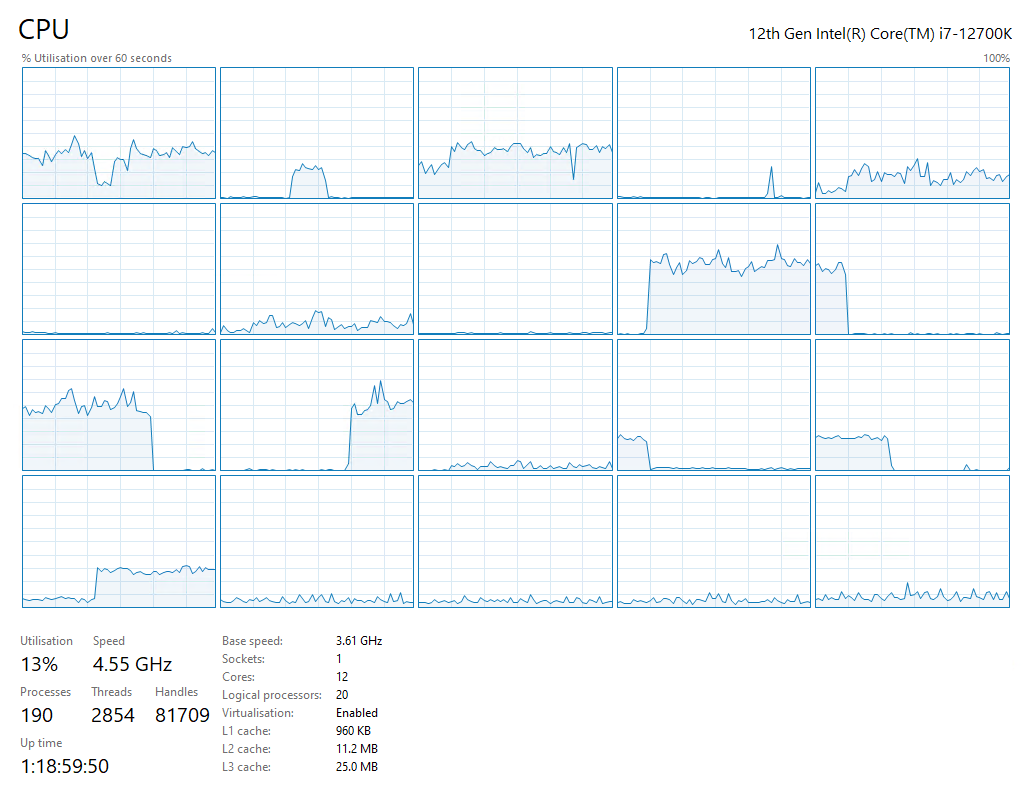
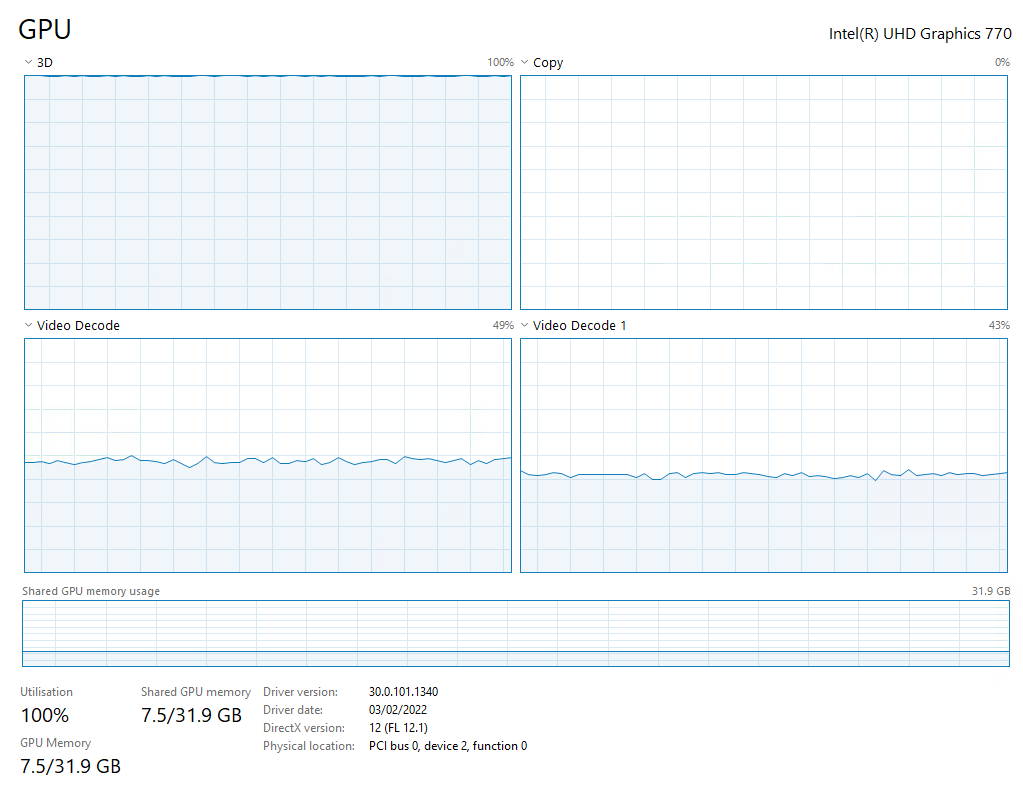
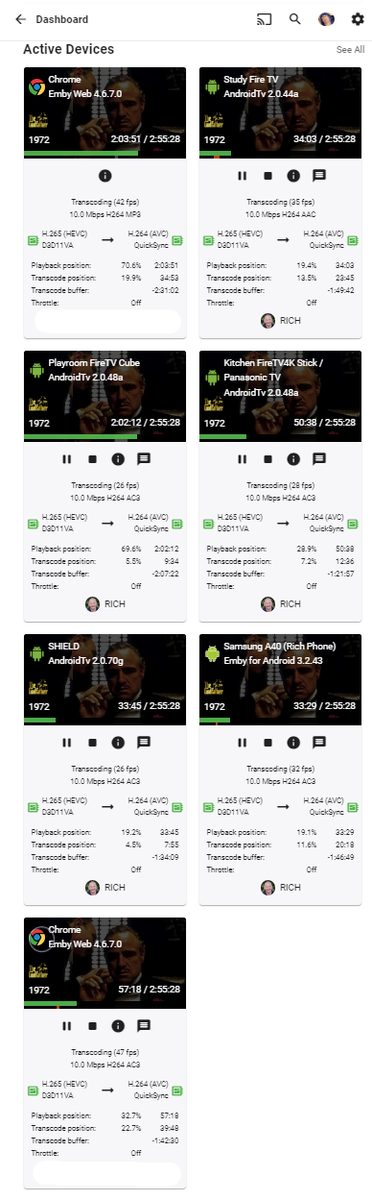
So I thought I'd do a quick experiment - to try and mirror the site below for 4K > 1080p Transcode for Emby & Intel UHD 770 https://www.elpamsoft.com/?p=Plex-Hardware-Transcoding - Video : 68Mbit/sec HEVC 4K Remux (The Godfather - Just happens to be 68Mbit/sec) > 10Mbit/sec h264 1080p - Clients - Various but all forced to 10Mbit/sec - Emby - 4.6.7.0 - Stable Release - Source was local SATA Disk (JBOD) - Audio - AC3 (so direct play/no transcoding required) - No tonemapping (turned off) - No THROTTLE - ie simultaneous continuous transcodes - SINGLE transcode performance = 180 fps. Results - I got to 7 streams before I ran out of clients - but transcoding fps was getting very close to 25 - so probably very close to the limit anyway. GPU - it hit 100% '3D' on the first stream, so not 100% sure what that graph shows - the key thing is memory. Each 4K stream takes about 1.1 GB - so for the 7 streams, I'm up to 7.5GB of memory, but have plenty to play with. I have 64GB, but max here is 32GB. CPU load is low @ 13% overall. With Throttle turned ON (ie transcoding as required to fill the buffer), then it's possible that another 1 or maybe 2 streams can be utilised but of course if the fps drops below 24 then the buffer is no longer being maintained. This is 7 x 68Mbit/sec streams - so nearly 500 Mbit/sec worth of transcoding ! Certainly not bad for an integrated GPU To note - tone mapping knocks down the single stream performance to 140 fps - so ~ 6 streams with tone mapping. @softworkz - FYI
 2 points
 -
Even better - on the UHD770 testing I did, I had 10 x 4K Remux > 1080p transcodes going with tonemapping - so I think you'll have no issues at all with the proposed workloads.2 points
-
I can imagine someone who has a very weak NAS or Raspberry Pi, yet a TV in the living room that can display 4K, and one in the bedroom, without 4K.2 points
-
At a minimum it needs to be default collapsed.2 points
-
I am switching over from a Win7 box running MBC to Chromecast dongles. With the Win7 box I had a HDMI to Cat6 setup that allowed me to stream to up to 4 displays/TVs simultaneously. It was great while it lasted, but involved stapling cables to the ceiling to run it from room to room - plus it has borked Can there be an option to multi-cast to several receivers at once? i.e. simultaneously play to Chromecast dongles in my office and living room and kitchen simultaneously so i can walk from room to room without stopping and restarting the movie or show all the time? I realize that bandwidth could POTENTIALLY be an issue, but i have a fill gigabit network and a multi-port NAS so that really is the least of my worries... Thank you!1 point
-
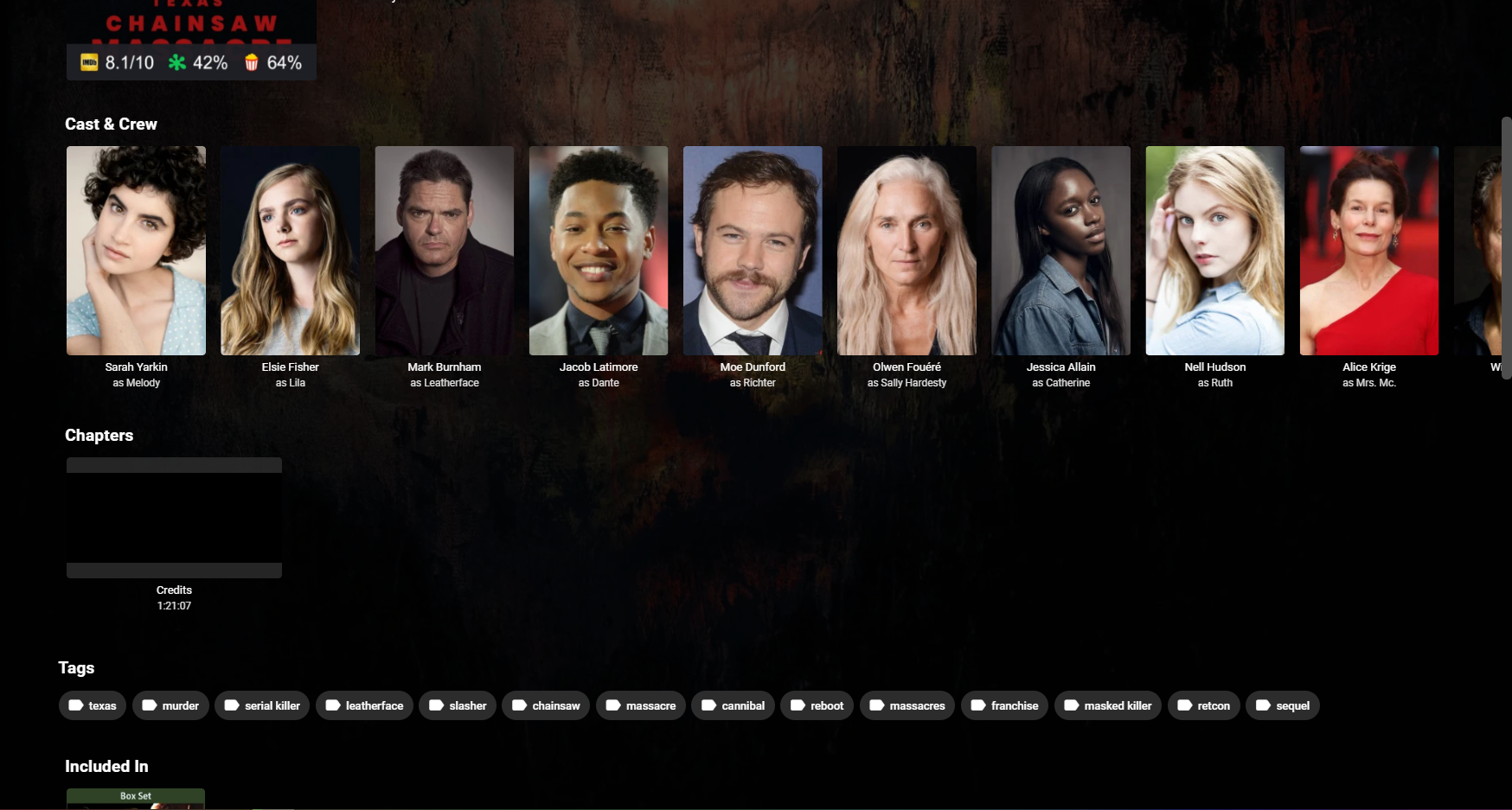
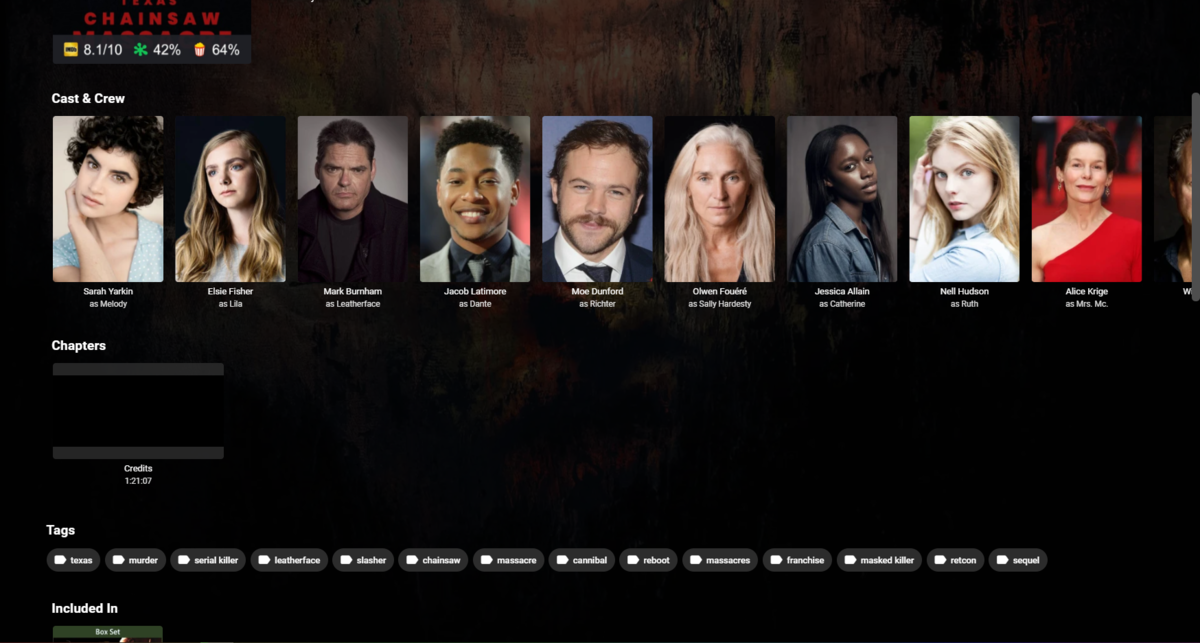
Yep, that's surely one handy chapter marker, no doubt there.
 1 point
 -
I do a lot of side loading of apps on my Android devices. I made a simple video on how to easily install apps that are not on the Play store, using a Windows machine and an app that is in the app store. I download the app on my PC and use X-plore running the Android device to install the app. Very quick and simple.1 point
-
It’s happening but in my two examples I posted, it’s picking the the wrong folder, likely the first one it finds or something, which in my 2 examples are the incorrect ones.1 point
-
I don't have the need to edit the queue, but having the ability to sort it by Name makes SO SO much more sense than by date added, will make it much easier to find files.1 point
-
Yes, I was able to get the queue sorting: 1. by name (ascending/descending), 2. by date added (ascending/descending), 3. GroupBy media type (episode/movie)1 point
-
Is this sort for viewing the queue or processed files? If so being able to view the processed or queue order and being able to find something in a list alphabetical is needed. But it's just a nice thing to have but not needed for true functionality. Once up and running the whole point is automation and not having to baby-sit it. With that said, if it makes your life easier doing the coding then wack it.1 point
-
For those struggling to sideload. here's the basic steps if you want to do it all direct from your Shield/android device: (I have no affiliation with these sites, just referencing them for the screenshots, if this violates any rules, feel free to edit/delete) Grab the "Downloader App" from the play store, launch it, then start at step 1.4 here: https://cordcuttersanonymous.com/iptv-smarters/#install-iptv-smarters (just referencing for the downloader app screenshots. Everything else on here is for the firestick platform, which is different from android TV, and, as far as I know, emby is not blocked on the FireOS platform, so ignore the stuff before and after the downloader app.) When you get to the step to enter the URL, enter the apk URL. Most people will want arm7, but if you have x86, you can use that link instead: https://github.com/MediaBrowser/Emby.Releases/raw/master/android/emby-android-google-armeabi-v7a-release.apk That's a lot to type with a remote, so here's a tinyurl if you prefer. In general, don't trust tinyurls, but for any tiny url, you can plug in everything after the / at the end of this preview URL to ensure that it's redirecting to the above link and not something malicious https://tinyurl.com/preview.php?num= or, alternatively, create your own at tinyurl.com to be extra safe. https://tinyurl.com/3wd67kyn (non-malicious redirect proof: https://tinyurl.com/preview.php?num=3wd67kyn) In the off chance you have a x86 client, you can use either of these URLs, if you aren't sure, try the above URL's first: https://github.com/MediaBrowser/Emby.Releases/raw/master/android/emby-android-google-x86-release.apk or https://tinyurl.com/y8xkktrx (non-malicious redirect proof: https://tinyurl.com/preview.php?num=y8xkktrx) Click "Go." When the apk finishes downloading, click Open/Install (can't recall off the top if it's one or both.) You will then get a security warning about authorizing the app to allow apk installations with a link to your settings, open settings and allow "Downloader App" to intall apk's (will say something scary like allow this app to install from untrusted sources.) Once you enable, go back to the downloader app, and either down to files on the left hand side and reopen the apk you downloaded and install, or, just enter the URL again and install. Once complete, I recommend you uninstall the downloader app. If you already have a version of emby from the playstore, you *might* need to uninstall it, however, I would recommend just keeping it until this issue is resolved. Reason being, if you run into an issue with this process and you've uninstalled, you have no recourse to reinstall it. Again, no affiliation with the site above nor the downloader app. Just posting to help others. I like this method because it can all be done direct from the client vs needing a thumbdrive or some other "sneakernet" or manual transfer from device to client. Hope this helps others out there. The only thing I'm not sure about is if you have an emby premiere or unlock license via the play store, if it will be respected via a sideloaded app. Maybe official Emby team can chime in on this.1 point
-
It might be quicker for you to teach your friend how to sideload an app.1 point
-
Hi, we'll remove that for the next release. Thanks.1 point
-
Hopefully soon. We are working hard on it.1 point
-
It's something we can look at improving in future updates. Thanks for the feedback.1 point
-
Let me test and let you know.1 point
-
@chef Thank you for your great work. I got two question: - it is possible to just add e.x. (1) instead to overwrite the file? Sometimes I download some versions of movie. - there is necessery to use EMBY Server? There is not possible to get standalone docker only with autoorganize? Thank you!1 point
-
Disk space is one. For my use case senario is that I'm off loading files to online storage, some I keep on my NAS and others get off loaded to the cloud, on occassion I want a copy on the cloud and my NAS, so the option to have it going to either location is useful espcially if the item is already found in one location. Rather than it saying 'item already exsists' and only having an option to overwrite or re-identify, would be good if there is a button 'send to root folder xxxx'1 point
-
Can we get an option for if files are found to already exsist in the 'default location', have an option to be able to force a new location, i.e. A:\TV\Show\FileName.mkv (the default location) B:\TV\Show\FileName,mkv (a new location I would like it at). This would help with the above different quality versions I assume?1 point
-
I think I've fixed this for an upcoming release. I will post it shortly. I was able to calculate the media type of the file in the source folder prior to attempting to sort it. Before, the plugin would attempt to sort the Fike as a movie first, if it failed we would attempt to sort it as a tv episode. If that failed we left it up to the user to identify it. I had always hated that. Now, we read the File name, and make the media type distinction (tv, or movie), then call the appropriate organization methods (EpisodeOrganizer/MovieOrganizer respectively). That logic just seems to be how it should have always been.1 point
-
For every UHD BluRay I have a also do a 1080p encode, yes.1 point
-
I don't think any of them is suitable for transcoding, none of those have GPU so you need to rely on software transcoding. For software transcoding, I think only DS3622xs+ is capable of doing anything 4K related and even then, probably only single stream. After taking a quick look on Synology current product line, I would say your only option would be to go with DS1520+ and expansion bays. I am myself using DS1019+ for all my multimedia needs and it can handle 4K just fine, with the help of QuickSync or VA-API.1 point
-
I've send you a test version via PM. Not sure if this fixes the issue, but please try it.1 point
-
Thanks. I believe it has some weird characters in my Anime collection. I will try a new version soon and reply back.1 point
-
Thank you very much, I already sent the email.1 point
-
I have another issues that has always been there - and I manually manage - May as well raise it now while i am on a roll!!!!!!! For example, I have Dynasties in two locations - : /mnt/user/Media4K/Media-TVShows4K/Dynasties/ /mnt/user/Media-TVShows/Dynasties/ There are two libraries to match the above. I just added two episodes of Dynasties, and it wrote to the 4k set : Firther to this, I have another thig that is the same issue I believe, but different folders. That relates to Gogglebox. Gogglebox is on TV here is Australia and I record it - so it is in /mnt/user/EmbyRecordingsSSD, but there is also a gogglebox UK in emby that has the metadata name of 'Gogglebox'. When that UK edition gets added via auto organise, it instead writes it to the EmbuRecordingsSSD location, imnstead of following what is actually set in the Default Series Library folder In summary - the default series libarry folder is NOT being forced (as can be seen with the image above and dynasties).

 1 point
 -
Oh without a doubt. i bought the lifetime license for plex a long while back but once i tried to make IPTV work with it nicely i gave up. And i grabbed emby and the lifetime license there and have never looked back. Every once in a while i look at the competition just to make sure there is not something that might be cool to try to create as a plugin or such but really emby does everything i need it to do1 point
-
Hello @mrdrew Previously I had read your post while troubleshooting - to no (initial) avail. After testing again, here is what I have discovered - at least with Synology DSM. For any others who are using Synology DSM to host Emby server, this is the path where the sync folders are located: DSM 6.2.4 - /volume"x"/Emby/sync$ DSM 7.1 - /volume"x"/@appdata/EmbyServer/sync$ I ensured the sync directories were empty, AND, removed(uninstalled) the Emby iOS client, then reinstalled the client, connecting fresh with no outstanding sync requests, nor any residual download data. I am still unable to sync from DSM 6.2.4 - nothing appears in the sync folder once a sync request has been made by the iOS client, yet Emby shows: Ready to Transfer However... I am now able to sync from DSM 7.1. - I can watch the immediate transfer progress from the Emby downloads window. All 4 (Music, Movies, Pictures, Home Videos) libraries I use transferred successfully. Sync was tested with both "Original" and "Transcoded" files. In both DSM installations, I also set up the Inotify fix for RTM task (from a previous thread on this issue). To note: Download progress % shows in 3 of the 4 media types (Only movies do not show progress %) Thus... at this point - repeatable, actionable success with Synology DSM 7.1, not yet with Synology DSM 6.2.4 (no other Server Host OS testing at this time).1 point
-
I do like my DS1821+ (8 bays) and it meets all my needs, but I wouldn't get it if you're doing transcoding and especially 4K. You will want the Intel processor models and stay away from Ryzens to use hardware assisted transcoding and va-api. I can only see 3 models then that meet your requirements DS 2419+II, DS3622XS+, and DS3617xsII. Transcoding, 8+ bays, expandable, etc. All of these are $$$ though, but you didn't mention that in your requirements so maybe it's not an issue. Product List | Synology Inc. You could go with a smaller bay model (cheaper) and add an expansion cabinet (5 bays) but then you mentioned power. An expansion cabinet uses its own power brick, so that's now almost double the power needed. BTW, @cayarsdid an excellent write-up on using the nvme slots for more than just read/write cache.1 point
-
@FrostByte I think will have great things to say about his Synology model.1 point
-
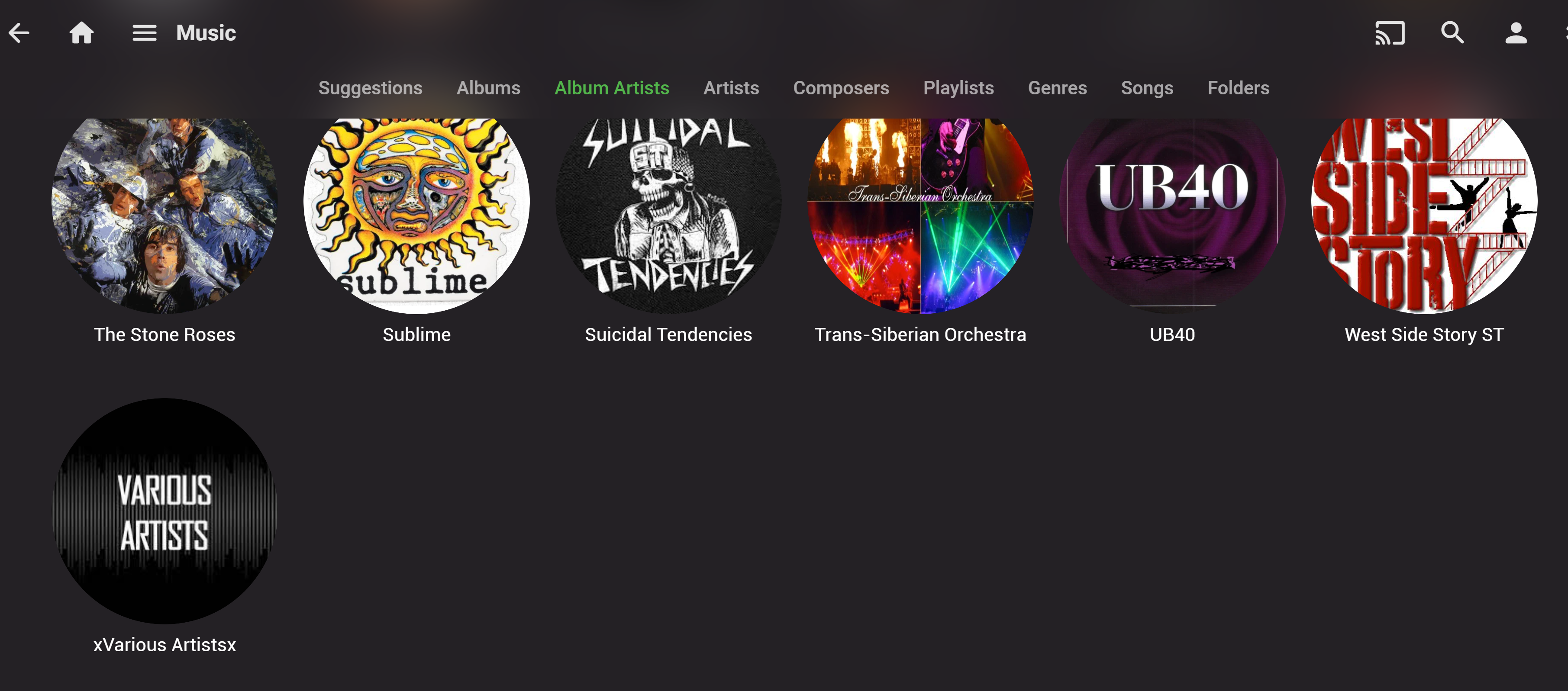
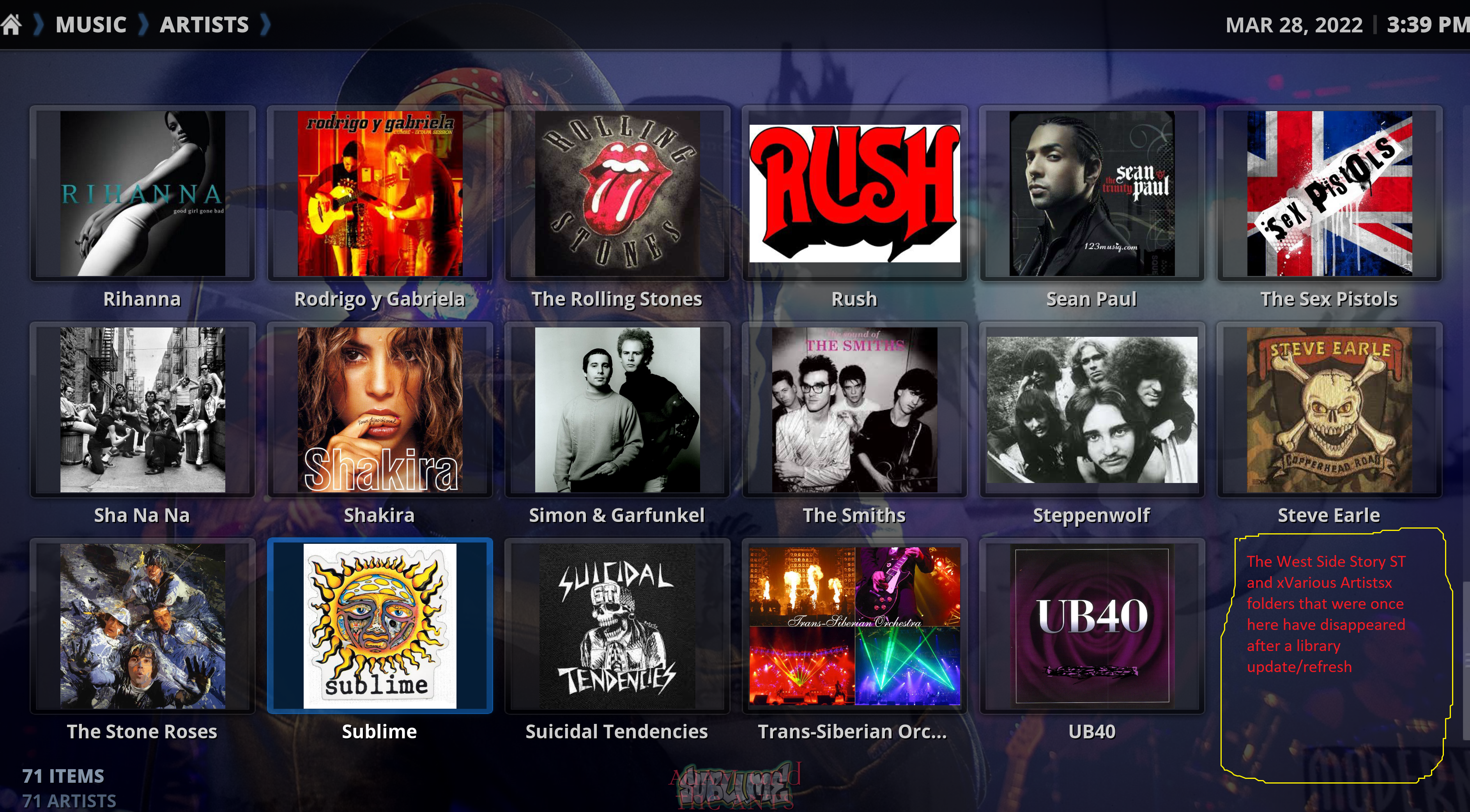
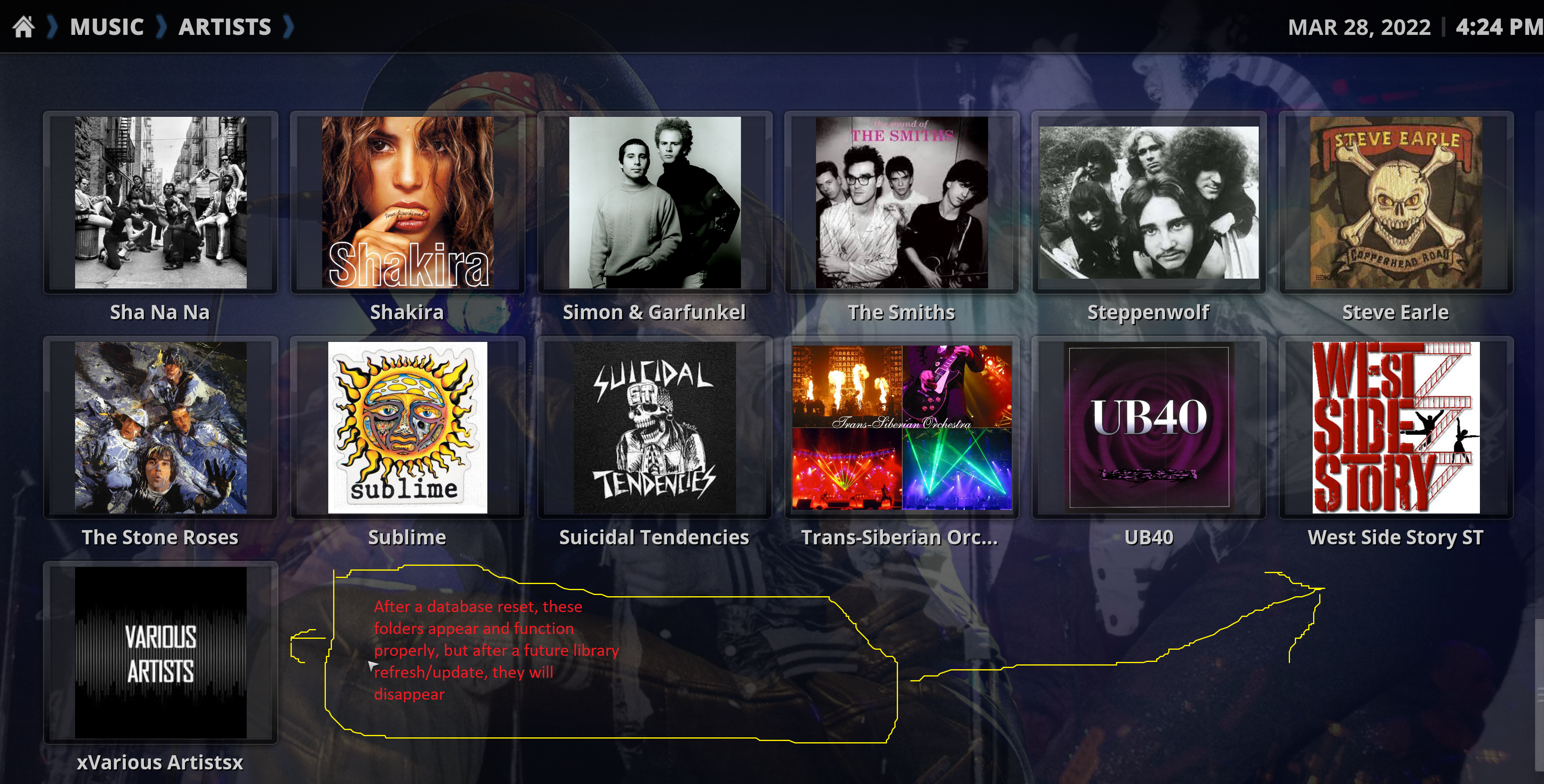
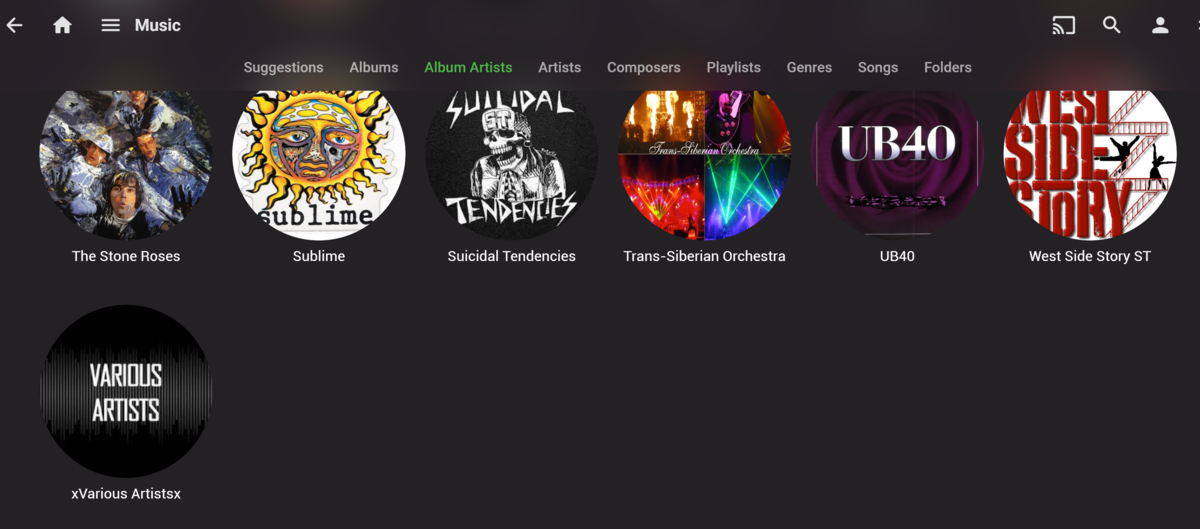
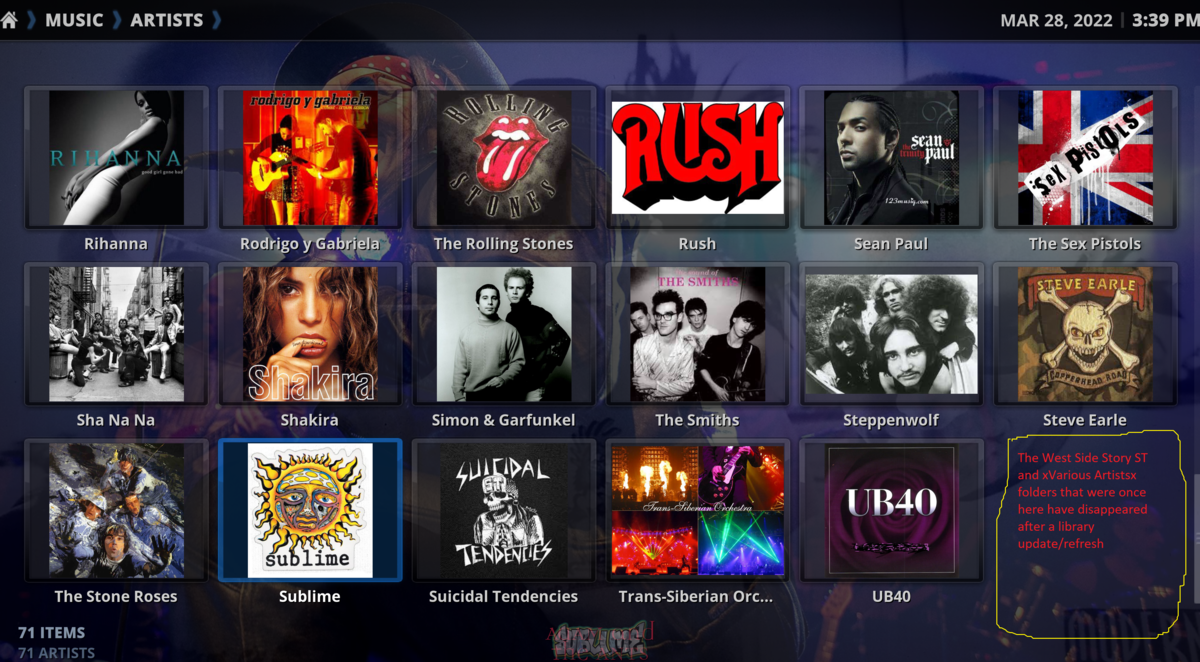
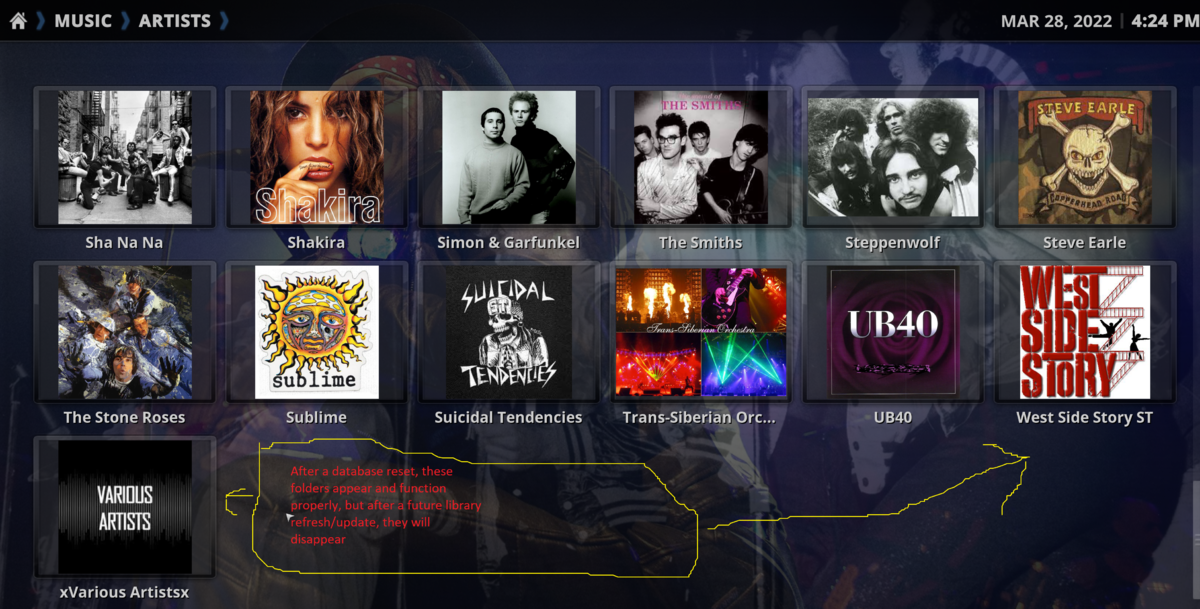
i've been using 7.x for almost 2 weeks....and it's been great except for only one single issue...the plug-in seems to have a problem when an audio file's "Artist" and "Album Artist" tags are not the same...if the audio files have both the "Artist" and "Album Artist" as the actual artist name, there is no problem....but, for example, if i have "Artist" = actual artist name, but "Album Artist" = xVarious Artistsx, a problem will develop (the folders will disappear)...same thing will happen with files i have tagged Artist = Leonard Bernstein, Album Artist = West Side Story ST...and actually after a database reset everything appears fine, but it’s only after a subsequent library update/refresh, that the folders containing the files with the Artist/AlbumArtist mismatch will disappear neither Kodi nor Emby Server have a problem displaying the library by Album Artist even with mismatched Artist/AbumArtist tags as you can see in the following Emby server screenshot aside from this single issue with the Music library, the Movie and TV libraries have been working perfectly for me
 1 point
 -
What happens when you have different pipelines that you process? Or use a few download type programs? Do you really want these all dumping files to the same output location? I'm just asking and haven't tried this but would think multiple inputs would be better, just like in Library setup you can have multiple mount points. Although I guess if you're done everything your going to do to the files and ready to have it added to Emby it doesn't matter. So after just answering my own question, I guess the only thing I'd have left is that I would think being able to specify one path for shows and one path for movies would be best simply because anything in movies should never get mis-classified as a show and vice versa. Without the different paths how do you make sure that doesn't happen?1 point
-
chef@work = blazing fast Thanks mate!1 point
-
...I have time to continue working on 7.x in the next days btw, I already fixed several issues including artwork updates for music content. I'll release a new 7.x. version in the next days. Can you please summarize, what issues are currently open from your side?1 point
-
Ciao, se entrambi stanno scansionando contemporaneamente, sì, è possibile che possa influire sulle prestazioni. Si prega di allegare il registro del server emby dal momento della scansione e potremmo essere in grado di offrire consigli su come migliorarlo: https://emby.media/community/index.php?/topic/790-how-to-report-a-problem/ Grazie !1 point
-
What browser? Are there errors in the browser console when you do this? No issue seen in Edge or Chrome on stable to beta server here.1 point
-
No, I've never used local media with mine but always over the network since my media is available that way and I already have it mounted for direct access.1 point
-
We are working on improving it. Thanks.1 point
-
As a hint for all users with communication problems or sync issues, maybe you all have to look in emby (webui) at devices and remove all your Kodi devices and than start a new fresh emby server connection in kodi (emby next gen). Maybe this is still a bug if you just updating from old emby next gen versions.1 point
-
This is a very interesting topic. A lot of new comers here need to understand how Emby has come about and the history behind where we are today. I would like to defend Eric and Luke here. I have known @ebrEric since about 2008 when i stumbled across the MCE plugin and started using it, i started to learn code and wanted to do some stuff with VideoBrowser (yes that what it was called). He helped me out quite a bit with Themes at the start. He was the original admin with the other guy (can't remember his name) It then changedto MediaBrowser, still only a complete MCE plugin which was coded purely in C# and mcml. @Luke came on the scene a very long time ago can't remember when exactly, 10yrs or so, and was writing amazing plugins for the MCE app. He evolved and off his own back, and Eric's, They then started to create a server where apps would access it! MediaBrowser 3.0 was born!! Bearing in mind all this was still very free and actually it was the plugin and theme creators that could charge for their work, MediaBrowser 3.0 was still very free. Hours and hours of work went into MB3.0 to which i used to donate $10-$15 a month to them to thank them for their amazing work. The project was moving in the right direction. Then the project moved to Emby and new era a new structure. So what if they want to charge you for all of their hard work over at least the last 15yrs and make the project closed source. The whole reason for this, was because having open source, people would fork the repo, remove the premium validation and distribute it for free and use the server and apps for free. The whole reason it has been closed source now, is because of the UNMORAL & DISHONEST people in the world. They do this full time now so give them respect, pay your subscription and enjoy the app. Jellyfin do what they do and the interfaces are still from way back when, nothing has changed other than a few cosmetic enhancements. They snoop the forums for ideas and hoping to "acquire" code from plugin developers... to keep up with the Jones'. There are 2 guys here... that work their asses off to bring this amazing media experience, give em credit and support them as you should. And yes... Jellyfin should credit the devs. What makes me laugh is there are still so many components in their source code which have an emby prefix... so i guess that is some accreditation. (I'm just donning my Bomb Disposal Suit now...... for all the trollers out there!!)1 point
-
DBBrowser for Sqlite This is what I use but I exclude 3D and 4K files (I keep 3D and 4K in the name) select Name, ProductionYear from MediaItems where type=5 and Path not like '%4k%' and Path not like '%3D%' and Path not like '%extra%' group by Name || ProductionYear having count(Name || ProductionYear) > 1; You can find a copy here with some other scripts: from that message down a few are a couple of scripts you might like1 point
-
I want to thank Carlo, he was able to remote into my computer and setup the EPG and Tuner, everything is working great thanks again Carlo1 point
-
You said to look at the Plex ATV app, so I posted comparisons. As you can see, the Emby ATV app is inordinately better looking than the Plex version. Yes there could be some tweaks made to the Emby ATV app to line stuff up, but it's only minor. And as an aside, the Emby ATV app is still far superior to the Emby mobile app running on an Android TV device (Shield).1 point
-
and i think this is why emby has failed at web app design, because designers here see mobile and tv apps as the same thing as web app design.1 point