Leaderboard




Popular Content
Showing content with the highest reputation on 03/28/22 in Posts
-
I think I can get auto recognition working movies using one folder. I think we should try this. We could always go back if there are problems But I can't really foresee why we couldn't do this. It would be much easier to manitain. Right now the entire movie sorting is almost exactly the same code copied and pasted. The core sorting would stay the same, we would just look in one place for the items instead of two. Let me try and code this up. I won't update the GitHub incase it runs off the rails. I'll be back, it might take me a while, but know I'm on it!3 points
-
Consolidating the plugin came together quicker then I thought. I'll have to test it to make sure it all works, but so far I have sorted a movie and a tv show using the new one folder method and everything is working like before. There is now one config page for settings. Before there was two objects that got called inside the main configuration object. It was confusing AF. Just have to layout the settings page to be usable. I believe this is going to fix the movie and tv sorting issues we had. I also made sure to fix the sorting buttons on the activity table. So they will be theme specific. Now, I'll find the problems with languages and provider data. That might take some time.2 points
-
I just updated the code and added in a provider variable. Right now I only know what the format is for apollo, but others could be added in if needed. I also created a compare function so existing stuff doesn't get "re-written" with a new timestamp. https://github.com/hooray4me/m3u2strm2 points
-
HI, this is an issue specific to the album title of () and is resolved for the next release Thanks.2 points
-
I have a question for you guys. Currently I have setup one monitored folder for both tv shows and movies. The plugin is capable of monitoring this one folder and sorting each type. Is there any reason why we couldn't just have one monitored folder? We would still have the configuration options for each type, but everything would be placed in one monitored folder. This would shorten the code substantially, making it easier to maintain. It would also allow us to shorten the configuration down to one page for sorting. How bad is it to place all new media items into one folder, and allow the plugin to do it's thing?2 points
-
We are working on getting it back into the store and will let you know when the issue is resolved. Thanks.2 points
-
Hi Emby devs, i would like to request to have an option when creating a new library name to to be displayed on the homescreen as is. Like for example i created a new library named Coming this week and should be displayed on the homescreen as "Coming this week" instead of "Latest Coming this week". Hoping this to be included on the next update :). Thank you Emby team.1 point
-
What do you call this row at the bottom of the player? I'll call it the cmd strip. I'd like the cursor movement to continue rolling left (from the left-most control) to the right end so I can get to those cmds (especially Settings) faster. So if I am at the reverse button, I can click left on my Shield remote and be able to quickly get to the right end of the strip/menu. I hate having to go down, right, right, right... to get to those far-right cmds. This is especially painful when trying to debug.
 1 point
 -
I did very much the same thing as you. I had a java version for my own use primarily and have just added more things that I needed. most recently i added the ability to handle the apollo specific live events though those look a little funky in emby.. they work and parse great its just a matter of how to make them show up in some consumable format for users of emby. I just happened to have something very similar to what you wrote and.... yeah i cheated and piggybacked on your thread to put my java version out there1 point
-
I do agree, Media Servers should not touch source files all the additional metadata can be kept separately. In fact, I would be very cautious even letting anything (even able of) doing automatic tag changes to my files near my music library.1 point
-
Yes, I believe it does. Everything in the current library seems to work as expected. I just don't want to add the Music, Sunday, and Classical Folders yet.1 point
-
I didn't know you were the original creator. I got the base script from someone else. Added u for credit in the readme. And same here... VOD libraries are all my users use!1 point
-
I have seen it, used it, and loved it... but it is not cross platform that is why i created the python version I do like it however, I used it prior to making the python version. I really didn't expect the python version to get so much interest especially so long after I wrote it. It was really designed for my one specific use case, but it's cool to see people still using it. My GitHub is https://github.com/silence481 point
-
Home Screen, entering first Next Up object - looks good. Going back, re-enter same object - looks bad. It's a 50:50 if it works or not.1 point
-
Thanx...I know it's not a major shortcoming, but Emby's spoiled me -- I now expect it to be perfect.
 1 point
 -
Do you have a MusicBrainz_AlbumID set for that album? If not, try adding it then rescan/refresh metadata and see if that pulls them together.1 point
-
Experiencing one issue. If I navigate to Synced Nodes (Emby), select my series node and scroll all the way down to "Nästa avsnitt" (Next episode in english), this contains no shows. This is the only node that's named in my native language if that has anything to do with it.1 point
-
Apologies, it doesn’t seem to be a Trakt issue, but an issue with Emby itself. Using a Shield. I’ll do some further tests and get back, but the movie progress, even if just seen for a few seconds, gets reported to Emby as being ‘watched’. I’ll get back to you.1 point
-
Sorry, i figured it out - for some reason something has come along and changed the sort order metadata (radarr i susepct). Corrected this and now working as expected.1 point
-
Thank you so much. Emby 101 for me, appreciate everyone's input and time for guiding me. Re-populating correctly as I type.1 point
-
And you need to remove F:\Movies from there, as you have it in both Movie and TV Show library, causing all movies to be queried as series. Remove, rescan and everything will populate accordingly. Edit: Remove F:\Music as well, while you're at it.1 point
-
You likely have a corrupt database, most commonly due to abrupt termination of the server process leaving db locked. Try following the steps here: Corrupt Database : Emby1 point
-
I have 2 QNAPs and I sync #1 to #2. It's an hourly sync which will replicate #1 (and delete/change any files in #2 that aren't the same, old etc) Had Emby pointing to folders on #2, then when sync would kick in it would delete all additional data NFO files, etc... never even crossed my mind until I just checked for NFO files and they disappeared and I though W T H - then I realized what was happening. However, for the 1 FR show. I had to manually set the poster/main photo as it still wasn't working for whatever reason; I guess there can be glitches from time to time, and I'll leave it at that. Thanks for working with me on this! [My only issue/complaint with Emby and I get that this is a limitation (at least for now) is with libraries created from subsets of data from other libraries and search/favorites/latest media not working. Very sad this is not working as this is how I share family media with my remote family and these 3 features are so very important in this case]1 point
-
Happy2Play is correct. The current behavior that exists is fine like it is... just adding it to do as described ( randomized ) at Library level.1 point
-
It appears from first glance that the audio is out of spec but correctable with a conversion either with ffmpeg or the Shield TV itself. So it can't be to far out of wack. Unfortunately the android play "Exo" is finicky and doesn't do any type of fixing. But as ebr mentioned earlier we often add our own code when possible and it makes sense. One of the devs needs to take a look to see exactly what the issue is and then determine if it can be handled.1 point
-
We'll take a look at it. Thanks.1 point
-
@chef, anything you want me to test re this Season naming above 9, I am happy to help. I added the latest dll you posted in this thread.....1 point
-
This looks like it's hard coded to work only for Apollo vs working with multiple different providers. From a quick look I only saw movie and show processing but not other types like sports that are available. I'd change that so it works with many different services and adapts to each new service if something is different. You might want to build in the ability to use the existing path where the files are stored and used so you can remove items no longer in the feed which is just as important as adding new content. A couple quick ways you can do that. On any file system honoring the Archive bit you can set all strm files as backed up (no archive). Any media file processed and overwritten will get the archive bit set by the OS due to change. When strm writing is done anything without the bit set wasn't present so can be deleted or moved. The archive bit is handy if you want to shell xcopy to do that work for you. If you want to handle it all in code, forget archive bit and look at all strm files with a date/time earlier then when you started processing the m3u files. The only thing to handle special is a company who used 20 tv show m3us and keeps adding new ones. So you would want to have 2 directories for these shows. One holds the current working m3u files and the second is hands off from deleting and is the other 19 m3u files no longer being processed. I noticed when I used to use them they would sometimes change the files. It could be a mkv being used but gets replaced and the new one is an mp4. So every once in a while you will want to reprocess the old lists to freshen them up too.1 point
-
@Luke, I am doing direct play, so changing transcoding quality wouldn't affect anything. What I did is resetting my router (it doesn't have qos settings), which at the moment seems to have solved the problem, will have to see if the problem resurfaces. I haven't checked what @visproductionsaid about .NET as I haven't updated those drivers recently, and also haven't changed any hardware profiles. In any case, I'll keep you all posted, thanks!1 point
-
1 point
-
Hi, currently there is no way but I agree it's a good idea. We'll take a look at it. Thanks.1 point
-
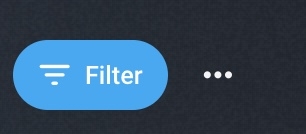
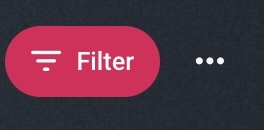
Firstly absolutely great job, this really cleans up the UI nicely. Switched to beta version as i noticed issues with the latest non beta on beta .32 which appears fixed in the beta, had to make a cpl of changes so far Multi Select This is fine in non pinned mode, the bar stretched the screen okay, but in pinned mode the qty number is hidden by the sidebar So i added the following for my setup (different colours) to ensure its center of the screen with a max-width /*add styling to multiple edit box*/ .selectionCommandsPanel { background-color: #212730 !important; border-radius: 40px !important; margin-top: 15px !important; max-width: 80% !important; margin: auto; } Margin top still overrides the auto which centers it but moves it down from the top edge Multi Select (Disabled) So seemed no or little styling on items that are not selectable as there is only one item i.e one audio track As you can see in the Audio section especially, so didnt spend long here but just added the following for now /*Disabled selection box add padding and bold font to match*/ .emby-select-inline[disabled] { padding: 7px !important; font-weight: 500 !important; } Active FIlter This one bugged me but got there in the end, if you apply a filter the button colour is blue. Obviously you would want it to match your root colour choice (yellow) or in my case Pinky Red. As the original was flagged with !important, had to take a diff approach to make my !important more important then theirs /* Filter Active Colour*/ div.emby-scroller .filter-active { background: #e0095b!important; background-color: #e0095b !important; } So now the active filter tab fits in with the rest Just need to sort out the issue of coverart disappearing when you select it for multiselect but thats for another day Many thanks for this theme once again !




 1 point
 -
I re-wrote this so it's a bit more re-useable. Hopefully the setup instructions are clear. https://github.com/hooray4me/m3u2strm1 point
-
Bueno, realmente hasta hoy nunca me intereso saber si mi procesador de mi celular es arm o x86, asi que no se como saberlo xD Pero intente con el x86 y fallo asi que intente con la arm7 y todo bien, muchas gracias1 point
-
I have been playing the same series every day and so far it has chosen to behave. Thanks again for your support. I tend to watch intermittently while I am doing other things so I thought that might have something to do with it, but I have not changed the way I watch. I might play for 5 minutes, then pause for 10 or 15 minutes, then play for 10 minutes, pause for 5 minutes, repeat.1 point
-
finalement autant rester en ipv6 .... c'est l'avenir (imposé) Alors autant affronté le sujet maintenant car revenir en ipv4 fixe n'est que provisoire merci encore EMBY est au top !!!!!!!!!!!1 point
-
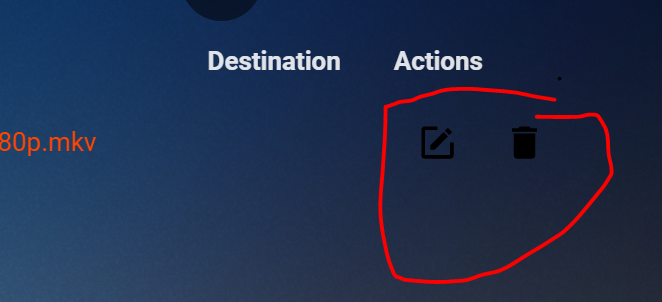
chef, with the latest server update I did (went from .18 beta to .30 beta) the organize and delete button turned black. As I am usually using the black theme I can't see them (black on black), the screenshot was made with blue radiance theme. Anything you can do about that, maybe the button color needs to be theme dependend? Thank you!
 1 point
 -
And here is an improved showList selector that allows selecting movies ... again at least from apollogroup CreateStreams-1.0.zip1 point
-
Personally, I don't want any streaming software touching my files. I'm fine with being given the option to create metadata files than can live along side those files. Those can be ignored or nuked without lasting consequences. Once you modify a media file, there is no "undo". Though I've never had much success with it, many people swear by beets to tag, rename, and organize their media.1 point
-
Would be great to be able to just click a user, clone user to new user... that copies, profile, access, and parental settings.. set new user name, set password. Good to go.1 point
-
Hi @Luke, I would suggest that you add something like this notice to your QNAP installation page: "Note: Due to licensing requirements, before installing the Emby QNAP app, you must have "Allow installation and execution of applications without a digital signature" selected and applied on the QNAP server at this location: App Center / Settings [gear wheel] / General. (This will produce a warning.) You must leave this setting on in order to avoid having the Emby app shut down every day or so by the QNAP system (which would then require a manual restart of the Emby app)."1 point
-
Just FYI to anyone reading this, another work-around is to just create a custom widget and point it to the EmbyCon Widget NextUp node.1 point
-
+1 for manual timezone settings1 point
-
why not just create a setting in the app where someone can either choose their timezone, or GMT +/- hours. This way it shouldn't be dependant on anything on the TV, or the IP address1 point
-
Hello, So good job @@t1m... Thank you so much.1 point