Leaderboard




Popular Content
Showing content with the highest reputation on 03/26/22 in Posts
-
We are working on getting it back into the store and will let you know when the issue is resolved. Thanks.4 points
-
9.01 hotfix three was released today. The third 9.0.1+ HotFix is now live and contains the following fixed: -Resolves issue pairing Dual Shock 3, XBOX, and Switch controllers -Resolves bug where video colors would be displayed incorrect when HW acceleration is enabled -Fixes bug affecting streaming to twitch -Adds helpful notifications when connecting or formatting removable storage -Fixes bug where system would hang when access home screen after matching frame rate in Kodi -Fixes bug where surround upmixer would stop working after playing Dolby audio streams -Adds Plex support for latest Hauppauge WinTV-dualHD DVB-T tuner (EU only) -Fixes bug where AI upscaling could not be changed in Netflix app -Resolves issue where Documents UI cannot access external storage folders -Resolves issue where SD card notification would be displayed when launching apps -Resolves issue when capturing screenshots in GeForce NOW using NVIDIA Share -Resolves crash issue with Google Play Games on 2015/2017 SHIELDs. -Resolves localization issue with Canadian Language selection of energy start timers -Resolves audio issues when connecting headset to 2015 SHIELD Controller SHIELD Experience Upgrade 9.0.1+ Hot | NVIDIA GeForce Forums3 points
-
Personally, I have no dog in the fight, so I was merely presenting opposing views from that other community but I'm already sold on Emby anyway. Any improvements thereafter, such as what's presently in the beta, is a bonus to me. I'm generally not inclined to run betas though, so I'll gladly wait until the next stable release to enjoy those.2 points
-
You've grown up with watching live tv but on television only runs garbage? You have a big library but don't know what to watch next? Then this for you: "VirtualTV" - my new live tv plugin that allows you to create custom channels based on conditions of your Emby library content. What's missing: Maybe codec conditions Known problems: Needs Emby Premier to work (Playback) Emby's live tv and playback api is very limited, so i've had to make some detours to get things working. The plugin has two general playback modes: "continous" and "playlist" playback. With "continous" mode you can also choose between "live", which bahaves like real live tv or "archive", which plays the videos from the start. In "Continuous" mode multiple videos are queued and concatenated to one big file with the help of ffmpeg. To make this happen every video in the queue has to have some common features (video and audio codec). That's why it often happens that the video also has to be transcoded by ffmpeg. For transcoding the plugin relies on Emby's internal transcoding engine. If there's a problem, not uncommon with hardware acceleration enabled, the plugin also has a problem. Nothing i can do about it. The availability of subtitle tracks is mostly dependant of the Emby user playback settings. In continous playback mode only one (the default) subtitle track can be used and this one has to be burnded into the video (transcoding takes place). In "Playlist" playback mode the videos are pushed as a playlist to the Emby clients. It's like you would play your videos directly from your libraries. This way you get all the features you are used to. Audio and subtitle selection, pause, skipping around and similar things. "Native" playback method was created by the Emby Devs. Similar to Playlist playback it will play the real library videos, but with the big difference that playback is purely initiated by the client app, without any remote command execution. This is why it also works for Roku devices on a WAN network. And although the real videos are played, the whole thing is treated like live TV. This means that channel zapping is possible and no dialogs for playing the next episode are displayed. Unfortunately, the new playback method does not yet support all features. As the name "Archive" suggests, it will currently always start all videos from the beginning. In addition, only very few Emby apps automatically advance to the next video. If you want it to be improved even further, each of you should raise your voice in this thread. To get things started install the plugin via Emby's plugin catalog and restart Emby. Setup your channels with a name and number and choose your playback mode. In the channel conditions you'll have to select an Emby account. This account is used to get library access, respect parental rating, reading watched states and selecting the stream language. At least one textual input field of the conditions has to be filled to get some program data. Fields with an asterisk are either evaluated with an "AND" or "OR" condition among each other. Finally, if you've chosen "Continous Playback" for one of you channels, take a look at the transcoding settings. Save your channel line up and manually trigger a "Guide Refresh". Now have fun! Version History: After a plugin update, always clear your browser cache. If your settings still don't load in the config screen, you have to move the "VirtualTV.xml" out of ...\plugins\configurations and restart Emby. Start from scratch. 2.0.0.0 Unlimited number of channels; New playback method "Native (Archive)"; New security concept for the Export API 2.0.2.0 Performance improvements to Guide Refresh; Preview for Add/Edit Channels; Option to disable Program indicators 2.0.3.0 Fixed missing Playlist sort order for some Content Types; Added support for Seasons with Content Source Collections 2.1.0.0 Selectively enable channels for specific users; Create copies of existing channels; Ordered unwatched episode playback 2.1.5.0 Added option to (auto)enable channels on a specific date range; Bug fixing1 point
-
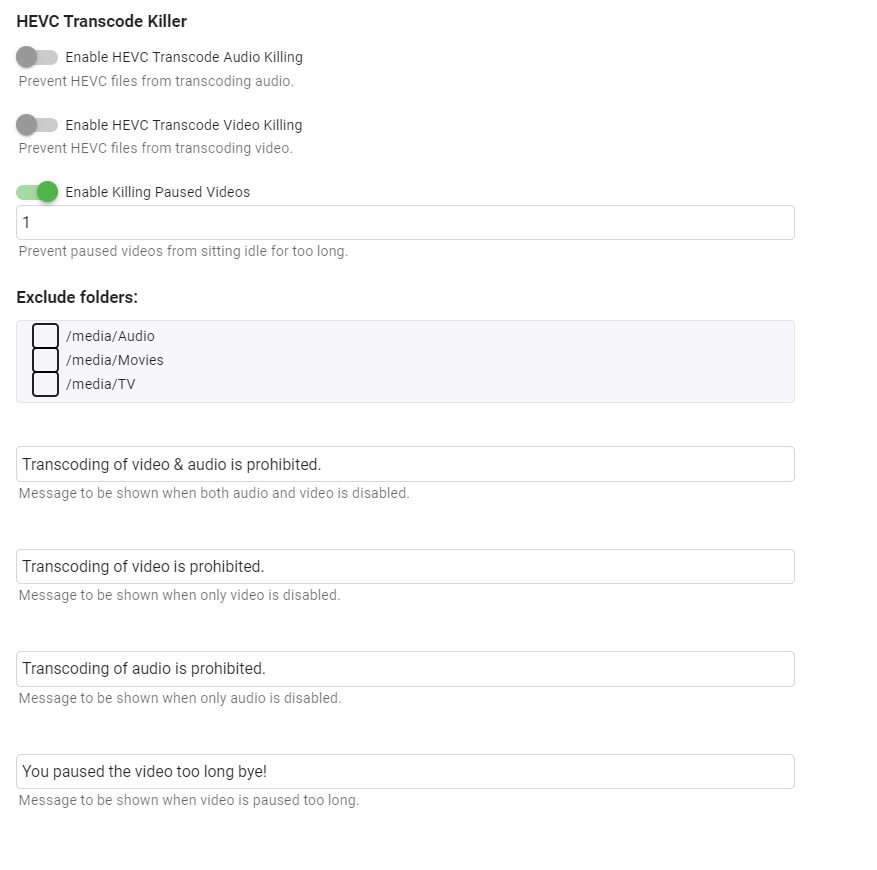
I reworked my original 4k transcode killer to just target hevc transcoding and instead of being on a schedule job to be on playback reporting. I only tested on web ui/ios/shield. https://github.com/bakes82/Emby.HEVCTranscodeKiller Update 4/8/2022 - Added paused video killing.
 1 point
 -
just got a new phone (Samsung s22) and I can't seem to find the app on the play store to download... anyone else having the same issue?1 point
-
(Sorry for the delay - I've been away) 2.1.5 is much better scrolling in general, though it still sometimes sticks if I don't "flick" with my finger lightly enough; but it's fine to use again. Paul1 point
-
Thanks, that seemed to do it.1 point
-
You need to enter "!vtv-skip" in "Tags:" field a bit lower down.1 point
-
How long does it usually take Google to pull their head out of their ass?1 point
-
Any details as to why it was pulled?1 point
-
Where exactly is it promoted as "free" player? https://support.emby.media/support/solutions/articles/44001173099-emby-premiere-feature-matrix1 point
-
Ive had this exact error on multiple installations on two of my samsung tv's and it was always fixed by running the maintenance tool within the samsung settings. For some reason after deleting a usb installed app it tends to be moved instead of actually being removed. If you dont have that option check if there is a direct option to clear cache and such. When that is also not an option, try removing other apps you dont use (edit: to increase free space)1 point
-
Does this help? How to access Synology NAS as Superuser using WinSCP - Tutorials and Guides - Emby Community1 point
-
You must enable enhanced artwork in plugin config menu -> interface. After doing so, you need a database resync or refresh artwork manually (delete existing artwork on Kodi) or using the artwork cache option (reset artwork there)1 point
-
please ignore this, found the silent error that was killing the JS, its nothing to do with the embylink simply a single typo in just one of the ApiClient functions where i had probably just caught the keyboard or something ApiClient.getJSON(ApiClient.getUrl('Typo in here so wasn't a string literal as such!')).then(response => I cannot believe this took hours to find, also that it did not even throw an error in the browser console and prevented any JS from working at all! It was a completely silent error.1 point
-
Glad to hear this is being worked on, thanks Luke. Just installed antenna and SD HD HomeRun and came to figure why there was no audio on ATSC 3.0 channels. Eagerly awaiting!!!!!!!!!!!!!!!!1 point
-
I'm going to send a PM with some screen grabs of my settings. I have Cinema Intros enabled and they do work on my client devices for Cinema Mode but not for Vantage Point.1 point
-
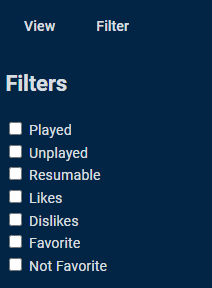
The API and add other variables. Also have you looked at filters in Reports plugin?
 1 point
 -
Stop looking at intros You need to write a book on how this horrible api works lol. My dart game is getting pretty good over here.1 point
-
It is the proper solution. Previous versions selected this option automatically for you when you were running with just stereo speakers but now we allow you to override it.1 point
-
Well... that is debatable. Emby's core streaming is using ffmpeg. That custom build of ffmpeg has been updated several times in the last year alone. Adding feature for intro detection, better transcoding, etc. With regards to any c# backend code... Well, the API is constantly being updated with changes to routes, interfaces, and the methods used to control,sort and utilize media. Is it absolutely nesessary for emby to jump to the lastest version of .net?... I would argue it is not. .Net5/6 changes how you write c#. But the compiler will always break that code syntax down into the same intermediate conditionals, while loops, reference type, value types, etc Emby users would most likely not ever notice a change like that. The dashboard interface has changed a lot too. If you look at the layouts in the beta server, there has be obvious enhancements. The libraries we define to bring into dashboard pages have gotten a lot better. it has entire element libraries specific to it's layouts (emby-buttons, emby-inputs, emby-toggles).1 point
-
Hi, yes we are looking into this and will let you know when it's back in the store. In the meantime apk's are on our website: https://emby.media/emby-for-android.html1 point
-
yes i can confirm this, simpsons was one of the most problematic show i have. I had to manually do almost every season and they have 33 now, so a lot of work intros are 95% almost at the very beginning and the intros are all the same till it comes to the couch scene, here it is different for every episode, also to mention halloween and xmas are very different from all the rest of the seasons1 point
-
I ended up solving this by rooting my tv, and updating the certificates. In the end it was pretty easy, even though I'm a complete noob. Here is a step by step. Warning: Do this at your own risk. 1. Open the browser on your TV. Enter rootmy.tv. Slide to root. You can use the same address in your browser to read more. 2. Go to the homebrew app and settings. Enable telnet. Reboot tv. 3. Download an ssh client for your PC, like putty and open it. 4. To find the address you need to connect to. Go to tv settings and network. Click on your internet connection (wifi or ethernet). There you will see an ip address. 5. In putty type in the address and choose telnet as connection. 6. You should now be connected and be able to type a command. You can use the script from here: https://gist.github.com/stek29/761232c6f7e1ffbc36b98da2a3a0f4d9 Simply type "curl -qs "https://gist.githubusercontent.com/stek29/761232c6f7e1ffbc36b98da2a3a0f4d9/raw/install.sh?$(date +%s)" | sh -" The script should run and update certificates. 7. Reboot tv. That's it. Everything should work now. You should turn off telnet again in homebrew settings.1 point
-
Any update on this? Given there are a few freebie reading solutions emby could link into. I can visualise a scenario such as.....get up, put the news on the emby tune in plug in, it finishes, so you then put some music on, via emby and read the paper on your tablet, via emby. Then emby would be a complete solution.1 point
-
Cloudflare doesn't cost anything the way most people use it and you get a lot for free. From DNS entries pointing to their servers vs your own wan to faster delivery to the client app due to their routing, to the much faster client experience and less bandwidth needed on your system since they cache your graphics. Plus they have all the protect to mitigate things the average person would not be able to cope with. It's not for everyone but there is definitely value to be had.1 point
-
file 2 folder http://file2.softsea.com/File_Management/file2foldergui.exe i found this tool which helped me a great deal i transfered over 9000 rom files and a shed load of mame files in 1 easy click. downloaded artwork etc from emumovies (registered user) make sure roms have the same name. (ie end with your region (US) (EUROPE) etc. Simply select rom path or artwork path and hit start button. it will put all artwork in a folder with the same name. then simply drop the folder over the roms directory and click overwrite. scan library job done. this is also a good tool for your .strm files etc1 point
-
Emby for LG TV's 1.0.33 has been released. Stay tuned to the blog for the release announcement.0 points