Leaderboard




Popular Content
Showing content with the highest reputation on 03/24/22 in Posts
-
This is a very interesting topic. A lot of new comers here need to understand how Emby has come about and the history behind where we are today. I would like to defend Eric and Luke here. I have known @ebrEric since about 2008 when i stumbled across the MCE plugin and started using it, i started to learn code and wanted to do some stuff with VideoBrowser (yes that what it was called). He helped me out quite a bit with Themes at the start. He was the original admin with the other guy (can't remember his name) It then changedto MediaBrowser, still only a complete MCE plugin which was coded purely in C# and mcml. @Luke came on the scene a very long time ago can't remember when exactly, 10yrs or so, and was writing amazing plugins for the MCE app. He evolved and off his own back, and Eric's, They then started to create a server where apps would access it! MediaBrowser 3.0 was born!! Bearing in mind all this was still very free and actually it was the plugin and theme creators that could charge for their work, MediaBrowser 3.0 was still very free. Hours and hours of work went into MB3.0 to which i used to donate $10-$15 a month to them to thank them for their amazing work. The project was moving in the right direction. Then the project moved to Emby and new era a new structure. So what if they want to charge you for all of their hard work over at least the last 15yrs and make the project closed source. The whole reason for this, was because having open source, people would fork the repo, remove the premium validation and distribute it for free and use the server and apps for free. The whole reason it has been closed source now, is because of the UNMORAL & DISHONEST people in the world. They do this full time now so give them respect, pay your subscription and enjoy the app. Jellyfin do what they do and the interfaces are still from way back when, nothing has changed other than a few cosmetic enhancements. They snoop the forums for ideas and hoping to "acquire" code from plugin developers... to keep up with the Jones'. There are 2 guys here... that work their asses off to bring this amazing media experience, give em credit and support them as you should. And yes... Jellyfin should credit the devs. What makes me laugh is there are still so many components in their source code which have an emby prefix... so i guess that is some accreditation. (I'm just donning my Bomb Disposal Suit now...... for all the trollers out there!!)8 points
-
Normally, I'd say "my bad", but I'm gonna pass the buck up the line to the person who gave me the raw bullet list, but I won't mention any names. LOL @GrimReaper thanks for the heads up on this and sorry this was confusing @mbarylski I edited both the Android and iOS blog posts to reflect this.3 points
-
Hello, It will be great to have the possibility to exclude a library from the global search. For example the Adult content one. Or at least to be able to exclude a tag from the global search and by this I can tag the entire Adult library as Adult and Adult tag to be globally excluded on search. Imagine what happens when you want to search for "Coffee with Ana" movie and you start typing in the search field "Ana" with little kids near you Thanks!2 points
-
I changed the chmod settings to 755 and 645 and the server runs, I can connect and play back stuff. I also created a new user. Looks like it's sorted. Eventually. Seamless upgrade! Sweet!2 points
-
Just adding on this. I got a lifetime MB3 / Emby subscription directly from Eric @ebr some 8 to 10 years ago for a $10 donation which has a grandfathered unlimited devices.. That's right $10! At any rate, I rode on that for a few years but seeing how this has significant value to my and my family's lives I now subscribe for $4.99 a month to support their efforts. even though I don't have to.2 points
-
Has open source been considered?2 points
-
Hey guys, I am so sorry about the delay. I will be getting back onto this project shortly. I'll also be looking for another developer who would be keen to continue developing with me. Thank you so much everyone for the feedback and for using my plugin. Warmest regards, Anthony2 points
-
Emby For iOS 2.1.3. Has Been Released, Featuring New Timeline Seeking and Thumbnails Graphics! Visual Timeline Seeking including Thumbnail Graphics Included in our new 2.1.3. release is support for visual seeking. You can Rewind, Fast Forward or Jump to any position in the timeline quickly and easily. Best of all our thumbnails graphics help you pin-point the scene you want to re-watch or queue up. The above pictures shows how easy it is to find a scene you want to watch. You even get the chapter name embedded in the thumbnail picture. Speaking of which, Chapters make use of our thumbnail graphics as well with their own set of information and use of graphics. The above screenshot shows the use of Thumbnail graphics in our Chapter selector available from the easy to use OSD menu. This screen demonstrates how easy it is to view the Name, Starting Time as well as Thumbnail showing the action taking place at the start of the Chapter. Improvement to Audio On Screen Display (OSD) You can now toggle the play queue on and off, allowing you to choose between seeing the list, or just the artwork. This change makes room for additional space needed for a new user requested feature that is quite popular. New Use of Graphics Elements This release of Emby for iOS uses additional graphical elements in subtle ways that sure to please. It still has the classy interface you've come to love but uses additional graphics in a modest manner giving it an elegant and refined look. The screenshots above demonstrates this with a couple simple changes from a text based titles to the graphical logos. Pretty sweet! Of course that's not all. Release 2.1.3. has additional new features including: Fixed intermittent app crashes on device rotation during video playback Addition of a Resume Rewind Playback Option Additional Info in the OSD including Chapter, On Now and a Guide for Live TV Newly added Support for A-Z Picker with Descending Order New Support for A-Z Picker when Sorting by Album or Album Artist New Subtitle Background Color and Opacity Options to make Subtitles Easier to View Improved Audio Book Detail Screen Updates to the Top Tab Design to be More Discoverable and Easier to Use Improved Performance of Playlist Detail Screen Various Subtitle Improvements View the full article2 points
-
Guys, The ebook side of Emby/MediaBrowser has been long stalled or rather stagnated. I would like to offer up a couple of suggestions. Many people use calibre as an ebook/comic book tool for scraping data and general management of their collection already. This program is absolutely astonishing in its ability to pull metadata from post calibre scans, as well as draw in metadata from the file source and/or directory structure. http://vaemendis.net/ubooquity/ Its a self contained .jar server/reader combination. And honestly I am very impressed by it's small footprint and wide range of abilities. The other option is COPS , which was written specifically with calibre in mind. It is open source, so making it work with emby I would think would be fairly easy. https://blog.slucas.fr/projects/calibre-opds-php-server/ Ever since the original release of MediaBrowser's bookshelf I have always wanted something that would allow me to 'read' my collection, rather than being basically nothing more than a place-set for images of books I own. I am sure that those who mainly have audiobooks are thrilled with bookshelf , but it's nothing more than an extension of the music library IMHO, not new features. We can have both right? Here I give you two suggestions free of charge.. Just because I love you, and Emby Personally I plan on running the Ubooquity Server along side of Emby from now on, just because of it's massive functionality and tiny footprint. But I sure hope that someone decides -- "yeah, ebook support should be in here too" and do something about it - rather than allow this now very very ancient issue to continue to remain an issue. And so I don't have to have 20 different ports open, some with SSL support - some not, because Emby isn't delivering the 'complete package'. (Please take some of this with humor, I know you have your hands full with improvements/bugs/suggestions/requests)1 point
-
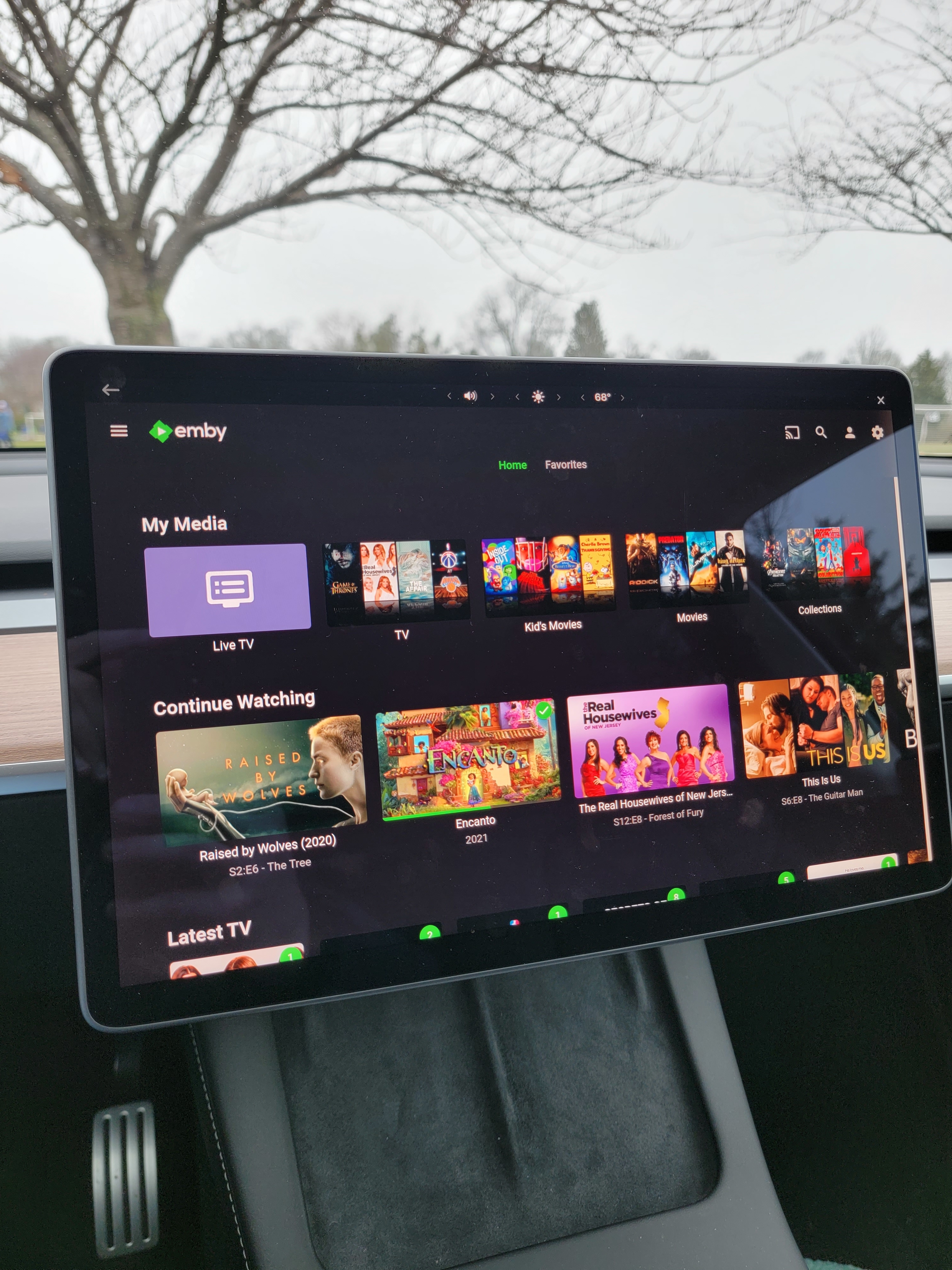
Pretty sweet. Kid's soccer practice got so much better.
 1 point
 -
Today I held a send-off for my old media hard drive which happened to be same age as the TV, old things have to go at some point, so it would be counter productive and a waste of your time to look for additional solutions, given the fact that workaround above just solves it. I would not want to transcode anyway, especially that all files are playable directly. Will try to avoid any subtitles from now on until the TV is also replaced. Not that I ever had subtitles on, they just happen to be left in on some remuxes... Thank you for support!1 point
-
Well... that is debatable. Emby's core streaming is using ffmpeg. That custom build of ffmpeg has been updated several times in the last year alone. Adding feature for intro detection, better transcoding, etc. With regards to any c# backend code... Well, the API is constantly being updated with changes to routes, interfaces, and the methods used to control,sort and utilize media. Is it absolutely nesessary for emby to jump to the lastest version of .net?... I would argue it is not. .Net5/6 changes how you write c#. But the compiler will always break that code syntax down into the same intermediate conditionals, while loops, reference type, value types, etc Emby users would most likely not ever notice a change like that. The dashboard interface has changed a lot too. If you look at the layouts in the beta server, there has be obvious enhancements. The libraries we define to bring into dashboard pages have gotten a lot better. it has entire element libraries specific to it's layouts (emby-buttons, emby-inputs, emby-toggles).1 point
-
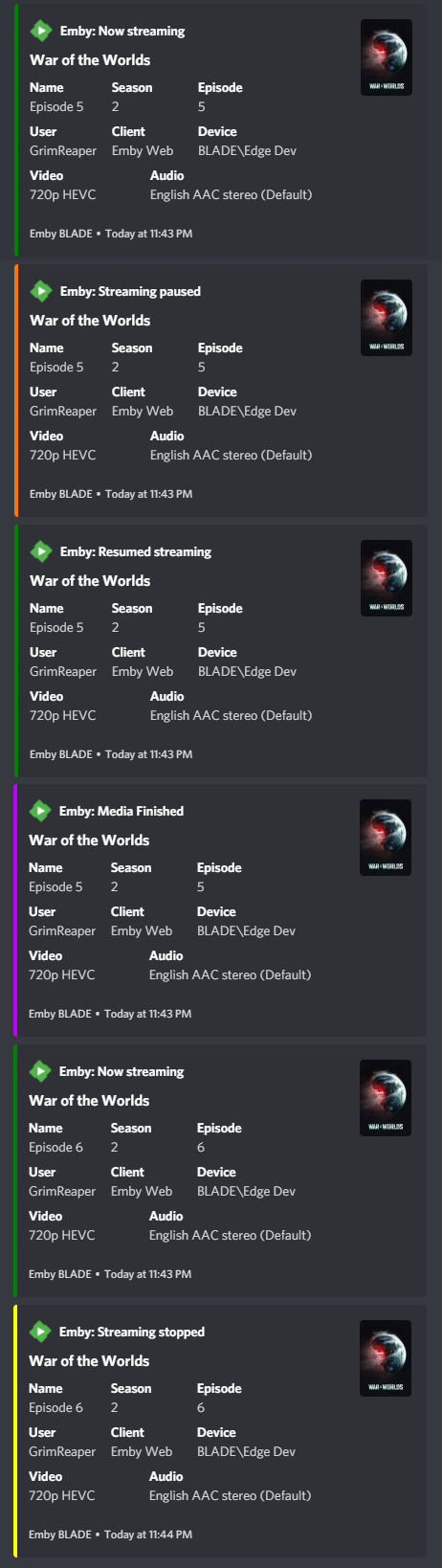
As a sidenote, on both stable 4.6.7.0 (Webhooks plugin 1.0.16) and 4.7.0.32 (Webhooks plugin 1.0.18), with some added logic on Notifiarr side, both servers are sending proper single-event playback notifications: Still waiting for that Transcode info insight.
 1 point
 -
Was this ever resolved? I am experiencing the exact same issue with "That 70's Show" My apologies for the slow response. I have solved the issue, at least on my own server. It seems that somewhere in the scanning or conversion process, the "season.nfo" file for each season set the Season parameter to 70, therefore causing Emby to place most episodes into season 70. Changing the season.nfo files to the proper season numbers and rescanning the library corrected trhe issue.1 point
-
Very cool. I've tested this before myself and it went well.1 point
-
yes i can confirm this, simpsons was one of the most problematic show i have. I had to manually do almost every season and they have 33 now, so a lot of work intros are 95% almost at the very beginning and the intros are all the same till it comes to the couch scene, here it is different for every episode, also to mention halloween and xmas are very different from all the rest of the seasons1 point
-
Without logging from the reverse proxy it's hard to determine if the problem comes from the app or the proxy. If it were coming from the app then you'd think the requests would not even get past the reverse proxy. Nonetheless we did a sweep through the app code to look for possible cases where this might happen, and while we didn't find any, we did do some general cleanup around the way the urls are put together, so there's always a chance that will help.1 point
-
Every episode within a season is compared to every other one within that same season. We do this so we can look at all the possible matches and get a better idea of if the results are correct or not. Looks like we’ll have to do some further testing to figure out why this might be happening, because I would’ve expected Simpsons to have a better result.1 point
-
Sure, thanks1 point
-
Makes perfectly sense, I put that on the todo list.1 point
-
I found out the root cause of my issue. One of my Emby libraries was labeled "News\Documentaries" and the Emby-Next-Gen plugin errored out when building the directory for that library because it interpreted it as a folder. It appears the rest of my libraries failed to build after that first error occurred. [Errno 2] No such file or directory: b'/home/kodi/.kodi/userdata/library/video/emby_movies_News/Documentaries/' After renaming my Emby library to "News & Documentaries", I now see all my libraries populating under the Emby-Next-Gen plugin.1 point
-
As a hint for all users with communication problems or sync issues, maybe you all have to look in emby (webui) at devices and remove all your Kodi devices and than start a new fresh emby server connection in kodi (emby next gen). Maybe this is still a bug if you just updating from old emby next gen versions.1 point
-
It looks like the plugin has picked up registration and the banner at the top is gone and is now matching multiple rules. Just took a bit of time. Thanks!1 point
-
I will, but that device is leaving town for a while. I'll try it sometime in the next month.1 point
-
Are you still running into this?1 point
-
We'll be submitting an update today to resolve this. Thanks guys.1 point
-
We plan to add options for more fallback languages in future updates. Thanks.1 point
-
Reason 3 was that being open source was gaining us nothing as we got no significant contributions from anyone outside our team. All it was doing was giving away all of our hard work for free and we simply couldn't continue to do that and also be able to continue to build and support the system the way we want to.1 point
-
Hi Anthony, It is so happy to see you back. We tried to develop this project for new version Emby, unfortunately it seems not open source. I believed that many developers in the community are happy to contribute their forces to let the project perfectly. KIND REGARDS1 point
-
Hi, very sorry I missed that. I understan everything now. Thanks for help and forgive me. Regards.1 point
-
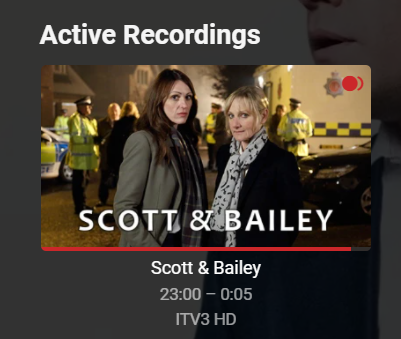
Yes please to the Tuner additions. For the recording start/stop event issue. This was a test I did. I set a recording schedule from the TV guide, and the recording started, however, I didn't get a WebHook trigger at 23:00: I manually played a LiveTV channel at 22:54 and that was logged. I also selected to record a program from the guide that had already started @23:10: The 23:00 log is missing as the event did not trigger. This is my logger: [23/03/2022 22:54] running as user:root params:/config/iptv/m3uChangeChannel.sh <MultiDictProxy(data: bytearray(b{"Event":"playback.start","User":{"Name":"emby","Id":"f8166f06c3984b5cb3b2b9eb8229c4a5"},"Item":{"Name":"BBC One West Midlands","ServerId":"6c6470fb0b204143bf73daa8411224a9","Id":"4","DateCreated":"2022-03-23T22:52:51.7810970+00:00","PresentationUniqueKey":"0b1f0a3e28f105ec2be490328f3a9e0a","ExternalUrls":[],"Taglines":[],"Bitrate":15096291,"Number":"101","ChannelNumber":"101","ProviderIds":{},"IsFolder":false,"ParentId":"3","Type":"TvChannel","MediaStreams":[{"Codec":"h264","ColorTransfer":"bt709","ColorPrimaries":"bt709","ColorSpace":"bt709","StreamStartTimeTicks":515785694000,"TimeBase":"1/90000","VideoRange":"SDR","DisplayTitle":"1080p H264","NalLengthSize":"0","IsInterlaced":false,"BitRate":15000000,"BitDepth":8,"RefFrames":1,"IsDefault":false,"IsForced":false,"Height":1080,"Width":1920,"AverageFrameRate":50,"RealFrameRate":50,"Profile":"High","Type":"Video","AspectRatio":"16:9","Index":0,"IsExternal":false,"IsTextSubtitleStream":false,"SupportsExternalStream":false,"Protocol":"File","PixelFormat":"yuvj420p","Level":42},{"Codec":"aac","StreamStartTimeTicks":515785903440,"TimeBase":"1/90000","DisplayTitle":"Und AAC stereo","IsInterlaced":false,"ChannelLayout":"stereo","BitRate":96291,"Channels":2,"SampleRate":48000,"IsDefault":false,"IsForced":false,"Profile":"LC","Type":"Audio","Index":1,"IsExternal":false,"IsTextSubtitleStream":false,"SupportsExternalStream":false,"Protocol":"File"}],"ImageTags":{},"BackdropImageTags":[],"MediaType":"Video"},"TranscodingInfo":{"AudioCodec":"aac","VideoCodec":"h264","SubProtocol":"hls","Container":"m3u8","IsVideoDirect":true,"IsAudioDirect":true,"Bitrate":15096291,"AudioBitrate":96291,"VideoBitrate":15000000,"TranscodingPositionTicks":0,"TranscodingStartPositionTicks":0,"Width":1920,"Height":1080,"AudioChannels":2,"TranscodeReasons":["ContainerNotSupported"],"VideoDecoderIsHardware":false,"VideoEncoderIsHardware":false,"VideoPipelineInfo":[{"HardwareContextName":"Software","IsHardwareContext":false,"Name":"SW Decode H.264 (AVC)","Short":"H264","StepType":"Decoder","StepTypeName":"Decode","FfmpegName":"h264","FfmpegDescription":"H.264 / AVC / MPEG-4 AVC / MPEG-4 part 10","FfmpegOptions":"","Param":"0:0 - COPY","ParamShort":"0:0 - H.264 (AVC)"},{"HardwareContextName":"Software","IsHardwareContext":false,"Name":"SW Encode copy","Short":"COPY","StepType":"Encoder","StepTypeName":"Encode","Param":"Software Codec","ParamShort":"copy"}],"SubtitlePipelineInfos":[]},"Server":{"Name":"vDSM","Id":"6c6470fb0b204143bf73daa8411224a9"},"Session":{"RemoteEndPoint":"192.168.2.64","Client":"Emby Web","DeviceName":"Chrome Windows","DeviceId":"aba1609f-01bb-443a-8cd6-593c1c0732cf","ApplicationVersion":"4.7.0.32","Id":"7bc76f6c03589087aa1e01a18214eeee"},"PlaybackInfo":{"PositionTicks":0,"PlaylistIndex":0,"PlaylistLength":1}}))> [23/03/2022 23:10] running as user:root params:/config/iptv/m3uChangeChannel.sh <MultiDictProxy(data: bytearray(b{"Event":"livetv.TimerCreated","TimerInfo":{"Status":"New","RunTimeTicks":33000000000,"ProgramInfo":{"Name":"Peston","ServerId":"e0499ff5e16d4138a2359f55744134aa","Id":"1315559","Etag":"45ec61622cc2e581bf3ad93d49947ae7","DateCreated":"2022-03-23T01:00:44.0000000+00:00","CanDelete":false,"CanDownload":false,"PresentationUniqueKey":"EP030518540143","SortName":"Peston","ForcedSortName":"Peston","ExternalUrls":[],"ChannelId":"1296733","ChannelName":"ITV HD","Overview":"Robert Peston presents a fresh, intelligent and lively perspective on the big matters of the day. Featuring major interviews with Westminster heavy hitters, topical guests and all the latest news and updates.","Taglines":[],"Genres":["News","Politics"],"RunTimeTicks":33000000000,"ChannelNumber":"103","IndexNumber":11,"ParentIndexNumber":8,"RemoteTrailers":[],"ProviderIds":{"SeriesZap2It":"EP03051854"},"ParentId":"1296733","Type":"Program","GenreItems":[{"Name":"News","Id":1261129},{"Name":"Politics","Id":1264141}],"TagItems":[{"Name":"New","Id":1261195}],"DisplayPreferencesId":"8cab5e5f60ae4830c47f6431bbe4c3cb","Status":"New","PrimaryImageAspectRatio":0.6666666666666666,"SeasonName":"Season 8","ImageTags":{"Primary":"44e4934d6a19a6fe59f7758c78f37e94"},"BackdropImageTags":[],"MediaType":"Video","EndDate":"2022-03-23T23:40:00.0000000+00:00","LockedFields":[],"LockData":false,"ChannelPrimaryImageTag":"0e979bb2f6cd54cfd0f4bc54f9232562","StartDate":"2022-03-23T22:45:00.0000000+00:00","IsNew":true,"IsSeries":true,"IsNews":true,"TimerId":"b2c8bb406358457498b9daaeb06a2365"},"Id":"b2c8bb406358457498b9daaeb06a2365","Type":"Timer","ServerId":"e0499ff5e16d4138a2359f55744134aa","ChannelId":"1296733","ChannelName":"ITV HD","ChannelPrimaryImageTag":"0e979bb2f6cd54cfd0f4bc54f9232562","ProgramId":"1315559","Name":"Peston","Overview":"Robert Peston presents a fresh, intelligent and lively perspective on the big matters of the day. Featuring major interviews with Westminster heavy hitters, topical guests and all the latest news and updates.","StartDate":"2022-03-23T22:45:00.0000000Z","EndDate":"2022-03-23T23:40:00.0000000Z","Priority":0,"PrePaddingSeconds":0,"PostPaddingSeconds":60,"IsPrePaddingRequired":false,"IsPostPaddingRequired":false,"KeepUntil":"UntilDeleted"},"Server":{"Name":"EMBY","Id":"e0499ff5e16d4138a2359f55744134aa"}}))> So, with the current implementation (and the proposed Tuner additions), I can obtain details for LiveTV using the Event: playback.start/stop and using the 'Type' as a filter. TvChannel is LiveTV (requires channel change) and Episode is playing a Recording (channel change not required). For Scheduled Recordings, I can use Event: livetv.TimerCreated (possibly requires channel change is timer is NOW). I do not know the other Events as the scheduled recording start/stop is not triggering. Chris
 1 point
 -
Yes thats the weird thing Maybe thats a thing with the newer Models because there are some other small issues within the app on the 2021 Modell In my opinion it looks like there were made some changes in the firmware which are not ''well optimized'' in the App1 point
-
None of the other settings changed anything. Just the downmix to stereo1 point
-
Without server version requirement, which is what lead to this whole discussion.1 point
-
@Przemek Sync was renamed "Download to" as mentioned on the first page of the thread. Step One. Setup the plugin for one of more folders you wish to sync. Manually create the folders on disk and make sure Emby has read/write permission to that location. In the plugin you will give this location a name and location. Example names: "FS Mobile 1.5mb", "FS TV 4mb". I use "FS" so I know it's a location, not a device and it's a FS or File Sync destination. Now go into a library and select the content you wish to process. You can use multi-select if you wish. Click the 3 dot button and choose "download to". I would then get a choice of any of my devices if setup and then two examples from above. So I'd select "FS Mobile 1.5mb" and then choose the profiles and bitrate on the next page to do the conversion for me. Does that help at all? PS I made a note to update the KB articles for anything mentioning "sync" so it reflects the new name "download to".1 point
-
That’s a great workaround lol. I’ll consider doing that as well if it doesn’t get fixed.1 point
-
Ok, I'll let you know when I have sent it. I'll get back to you. Thanks1 point
-
Hi, we're looking into this. Thanks.1 point
-
I just created a folder and added some trailers i just knocked up, Ticked Local trailers added the path. Result - No Trailers played and also No Certificate bumpers played. Removed trailer link and the certs played again HOWEVER There is always a way around it lol so i just added the trailer path (no library just a hidden folder) to the Ads/Funnies section as i dont use that section and boom, random trailer plays and then the certificate preroll plays fine Obviously they could get the same trailer over and over lol however1 point
-
For those of you living on the edge, I just pushed a 4.7 beta compatible version of Iconic to the catalog. If you're running Emby 4.7, you should see an option to install Emby 2.0.1.0 (Beta) in the version dropdown of the Catalog Page for Iconic. Let me know if you have any issues with it. @horstepipe1 point
-
Hi there, please attach the emby server and hardware detection log files as well. Thanks.1 point
-
Emby for Android 3.2.43 has been released. We hope you enjoy some of new features! Visual Timeline Seeking including Thumbnail Graphics Included in our new 3.2.43 release is support for visual seeking. You can Rewind, Fast Forward or Jump to any position in the timeline quickly and easily. Best of all our thumbnails graphics help you pin-point the scene you want to re-watch or queue up. The above picture shows how easy it is to find a scene you want to watch. You even get the chapter name embedded in the thumbnail picture. Speaking of which, Chapters make use of our thumbnail graphics as well with their own set of information and use of graphics. The above screenshot shows the use of Thumbnail graphics in our Chapter selector available from the easy to use OSD menu. This screen demonstrates how easy it is to view the Name, Starting Time as well as Thumbnail showing the action taking place at the start of the Chapter. Improvement to Audio On Screen Display (OSD) You can now toggle the play queue on and off, allowing you to choose between seeing the list, or just the artwork. This change makes room for additional space needed for a new user requested feature that is quite popular. New Use of Graphics Elements This release of Emby for Android uses additional graphical elements in subtle ways that sure to please. It still has the classy interface you've come to love but uses additional graphics in a modest manner giving it an elegant and refined look. The screenshot above demonstrates this with a change from a text based movie title to the graphical logo version shown. Pretty sweet! Of course that's not all. Releasee 3.2.43 has additional new features including: Addition of a Resume Rewind Playback Option Additional Info in the OSD including Chapter, On Now and a Guide for Live TV Newly added Support for A-Z Picker with Descending Order New Support for A-Z Picker when Sorting by Album or Album Artist New Subtitle Background Color and Opacity Options to make Subtitles Easier to View Improved Audio Book Detail Screen Updates to the Top Tab Design to be More Discoverable and Easier to Use Improved Performance of Playlist Detail Screen Improvements for HDR Playback Various Subtitle Improvements View the full article1 point
-
We are trying to arrange for an updated NextPVR plugin compatible with these recent Emby changes. Hopefully we'll be able to have something up an running in the near future. It wont provide the same functionality, but will fit in with Emby's new model.1 point
-
I think it should be better with the next app update. Thanks.1 point
-
Hi there, yes more improvements to these are planned for future updates. thanks.1 point
-
Hi all! So I have just added the movie theme song plugin and run the scheduled task. I've come across a problem with duplicate movie titles. For example Aladdin (1992) doesn't get given a theme song, but Aladdin (2019) gets a track from the 1992 version. From what I have read on other posts the plugin is merely a means to downloading the tracks and that I could do it all manually (assuming I had the time and source material). My folders are all named [Title] [Year] [FORMAT] i.e. Aladdin (1992) (BD). Both versions of Aladdin are stored on the same drive. Is there a solution to this problem as I have plenty of films that will be effected, to name a few; The Addams Family (1993 & 2019) Midway (1976 & 2019) Beauty and the Beast (1991 & 2017) The Jungle Book (1967 & 2016) The Lion King (1994 & 2019) Cheers1 point
-
I've done both the unsupported NVMe to volume trick with the upgrade to DSM 7.1 about a dozen times in testing and it seems to work fine. I did experience 4 crashes at the start which I thought were NVMe related but found out it was a system root space issue and a good lesson I'll pass on. This is a "Linux" tip in general not Synology specific. If you SSH into the NAS and "sudo df -H" you'll get a display similar to this. The line above for /dev/md0 is the root mount for the system. In the above picture it shows 22% full which is totally normal. When I was having an issue it was 88% which wasn't enough free space to do the upgrade to DSM 7.1 and the beta package upgrades (I had configured). It was filling my root "/" and would lead to system instability/crash. Once I figured out what was taking up so much space in /dev/md0 and fixed the issue everything was very smooth upgrade wise. PS It was a rogue 3rd party development package (reported and fixed) that was the cause of md0 filling up. Just to be clear, when I said "crash" above I didn't mean a Windows "blue screen" type event. On Linux when the root fills up you have no working space left which leads to some programs or commands failing to execute properly. As an example I couldn't "sudo", I couldn't add/remove packages, etc as there was no working room. It would get to the point I could even login via SSH. Once more space was freed up the system would work fine until it again filled up. I never had any actual files or data at risk but it's a bit "alarming" until you figure out the issue and address it. If you want to upgrade to 7.1 you should be fine but as always have a verified good backup which should go without saying.
 1 point
 -
glad you registered to share this insight1 point