Leaderboard




Popular Content
Showing content with the highest reputation on 03/17/22 in Posts
-
Installed .42 Eureka. You guys are the best. Triggers DV. No lag and no crash in Dune profile 7 and 8. No Time to Die also no crash/freezing. Thank you again for the best support. I will be testing other DV movies in the near future. But I do not see why it should not work. Keep up the good work2 points
-
Thanks. The issue has been solved in the current beta version (4.7.0.31).2 points
-
I updated the "Quick Links" page for Synology in the Knowledge Base with an entry for "Forgot Password (admin account). https://emby.media/support/articles/Synology-NAS.html2 points
-
Not forum bug but website, not a bug, but a bit of a throwback moment; https://emby.media/emby-web-client.html On mobile this shows an old Media Browser screenshot, with Media Browser branding. I'm all for nostalgia but thought it needs pointing out for continuity.2 points
-
I moved from Plex to Emby and even though I think Emby is superior in its flexibility there are some things I like better with Plex, especially in terms of its looks. This theme is trying to fix that by making it a bit more similar to Plex but with some, in my opinion, improvements. The CSS is attached to this post for anyone interested and below are some screens to show it off Good to know I only use Chrome so I can't guarantee this CSS works as expected in other browsers. If you want the sidebar menu to look like in the screens, make sure to pin the sidebar. Watched badge/banderoll is inverted which means that the badge will not be shown if media have been watched, like in Plex. For desired look, please use the "Dark" theme for both Theme & Settings theme in the display settings. Emby-Stable-style-v3.6.txt





 1 point
 -
It is really cool that Emby has the ability to support multiple versions of the same movie. It would be nice to have a setting on the client side to allow the user to set which version should be selected by default. This could be as simple a user-entered string, or it could be a list of detected strings to choose from. It could allow multiple entries and it would choose them in the order entered. On the Kodi side, it would also be nice to get the "Choose the Best Version for Me" option that the Emby app has.1 point
-
It would be great to be able to pinch to zoom the video so it fills the screen on Android. I have a lot of older 3:2 ratio TV shows and watching them with such large black borders is quite annoying.1 point
-
It would be useful to have a "Thumbs Up/Thumbs Down" for music files, rather than just a "heart." Some tracks are in our libraries and we don't want to delete them, but we would like to exclude them from play when we queue up a full album or create a playlist by adding full albums. Examples: an awful track on an otherwise good compilation disk, or a spoken-word intro track on a music album. Being able to easily mark such tracks with a "thumbs down" would be very useful.1 point
-
Hello i have emby premium but i would lik to know what are devices who have purshased licence : I want to see on my server the devices with a license and those without licenses is it possible to have this ?1 point
-
Hello as title says i stopped using kodi as it crashs more than it plays something - started to love emby again but i realllllly miss one feature sorting my movies by genre & genre Here in emby when i add 2 genres in Filter than it shows me for example all action movies + all thriller movies but with an "AND" modifier i could see only movies that have both genres at the same time for example what i used before: Action - Thriller SciFi - Horror SciFi - Adventure War - Romance Romance - Drama ... etc. - the possibilities are endless please consider this for a future change1 point
-
Latest beta .42 solved all DV issues I had. Smooth playback and no crashes (direct play, MKV).1 point
-
Can you please try with the latest beta of the standard Android app?1 point
-
To be honest i have not tried but I will have a look and see if it works1 point
-
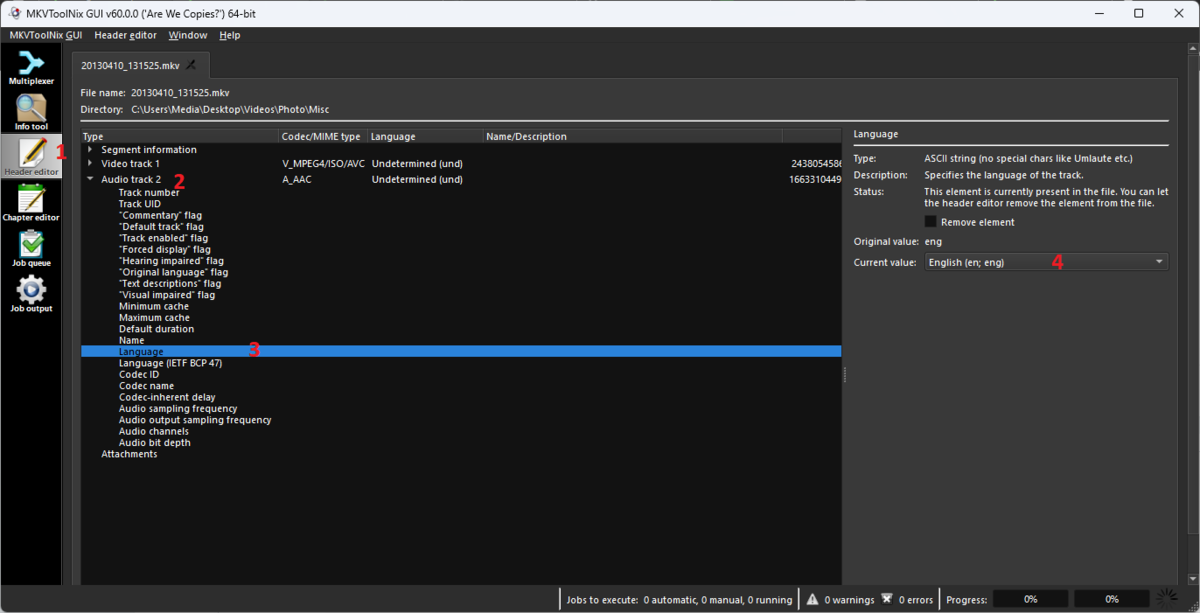
From a mkv standpoint it is just a matter of changing header info and hit ctlr-s to save.
 1 point
 -
Oh thank you, didn't see this button1 point
-
Hi Luke, Thank you very much for looking at the logs. I will eagerly await the release of 4.7 and update my server. Thanks again!1 point
-
Hi, no. Just some new strings that we may use.1 point
-
No interaction has been done with Infuse or any other media players. Infuse is an external app much like VLC and the other 100 media players that are available. The plugin is only designed to work with Emby Apps. It's really upto the developer of Infuse to utilise our API and integrate the Intro skip feature.1 point
-
I reckon you'll hardly get a definitive answer there, as that is highly dependent on one's usage-case and not all setups works in all scenarios, especially not knowing what other containers/VMs your gonna run and how much multi-threading capabilities you actually need. From pure media server perspective transcoding-wise, I reckon latest-gen QSV-enabled Intel CPU takes an easy win over an AMD/GPU combo and has an upside of not needing a discreet GPU to begin with. Then again, having a discreet GPU does give some future-proofing as you can always swap for something beefier. I know @rbjtech has been getting some wild results with his 12700 (same UHD 770 as in 12600) that would likely eat that GTX 1650 for breakfast, need a minute to find that thread - or he might jump-in and offer his insight (and spare me roaming through the topics ). Then again, have absolutely no idea about your other requirements. Edit: Well, that went faster than I thought:1 point
-
No sé si alguien más tiene o ha tenido esté problema con los puertos, pero encontré una solución que propuso el usuario msqwertylaboeuf en esta guía: https://emby.media/community/index.php?/topic/91035-accessing-emby-from-outside-home-network/page/2/ usando ZeroTier. Al menos a mi me a solucionado el problema y ya puedo acceder a Emby perfectamente desde cualquier sitio. La única pega es que tengo que dar permisos para cada dispositivo que quiera que tenga acceso (o dejar la red en pública), pero eso me brinda de más seguridad. Un saludo!1 point
-
This has to do with system xml "CollapseVideoFolders" and library options xml "CollapseSingleItemFolders" hidden switches. By default, the system xml is set to true overriding all library options xml's. which are set to true also. And you have to change system before changing library to honor new settings. Note changing these switched is destructive and will cause items to be removed from database and readd. Not proficient on this platform but you will need to use tools to ssh into platform to edit files. Shutdown Emby You will need to edit the system.xml to change "CollapseVideoFolders" node from true to false. {Application path}/system/config/system.xml Then navigate to the specific library options.xml to change "CollapseSingleItemFolders" node from true to false. {Data path}/root/default/specific library/options.xml Start Emby and do a library scan on the library you edited. You can see Application and Data paths in top section of Server log As for Mixed Content, it does not currently support Photos.1 point
-
Not yet been catching up with IntroSkip. But should get round to it tomorrow. Truck is in for MOT so day at home1 point
-
Had the same query some time ago... and longish discussion afterwards.1 point
-
From what I'm reading above - I believe the ZYXEL VMG8623-T50B LAN Port is connected to the Asus RT-AX88U LAN Port ? If yes, then this is correct. All the Asus 'routers' are just being used as Access Points (Mesh). If you are connecting to the WAN Port on the Asus RT-AX88U, then this is wrong as Cayars says above - you have introduced double NAT onto your LAN, making this much more complicated then it needs to be. Let us know and we can then advise the next steps if required.1 point
-
The solution for MetadataRefreshOptions is to add IFileSystem to the plugin constructor: public class ServerEntryPoint : IServerEntryPoint { public static ServerEntryPoint Instance { get; private set; } public IFileSystem FileSystem; public ServerEntryPoint(IFileSystem fileSystem) { Instance = this; FileSystem = fileSystem; } } and then add that whole FileSystem as argument to initialize new MetadataRefreshOptions: var options = new MetadataRefreshOptions(ServerEntryPoint.Instance.FileSystem)1 point
-
Hi, is cinema mode supposed to work with custom intros? If I enable cinema mode with a folder for custom intros kodi refuses to play a movie (i've attached a log). It fails playing the custom intro because it tries to request a local path. If I remove the custom intro setting from the server settings, kodi works fine and plays both a trailer and the movie. kodi.log
 1 point
 -
Actually, i contacted the guy, nice dude he is. He shifted to plex and doesn't have these icons anymore. He can give access to anime genre icons on the link on the first page if you are interested in that.1 point
-
Hi, Sorry if this is an duplicate but I am using Emby's-Live TV module and it work fine technically. But the user experience to swap and search channels is super bad. Therefor i would like to create this request with some proposals. Get better overvew about the Channel Groups When starting a channel - make possible to swap (up/down) through channels This could be achieved when taking the "TV Guide" and make a better UI. As example you can check out the Smarters Player (Lite) or KODI. Best wishes and Thanks.1 point
-
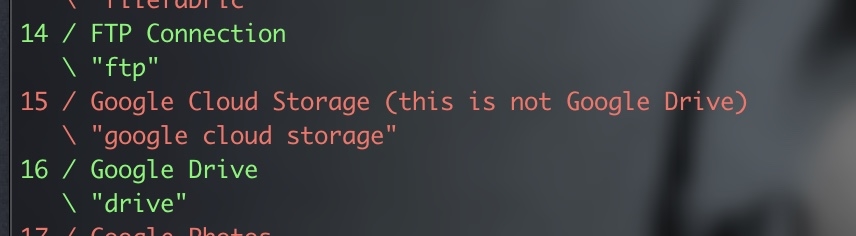
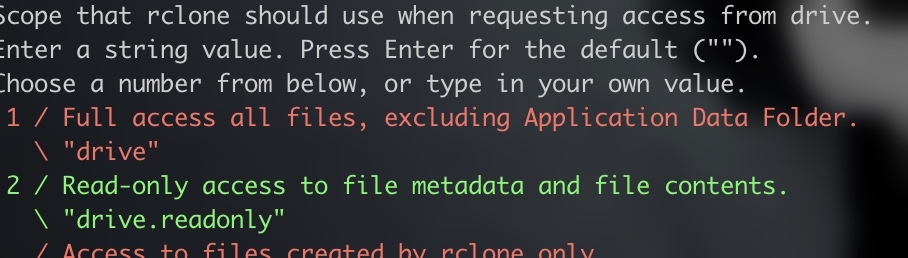
Yep The below is what i do on Debian you will need to get your Client Api /secret Key as per the rclone guide first as using the shared key is not advised, this takes a few minutes API Keys Visit - Google Console from the Account that has access to the drive you want to mount, the below is an excerpt from Rclone Rclone GDrive Log into the Google API Console with your Google account. It doesn't matter what Google account you use. (It need not be the same account as the Google Drive you want to access) Select a project or create a new project. Under "ENABLE APIS AND SERVICES" search for "Drive", and enable the "Google Drive API". Click "Credentials" in the left-side panel (not "Create credentials", which opens the wizard), then "Create credentials" If you already configured an "Oauth Consent Screen", then skip to the next step; if not, click on "CONFIGURE CONSENT SCREEN" button (near the top right corner of the right panel), then select "External" and click on "CREATE"; on the next screen, enter an "Application name" ("rclone" is OK) then click on "Save" (all other data is optional). Click again on "Credentials" on the left panel to go back to the "Credentials" screen. (PS: if you are a GSuite user, you could also select "Internal" instead of "External" above, but this has not been tested/documented so far). Click on the "+ CREATE CREDENTIALS" button at the top of the screen, then select "OAuth client ID". Choose an application type of "Desktop app" and click "Create". (the default name is fine) It will show you a client ID and client secret. Make a note of these. Go to "Oauth consent screen" and press "Publish App" Provide the noted client ID and client secret to rclone. Click "OAuth consent screen", then click "PUBLISH APP" button and confirm, or add your account under "Test users". Be aware that, due to the "enhanced security" recently introduced by Google, you are theoretically expected to "submit your app for verification" and then wait a few weeks(!) for their response; in practice, you can go right ahead and use the client ID and client secret with rclone, the only issue will be a very scary confirmation screen shown when you connect via your browser for rclone to be able to get its token-id (but as this only happens during the remote configuration, it's not such a big deal). POINTS TO NOTE If you are most likely only going to be able to SET app type to external as it will not pass googles checks to make it an authorised app (you have to submite ownership urls etc etc). This places it in testing mode (fully working), with this comes one issue the token expires once a week, so you will need to refresh the token every 7 days (takes a few secs). When you get to the setup Screen for scopes make sure you authorise as a minimum the following: Scopes Once you have written down your client App ID and Secret you can move on to the next stage Install Rclone curl https://rclone.org/install.sh | sudo bash Now let's setup your first Mount rclone config Then type N for new mount, and enter a name for this mount to identify it (no spaces) A list will be displayed make sure you pick Google Drive which is currently option 16 on my setup Now enter your client application ID Now enter your Client Secret Give Full Access to the drive Root Folder ID - Leave blank do not type anything click enter SA Account file - Leave blank do not type anything click enter Edit Advanced - Type N press enter The next question depends on your setup, you mention VPS so i presume that has no desktop UI and is server install so answer as follows Use Autoconfig - Type Y if your machine you are running rclone on has access to a browser Use Autoconfig - Type N if your machine does not have a browser i.e a server os remote Anyways I presume you have no Browser and are running remote so: Click N A Https link will show which you need to copy and paste into your browser You will be shown the Oauth screen for the app you created at the beginning of this guide, you will need to login with the user you set as test user in the first part of the guide (security precaution), then You will see several screens asking you to confirm you are happy to proceed, do this until you get to the Token screen Copy the token provided and go back to your ssh session Paste the key and press enter Confirm you are happy to create by typing Y You should now see your Rclone mount listed so time to mount it: SYSTEMD Mount So create a mount point where you want the drive mounted, you never mentioned if you are running base os version of emby or in docker, so adjust the following mkdir /mount/MyMountFolderName In this example i am creating the mount in folder mount and creating a folder called MyMountFolderName, you can change this to wherever you want it Also for this we are going to create a cpl of extra items up front as this reduces the chance of Error 1 messages when starting the service mkdir /rclonelogs touch /rclonelogs/rclone_vfs_mount.log mkdir /vfscache mkdir /vfscache/gdrive So now time to create the service file (location below based on debian file pathcs): cd /etc/systemd/system Then (name this whatever you want): nano rclone-gdrive-mount.service The below should be copied in and adjusted to your paths, the below is a perfect working solution for Emby and the other media server that shall not be named [Unit] Description=RClone Gdrive Service Wants=network-online.target After=network-online.target [Service] Type=notify ExecStart=/bin/rclone mount YOURRCLONENAMEHERE: /mount/MyMountFolderName \ --config /root/.config/rclone/rclone.conf \ --cache-dir=/vfscache/gdrive \ --vfs-cache-max-size 80G \ --poll-interval 15s \ --log-level INFO \ --dir-cache-time 5000h \ --vfs-cache-mode writes \ --vfs-read-chunk-size 128M \ --vfs-cache-max-age 3h \ --vfs-cache-poll-interval 5m \ --allow-other \ --bwlimit 110M \ --no-checksum \ --no-modtime \ --drive-pacer-min-sleep 10ms StandardOutput=file:/rclonelogs/rclone_vfs_mount.log ExecStop=/bin/fusermount -uz /mount/MyMountFolderName Restart=on-failure [Install] WantedBy=default.target Points to note Your clone Name should be replaced with what you named your Rclone mount earlier If you only want to mount a single folder from your gdrive you can enter as follows YOURCLONENAMEHERE:/myonlyfoldername Path to your created mount folder should be just that the path to the folder you want the gdrive mounted to, make sure you also set this path in the mount point section on the line starting EXECSTop. If you have good hard drive space set up vfs cache as above Se the Max Size of vfs cache to whatever you have available (leaving space of course) bwlimit this is the max network bandwidth you want to use in my example its 110M or 880mbps, adjust this to lower than what you have available or remove all together if you do not need to limit ctrl o ctrl x Now you have saved an exited so time to start the service systemctl start rclone-gdrive-mount.service Now if all has gone well then you should get no error so check if its running systemctl status rclone-gdrive-mount.service If it states it's running then all is good so lets enable this mount at boot systemctl enable rclone-gdrive-mount.service Your Gdrive should be mounted in the folder you specified now you just need to make it available in Emby but as mentioned you ddidnt mention if it was docker or base install if docker its easy just to map the folder in the compose file. If you get an ERROR 1 when trying to start the service you will need to re-check the names and paths in the file again as most likely there is an error in how you have typed it. This is why we also created the mount and cache folders and log files earlier, to reduce that as being an issue. Also not knowing what OS you are using there is a possibility fuse(ermount) may not be installed (debian based normally has this even in minimal install) so that may need to be checked also If you do have to change the file you will be informed to reload the systemctl daemon, so do this before trying to re start
 1 point
 -
Yea it's really odd. The upcoming 4.7 release jumps forward two major .NET runtime releases, so maybe that will help with this.1 point
-
Having Connect account linked is NOT pre-requisite for you to connect remotely, you can do it without it just as well. Think of Connect as sorta DDNS, where you don't have to know address (IP) of your server when connecting remotely.1 point
-
Any idea on when these updates will come out? Was going to switch to Plex for Dolby Vision support but may hold off if this is happening soon.1 point
-
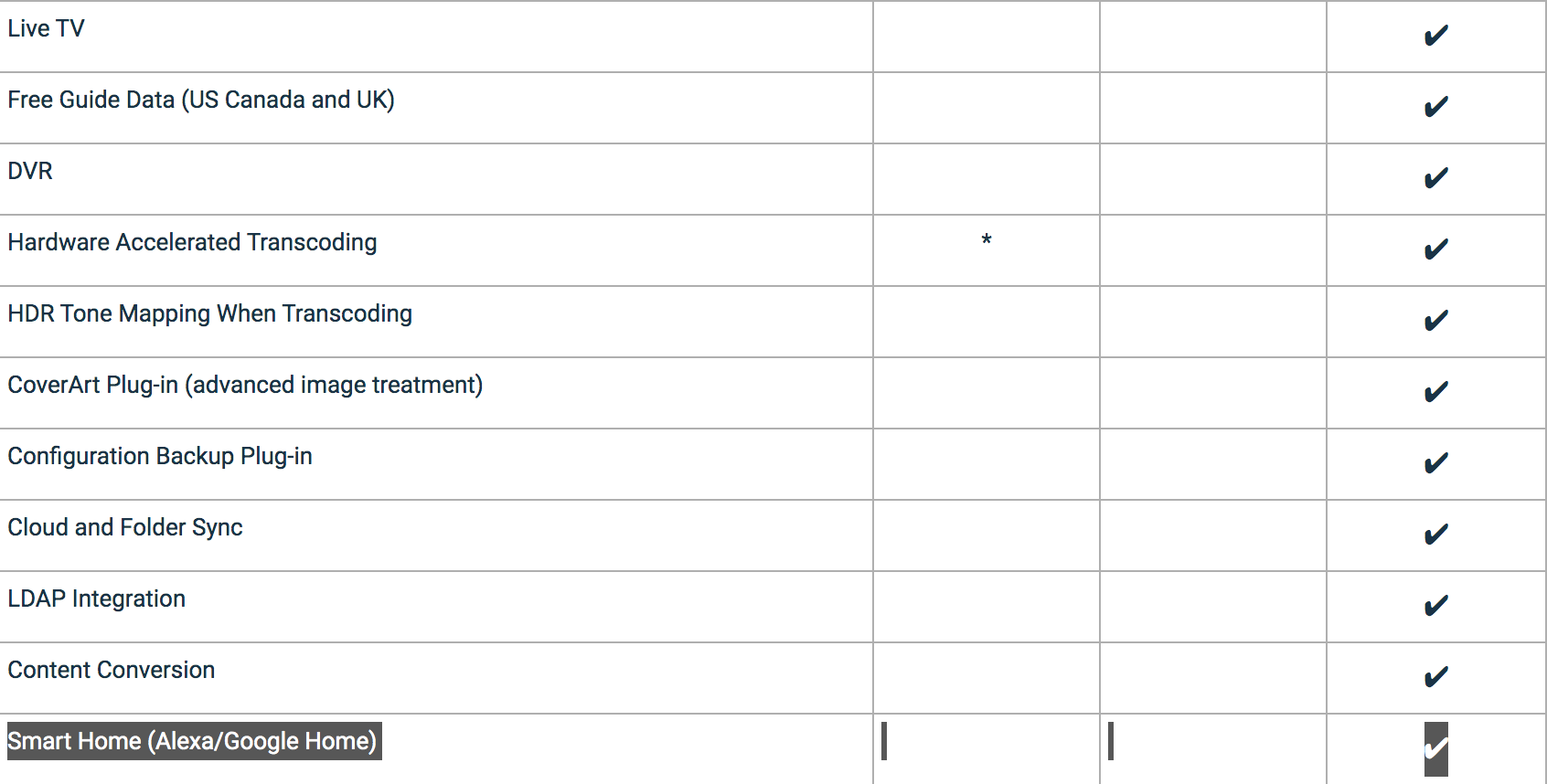
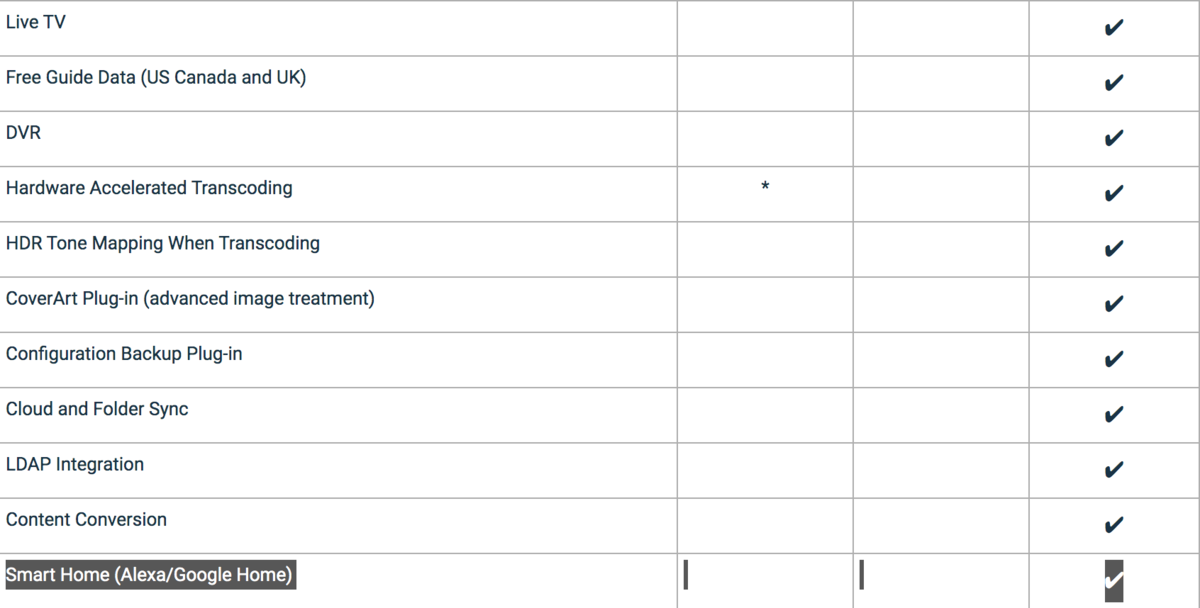
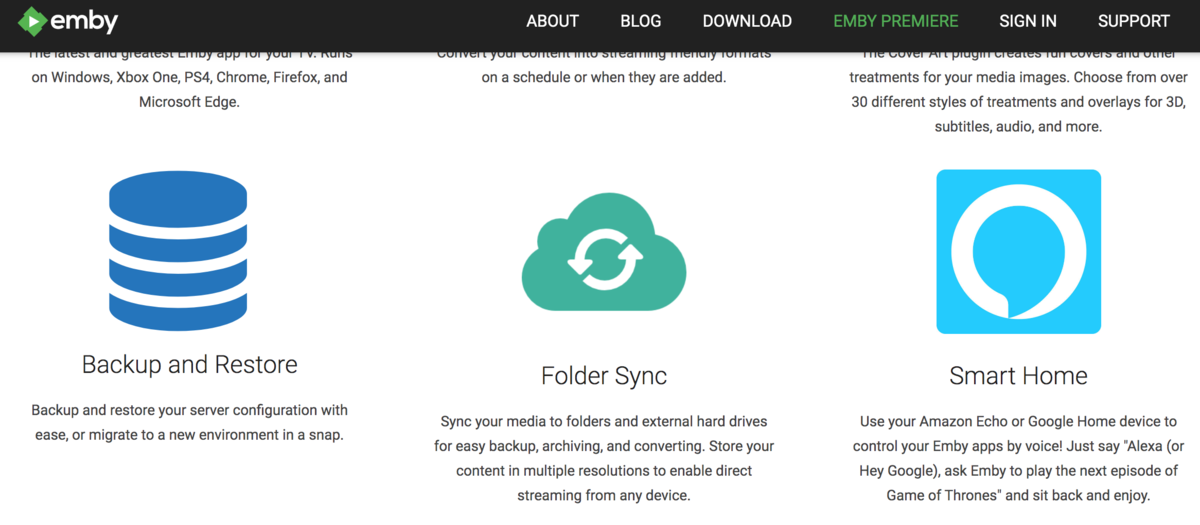
You are promoting Home Assistent as a premiere feature and not just for US or UK like you do with the Free EPG Data. You are promoting it as a feature for all Premiere users so please make it work.
 1 point
 -
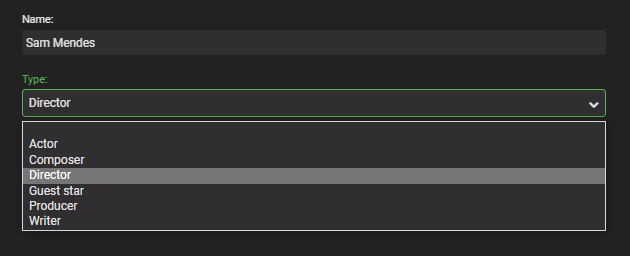
So these sort of edge cases are exactly what Plugin's are there for - to fill the gaps - Emby does have Metadata options for Writer (as seen below) - so it just be a case of re-scraping the data from a source that provides it. Alternatively, 3rd party media tools such as TMM may even be able to do this for you automatically via the NFO file. I don't use TMM but @GrimReaper will I'm sure advise if this is indeed possible ..
 1 point
 -
Hi. We don't feel that working on features one person may be willing to pay the most for is the right approach. We try to work on the things that will bring the biggest benefit to the largest audience of users.1 point
-
The main thing keeping me from switching to Emby from Channels DVR is their commercial skip feature. Have you seen how it works? While playing back a recording, when commercials start, a "Skip Commercial" button appears on the screen. It's very accurate. You can also have it skip automatically, but I think having the button is better.1 point
-
I understand that MBS is supposed to allow trailer download for local movies. This does not work for me and is dealt with in a separate thread as bug fix. This thread is about downloading trailers of movies that I do not have. In other words. all trailers that show up under Media-Collection trailers. Would it be possible to download them rather than offering to stream and also delete trailer is they exceed a certain age? Thoughts?1 point