Leaderboard




Popular Content
Showing content with the highest reputation on 03/16/22 in Posts
-
Still not as good as the fully-functional ATV app.3 points
-
It appears that any playlist that any user creates is public--all other users can see it. I can appreciate the benefit of a public playlist. I could create a playlist called "Harv's Favorite Horror Films" for example, in case other users are interested in checking out what I like. However, the way most of my users are using playlists is to keep track of things they want to watch in the future. They are typically things that the user has not watched yet, so it's not meant as a recommendation to others, just as a way of them personally keeping track of what they want to watch. Having that kind of playlist be public is of questionable benefit to other users. Additionally, it is not clear when you create a playlist that other users will be able to see it. That has the potential to cause some embarrassment. He hasn't created one yet, but I wouldn't want to see my nephew's "movies to fap to" playlist, for example. If I could make a suggestion, I would suggest associating each playlist with the user who created it, and giving that user the ability to make the playlist private or public. For example, the following two checkboxes could be shown when creating or editing a playlist: Allow other users to see this playlist Allow other users to edit this playlist Initially, both checkboxes would be unchecked. Since another user cannot edit a playlist they cannot see, the second would be allowed to be checked only if the first were also checked. (You could grey it out to make that clear.) Depending on your UI preference, it could also be a drop-down menu. Playlist visibility: (Only me | all users can view | all users can view and edit) Thanks for considering this.2 points
-
Everything aside... Ozark is an amazing TV Show! Love it!! Reacher, Vikings:Valhalla, Witcher: are awesome2 points
-
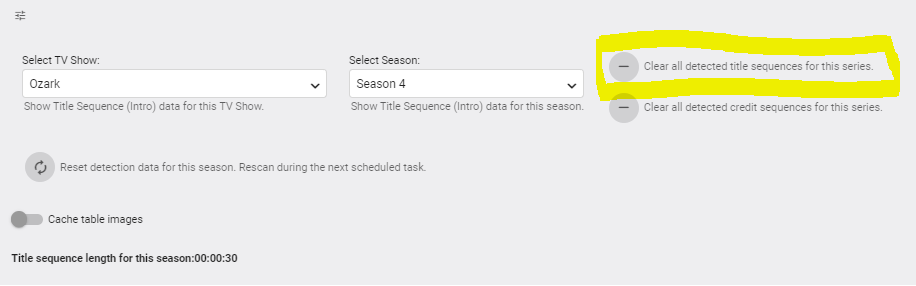
Having a listen to the actual 'Intro's picked up in Ozark myself - On a couple that I listened to - some episodes DO have a similar undertone music in those sequences and that is what I believe Introskip is picking up on (but agree 100% they are not Intros..) but it's not true for all the episodes in that season - it's a bit odd I agree. This is actually what the 'Clear All Detected Title Sequences' button is there for as I noticed this phenomenon during the development and testing a few months ago - the same for Credit's if that is the issue. Use cautiously though, as it clears ALL Intros's from ALL Seasons for that show - not just the Selected Season. Also worthy of note which many do not realise, is you can actually play the 'Intro' part directly from the Plugin GUI if Intro = True - just click on the Green 'Play' Icon on the left hand thumbnail image. I should probably put that in the Wiki as well ..
 2 points
 -
In TV mode apps, it would be nice if FF & RW (and skip forward / skip back or equivalents) should be "page down" and and "page up" in lists for faster navigation. I find the buttons don't do anything in lists in TV mode in web based apps I've tried like sideloaded Android app on FireTV and Emby Theater on Windows PC, but also in AndroidTV app on FireTV it also doesn't work. I also have a Roku as well and in that app, this appears to be hooked up this way, so kudos there. - Jason2 points
-
Be able to create playlist based on a certain criteria, like genre and or year, in order to create a dynamic playlist that it refreshes automatically when new content is added. This way you can for example, create a tv comedy playlist from the 90's, or a new sci-fi Movies playlist. Some other criteria for rules could be the rating, watched/unwantched, score, tags, language, audio codec, etc The possibilities could be endless1 point
-
Guys, The ebook side of Emby/MediaBrowser has been long stalled or rather stagnated. I would like to offer up a couple of suggestions. Many people use calibre as an ebook/comic book tool for scraping data and general management of their collection already. This program is absolutely astonishing in its ability to pull metadata from post calibre scans, as well as draw in metadata from the file source and/or directory structure. http://vaemendis.net/ubooquity/ Its a self contained .jar server/reader combination. And honestly I am very impressed by it's small footprint and wide range of abilities. The other option is COPS , which was written specifically with calibre in mind. It is open source, so making it work with emby I would think would be fairly easy. https://blog.slucas.fr/projects/calibre-opds-php-server/ Ever since the original release of MediaBrowser's bookshelf I have always wanted something that would allow me to 'read' my collection, rather than being basically nothing more than a place-set for images of books I own. I am sure that those who mainly have audiobooks are thrilled with bookshelf , but it's nothing more than an extension of the music library IMHO, not new features. We can have both right? Here I give you two suggestions free of charge.. Just because I love you, and Emby Personally I plan on running the Ubooquity Server along side of Emby from now on, just because of it's massive functionality and tiny footprint. But I sure hope that someone decides -- "yeah, ebook support should be in here too" and do something about it - rather than allow this now very very ancient issue to continue to remain an issue. And so I don't have to have 20 different ports open, some with SSL support - some not, because Emby isn't delivering the 'complete package'. (Please take some of this with humor, I know you have your hands full with improvements/bugs/suggestions/requests)1 point
-
Hi. I wonder if it is possible to add a register button on the login screen. Thanks in advance!1 point
-
Pretty simple suggestion. I have multiple users for my Emby server. If I want to do continuous maintenance on the media, I have to tell everyone. some of them are harder to reach than others ( i.e. no Facebook or Skype chat etc. ) It would be great if say... on the admin panel, I could hit a check box that enables 'maintenance mode', where the server still runs does everything as normal, but instead of the login screen it displays a maintenance page saying the server is unavailable. Even better if I were able to directly put a reason in a text box that would then display on the login screen as well. Not really sure what others would think of this, but for me it would be quite helpful. mostly if I want to make sure no one is trying to access content I know won't work until I've done a full library scan again. Thanks for reading. -Kyle1 point
-
Could the way User Settings are handled be changed so that: 1 - Every setting that is changed via the Admin/Server - Users settings page becomes the new default for that particular user (instead of the Emby supplied default). 2 - Any setting that is changed appropriate for an end user to change from within that particular user account being signed in is saved at the local device level, and would be used instead of Server specified defaults. This wouild: A - Allow us to adjust the default behavior when NO local settings exist. B - Still have local device specific settings override what have been set as Server defaults. (Allowing the same User to have different settings per Device - as it is now.) It doesn't seem like the logic would be that much different than it is now. Assuming if no local settings already exist today, the Server has to pass along what it has them as for a starting point. The change wouild just be allowing us to alter what any of those base default settings are.1 point
-
I'd like to see a feature where on a piece of content there was a button to report a playback error or such. I have a lot of content that I haven't watched that friends have requested - if there was a simple button they could click that pings me a message letting me know there's an issue with the file that'd be great.1 point
-
Is it possible to have a banner on the front page, and/or popup to announce maintence going on with the MediaBrowser service. It would be nice to be able to announce a maintenance to family and my kids who are at their moms. Anyone else think this would be neat? thanks!1 point
-
http://comicbook.yanapax.com/ OPEN SOURCE READER Would be great to integrate that into EMBY, create a library for people to read comics/pdfs/ebooks etc on the emby server instead of just a download link..... what do you guys think?1 point
-
Can we get the option to lock external IDs, just like you can lock other items under metadata? There are times when the show you are adding isn't in your main metadata provider, but it is in the 2nd or 3rd option. However, Emby overrides the lower options to find the most similar one in your main provider. It would be great to add the ID from a 2nd tier provider and then lock it so Emby won't search another provider for that particular title.1 point
-
Can we lock the movie order in a playlist? I want to make a MCU movie sequence, but anyone can change the order in it and i need it to be always the same order.1 point
-
Hello all, i figured since i got this to work i would share my guide on how you can use no-ip and emby together. I realize this is a paid option and not free (20$ for the year with coupon), but for me its worth it as i dont have to worry about my domain name expiring every month or the ssl cert either for an entire year. hopefully this wall of text isnt too crazy. any q's let me know. ____ ** this guide is assuming you use windows 10 or windows server 2016,2019,2022 and no-ip Enhanced Dynamic DNS - 25 Hostnames*** ** always can get coupon so its 20$ for the entire year*** **Enhanced Dynamic DNS - 25 Hostnames gives you 1 included ssl cert* **NOW CALLED Encryption Everywhere DV**** ** now get a free cert with free version of dynamic no-ip** what i currently use -------- 1-manage user certificates in windows search bar. 2-select personal on left then right click on right open space. 3-all tasks > advance > create custom request 4-can follow this guide -but when done leave cert manager open you will be uploading this file to no-ip -- Remember the "common name" you entered will need this to search for in step 6 https://www.noip.com/support/knowledgebase/generate-csr-windows-10/ **Remember to use 2 upper case letters for state and country** **you can choose where to save this csr as well so you dont have to search later, but they are stored by default in C:\windows\system32 if you need to find later as well steps 5-9 explain the other way** you can wait for your status to validate on no-ip.com (took 15 min for me) they are use for my dns so i can skip the txt part. download the pem file to your server once it validates. 5-now you need to get your private cert from your system 6-go back to cert manager right click personal and click find certs 7-search for your common name you setup before (should be 1 that matches) 8-right click and export 9-below is how to do this (sorry its long) Go to Start > run > MMC. Now navigate into the console tab. Select File and then click Add/Remove Snap-in. Under the Available Snap-Ins column, select Certificates and click Add. Choose Computer Account and click Next. Now select Choose Local Computer and hit Finish. Now close the Add Standalone Snap-in window and click OK on the Add/Remove Snap-in window. Step 2: Export Your SSL/TLS Certificate. Now, open the Certificates (Local Computer) snap-in and go to Personal > Certificates from the left-hand pane. Right-click on the certificate you want to export and go to All Tasks > Export. Once you do this, the Certificate Export Wizard will open up. *** you may need to search for your cert by riight clicking personal and clicking find certificates. search by your "common name" in the cert not the name you made. *** Select the Yes, export the private key option and click Next. Now the Export File Format window will open. Make sure that the option for Personal Information Exchange — PKCS#12 (.pfx) is selected. Tick the box for Include all certificates in the certificate path if possible. Now, de-select Require Strong Encryption. <--may or may not have this option (thanks to Teredactle ) Enter a password for protecting your PFX file and click Next. remember this password! Now choose a file name and the location to export the file and click Next. Finally, verify all the information and click on Finish if it’s okay. 10-install https://slproweb.com/products/Win32OpenSSL.html grab latest version (i used Win64 OpenSSL v1.1.1s) open an explorer window to the directory of openssl and place the 2 files. 1 file is from your export you just completed. the other is the pem file no-ip. once installed open a cmd prompt with admin privilege cd to the directory of openssl (mine is located here C:\Program Files\OpenSSL-Win64\bin ) C:\Program Files\OpenSSL-Win64\bin> openssl pkcs12 -in privatekeyemby.pfx -out localprivatekeyemby.pem -nodes <---converts private key from server to pem file the file will be created in the same place you ran the openssl tool. now u will take the localprivatekeyemby.pem you just exported by command line and combine with the pem file you downloaded from no-ip. C:\Program Files\OpenSSL-Win64\bin> OpenSSL pkcs12 -export -in noiphostnamedownload.pem -inkey localprivatekeyemby.pem -out emby.pfx <--combines pem cert from no-ip and private to a pfx file for emby ****As of Feb 2023 we now need to use the new cert from "Encryption Everywhere DV" there is a bug when downloading the PEM file. the file is all garbled and wont work in the command above. download the pem chain file instead and remove all sections but the first.. save as a normal pem file and use this in the openssl command above see my post on feb 2nd 2023 for more details ****** now go to emby server and select the file. in my case its emby.pfx and add the password you created when you exported the pfx file from your server. make ssl external connections only and reboot your server. make sure your ports are properly open. i use https://www.yougetsignal.com/tools/open-ports/ you can verify your cert is working properly with https://www.geocerts.com/ssl-checker i use the default emby 8920 https port. cheers!1 point
-
Hello as title says i stopped using kodi as it crashs more than it plays something - started to love emby again but i realllllly miss one feature sorting my movies by genre & genre Here in emby when i add 2 genres in Filter than it shows me for example all action movies + all thriller movies but with an "AND" modifier i could see only movies that have both genres at the same time for example what i used before: Action - Thriller SciFi - Horror SciFi - Adventure War - Romance Romance - Drama ... etc. - the possibilities are endless please consider this for a future change1 point
-
yup, seems to be workig fine when I use JUST this code. That means that some other part of my css must be interfering with 'visibility' (as 'display' works correctly). Guess I will have to check that bit by bit by myself now... Thanks.1 point
-
Do you know what the 192.168.50.1 address is? Was that the computer you plugged directly in? If it was then it looks clean. Keep in mind if you have two routers in place you could be causing your own double NAT. You either need to set the first router in bridge mode (no routing, no NAT, no anything) plugged directly into the 2nd router which now is in charge and does NAT/routing/firewall, etc or You have to setup port forwarding on the 1st router pointing to the 2nd router. Then on the 2nd router you setup port forwarding to your Emby Server. See if that helps, Carlo1 point
-
Only did minimal testing but how about this? div.skinHeader button.headerBackButton:not(div.skinHeader.skinHeader-withBackground button.headerBackButton) {display: none;}1 point
-
@rbjtech -- I really appreciate it. I need to move the server physically to do that, but I can do it. Let me see if sideloading the updated app works first. Trying to do one thing at a time so that I know when I hit the actual problem. I suppose it could be my quite old chipset, too, but I'm putting that off. Also, I actually don't have IPv6 enabled yet, but I can see if that makes a difference. I just hadn't got around to researching what it might break (specifically things on my work computer).1 point
-
OK yes we plan on adding more options to control orientation. Thanks.1 point
-
Will have to take a look at this but skinheader is separate from page so id only applies to page content not header.1 point
-
@GrimmReaper: There was some snark in my 'inside voice' when I penned that: "... to the 28th". I agree, that is an elegant, simple and reliable solution. In particular from the user/'Household Emby admin' perspective. I guess my observations were referring more to the fact that there may be something awry with the way the application reads and interprets those "Complex" sub/parent folders, and may be a larger issue. Thanks, for the view of the Library structure. I feel that will help some others who are looking for guidance on this topic. -Ken1 point
-
Okay, thank you.. I'll keep a copy of that message I thought it was something like that.. But better now screw around too much1 point
-
We're looking into it. Thanks.1 point
-
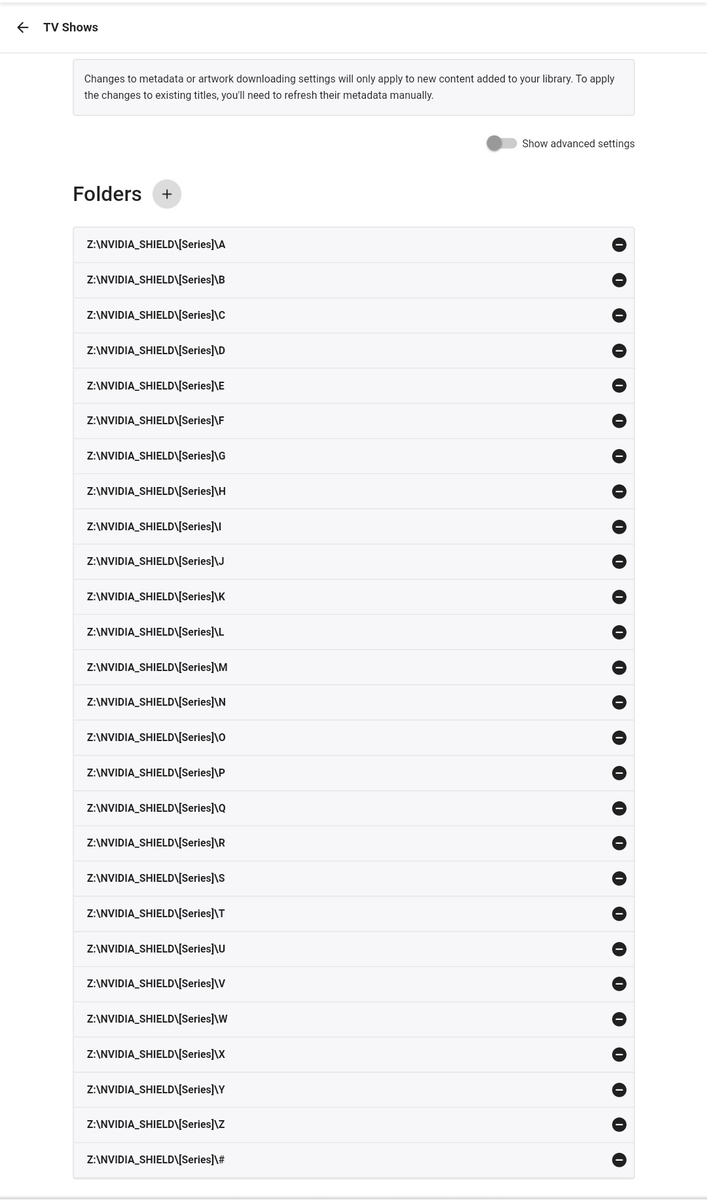
Why would it be ridiculous? I have them setup exactly like that for years, it took 10 minutes and no more worrying which show will break complex folder structure. Simple does it.
 1 point
 -
I think the OP just wants to download an offline version of a movie to their phone - they can just use wifi to do that, no need for an external connection ? But they do need to use a client with the download feature - ie not AndroidTV App - as Grim has alluded to above.1 point
-
Yes, that is the right approach but it is pretty complicated in our system. There could be multiple people watching Live TV at any given time and on any number of devices remote or local. So, obviously, doable but more complicated then a single integrated system such as WMC.1 point
-
Yep - just tested this on my Android Phone - it plays the backdrop video in the foreground instead of background - the Episode listings are not shown .. A 'back' gets you back to the Episode list.. Oh dear ... I spent a bit of time grabbing the Game of Throne UHD backdrop video's to re-create the UHD disk experience - and then released it only works on Web browser .. doh! So I would love to see this implemented on ATV as well. A quick sample of what decent video backdrops look like for those interested ... 2022-03-16_17-18-21.mp41 point
-
Happy to help in any way, although I'm quite new to emby. I don't know if the same procedure would work on an emby version upgrade - I suppose that depends on whether there have been changes to the library files at /var/lib/empy/lib/ and /var/lib/emby/system/ which (for emby-server 4.6.7.0) have Aug 21 2017 dates.1 point
-
I've added this into the Wiki - 3. Settings · chefbennyj1/Emby.IntroSkip.Release Wiki (github.com) and also added to FAQ 6. FAQ · chefbennyj1/Emby.IntroSkip.Release Wiki (github.com)
1 point
-
Thanks for the reply Luke. Prior to start using emby as my main media server I used the now defunct TVMosaic, which handled recording the way I described. Anyway, keep up the good work guys!1 point
-
log https://paste.kodi.tv/aguhojimaj1 point
-
So, let me come back to this as of right now I am having some other issues with the getting metadata/show info to get pulled, will post accordingly.1 point
-
1 point
-
I tested it (The normal Android app not the ATV app) now on my ATV. The theme videos do not play in the background and open in the foreground which makes it useless at this point. Tested on my MiBox4. EDIT: This happens on my Android phone as well. Tested on my OnePlus 9 Pro.1 point
-
Hi. The Apple TV or Roku apps wouldn't require Premiere just for playback...1 point
-
I'm fine with global, as current timeframe is. If you can - I'd appreciate it, if not - clickfest continues, but it's not a dealbreaker. Thanks.1 point
-
After all that time in use, now you want a new option after i've written the plugin is in feature freeze? If i make it happen, then only global, not per channel.1 point
-
I have noticed anime seems to be a bit troublesome fir this plugin in its current state.1 point
-
I'd like to echo the others and show my interest in this as I'm currently getting very irritated with exactly this for the animated show called "Doomlands" As it's in my "Animated" library which primarily consists of Japanese anime, my preferred metadata providers are AniDB/AniList etc above all else with TVDB/IMDB at the bottom so manually identifying "Doomlands" (TVDB: 415069 / IMDB: tt17163920), the real data is overridden by the incorrect anime of "Doomed Megalopolis" as Doomlands doesn't exist as an anime It's not the first time I've run into the issue so being able to lock ID's would be a valuable addition. Maybe I'm misinterpreting what Happy2Play has said but a single button to lock all ID's per show (such as the "People"/"Genres" etc locks) would make more sense than locking empty ID's? But either way, I'm not really fussed on the how, just as long as there is an option to do any kind of locking of ID's so we can have just the correct ID's and prevent any mismatched ID's from being added.1 point
-
Well, I'm not super keen on writing up the instructions myself because I'm not 100% confident I completely understand everything I configured and don't want to give out poor info, it works, but I was following someone else's guide already. I found the frontend config in haproxy very unintuitive, I don't know why it works, but it works. The good news is my haproxy configuration was copied almost exactly from an existing, well written, easy to follow setup guide. https://www.danatec.org/2021/06/22/reverse-proxy-with-haproxy-acme-in-pfsense/ I followed that almost precisely, with the obvious port and address substitutions where required. I also used my existing SSL cert in place of the acme setup section of that guide, but most will want to follow the guide and save paying for an SSL cert. There is also a setting to pass the source IP on to the server that I enabled, my understanding is if you leave this off Emby sees all remote connections as local which could be a security issue and will require you have all accounts secured. I skipped the final section "Bonus: Protect Backend with username and password" as its redundant with Emby handling authentication. There's another recommended configuration change: In Settings - Advanced - change default webGui port to something else. By default pfsense listens for the web interface on port 80, in setting up haproxy you create a rule to allow port 80. As long as haproxy is working this is fine, but if haproxy shuts down, crashes or is disabled you have now made your web interface visible on WAN.1 point
-
Hi there, it's planned for future updates. Thanks.1 point
-
I keep my tv series under folders. The app can’t find them. So the only way I can browse them is by folders. So it’s the most important tab as far as I am concerned1 point
-
A suggestion from having spent holidays at my Mums, doing more remote access on tvs around less tech savvy users. Clients already remember the last user logon in perpetuity (until the user signs out), could the Emby clients remember more than just one user logon? And provide a UI to switch between remembered accounts? So if i want to logon as myself for the holidays (or evening) on a device which is currently logged on as 'mum', i can easily revert the default user back to 'mum' when i have finished. From the 1st or subsequent users perspective, they are not giving any more away than what what they have already (they can always sign out). Less clicks to get to your watched history and back again would be nice. re-entering a complex password on a TV is a PIA. As an aside (not the core of this fr), i wonder if the 'sign out' function should be limited to users profile menu, and not be so prominent on the client exit screen (especially on tvs)...ie when clicking 'back/exit on remote. thanks for considering.1 point
-
Each time Windows has offered an upgrade since Windows XP I have upgraded as soon as I verified that there was nothing that hurt, much, the ability to use anything that I used regularly. However, this time, I am not even going to try because there are too many reports of changes Microsoft has made or are making or or planing to make that would force changes to the way I do things. I am now over 73 years old and Windows 10 should work fine for at least five year or so and even after that, judging by how long Windows 7 has kept working, Windows 10 should remain working well after that five years and will probably remain working, just without direct support, for another 10-12 years. My plan is to keep Windows 10 on all my devices at least until I am 90 or so and then I may well not care any more. I "like" being fully up to date but only one of my computers can upgrade to Windows 11 according to Microsoft. I will only upgrade if I am forced but I will make sure any new machines I get can run or already are running Windows 11. A friend of mine upgraded to Windows 11 and I had a chance to test it a bit. After that I am even less likely to even try to upgrade to Windows 11. Maybe, over the next few years, this will encourage me to implement Linux on all my computers. There are numerous advantages to Linux and I am fairly comfortable with it and virtually all tools I use either have versions that work under Linux or there is a replacement for Linux that is just as good I will ask in another thread but there are so many "flavors" of Linux that it may be hard to find the "best" one for my use, should I decide to go that way. Also I need to double check that there really is a Linux workaround or tool for all my needs. Things are still WAY up in the air and what I do is not necessarily correct for others. BTW: My friend had an Emby server running fine under Windows 10 and his failed to run after the upgrade but he did a remove and reinstall and Emby started working for him again.1 point
-
This is exactly what I need and is missing1 point
-
Thanks for trying it out and I'm glad it's working out for you. I do have plans to add TV shows and Collections after the initial release. But I'll have to sit down and figure out what rule options make sense and how to present them in a manageable way through the UI, then figure out whatever differences and quirks there are for each of them. It's a whole thing. If that ends up being a common request, I'll add an option for per rule colors. But that will lead to requests for per rule shape. And size. And opacity. And... Personally, I like the consistent look.1 point
-
What would also be sweet is different-colored badges, i.e. Rule icon pop-up window to contain color picker as well.1 point