Leaderboard




Popular Content
Showing content with the highest reputation on 03/14/22 in Posts
-
Thanks, I've raised a case with Samsung, waiting for their reply. I can reproduce this and can clearly see that their function to change tracks isn't working on this model3 points
-
I thought about adding it to the tutorial section but don't think it's a great idea being there. It should stay here in the Synology section IMHO and be used as a reference only for those looking for the utmost performance. We know it works today and I've tested it about as good as one can test this looking for different ways it would break other Synology apps and vice versa but we never know what the next upgrade version holds. We're essentially operating our NAS units outside the scope/intent of the company making it. A mod like this could cause issues getting support or cause other similar issues so it's probably best not "advertising it" so we don't get into a situation "Emby said it's ok" or "Emby recommended it" type thing if someone had a problem. This was just me personally sharing some info and doing a bunch of tests on my own time to make sure it was pretty safe. I might have other similar "speed/functionality hacks" (more extreme) but have been thinking about posting instructions elsewhere (ie home blog/site) vs here as it's better to keep this about Emby and Synology working together nicely. Carlo3 points
-
Well you could look in /var/lib/emby/data
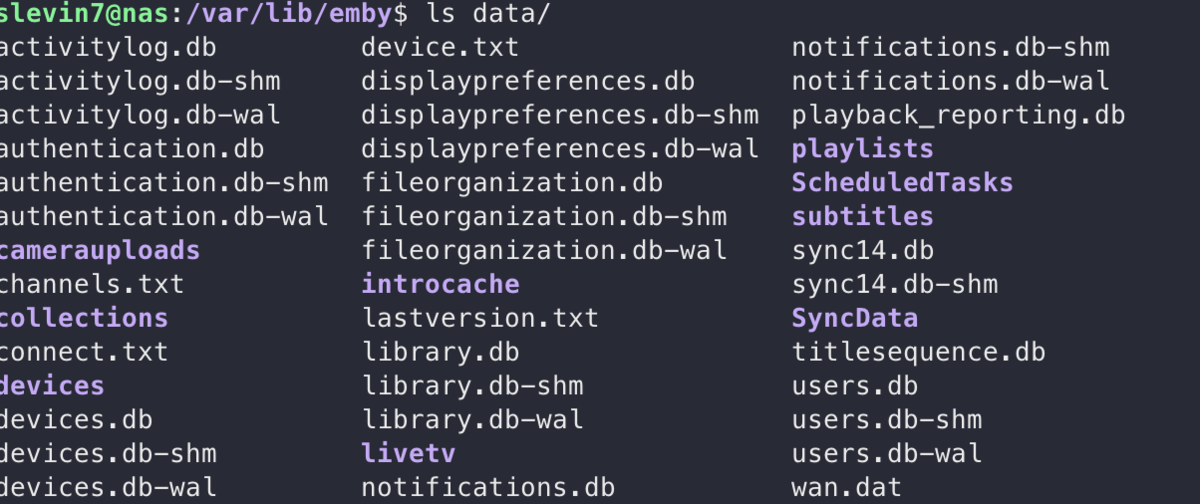 2 points
 -
Could we get an Overview (Circled "i") icon on Playlist items, same as on episodes in Season view, when used for video items?1 point
-
I want a change in the naming convention that Emby uses for the thumbnails of episodes. I use a lot of "custom" episode/thumbnail cards from reddit Currently they have to have the same name as the actual episode file + "-thumb". So if the video file is called "series.s01e01.pilot.x264" the thumbnail/episode card file will be called "series.s01e01.pilot.x264-thumb" Since I have sometimes multiple files per episodes like an HD or 4K Version which creates two separate episode/thumbnail cards. I would like Emby to use a neutral naming convention let's say something like "s01e01-thumb", so both versions point at the same thumbnail/title card file. This would also come in handy when I re-encode video files (with a new name) and don't have to go and rename the titlecards as well. I hope it's possible. cheers1 point
-
I'm looking for a way to select songs from my Emby Server using voice commands on a Google Home device such as the Google Home Mini or the Google Nest. I want to play the music directly on the Google Home device that issues the voice command, rather than routing it to my phone or a DLNA-compatible "player." However, there doesn't seem to be an option to simply play the selected music directly on the Google Home device's speaker. Am I overlooking something? I have successfully installed and configured the Emby for Android app and linked it to my Emby Server using Emby Connect. I can start a session by saying "Hey Google, talk to Emby Home." I can then say "Play <a song title> by <artist name>. Google finds the song on my Emby Server and asks which player I want to use. (Right now there are only two choices—my android phone or a DLNA device that I never use.) To test the feature, I selected my phone and it does play the song as expected, but not on the speaker I would like to use. (If the Emby team wants to pursue improving Emby for Google Home, you might take a look at a product called MyMedia, which is an Amazon Echo "skill." Their approach is elegant and it works flawlessly. The software "watches" and indexes local music folders on a PC to create a lightweight music server that is compatible with Alexa. I wish something similar existed for use with Google Home products.)1 point
-
Feature request: add another option to the Zoom sub-menu within the playback OSD settings menu that forces the video being played into 4:3 aspect ratio. (None of the current options - like horizontal stretch, etc. - achieve this.) Reasoning: Currently I have to install & configure a Kodi client on each device in addition to Emby just to watch certain older shows I've recorded (with Emby) which are supposed to be in 4:3 SD format, because either: 1) the channel correctly broadcasts the show itself in 4:3 but it's interspersed with adverts in 16:9, or 2) in some cases the channel wrongly broadcasts the show in 16:9 in the first place (even though it clearly should be a 4:3 video stream as everything looks distorted and overly wide). In the first case, the Emby client does not recognise the change from 16:9 (adverts) to 4:3 (show itself) during playback, nor on forward-skips (though it seems to recognise 4:3->16:9 on forward skips); the only way to get the show to appear in the correct ratio is to watch 15-20 seconds of the show after the ad-break in 16:9 and then skip back 10s - at which point it does recognise & enact the switch to 4:3 - and re-watch that bit again (& do the same after every single ad-break). In the second case, there doesn't seem to be any way at all to watch the programme in its proper 4:3 ratio in the Emby client. While case 1 would be addressed by better auto-switching within the video playback - and I'd love it if this was improved - that would do nothing to address case 2 ... hence my request is simply to add a 'zoom' option that just forces the entire playback into 4:3 ratio (even bits like the ads that may be correctly in 16:9) and ignores any ratio indicators in the video stream itself. Having to do this once at the start of each such episode/programme would hardly be any real inconvenience, and I doubt there'd be virtually any scenarios in which people would then need/want to manually adjust back-&-forth between the ratios within that same programme, so anything much more automatic isn't especially critical. Hopefully that makes it a relatively straightforward option to introduce. Note: all the above relates to the Android/Fire TV clients - I don't know whether the same is true of other clients since I don't use them, but if so it ought to be made possible in all Emby clients to achieve the end result of watching something in its "true" 4:3 ratio even if it was wrongly broadcast/recorded in 16:9.1 point
-
Not instantaneously but yes it will update.1 point
-
Do you have an example of shows where Introskip is not successfully picking up the Intro's ? General consensus is Introskip is successfully picking up 70-80% of shows without manual intervention. Remember, the technology is matching the AUDIO patterns of each episode - so unless the Audio is the same for every Intro, then it will not pick it up - the Video is not used. And for this very reason, it will never automatically pickup 'recaps' as they are obviously different for every episode. The ability to skip recaps can be 'manually' added however if the 'Intro' happens immediately after the recap - you just need to bring forward the detected Intro 'Start' time to also cover the recap.1 point
-
That is only the display name and won't impact connectivity.1 point
-
@chef I've now had a week to use IntroSkip beta v0.0.1.96. So far, it has only successfully detected intro and credits for a few files (out of many). I've tried re-running the AF and resetting detection data, but it still couldn't find the intro or credits for the bulk of my files. Is this as expected with the beta releases? Also, for those files in which IntroSkip did detect the intro, it still played the long previous episode recap shown before the intro. I would love to see IntroSkip detect and skip the previous episode recaps along with the intros. The episode recaps drive me nuts...usually 2 minutes long and rarely necessary....lol. Cheers.1 point
-
I think if you search the css for i.md-icon that'll be the one. The third one that you find is the shortest and most general, so probably the one to go for. Probably best to just comment it out. Also bear in mind your image has a white background, and the theme is for a dark background really, not that you can't fiddle to your hearts content...1 point
-
More precisely, any user to whom you have given the admin role can manage the server. The point is, though, that it is the Emby user that determines that right, not the Windows or other type of user (which the browser or app doesn't pass to the server anyway). Paul1 point
-
I had the same issue with multiple portable test systems on the same machine until I applied a custom name instead of hostname for all servers. But cannot say how log it takes to update the currently cached select server list.1 point
-
OK, thanks!1 point
-
Having Connect account linked is NOT pre-requisite for you to connect remotely, you can do it without it just as well. Think of Connect as sorta DDNS, where you don't have to know address (IP) of your server when connecting remotely.1 point
-
Exactly this.1 point
-
Ok, thanks for this information. But if, as you said, this is a way of working that will disappear, we might as well stop using it now1 point
-
Hi there, are you confusing Emby Connect login vs. the local login on your Emby Server? They are two different things. If you don't remember the local password on your Emby Server, perhaps try going to through forgot password process, which is on the login screen.1 point
-
A webhooks plugin update went out for this, although I've limited it to 4.7 servers for now.1 point
-
Wonderfull ! I had tried in all the menus, this one I had not seen grrrrr It works perfectly, thanks for your time Very good work anyway, usually to scan all my media libraries it took more than 2 hours, now it's done in a few minutes, incredible. Have a great day1 point
-
Yep - 24fps is a 'valid' framerate - but I'm wondering if there is some sort of mismatch going on in the Emby LG Client - as per your observations and my testing - It's not immediately obvious that there is a problem until you get 2-3 mins in - THEN you get the audio breakup issue. I believe it's the same if you jump to a chapter - Audio is ok again (as it re-sync's the AV) but then again after 2-3 mins you get the audio breakup. So I'm thinking the AV are not keeping up with each other or the LG Client is timing it (or just the Audio) as 23.976 when infact its 24 fps..1 point
-
Here is a video with the basics. https://youtu.be/S5_cDL5ra9A I'm not an expert with this skin, but I think the concept should be clear. Feel free to modify anything you want with this approach.1 point
-
I think you're onto something here. I checked the media info for some more mp4 files and all those with issues are indeed 24fps, all the ones without are 23.976. I just looked it up and apparently some streaming services like Disney+ which are the source for big part of these files with audio distortion now release files with 24fps: https://www.flatpanelshd.com/news.php?subaction=showfull&id=1629438832 . The Witcher also seems to be 24fps: https://discussions.apple.com/thread/250993105?page=2 . So I guess the framerate for the files is correct but there are issues with playback in the LG client?1 point
-
I understand of course, but a trial time would be nice to have, like 1 week or something similar where one could set up the live TV to try it out.1 point
-
I take a video, give me a few minutes....1 point
-
1 point
-
So the issue appears to be poorly muxed files. I've managed to re-create the issue myself using the same files as the OP, and they are all 24fps - not 23.976 as they should be. A remux using mp4muxer fails on them, while other files from the same source (but 23.976) re-mux ok. In summary, I think the source files are 'non-standard' in some way - thus the LG Client is having audio timing issues on them. Interestingly, the Android player via a Shield has no such issues. @SamES - I'm not sure if there is much that can be done here - other than perhaps a framerate Audio/Video mismatch in the Emby streaming pipeline on the LG Client ? - as when played on a USB stick, there are no such issues (according the OP, I have not tested this).1 point
-
Yes, I'm connected now with vpn from my office Thanks and Regards.1 point
-
Are you on DSM 7? If so, it sounds like your shared folder permissions weren't set correctly. See the link below1 point
-
I think something is borked Ok so on my windows pc with a fresh install of Leia and Emby Next Gen 6.2.11 - playlists are working fine. On my Shield, my .xsp looks exactly the same as yours. I will reinstall kodi on my Shield and pretty sure this will fix it. Thanks for your help.1 point
-
Yes please. I also checked the xsp files and looks ok. (identical with 5.x) playlists. ..kodi/data/userdata/playlists/video/emby_movies_Movies.xsp <?xml version='1.0' encoding='UTF-8'?> <smartplaylist type="movies"> <name>Movies</name> <match>all</match> <rule field="tag" operator="is"> <value>Movies</value> </rule> </smartplaylist> I haven't tested with Leia but shouldn't make any difference but who knows.1 point
-
When I play 4:3 videos on my Android they are correct. I have only seen videos played with the wrong aspect ratio when the headers of the file contained errors - and when that happens I correct the file. Paul1 point
-
Hi, my Emby Next Gen just auto updated to 6.2.11 and wanted to say thanks for your hard work. The library importing seems like its five times faster now. However I'm having some issues with Smart Playlists since the update. After finding and enabling "Enable smart playlists" in the addon settings, my emby libraries now show in the Kodi playlists section however when I click on them nothing populates/no movies show. I tried repairing libraries but didn't help and then I tried deleting Emby Next Gen and starting fresh but hasn't helped. Not sure if this is a bug or I'm missing something?1 point
-
Would be great! Thank you.1 point
-
We'll look at improving it. Thanks for the feedback.1 point
-
Correct, yes.1 point
-
Hi, we're looking into improving it. Thanks.1 point
-
Hi, we'll take a look at it, but you didn't need to go to that extreme. Just restarting the server after the time change would have been good enough.1 point
-
New version 1.1.1 in the starting post: Channels: Do not search for Actors and Directors at series level but episode level only Fixed suspend guide refresh option Export API: Better handling of https request Do not throw exception in playlist generation for channels without image1 point
-
Best RoadMap I see in the foreseeable future is TV Headend.1 point
-
No need to rebuild all libraries, here's a hack to change content type:1 point
-
@Przemek https://github.com/mregni/EmbyStat/releases/tag/0.2.0-beta.27 1- Extrat de .zip on a folder named EmbyStat 2- Right click on the folder open terminal and type sudo chmod +x EmbyStat 3- On the same terminal windows type sudo ./EmbyStat 4- Open browser localhost:6555
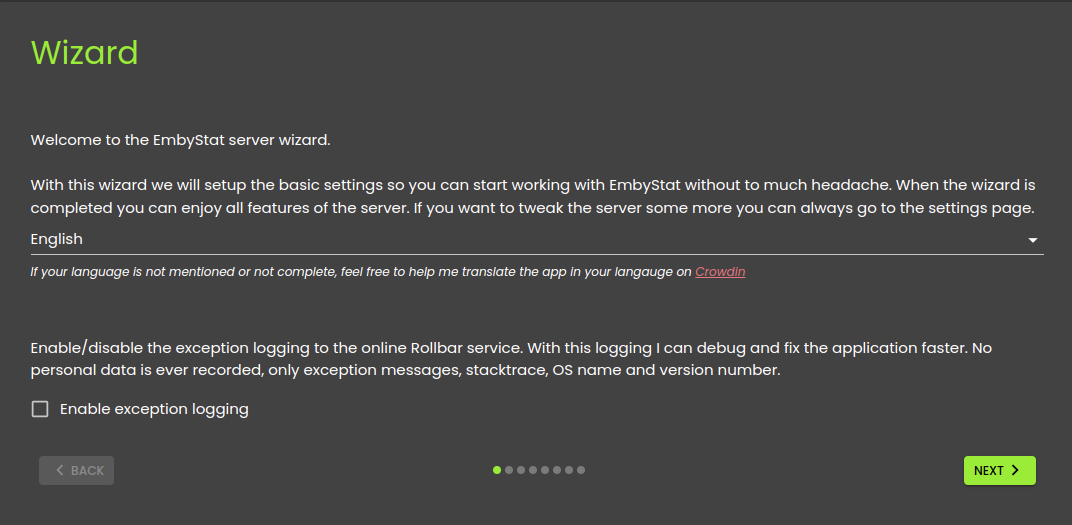 1 point
 -
Hi @sfatula, do you have playlists as one of the top level sections in the web app for the same emby user?1 point
-
A tutorial is probably more appropriate. The thread is 7 pages.1 point
-
I have roughly 500 mkv movies and 300 photos. I can scroll them all at full speed and they populate the screen with zero lag. Selecting a movie is instant. Maybe 2 seconds tops for a movie to begin playing once I hit play. So yea, for me, it has significantly increased browsing and accessing media. I had a few 4k movies that would stutter a little and take a few seconds to buffer, and I haven't experienced any of that since the upgrade. I don't do TV through Emby, so no comment there. I'm about to open my Emby server up to others which will require transcoding of my 4k stuff, so we'll see how that goes. This is why I wanted to do this upgrade, so when outside users watch a movie, their needs, won't impact me while I'm watching something. Highly recommended "easy" upgrade that is worth the price of a 500Gb NVMe. Again, most grateful to you Carlo, for putting so much R&D time and sharing your efforts! Edit: Might consider this thread, or at least a summation as a "sticky"1 point
-
Yeah, that was the first thought I've had upon reading your description - glad you got it sorted out.1 point
-
+1 for this feature. I create at least 2 versions of a movie from my purchased DVDs, Blurays and UHDs ... DVD = 1 version = SD (480p AAC) Bluray = 2 versions = HD (720p AC3) + FHD (1080p DTS) 4K = 1 version = UHD (2160p Atmos) ... which are named as follows in the movie folder ... Movie Name (YEAR) - SD.mp4 Movie Name (YEAR) - HD.mp4 Movie Name (YEAR) - FHD.mkv Movie Name (YEAR) - UHD.mkv ... and which direct play on all my devices and for friends across the internet ... ... which is why I do it. It would be great, if I could specify the default version of 'HD' (if it exists) otherwise 'the only one version found'. Just thought - even better, would be the ability to specify in which order they are prioritised (based on the correct file naming convention). e.g. HD FHD SD UHD Please give it this idea some consideration and keep up the great work. Regards, Paully1 point





.thumb.jpg.53889d96f5dd8fa8bef7636d5df1cfb3.jpg)