
Leaderboard




Popular Content
Showing content with the highest reputation on 03/04/22 in Posts
-
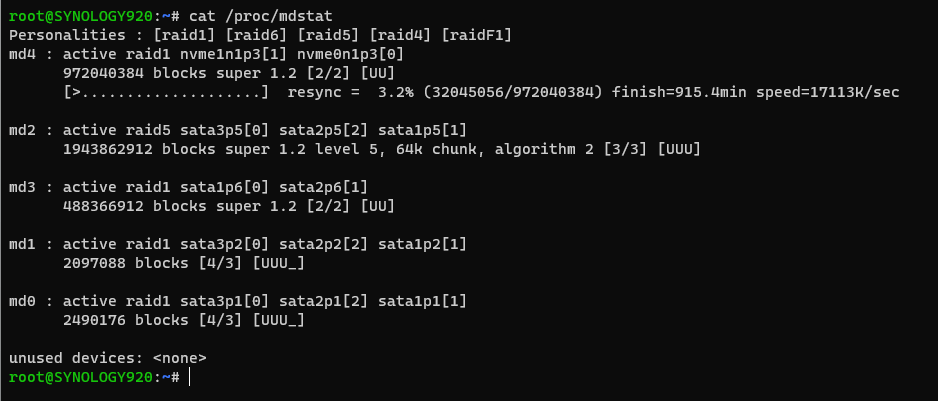
Just wanted to let you know I've reviewed a few of the other existing sources of setting up NVMe(s) for storage use and I'm trying hard to make this more detailed and thorough. It includes instructions for a single NVMe use (in either slot) or use of two NVM(e) drives in a RAID 1 configuration. I've been completely through the first iteration of a single NVMe including updating to the latest DSM 7.1 release which is now in it's 3rd iteration/release that I know of. The RAID 1 setup of NVMe(s) does take quite a while so be prepared for that. As you can see it's 3.2% done with 915.4 minutes to go or about 15 hours. I wrote the documentation on the first pass with a single NVMe and double checking it during my second test run. It's 4am my time and nothing more to do for several hours until this process finishes. I'll have about a hour left of testing assuming everything goes smooth and instructions will be posted for both single and dual drive NVMe configurations plus the needed instructions to setup Emby Server to properly use the new volume. If you need to perform a backup (and you should) now's the time!
 3 points
 -
Hey guys! I just wanted to share some library icons that I created, which work very well for me, in case other members are interested.
.jpg.8a5be7eae21c775cfc19cf05a7cecf73.jpg)
.jpg.d464f081546a05d58f73f1d3b81fb649.jpg)

.jpg.b4278fd00623700b3cbbe124e6c51de3.jpg)

 1 point
 -
I recognize this thread is 1 year old, however, I found it in my search for more detailed information about Emby webhooks and the data it POSTs to the configured endpoint. I took some time to learn (for fun) Node.js, Express, and Mongoose to standup a simple API with the idea of simply logging all the events in MongoDB. Later I would decide what I want to do with them or any actions I wanted to process as they come in. Here are a couple things I learned. A. There are several events published by Webhooks (System, Playback, and User events) but I am hoping more are added such as: 1. Recording Events Recording Set/Canceled Recording Started/Completed/Failed DVR Post recording script result (return code) 2. Guide Events Guide data refreshed Series recordings - new occurrence found/scheduled B. Node Express prefers JSON out of the box Emby POSTs as mentioned by @BillOatman. The key implication is that typical route processing in Node Express won't pick up the form-data as part of req.body (request body). This means you have to tweak a few things, namely using 'multer' module. Ultimately, I ended up with: // routes/emby-event.js // Disclaimer: Clearly not production code! // let EmbyEventModel = require('../models/emby-event.model') let express = require('express') let router = express.Router() let multer = require('multer') // Required for form-data submissions let upload = multer() // CREATE a new emby-event router.post('/emby-event', upload.none(), (req, res) => { if(req.body) { console.log('Using JSON in request body') eventData = JSON.parse(req.body.data) } else { console.error('Request body not found!') res.status(400).send('Request body is missing') } // ... let model = new EmbyEventModel(eventData, false) model.save() .then(doc => { if(!doc || doc.length === 0) { console.log('error saving document') return res.status(500).send(doc) } res.status(201).send(doc) }) .catch(err => { console.error('caught an error while trying to save', err) res.status(500).json(err) }) }) C. Event Schema (relevant for Mongoose Schema and/or reference purposes): Once I was able to log the data submitted by Emby, I was able to parse it and convert the raw values to the Schema types supported by mongoose module. This is not 'strictly' required but ensures that mongoose preserves the values sent. Note: you could instead rely on an empty Schema {} with { strict : false}. Of course, I find this useful for reference as to what information is sent from Emby. Note the Schema below was sourced from raw data received for event type 'playback.start'. I haven't compared all the event types yet to know if they are consistent. // models/emby-event.model.js // Disclaimer: Clearly not production code! // let mongoose = require ('mongoose') const eventdb = { server :'localhost:27017', database : 'webhook-api', user : '***', password : '***' } conn = mongoose.createConnection(`mongodb://${eventdb.user}:${eventdb.password}@${eventdb.server}/${eventdb.database}`, { authSource: 'admin' }) let EmbyEventSchema = new mongoose.Schema( { Event: String, User: { Name: String, ServerId: String, ConnectUserName: String, ConnectLinkType: String, Id: String, PrimaryImageTag: String, HasPassword: Boolean, HasConfiguredPassword: Boolean, HasConfiguredEasyPassword: Boolean, LastLoginDate: Date, LastActivityDate: Date, Configuration: { AudioLanguagePreference: String, PlayDefaultAudioTrack: Boolean, SubtitleLanguagePreference: String, DisplayMissingEpisodes: Boolean, SubtitleMode: String, EnableLocalPassword: Boolean, OrderedViews: Array, LatestItemsExcludes: Array, MyMediaExcludes: Array, HidePlayedInLatest: Boolean, RememberAudioSelections: Boolean, RememberSubtitleSelections: Boolean, EnableNextEpisodeAutoPlay: Boolean }, Policy: { IsAdministrator: Boolean, IsHidden: Boolean, IsHiddenRemotely: Boolean, IsHiddenFromUnusedDevices: Boolean, IsDisabled: Boolean, BlockedTags: Array, IsTagBlockingModeInclusive: Boolean, EnableUserPreferenceAccess: Boolean, AccessSchedules: Array, BlockUnratedItems: Array, EnableRemoteControlOfOtherUsers: Boolean, EnableSharedDeviceControl: Boolean, EnableRemoteAccess: Boolean, EnableLiveTvManagement: Boolean, EnableLiveTvAccess: Boolean, EnableMediaPlayback: Boolean, EnableAudioPlaybackTranscoding: Boolean, EnableVideoPlaybackTranscoding: Boolean, EnablePlaybackRemuxing: Boolean, EnableContentDeletion: Boolean, EnableContentDeletionFromFolders: Array, EnableContentDownloading: Boolean, EnableSubtitleDownloading: Boolean, EnableSubtitleManagement: Boolean, EnableSyncTranscoding: Boolean, EnableMediaConversion: Boolean, EnabledChannels: Array, EnableAllChannels: Boolean, EnabledFolders: Array, EnableAllFolders: Boolean, InvalidLoginAttemptCount: Number, EnablePublicSharing: Boolean, RemoteClientBitrateLimit: Number, AuthenticationProviderId: String, ExcludedSubFolders: Array, SimultaneousStreamLimit: Number, EnabledDevices: Array, EnableAllDevices: Boolean }, PrimaryImageAspectRatio: mongoose.Decimal128 }, Item: { Name: String, ServerId: String, Id: String, DateCreated: Date, PresentationUniqueKey: String, Container: String, PremiereDate: Date, ExternalUrls: Array, Path: String, Overview: String, Taglines: Array, Genres: Array, RunTimeTicks: Number, ProductionYear: Number, ProviderIds: mongoose.Mixed, IsFolder: Boolean, ParentId: String, Type: String, Studios: Array, GenreItems: Array, SeriesName: String, SeriesId: String, SeasonId: String, PrimaryImageAspectRatio: mongoose.Decimal128, SeasonName: String, MediaStreams: [mongoose.Mixed], ImageTags: { Primary: String }, BackdropImageTags: Array, Chapters: [mongoose.Mixed], MediaType: String, Width: Number, Height: Number }, Server: { Name: String, Id: String }, Session: { RemoteEndPoint: String, Client: String, DeviceName: String, DeviceId: String, ApplicationVersion: String, Id: String } }, { strict: false }) module.exports = conn.model('Event', EmbyEventSchema)1 point
-
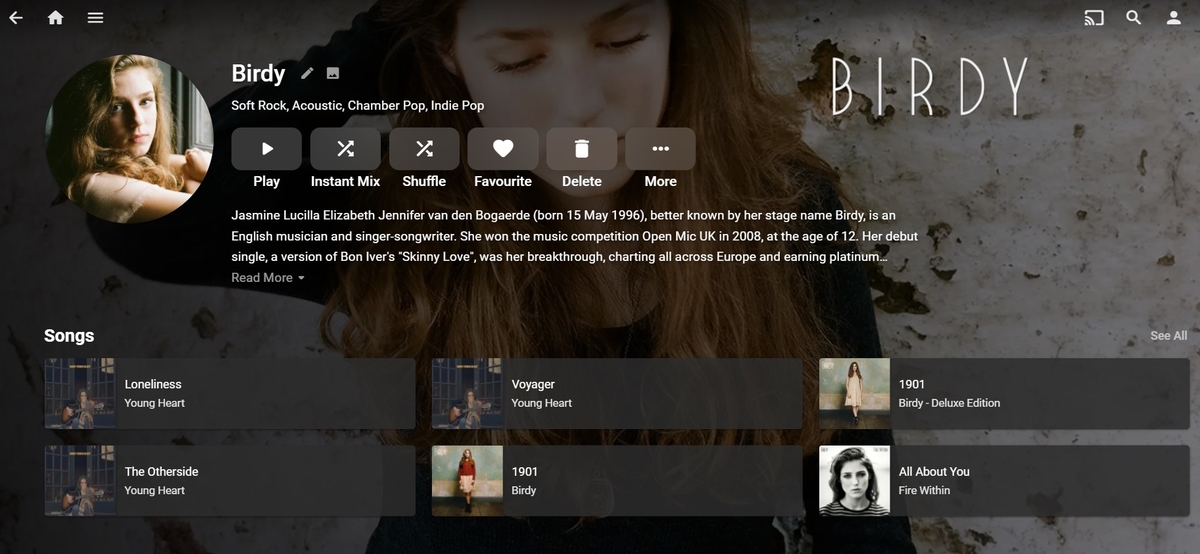
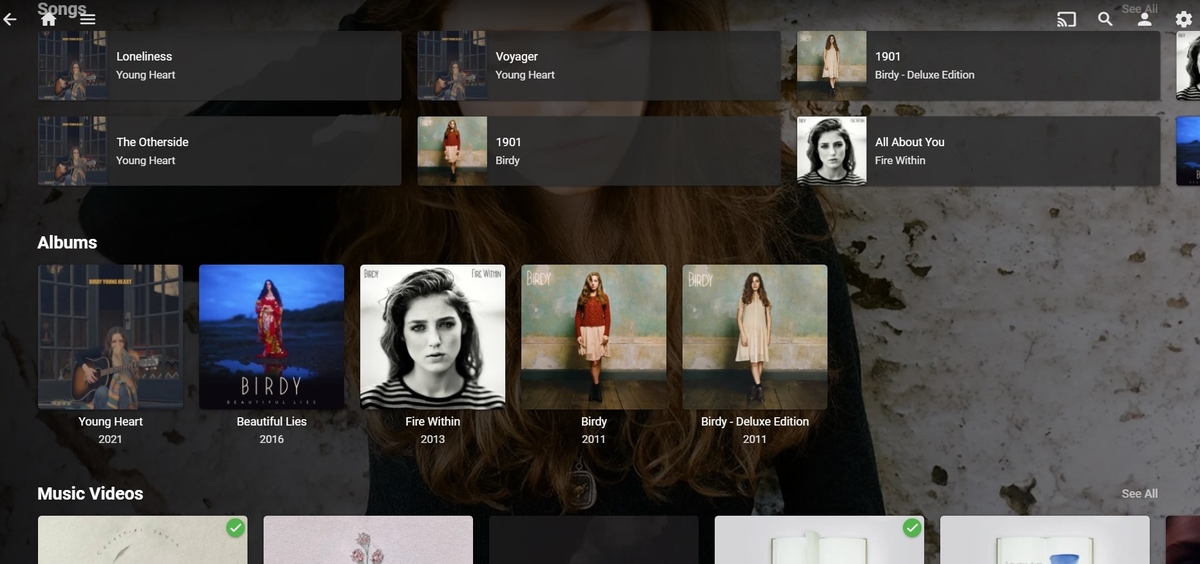
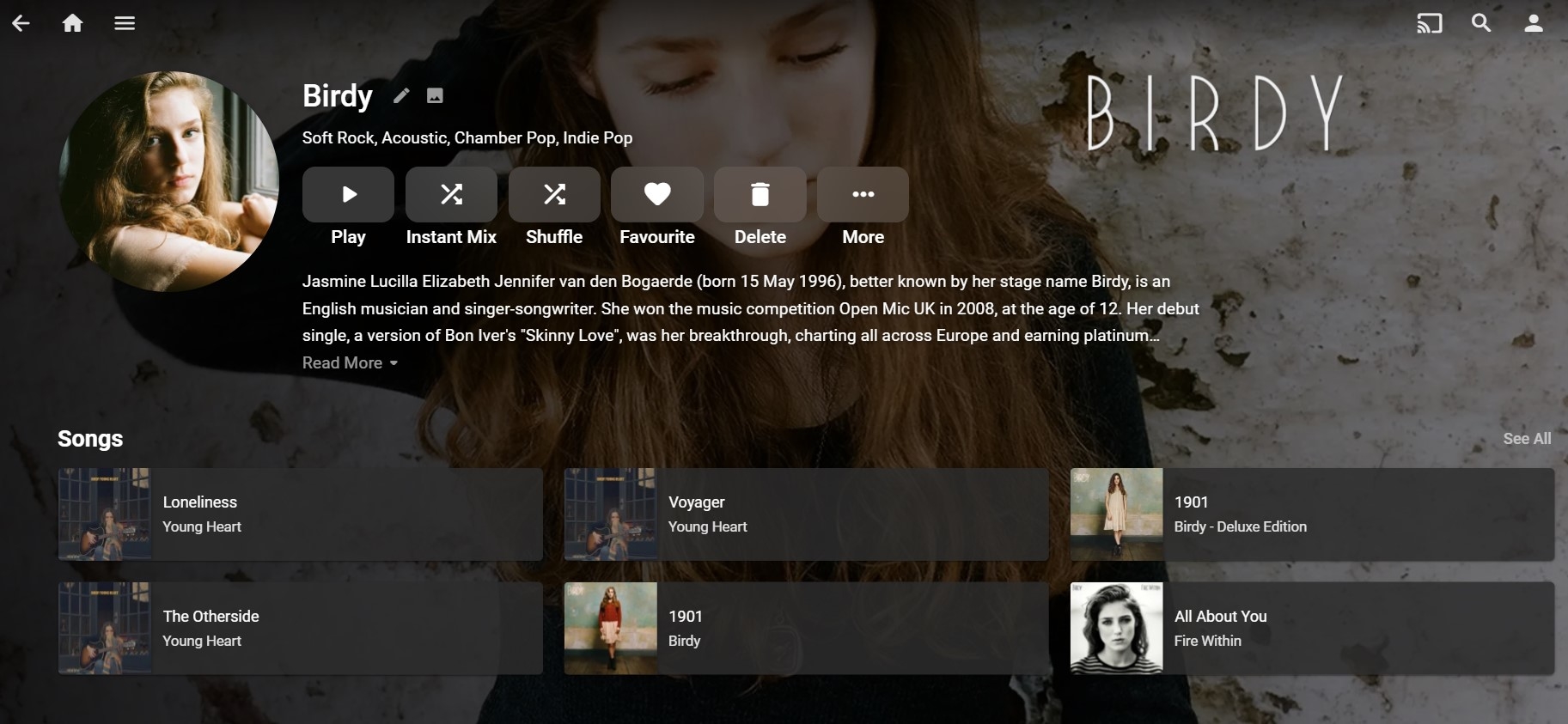
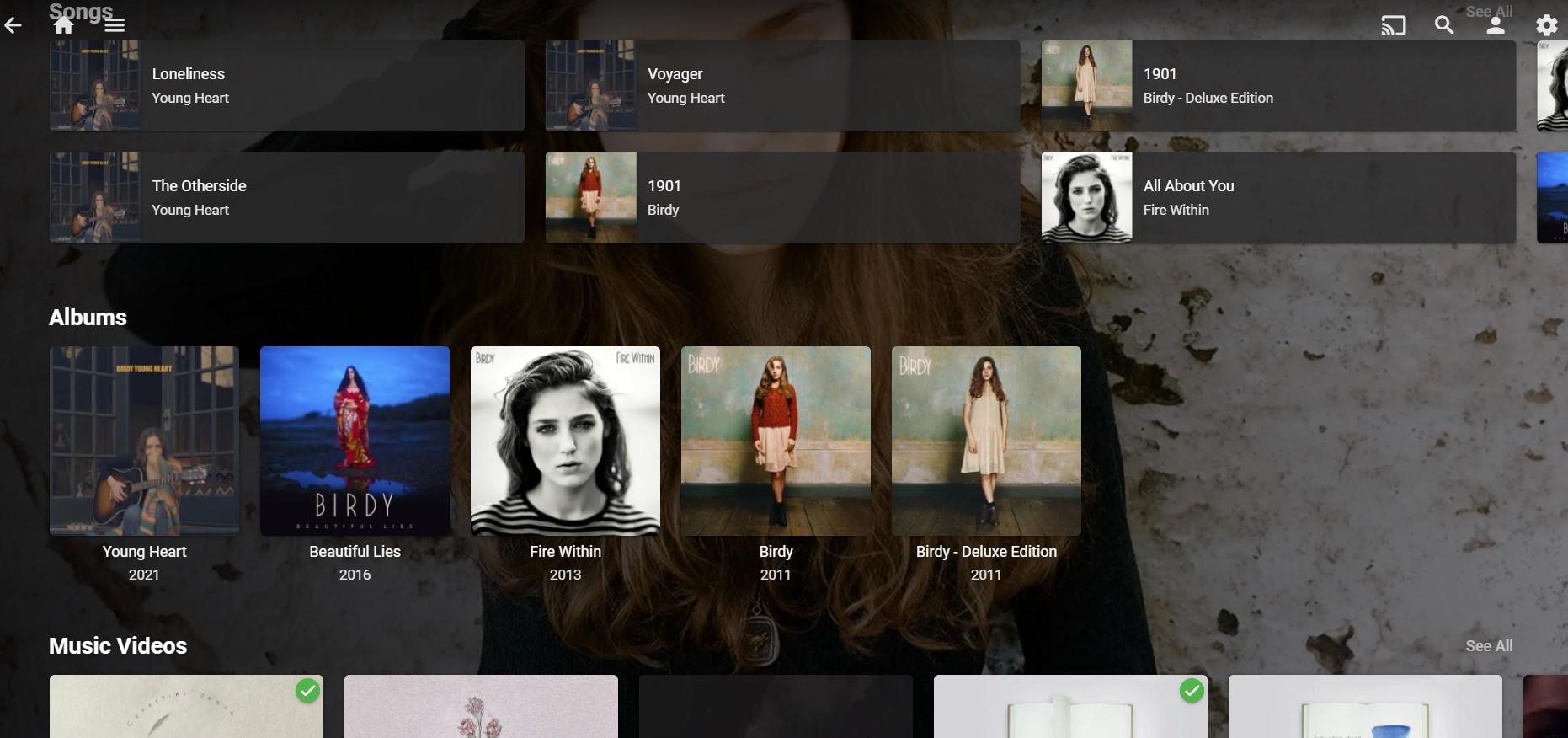
Hi, A general question really. Not sure if this is possible or not? I currently have libraries called: 'Music' - content type music and 'Music Videos' - content type music videos. If I click on 'Artist' the artist screen shows sections: Songs Albums Music Videos for that artist, which is great. See below: However, I also have a number of live concerts in a library called: 'Music Concerts' - content type movies (not sure if that is the correct library type?) and a number of interviews with artists in a library called: 'Music Interviews' - content type music videos (these currently appear in the music video section of the artist screen) Is there any way of having the Music Concerts and Interviews show up on the artist page? Maybe as sections called 'Live concerts' and 'Interviews/extras' or similar? Do I need to change the library type maybe? Thanks
 1 point
 -
I understand Looks like it's settled...This weekend I will make a transfer .sub to srt ..... Only a total of 14 ......Thank you1 point
-
This is awesome @vdrover @BillOatman I can confirm this is working with the latest server beta and Firestick client.1 point
-
I'm sorry after you telling me that it makes sense now just never paid attention.1 point
-
Hi, it's actually the same layout as android tv, the difference is that the info about the selected program is on the bottom rather than on top.1 point
-
That was the intention, but we haven’t heard from the person who created the topic in some time and they’re the only person that can edit it.1 point
-
@Abobader1 point
-
@ebr I'm getting 5.1 audio in the Android TV app now, so it seems to be fixed there. @Luke I can't get it to work in the standard Android app though (v.40). When I select 5.1 audio it just goes to a blank screen and that's it.1 point
-
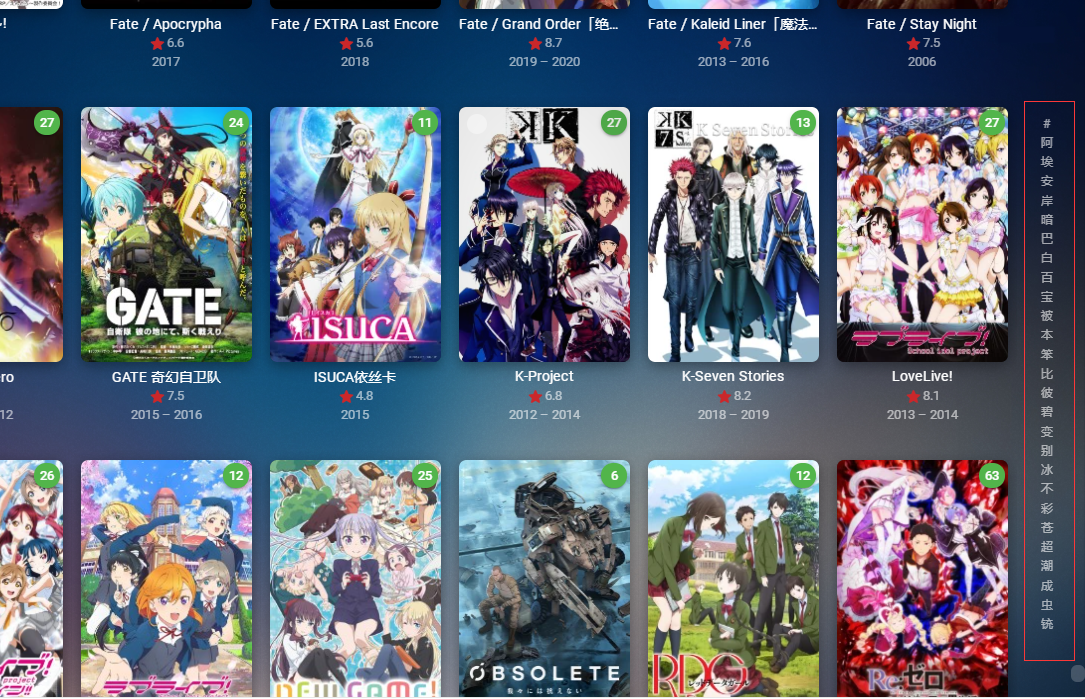
If you want to improve this sorting function by A-Z, first take Chinese as an example. You need to distinguish it according to Chinese Pinyin, so that A-Z can work
 1 point
 -
I saw emby 4.7.0.29 was released today. I ran the update to it and it is now skipping intros on my android TV.1 point
-
Hi, we'll take a look at this !1 point
-
I've always thought it would be neat to use a-z picker and allow it to change contents for different sort orders. So for example, if you sort by community rating, then instead of A-Z you might see 0-10 numbers. Or if you sort by date or year, then maybe we'd put decades there.1 point
-
One could always revert back to 8.2.3 to regain that ability. There is really not much “gain” in android 11 after all. I’ve toyed with that more than once. There are features in android 11 that have enhanced the operation of other apps (Dolby audio processing which for me removes the stutter in video in Apple TV+…weird, but it does) so i guess it’s a trade-off. At least http has been working but I will miss the ability to test connection issues without direct file path. Without it, and the suggestion of others behind the scenes, I would not have been able to get Uhd remux to work on nvidia shield server just to test the connection a year ago and I think consequently, fixing http. At least for now, it all works.1 point
-
Thanks for the feedback.1 point
-
This looks absolutely fantastic. Really a great help for my elderly parents that often ask me if I can recommend something up their street.. If it's not too much of a hassle, Permissions to recommend would be the only thing I'd wish for other than the basic functionality, that way nobody can recommend something unsuitable for my old parents, or my younger son.1 point
-
The option is definitely available in that app. Make sure they have enabled it.1 point
-
Hey Embians! Just an early update: Made a lot of initial headway in the past couple of days on the Subsonic API plugin. Worked through a couple of thorny issues. I've barely started implementing the API (I'd only trust ping right now), although getLicense and getAlbumList appear to be working against my own Emby server at least. Authentication probably was the biggest problem because the documentation and the Emby.ApiClient package are unfortunately quite dated. I'd love to contribute to one or both after I have an MVP for the Subsonic API plugin. I know it hasn't been long since I last posted, but since others coding against the API sometimes seem to have issues with authentication, I wanted to at least let ya'lls know that I got it working, although my plugin code is in a very early state and shouldn't even be considered a solid example of Emby plugin best practices, let alone programming best practices. My focus is to get it working in the short term. That being said, authentication works and if you are having API authentication problems feel free to go check out my plugin code. As always, feel free to bring up any requests over at the repo, or questions here. Cheers! Talk soon.1 point
-
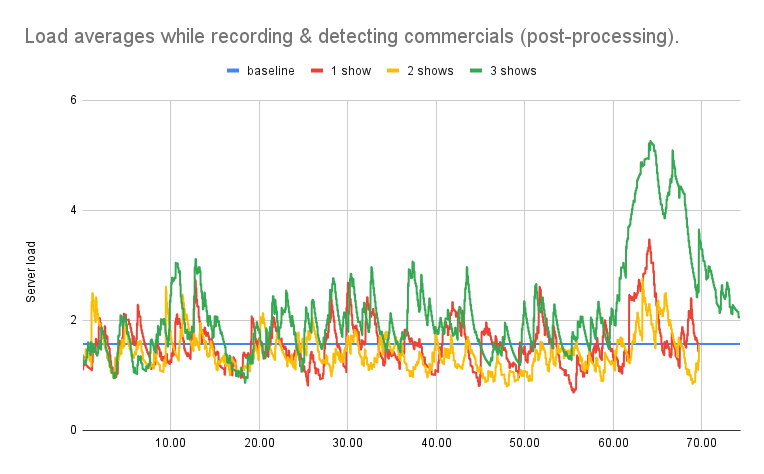
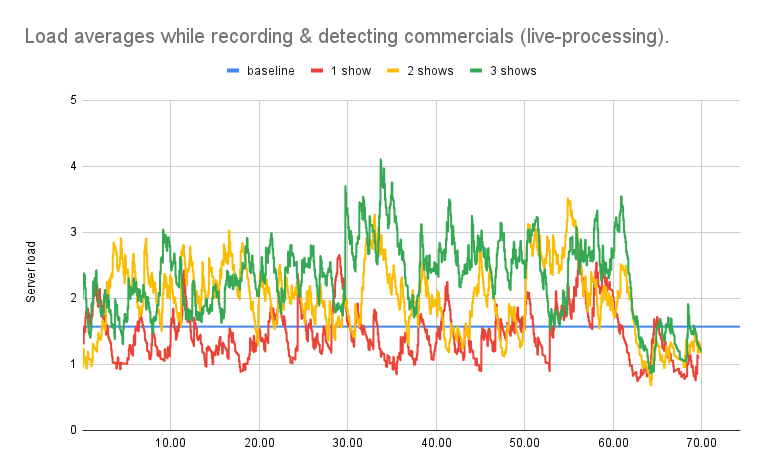
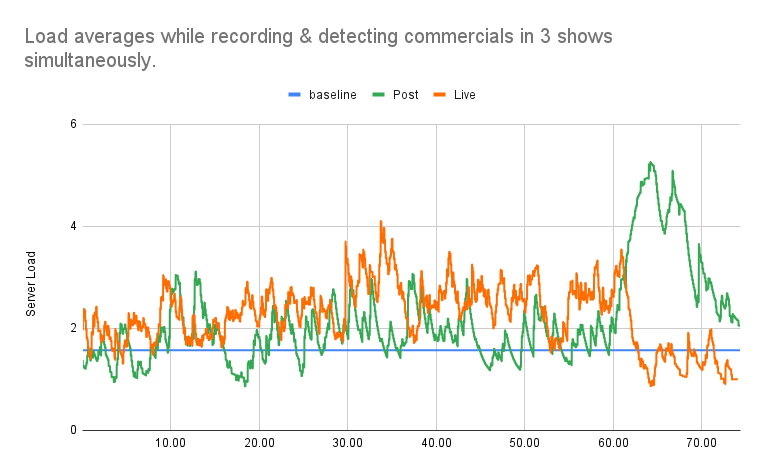
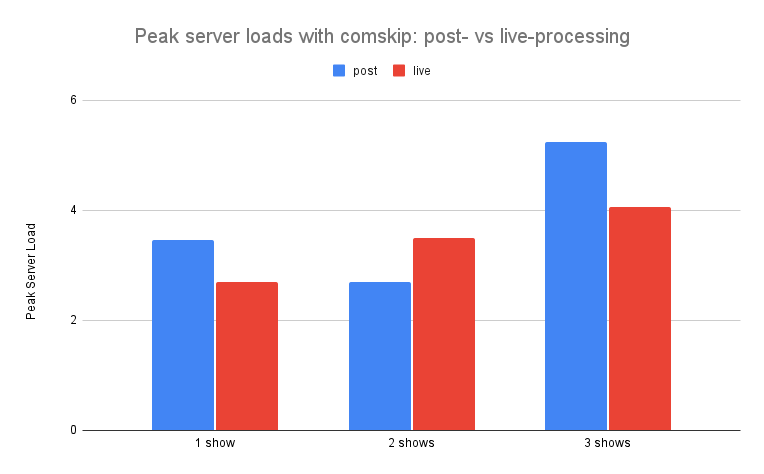
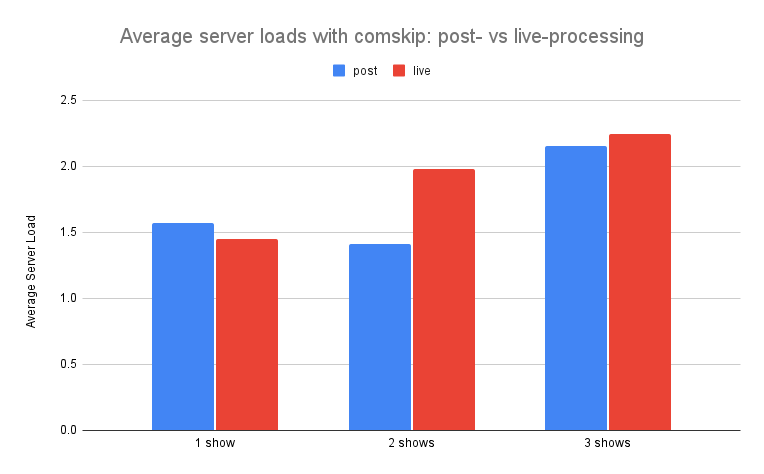
Performance testing 2: live- vs. post-processing In my first performance analysis, I described in detail the methodology I used to monitor the effects of multithreading and low resolution detection on server performance and commercial detection time while using comskip. I used the same methodology in this analysis, so I won't repeat it here. However, my goal was the same: to find the most efficient way to use comskip while keeping my server load at or below 3. Live detection has the advantage of being able to skip commercials while shows are still recording. At the same time, it might be an added burden on your server. To determine if this was the case, I measured server load while recording shows and detecting commercials. Effects of post-processing In my first test, I monitored server load in a seventy minute interval starting when a new recording began. I knew from my earlier analysis that 70 minutes would be enough time to record a 60-minute show and complete the detection of commercials after the recording was complete ("post processing"). As you can see below, the server load hovered just above or just below the baseline (shown in blue) during the 60 minute recording interval. When recording one or two shows, not much change was observed when detecting commercials in the 60-70 minute interval after recording had finished. However, there was a clear spike in server load in the post processing window when 3 shows were recorded at once. Even 15 minutes after recording completed, the server load had not yet returned to baseline. Effects of live-processing Next, I repeated my server load measurements for the same 70-minute interval, but with live commercial detection (live processing). When recording a single show, the server load hovered just above or just below the baseline. When recording 2 or 3 shows at once, the server load trended higher than baseline with a few spikes evident in first 60 minutes (example, 35 minutes). However, once recording was complete, the server returned to baseline within 2 minutes regardless of the number of shows being recorded. Recording 3 shows Since 3 simultaneous recordings put the most strain on the server, I thought it might be helpful to compare the post- and live-processing data on the same graph to get a relative idea of the peaks in load. As you can see, live processing shows a number of load spike while recording, with post-processing showing a large spike after recording with a slow return to baseline. Comparing peak server load As shown above, the spike in server load when post-processing 3 shows is higher than any spike when live-processing commercial detection. I processed the existing data to isolate and plot the peak server load for all of the conditions above. As expected, the highest server load occurs when post-processing 3 shows. However, this was not a consistent trend. The peak server load when recording one show was higher for post-processing. But live-processing was higher when recording two shows. This is likely due to the variability in server load, which is quite high even when no recording or commercial detection is in progress, and the low sample size (n=1). Comparing average server load Due to the inherent variability in server load and small sample size, I thought average server load might be informative. As you can see below, the average server loads over the entire 70-minute interval did not exceed 2.25. This is well within my goal of keeping server load at or below 3. Conclusions Based on the data presented above, I make the following conclusions: Average server load is comparable when detecting commercials with comskip either post-processing or live-processing. Post-processing with 3 shows simultaneously causes the largest peak in server load. Post-processing takes longer to complete then live processing. Given these conclusions, I will definitely be using live processing for commercial detection. Although average server loads may be a marginally higher in some cases, the peak server load is generally lower for live processing, the detection process completes sooner, and commercials can be skipped when watching a show that is still recording.
 1 point
 -
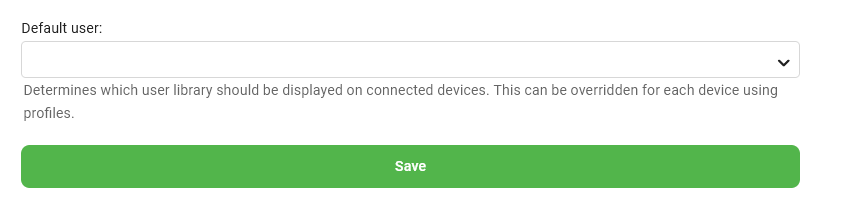
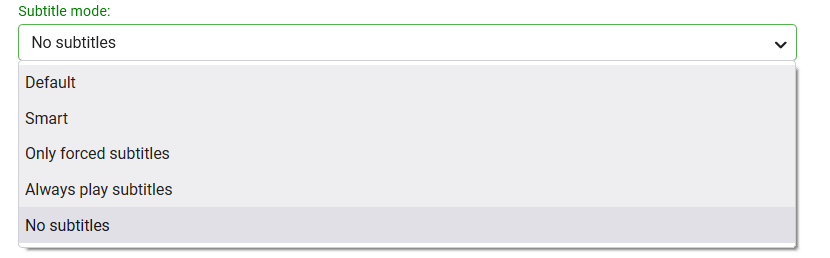
It's empty, if I click on the arrow I get the local account name of my Windows PC. This was 'Default' and I changed it to 'No subtitles' and now no transcoding happens and the subtitles are shown from the external .srt file. Thanks a lot for your help
 1 point
 -
4 years and its the same damn response. I'll believe it when I see it.1 point












.thumb.jpg.21d888786f2104b4f688825203ce7598.jpg)


