Leaderboard




Popular Content
Showing content with the highest reputation on 03/02/22 in Posts
-
Hi guys, I was wondering if it was possible to modify the way the playlists behave for movies and TV series. I tend to put movies that I plan to see on various playlists (e.g. Own, Family, ...). When you click on one of the items on the list the video starts playing right away but sometimes it better to get a chance to read the summary or see a trailer. For my use case it would therefore be ideal if selecting an item from a (movies/TV series) playlist would bring you to its Emby site rather than starting playback. What do you think? Would such an approach be feasible? Thanks, Glin2 points
-
@cayars and @GrimReaper on the server side i have not touched any of the settings regarding bandwidth. I don't use transcode either because my movies and tv are not high bitrate anyway. What i have done, is in Emby for Android app in the settings>plackback>internet quality i changed it from the default setting which was Auto to 1080p - 20Mbps. Now it does plays with no hanging2 points
-
+1 there definitely should be some way to see the movie info screen within a movie playlist.2 points
-
Alright, problem solved! It looks like it was special characters in the password that was causing it (for the record, there were @ and & symbols in it). Also fyi, changing the directory or the file's permissions did not have an impact. So it is now showing that I'm on HTTPS/8920. Huzzah! Your assistance is much appreciated. Thank you.2 points
-
The user that is running Emby Server needs to have read permissions on the cert file. Sometimes the root of the drive is not the best location for that. Also, as a test are you able to regenerate the cert using a basic password to rule out any special characters causing an issue?2 points
-
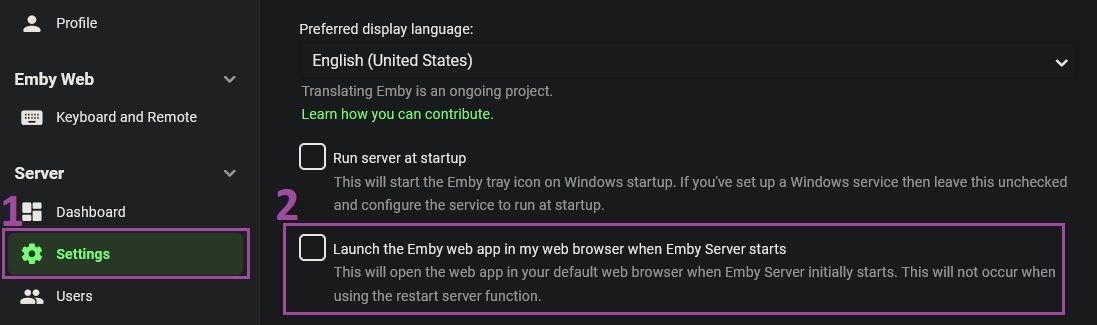
"Dashboard-Settings" AKA: 1. Gear Icon (Always visible in the top right corner of the web interface) 2. Settings (Under the "Server" group) 3. Checkbox "Launch the Emby web app in my web browser when Emby Server starts" 4. Save button
 2 points
 -
Hey To save bandwidth it would be nice that the “are you still watching” dialogue would also pop up on live tv. best regards1 point
-
First every user has to have a local user account no matter what. Then you the admin have to link Connect username/email address to the local user account to allow Connect accounts to connect to their own accounts to track their userdata.1 point
-
Try Reinhard, looks much better to my eye.1 point
-
Thanks for the reply. It would be great if Emby could support one nfo per set - I don't think tinyMediaManager even supports creating an nfo for each part so this would have to be done manually. I'm guessing a lot of people use tinyMediaManager and could run into this issue. Thanks!1 point
-
You want actors ONLY from episodes, NOT series correct? It isn't planned yet, but i can implement it next week.1 point
-
Right it's part of the app, and yes we will get there.1 point
-
Yeah, that was the first thought I've had upon reading your description - glad you got it sorted out.1 point
-
Africa and America are both rather large continents - you need to specify the nearest large city - as that's where the internet hubs will likely be connected to. Inter-continental connectivity is going to have latency - and there is nothing you can do about that - a VPN will not help you. The reason services such as Netflix work ok is because they have CDN's - Content Delivery Networks - which are based 'local' to you - in other words 'copies' of all the streaming media. The only reliable way of getting data from the many 1000's of miles away (3-7K?) is to download it, and replay from the local copy once it's finished downloading.1 point
-
Hi, this is resolved for the next update to the Emby Apple TV app. Thanks !1 point
-
1 NVMe is probably going to be fine for our purposes of meta-data, cache & transcoding. That's going to leave the other NVMe lonely. I'd suggest leaving the 2nd NVMe out for a few days to a week of use to best decide it's use moving forward. You could: Set it up as a mirror for redundancy - Really not needed as we'll be syncing the cache and meta-data folders back to the Emby Volume. Standard Read Cache - Add it back to the Synology file system as a read cache to your volumes. DVR Recording - Set it up for Emby to use specifically for DVR Recording. This provides Emby Server the best IOPs possible which will breath new life into DVR & Trick Play watching of sports games/matches by removing spinning rust. I probably won't have this included in the initial docs as it's a more advanced topic but you could also set both NVMes up in a striped configuration (RAID 0) that splits the IO between them and doubles the storage for even more IOPs. This will provide one new volume making the space of both available for use. This will likely only make sense if using the NVMe as a tempority DVR recording area otherwise the extra space will likely never be used. In that case the NVMe is probably best set backup as a read cache for Synology volumes.1 point
-
No no, it's very useful. I was just making a joke comment as to your space requirements. NVME is 110% worth it.1 point
-
I installed 6.2.11 and moved my last sync date back a month. I can confirm that all my TV Shows synced over properly. After confirming the fix, I went and changed my content type on the emby server to the proper value (while removing and readding the source in next-gen plugin). Hopefully I'll be good for the forseeable future now. Thanks again for taking such a close look at things.1 point
-
I see! (...said the blind man to the deaf dog) Well than you can probably stick a piece aluminum foil inside the m.2 slot and it should be enough space. hehehe1 point
-
You can split your mkv by time, chapter, etc using mkvtoolnix. Just make sure you still have the issue after splitting and before uploading to a share site. Then PM the link to Luke1 point
-
New version available 6.2.11 delta changelog - fix mixed content lib sync on Kodi start1 point
-
Good to know. We've seen other audio problems solved by disabling this as well. I don't think you are losing anything. The description of the feature from NVidia:1 point
-
Hi. I'm afraid there is no way around the need for periodic license checks. The domain you need access to is mb3admin.com.1 point
-
Hi, yes I agree this would be a good idea. Thanks.1 point
-
I can confirm, there is a bug in mixed library content sync. I'll fix it soon.1 point
-
Lets keep it in English please. Please edit you post and add a English translation. Thanks1 point
-
I am glad that you figured it out. Let me know if there is something I can do to make the tool easier to use and understand. Vic1 point
-
Yep, it's been running great since we exchanged messages back in January and you were testing breaking the raid with nvmes. Which I now don't think there is any need for as just doing an incremental backup takes likes a minute on daily basis and saves me from buying another m.2 nvme drive.1 point
-
@BillOatman With some further testing (using Beta .28) the "crashing" (or how ever you describe the plays the menu screen with the audio in the background). This happens to me with an AppleTV 4k v1. It works perfectly with the iPhone Emby app as well as in the Safari browser.1 point
-
Updated to included live-processing for Linux, which as some differences to windows. See steps 5 and 8, and a new attachment.1 point
-
Okay, I was just typing that it still takes another minute or two for Emby to fully come up after the service is up.1 point
-
Can delete this thread it was post upgrade took a whiile then started to work1 point
-
Have a look in /volume1/@appdata/EmbyServer/metadata and /volume1/@appdata/EmbyServer/cache after navigating the metadata run this command to get the total size of content du -s -h navigate to the cache folder and run the same du -s -h command I just had a look at a backup of my system and the bif sizes are far smaller than I was thinking they were. I had forgotten that softworkz did a fantastic optimization job on these and reduced the sizes a lot. Bifs on my system are about 400 GB so I'd feel pretty comfortable thinking every key folder could easily fit on a single TB NVMe. If you do want to find the specific size of bif files try this command from the metadata folder find -type f -iname *.bif -print0 | du -ch --files0-from=- | grep total$ Add the size of metadata and cache folder will form the base of storage needed. Then we need some dynamic space for converting and transcoding which only you can determine looking at current use. I myself would want to do my actual DVR recording to the NVMe as well then a script would move it back to regular HDD storage after it's done recording. This I'd consider optional but would help to push the envelope on performance enhancements. I don't think you need to worry about trying to RAID 2 NVMe disks for redundancy as we can create a script that runs at least once a day or more to sync the contents of metadata & cache to the old location in case of NVMe failure. This would allow using cheap NVMe disks as well to save $ vs seeking out premium high priced ones for max durability. IE for same cost a no name 1 TB NVMe will likely be better for our use then a 256 GB Premium NVMe since it should be big enough to function for DVR and still remain about half empty which helps to extend the life of NVMe sticks but still give you plenty of margin on use. So are you doing this already yourself? Yep exactly. Being able to copy/sync the contents back to HDD is ideal. Do you use the coverart plugin? If so have you noticed how much faster screen updates are using NVMe. Crazy fast.1 point
-
I think that he is referring to this DirectShow filter https://en.wikipedia.org/wiki/AC3Filter that decodes AC3 and allows him to boost the center channel. And he is asking if there is a way yo do that in Emby. Hasta donde se emby no tiene ninguna función similar, si acaso permite configurar en la transcodificacion el subir el volumen al hacer downmix. Quizás necesites crear una solicitud para que se implemente esa función. Aunque si usas un receptor de teatro en casa quizás sea mas fácil que lo configures de manera que refuerces el volumen del canal central.1 point
-
If I focus more, I can usually weed out unnecessary questions and answer the others myself.1 point
-
Hi, there is also epg.best, although I've heard mixed reviews about it.1 point
-
@ielmax I looked at your ffmpeg log example of 1.5 mbps. I think the answer to keep in mind is that 1.5 mbps corresponds to the entire file bitrate, not the video. So the audio stream takes 320 kbps from that, and then the video stream gets the remaining amount, which will be less than 1.5 mbps. Does this help answer your question?1 point
-
No, I haven't. When I go to add libraries in next-gen, it only shows "Camera Uploads". In both the remove and repair sections it shows "Movies" and "TV Shows".1 point
-
I am locking this thread, as we will do forum update this week, and will start new thread for your feedback. Thanks all.1 point
-
Hi. Each user can already set a default landing page on each library.1 point
-
Theoretically, we could have both. The page could still scroll virtually but you could have some sort of jump points similar to what we do now with the letter jump. So a way to do the same thing when sorted by something other than title.1 point
-
Thanks for the positive comments, and I'm glad it worked so well for you and that my post was easy enough to follow. I've learned a lot from these forums and am glad that I was able to add a little to the body of knowledge available here. Thanks!1 point
-
Bumping this. Even a simple, 5 band built-in Emby equalizer - like Plex has, like WinAmp has - would be very good to have.1 point
-
I absolutely agree that movies should not start playing right away within a playlist. Clicking on a movie in a playlist should take you to the movie's info page. Simple.1 point
-
Collections are a good idea. We should probably have a way of getting to the media detail screen from a playlist though.1 point