
Leaderboard




Popular Content
Showing content with the highest reputation on 02/25/22 in Posts
-
@cayars @ebr@Luke thank you so much for all the prompt and detailed help! I'm really impressed with Emby and am looking forward to trying out remote connections!3 points
-
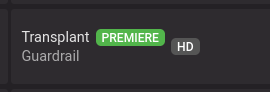
The EPG data from Emby includes a "Premier" label for TV shows that that can be displayed in the Guide if the option is selected. (Picture attached.) This identifies new TV shows as they are added to the TV channel lineup, however there is no capability at present to search on or display all premier episodes of newly added TV shows. Adding this capability through a search or other page that displays these shows would help users find and record new shows. Would be especially useful for the fall TV season when new shows are being added to the lineup. Please consider adding this feature as it will provide a great new user friendly feature. In addition, the EPG should be evaluated to determine what other "labels" are in the EPG that could be valuable to Emby users as they search for shows to record or watch.
 2 points
 -
We announced a while back that Emby for WMC would not continue to be supported beyond server version 4.6. With the release of 4.7 getting closer, we just wanted to issue a gentle reminder. View the full article2 points
-
Telegram Notifications Plugin for Emby Finally after using it by myself for over 3,5 years and "supporting" it in another Thread https://emby.media/community/index.php?/topic/42912-telegram-notification/ i decided that with the latest Version it would be good to have a destinct Plugin Thread for it. Nope it is not in the Plugin catalog, because there are only plugins by developers which are "willing to fully support it. That means keep it up to date with server versions as well as fix any issues and respond to user help requests." Because of the closed source code of Emby and the lack of Plugin development documentation that is something i cannot ensure. What it does? It simply forwards the Messages of the Emby Notification Framework to a Chat or Channel. Not more, not less. Sorry no fancy posters etc. because the Standard Notifications of Emby dont support it. That could be hacked into, but those things can break easily on every update and i dont want to spend more work on this. How to install? Install the Plugin by downloading the DLL (or build it yourself using VS2019) and putting it into your Emby Plugin folder Restart your Emby Server Talk to @Bodfather with your favorite Telegram Client to create your Telegram Bot Start a chat with your bot (or place it in a channel) and send a message to it Fire up your browser and type the following URL: https://api.telegram.org/bot<BotTokenGoesHere>/getUpdates (without the braces) and find the ChatID Use the Settings Page of the Plugin to set Bot Token and Chat ID Activate the Telegram Notifications Plugin in the desired Server notifications Known Issues? There are no issues with the Plugin itself because it is really simple. The problems are inside the Emby Notification Framework for example if you want to use it to keep your Family and Friends up-to-dat with the newest Additions to your server. For every scan Emby only sends 10x New Media Notifications so if you add 100 Movies you only get the first 10 send to you. That is something that should have been worked on for quite some time but nothing happened. Where to get it? You can download the Source and DLL v1.4.0.0. here: https://codeberg.org/bjoerns1983/Emby.Plugin.TelegramNotification/releases Have fun with it. If you have a cool idea simply open an issue. To be honest i dont know how long this Plugin will be maintained. I mean it works since nearly four years without any problems. I am really waiting for the New Notification Webhook feature which would make these kind of notifications way more easy.
 1 point
 -
I have been using the finamp app for jellyfin and I think emby needs to create its own or even clone this as jellyfin comes from emby's code so should not be too hard I believe. The reason I am writing this is because emby needs a separate music app which me and others have been requesting for a long time and even though finamp is not complete it has been great for daily use compared to the full emby and jellyfin apps. Thanks1 point
-
Hi, I know it is possible to put different Versions of a movie into same folder and give them behind the "-" different names for identification. I use this feature very often, also if a movie is in 3D, HD and 4K available. Sometimes also special Extended Versions, etc. I also use this Feature for Multi-Movie Boxes, like Tarantinos Grindhouse. (Grindhouse (2007) - Death Proof, Grindhouse (2007) - Planet Terror) which work great. But I noticed, that the Chapter List in the Grid View don't refresh, for the newly chosen file. Is it possible to implement this, that you see the chapter list of the selected version?7 It's not a big deal and not a nobrainer, but it would be more elegant if this could work. Especially if different Movie Versions have different Chapters.1 point
-
Say I have a custom collection of 56 Christmas movies. During the Holiday Season, I would like to show this on the main page as a Library. Now, I could make a drive folder called "Christmas" and put these movies in that folder. However, now we're getting away from using metadata for organization and moving back to using folders for organization. Something you've spent the last few years trying to get away from. So each collection should have a toggle to show it as a library on the Home Page. Then people can make collections for Christmas, Halloween, Summer Romance, Summer Slasher Films, whatever and show them on the front page where they are easily accessible. Don't want to show it anymore, switch the toggle off.1 point
-
One thing the streaming community hasn't done well is really create tools that allow us to simulate live TV well. I think the biggest reason that binging on Netflix (and Emby) is so popular is because you push a button and go. I'd like to see Emby create a "To Watch List" that basically allows you to sort shows into a specific order. When you watch that list, it will only play the most recent episode of each show in the list that premier inside that week. Lets pretend I made a DC TV Watch list, it would only play this weeks episode of Arrow, Flash, Legends, Supergirl and Gotham one after another. If an episode didn't premier that week, it gets skipped. Additionally, I'd like to see this system *ALSO* allow us to insert bumpers similar to Cartoon Network or Toonami. In the here and now, it would only insert bumpers between the series, but it would be nice if in the future, a system that allows some method for choosing the appropriate points between each act of an episode where bumpers could also be inserted. Bumpers would be a community thing to create, but inside the "to watch list", you'd choose what bumpers (if any) are used. Bumpers could even be surrounded by previews. Finally, another thought: while Emby already can pull Movie Trailers, it might be another cool future project if we could pull previews of related series not in the "To Watch List" and/or perhaps ones that aren't on your server that are similar to what you are watching. There's a lot of ideas in this post to digest and several should be their own project as part of this concept. Thoughts1 point
-
omg My ISP changed my IP address. It's dynamic, but they haven't done that in like 2 years. I had to update the A record in my DNS domain info. Working now w00t! @GrimReaper thank you for the help!1 point
-
Hi thanks for the tips, i've added the lines you've suggested and its all still working fine. Glad I did as virtually all my media is mp4! I just found it odd that changing a few lines for the SSL settings suddenly got it working and was speculating it was that line that had resolved the issue when: # Let's Encrypt SSL include conf.d/include/letsencrypt-acme-challenge.conf; include conf.d/include/ssl-ciphers.conf; ssl_certificate /etc/letsencrypt/live/npm-1/fullchain.pem; ssl_certificate_key /etc/letsencrypt/live/npm-1/privkey.pem; changed to # Let's Encrypt SSL ssl_session_timeout 30m; ssl_protocols TLSv1.2 TLSv1.1 TLSv1; ssl_certificate /etc/letsencrypt/live/npm-1/fullchain.pem; ## Location of your public PEM file. ssl_certificate_key /etc/letsencrypt/live/npm-1/privkey.pem; ## Location of your private PEM file Although looking again perhaps it was the removal of the include lines that had more to do with it. At this point i'm just relieved its working! I'll take a look at the config in your info, thanks again for the advice1 point
-
when you do a search on my emby server it takes 10-15 seconds... people give up or try typing something else which just takes another 10-15, they usually give up. Can we get some kind of loading spinner or something while emby is pulling up results?1 point
-
https://support.emby.media/support/solutions/articles/440011591161 point
-
Yes, with the update it already synchronizes correctly, thank you very much for the help!1 point
-
Wow...awesome analysis and write up! Will be taking notes and making some changes to see if my times drop in general (even on MCEBuddy)!1 point
-
So it is the resolution that is the problem, not the bitrate. Can you please play that item for a few seconds and then follow the instructions to send a log from the app?1 point
-
Hi. There is your answer. The app needs to have a way to know that this is not supported and force the transcode. I thought we already had this so I'll have to look. This isn't a bitrate problem. Reducing the bitrate is just forcing the transcode.1 point
-
Yeah, the Shield (and most other devices) won't have an issue. It is older Fire devices that do.1 point
-
That is not correct (in this instance anyway). The Fire is reporting support for that audio track so we are using the native decoder for it. However, there has been a history of issues on older Fire devices with some Dolby audio. Exo (and we) have implemented some workarounds for this and I haven't seen any issues until this post - but maybe no one has this specific combination of 7.1 EAC3.1 point
-
Hello developer! 1. Multi version video: It seems that only the chapter diagram (BIF) of the first video will be used by default. In fact, there may be different chapter diagrams in multi version videos. For example, for films released in different countries, when some clips are deleted according to the law, the length of the film will be different. It seems inappropriate to use the first video as the chapter diagram by default! 2. Multi content video: It seems that only the chapter diagram (BIF) of the first video will be created, and the chapter diagram will not be created for subsequent videos (CD2, CD3, etc.)? In addition, is the order of multiple additional content according to the video existence time? Can't you follow the video file name? *cd2. ext *cd3. ext *cd4. ext ... This seems more in line with expectations!1 point
-
Hi, yes it's something we can add. Thanks for the feedback.1 point
-
Hi, this is an open issue regarding chapters with multi version videos. Thanks.1 point
-
1 point
-
Roku have removed all "private" channels, of which the Roku beta is one. You need to install the release version (now the only one for Roku). Paul1 point
-
I've been having my own Synology issues as well the last couple of days (probably self induced) and presently moving as many files off it I can to do a factory reset. When they work correctly you take the little miracle box for granted but every once in a while they like to give us a reminder they're still a computer and have issues like any other computer. It's really good to hear you were able to get the hardware problem fixed and then turn around and solve a problem like that without loosing your cool. I bet you feel a lot more comfortable now knowing you can handle these types of things! Great job!1 point
-
And if we only load one version of the image? Will it be used even if not optimal for the theme?1 point
-
Solved it! Split the file, then changed the title (but not the original title) in metadata manager!1 point
-
You can look through all of the ones @atomicmoon created, as he was the initial creator. Others have added some along the way that you may like as well. If you have anything specific, you can post a request, and someone will usually throw it up.1 point
-
Yes if Emby wasn't showing correct external ip you would need to do this. But the issue is if that address changes.1 point
-
@cayars I ended up getting Tailscale to work with Emby by adding the TailScale assigned IP as Emby's External Domain under the "Network" settings on my Emby Admin panel. Now I'm able to connect to Emby remotely! Was this the correct way of doing this?'1 point
-
This appears to be fixed in .68 beta from my testing.1 point
-
MUHAHAHA, I got it working now! Thanks for all the help! After scanning my Drive 1, it found some bad sectors and now it's up and running like normal! That's probably the last time I'll work on soldering items. Turns out I'm not very good at it. But a good experience to figure that out. Yay success! Thank you for all the help everyone!1 point
-
I see you're stuck on an old beta server version, so first I would update and then re-evaluate.1 point
-
@MikeB111 I followed your instructions exactly and I am very impressed. Worked like a charm. Purchased my domain name, copied all the TXT string info that was given to me by le64 (which worked perfect in Windows 10), opened 8920 in my router and done. I've had most all my users delete the http account and log in with the new domain name and port 8920 and I'm ecstatic. I can use the https url in browser and it is locked and secure. Thank You for all the work you put into that tutorial. It was actually very easy and I only spent $24 on a 2 year domain name. Thank You Again...1 point
-
Sounds like you are talking about DLNA. Go to Settings-DLNA and disable the DLNA server.1 point
-
he said " the best personal media server available" not "the perfect media server". they've already achieved the former IMO1 point
-
Our original vision was for it to be open source but, as it developed, we found that we were not going to be able to reach our goal of being the best personal media server available with that model. It was going to require full-time investment and resources. In hindsight, we left the code open for much too long.1 point
-
there needs to be a reaction on this forum that indicates IDGAF1 point
-
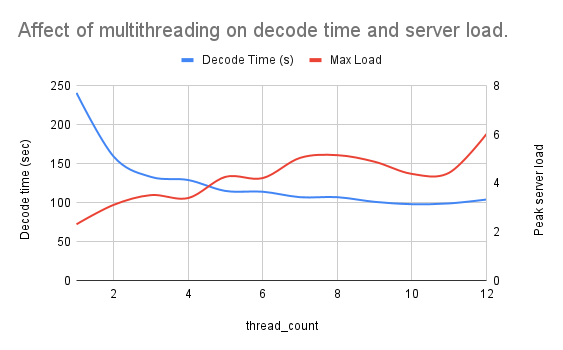
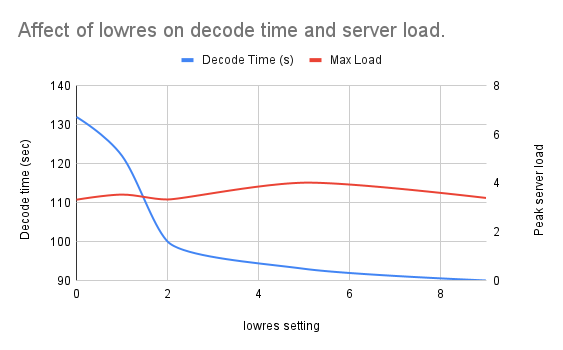
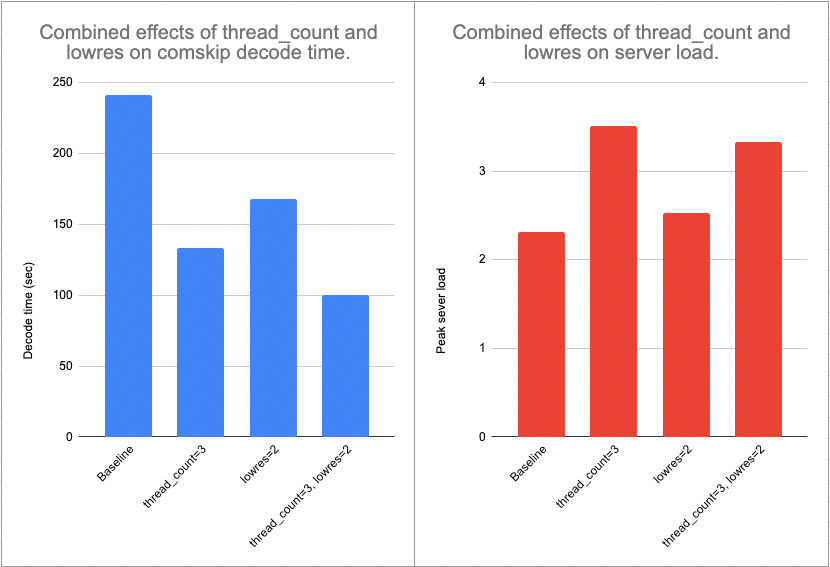
Performance testing 1: Multithreading and low-resolution decoding I've done quite a bit of performance testing and optimization in the last few days. Herein I present my findings with two comskip parameters mentioned above by @TMCsw: thread_count (specifying the # of processor cores to use at once) and lowres (decoding the video file in "low resolution" mode). Test environment Hardware: Intel NUC10i7FNH NUC 10 Core i7 with 32GB RAM and a 4TB SSD. # of cpu cores: 12 @ 1.10GHz OS: Ubuntu 20.04.3 LTS (64 bit) Test file 61 minute show recorded with my HD Homerun Codec: 1080i MPEG2VIDEO Resolution: 1920x1080 Framerate: 29.97 Bitrate: 8,139 kbps Bit Depth: 8 bit Pixel Format: yuv420p Test procedure and data collection Here are the steps I took for each test. Record the server load by running the following command from a terminal window (terminal A): while true; do uptime >> '/home/username/Downloads/uptime.log'; sleep 1; done In a second terminal window (terminal B), modify comskip.ini by adding the parameters below. In my case, I tested variations and combinations of the following (where X and Y are an integer between 0 and 10): thread_count=X lowres=Y Run comskip in terminal B. When complete, terminate the uptime command in terminal A. Record the following data in a spreadsheet: decode time (from terminal B). peak 1-minute server load (from uptime.log saved in step 1. Delete the contents of uptime.log file and return to step 1 to test a new parameter. Note: Most of the data below is simply the result of one test (n=1). Anecdotally, identical parameters produced very similar results within a few percentage points of each other. Interpreting the results The two metrics I followed in this test were the total time required for comskip to complete (the decode time), and the server load. My server generally operates at a load of 1.2 when not recording a show, detecting commercials, or transcoding video. I have noticed that Emby works well at a load of 4, but I am hesitant to push the load above this for fear of affecting overall server performance. For a full discussion of server loads in Linux, this is a good resource. For most folks, having fast commercial detection without a big impact on server load is ideal (especially true if your server has a loud fan!). My goal is to make commercial detection as fast as possible while keeping the peak server load around 3. Results Note: All the graphs below are color-coded: blue represents decode time and red indicates peak server load. Multithreading I first tested the effect of enabling multithreading, or using multiple CPU cores at once, to detect commercials. As shown below, a significant reduction in decoding time was achieved when thread_count=3 was added to comskip.ini. Only marginal improvements occurred with additional cores/threads, while server loads trended upwards. I concluded from this data that thread_count=3 was best for my system. Lowres I don't really have a clear understanding of how the lowres parameter affects comskip performance, but I imagine it has to do with how carefully it examines each frame of the video. In any case, the data was clear. As shown below, increasing lowres did not increase the server load in a consistent way. However, lowres=2 dropped the decode time by about 30% (remember, thread_count=3 was held constant in these tests). Note that lowres=10 automatically sets this parameter to the best value. In my case, the data using lowres=10 (not shown) was a very close match to lowres=2. I concluded from this data that lowres=10 (i.e. lowres=2) was best for my system. Update 2/25/2022: The lowres=10 is great for performance, but the accuracy was not appropriate. I adjusted to 5 with much improved results, but eventually removed the parameter entirely. Multithreading + lowres As a final test, I compared the individual effects of lowres and thread_count to the combined effect of both. Consistent with the other data presented, thread_count=3 and lowres=10 had signifiant individual impacts on decode time. Together, the two parameters produced a nearly 60% reduction in decode time. Server load increased 44% under the same conditions. However, the peak load was still close to my desired threshold (3). Importantly, the higher load was short-lived. Conclusion I concluded from the data that lowres=10 and thread_count=3 was best for my system and I'll be adding those parameters to my comskip.ini file. Next steps In my next analysis, I'll be looking at server performance when running comskip as a post-recording process compared to running it in real time as recordings occur.
 1 point
 -
It's more a question of the .NET runtime file API's handling symlinks, which is what Emby Server is built with. Right now it is limited but improvements are coming: https://github.com/dotnet/runtime/issues/242711 point
-
That will definitely help some playback issues with high bitrate files. The issue that the op is seeing is different in my experience, but the limitations of the lan port are worth keeping in mind as well. Thanks.1 point
-
Offered for consideration: Sorry if this was mentioned. Are you using wi-fi or Ethernet? The Ethernet ports on practically all TVs are limited to 100Mbs, where wi-fi can do 300-400Mbs with newish wi-fi routers. You could be bumping into the limits of the Ethernet port? I solved one of my issues by using a Cable Matters Ethernet to USB dongle on my year old Sony.1 point
-
The issue with the pixelation is a common one and is caused when the existing HEVC video stream is broken up to serve the file via DirectSteam. Reducing the bitrate will force it to transcode the stream which should fix the problem, but it isn’t your next option Playing the TrueHD track is your problem as it’s not supported in apps on your TV, resulting in the DirectStream approach. There are a lot of threads on this forum about the issue, including why it appears to work via USB I suspect the file has an AC3 audio track. Try selecting it before playback and see if it fixes the issue.1 point
-
Pretty much the title. On Web, there is the "Ends at" which tells you when something will be over. This is missing on our Samsung TVs. Both the same model. May seem minor but this is very useful for when you want to watch something before bed and quickly see if it ends on time. My wife really misses it too lol. Not sure what update may have removed it but I know it's been gone for a little while now. See pic for example (from Web).
 1 point
 -
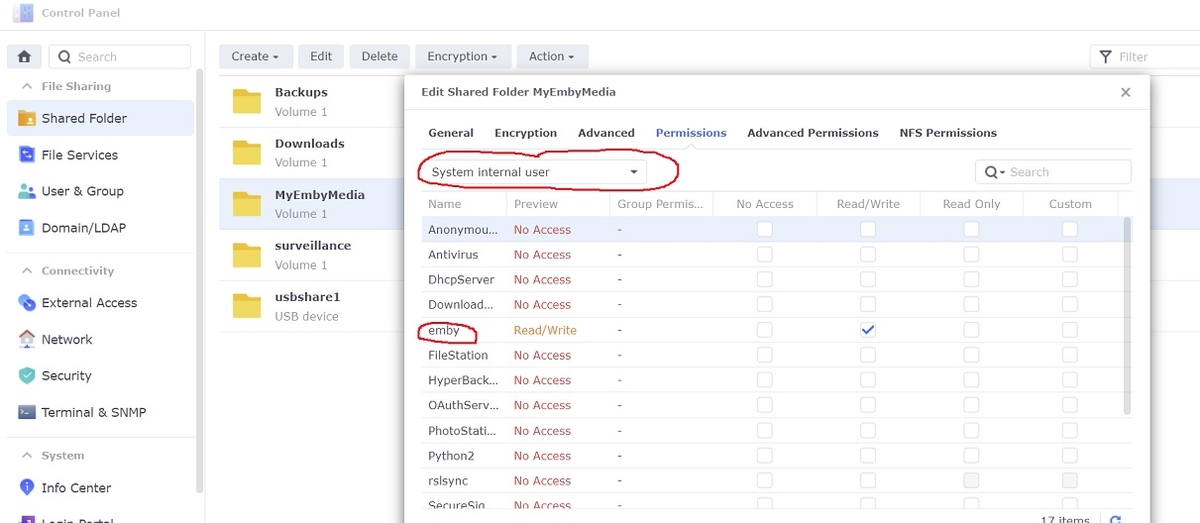
The only permissions you should have to set for emby when switching to DSM 7 are the Shared Folder permissions with read/write access. However, emby is now a "System internal user" so make sure you click the drop down box first before changing. Any old emby local users can be deleted under DSM 7
 1 point
 -
Ok. Thanks for the reply.. I think I'll give it a miss!0 points
-
Let's not discuss the methods to do this yet on the forum until the process is vetted. My first attempt at upgrading to DSM 7.1 was met with disaster (but not saying it's 7.1 related). My NAS right now is mostly unusable. Most software is now crashing, trying to go SUDO from SSH is a no go and met with errors. Can't copy anything to USB drives, no rsync, etc I immediately pulled the network connection as a precaution, grabbed a small 8 port managed switch and old laptop to only allow only those two devices on a private network. I was able to access the shares I care about over the network so I grabbed an 8 bay USB3 enclosure and some SATA drives to build a little 50 TB storage box. I was checking the drives and reformatting them on my normal work computer when part 2 of my mini disaster struck at 4am as I was tired. I fixed a pot of coffee sat back down, hit the space key to get a nice blue screen. I was trying to rush things along catching up in the forums and got sidetracked and thought I was in the VM attached to the storage bay but wasn't. I formatted the 3 drives in my notebook. I of course had a full backup from Sunday with incrementals the next couple days. Wanna guess where my notebook was backup up to? Yep, the Synology 920+ which just added fuel to the fire. I had a Windows 11 thumb drive handy and a Samsung 950 SSD handy so I stuck it in a USB3 adapter inserted the thumb drive, rebooted with a BIOS change and installed Win 11. I didn't want to touch the NVMe drives until after getting sleep. So making a long story a bit shorter, I got the 8 bay enclosure hooked up to the old notebook and it's moving files off the NAS but with only 1 GB NIC it's seems painfully slow. I finally today unformatted the NVMes and have the notebook running same old, same old again. At present I've got 23 TB give or take to move off the NAS before I touch it. I had installed by way of thumb drives a few virus and malware package that I've used to scan files moved off the NAS thinking possible could be related but so far it's clean. I had just ran a full security sweep including virus and malware checks 2 days prior on the whole network which was clean but I just wanted to be sure. I've had a few goofy things going on with the NAS likely from installing so many different things on it and experimenting with it. So I'm surely not saying it's 7.1 related but can't say right now it's not either. I could certainly have had the same problem with a NAS restart and no update. Once I've got the files off I care about I'll reset the NAS clean, get DSM 7.01 installed as well as Emby and a few typical programs. I'll then start testing from this clean install. I certainly wouldn't want this happening to anyone else who would likely think it's related. I'm sure it was just a "perfect storm" of events but non-the-less I want to test this properly before releasing any kind of instructions.0 points

























.thumb.png.225edb9636a79b10cd220c27f59990f3.png)

