Leaderboard




Popular Content
Showing content with the highest reputation on 02/18/22 in Posts
-
Support for the beta 4.7 is here. I've given it a quick run through. Let me know of any issues. (If you're not running the beta, don't install, this is a separated release on it's own branch.) SmartPlaylist-2.2.0.0.zip3 points
-
Next on the list!!!2 points
-
That's correct. The option is only limited on 11+2 points
-
I've given up trying to persuade Eric that it has it's genuine use cases. Unless there is good reason to upgrade, On my Shield Pro (used exclusively for 4K remux playback only) I'm sticking with Android 9 and the latest Emby Beta which had DFA - as everything works perfectly. It may change in the future once the Android 11 permission model is better understood - we can always hope.2 points
-
Just adding my wish for this issue to get fleshed out. I really prefer playing files direct, especially when I open up my 920+ emby server to my family/friends (who are gonna get much of my media via transcode). I don't want to have my media consumption impacted by their streams if it can be helped.2 points
-
Hey Everyone, My journey from Plex to Emby has been pretty smooth with the exception of setting up SSL encryption. There are lots of great posts on this forum and elsewhere on how to do this, and I consider myself pretty computer literate. But I'll be honest, this was a bit overwhelming for me as I have no experience at all in hosting web servers, DNS, or encryption certificates. After many hours, I've got it all working, so I thought I'd share what I've learned. I'm going to try to write this for the newbie, so don't be offended if it seems like I'm explaining lots of simple stuff. That's really what I needed a week ago, so maybe it'll help someone else in my shoes. Also, this is for Windows, although most of it applies to any OS. There's lots of text, but it's really very easy. Let me also say, I understand that a reverse proxy gives you lots of benefits and flexibility for securing your server. But that was a step too far for me. If you want a reverse proxy this post is not for you, but there are many posts in this forum to help you. If you want to access your Emby server from outside your home network you will want to require secure connection mode for all remote connections (see "Network" tab in Emby server configuration). To do this you need an SSL certificate. To get an SSL certificate you must have your own registered domain name. Here's a step-by-step. Domain Name Registration A domain name is the readable text part of a web address. So emby.media, or google.com, or media.yourdomain.net. Most home users don't have one, but you need one to get an encryption certificate. While (Edit:)There are many options for purchasing a domain (godaddy.com being very popular), I chose to buy my domain from domains.google. It cost me $12/year, and this is the only cost to getting your Emby server working with encryption. Go to https://domains.google, pick a domain, pay your money, and you're ready to go. For the rest of this discussion let's say you registered the domain name yourdomain.net. Now you need to associate your new domain with your home IP address. Most home users get their IP address assigned to them by their internet provider and it is "dynamic," meaning it can change. So you need to be able to tell your domain provider what your address is and update it when it changes. This can be done automatically, and is called dynamic DNS (DDNS). (Edit:) Before obtaining a domain, ensure the provider supports Dynamic DNS. Google domains supports this easily, here is the help page explaining how to set it up. Fortunately, my ASUS router has this capability built in so it was easy, but it's easy even if your router doesn't (follow google's directions). (Edit:) In case you have a static IP (obtained from your ISP), DDNS support is not mandatory. That's it for domain name registration. Now yourdomain.net points to your home network IP address. SSL Certificate Now you need to get an SSL certificate. This has the encryption keys you need, and must be issued by a recognized certificate authority or it gets blocked by your browser. Lets Encrypt will give you a free SSL certificate but it has to be renewed every 90 days. This was the part I was most confused by, but it's actually really easy. The part to understand is that Lets Encrypt must have some way of proving you own your domain name before they can issue you a certificate. There are two options, 1) they give you a little text file to place on your web server in a certain location. I don't have a web server so this is a no-go. 2) They give you a text string to add to your DNS registration in what is called a "TXT Record." You do this with google domains, it's very easy. To get a certificate you need an ACME client program that knows how to talk to the lets encrypt server. They recommend certbot, but it doesn't work in windows. Dig enough and you'll find ZeroSSL, they have a nice downloadable program that does it all and is really easy. Download here. Make a directory on your computer (I used c:\ZeroSSL). Put the le64 (or 32) exe in this directory. A single command will create your certificate. I think the easiest way to do this is create a text file in the same folder as the program, call it "get_cert.bat" and put the following three lines of text in the file. Edit the second line to have your actual domain name (instead of "yourdomain.net"), and to have your actual password for your PFX file (whatever you want it to be, just replace "yourpasswordhere" in the code below. @[member="Echo"] off le64 --key account.key --csr domain.csr --csr-key domain.key --crt certificate.csr --domains "yourdomain.net" --generate-missing --handle-as dns --export-pfx “yourpasswordhere” --live pause Save the text file as get_cert.BAT and then double click it to run. This runs the le64 program, creates the public/private key pair, asks lets encrypt to generate a certificate, saves that certificate, and converts it to a PFX file format that Emby requires. All in one command! When you run this, a command window will appear and you can see what it's doing. After a few seconds it'll pause and ask you to place the TXT record in your domain. It gives you a name and value, the name will be something like _acme-challenge.yourdomain.net, and the value will be a bunch of random letters and numbers. The program pauses here for you to put this into your domain. So now you just log in to your google domain again, go to "DNS" on the left menu, scroll all the way down and enter a "Custom Resource Record." The type is TXT, the name and value are what le64 gave you. Put them in, wait a few minutes for the change to take effect (took just a couple of minutes for me). Then go back to the command window where le64 is running and press enter to continue. It'll then verify your TXT record is there and issue your certificate. You'll find a file certificate.pfx in the le64 directory, that's it! Emby Setup Now log in to your Emby server setup. Go to "Network," in the field "External Domain" you put your domain name, so yourdomain.net or whatever you chose. For "Custom SSL certificate path," browse to the .pfx file that was created by the le64 program. In the "Certificate Password" field put whatever password you used in the .BAT file above when you created your certificate. Then for "Secure Connection Mode" I recommend you choose "Required for all remote connections." You also have to log in to your home router and forward port 8920 to the computer running your Emby server. I'm not going to give directions on how to do this, it depends on your router, but it's super easy. That's it. You need to restart your Emby Server, and then you're done! You can now access your server remotely and securely at https://yourdomain.net:8920. Certificate Renewal Now, I mentioned before that the Lets Encrypt certificates are only good for 90 days. So every 90 days you have to renew the certificate. Take that "get_cert.bat" file you made earlier and make a copy of it called renew_cert.bat. At the end of the second line, just add the text "--renew 20" (without the double quotes). When you are within 20 days of your expiration date run this file, it'll renew your certificate. I believe it'll ask you to place a new TXT record in your domain, so certificate renewal cannot be made fully automatic. You'll have to run it manually and add this TXT record into your google domain just like when you created the certificate in the first place. But it takes just a few minutes and then your certificate is renewed. You'll have to restart your Emby server for it to take. The file locations all stay the same, so you don't have to update anything in the Emby setup, just restart Emby. That's it! Well, I hope this helps someone. Sorry for the long post. I would have benefited from this level of detail a week ago, so maybe it'll be good for someone. If anyone sees something wrong here, feel free to correct me.1 point
-
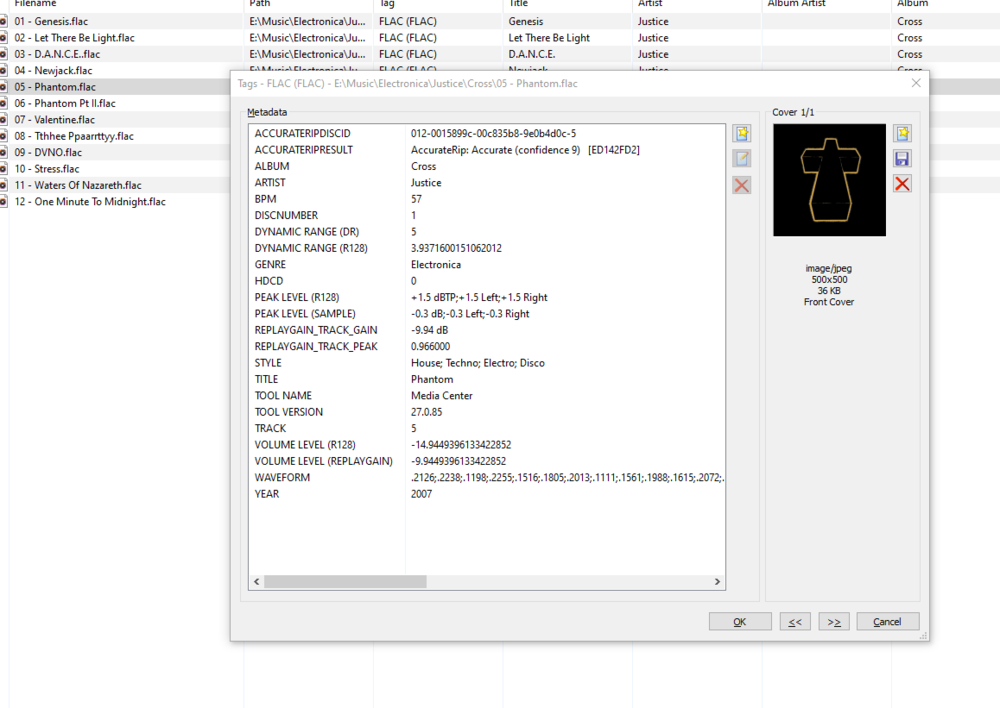
My apologies if this has been asked already. Could the Style tag in embedded music metadata be filterable in the Genre area? For example, I could select 'Electronica' within genres, and then a filter option would allow me to filter House, Disco, Trance... This could prevent genre cluttering for large collections
 1 point
 -
Yeah, likely. Still funny, though: skip chapter - "Okay, dear guests, that's all folks, finished, good night." Edit: Maybe I'll put it on next time the in-laws are visiting.1 point
-
Hence the suggestion to load beta app as it should handle certificate issues better.1 point
-
Thank you @CassTG - I missed that error somehow - most likely is a permissions issue for that share - "Other Media". Will check when I am back home and report here. Re: space - I should have plenty of space, since those volumes are not mapped within the container.1 point
-
OK we're looking into it. Thanks.1 point
-
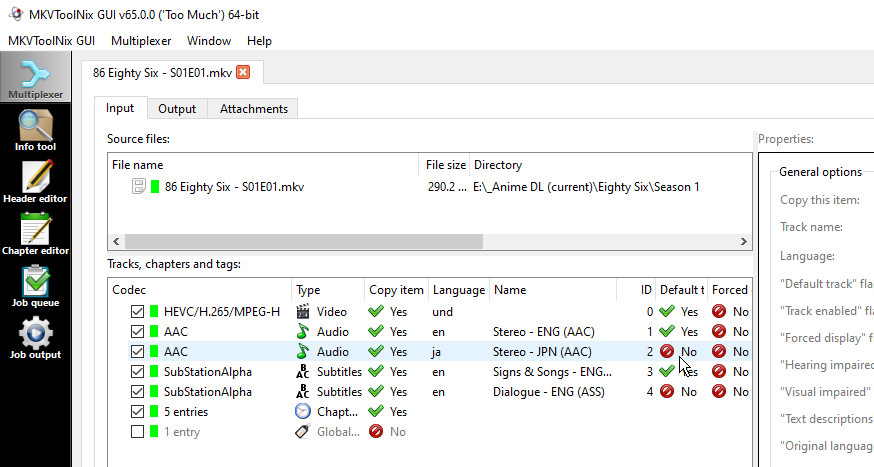
I am still not sure from what you have written whether you have addressed my question. I am not asking what you do - we already know that - I am asking: if you look at the file (most easily by dropping it into MKVToolNix), do you see the "default" flag set on more than one audio stream? I have a lot of anime, and so am aware that it is not uncommon for this to happen, and it can cause problems in some players, such as Emby. Using MKVToolNix, you should see something like: If you see more than one tick in the default column for audio or subtitle streams, then you will have problems. Paul
 1 point
 -
Some of the online references are frankly incorrect - so if you haven't done this sort of thing before, if possible, I would test on an old Android phone to get the feel of adb and fastboot. Getting your pc to recognise the Shield TV with fastboot is actually the most technical bit .. (or was for me). In the end, I used Samsung USB drivers.1 point
-
Hi @LuizFilmes do you have the "are you still watching feature" enabled in the app's settings?1 point
-
No problems here with either SE9.0, or SE9.0.1.1 point
-
Thanks for the reply ebr. I can see that. So I'm really close to trying to roll back to Android 9 on the shield. If I do chances are high that I will bork this, but this is how I learn, eh! Wish me luck!1 point
-
I can certainly sympathize with needing to manage support time constraints. You're trying to run a business, after all. Might I suggest making DFA an "unsupported advanced feature" or plugin, with caveats that it won't be supported by the staff? Then we users can work among ourselves here? I have hopes that something will change that would permit your code to open this feature back up.1 point
-
Hello. Are you using the beta version of Emby? If yes, then the plugin does not work there. Only with the stable version. I am also still waiting for it to work in the beta.1 point
-
That's close enough to call them identical!1 point
-
nope that appears to be what i've been doing wrong this entire time.1 point
-
The room tags will map to emby tags, yes.1 point
-
I am running mine on Ubuntu here without issue, You restarted the service right? And do you see the option in the management menu? (Normally goes in /var/lib/emby/plugins)1 point
-
Under those top folders, do you have a subfolder for each show, as per KB article? Emby TV Naming : Emby1 point
-
If I read the release notes correctly you can still upgrade the app if you're on Android 9 because it checks the OS version before disabling the option. However, I would keep the .66 apk just in case.1 point
-
Any skin with the ability to use shortcuts as widgets/menus will work, the node is just another video addon section. Example of skin highly customizable: Arctic zephyr reloaded.1 point
-
Thanks for this. I had done a fresh install on two systems and it seems that I put the same backup on both devices. I have fixed my mistake and now works all normal. Too bad, that was useful, always starting a movie for it is a bit pointless. Thank you for your help and your time.1 point
-
There is something really wrong. There is a double login to the same Emby server. I've seen that in the past once by another user. The only solution was wiping all plugin data manually. Even better remove the complete .kodi folder and start from scratch. Currently I've no idea why this happened to you. I hope it's not a Kodi bug. If you which I can have a deeper look, but in this case I need a backup of the complete .kodi folder for review.1 point
-
That's right, it changed by Emby server update/new version. The question is, does it work to send messages? I'll check the log.1 point
-
I can't wait for the option to skip intro's the easist way I think to do it will be to use the chapter markers in the files1 point
-
Are you sure you configured it for the right folders? (the ones containing the files being converted).1 point
-
What and where did you check?1 point
-
HI, looks like you setup a conversion job to convert and move the new files into your media folders, but you did not ensure that emby server has sufficient write access to do that: 2022-02-17 13:27:15.137 Error App: Error transferring sync job file *** Error Report *** Version: 4.6.7.0 Command line: /volume1/@appstore/EmbyServer/system/EmbyServer.dll -programdata /var/packages/EmbyServer/var -ffdetect /var/packages/EmbyServer/target/bin/ffdetect -ffmpeg /var/packages/EmbyServer/target/bin/ffmpeg -ffprobe /var/packages/EmbyServer/target/bin/ffprobe -nolocalportconfig -ignore_vaapi_enabled_flag -pidfile /var/packages/EmbyServer/var/EmbyServer.pid -defaultdirectory /volume1/Public -updatepackage emby-server-synology7_{version}_x86_64.spk -noautorunwebapp Operating system: Linux version 4.4.180+ (root@build13) (gcc version 7.5.0 (GCC) ) #42218 SMP Mon Oct 18 19:16:55 CST 2021 Framework: .NET Core 3.1.21 OS/Process: x64/x64 Runtime: volume1/@appstore/EmbyServer/system/System.Private.CoreLib.dll Processor count: 2 Data path: /var/packages/EmbyServer/var Application path: /volume1/@appstore/EmbyServer/system System.UnauthorizedAccessException: System.UnauthorizedAccessException: Access to the path is denied. ---> System.IO.IOException: Operation not permitted --- End of inner exception stack trace --- at System.IO.FileSystem.CopyFile(String sourceFullPath, String destFullPath, Boolean overwrite) at System.IO.File.Copy(String sourceFileName, String destFileName, Boolean overwrite) at Emby.Server.Implementations.IO.ManagedFileSystem.CopyFile(String source, String target, Boolean overwrite)1 point
-
this code may help, change all '/mnt/tv','/mnt/movie' to '/mnt/data/TV', '/mnt/data/Movie' in emby database # coding=utf-8 import sqlite3 conn = sqlite3.connect('library.db') conn.row_factory = sqlite3.Row def colunms_info(table_name): c = conn.cursor() cursor.execute() def check_text(table_name, texts): cursor = conn.cursor() cursor.execute('select * from {};'.format(table_name)) items = cursor.fetchall() cursor.close() c = conn.cursor() for item in items: new_line = {} for column in item.keys(): value = item[column] if isinstance(value, str): for text, replace in texts.items(): if text in value: new_line[column] = value.replace(text, replace, -1) if len(new_line): params = '' args = [] for k, v in new_line.items(): params += '{} = ?, '.format(k) args.append(v) params = params[:-2] sql = 'update {} set {} where Id = {};'.format(table_name, params, item['Id']) print(sql, tuple(args)) c.execute(sql, tuple(args)) c = conn.cursor() c.execute("select name from sqlite_master where type = 'table';") tables = c.fetchall() c.close() for table in tables: print(table) check_text(table[0], {'/mnt/tv': '/mnt/data/TV','/mnt/movie': '/mnt/data/Movie'}) conn.commit() conn.close()1 point
-
Ok, so I may have one too many hard lemonads, The star treks dont have DA.......which is the test file I was using due to the DV audio sync. That is a real issue and not because I had a stupid moment... So its the DV audio sync and the skip forward or back or resume that is left for me anyway. So, to commemorate my stupid moment, I am going to have another hard lemonade1 point
-
a USB2LAN Adapter is a good solution for owners of LG TVs with 100Mbit LAN ports, that want a wired connection instead of WLAN1 point
-
Seems to work great, @ShaneP - thanks so much. One request for next iteration: fix playlist renaming, which doesn't currently work - it fixes within the plugin module, but doesn't seem to take effect when returning to the list of playlists in main screens.1 point
-
I'll throw in my vote for 2FA. Not necessarily because I feel my network is insecure or the Emby software needs it, but mostly for peace of mind. I can understand why it hasn't been a priority though, weighing the man hours developing/testing such a substantial change versus other more important or even just lower hanging fruit. EDIT: I will say it'd be cool if there were more frequent updates/timelines on exactly how Emby's development time is being spent though. As far as major new features go... not necessarily the incremental update notes. It'd probably calm people down a little bit when popular feature requests aren't handled timely enough.1 point
-
Yes, that's why we all love you so much , because you figure out the hard stuff.1 point
-
No, but securing the admin users with write and delete permissions to allow them to secure the logins. We don't want to FORCE all users to have it enabled, but the possibility to enable it for specific accounts. Hopefully for normal users if they activate it, there is a way to enable "don't ask again for this device" eg. on a TV. But it is not really for normal users, we want this more for users with delete permissions. Thanks1 point
-
If 'there is not problem implementing it' and it's something requested over 4 years ago which users still keep asking for, surely the easiest solution is to just do it? I'd certainly use it on my admin account and possibly a few users too!1 point
-
Very nice @vdrover! I'll make a PDF out of it and put it in github and the release!1 point
-
Thanks @jordy! Let me see where I have made the mistake, and I'll fix it.1 point
-
That's a good question. I may only want to force it for admins at first and those who can modify/delete. Someone I don't know watching my media is ok by me, but if they try to download the entire catalog at once, then their stay may be more problematic.1 point
-
Most users will not be able to cordon their apps sufficiently to protect against a code/toolset compromise, though if that is the issue then nobody should use Emby. What is one of the main points of this thread, and why so many people are vying for the necessity of MFA is that account compromise is the most common and simplest vector of attack against apps. MFA almost completely nullifies these threats.1 point
-
ebr - Are there any users of the app involved with programming changes? Anecdote time: We used to get a new second level manager every other year. The first thing they would do is reorganize the departments. No actual improvement, just something so that their manager knew they were doing something. That's what this latest change feels like. Nothing really improved but someone is trying to justify their job. My 2 cents. Please consider offering a retro version of the app (meaning two versions). Thank you Jack1 point
-
Disallowing users from shooting themselves in the foot is different than disallowing safety. We don't know all the different scenarios that users have. For example, having a bad password is ok if the user is LAN only. Perhaps there should just be help text that would mitigate footguns. MFA significantly reduces the risk of accounts being compromised. If someone doesn't agree with that, we should have a different discussion, but I'm assuming that everyone understands this. Governments and businesses force MFA because they have something to lose. I hear over and over how organizations that don't use MFA have issues with account compromise. My point is that I feel like I have something to lose. If Emby is compromised, someone is in my network with more important things than what Emby has. Emby is the gateway into my network which has all sorts of things that I don't want to be in the hands of anyone else. All the other apps that I expose to the WAN understand this and have MFA.1 point
-
It was much better as it was and I will never understand why you felt the need to change it. The old look was never blocky and looked fine as it was. The green is horrible and not easy to pick out and the icons are to small. Even my girlfriend who has 20/20 finds it hard to see. There really needs to be some customisable options here to keep everyone happy.1 point
-
Hi @Luke Good News!. I use style tags as well. Currently I have been using the emby custom tag feature for styles. To eliminate any UI changes, I would be happy if emby could read embedded "style" tags and just add them as an "emby" custom tag value. For example embedded tag "Style: Bop; Hard Bop" (a couple of Jazz styles) emby "tag" Bop. emby "tag" Hard Bop with emby being tag driven it would add greater portability/permanence to music related info as it would be embedded in the track. style is pretty common across many music genres, so would have broad use. But could also allow user's to create their own "tags value" that emby from the track. To simplify things even further I have noticed that emby writes custom tags to nfo's with the "style" designation. to recap: 1) no UI changes, use emby's "tag" framework. 2) no db changes 3) no nfo changes 4) change - read embedded style tag map to internal emby "tag" Anyway just one opinion. Thanks for consideration -vicpa1 point
-
Thanks for the info. Yes that's possible for the future.1 point
-
Hi. As noted by the message the issue is with the container, not the codec - although only Roku TVs can support mpeg2. None of them can take a raw .ts container. And then, once you convert the container to HLS, then mpeg2 is no longer a supported codec. https://developer.roku.com/docs/specs/media/streaming-specifications.md1 point