Leaderboard




Popular Content
Showing content with the highest reputation on 02/17/22 in Posts
-
Hey All 2.1.0.3 ready for testing. Version 2.1.0.3 Feature Added "Country" Filter Criteria. Filter item on the "ProductionLocation" metadata. Added "Genre (List)" Filter Criteria. Displays a drop down list of Genres already in the system, if the Genre does not exist the fall back it to use the already existing "Genre" string filter. Added checkbox on delete confirmation to retain the generated playlist/collection Sorted playlists/collections alphabetically Added "Tag (Tree Crawl)" Criteria. Filters the item on tag or its parents tags (and so on, all the way to to root). Added "Studio (Tree Crawl)" Criteria. Filters the item on it's studio value or its parents studio value (and so on, all the way to to root). Updating sourcing to navigate to the lowest item in the path. Added new Update types: Daily, Weekly, Monthly, The main difference between this and the shuffle update types is that the shuffle will remove all items in the playlist/collection prior to adding new items, and then shuffle the playlist randomly, where as the scheduled update types will only add new items to to the playlist/collection or remove items no longer meeting the criteria from the playlist/collection and NOT shuffle the playlist/collection. Scheduled update types are way better when it comes to performance as there are only small updates to the the backend after the initial populate. Added updateType Icons Added tooltips to buttons and icons Bug Fixed a legacy bug where the next shuffle date was calculated based on the last shuffle date isn't of the current run date. Meaning that if the playlist ran twice the shuffle date would be bumped twice. As always code in the repo SmartPlaylist-2.1.0.3.zip4 points
-
I'd really like to have 2 Factor Authentication added to the login screen. It's just this (optional) extra layer of security to help secure the server (which, especially if people use camera uploads) contains pretty private data. There are for every type of programming language quite a few libraries available, so implementation on a server shouldn't be too hard to realise2 points
-
it would be very nice, if there can be a possibility to get users the access to edit metadata and image so the user can manage a the libraries. I would like to use it as a "content manager"-user which is like a technical engineer caring about the media content and nothing else. btw. emby is very very nice, thanks for all of your work!2 points
-
I'll throw in my vote for 2FA. Not necessarily because I feel my network is insecure or the Emby software needs it, but mostly for peace of mind. I can understand why it hasn't been a priority though, weighing the man hours developing/testing such a substantial change versus other more important or even just lower hanging fruit. EDIT: I will say it'd be cool if there were more frequent updates/timelines on exactly how Emby's development time is being spent though. As far as major new features go... not necessarily the incremental update notes. It'd probably calm people down a little bit when popular feature requests aren't handled timely enough.2 points
-
HI, this will be resolved in the upcoming Emby Server 4.7 release. Thanks.2 points
-
Hey All, Firstly, excellent work! secondly, I noticed that this has stopped working in Emby 4.6.4.0, I have forked the repo and fixed if anyone is interested. (Have PR out for main repo) https://github.com/ShanePe/Emby.SmartPlaylist.Plugin/ Sorry also, I have made an update, if the playlist has NOT yet been generated, it will generate it, regardless of the playlist schedule trigger. So one no longer need to 'manually' run first to initialize the playlist if it falls outside of playlist generation schedule. (Make sense !?!?!?!) Version 2.4.0.3 Feature Create a copy of a playlist. (Duplicate) Decluttered UI by adding a pop up menu to playlists New Criteria: Added Audio Stream Codec Criteria (Stream: Audio Codec) Added Audio Stream Language Criteria (Stream: Audio Language) Added Audio Stream Display title Criteria (Stream: Audio Display Title) Added Subtitle Stream Language Criteria (Stream: Subtitle Language) Added Video Stream Codec Criteria (Stream: Video Codec) Added Video Stream Display title Criteria (Stream: Video Display Title) Updated Criteria: Parental Rating: Now uses official rating under the hood Resolution Height: Now uses video streams to determine the available video heights rather than the metadata. Resolution Width: Now uses video streams to determine the available video widths rather than the metadata. Added Monitor Mode to shuffle playlist type. Meaning that the playlist will be destroyed and recreated on a schedule, but between scheduled executions, media item changes will be batched and monitored for inclusion/exclusion. (So .... combination of live and shuffle modes but could have a perf hit on larger playlists, experimental) Collapsible sections in the playlist editor that keeps state, for more UI real estate. Added the ability to add notes to a playlist (limited to 256 chars). If there are notes assigned a pop up is displayed when hovering over a playlist (2 second delay). Order all selection lists on criteria with dropdowns alphabetically. ------------------------------------------------------- Releases Here -> (See change logs in this thread .... way down) Plugin for Emby Server 4.8: SmartPlaylist-2.5.0.4810.zip1 point
-
Mostly pertains to m4b but I have seen tags on mp3 files that have time stamps you can jump around in too. Can pm if example needed.1 point
-
While Emby already has recommendations built in based on previously watched items I find they are not all that helpful. They seem to be based on genre only, for example, because you watched a comedy here are other comedies in your library. I do like how the also directed by/appear in recommendations work though. What would be great is if Emby could incorporate Trakt's recommendations as they are much more sophisticated. Trakt's recommendations are not only based off of what you have previously watched but also what your Trakt friends and other Trakt users have watched. It takes user ratings and trending/popular media into account. Ideally Emby would include full Trakt integration allowing users to rate media after watching, view lists and recommendations, and view upcoming media all from within Emby but for now I think recommendations would be a nice addition. Trakt has the potential to give Emby that community feel and allow users to discover new media, find something to watch, and recommend media to other users. http://docs.trakt.apiary.io/#reference/recommendations1 point
-
It would be useful if the server (or perhaps clients) could cache most (if not all) content images (posters, backdrops, logos, etc) for movies, TV series and seasons. This would mainly be of benefit when a portion of someone's content is offline but the users would still like to view the content to know what exists. I think caching on the server would be preferable, then all clients could make use of the same cached images. if you think this would be a useful feature, please click the "Like This" button on this post.1 point
-
PIP is something I really need, but I can't seem to get it working on my iPad running ios 12 Will Emby ever support PIP for iPad, or should i look for another media server system? I really don't want to invest time into a system that never gonna implement what i require.. Thanx..1 point
-
It occured to me while ripping an audiobook today that many (audio)books that have "books", or "parts", or whatever separating them have subtitles for those parts. For example, Fellowship of the Ring: Book I - Return of the Shadow. And then it occured to me that, in lieu of playlists, I have combined my Star Wars, Pirates of the Caribbean, and Harry Potter soundtrack albums together into franchise-inclusive albums instead of having, say, eight Harry Potter albums or ten Star Wars albums. But though I separated each source album in the combined one by "Disc Number", it would be better if I could label them. So I request the ability to attach a label each "disc", for audiobook and/or music libraries.1 point
-
I want to suggest you to add powerful HW+ decoder in Emby Android TV client app. In this way, a totally fluid reproduction is ensured without jerks and without jumps in the image of all devices with the Android TV operating system. MX Player app (MX Media - formerly J2 Interactive), managed to achieve wonderful results in fully smooth playback without stuttering or skips on Android TV images with its powerful HW+ video decoder. Do you know if the internal player in the Plex Android TV client app has an HW+ decoder? It is that the Plex client works almost identically to the MX player, without jerks and without startles in the images. Thanks. greetings1 point
-
Can confirm stutter-less DirectPlay HEVC (8-bit/10-bit) with AAC/AC3 on Edge Dev 100.0.1163.1 and HEVC Video Extension 1.0.50362.0.1 point
-
Yes that's correct! I've never told anything else1 point
-
Playback of videos in Chrome and Edge have long had a problem where the playback is unviewable: Stuttering, playing several frames and then playing a frame that was already played several frames ago. This happens under the following conditions, to the best of my knowledge: Video is encoded in HEVC / h.265 Video encoding uses b-frames for better quality at a given bit rate Video is played in Windows on Google Chrome or Microsoft Edge (Firefox has its own, separate issues) I posted a sample video in the thread below; one where Luke was amazingly patient and tactful with me: It looks like Microsoft has been hard at work on the problem and has a potential fix. See the relevant Microsoft forum post here: https://techcommunity.microsoft.com/t5/discussions/hevc-video-decoding-broken-with-b-frames/m-p/3176711/emcs_t/S2h8ZW1haWx8dG9waWNfc3Vic2NyaXB0aW9ufEtaUUhYV1QwUE5TTEJSfDMxNzY3MTF8U1VCU0NSSVBUSU9OU3xoSw#M52158 I haven't had the opportunity to try this yet, so please report any issues in that thread.1 point
-
you'll find it in the new Info Screen (during playback)1 point
-
Yep, I tought so, that there's no semantic linking. Anyway, thank You for Your help, really appreciate it :)1 point
-
In \data folder, should be something like /var/lib/emby-server/data or /var/lib/emby/data. Nope, there is no semantic linking.1 point
-
Thanks for the feedback.1 point
-
Not yet. I will try to deliver it today1 point
-
I would like the ability to give specific users the ability to edit or just add to the Tags and/or Genres of the media they have access to. I searched but didn't find this topic but if it exists please excuse the duplication. My use case is in combination with the Smart Playlists plugin by ShaneP. my users can auto manage lists that are important to them. Thanks for all the great work that goes into Emby. TIHTCM1 point
-
This is a more general request for basically the same thing - some sort of role-based control of which fields a user is allowed to edit.1 point
-
Nowhere. It's either NFOs with media or no NFOs/db only. To \metadata folder, your Dashboard should tell you where that path is (or if you customized it under Settings>Library>Advanced tab).1 point
-
Ok, the green text is good. I mistakenly thought you were seeing that originally. I think you are within the 24 hour now that your email issue is resolved.1 point
-
Salut, il y a un tuto en anglais ici, mais je rejoins @Randdrick ce n'est pas simple. En résumé, il te faut un domaine associé à ton accès internet (par exemple chez noIP) Il faut rerouter les flux associés à ton serveurs Emby (dans ton exemple 32600) vers celui-ci depuis ta box (ton serveur doit disposer d'une adresse IP Fixe). Demander un certificat Let's encrypt associé au domaine déclaré (noIP) Générer un certificat pfx à partir des fichier Let's ecrypt à renseigner dans Emby renouveler régulièrement le domaine et le certificat Personnellement j'utilise Emby sur un Synology et les renouvellement de certificats sont simplifiés, il y a un service dédié. En revanche il me semble si tu te connectes avec Emby connect, l'authentification est chiffrée même si ton serveur ne l'est pas. Il suffit d'associer un utilisateur Emby au compte Emby Connect1 point
-
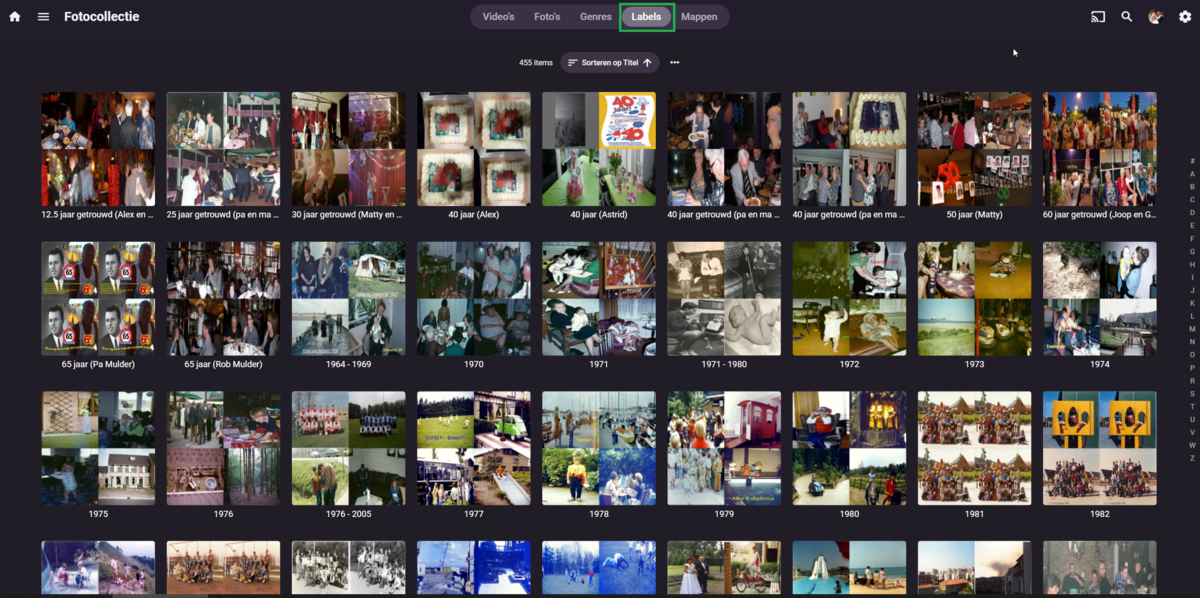
I mean this one. This is not yet visible in Kodi Next gen. All I see there is A-Z but all those folders are empty.
 1 point
 -
@vdrover Wow our ini files are VERY different for both being in the US (I assume)! I'm going to give yours a try! My wife likes wheel of fortune and they do that nonsense where they have a commercial, Vanna talks for 5 seconds, then back to commercial. With my ini it screws up and shows the commercial after she talks every time. Otherwise it's damn near perfect, but my ADD won't allow me to let it go so I seek out the holy grail of comskip.ini files1 point
-
Very nice @vdrover! I'll make a PDF out of it and put it in github and the release!1 point
-
Okay you are trying to EDIT a user account. Those options will not be available as they are not user settings they are per client settings.1 point
-
Those settings belong to the app, not the user. That's why you can't administer it remotely.1 point
-
The next hotfix has been deployed for 9.0.1. https://www.nvidia.com/en-us/geforce/forums/shield-tv/9/485445/shield-experience-upgrade-901-hotfix-image/1 point
-
Ce n'est pas simple, en effet, de mettre en place un système de certification (que cela soit Let's Encrypt ou autre) car cela suppose d'avoir de solides bases en informatique (Compréhension des réseaux en général, et plus particulièrement, leur sécurisation avec la mise en service de certificats, d'une autorité de certification qu'elle soit auto-signée ou non, de savoir ce que c'est un DNS (Domain Name Service) et comment cela fonctionne, etc. La question que tu dois te poser est de savoir si tu as vraiment besoin d'encrypter tes communications ou non. Si tu utilises ton serveur Emby que pour toi, alors aucun intérêt car rien ne va sortir sur internet. Si tu veux mettre a disposition ton serveur Emby pour de la famille, cela peut avoir un intérêt (parce les communications vont passer à travers le web et qu'elles seront non cryptées). Pour autant, reste qu'une vidéo n'est pas une information sensible en tant que telle et l'encrypter n'a donc que peu d'intérêt. Maintenant, tu peux vouloir autoriser uniquement des membres de ta famille à se connecter sur ton serveur. Pour cela tu peux le faire facilement avec ta box. En définissant qu'elles sont les adresses Ip externes qui pourront accéder à ton serveur. Bref tout cela pour te dire qu'avant de te lancer dans la mise en place d'une autorité de certification, poses toi la question de ce dont tu as vraiment besoin de faire. Edition du post : Si tu veux créer un certificat privé auto-signé pour windows 10 (ou 11) et exporter sa clef pour la stocker (ce qui est demandé par Emby pour sécuriser les communications) voici la procédure que dois suivre (et un peu adapter) : https://docs.microsoft.com/fr-fr/azure/virtual-wan/certificates-point-to-site1 point
-
That's a good question. I may only want to force it for admins at first and those who can modify/delete. Someone I don't know watching my media is ok by me, but if they try to download the entire catalog at once, then their stay may be more problematic.1 point
-
ebr - Are there any users of the app involved with programming changes? Anecdote time: We used to get a new second level manager every other year. The first thing they would do is reorganize the departments. No actual improvement, just something so that their manager knew they were doing something. That's what this latest change feels like. Nothing really improved but someone is trying to justify their job. My 2 cents. Please consider offering a retro version of the app (meaning two versions). Thank you Jack1 point
-
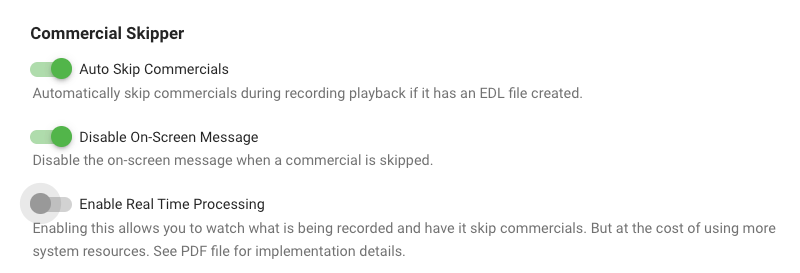
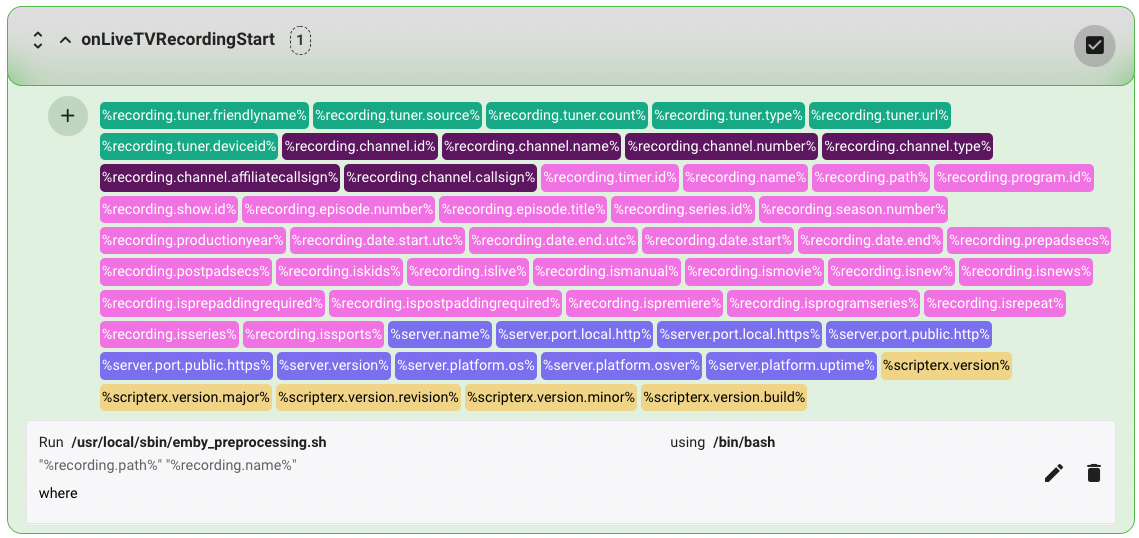
Detecting & skipping commercials on Ubuntu I wanted to contribute by sharing the details of setting up comskip on Ubuntu 20.04.3 LTS. Other flavors of linux will be similar I suspect. I'm a bit new to Emby, so this how-to is very detailed as I was learning and experimenting as i was going. I hope you find it useful! Step 1 — Preparation Before starting, you should have Live TV working in Emby and be able to record TV shows. You will also need to know the location of your emby server. Mine is installed in "/opt/emby-server". To check where your is installed, you can use this command from your terminal. $ sudo find / -type d -name "emby-server" And since you will be testing in some steps, it will be helpful to have already recorded a show and know the full path. I will use the example file path below, but you should replace it with the real path to your file: /mnt/Emby/TV Shows/Seinfeld (1981)/Season 8/Seinfeld S08E05.ts Step 2 — Install comskip In this step you will install the "donator version" comskip. I strongly recommend that you support the author my making a donation here. This step does not involve Emby in any way. The instructions were borrowed from here. From a terminal, enter the following commands. $ sudo apt-get update $ sudo apt-get install ffmpeg libavcodec-dev libavformat-dev libavutil-dev autoconf automake git libargtable2-dev libtool $ git clone git://github.com/erikkaashoek/Comskip $ cd Comskip $ ./autogen.sh $ ./configure $ make $ sudo make install Verify that comskip is working by entering the command below. The basic instructions for using comskip should be displayed. $ comskip -h Verify the path of comskip by entering the command below. If different than shown below, be sure to substitute this path when needed in Step 5. $ which comskip /usr/local/bin/comskip Step 3 — Create a comskip configuration file comskip requires the use of a configuration file to accurately detect commercials. For example, here is a basic configuration file that specifies some parameters: detect_method=107 output_edl=1 live_tv=1 edl_skip_field=3 max_commercialbreak=300 verbose=0 output_default=0 delete_logo_file=1 These parameters are stored in a file called comskip.ini. You need to create a comskip.ini file and note the full path to this file for use in Step 5. Download the attached comskip.ini file to your downloads folder. Copy the file to your /etc folder with the following command: $ sudo cp ~/Downloads/comskip.ini /etc The path of your config file will be: /etc/comskip.ini Step 4 — Test that comskip is working as expected This step does not involve Emby in any way, but it is important to help troubleshoot any issues later on when we ask Emby to trigger comskip (Step 5). We will now use the path to your recorded show from Step 1 and the path to the comskip.ini file from Step 3 to test comskip. From your terminal, enter the following command: $ comskip --ini=/etc/comskip.ini '/mnt/Emby/TV Shows/Seinfeld (1981)/Season 8/Seinfeld S08E05.ts' If comskip is working as expected, the output should be similar to that shown below with a slowly increasing progress indicator. Wait for this process to finish. "Commercials were found" should be the last line of the output. Comskip 0.82.010, made using ffmpeg Donator build The commandline used was: comskip --ini=/etc/comskip.ini "/mnt/Emby/TV Shows/Seinfeld (1981)/Season 8/Seinfeld S08E05.ts" Setting ini file to /etc/comskip.ini as per commandline Using /etc/comskip.ini for initiation values. 0:41:16 - 148470 frames in 685.90 sec(216.46 fps), 1.00 sec(248.00 fps), 99% 148549 frames decoded in 704.88 seconds (210.74 fps) Commercials were found. Using your file manager, navigate to the folder containing your recorded show. You should now see a file named "Seinfeld S08E05.edl" (note the EDL filename extension). You can view the file contents to confirm the start and end times (in seconds) for the commercials. 0.00 77.54 0 2167.10 2293.04 0 Step 5 — Launch comskip when a recording is complete. This is where we start to connect Emby and comskip. In this step we will configure the LiveTV section of Emby to launch the comskip application you installed and tested above. There are two ways to go here: (A) launch comskip when a recording completes, or (B) launch comskip when a recording begins and look for commercials in real time. CHOOSE ONE METHOD OR THE OTHER, NOT BOTH. Step 5(A) — Post-processing: running comskip when a recording is complete. From your Emby instance, navigate to the Advanced LiveTV settings as follows: Manage server > Live TV / DVR > Advanced. Scroll down. Locate the following 2 fields and enter the values shown (see Step 2 for the correct path for comskip and Step 3 for the path to comskip.ini): Post-processing application: /usr/local/bin/comskip Post-processor command line arguments: --ini=/etc/comskip.ini "{path}" Click the Save button at the bottom to save your changes. To test that this is working, record a new show. When the recording is complete, wait a few minutes and then check for the presence of a new EDL file in the folder containing the show. The EDL file should be created shortly after the recording completes. However, comskip can take a while to completely process every frame of your video. The longer the video, the longer it will take to finish. Thus, the EDL file may not be finalized for 5 to 30 minutes after the recording is complete. Step 5(B) — Live-processing: run comskip in real time during a recording. MASSIVE thanks to @reneboulard for his excellent work on live-processing in Linux. Live processing requires the installation of the Emby Scripter-X plugin. This allows you to execute scripts and commands when specific events occur such as the start of a recording. It also requires the use of a bash script (attached) called emby_preprocessing.sh. The attached bash script is very powerful. It logs activity, and allows you to use show-specific comskip.ini files on a per-show basis (see Step 8). Install the Emby Scripter-X plugin: From your Emby instance, navigate to the Plugins area as follows: Manage server > Plugins. Click the Catalog tab at the top. In the General section, locate and click Emby Scripter-X. On the plugin detail page, click the Install button. When installation is complete, reboot your Emby server. Create and test the bash file: Download the attached emby_preprocessing.sh file to your downloads folder. Copy the file to your /usr/local/sbin/ folder with the following command: $ sudo cp ~/Downloads/emby_preprocessing.sh /usr/local/sbin/ Make the bash file executable with the following command: $ sudo chmod +x /usr/local/sbin/emby_preprocessing.sh Test that the bash script is working by launching the script along with the test file above and looking for the production of EDL files. Here are sample commands: $ cd /usr/local/sbin/ $ ./emby_preprocessing.sh '/mnt/Emby/TV Shows/Seinfeld (1981)/Season 8/Seinfeld S08E05.ts' Combine the Emby Scripter-X plugin with the bash script: Ensure that the live_tv parameter in /ect/comskip.ini is enabled: live_tv=1 In the Emby Plugins area, ensure that the Real Time option is enabled. Navigate to the Emby Scripter-X settings as follows: Manage server > Scripter-X → Actions. Scroll down to locate the onLiveTVRecordingStart section. Click the section title to display the details. Click the "+" icon at the top-left of the long list of variables and then the edit/pencil icon on the right. Complete the following: Script file: /usr/local/sbin/emby_preprocessing.sh Parameters: "%recording.path%" "%recording.name%" using (dropdown): /bin/bash Click the save/check icon on the right to save the changes. Test that the the Emby Scripter-X plugin is properly launching the bash script by recording a show and looking for the production of EDL files. Since the bash script includes a 1-minute delay, wait a few minutes and be patient. Once the EDL file is created, you can observe this file during the recording. Entries should show up in real time as commercials are detected. Step 6 — Installing the Com Skipper plugin for Emby Server Now that your system is properly configured and tested, it's time to install the Com Skipper plugin and enjoy the ability to skip commercials while watching a recorded show! Note: This plugin is not (yet) in the existing plugin catalog and must be installed manually. Once installed, it will appear in the Plugins section of Emby and you can manage it from there. Download the com_skipper plugin from the first post in this thread. I recommend subscribing to this thread to get notified when updates are released. You might also consider watching this repository on Github for the same reason. Extract the ZIP file to your downloads folder. Copy the DLL file to the Emby plugins folder with the following command (update to your emby path from step 1 as needed) . $ sudo cp ~/Downloads/ComSkipper.dll /opt/emby-server/system/plugins Restart Emby from the dashboard. Review the plugin settings by navigating to Manage server > Plugins > Com Skipper > Settings. Note 1: The setup described above does not support the Real Time Processing option shown in the plugin. Note 2: For AppleTV users, you MUST enable the first 2 options for things to work as you expect. Step 7 — Test commercial skipping in your Emby client! If everything is done right, you can now watch either the show you used for testing in Step 4, or the new show you recorded as a test in Step 5. Commercials should be skipped based on the times (in seconds) noted in the EDL files created by comskip. If many of your commercials are not detected, or if the start/end time for the detected commercials is not accurate enough for you, feel free to experiment with the values in /etc/comskip.ini until the desired accuracy is achieved. Google is your friend in this pursuit. For example, this thread, and this one regarding country-specific INI files. Step 8 — Using series-specific comskip.ini files If you followed the live-processing instructions in Step 5(B), you can put a comskip.ini file in the parent folder for any series you are recording. This file can have different parameters than the default file in /etc. This is useful for problematic shows that need specific optimization. Using the Seinfeld example above, use this command to copy and then modify your default ini file: $ cp /etc/comskip.ini '/mnt/Emby/TV Shows/Seinfeld (1981)' $ nano '/mnt/Emby/TV Shows/Seinfeld (1981)/comskip.ini' comskip.ini emby_preprocessing.sh
 1 point
 -
Hi, yes that is planned for future updates to the app. Thanks.1 point
-
After updating to the latest version, the Stop button on my remote doesn't seem to work anymore. Pause works correctly, but not Stop.1 point
-
Hey @Brailyn, to support the CSV import would require quite a bit of validation and time to write. BUT what I can suggest is that the data for the playlists are stored in just plain "json" files on the server. (linux: /var/lib/emby/data/smartplaylists, not sure on windows). You could generate the json file from csv or another tool and just copy them across? If you have a look at one of the files it will give you the layout. (You'll need to make 100% sure the field name, operators and selection list values are 100% the same)1 point
-
The thread exists and is this active because a feature that many used 'without incident' is no longer working. If you can fix Emby to use Android 11 like otehr Apps have, then this thread will be totally redundant ... After my Android 9 recovery, it took less than 30 seconds to configure in the Shield... And we aren't arguing that case either - we agree with you lol - we are simply suggesting that for that 1% of cases that DO need it (for whatever reason), then why take that reason away ? I'm in the middle of doing this - it is reasonably clear that on decent hardware, it does make no difference and HTTP is fractionally faster. I've literally just finished an experiment where I have setup a '1Gig NAS' (instead of my production Direct Attached Storage) and had 6 x 100Mbit 4K remux's running over HTTP - zero issues on any of them, BUT the Emby server is my current i7 12700K - and the NAS was on a separate VLAN and physical interface to the Clients. ie Best Case Scenario. I now want to go the opposite end of the hardware spectrum, and run Emby Server on a low powered CPU - maybe the Shield itself on the same Network (that 99.9% of people will have) and see if I can repeat the exercise. ie Worst Case (typical?) Scenario.1 point
-
We will be proving the use case for DFA - if I'm reading it correctly, your tone in this thread suggests you think there is no technical need for it and ultimately want to remove it. A lot of us beg to differ. Once we have agreement on the need for it or not, then, assuming we do - we can move onto the next stage of why it does not work in Emby on Android 11 when other apps have no issues with it. It pointless moving onto the next stage if we genuinely have no need for it, but we can only make that decision with use cases.1 point
-
I think you summed it up with these two lines. The high resource use is due to burning in the graphical subs or combining them with the video track which is an expensive process if the client app can't handle the format on it's own. The server is flexible enough to be able to do this for you when all else fails. This functionality can be turned off per user but then they would get no subs if these were the only ones available. The options would be to replace the graphical subs with text based/srt style subs or to OCR the current subs to convert them into text based subs if you can't find premade text subs.1 point
-
I dont like the idea of creating a user with a no password, yes I could set one, and "require" the user to change it, but I cant enforce that. I would love to see some work put into the adding users via the emby connect flow. For me, ideally, I could send the user to emby connect site, let them create the account first. Then as part of that flow, they could provide a "server request", ie a URL for a server they were asking for permission to join. Then the admin of the server would get a notification from my server, that a new user request has been received, and I could either approve or disapprove on the local server, and the credentials would initially be a random password. On the local server side, adding the ability to "require user to change the password the next time they log in" would enable this to happen with no password information being exchanged.1 point
-
For "multiple versions", it would be great to have both the 4K / 1080p versions of the same film in a single MKV so that the audio tracks / subs can be shared and not wasted space.1 point
-
Hi, yes, given that the feature is already there for video, we should be able to easily add this. Can you provide a sample file for testing? Thanks.1 point
-
A new release of Emby Server is currently rolling out, and this is largely a bug fix maintenance release while we work on new features for future updates. Here is the list of improvements and issues resolved: Fix regression with local network multiple subnet detection Improve cleanup of transcoding processes View the full article1 point
-
Hi as i can see the exoplayer is nearly to get a major update like allowing Dolby Vision from .mkv containers and looks like MKV standard it's nearly to support it and as soon the MKV get support for DV (Dolby Vision) exoplayer will be upgraded as soon. Mastroka Standard https://github.com/cellar-wg/matroska-specification/pull/390 ExoPlayer https://github.com/google/ExoPlayer/issues/7267 BTW, as I read I found than ts(Containers) and others already support (Dolby Vision). But I also would like than Emby add some transparent icon or something that display than the content is well in Dolby Vision and Atmos an Transparent icon/tag/logo for exemple at the beginning at the movie during 10 Seconds (Usually the time of the intro scene) and at the movie UI Wil be nice. FYI. MKVToolNix implement it in the next version https://gitlab.com/mbunkus/mkvtoolnix/-/issues/2784#note_335568674785a60fd09cfbbf3b873780a63a1513 So conclusion. Support Dolby Atmos + Vision with and logo/icon/tag whatever you want(I prefer a tag and a icon) on the movie, music UI to see than that movie have that support i also know than other concurrents are working on this implementation. So hope than emby is the first one. Nvidia Shield already support Dolby Vision and Atmos and many tv and sound bars support Atmos unfortunately there is no info on the movie,music UI to show us properly than the movie,music have Atmos and/or have Dolby Vision. And also create a filter to add this as a tag to select directly the movie have Atmos and/or Dolby or each one (Dolby Vision or Dolby Atmos) Like this. VOTE UP for this enhancement Kind regards1 point
-
thanks for your reply! yes it would be really nice for bigger systems with a lot of users to clearly define roles and what they are allowed to.1 point
-
Hi. The subtitle editing permission is already there. The others or, rather, a role-based permission system, is a good idea for the future.1 point
-
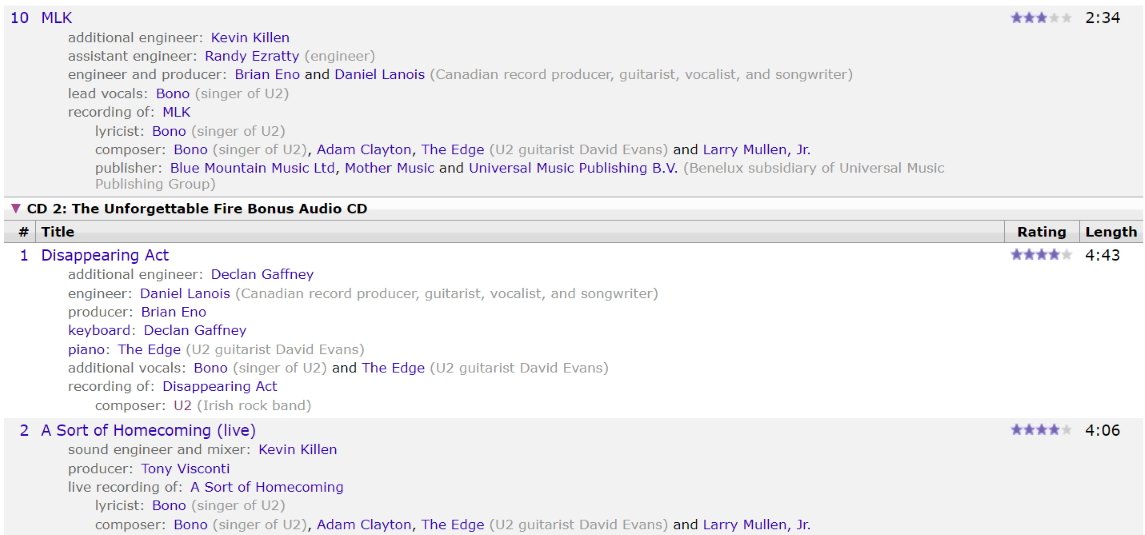
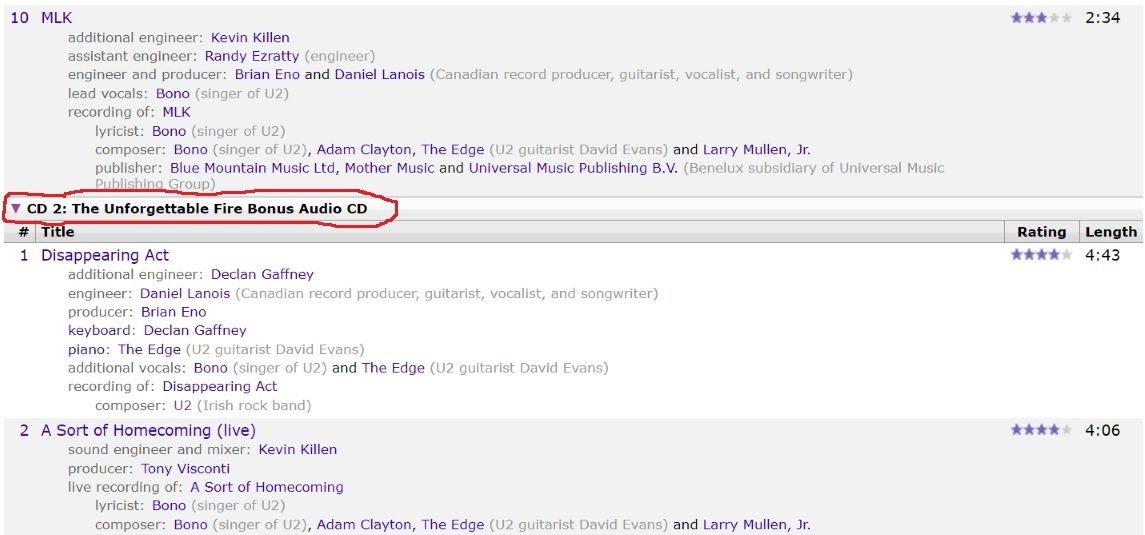
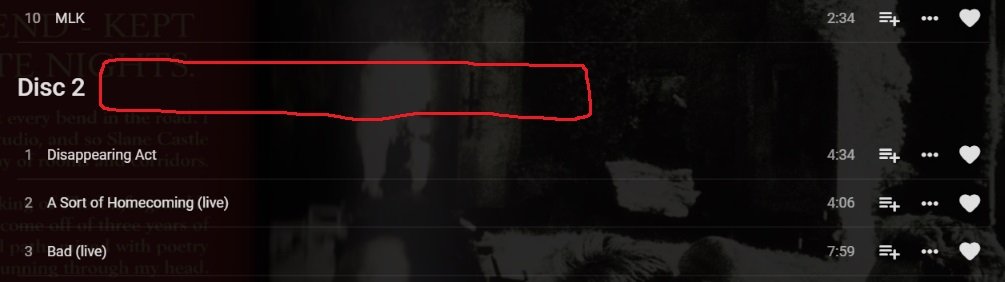
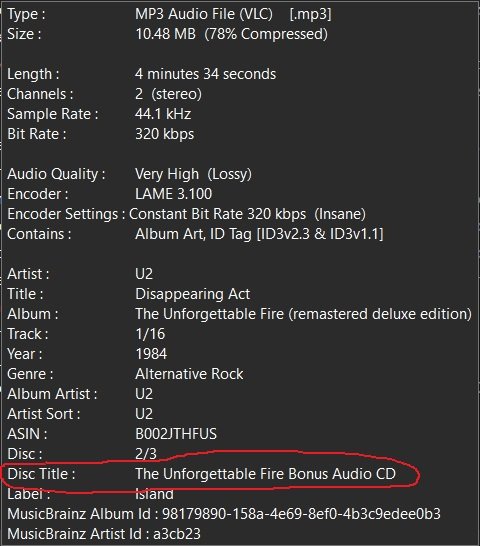
Conjuring this one back up because for multi disc music albums I'm having a tough time sometimes figuring out what is what. I have multi-disc albums anywhere from 2 to 100 discs big and just the label Disc # isn't always meaningful unless I pull out the physical disc and read what the covers say. The bigger the boxset the more important the disc title information becomes. For my 100 disc boxset of Beethoven music I can't make out what is what without the physical cover telling me as I'm not an expert in classical music. If you could pull the "Disc Title" id tag and append it to the Disc # label then I wouldn't have to pull out the physical cover for the CD to know what I'm playing. Single discs don't have this information in musicbrainz so it wouldn't affect them at all. This isn't the same thing as the Album Title. This is the label used to name individual discs within a multi-disc boxset This information is pulled from musicbrainz using mp3tag/picard As seen on musicbrainz https://musicbrainz.org/release/98179890-158a-4e69-8ef0-4b3c9edee0b3 As mentioned above this is where it probably would be a good place to put it
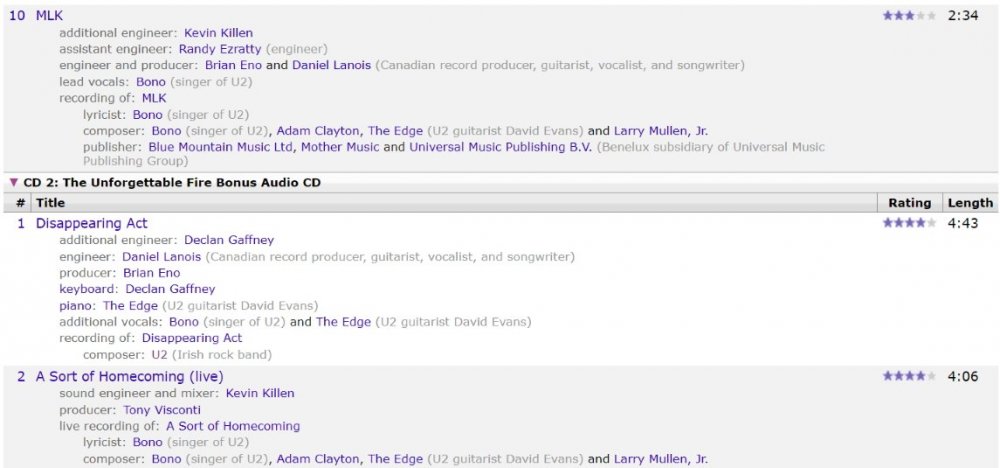
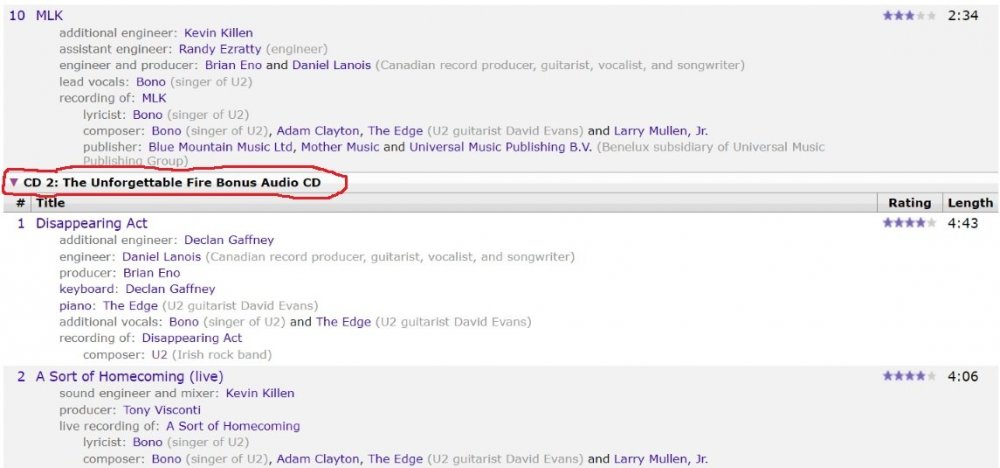
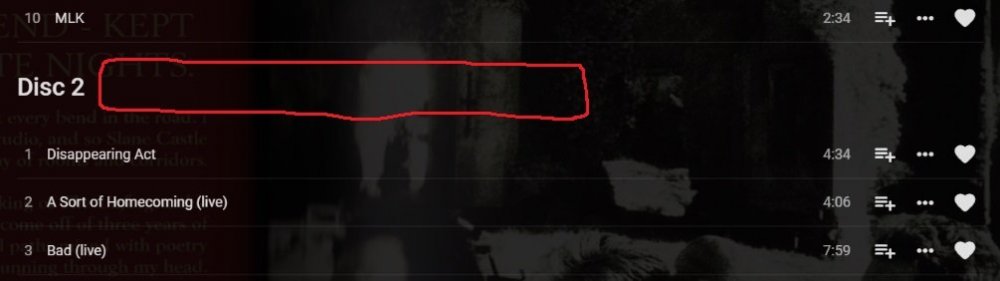 1 point
 -
in user preferences you can enable "show a Folder view". then it will add a Folders menu to your user views and you can see that plain structure.1 point