Leaderboard




Popular Content
Showing content with the highest reputation on 02/16/22 in Posts
-
I'd really like to have 2 Factor Authentication added to the login screen. It's just this (optional) extra layer of security to help secure the server (which, especially if people use camera uploads) contains pretty private data. There are for every type of programming language quite a few libraries available, so implementation on a server shouldn't be too hard to realise2 points
-
With respect, technically you are not the OP, I am. You just butted in with a different problem.2 points
-
Can you expand on why you think this is a considerable security risk ? For any app holding personal or financial information, then yes, 2FA is necessary - but this is a personal media server. I would personally be more concerned that Emby does not enforce the use of password strength, does not enforce any sort of brute force lockout nor does it even force the use of HTTPS. They are far more of a 'priority' than 2FA is imho.2 points
-
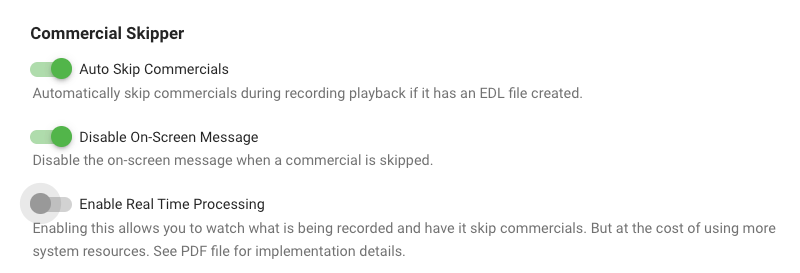
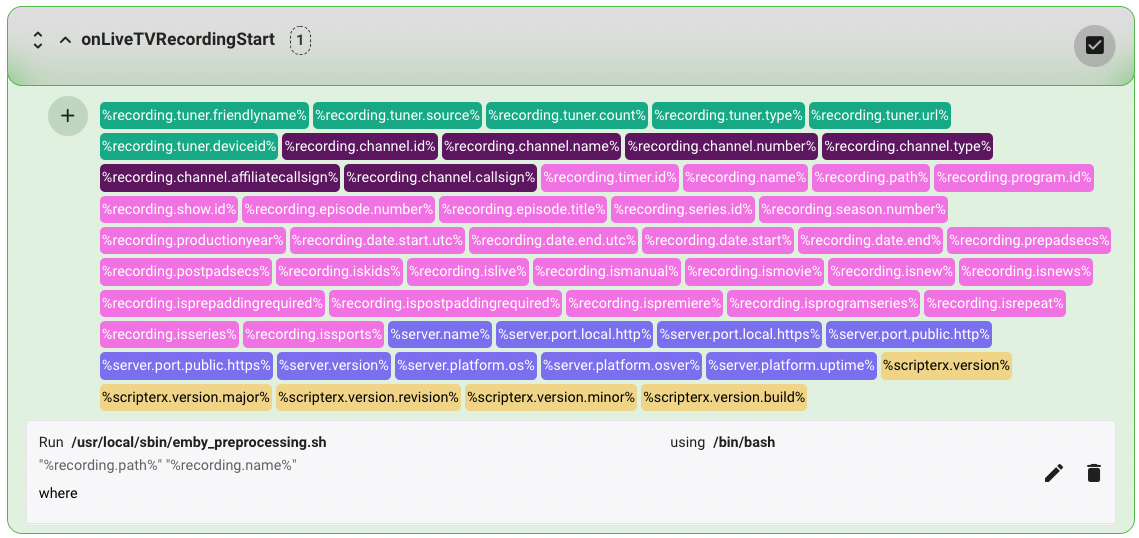
Detecting & skipping commercials on Ubuntu I wanted to contribute by sharing the details of setting up comskip on Ubuntu 20.04.3 LTS. Other flavors of linux will be similar I suspect. I'm a bit new to Emby, so this how-to is very detailed as I was learning and experimenting as i was going. I hope you find it useful! Step 1 — Preparation Before starting, you should have Live TV working in Emby and be able to record TV shows. You will also need to know the location of your emby server. Mine is installed in "/opt/emby-server". To check where your is installed, you can use this command from your terminal. $ sudo find / -type d -name "emby-server" And since you will be testing in some steps, it will be helpful to have already recorded a show and know the full path. I will use the example file path below, but you should replace it with the real path to your file: /mnt/Emby/TV Shows/Seinfeld (1981)/Season 8/Seinfeld S08E05.ts Step 2 — Install comskip In this step you will install the "donator version" comskip. I strongly recommend that you support the author my making a donation here. This step does not involve Emby in any way. The instructions were borrowed from here. From a terminal, enter the following commands. $ sudo apt-get update $ sudo apt-get install ffmpeg libavcodec-dev libavformat-dev libavutil-dev autoconf automake git libargtable2-dev libtool $ git clone git://github.com/erikkaashoek/Comskip $ cd Comskip $ ./autogen.sh $ ./configure $ make $ sudo make install Verify that comskip is working by entering the command below. The basic instructions for using comskip should be displayed. $ comskip -h Verify the path of comskip by entering the command below. If different than shown below, be sure to substitute this path when needed in Step 5. $ which comskip /usr/local/bin/comskip Step 3 — Create a comskip configuration file comskip requires the use of a configuration file to accurately detect commercials. For example, here is a basic configuration file that specifies some parameters: detect_method=107 output_edl=1 live_tv=1 edl_skip_field=3 max_commercialbreak=300 verbose=0 output_default=0 delete_logo_file=1 These parameters are stored in a file called comskip.ini. You need to create a comskip.ini file and note the full path to this file for use in Step 5. Download the attached comskip.ini file to your downloads folder. Copy the file to your /etc folder with the following command: $ sudo cp ~/Downloads/comskip.ini /etc The path of your config file will be: /etc/comskip.ini Step 4 — Test that comskip is working as expected This step does not involve Emby in any way, but it is important to help troubleshoot any issues later on when we ask Emby to trigger comskip (Step 5). We will now use the path to your recorded show from Step 1 and the path to the comskip.ini file from Step 3 to test comskip. From your terminal, enter the following command: $ comskip --ini=/etc/comskip.ini '/mnt/Emby/TV Shows/Seinfeld (1981)/Season 8/Seinfeld S08E05.ts' If comskip is working as expected, the output should be similar to that shown below with a slowly increasing progress indicator. Wait for this process to finish. "Commercials were found" should be the last line of the output. Comskip 0.82.010, made using ffmpeg Donator build The commandline used was: comskip --ini=/etc/comskip.ini "/mnt/Emby/TV Shows/Seinfeld (1981)/Season 8/Seinfeld S08E05.ts" Setting ini file to /etc/comskip.ini as per commandline Using /etc/comskip.ini for initiation values. 0:41:16 - 148470 frames in 685.90 sec(216.46 fps), 1.00 sec(248.00 fps), 99% 148549 frames decoded in 704.88 seconds (210.74 fps) Commercials were found. Using your file manager, navigate to the folder containing your recorded show. You should now see a file named "Seinfeld S08E05.edl" (note the EDL filename extension). You can view the file contents to confirm the start and end times (in seconds) for the commercials. 0.00 77.54 0 2167.10 2293.04 0 Step 5 — Launch comskip when a recording is complete. This is where we start to connect Emby and comskip. In this step we will configure the LiveTV section of Emby to launch the comskip application you installed and tested above. There are two ways to go here: (A) launch comskip when a recording completes, or (B) launch comskip when a recording begins and look for commercials in real time. CHOOSE ONE METHOD OR THE OTHER, NOT BOTH. Step 5(A) — Post-processing: running comskip when a recording is complete. From your Emby instance, navigate to the Advanced LiveTV settings as follows: Manage server > Live TV / DVR > Advanced. Scroll down. Locate the following 2 fields and enter the values shown (see Step 2 for the correct path for comskip and Step 3 for the path to comskip.ini): Post-processing application: /usr/local/bin/comskip Post-processor command line arguments: --ini=/etc/comskip.ini "{path}" Click the Save button at the bottom to save your changes. To test that this is working, record a new show. When the recording is complete, wait a few minutes and then check for the presence of a new EDL file in the folder containing the show. The EDL file should be created shortly after the recording completes. However, comskip can take a while to completely process every frame of your video. The longer the video, the longer it will take to finish. Thus, the EDL file may not be finalized for 5 to 30 minutes after the recording is complete. Step 5(B) — Live-processing: run comskip in real time during a recording. MASSIVE thanks to @reneboulard for his excellent work on live-processing in Linux. Live processing requires the installation of the Emby Scripter-X plugin. This allows you to execute scripts and commands when specific events occur such as the start of a recording. It also requires the use of a bash script (attached) called emby_preprocessing.sh. The attached bash script is very powerful. It logs activity, and allows you to use show-specific comskip.ini files on a per-show basis (see Step 8). Install the Emby Scripter-X plugin: From your Emby instance, navigate to the Plugins area as follows: Manage server > Plugins. Click the Catalog tab at the top. In the General section, locate and click Emby Scripter-X. On the plugin detail page, click the Install button. When installation is complete, reboot your Emby server. Create and test the bash file: Download the attached emby_preprocessing.sh file to your downloads folder. Copy the file to your /usr/local/sbin/ folder with the following command: $ sudo cp ~/Downloads/emby_preprocessing.sh /usr/local/sbin/ Make the bash file executable with the following command: $ sudo chmod +x /usr/local/sbin/emby_preprocessing.sh Test that the bash script is working by launching the script along with the test file above and looking for the production of EDL files. Here are sample commands: $ cd /usr/local/sbin/ $ ./emby_preprocessing.sh '/mnt/Emby/TV Shows/Seinfeld (1981)/Season 8/Seinfeld S08E05.ts' Combine the Emby Scripter-X plugin with the bash script: Ensure that the live_tv parameter in /ect/comskip.ini is enabled: live_tv=1 In the Emby Plugins area, ensure that the Real Time option is enabled. Navigate to the Emby Scripter-X settings as follows: Manage server > Scripter-X → Actions. Scroll down to locate the onLiveTVRecordingStart section. Click the section title to display the details. Click the "+" icon at the top-left of the long list of variables and then the edit/pencil icon on the right. Complete the following: Script file: /usr/local/sbin/emby_preprocessing.sh Parameters: "%recording.path%" "%recording.name%" using (dropdown): /bin/bash Click the save/check icon on the right to save the changes. Test that the the Emby Scripter-X plugin is properly launching the bash script by recording a show and looking for the production of EDL files. Since the bash script includes a 1-minute delay, wait a few minutes and be patient. Once the EDL file is created, you can observe this file during the recording. Entries should show up in real time as commercials are detected. Step 6 — Installing the Com Skipper plugin for Emby Server Now that your system is properly configured and tested, it's time to install the Com Skipper plugin and enjoy the ability to skip commercials while watching a recorded show! Note: This plugin is not (yet) in the existing plugin catalog and must be installed manually. Once installed, it will appear in the Plugins section of Emby and you can manage it from there. Download the com_skipper plugin from the first post in this thread. I recommend subscribing to this thread to get notified when updates are released. You might also consider watching this repository on Github for the same reason. Extract the ZIP file to your downloads folder. Copy the DLL file to the Emby plugins folder with the following command (update to your emby path from step 1 as needed) . $ sudo cp ~/Downloads/ComSkipper.dll /opt/emby-server/system/plugins Restart Emby from the dashboard. Review the plugin settings by navigating to Manage server > Plugins > Com Skipper > Settings. Note 1: The setup described above does not support the Real Time Processing option shown in the plugin. Note 2: For AppleTV users, you MUST enable the first 2 options for things to work as you expect. Step 7 — Test commercial skipping in your Emby client! If everything is done right, you can now watch either the show you used for testing in Step 4, or the new show you recorded as a test in Step 5. Commercials should be skipped based on the times (in seconds) noted in the EDL files created by comskip. If many of your commercials are not detected, or if the start/end time for the detected commercials is not accurate enough for you, feel free to experiment with the values in /etc/comskip.ini until the desired accuracy is achieved. Google is your friend in this pursuit. For example, this thread, and this one regarding country-specific INI files. Step 8 — Using series-specific comskip.ini files If you followed the live-processing instructions in Step 5(B), you can put a comskip.ini file in the parent folder for any series you are recording. This file can have different parameters than the default file in /etc. This is useful for problematic shows that need specific optimization. Using the Seinfeld example above, use this command to copy and then modify your default ini file: $ cp /etc/comskip.ini '/mnt/Emby/TV Shows/Seinfeld (1981)' $ nano '/mnt/Emby/TV Shows/Seinfeld (1981)/comskip.ini' comskip.ini emby_preprocessing.sh
 2 points
 -
Thanks for the continuing updates. But you never blog about the releases for LG. So it's guessing what has changed.2 points
-
Emby for LG TV's 1.0.33 has been released. Stay tuned to the blog for the release announcement.2 points
-
I moved from Plex to Emby and even though I think Emby is superior in its flexibility there are some things I like better with Plex, especially in terms of its looks. This theme is trying to fix that by making it a bit more similar to Plex but with some, in my opinion, improvements. The CSS is attached to this post for anyone interested and below are some screens to show it off Good to know I only use Chrome so I can't guarantee this CSS works as expected in other browsers. If you want the sidebar menu to look like in the screens, make sure to pin the sidebar. Watched badge/banderoll is inverted which means that the badge will not be shown if media have been watched, like in Plex. For desired look, please use the "Dark" theme for both Theme & Settings theme in the display settings. Emby-Stable-style-v3.6.txt





 1 point
 -
i have thousands of obscure things... lots of shorts, things not on imdb, alternate versions of things etc.. and every time i have to move and redo my setup/re-import everything i have to spend days identifying things in my movie library... but there is no real way to do it... have to manually add an image and name etc... with plex i can just click one button UNMATCH and it removes the usually misidentified match/metadata and replaces it with the thumbnail and filename. just finding the mismatched items that aren't on imdb is a full days work ; ) : ( i'd kill for an unmatch button : )1 point
-
Please add a "next item" button on every level. Now it's really annoying when you use emby to resume watchin a TV show. You click on the show to get to the season level, click on the season to get to the episode level, you pick the episode where you left off before by clicking on the play button on the episode...and there's not "next item" button in the player controls. Only if you click on "play all from here" in the dashboard on an episode level you'll get a "next item" button. To make this completely confusing: If you're on the homepage of the dashboard and hit "play all from here" on an item in the "Continue watching" section of the homepage - no "next item" button. Please just add one no matter how you start playing a TV show. edit: After some talk in this thread I clarified the title. It's all about adding an auto-queue feature without the need to turn on the auto-play feature so you'll always have a skip button available when playing the episode of a TV show.1 point
-
Hi. Please also confirm whether or not you have the "Are you still watching" feature enabled on whatever client/app you were using.1 point
-
That would be great, thanks.1 point
-
Hey, the dialogue works properly now and the graphs refresh immediately after a theshold change but the Table does not - still needs a page refresh. thanks1 point
-
Hi. They really aren't. The only sizes that changed are the top "My Media" row. Well, they all have slightly rounded corners now so, I guess, technically, they got smaller by whatever that corner is and only on the corners. I think maybe there is a perception of size change due to the focus indicator changing from a very large white box that goes all the way around the item - including text - to a green outline that only goes around the image. We plan to offer an option to use a neutral/white outline focus indicator in the future.1 point
-
Right OK the new option will be in the 4.7 release, so for now you'll have to look at the top of a server log.1 point
-
I agree - and I'm not against the idea (for remote Admin), I'm simply stating that there are other fundamental items that are at a greater risk to the average Emby user that need fixing first. What would be the point of 2FA if I could simply inject an authorised string into the reply from lack of an encrypted authorisation ? What would be the point of 2FA if I had no password at all ? (still allowed in Emby) At this point it's actually not 2FA at all .. lol What if I set password as 'password' - same as above, not 2FA at all. What if I set a password with a very low entropy, as there is no password lockout, I can break it in seconds... so we are back to no 2FA again. You see my point ? Internet security is based on layers, get the base layers correct, then you add more optional layers (such as 2FA) - until then, it is pointless and you are actually putting people into a false sense that there IS security, when infact there isn't ...1 point
-
No, but it's possible for future updates.1 point
-
great, so is it coming in the next stable version?1 point
-
why don't you just give us the option to use it instead of telling the people in this thread wanting the feature since 2018 that they don't need it and it is not a security problem etc.? Whats the problem of implementing it and let the users decide if they want/need it or not?1 point
-
It was much better as it was and I will never understand why you felt the need to change it. The old look was never blocky and looked fine as it was. The green is horrible and not easy to pick out and the icons are to small. Even my girlfriend who has 20/20 finds it hard to see. There really needs to be some customisable options here to keep everyone happy.1 point
-
Nope. Yeah, just assign some "neutral" (innocent? ) image; if you only delete it, it will be auto-generated again with random items within, basically what you have now - whether those randomly picked will be acceptable - that's anyone's guess.1 point
-
came across this while briefly testing the standard android app on my shield combined with a harmony remote and hub. the app was completely unusable1 point
-
It will generally be a combination of the two. There are open feature requests for emby server to keep complete copies of images in internal folders to reduce hdd access. Thanks.1 point
-
OK yes I can reproduce. We'll have to tone it down the blur depending on the performance of the device.1 point
-
Bonsoir @Piregwan Alors, ce n'est pas parce que tu changes un numéro de port que tu sécurises tes flux. Au mieux, comme il ne s'agit pas là de ports commun, ton serveur Emby sera moins exposé sur le net (à condition que ce dernier soit en effet accessible depuis internet). De deux choses, l'une : - soit tes communication se font en http, ce qui impliquent qu'elle ne seront pas cryptées - soit elles se font en https, donc elles seront dans ce cas là bien cryptées, mais cela impose la mise en place d'un certificat pour assurer leur cryptage. Le port quant à lui, n'a rien à voir là dedans. Il indique juste par quel chemin passeront tes communications.1 point
-
In Kodi configuration files I think so I don't think it would be related to your issue. Plus, you said your issue is definitely related to the beta server, correct?1 point
-
yes it is that simple. i have a win 10 server and 2 syno disk stations each with an expansion box.1 point
-
3 dot menu -> get server info. also see the top of any server log.1 point
-
btw, would it be possible to make some icons to destinguish whish lists live/scheduled/manual?1 point
-
The focus being all over the place instead of in position 1, and "highlighted" in a less visible green which I find harder to see. I had hoped to come on here to find that Roku had done something, and that I could switch to a firestick or something. But it's the same across all platforms. Yay. I have always loved Emby and you all do a great job. It's just irritating, is all.1 point
-
I really do hate to sound negative, but I can't say that I've noticed any visual "improvements" with this update. New irritations, sure. Improvements? Not really. I would really love the ability to just lock in the previous version, with no further updates. It's like someone has come into my living room uninvited and started redecorating.1 point
-
Hi. This is definitely a handshake issue between eArc etc. and should be less of a problem in the beta release of the app. The error in your server log is unrelated.1 point
-
In the Sony OS (Android) - do you have the option to 'Force' close the Emby application (in the 'App section) after closing it ? The reason I ask is when you 'close' the App, you don't really close it - it just gets removed from the quick access and parts of it stay in memory still. If by forcing the App to close, then re-open and it works again (without restarting the TV) proves that it's a handshake type problem not recovering from it running in the background.1 point
-
There you go https://github.com/MediaBrowser/Emby.Releases/releases/download/4.7.0.23/emby-server-synology-mono_4.7.0.23_armv7_legacy.spk1 point
-
Let us know when it's ready @alucryd as @Bingo61 and I can setup a remote session to do the install and I can grab any logs if needed if the problem persists.1 point
-
I will be updating the mono package to support the DS215j later today, according to the logs @cayars sent, you are getting a segfault, which means the dotnet runtime has an issue on your architecture (which sadly isn't found in any other NAS device I know of so I can't rule out a Synology bug).1 point
-
Ok, great! Maybe you can squeeze in an option to generate Daily List but without Shuffle. The reason is that Live list is very memory consuming especially with big libraries so I like to use Daily Shuffle instead (daily updates are just fine) but I don't like Shuffle in any lists...1 point
-
Emby for LG TV's 1.0.33 has been released. Stay tuned to the blog for the release announcement.1 point
-
That fixed it thanks you might want to disable trueHD if it's not supported so it just runs in AC3 save lot of trouble at least have a note popup. Everything is wired 1Gbit no wireless so far so good have watched 3 UHD movies. I notice now once I changed it to AC3 it no longer says translating it says direct play.1 point
-
For Emby to work in DSM 7 after having it running on DSM 6 you have to do the migration per those instructions. If you don't do the migration you'll essentially have a new setup which will require reconfiguring everything. The problem in a nut shell is that the location for DSM 6 programs is now different in DSM 7. So all your old DSM 6 info is still there but at a different location. The migration process is basically just copying this information over, resetting permissions and then installing the program again. But this needs to be done in a specific way so you will want to follow the directions in that thread in the first message.1 point
-
I can make that happen by uncommenting one piece of code, and commenting out another. I put it there just incase.1 point
-
You could also use the 'Playback Reporting' plugin to filter by date and specific (or all) users to give you a nice summary1 point
-
@Gee11 point
-
Yes this is something we can look into. Thanks.1 point
-
Hi, yes we're looking into this. Thanks for reporting.1 point
-
Hi. No, you do not have to do that. No changes to your file system should be necessary. You just need to change your library setup to be much more simple. In the case of your movies you would create a single library called "Movies" (or whatever you wish) with the Movies content type. Then under folders you would add two folders: K:\videos\movies\a K:\videos\movies\b OR if you have only those two subfolders under movies and may add more in the future that you want included, you would just specify: K\videos\movies Now that library will show all of your movies and present them to you in a much better way in all of the interfaces. Note: if you make this change, either start from scratch (probably easiest) or be sure and delete all of the other libraries you created that point to your movie folders now and let a library scan complete before adding the library as I indicated above.1 point
-
martincom and troyhough, You have the magic touch! I raised the exact same issue a year ago, but you got it fixed in just a few days! Good for you, and good for Emby. I will be more likely to record these 1080i stations on Emby using Silicon Dust instead of Comcast cable card. THANKS Emby support folks.1 point
-
Very nice to see the progress here and the responsiveness of the devs. Not like "Brand P"!1 point
-
After using the new UI a bit more, I do happen to agree with @jemoore, things have been changed with no actual improvement from a user's point of view, IMHO it's now a bit of a mess! It was fine the way it was!1 point
-
The usability has been gutted in two important areas (IMHO). Please excuse my not knowing the proper names for the different items. I've tried my best. One is that I need to look around to find the highlighted show. It's no longer always the first item on the left. When moving from one library to another, the focus moves directly down instead of on the first item in the list. I can no longer view shows in a particular library and have them wrap around to the first item when I've reached the end. It seems changes were made for the sake of changes. No improvements. Probably changes made by someone that doesn't use the app on a roku. Can we have options to customize these aspects? Please? Thanks Jack1 point
-
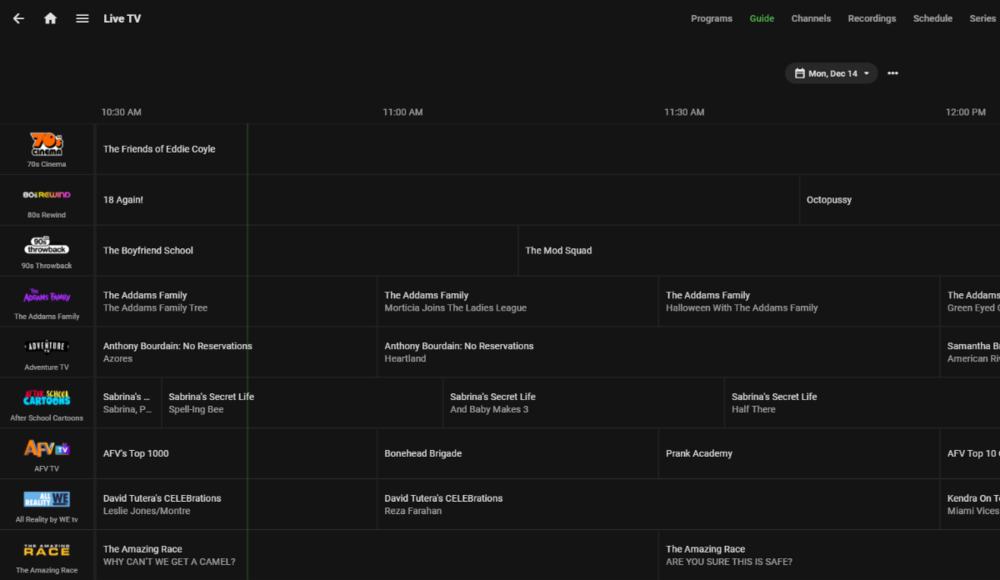
FWIW, this docker image that was developed for ChannelsDVR provides a m3u and xml guide data that works with emby. It can be added as tuner and guide source. https://github.com/maddox/pluto-for-channels
 1 point