Leaderboard




Popular Content
Showing content with the highest reputation on 01/16/22 in Posts
-
BINGO! This morning I did a search on button remapping for the shield, of course there is an app, so I downloaded it ... Cool little app, it did just what you were suggesting. A long hold of the back button now gets me back to HOME .... I thank you. Both remotes are the newer style, I liked it on the newer "cigar" Shield so I replaced the old remote for the Shield Pro ... not sure why the long hold wasn't set to work as others kept stating, but the mapping app kicked it into gear. Again ... Thanks to all that offered assistance4 points
-
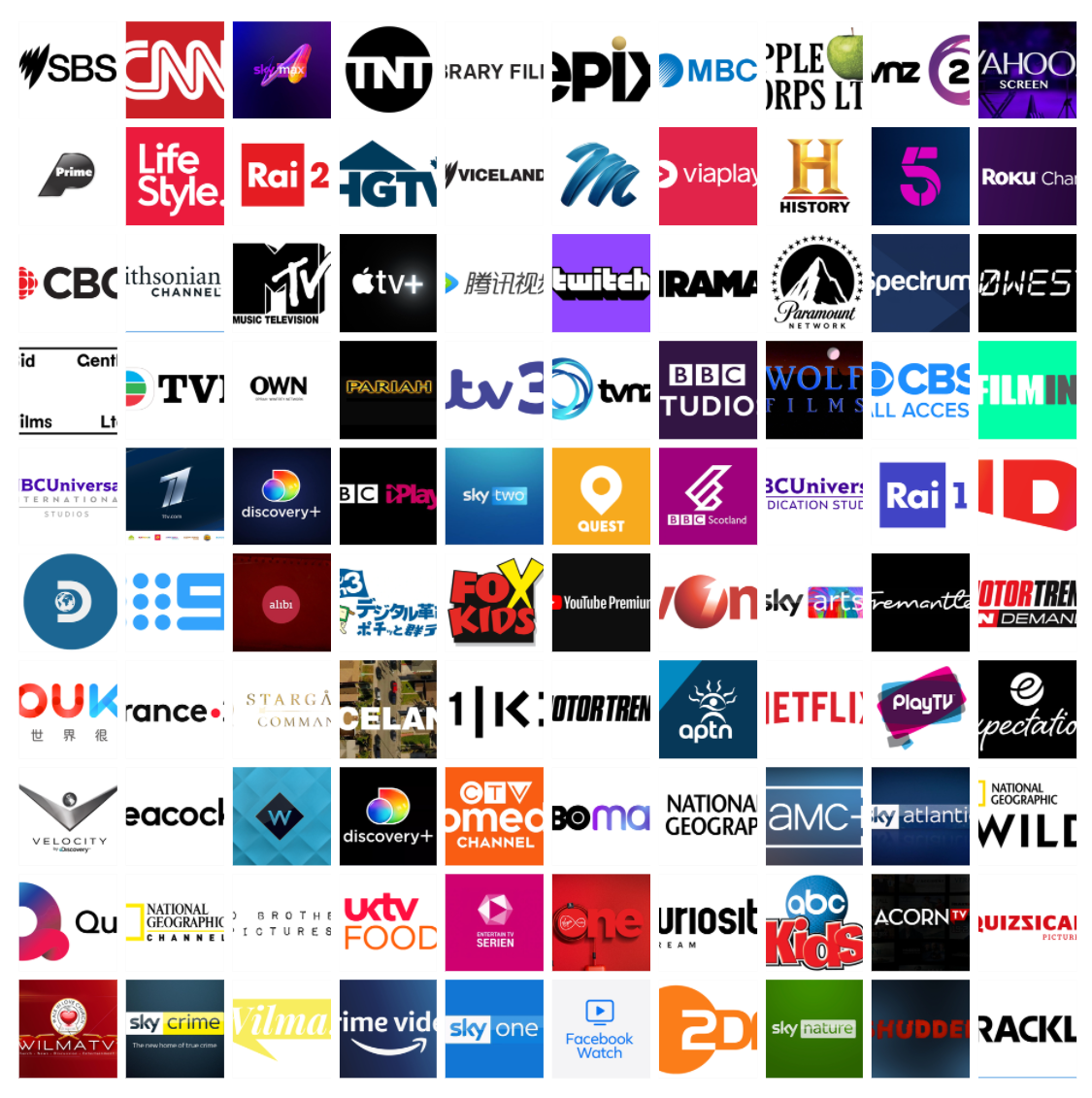
Made a few images for TV Networks based on my Network list. They are all mainly grabbed from logopedia, all believed to be 'free to use', will place them in a ZIP on a google drive if people want to download them, nothing special, I have not created the images, just placed them in a 16:9 frame for use with Emby there is 136 images. https://1bestlinks.net/TVNetworks1 (updated link) Samples below;
 2 points
 -
This is correct. We don't use up space for a home button that might take you more clicks to reach than the back button presses to get where you want to go. Long-press of the back button has been a shortcut to home for a long time. If it isn't working for you, I suspect something is interfering with that functionality in your setup somehow. Can you please navigate somewhere a few pages deep, then hold the back button down for 1-2 seconds and then immediately follow the instructions to send a log from the app? Thanks.2 points
-
Hey everyone, I fixed the problem. For some reason automatic updates were deactivated on my Shield, and therefore some apps like Emby and some others weren't up to date. I probably wouldn't have noticed this, as I thought apps would update themselves as usual. But your comments, that some apps are not up to date let me to check this in more detail. I don't know why automatic updates were deactivated. I played around with a different launcher a few months ago, maybe this was the reason. Anyway, my issues with wrong colors are gone now. I thank everyone who helped me solve this problems with their comments to this thread!2 points
-
So I noticed that the video info on the app was showing SDR for the video range for DV files. I forced the server to refresh all meta data for the effected files. After that finished it is now playing the files correctly. The ATV app is still showing the incorrect video range on the pre-playback screen (SDR) but is showing correctly on the server (dvhe or DOVI).2 points
-
Maybe it's time to update Exoplayer then-- either now, or the next beta cycle. The Exoplayer we're using is almost a year old and there are a few Android 11 fixes which have been made. Even if it doesn't fix this problem there has got to be something in that huge list of fixes which would be beneficial.2 points
-
When using Emby for audiobooks, playback speed resets to 1x every time you reload the app, both web and android app have this issue. Even worse, accessing playback speed button requires 2 clicks more then ideally needed, making Emby a chore to use with audiobooks.1 point
-
Could the way User Settings are handled be changed so that: 1 - Every setting that is changed via the Admin/Server - Users settings page becomes the new default for that particular user (instead of the Emby supplied default). 2 - Any setting that is changed appropriate for an end user to change from within that particular user account being signed in is saved at the local device level, and would be used instead of Server specified defaults. This wouild: A - Allow us to adjust the default behavior when NO local settings exist. B - Still have local device specific settings override what have been set as Server defaults. (Allowing the same User to have different settings per Device - as it is now.) It doesn't seem like the logic would be that much different than it is now. Assuming if no local settings already exist today, the Server has to pass along what it has them as for a starting point. The change wouild just be allowing us to alter what any of those base default settings are.1 point
-
Hi, Since I am using more and more TMDb, (since tvdb is more and more a mess), I am missing a very important feature. tvdb had the feature of grouping stuff into aired, DVD and absolute, which is supported by emby. TMDb had also this feature. See this example for "La casa de papel" (Money Heist, Haus des Geldes): The Original Order is allways the "aired order" of the original country. "La casa de papel" was originaly released by "Antena 3" and was taken over by Netflix, which results in different episodes ordering, which is a mess. They solved it in episode grouping. This feature is missing from emby, but it's integrated in their API and is allready supported in other apps, like kodi. At least, Banana a TMDb Mod claims it, that it's supported by Kodi: https://www.themoviedb.org/tv/71446-la-casa-de-papel/discuss/5e7032d84f9a99001152704f?page=1#5eb76872ca7ec6001f7c53cb Is it possible to add this feature into emby? It is the last scraping feature, I really really miss for TMDb on emby. It adds much flexibility and is overall a much better solution, than on tvdb with their aired, dvd and absolute order. Another great example is Dragonball Super: As you see, it adds much more flexibility for different regions over the world. It's in my own eyes a must have for emby!

 1 point
 -
A checkbox in the server settings somewhere to hide the domain and IP address in log files so they can be uploaded for troubleshooting without needing to be edited.1 point
-
Some time passed, but to close this topic, what fixed it really was to just completely remove the music libary and re-add it. After that everything worked as before, all artist showed up and all albums + tracks including the images. Just doing a manual rescan did nothing and completed after just a few seconds as said before but removing and re-adding the libary seems to have triggered it in a different way. I didn't change the tags or added any MusicBrainzID.1 point
-
Hi, thanks for the update !1 point
-
I ended up ordering this G40S (not from Amazon though), which is basically G30s with the awkward shape and button geometry corrected: https://www.amazon.com/Strqua-Gyroscope-Learning-Remote-Android/dp/B08L8ZGRLG1 point
-
If local connects are failing it usually means there is a firewall issue. If you have no third party AV/filewall you can shutdown Emby, goto the C:\Users\{username}\AppData\Roaming\Emby-Server\programdata\config\system.xml and reset <IsPortAuthorized> to false, save and start Emby. This will/should authorize Emby ports again. If that does not work you may need to go to Windows firewall and remove all rules for Emby and/or Emby ports. Emby Connectivity : Emby1 point
-
I see what you are doing there.1 point
-
@fedward I'd recommend picking up a streaming box and getting off the TV altogether. Several decent ones for as low as $30.1 point
-
thank you
 1 point
 -
I found it sorry I was trying to do it over the app. Forgive my stupidity.1 point
-
https://developer.musixmatch.com/1 point
-
Thanks for the feedback.1 point
-
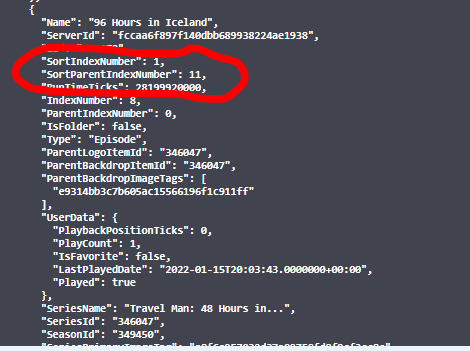
Try requesting the field SpecialEpisodeNumbers1 point
-
Hi, you could just switch to thumb view when browsing your library and then fixing any blank ones.1 point
-
The server is functioning fine. Only issue I have. Is the pass direct path.1 point
-
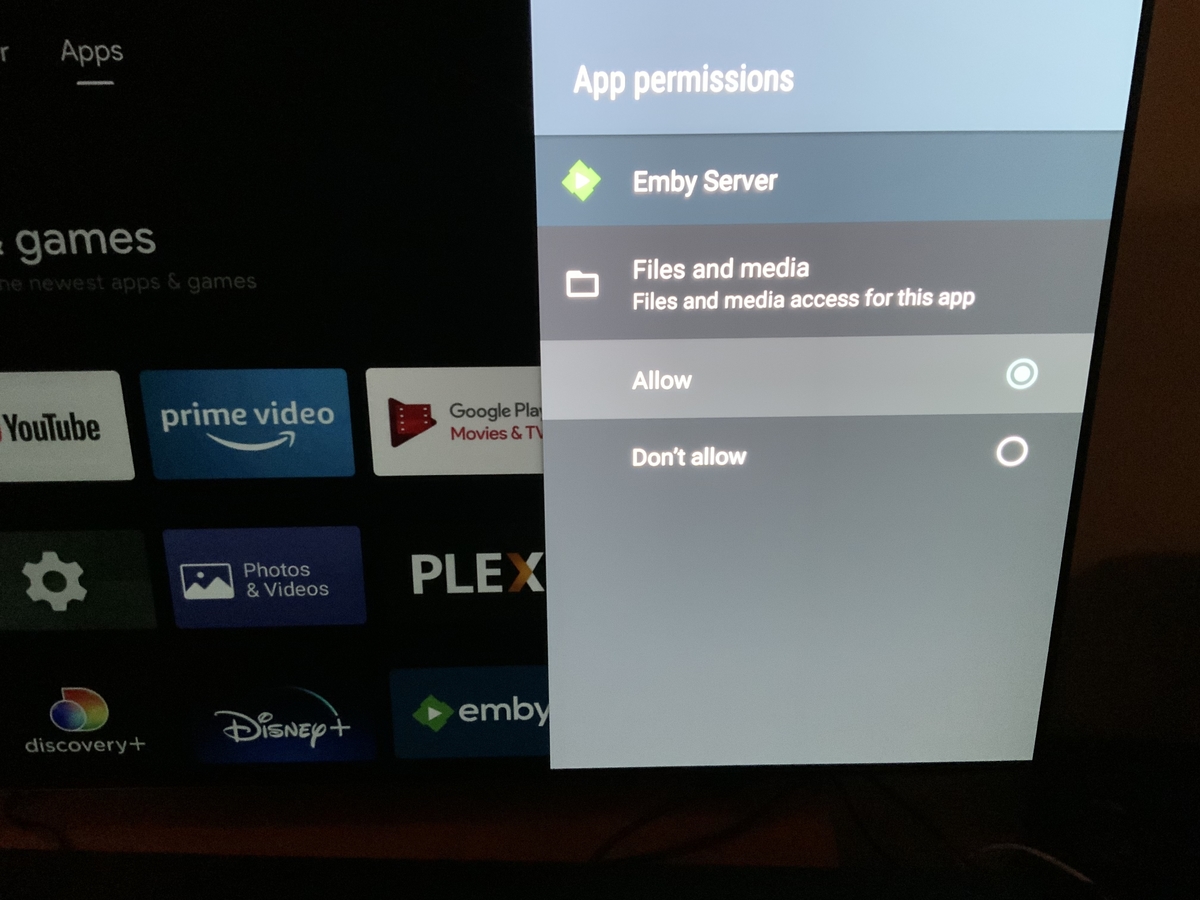
Shield Emby server.
 1 point
 -
Hey @Kauzig, this makes sense to me now, so I think I'll add an option called source were once can select all media or a collection/playlist then when running, it gets the media items from the source and apply the regular rules. This shouldn't be that hard to do and will add it to the list for the next version. Only issue I foresee is if you are using a generated collection as the source and it runs before the collection is generated. But I guess it just makes sense to run your generated playlists first. I'm currently adding an option to run the playlist generation straight from management side of things, but I'll also look into seeing if I can order the run. Hey @Thorman I had a look into this and path includes the filename when filtering, so let's say the file is '/media/youtube/ExtremeKnitting_KnitKing69-420.mp4' you could create a rule using path with contains 'KnitKing69-420' and any filenames that contains the value will be matched and added to the collection/playlist. this should cover your use case. (It's all string matching at the end of the day), Let me know if this works... I might relabel Path to "Path/Filename" to make it a little clearer.1 point
-
foobar2000 let you download both. Seem to be common, since not all app support syncedlyrics. Personnaly i keep unsynced lyrics in a tag, and synced lyric in a .lrc file.1 point
-
For information. https://piunikaweb.com/2022/01/15/nvidia-shield-tv-plex-and-other-apps-not-working-after-android-11-update/1 point
-
Yes got the hotfix now and it allowed VLC to play files on my mounted drives. Emby server database that was built prior to the hotfix is still not working. I'll try to wipe, reinstall and rebuild another emby server database later.1 point
-
Yes although the answer is a no Lukes “workaround” serves better than doing it one by one. Thanks for all the responses.1 point
-
Did you even give the user access to the library in the first place? Did you even create a library? It sounds like you're expecting this to magically figure out what you want and are blaming the devs because you did nothing and you're all out of ideas. First you need to create a library, which is the directories that you want to share. Then you need to add the user to your server, and grant them access to those libraries.1 point
-
Moved to appropriate section of forum as this is a problem and not a FR because the feature is already there and working for others. OP can help by submitting logs while attempting to use the Home function which is malfunctioning for some reason, or wait for the devs to weight in.1 point
-
Port Mapper is just a uPnP client that opens the ports dynamically on your router - if you disable it and emby still works (streams + Browser download) then you can safely remove it as it is unnecessary. You must have added port forwarding manually on your router (which is a much better solution anyway). This is for your emby SERVER - it has nothing to do with the Emby CLIENT (ET or Browser). Simply put - if the downloads work with a browser - then the issue is 100% with ET. I don't use ET, so I'm unsure if it has any logs...1 point
-
And if you disabled port mapper, do you have the same issue? Still don't see how port mapper has anything to do with this issue.1 point
-
I hope this feature comes back. I tested the beta for 30 seconds and I directly missed the button. I can only agree. The pictures are way too big, it looked better before. I really like the new buttons. At first I wasn't sure what to think of it. But after looking at it a bit longer, I think it's much nicer than before.
 1 point
 -
hi, quick question: how can i add more libraries ? cant find it edit: found the answer: Öffnen -> Datenbanken verwalten -> Bibliothek hinzufügen1 point
-
There is an issue in the 1.1.390 version, so please try again as soon as you have 1.1.391. Thanks.1 point
-
A new thing I notice and this might be a Kodi changed behavior with a newer patch. Playback does start but starts in the background of the Kodi app. You can see the item playing under all the Kodi navigation lists seen through the transparent layers of the GUI interface. The UI no longer navigates to the player directly upon playback. The only way is to back out of any current loaded sub navigation until you are at the parent main view where the player is loaded.1 point
-
Sure if it's a popular format.1 point
-
do you plan supporting .lrc file ?1 point
-
I closely monitored real-time progress updates, no issues there. I have had one issue that Kodi couldn't play any file, I guess E4K lost connection with the server. A simple Shield reboot fixed it, didn't happen again after that. For now I see that as an isolated incident . If it happens again I will post the log.1 point
-
Hi guys, I found a workaround that workers for me. If you disable http2 in advanced settings.xml everything works as before the Android 11 upgrade! https://github.com/xbmc/xbmc/issues/20631 I copied the advancedsettings.xml file which was already in the "Profile directory" via the Kodi File Browser to a remote SSH location, added the <disablehttp2>true</disablehttp2> part in the <network> section which was already in the file via nano/vi on the remote server and copied the file back via the Kodi File Browser. Works like a charm again Not sure what's the difference in http2 implementation between Android 10 and 11 which causes this behaviour though.1 point
-
Hi @KnightNZ yes you basically just install again right over the top. Please let us know if this helps. Thanks.1 point
-
If the Library is empty, then you can sort of hack the library to remove it. Shut down Emby "C:\Users\{username}\AppData\Roaming\Emby-Server\programdata\root\default\Collections" path will be platform dependent delete the options.xml or the entire Collection folder Restart Emby, go to Setting-Library, now the Collection library should be Mixed Content type and have the option to Delete/Remove the library. Assuming no collections exist, the library will not regenerate.1 point
-
Just a simple feature request, is it possible for a loading symbol to be added, for example when skipping through a movie the buffering/ loading animation of some sort shows up?1 point
-
personally i would recommend setting up gpodder to do the obtaining and point emby at the download folder as a mixed content library1 point
-
Hi Luke, thanks for the update - I'm looking forward to seeing this control in future updates. I bought Premiere about a year ago and this is my biggest annoyance with Emby by far. My workaround for now is to avoid the app completely and use my device's web browser to view Emby instead (since the browser respects Android's orientation settings). It would be great if the Emby app could honor this setting as well - there are reasons that I always have my screen locked into portrait mode, and I don't enjoy watching videos sideways.1 point
-
I would find it useful to use Emby in the car under Android Auto. Kind regards, Paul Roelandse1 point
-
To do that - blank out the Connect user name/email field on that user and save it.1 point