Leaderboard




Popular Content
Showing content with the highest reputation on 01/11/22 in Posts
-
Very simple, zero configuration, open source plugin to download TV series theme music automatically. Source and release
 2 points
 -
That is by design. The Fire devices crash our app when going to sleep and there is no way to stop them from going to sleep which happens after about 20 minutes. Therefore, we log out of the app every time the device sleeps on the Amazon platform. So no customization is possible here.2 points
-
There is actually an extremely good chance of that. However, it seems to me what you are asking for is a duplicate of the above request because it is also asking us to somehow select the "same" subtitle for each subsequent episode once one is chosen. Please lend support to that topic.2 points
-
I know this not a solution or even particularly helpful, but I don’t think you’ll have any immediate luck with it. The Series X version of Theater is completely unusable, and has been for months now. Crashes every minute, refuses to play half the time, pixelation on all videos regardless of quality, video judder. Before about July or August, the app was a dream. Now it’s a mess, and there’s no end in sight despite months of waiting and paying our subscriptions. All I can say is that I wish you luck.2 points
-
Correct, delete the current Playlist image then select Scan Library on the Playlist Library or just wait for Scheduled Scan. @Jägs Not sure how often Dynamic Playlist images are updated. @Luke2 points
-
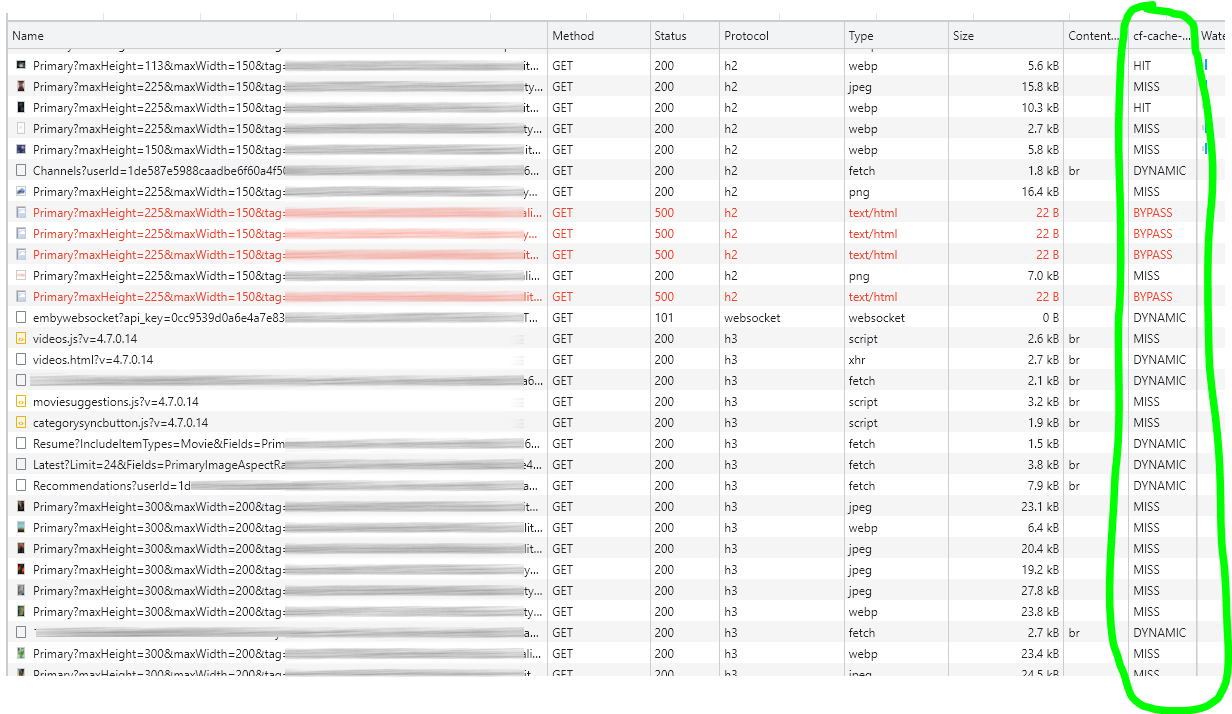
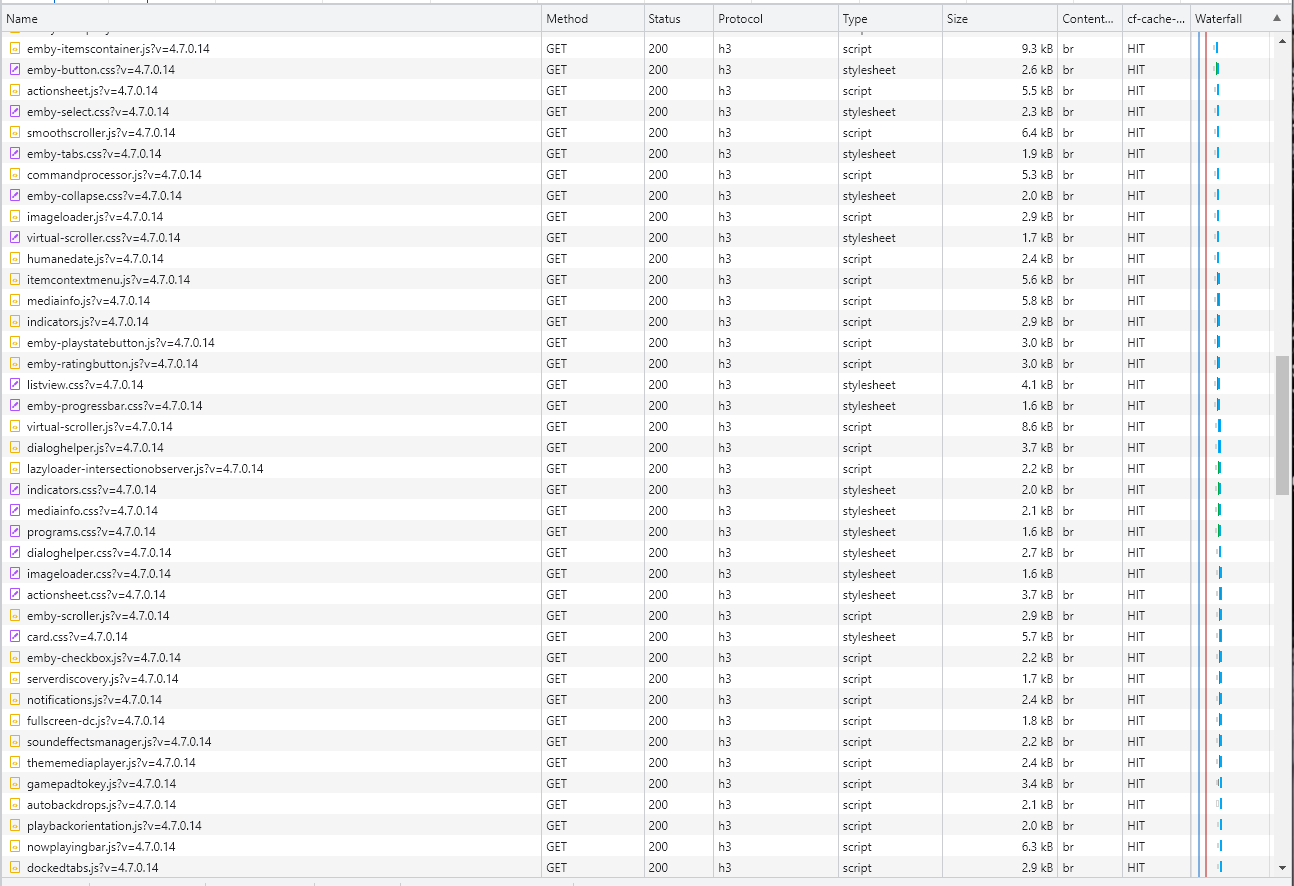
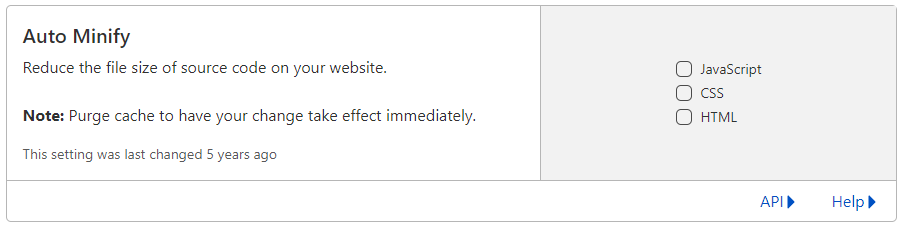
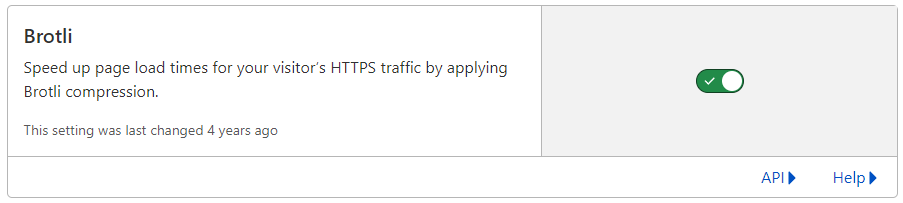
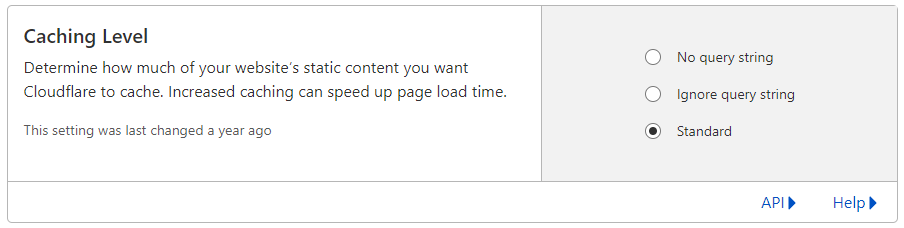
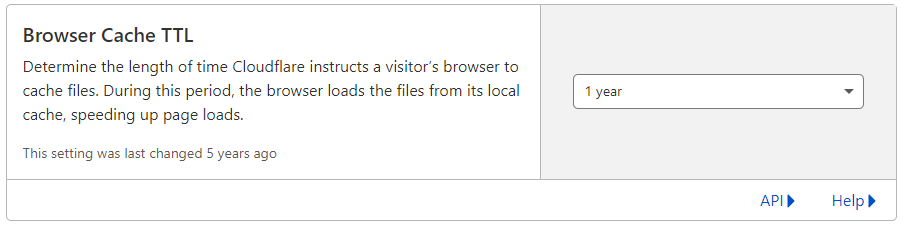
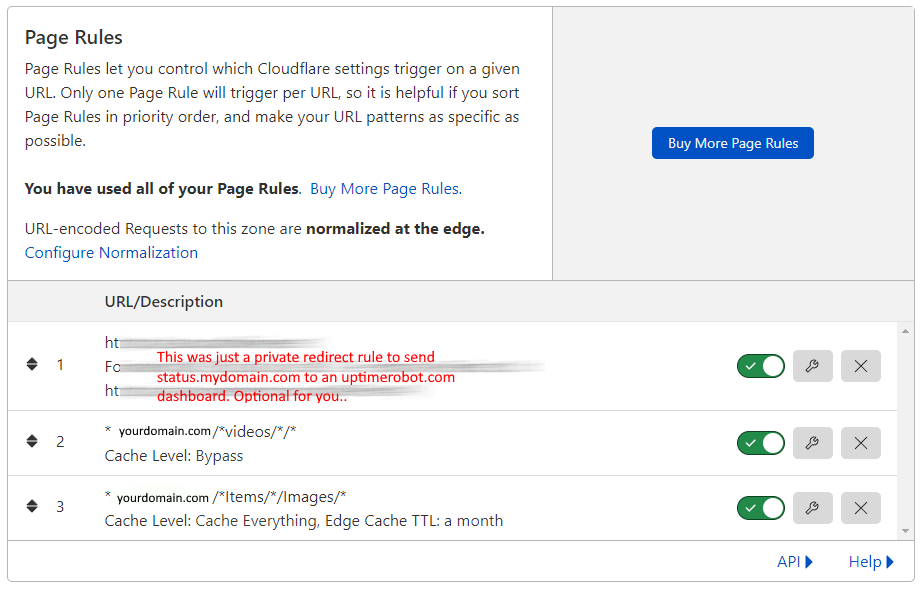
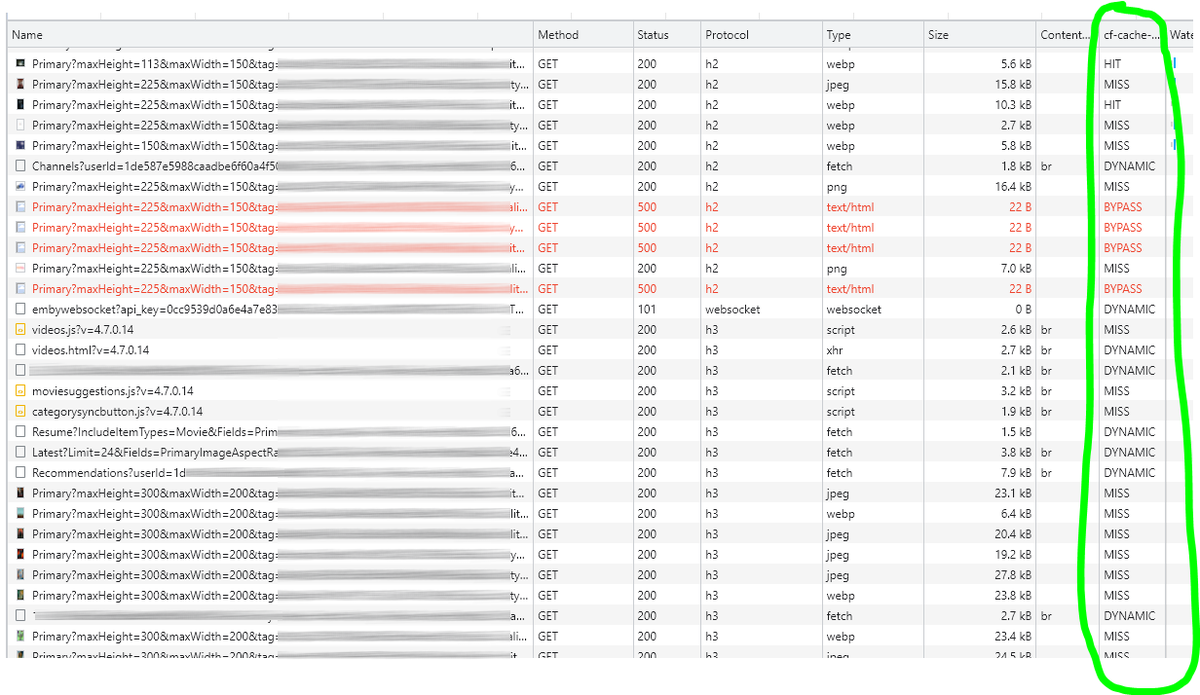
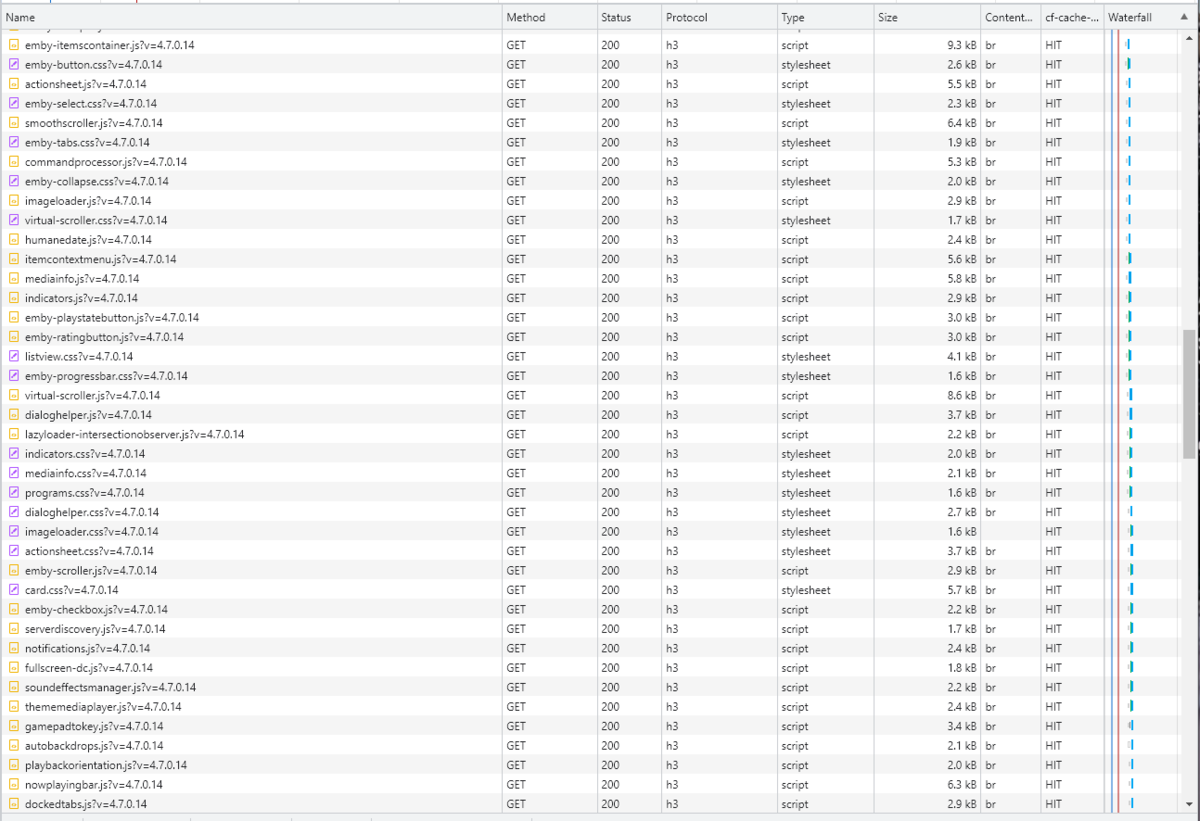
Cloudflare and emby Config Version 1.0.0 Last Update 02-25-2022 Update by Pir8Radio ** UPDATE: I AM HEARING OF EMBY USERS GETTING VIDEO FILES BLOCKED WHEN USING CLOUDFLARE (FREE TIER). IF THIS IS THE CASE, I NO LONGER RECOMMEND USING CLOUDFLARE. Even with the cache bypass rules, your video still passes through their system and is technically against their TOS. Use CloudFlare at your own risk if you choose to continue. I'll update if I get more info. Please post in this thread if you find you have video loading/playing/downloading issues while using cloudflare or have received an email from them about this. MESSAGE FROM CLOUDFLARE: Free, Pro, and Business Plans serving videos or a disproportionate amount of non-HTML content can be in violation of Section 2.8 of the Self-Serve Subscription Agreement (TOS). This will turn into a full Cloudflare how-to. Others are welcome to edit this or PM me with suggestions.. However right now I'm just going to post some recommended settings for people who already have Cloudflare setup. There are a few cloudflare settings that break emby, some break it in obvious ways, some only certain apps in certain situations.. These are the settings I found that work well as of today. I'll try to maintain this post and update the header info should new features come out, or the community discovers better settings than these. As of today, these are the settings available to us in Cloudflare FREE account: First disable the two main things that will break emby, go to the "Speed" tab then "Optimization" sub-tab. DISABLE Auto Minify and Rocket Loader! (screen shots are in the recommended state) Other options on this settings page are optional to enable, I suggest enabling Brotli compression. It's a good thing. Now head over to the "Caching" tab and select the "Configuration" sub-tab. Set your Caching settings as shown below. THIS IS OPTIONAL: Other settings in this settings tab are optional to whatever you like.. I have "Always Online" enabled, its kind of a neat feature that caches as much of your emby server as it can in case your server is down, users will at least see an emby splash screen, that's usually about it.. but its something... kind of useless otherwise.. Handy if you have other websites, it will totally cache normal html websites and users can continue to use your cached site when you have a web server outage. Next head over to the "Rules" tab. Create these two rules: Rule #2 here we will bypass caching 99% of all video. Caching the video will actually slow down the client experience. It screws with the chunks and often times has to fully cache 1 chunk before cloudflare sends it to the client, causing playback delays. Rule #3 here will cache all images on the edge servers for 30 days. We need this rule, because cloudflare only caches known file urls, like picture.jpg or poster.png emby serves up webp images with NO EXTENSION so cloudflare doesn't know to cache these items. But 99% of emby images come from the /items/XXXXXX/images directory so we will just force cache everything that comes from this URL, it should be only images. Keep in mind when you enable this it can take some time to build up cache.. emby serves up different sized images based on browser screen size, apps, etc.. so if you load a page that is minimized to a small window on your desktop emby will serve smaller sized images, if you make your browser full screen, now emby will serve up larger images and those images may load slow the first few times until they get cached too. Go below this screenshot and I'll show you how to check if caching is working. Check to see if Cloudflare Caching is working Well, how do you know Cloudflare is doing its thang'? Use a browser like chrome, or the new Microsoft edge (which is just a rebranded chrome). Open the browser, right click in the browser window and go down to "Inspect" (there is an F key for this too I forget what it is, I should add that here lol). Once the dev window pops up adjust it so you have a good view on the right, click the "Network" tab, hit the reload button on whatever page you are on so some info populates on the right dev screen. You should see something similar to this: Right click on the table header (Name, Method, Status, Protocol) anywhere, just right click the "Name" one. Go down to "Response Headers" then "Manage Header Columns". A little window will pop up hit "Add custom header..." and then add this header: cf-cache-status Now select the little sub tab that says "all" now surf your way to your emby server, and you should see something like the below screenshot. Hit is well..... a hit! this image came from cloudflare and was never requested from your emby server, saving you from sending this image to the client, saving time and bandwidth. MISS is also kind of obvious, it was a miss, either due to never being cached yet (first time Cloudflare has seen this image or document) if you hit refresh a few times, cloudflare will then cache it and it will turn to HIT. BYPASS I'm actually not sure why my server is returning server 500 errors below, this image is being called for by emby clients but the server has no image to serve, but usually you should only see BYPASS on playing video's if your rules above are correct. Or in my case, a server error will not be cached. DYNAMIC this is also a NO HIT response.. this is usually due to Cloudflare knowing this resource changes a lot and doesn't want to cache it so your clients don't get served stale data, or its a video, websocket, or some other format Cloudfare's great automated intelligence deems it should not be cached. That is the basics that will save you a lot of headache and blaming emby for things not working.. There are lots of cool options to enable outside of these basic settings above, ask questions here, send ideas that maybe I have missed that work great for you.. I just wanted to throw this up due to a lot more of you guys using Cloudflare. In the end you should start to see more "HIT" responses... and a noticeably faster loading time for the clients, less bandwidth usage for your emby server, and everyone is happy.. Well..... within reason....




 1 point
 -
A checkbox in the server settings somewhere to hide the domain and IP address in log files so they can be uploaded for troubleshooting without needing to be edited.1 point
-
While Emby already has recommendations built in based on previously watched items I find they are not all that helpful. They seem to be based on genre only, for example, because you watched a comedy here are other comedies in your library. I do like how the also directed by/appear in recommendations work though. What would be great is if Emby could incorporate Trakt's recommendations as they are much more sophisticated. Trakt's recommendations are not only based off of what you have previously watched but also what your Trakt friends and other Trakt users have watched. It takes user ratings and trending/popular media into account. Ideally Emby would include full Trakt integration allowing users to rate media after watching, view lists and recommendations, and view upcoming media all from within Emby but for now I think recommendations would be a nice addition. Trakt has the potential to give Emby that community feel and allow users to discover new media, find something to watch, and recommend media to other users. http://docs.trakt.apiary.io/#reference/recommendations1 point
-
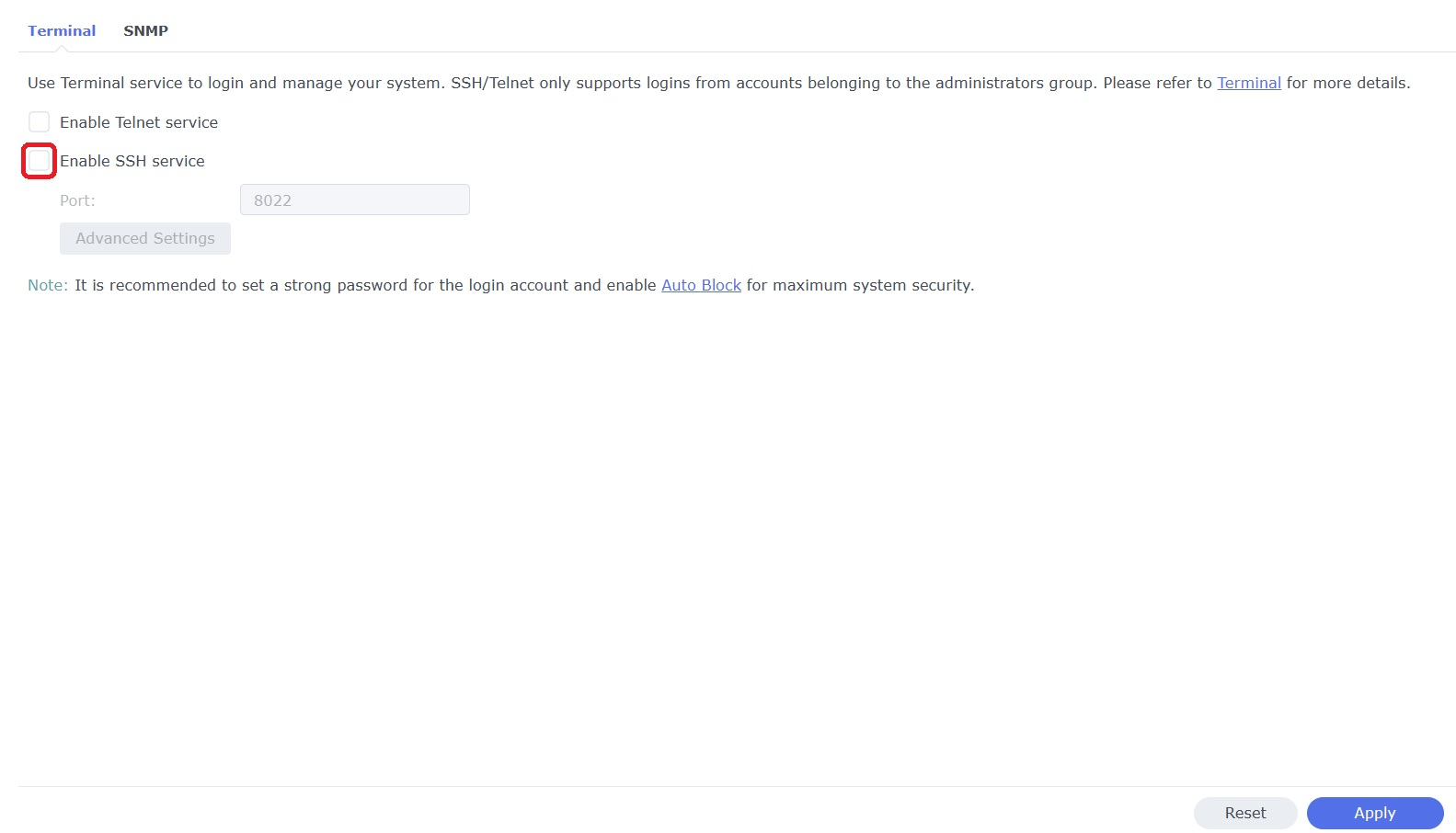
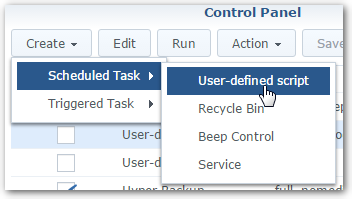
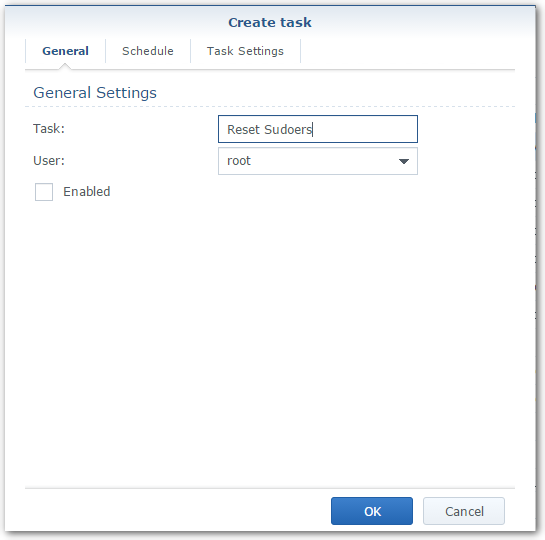
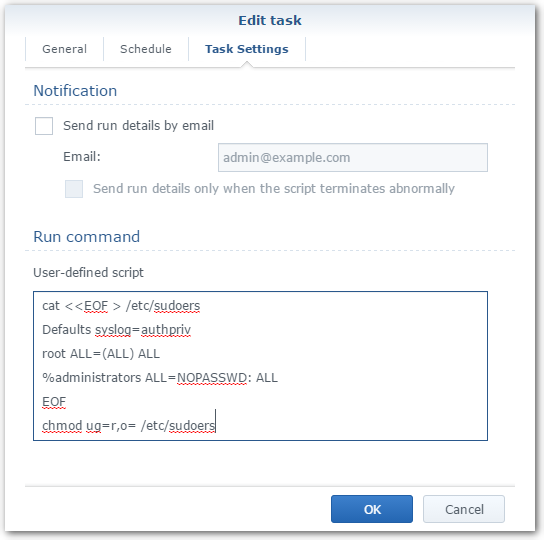
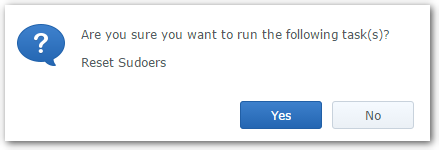
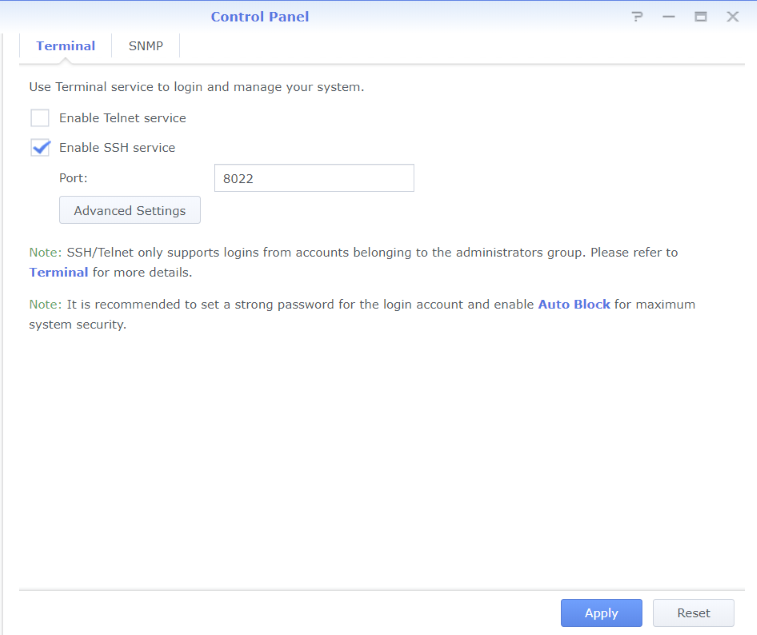
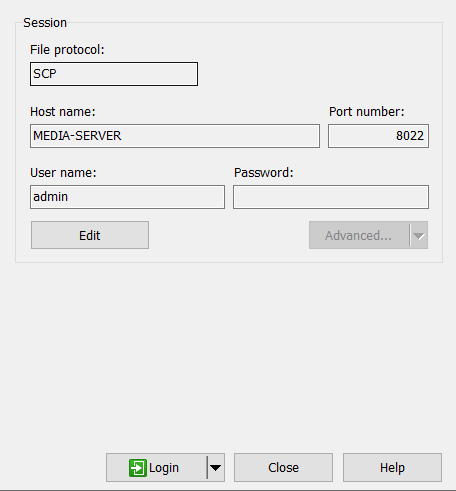
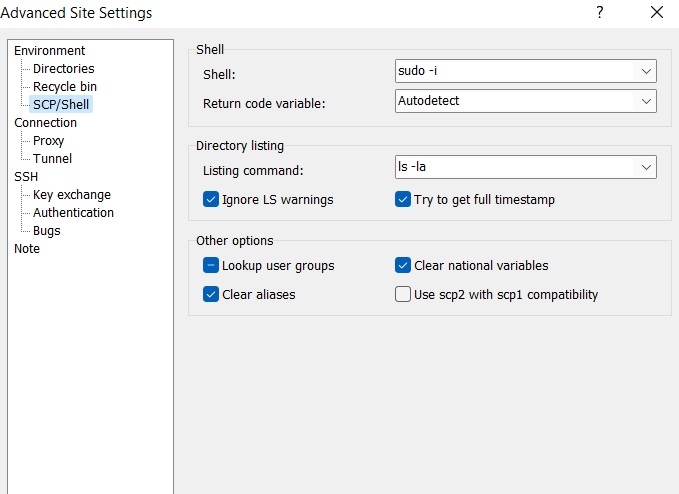
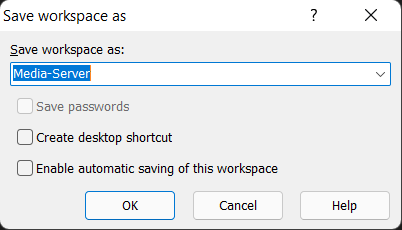
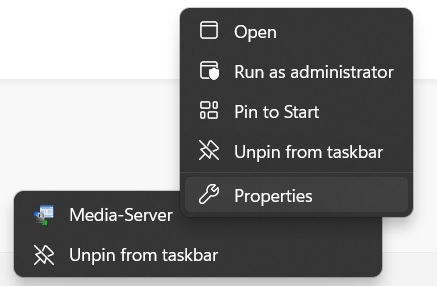
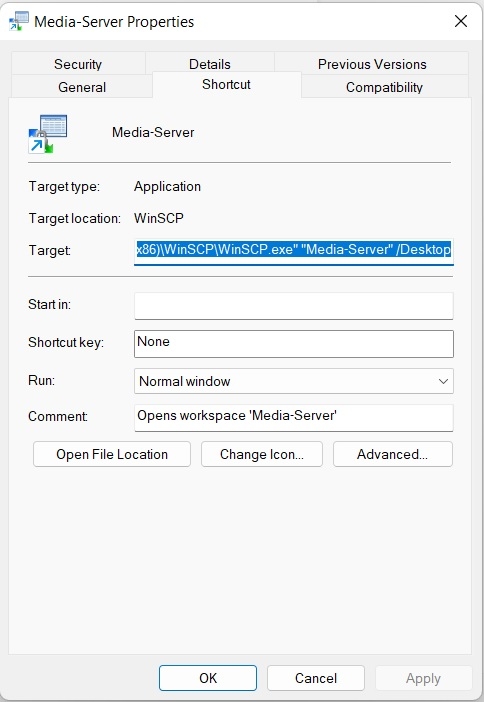
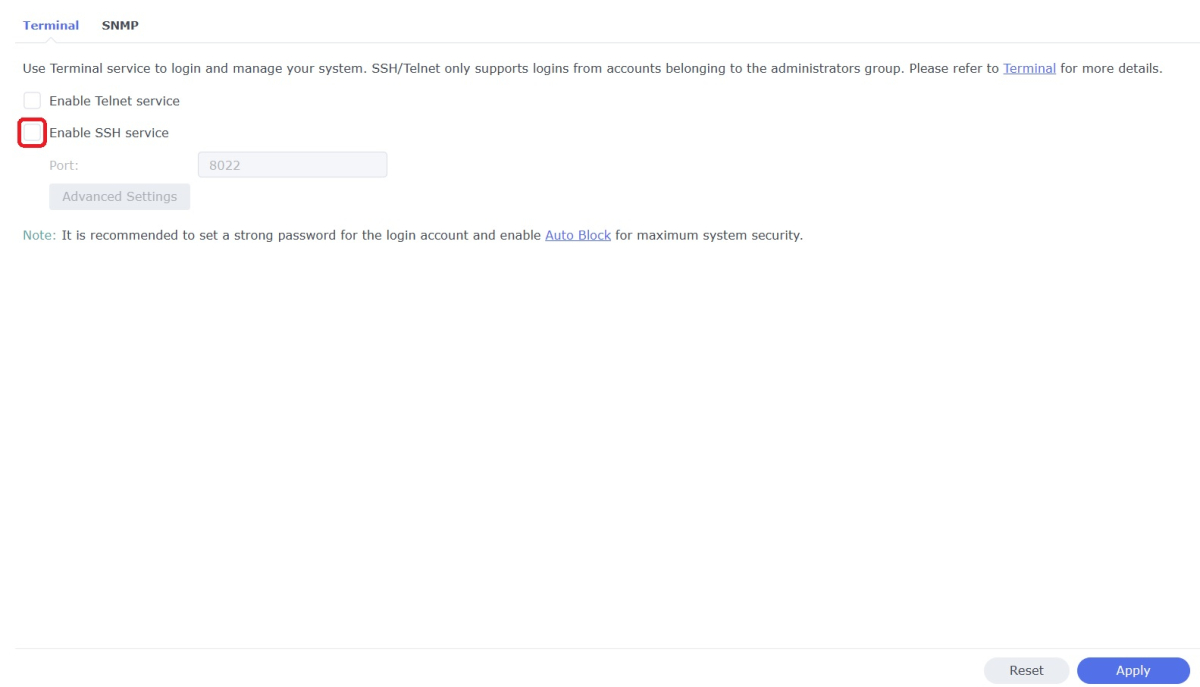
WinSCP is a popular SFTP client and FTP client for Microsoft Windows which can be used as a GUI alternative to Putty or Terminal. The procedures below will allow you to perform tasks as Superuser just like you can with Putty or Terminal. Superuser privileges may be needed for the following: full read/write/ execute privileges creating or installing files or software modifying files and settings deleting users and data If you do not need superuser access with WinSCP and just want to access your NAS using Admin then skip the steps (2, 3, and 6) in blue. 1. Enable SSH on Synology NAS Open DSM Control Panel Click Terminal & SNMP Click Terminal tab Check "Enable SSH service" Click "Apply" 2. Create script to modify sudoers config file on Synology NAS This script modifies the sudoers file which is needed to prevent DSM from prompting administrators only for the Admin password again when switching to superuser during the login process as WinSCP can't handle this prompt. This script is saved to rerun again later because DSM updates tend to overwrite any changes to the sudoers file. Open DSM Control Panel Click Task Scheduler Create a Scheduled Task - User-defined script Click General Tab Set task name "Reset Sudoers" Set user as "root" Uncheck "Enabled" box Click Task Setting tab Copy/paste the following into the Run command box cat <<EOF > /etc/sudoers Defaults syslog=authpriv root ALL=(ALL) ALL %administrators ALL=NOPASSWD: ALL EOF chmod ug=r,o= /etc/sudoers Click OK 3. Run the "Reset Sudoers" script on Synology NAS This step will need to be rerun whenever a DSM update puts your sudoers file back to default Highlight the new script you just created Click Run Click Yes 4. Install WinSCP Download and install WinSCP on Windows machine https://winscp.net/eng/download.php Allow WinSCP to start when done 5. Configure WinSCP to auto logon Create a new session/site: Change Login window using the following File protocol: SCP Host name: enter the NAS host name or IP address Port number: enter the port number you used from step 3 Enter User name: "admin" and password 6. Add switching to super user Click the Advanced... button In the the Advanced Site Settings window do the following: Select SCP/Shell under Environment Shell box: "sudo -i" Click OK to return to the Login window Click Save Click "Login" 7. Create a saved workspace for WinSCP (this step is optional) This will create a Windows shortcut to start WinSCP and automatically login to your session without any prompts Log into your new session you created in Step 5 Click Sessions Click Save Workspace... type a name for your new workspace Click OK 8. Create a shortcut for WinSCP on taskbar (this step is optional) While WinSCP is running Right Click the icon on the taskbar and choose "Pin to taskbar" Right Click on the WinSCP icon on the taskbar again Now Right Click on the WinSCP workspace you used in Step 7 and choose properties Your shortcut should look something like the one below with the exception of the workspace you used above Example Windows shortcut used on target line above "C:\Program Files (x86)\WinSCP\WinSCP.exe" "Media-Server" /Desktop Click OK Click WinSCP icon on taskbar start WinSCP and be logged into your NAS as Superuser without any prompts 9. Disable SSH in DSM (this step is optional) After you're all done using WinSCP it may be a good idea to close this port for security reasons. Additionally, you can also disable your Admin account now if you enabled it to do this. When you need to use WinSCP again just reenable SSH and you're ready. Open DSM Control Panel Click Terminal & SNMP Click Terminal tab Uncheck "Enable SSH service" Click "Apply"
 1 point
 -
I'd like to share with you my 80s and 90s Movies Collections artwork. I didn't create the backgrounds, those sources are cited in the PSD files' image info, but the rest of the designs are mine. I'm including a poster, logo and thumb image as well as the PSD source files and fonts. I'm also including the collection backgrounds I'm using which I sourced from freepik. Enjoy! 80s backgrounds.zip 90s backgrounds.zip 80s Collection-images.zip 90s Collection-images.zip





 1 point
 -
parsec is how plex added game streaming on windows the have a preview out for mac osx and they said that they soon have it for linux after mac is stable. be great to upgrade game browser for remote streaming of retro games. could start how plex did it with windows only right now. that way when mac linux support is added it be easy to impermeant those system as the ground work would be layed out.1 point
-
Emby works best when you use the preferred folder layout; in my early time with it I learned this the hard way! So my "documentaries" library (yes, I have one too) is in a single folder "documentaries", with each film in its own subfolder "documentaries\film-name" and each series in its own subfolder "documentaries\series-name\season01" (etc for additional seasons). This simply works as you'd want it to, and once you've got your library like that it's no trouble to keep it that way in the future. If Emby still has trouble with something obscure (I have a lot of that...), then I go to TVDB or TMDB and look it up manually, then either change the name in my library to be an exact match to their naming, or append their ID using the [tvdbid=...] or [tmdbid=...] format. In rare cases I have failed to find something manually, but have found it in IMDB (which Emby doesn't use) - adding [imdbid=tt...] to the folder name then sometimes enables the other databases to find what I'd failed to manually. Paul1 point
-
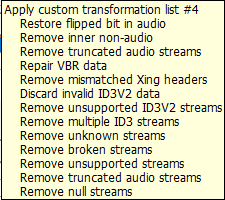
In the end I believe there is bad header data and has to be remuxed but don't necccarily know of a good process for that. But know that is basically what MP3 Diags did in the option I chose. It corrected the 14 second difference, and now has less than a second difference. Duration: 00:21:35.31 xmpDM:duration=\"21:35.266\" vs Duration: 00:21:49.71 xmpDM:duration=\"21:35.266\"
 1 point
 -
I'll give that a try!1 point
-
OK the server's internal metadata folder is not really intended to be used by multiple servers. For the one that downloads metadata, the best thing to do actually would be to enable saving nfo and images to media folders, then the other server will be able to read that information.1 point
-
I'll likely be starting this later tonight or tomorrow as the server's 4 stick NVME controller should be delivered tomorrow. So I've got a little extra motivation to get this done before I can switch around the NVME sticks.1 point
-
Hi. Yeah, the device decoder is throwing an error on that track so we are falling back to software decoding it. But, since it is only a mono track, there should be no loss of anything in this instance. Basically, the system is working as it should in this case I think.1 point
-
Should be able to resize dragging top-left corner of PIP box.1 point
-
As always, it is more about value vs. cost. When there are still large holes in a solution, then that reduces its value vs its cost and we still are finding more value in working in other areas at this point. I'm sure this is something that we will eventually provide.1 point
-
I think the original log file should be left as-is, but we should have a button in the server logs section to download an anonymized version.1 point
-
Sorry, somehow didn't see this thread. Turn off CF immediately until you get the page rules in place properly. The pages rules are there specifically to keep CF from caching video which is a giant red flag. Using media/video services though their free service is against their TOS so even with the rules specifically preventing caching of this content it's still murky at best if it's a violation of their TOS. I've reached out to them a couple times for clarification and talked to one person who told me it's technically still a violation even with the rules in place because the streams are still going through their service. He told me straight up they know everything there is to know about the type of content sites are transferring and they have been banning sites blatantly abusing their free service and may impose a ban on all home media servers from their free service in the future. So we don't want to draw any un-needed attention to ourselves (as a group) by trying to show our intention isn't for them to cache the video data which is a paid services. If you're having trouble understanding the rules to put in place send me a PM with your domain name and I'll give you the specific rules to put in place for your domain or help you quickly set it up via TeamViewer if you want. Just install TV be logged into CF ready to go and send me your TV ID and one-time password. It will take less than 5 minutes to do.1 point
-
HI, yes more control over this is possible for future updates. In the meantime you can always set your own library image. Thanks.1 point
-
I'm just doing so.1 point
-
so basically you mean that if I encounter this problem again I should send server logs and also a transcoding log. I will observe this issue further. As of today I got a new Firefox version...I got to the exact timestamp of the video file and no problem so far...maybe this issue is gone now...I have to observe if it does happen again with Firefox.1 point
-
Adding 2 cents. I just finished doing a complete wipe and clean install of Catailna 10.15.7 on my 27-inch Late 2012. Installed Emby 4.6.7.0 and have had on issues so far. Emby plays everything I have thrown at so far including my 4k UHD movies.1 point
-
How to do so that during music playback on Emby andoid tv only the artist image appears instead of the album image (this was like that before and in an update it changed). My TV is oled and it is very harmful to use static images as album frames.1 point
-
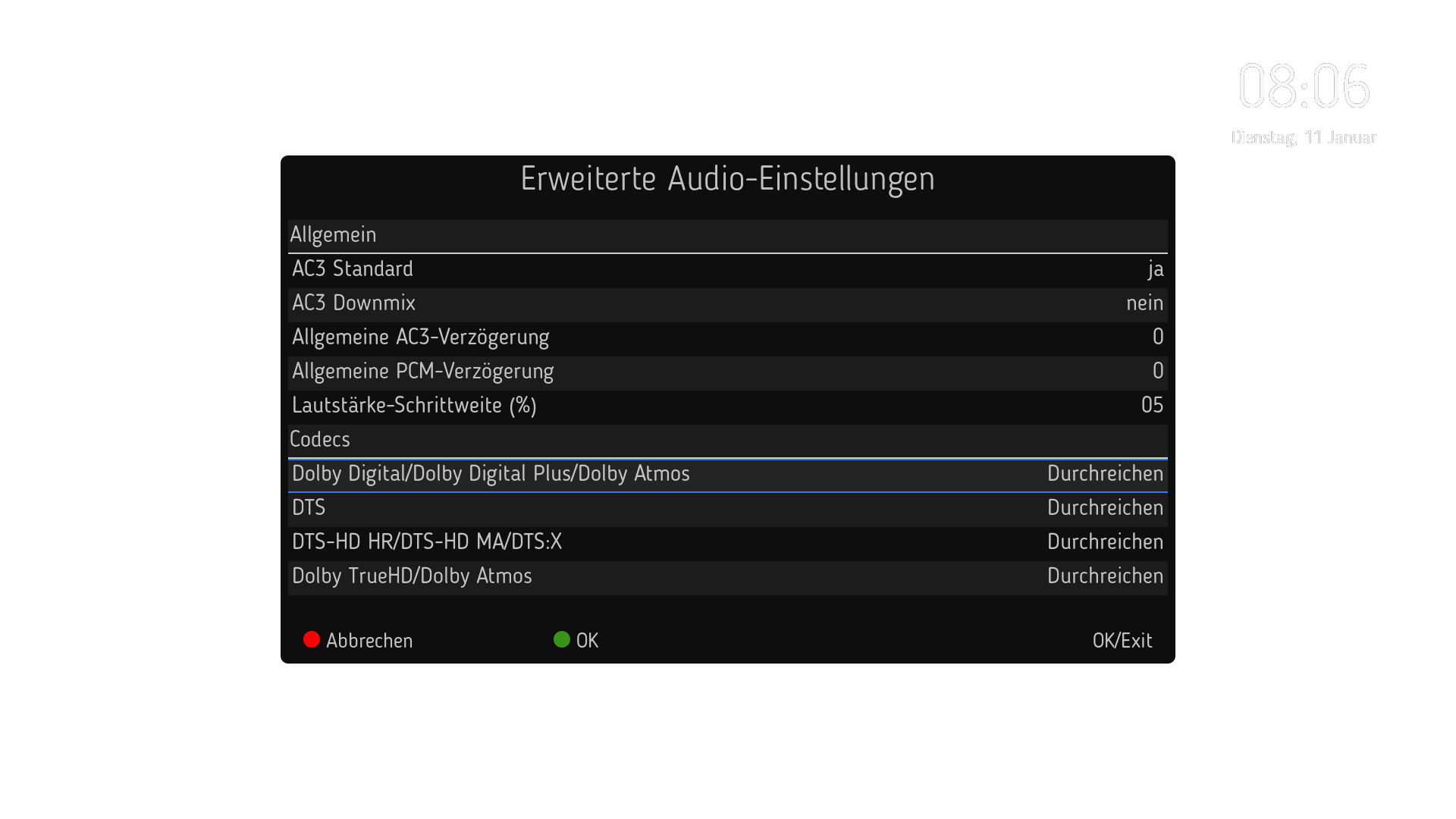
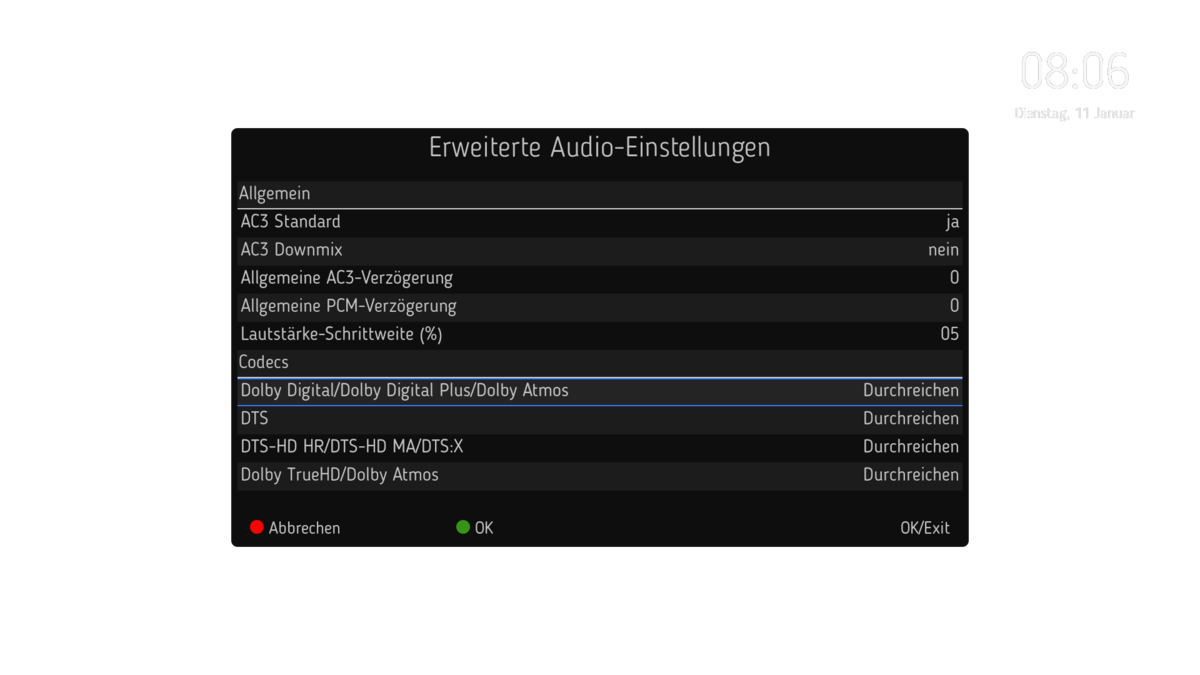
Hier noch der Link zum EmbyDreamServer Plugin. Dieses Plugin erleichtert euch die Installation des Emby-Servers auf einer Dreambox mit DreamOS. Hier könnt ihr die aktuelle Stable Version installieren und später auch den Sever Updaten. In Verbindung mit EmbyDream Client Plugin läuft das sehr gut. Direct-Play und Direct-Stream wird auch unterstützt, Transcoding funktioniert nicht, da der Gstreamer mit HLS nicht zu recht kommt. Für die Two und One könnte das aber mal möglich werden, hierzu hab ich mich schon mit den Dream-Dev's in Verbindung gesetzt. Das wird ja durchgeschleift über HDMI und wird nicht verändert, wenn dann dein AV das Abspielen kann funktioniert es auch. Hierzu muss man in den Audio-Einstellungen auf der Dreambox AC3-Downmix auf aus stellen.
 1 point
 -
I found the log, seems there is a problem with the user created for Docker and the user the package needs. "emby user does not exist." So i deleted users and the package runs. Thank you for your help1 point
-
No hurry, bud. Grateful for your efforts!1 point
-
Hi Luke! Thank you very much.1 point
-
HI there, yes we are working on improving this. Thanks for the feedback.1 point
-
I don't have any music playlist, but generally, if you have the "..." in the bottom right corner of the image (you do in genres, collections, etc..) and click Edit Image, and then delete the image... it will regenerate based on the content at that point (so things you added after that first track should randomly appear)... But I am not currently letting Emby manage my audio, so I am not completely sure I am correct here... I am sure someone else will be certain one way or the other... -G1 point
-
I am only coming at this from the perspective of someone who uses the Auto-Orgainze plugin, and someone who DOESN"T have much anime... BUT, in my experience, if the TVDB has them as you say (and looking at the link it does) then you should be able to leave S01 as is, rename the movie/film as S02E01-E07 (of the show) and the let the S03 get named/numbered correctly (accordingly)... Like I said, I am thinking of how Auto-Orgainze handles such things, but manually doing it should be simple enough. You may want to hit up @chef about how Auto-Organize handles it, because I am not 100% on anime stuff, but since you referenced TMDB I assume it would act as I expect. (and if that is your preferred metadata for the library it should work out.. I think..) Best of luck. -G1 point
-
You can scrape as it is, afterwards manually edit Season 3 episodes as Season 2 and lock items.1 point
-
When albumartist is empty the server will try to guess so it's better that it just be tagged in the file to begin with.1 point
-
Yea that won't be an issue anymore.1 point
-
Same thing we already discussed here:1 point
-
@Lukewill have to comment more on the error. 2022-01-10 20:53:02.920 Error GlobalExceptionHandler: UnhandledException *** Error Report *** Version: 4.6.7.0 Command line: /opt/emby-server/system/EmbyServer.dll -programdata /var/lib/emby -ffdetect /opt/emby-server/bin/ffdetect -ffmpeg /opt/emby-server/bin/ffmpeg -ffprobe /opt/emby-server/bin/ffprobe -restartexitcode 3 -updatepackage emby-server-rpm_{version}_x86_64.rpm Operating system: Linux version 3.10.0-1160.42.2.el7.x86_64 (mockbuild@kbuilder.bsys.centos.org) (gcc version 4.8.5 20150623 (Red Hat 4.8.5-44) (GCC) ) #1 SMP Tue Sep 7 Framework: .NET Core 3.1.21 OS/Process: x64/x64 Runtime: opt/emby-server/system/System.Private.CoreLib.dll Processor count: 8 Data path: /var/lib/emby Application path: /opt/emby-server/system System.InvalidOperationException: System.InvalidOperationException: Cannot process request because the process (31232) has exited. at System.Diagnostics.Process.ThrowIfExited(Boolean refresh) at System.Diagnostics.Process.EnsureState(State state) at System.Diagnostics.Process.GetStat() at System.Diagnostics.Process.get_StartTimeCore() at System.Diagnostics.Process.get_StartTime() at Emby.ProcessRun.CoreProcess.CoreProcessLocal.get_StartTime() at Emby.ProcessRun.Extensions.ProcessCpuMonitor.TimerCallback(Object state) at System.Threading.ExecutionContext.RunInternal(ExecutionContext executionContext, ContextCallback callback, Object state) --- End of stack trace from previous location where exception was thrown --- at System.Threading.TimerQueueTimer.CallCallback(Boolean isThreadPool) at System.Threading.TimerQueueTimer.Fire(Boolean isThreadPool) at System.Threading.TimerQueue.FireNextTimers() Source: System.Diagnostics.Process TargetSite: Void ThrowIfExited(Boolean) 2022-01-10 20:53:02.947 Info Server: http/1.1 POST https://xxxxx.xxxxxxxxx.com/emby/Sessions/Playing/Progress?X-Emby-Client=Emby Web&X-Emby-Device-Name=Chrome&X-Emby-Device-Id=0c3b9517-6890-4138-bee6-747439a10bdc&X-Emby-Client-Version=4.6.7.0. UserAgent: Mozilla/5.0 (Windows NT 10.0; Win64; x64) AppleWebKit/537.36 (KHTML, like Gecko) Chrome/97.0.4692.71 Safari/537.36 2022-01-10 20:53:02.949 Info Server: http/1.1 Response 204 to 191.240.175.5. Time: 2ms. https://xxxxx.xxxxxxxxx.com/emby/Sessions/Playing/Progress?X-Emby-Client=Emby Web&X-Emby-Device-Name=Chrome&X-Emby-Device-Id=0c3b9517-6890-4138-bee6-747439a10bdc&X-Emby-Client-Version=4.6.7.0 2022-01-10 20:53:02.953 Info Server: Stopping HttpListener...1 point
-
I am guessing this is not a TV Show Content type library, correct? Since TMDB is query type specific as you have notice same id in each type is something different.1 point
-
Thanks a million, never would have found that setting !!!1 point
-
Yes, I'll try tomorrow for you, I'll reboot the server so the logs smaller1 point
-
I checked, yes I keep it as it is. It's way too dangerous without the extra notification. Let me explain. The plugin captures remove notifications from Kodi. You assume this will only be trigger by pressing the delete button but it's not. e.g. a clear library command in Kodi wipes the complete (Kodi) database. With just a toggle option in plugin config settings , this would also wipe ALL FILES on Emby server without questioning. Also 3rd party plugins could initialize a (Kodi) database wipe. I don't wanna be responsible for that. You can use a custom key with a delete command (single confirmation), but I'll not capture the internal Kodi (delete) events without additional (manual) confirmation. Actually, I'm thinking about a toggle option in settings menu to disable this function by default. But even if enabled, the popup will stay.1 point
-
Well, remove requests are part of the incremental sync. So it's logical that from this point, nothing will be synced any longer cause it crashed.1 point
-
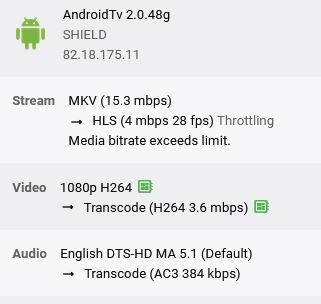
Hi ebr, He couldn't find the option but after sitting on the phone with him and him explaining the problem it seems to be android devices that have the issues (incl my moblie) .. I got it wrong about files on gdrive working, they have the same issue. If I set an upload limit on his account to force a transcode of the file everything works perfectly fine. DirectPlaying any file causes the loading circle which than eventually closes and goes back to the home screen. Nothing has changed my end, I have a 40Mbps upload & I beleive he is on a 100Mbps download. Most files I encode myself to ensure directplay I've enabled debugging on the server and have attached the main server log file along with recent transcode log files. He is currently streaming from me now with no isssues (upload is limited to 4Mbps to force a transcode) File Specs are usually: Format profile : Main 10@L5@Main Bit rate : 2 360 kb/s Width : 1 920 pixels Height : 960 pixels Audio ac-3 @ 384kbps embyserver.txt ffmpeg-transcode-5bec8da2-21e3-4720-80da-d89038f2444d_1.txt ffmpeg-transcode-a1630ffe-1b5b-495a-9025-e3ba0414dd73_1.txt ffmpeg-transcode-ceda146c-ff0a-4800-aa61-979a3fb82d7e_1.txt
 1 point
 -
Manipulating the play queue over DLNA has been added to the upcoming Emby Server 4.7 release. Thanks.1 point
-
One thing to add: If you use Chrome to check whether the rules are working correctly, make sure to check the little checkbox "Disable cache" on top of the Network tab in the devtools. Otherwise chrome might just serve you content from its local cache. Other than that: Thanks for the guide1 point
-
Wow! These are beautiful. I just went through 16 pages of them! Silly question but, where is the ZIP file? The original post has a link that is dead and the original poster zip file no longer works Coffee donation on the way too once I get them in meee hand.1 point
-
Yes it is. Thanks.1 point
-
Hi, they're sorted in the order that you added them. We don't currently have any sorting options besides that but we're planning on adding it in the future updates. thanks.1 point
-
I'm curious if this has been given anymore thought. Currently, I'm using the name convention for different resolution sizes: movie title - 2160p.mkv movie title - 1080p.mkv however, I don't think my CPU supports transcoding 4k because it chokes up whenever I try to play a video file that has both resolutions. I know it's supposed to choose the best option, but it seems to be defaulting to the 2160p file regardless. It would be nice to be able to merge both video files and select the appropriate one to play just as we do with subtitles. I know that it adds complexity but I think it would be a great addition. This could also be extended to merging Rated/Unrated/Extended/Director's Cuts versions all on the same file. I use the emby addon for kodi and have it set to direct stream and choosing the video streams that way works perfectly. Being able to choose the appropriate stream when using emby outside of the network would be so perfect and take it to the next level. I hope this is taken into consideration. Emby is awesome and I've been a proud supporter for quite some time now.1 point