Leaderboard




Popular Content
Showing content with the highest reputation on 01/10/22 in Posts
-
chromecast with android tv work and thank you very much for that, finally i can watch Dexter again without hanging on to the intro for 20 minutes2 points
-
@cayarsthank you so very much for helping me by logging in remotely to help resolve the issues I was encountering and for resetting the backup plug-in location. I could have never resolved this on my own. You went above and beyond, spending quality time troubleshooting and resolving the issues. I’m up and running again with DSM 7, thanks to the quality support you provided. THANK YOU!!! Best Regards, Julio2 points
-
Yes...and No. Auto skip works perfectly fine on my Roku Ultra (4660X) with the Roku Beta and release versions and also properly displays the message. However, on a TCL Roku TV it did not work and even worse, it crashed the Emby instance on my server. Tested the TCL Roku TV a couple times with the same results...crashed the Emby Server instance both times. Unhandled Exception Log: MediaBrowser.Model.Net.HttpException: MediaBrowser.Model.Net.HttpException: Unauthorized at Emby.Server.Implementations.HttpClientManager.CoreHttpClientManager.SendAsyncInternal(HttpRequestOptions options, String httpMethod) at Emby.Server.Implementations.HttpClientManager.CoreHttpClientManager.SendAsync(HttpRequestOptions options, String httpMethod) at Emby.Server.Implementations.Session.RokuSessionController.SendRequest(HttpRequestOptions options) at Emby.Server.Implementations.Session.RokuSessionController.SendMessage[T](ReadOnlyMemory`1 name, String messageId, T data, CancellationToken cancellationToken) at Emby.Server.Implementations.Session.SessionManager.SendMessageToSession[T](SessionInfo session, Boolean requireUserInterface, ReadOnlyMemory`1 name, T data, CancellationToken cancellationToken) at IntroSkip.RemoteControl.AutoSkip.SendMessageToClient(SessionInfo session, SequenceSkip sequenceSkip) at System.Threading.Tasks.Task.<>c.<ThrowAsync>b__127_1(Object state) at System.Threading.QueueUserWorkItemCallback.<>c.<.cctor>b__6_0(QueueUserWorkItemCallback quwi) at System.Threading.QueueUserWorkItemCallback.Execute() at System.Threading.ThreadPoolWorkQueue.Dispatch() at System.Threading.PortableThreadPool.WorkerThread.WorkerThreadStart() Source: Emby.Server.Implementations TargetSite: Void MoveNext() Relevant portion of server log: 2022-01-09 19:19:47.581 Info HttpClient: POST http://192.168.9.50:8060/input?Command=Seek&SeekPositionTicks=4700000000 2022-01-09 19:19:47.581 Info HttpClient: POST http://192.168.9.50:8060/input?Command=DisplayMessage&Header=&Text=Intro+Skipped&TimeoutMs=800 2022-01-09 19:19:47.709 Error GlobalExceptionHandler: UnhandledException *** Error Report *** Version: 4.7.0.19 Command line: C:\Users\admin\AppData\Roaming\Emby-Server\system\EmbyServer.dll Operating system: Microsoft Windows 10.0.14393 Framework: .NET 6.0.0-rtm.21522.10 OS/Process: x64/x64 Runtime: C:/Users/admin/AppData/Roaming/Emby-Server/system/System.Private.CoreLib.dll Processor count: 8 Data path: C:\Users\admin\AppData\Roaming\Emby-Server\programdata Application path: C:\Users\admin\AppData\Roaming\Emby-Server\system MediaBrowser.Model.Net.HttpException: MediaBrowser.Model.Net.HttpException: Unauthorized at Emby.Server.Implementations.HttpClientManager.CoreHttpClientManager.SendAsyncInternal(HttpRequestOptions options, String httpMethod) at Emby.Server.Implementations.HttpClientManager.CoreHttpClientManager.SendAsync(HttpRequestOptions options, String httpMethod) at Emby.Server.Implementations.Session.RokuSessionController.SendRequest(HttpRequestOptions options) at Emby.Server.Implementations.Session.RokuSessionController.SendMessage[T](ReadOnlyMemory`1 name, String messageId, T data, CancellationToken cancellationToken) at Emby.Server.Implementations.Session.SessionManager.SendMessageToSession[T](SessionInfo session, Boolean requireUserInterface, ReadOnlyMemory`1 name, T data, CancellationToken cancellationToken) at IntroSkip.RemoteControl.AutoSkip.SendMessageToClient(SessionInfo session, SequenceSkip sequenceSkip) at System.Threading.Tasks.Task.<>c.<ThrowAsync>b__127_1(Object state) at System.Threading.QueueUserWorkItemCallback.<>c.<.cctor>b__6_0(QueueUserWorkItemCallback quwi) at System.Threading.QueueUserWorkItemCallback.Execute() at System.Threading.ThreadPoolWorkQueue.Dispatch() at System.Threading.PortableThreadPool.WorkerThread.WorkerThreadStart() Source: Emby.Server.Implementations TargetSite: Void MoveNext() 2022-01-09 19:19:47.744 Info Main: Closing tray icon 2022-01-09 19:19:47.744 Info HttpClient: POST http://127.0.0.1:8024/exit 2022-01-09 19:19:47.881 Info Main: tray icon WaitForExit 2022-01-09 19:19:48.929 Info Main: tray icon Kill2 points
-
With College Football and NFL seasons starting up in the States, a multi-screen option for Live TV would be a nice addition to the Emby feature set. I am thinking of what the WatchESPN app offers thru their Web Browser access. The ability to open a multi-screen window that breaks into four (4) screens that allows you to select streams (Live or Replay) for each and then go full screen. Audio is from whichever of the four screens you have as active. I can accomplish the same right now with the HDHomeRun Quick View TV app. I open multiple instances of the Windows app and then snap them to each corner on my 110" projector screen. Equivalent of four (4) 55" screens. Would be nice if this were a remote friendly option from within Emby Theater and the WebUI clients. I have only seen it in Web Browsers at the moment and not any of the Win10 UWP apps (FS GO, NBCSn, WatchESPN). But, Fox Sports Go just released a multi-screen solution for their Apple TV app. https://techcrunch.com/2016/08/26/fox-sports-go-hits-apple-tv-allows-viewing-of-four-games-at-once/1 point
-
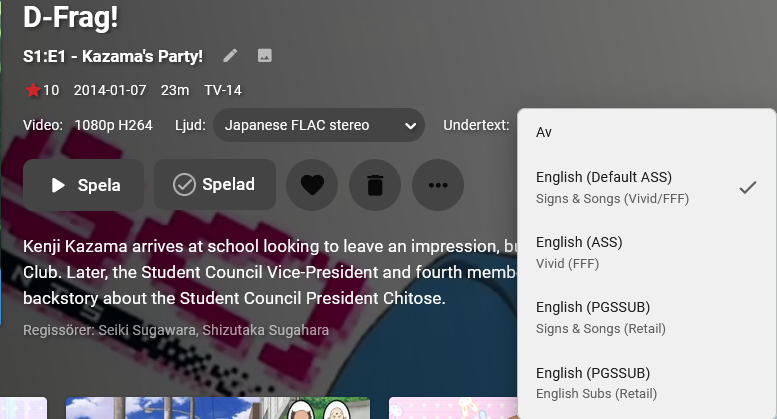
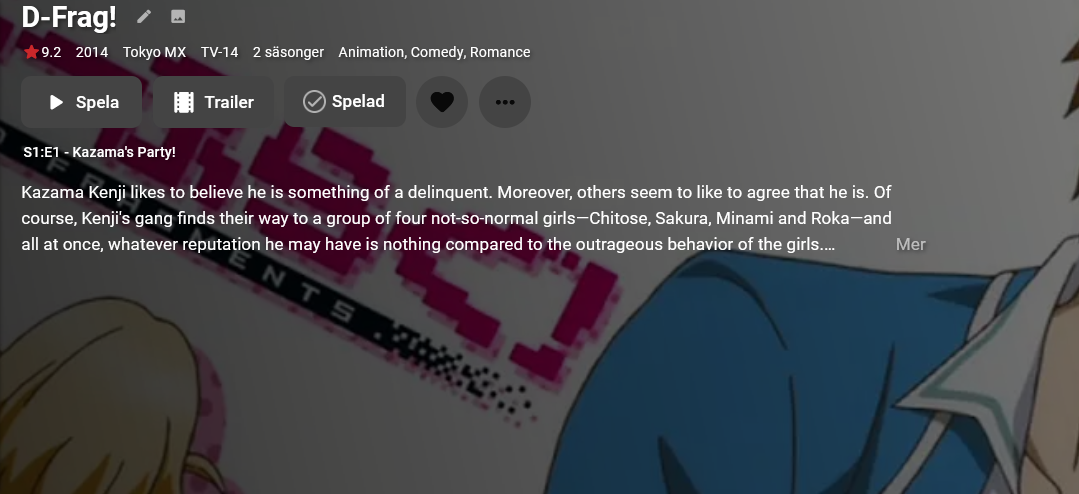
Before you go ahead and label this a duplicate or suggest that the "set preferred language" option in settings pleases this request, I'm talking about a use-case for a feature such as this for scenarios where language-labeled subtitles doesn't benefit from the already existing preset in settings, i.e if you're watching a foreign media and there's a signs track in English because there's also a dub of the show. Having to change tracks every episode even though technically the correct language is selected but it's still not the right one gets quite tedious. What I'm suggesting is that you add the per-episode menu to the show/season details one more or less-.
 1 point
 -
parsec is how plex added game streaming on windows the have a preview out for mac osx and they said that they soon have it for linux after mac is stable. be great to upgrade game browser for remote streaming of retro games. could start how plex did it with windows only right now. that way when mac linux support is added it be easy to impermeant those system as the ground work would be layed out.1 point
-
Did you try one of the x64 builds from the download link? I've not seen anything that says it won't work. Download Emby - Emby1 point
-
Since you have a Album tag and no Album Artst there is no linking happening for the album.1 point
-
And, if the MUSICBRAINZ_ALBUMID and MUSICBRAINZ_ALBUMARTISTID tags exist, those also need to match across all the tracks in the album.1 point
-
I have attached the server log from when I tested the Roku Ultra (192.168.9.83) and the TCL Roku TV (192.168.9.50). I disabled the pop-up notification and the Roku TV still does NOT auto skip while the Roku Ultra does auto skip correctly. Also, with the pop-up disabled, Emby no longer crashes when the plug-in attempts to instruct the Roku TV to skip the intro. I have the following clients available for testing if needed: Roku Ultra, TCL Roku TV, Sony built-in Android (10), HiSense built-in Android (9), Fire TV Stick 4k, Fire TV Stick 4k Max, Nvidia Shield and Chromecast with Google TV. I just finished a full scan a couple days ago on a TV library with 201 shows and 9,827 episodes. I am going to try to compile the results of that scan and note which shows/episodes did not properly detect the intro/credits. It will take me a bit to do that though. embyserver 2022-01-10.txt1 point
-
I can manually reboot my tuners but that does not address the issue with EMBY not releasing the tuners as it should. Has anyone figured this out?1 point
-
I also thank! If I could help you with anything, write. Test or any questions.1 point
-
I know my way around it and can make sense of it most of the time let me install the latest version and see what i can find1 point
-
Sure, but there's probably some small difference causing the Marantz app to crash. What is it, and is this something we should change, or is this something the Marantz app should be able to handle? That's what we don't know yet.1 point
-
That's the thing: I don't envision the server deciding whether to select type one or type two of the subtitles, I just want the ability to, by myself, manually select the subtitle type for a whole season/show. Now, this depends on the release I've grabbed to have named the subtitles alike throughout all the episode. I.e in the screenshot above it says on one episode of twelve "English (ASS) Vivid (FFF)", that's the same name for all the other subtitles in the other eleven episodes. The server could never guess correctly in this case. Now this specific show only had 12 episodes like I mentioned, but shows of this type regularly goes up to 24 episode or even more. Having the change the subtitles for all of these is tedious to say the least. If a function could be implemented that depended on the subtitle name being consistent across all episodes (which they all are for my 130 shows in my library, I know this from manually changing them every episode for shows that doesn't have regular subtitles as the default track) it would make the experience much more satisfactory. Maybe it's worth pointing out that this is anime, if you didn't know. This function is to cater to the users of Emby that doesn't watch mainstream shows like Westworld where there will, with 99% guarantee, be one subtitle track per language. For those types of shows the already-in-place system works for all cases, more or less. But multiple tracks adjusted for dubs are commonplace in Asian media (brought to the west), and that's when you get this scenario where the default tracks aren't regular subtitles, instead they're made for perhaps an English dub of the show. But there's always regular subtitles for those who watch it in the native language (it's about a 70/30 split of regular subtitles being default and then there's the rest), and that's when this function comes into play, even though both tracks are assigned as English, you'll be able to change the track for all episodes seamlessly. You're making the case that there's a big enough of a chance that the subs aren't named consistently, I mean that this medium in contrast to western media floating around on the internet are consistent, and that's why I suggested this function. I wouldn't have done it if that was a problem. External subs would be even better for this function, since they'll be the ones you probably want and while showing up as "undefined" you'll just select those for all the episodes of the series and be good to go.1 point
-
It all depends on where the apps need to read/write data. If you only write data to your own folders or areas where it has permission there is nothing to do. If you need to access locations outside this area you need permissions from the OS to do so. Emby uses the recommended method of creating a special account called "Emby" that's a system internal account (you can't login with it for example or change it's password). This allows the admin to grant/revoke permissions for the user running the software. The internal account distinction makes it clear it's not a normal user but a system user used for running something specific. It's just basic security practices that Synology finally embraced in DSM 7.1 point
-
Perhaps it was marked as played with that series and this new series has the same external id's in the metadata editor. That could be one reason why. First thing is to check the series level to ensure it has the correct external ids. If no, then fix them and that probably resolves this. If yes, then this will be hard to explain why because it is based on something that happened in the past. (when they were marked played).1 point
-
You can just use your other admin account if you want. The account just needs permissions to move files when using Putty/terminal/WinSCP, etc which a normal user won't be able to do1 point
-
so present in ui at show level the distinct set of audio track languages from all episodes as "ShowAudio Language" and the distinct set of subtitle track languages from all episodes "Show Subtitle Language" on change overwrite all per episode settings on language match overrule automated behaviour where match of show language setting to episode languages present. direct episode setting highest preference. as a suggestion1 point
-
Set the "Show Login Screen" option in the ATV app that @rbjtech suggested, but remember to exit the app when finished, rather than just putting it in the background. If you set the Auto Logoff option to it's lowest setting (one hour I think), then if you do back ground the app, it will (should) log the user out. If you background it and it doesn't log out, then the net time your son accesses the app, it will be you logged in instead of him. It's really simple to change users within the app, so perhaps you need to educate him as well Let us know how you get on, although I'm sure Eric will be along soon enough to put us all right1 point
-
Hello @TeamB Have a happy new year! Well, sorry for the delay and just to let you know that I found the reason my "In-Progress" widget wasn't refreshing properly. It was a bug in TMDB Helper which was fixed as registered here. So I now know that I had two issues. First one was that Trakt for Kodi wasn't detecting EmbyCon movies (whose fix you so kindly suggested, although I have no idea if the developer intends to apply, as registered here) and the second one was that bug in TMDB helper that prevented movies not finished to be correctly scrobbled to Trakt. I really appreciated your invaluable help!1 point
-
I checked, yes I keep it as it is. It's way too dangerous without the extra notification. Let me explain. The plugin captures remove notifications from Kodi. You assume this will only be trigger by pressing the delete button but it's not. e.g. a clear library command in Kodi wipes the complete (Kodi) database. With just a toggle option in plugin config settings , this would also wipe ALL FILES on Emby server without questioning. Also 3rd party plugins could initialize a (Kodi) database wipe. I don't wanna be responsible for that. You can use a custom key with a delete command (single confirmation), but I'll not capture the internal Kodi (delete) events without additional (manual) confirmation. Actually, I'm thinking about a toggle option in settings menu to disable this function by default. But even if enabled, the popup will stay.1 point
-
Hi @Josephus welcome. Intro skip currently will work on the Emby beta version of the server. There is a great wiki posted in rbjtech comment that can help guide you through the install process. If you need extra help let us know We'll most likely be releasing the entire thing free of charge, and maybe a possible donation if people are happy with it. A lot of work has gone into it, we would never just feed ourselves.1 point
-
Hi - this is an open beta (for beta emby systems only as an updated core component is required) but for the latest enhancements and testing then it's a closed beta. If you want to dabble on the Release version - then while this is not supported by the core team, you can just replace the core ffmpeg with the beta versions - My system has been like this for months with no issues. See Intro Skip FAQ There is a full wiki under construction here - Introskip Wiki If you can wait a couple of weeks, I would do so, as the new version we are working on works much better on lower powered systems and is much faster.1 point
-
In ETA 1-2 Weeks there will be a release, but keep in mind for windows it is only working with the BETA. Modding the ffmpeg files does work but this is what Luke calls a corrupted Emby installation as it is no longer the original one and "could" cause other problems1 point
-
I just deleted everything using the method I described in the "fix" post, let the scan finish and sure I will. What's bothering me is not the removal, because I can tell there's something going on (i.e. unfinished in the code) what's bothering me is the fact the addon suddenly stopped doing incremental syncs (which then led me to the removal issue). Can all this be due to the changes you made in the speed-up of the initial sync? EDIT: DONE, check your Inbox1 point
-
I'll check that. Still a problem when removing items. Can you send me your databases via PM? "/userdata/Database/*"1 point
-
fyi: I fixed the issue and will be included in next beta.1 point
-
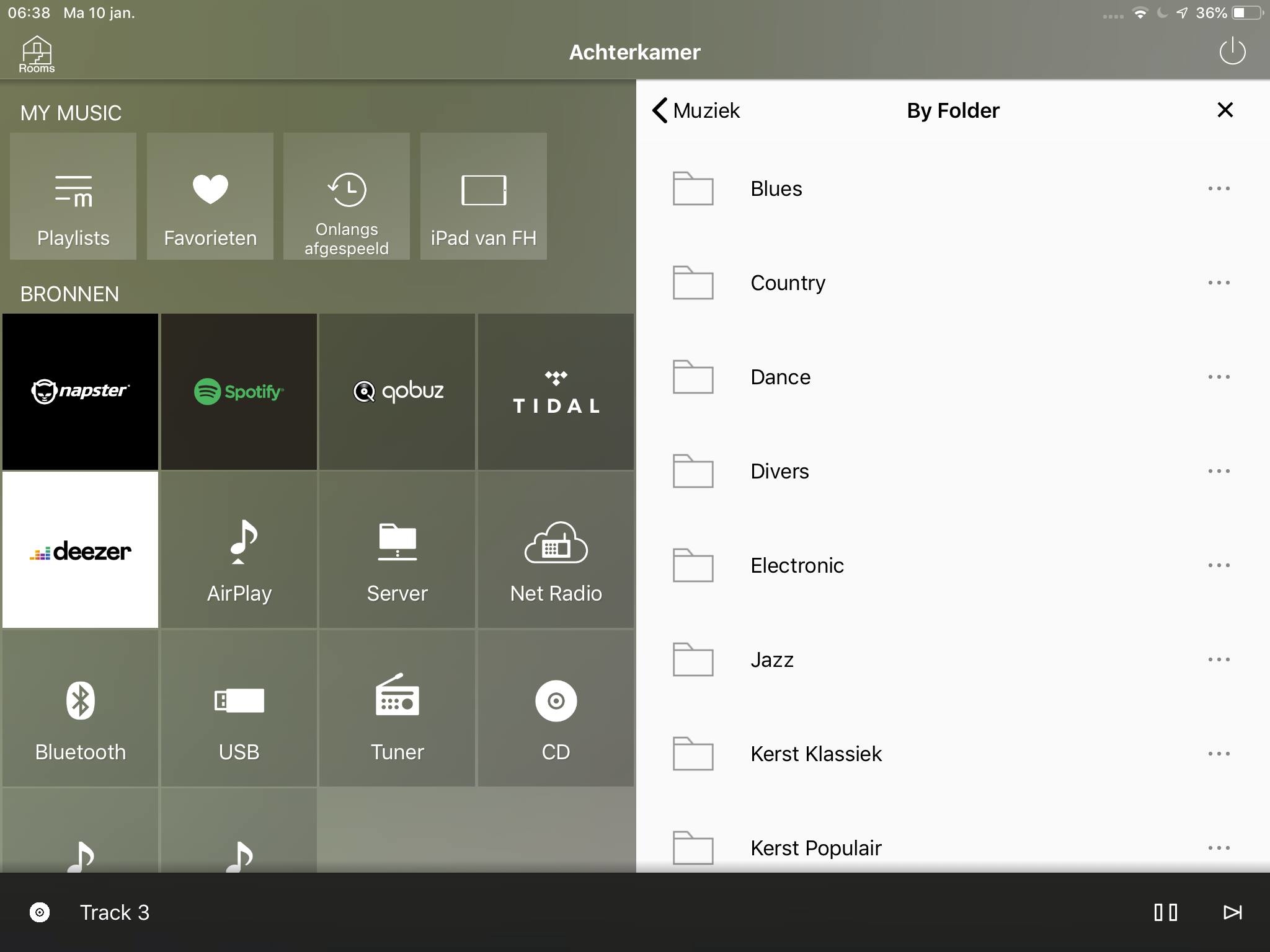
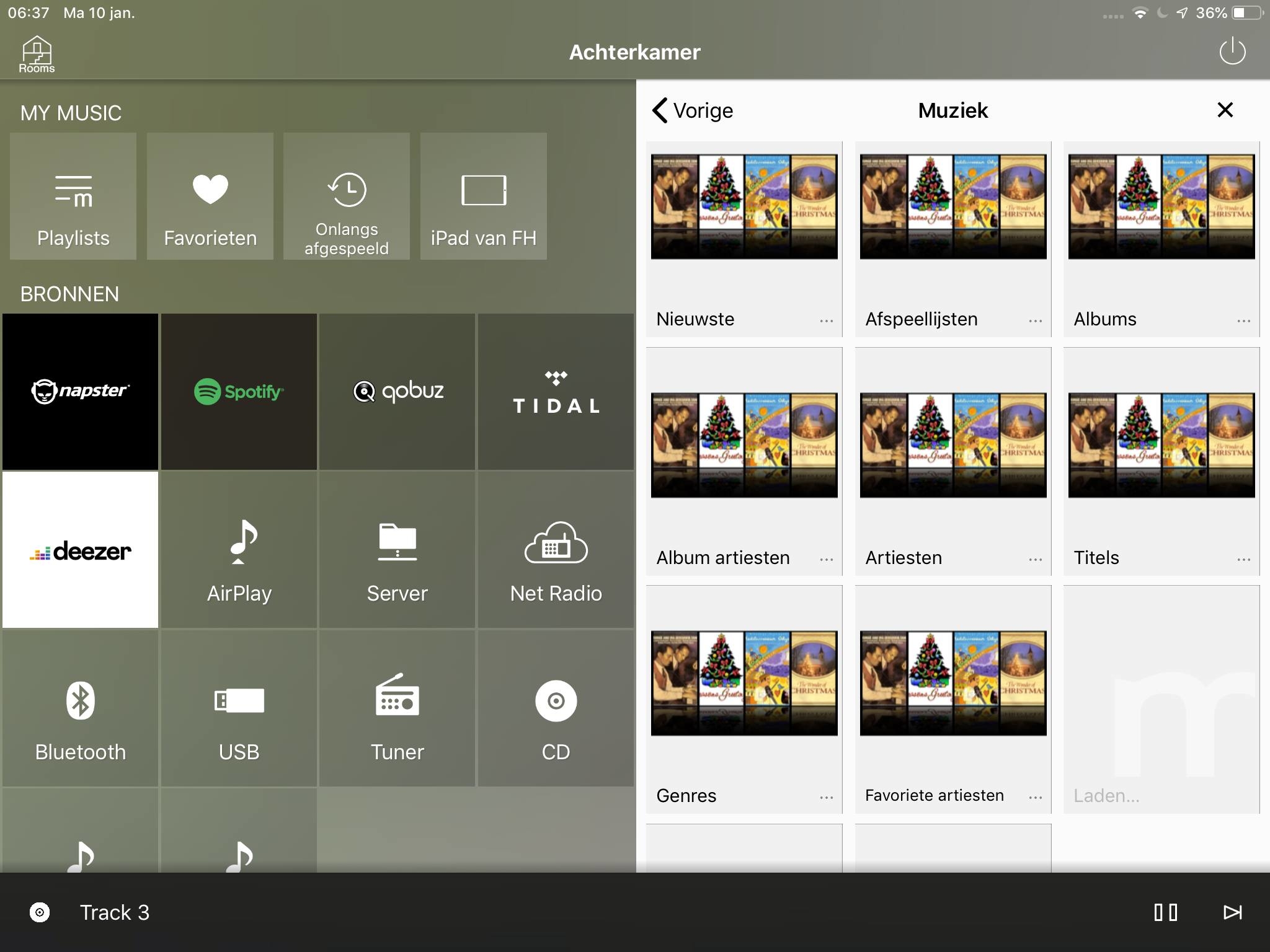
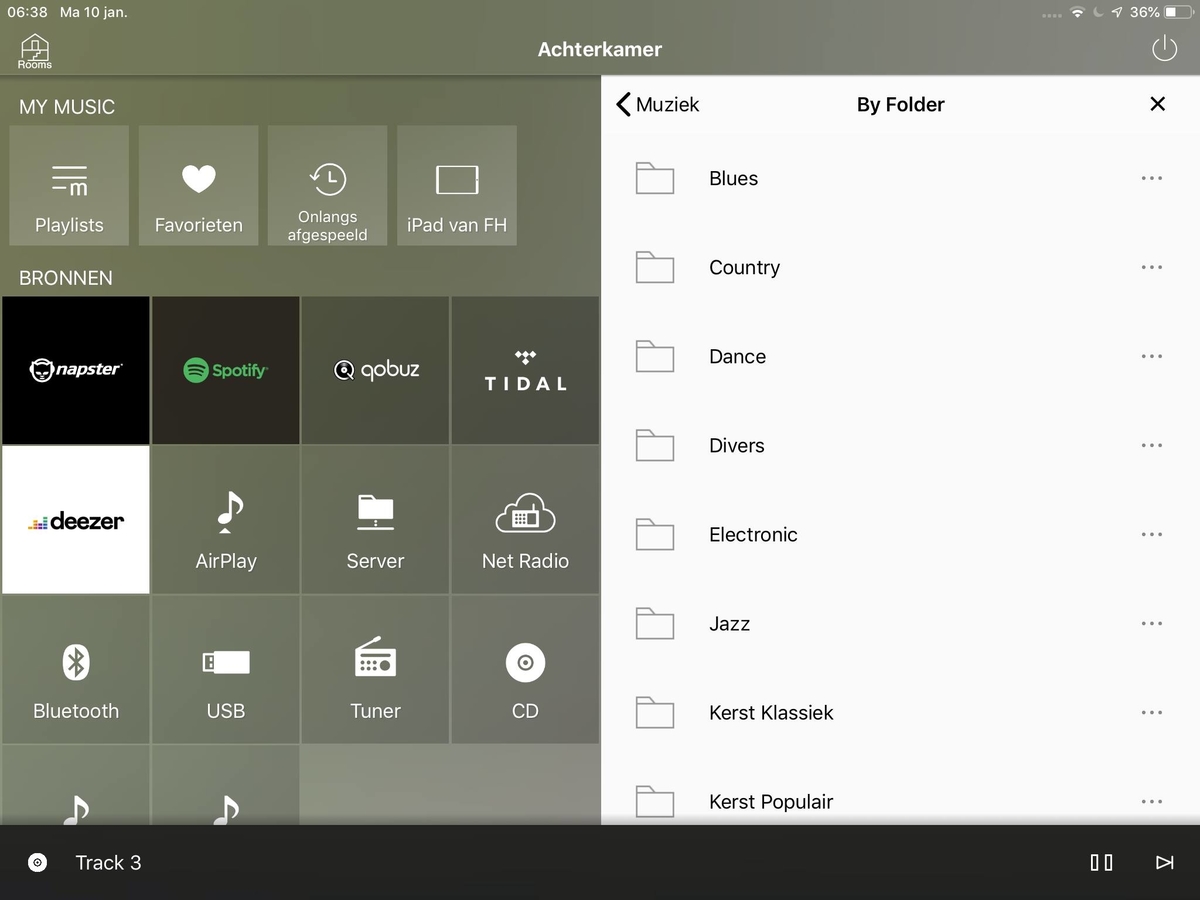
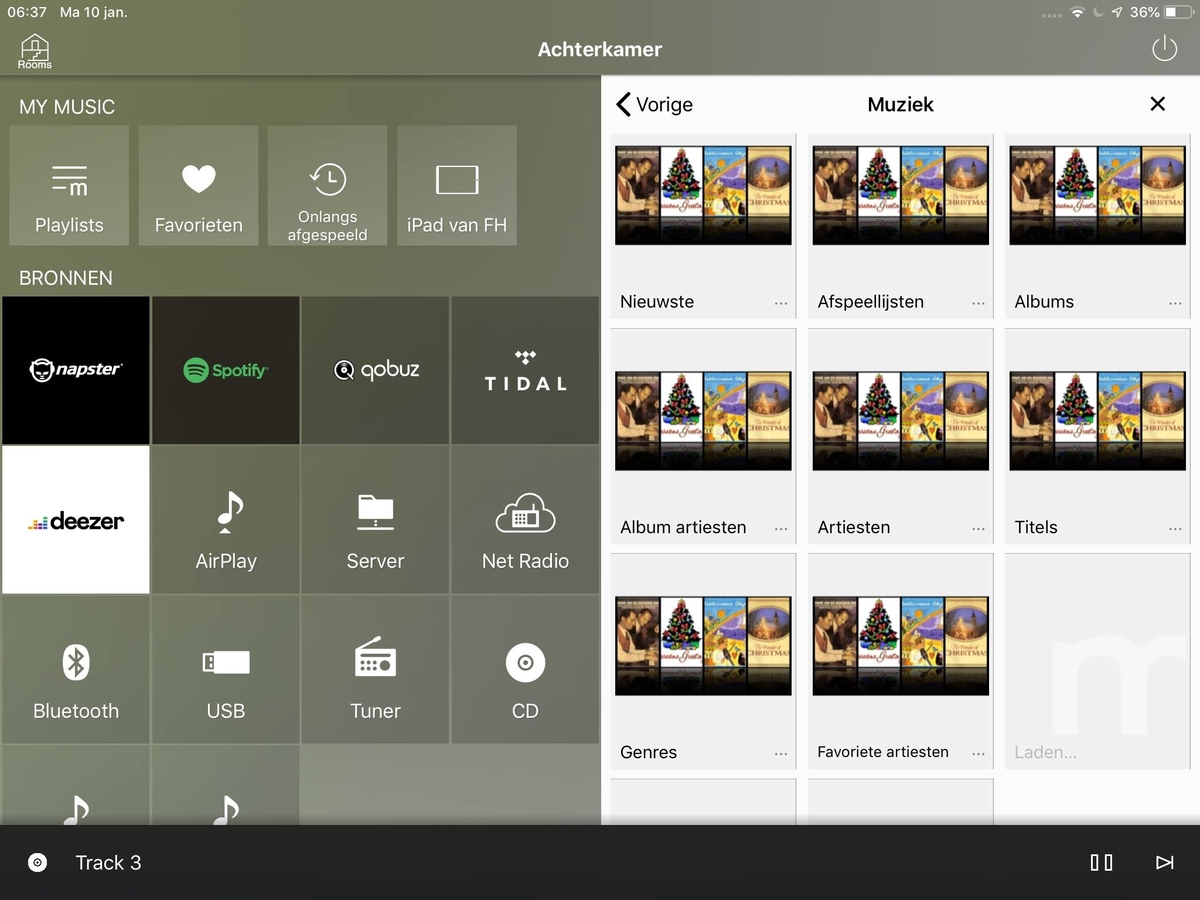
Hi, exactly the same setup here. I recently moved from Plex to emby but still have the Plex server running for that one reason: Folder View for my 2 Yamaha receivers. I'm amazed it hasnt been switched on in emby's DLNA b/c in my view devices like audio streamers are important clients for DLNA. For all other you'll have the app (Android, iOS, AppleTV), right? And, using the audio device, any other option like album, artist, genres are all unusable b/c there are thousands and thousands of them and that's exactly why I (and many like me) have created their well thought out folder structure - that works on a simple UI. So please enable Music-Folder View to make the choice for emby complete.
 1 point
 -
Perfetto, Thanks JN (pretending that he is Italian)1 point
-
That is a seeking error on Roku tv. Okay, so auto skip might not work on roku tv's. Well have to make sure to do a remote control capabilities check before attempting the send seek commands as well.1 point
-
Great Info - thanks ! Apologies about the crash - we should be able to handle that exception now we know about it @chef FYI I'm about to retire for the night, but I'll follow up on this tomorrow. thanks again.1 point
-
Reading in the Verizon forums, now I see that there was a licensing dispute. It seems to be over, but the guide data hasn't been restored yet.1 point
-
Anybody with a Roku using the Beta of IntroSkip with Auto-Skip enabled ? If yes, please could you let us know in the thread below - https://emby.media/community/index.php?/topic/48304-show-intro-skip-option/page/101/#comment-1105294 Thanks !1 point
-
Hi, it's something that can be improved in the future, but all that does is schedule a wake to the machine if it is asleep.1 point
-
Hi, that is the newest version. We're no longer publishing android updates for android 4.X. Newer versions of the app require 5.0+.1 point
-
Hi, it's resolved for the upcoming Emby Server 4.7 release. Thanks.1 point
-
Yes, the sync was optimized in one of the previous versions. Some internal Kodi database queries were very "slow". Just off by a few milliseconds but this sums up on initial sync when it's looped 10.000 or even 100.000 thousands of times. The people (artist etc) sync was case insensitive. Not really necessary and delayed the sync dramatically.1 point
-
Thanks for sharing! Let me check it out. I really love this community here! The current version DSM7 security (just updated every version) shows it’s all automated. Great job Emby! I guess it’s taken care of permanently now. Perpetual 90days renewal.1 point
-
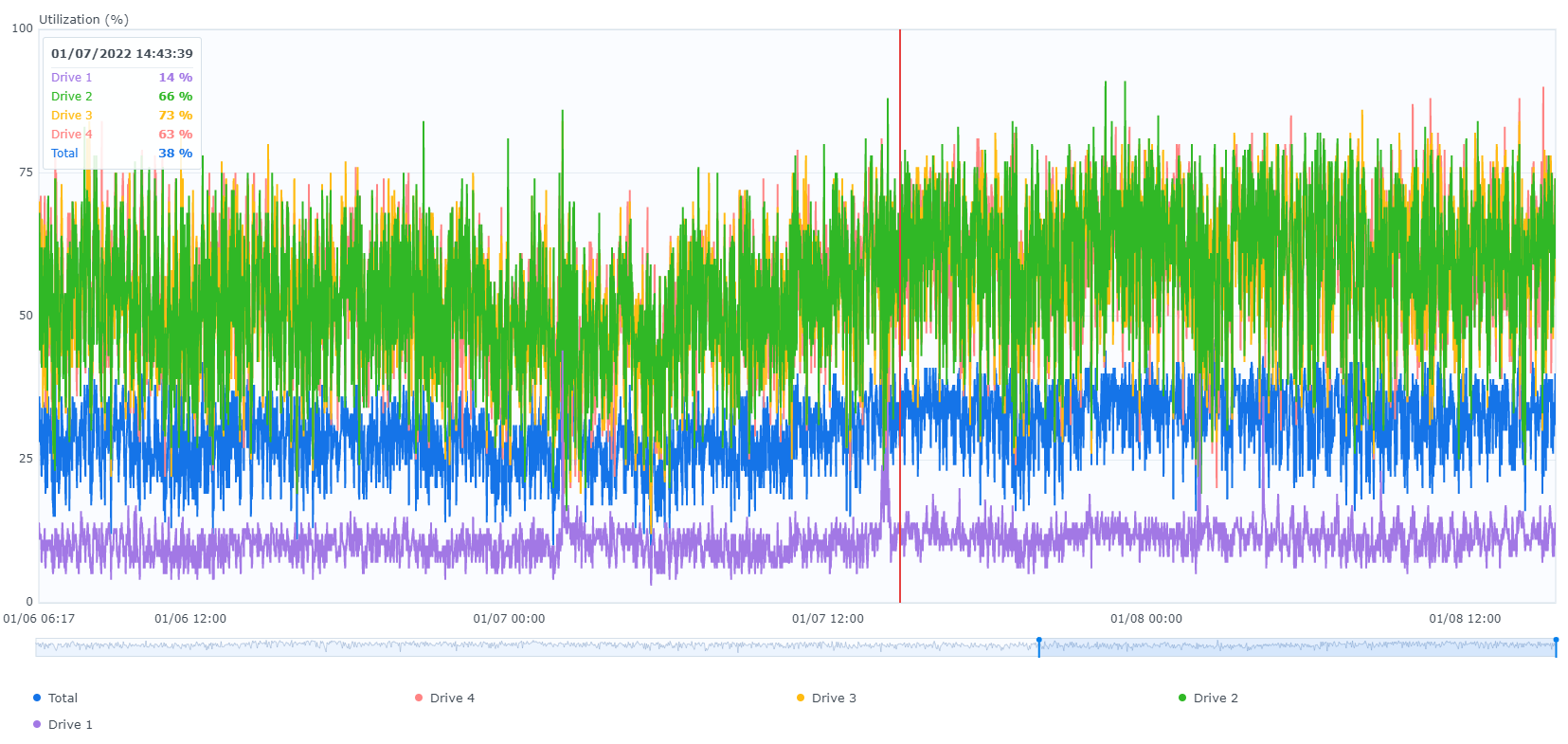
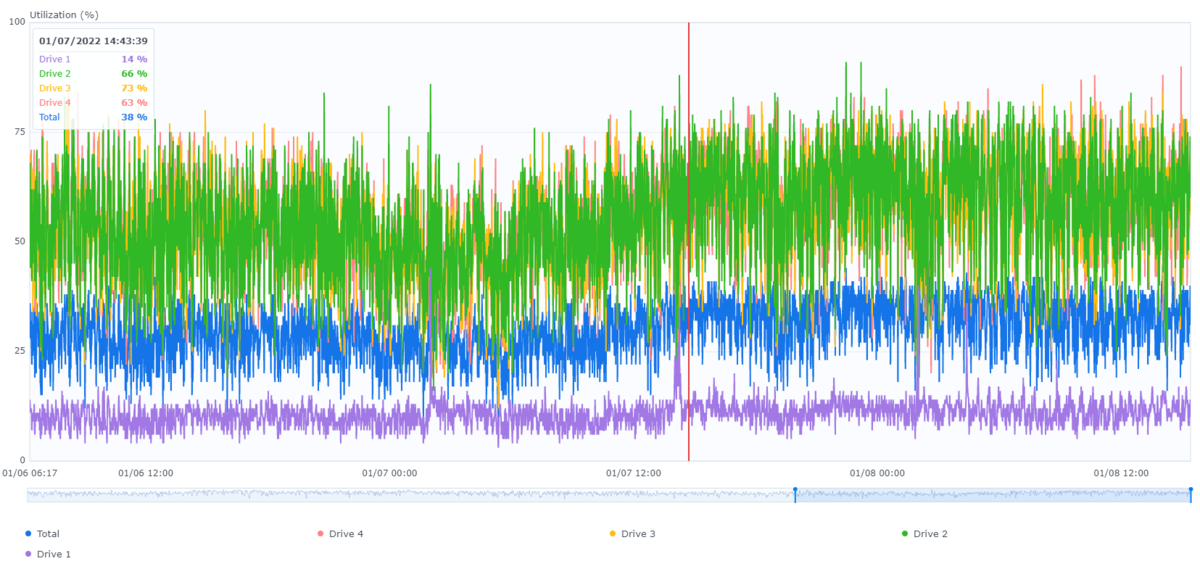
OK so you have transcoding turned off. I meant to post this for you previously. This is a week timeframe on my 920+. We both are in the same range but have the opposite problem. You have one drive high while I have way drive with far less utilization then the others. Mine is explainable. I had 4 WD Red 14TB NAS drives and wanted to start replacing them to go bigger so I replaced the first disk with an HGST 18TB Data Center Drive. While the Reds are 65%-73% utilized the HGST seems to be around 14% utilized. What makes this interesting is that my setup is an array and all drives should be working together doing "even" work. I think it's obviously the HGHST is a much higher performing drive but another factor could be at play here on both our systems. My Drive 1 is the newest drive added. Right now it has 899 hours while the other 3 are around 3500 hours. This drive likely far less fragmented. Your first drive could be the most fragmented drive and they fore showing up with the most activity. Have you used Storage Manager Volume tools to defragment your volumes? Instead of trying to guess what's going on, let's find out. Go to control panel, file services. For each protocol you have enable in each tab turn on logging for everything (all options). This will allow you to use the File Change log to see what's changed. Log Viewer will show you access to files. Resource Monitor Task menu services tab can be used to see which apps are writing and reading and can be sorted. Last but not least take a look at the Emby Server log file (upload it here) to see what it's doing when you think there is a lot of activity.
 1 point
 -
I live to serve . Glad this was an easy fix once it was figured out....1 point
-
OK, its updating. All is well. Stupido me about the arm8.1 point
-
Righto, but same effect with a series, right? But the difference with movies might more often raise the issue you mentioned. I agree at time of scheduling is the best time.1 point
-
Hello, it is I from the future. Are we there yet?1 point
-
yes, I know, its still a pain to use. and its not really "seamless" (in terms of usage). It seems its keeping multiple mkv files around. not the cleanest setup. much more natural in disc form. (at least imho).1 point
-
so I gave a couple of reasons why. 1) some people want to store the full optical media (say on their nas), i.e. its the "source of truth" and should be able to used as such 2) seamless branching. if I want to have a theatrical and director's cut of a movie that is stored on disc as seamless branching, I have to waste a lot of space if I would remux both of the 3) remux is actually changing the content, in a way that is just suspectible to bugs. i.e. there have been numerous bugs in MakeMKV/mkvtoolnix and the like over the years that have required people to rerip their content. In general they work well, but requiring an extra step that isn't required and can be done dynamically on demand, is in my opinion "better"(tm). with that said, yes, if I were the PM of emby, I'm not sure how much I'd prioritize such a thing, as its a bit of a niche feature (I personally think its valuable for reasons I enumerated, but I think many users wouldn't value it as much, i.e. they are either happy doing things the way they do them, they get media in non disc forms from various sources, so don't care or simply don't value the things I enumerated) I also think users who want menus to be streamed, don't understand the type of software emby/plex/jellyfin are, but that's a different story.1 point
-
except this (i.e. the github project I linked above: https://github.com/sjpotter/bluray-http-server) is a demonstration of how any streaming device can support it. i.e. just like if playing a file that isn't supported but whose codecs are, you remux on the fly, this poc demonstrates that the same can be done with discs. i.e. all user has to do is provide metadata that maps a program (dvd, though I believe dvd isn't as nice for this as bluray, as the mepg program concept mixes instructions and video data into the same stream, which makes predictability hard to impossible)) or a playlist (bluray) to a title and you can treat that as a file. I really think people get hung up on the concept that if its a disc "if it's a disc, we'd have to stream the menus and that just doesn't work", when one doesn't. one just has to be able to use specified playlists. think of it this way, imagine a user had a cue file for a cd image. There's no real reason why you couldn't use the cue file to stream individual tracks. (maybe you do support it?) this is the same.1 point
-
I hope I'm not missing something, but shouldn't Emby release the tuner? Is there a problem that needs to be fished out?1 point
-
Is there a way to set a simultaneous connection limit for each user. I share my server with family and a few friends and sometimes I see a couple with 2 or more active streams from different clients under their user and I would like to limit this to 1 connection per user for them. Thanks and keep up the excellent work.1 point