Leaderboard




Popular Content
Showing content with the highest reputation on 01/07/22 in Posts
-
So basically you are saying that refresh metadata option is not refresh metadata option, rather it is refresh fields that are empty ? great, than rename the option to refresh empty fields..and not metadata, since 99% of users expect refresh of all metadata.4 points
-
Feature Request: Have User Groups and all settings applied at the Group Level That way you can just assign users to the appropriate Group and all settings will be inheritated.2 points
-
I'd like to share with you my 80s and 90s Movies Collections artwork. I didn't create the backgrounds, those sources are cited in the PSD files' image info, but the rest of the designs are mine. I'm including a poster, logo and thumb image as well as the PSD source files and fonts. I'm also including the collection backgrounds I'm using which I sourced from freepik. Enjoy! 80s backgrounds.zip 90s backgrounds.zip 80s Collection-images.zip 90s Collection-images.zip





 2 points
 -
Hi, yes it's something we can look into. Thanks.2 points
-
@Chongwho is all set now. I did a remote support session with him last night and got everything working again. He's going to let this run a few days and then we may copy his docker setup and Emby and do the DSM 7 upgrade and migration. But for now we'll see how things go over the next few days while he thinks about the DSM 7 upgrade.2 points
-
Hi, we're not sure yet. Still trying to reproduce. Thanks.2 points
-
Hello, it is I from the future. Are we there yet?2 points
-
Thought I'd stick my css up here. Mostly its actually from Happy2play, Penkethboy and others who OK, I admit, I can't remember. Anyway, bear in mind, there's undoubtedly bits that have been done in a weird way (my stuff), bits that don't work any more (my stuff), bits that accidentally get applied twice (ditto), alternative ways to do the same thing, variations in general of similar things. And a few bits at the end not much good for anything, but I left them there anyway. So its not in the same league as The Plex Inspired Look, and others... But it might possibly count as a theme. Hope I haven't posted this somewhere else already... Don't say you weren't warned (full stop) EDIT - mostly tested in Firefox, though hopefully OK for Chrome, and its only really set up for the Dark Theme for both Media and the Dashboard. EDIT 27 Dec 21 - There's a slightly newer version a few posts further down... EDIT 06 Jan 22 - Another (third) version added here (dated 06 Jan 22)... EDIT 06 Jan 22 - fixed (I hope) bug in previous 06 Jan version, well the one I spotted anyway... EDIT 15 Jan 22 - appears the blur effect I added no longer works (temporarily I hope) in Firefox. Chrome and Edge seem to be OK... EDIT 23 Aug 22 - bit of an update, fixes a few bits, adds a few things, can't remember what, hopefully an improvement... Emby css for posting 23 Aug 22.txt Emby css for posting 06 Jan 22 mod.txt Emby css for download.txt1 point
-
Is it possible to add a tag to multiple movies at the same time? The only way I see to do tags right now is to find the movie -> edit info -> scroll ALLLL the way down -> add the tag you want -> save... Is there a way to do this to a selection of movies at the same time?1 point
-
Server: QNAP V4.6.7.0 Hi, I just imported my music library and was disappointed to see that Artist Sort Title field was not populated. This is available as part of the musicbrainz data set for an artists so I am curious why it is not imported. Amazing how many Joe's and Steve's I had in my Library when I was manually adding the field to get some sensible ordering to the ~3,000 artists I have in my collection currently. Regards, Gary.1 point
-
I think it would be useful to be able to add a second language as your preferred setting. I know 2 languages, yet I can only pick one so on Multi files it will end up playing something else as default instead of what would be my preferred secondary language.1 point
-
This is on my Pixel 3 phone. Emby for Android version 3.2.32 When I send the app to the background (ie. press the button at the bottom of the phone to go back to the phones home screen), wait a minute or two, then go back into Emby... the app acts like it's starting up for the first time, seeing the Emby splash screen for example. This is particularly noticeable when using Chromecast for music, like to a Google Home device, because it loses its connection to the device its casting to and the play queue becomes unavailable. Thankfully once I reconnect/re-cast to the device, the play queue comes back fully functional... but it seems like a few unnecessary steps seeing as I never closed out of the app and may be leading to other quirky behavior. Let me know if that makes sense please, or if I can do anything to help.1 point
-
Yes it works properly now.1 point
-
Hi first of all - thanks for helping us to test. ..and yes, I found the same bug about an hour ago. Does this episode have an End Title Sequence (ie is it TRUE or FALSE ?) - I suspect it is FALSE - and this is what is causing the issues. Can you manually set a title Sequence (set it to TRUE) and put in an approx end time - once saved - can you re-try the episode to see if it then starts at 0:00 and skips properly at 9:18>9:32 and then continues (it should then also skip the Title Sequence at the time you specified.) @chef - I think this issue is related to the one we spoke about earlier - I witnessed the same scenario - it skipped direct to the end of the Intro, missing the start of the episode. The episode did not start @ 0:00 so it should not do this. Thanks!1 point
-
@cayars You are the best. Thank you so much for helping me get things back up and running. Really amazing support. I will see how things go using the latest DSM6 version for a while and then maybe take the plunge to DSM 7 and the upgrade. Cheers.1 point
-
Hey, I installed the plugin and started scanning my series. After 6 days of scanning (I really have a lot of TV series) I am currently halfway through the detection and I wanted to try. When I launch an episode the intro is skipped since the beginning of the episode while it has not started. When I look in the data the markers are well positioned. For example: 12 Monkeys S01E01 the intro is identified and starts at 00:09:18 and ends at 00:09:32. When I launch the episode it will start at 00:09:32. Is it normal ? Thank you very much for your work!1 point
-
Until Emby changes it method of maintaining the entire stream session no. You could disable transcoding/remuxing per user but then you will have uses saying why and I getting No compatible stream errors. So you need as much spaces as you have transcoding sessions.1 point
-
I do not - which is why it won't work. I prefer all my containers to be self-contained and limited, which precludes anything like broadcast-based stuff. mDNS, broadcasts and similar will also not work across layer 3 VPNs, such as when I connect to my at-home VPN with my iPhone. Here, the iPhone cannot do mDNS and likely not broadcasting stuff either, so here a DNS solution is the only one that will work for service discovery..1 point
-
Agreed, very easy to do what can't be undone. There is a clear warning on the process as is, so it seems a similar one time pop-up in the settings would be enough... there is also that initial "are u sure" in kodi when deleting the entry, so if ur sure, your sure... gotta take responsibility for our own actions at some point, no? Thanks for considering!1 point
-
I have installed the newest beta (4.7.0.19) on my TX2. Currently the ARM V4L2 H.264 encoder is still the only available hardware option. Nvidia now supports hardware decoding on the Jetson platform: nvidia docs. Are there still any plans to include this? Thanks1 point
-
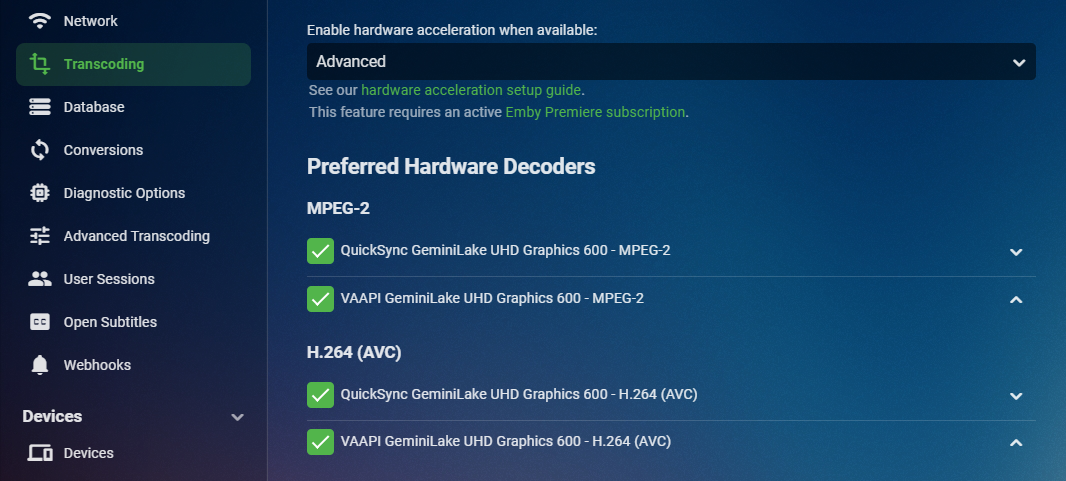
>>>>>> Processing Plan Info Name CanDoInHardware WillDoInHardware Reason Info VAAPI HD Graphics 500 - H.264 (AVC) >> True True Hardware Codec Info VideoInput >> True True Same adapter (/dev/dri/renderD128), s... Info Scaling >> True True Info VideoOutput >> True True Hardware encoder Info VAAPI HD Graphics 500 - H.264 (AVC) >> True True Hardware Codec >>>>>> Projected Processing Formats Info Previous HW-Context Format SW-Format Size Next Info h264 >> VAAPI vaapi_vld nv12 1920x960 >> scale_vaapi Info scale_vaapi >> VAAPI vaapi_vld nv12 1280x640 >> Hi, the reason is simple. Transcoding is handed off to the GPU to do the work. The CPU doesn't have to do the "muscle" work so it's involved by fetching the stream from disk and making sure the GPU is kept busy. The CPU is also receiving the data from the GPU and doing all the tasks to stream it. It's not doing more because there isn't anything more it needs to do. If you want to see it work hard go to the transcode menu option in your Server Dashboard and turn off hardware transcoding. You may like the picture quality better as you have an older HD Graphics 500 GPU. The newer generation GPU do a little better job quality wise. Before turning if off to test change the first option to Advanced and see if you have an option for QuickSync as well. If you do set each and every one up like this: Enable QuickSync and move it up to the top position. Now try playing again and see if QuickSync is better on your NAS than VAAPI is. Every CPU/GPU combo and media collection is different so we give you the tools to adjust it best for you system per codec for both Encoders and Decoders as that page will show you. Let us know what you find.
 1 point
 -
The channel image urls can be present in either the m3u file, or the xmltv file. If they are present in both, there is no way to choose but that's an option we plan to add in future updates. thanks.1 point
-
This is not wise as the providers would be swamped with unnecessary requests and likely block any future emby API requests from your IP. The real issue, is 'fake/filler' metadata being added to the providers so they can have an entry - TBA or Episode X instead of the real name for example. If they stopped doing that - then the Refresh metadata would work as expected (and yes I agree, this needs to be renamed..). However, I'm not sure how emby would react if the episode has a NULL for the episode name.. In the case of TBA, some tools allow you to not use the episode until it has a proper name. As a workaround - a script to query the dB for TBA and force a metadata refresh is not hard, but for Episode 1,2 etc in your example - that is not as easy because many shows do not have Episode names and Episode 1,2 etc are perfectly valid .. the only way to check that, is to compare against all other Episode names in that Season... Alternatively, something like using the 'Continuing' and 'Aired Date' value would give you a good indication that they show is a candidate for a metadata refresh.1 point
-
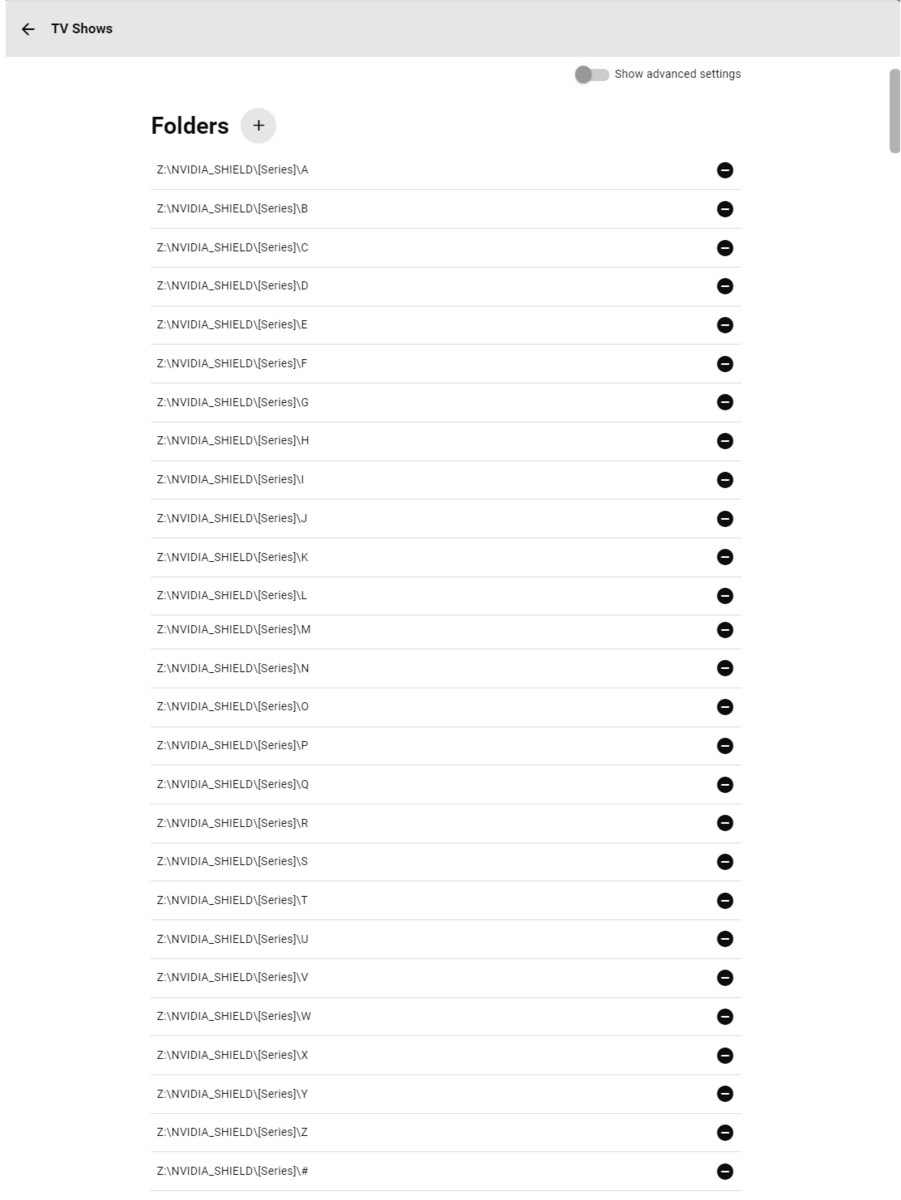
As stated here: you can avoid any/all issues if you add those letter subfolders as separate paths. It should take you like 2-3 minutes and be done with it.
 1 point
 -
Desktop version works perfectly. Just Windows Store version has issues for me.1 point
-
Hi quick update as I found the pressing any key on the keyboard once you have started playback makes the cursor disappear. Not a proper fix but a decent workaround in the meantime so thought i would share. Thanks!1 point
-
Is there any progress? I still can't use the Emby Theatre UWP app without giving access to all libraries ...1 point
-
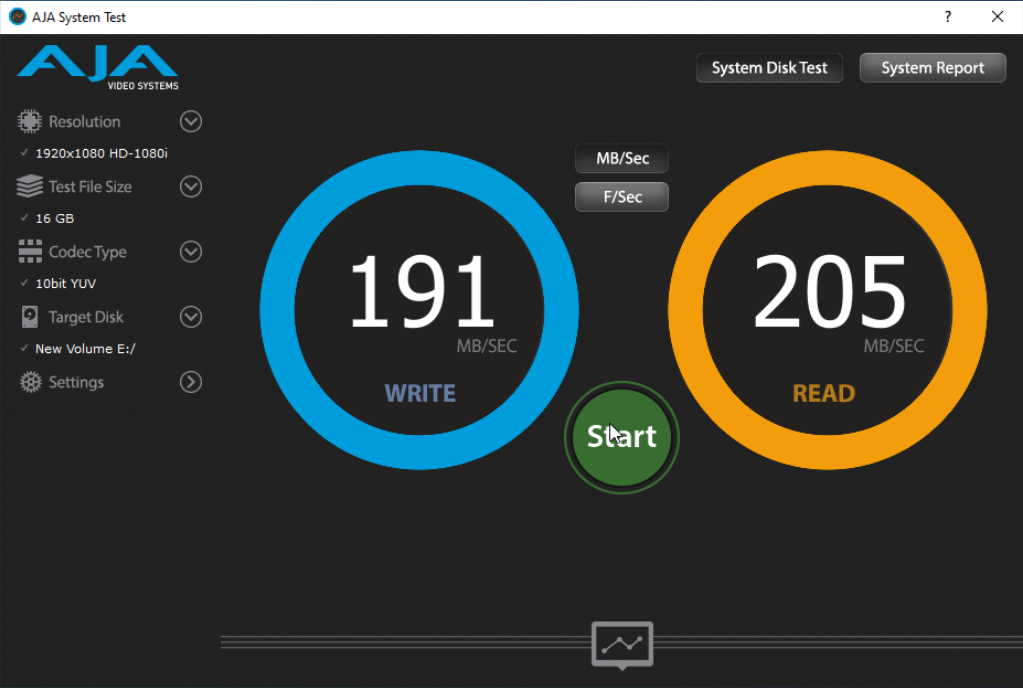
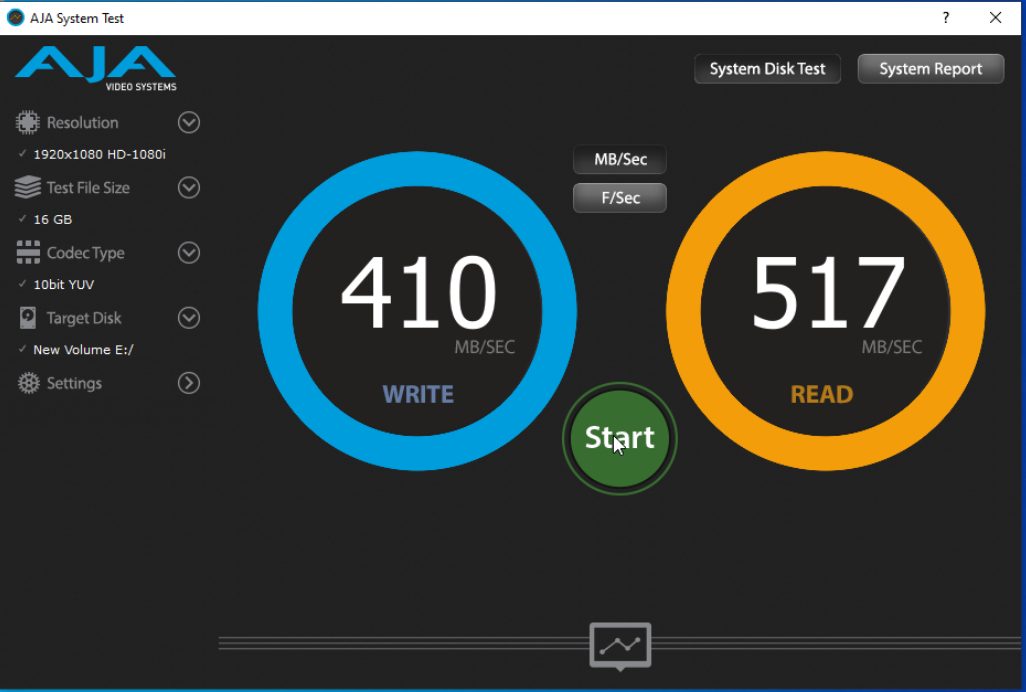
The difference between USB3 (5Gbps) and eSata/SATA (6Gbps) is very noticeable. I test a few different ways but I think this shows it best. In normal software testing it was much closer. For this I turned off all system caching and did a 16GB file transfer first writing the reading. Kind of worst case that way but true bandwidth.
 1 point
 -
This technique worked very well for me to move libraries on a Windows 10 box, and I've provided example sqlite code for that since these examples are all for Linux paths... in case someone is searching for a solution on this site and finds only the Linux sqlite code in this forum. On Windows I used a program called DB Browser for SQlite to make the changes with Emby Server stopped. I also edited the root/default/Movies and TV options.xml files to refer to the new directories. Worked perfectly on restart. (Probably only because I had carefully backed every file up...) Collections were preserved perfectly as well. In the long run, this means I may even switch to Linux since I should be able to preserve libraries... The only YMMV caveat I can think of is that I store movie/TV metadata files in the movie/TV folders... not sure if that would matter any longer as the library tables have been simplified. UPDATE MediaItems SET Path= replace(Path, 'T:\Shared Videos', 'M:\Media\Movies') where Path like '%T:\Shared Videos%'; UPDATE MediaStreams2 SET Path= replace(Path, 'T:\Shared Videos', 'M:\Media\Movies') where Path like '%T:\Shared Videos%'; UPDATE MediaItems SET Path= replace(Path, 'T:\TV Shows', 'M:\Media\TV') where Path like '%T:\TV Shows%'; UPDATE MediaStreams2 SET Path= replace(Path, 'T:\TV Shows', 'M:\Media\TV') where Path like '%T:\TV Shows%';1 point
-
correct, Actually I've been using that since the beginning, the guide data was off by an hour, so when you would tune to a channel, it was the show that was supposed to be on before the one in the guide.1 point
-
@Abobader1 point
-
When you connect by IP:port you're using local web app, while using app.emby.media you're loading online web app (which is usually more "ahead" in features - in line with current server beta - as opposed to current stable). Once current beta 4.7+ hits release, you'll have same in local web app, as well.1 point
-
See all the others as examples. I'll continue to monitor.1 point
-
Thanks so much.I’ll start with all of that and then get back to you. Bless!1 point
-
Thanks for the update.1 point
-
Hi, yes this is resolved for the next update but in the meantime you should be able to use the LG mouse pointer on the remote1 point
-
Rock on dude, delete is now deleting! Thanks again for the support. I wonder if it really needs to be a two step process tho? Can't there just be a setting in the add-in, under advanced maybe, defaulted to 'no', that asks "also delete the file upon delete request".... just an idea.1 point
-
Hi. The way Exoplayer works is it supports what the hardware supports - and then we have extended it to also support local decoding of other formats in some situations. if you leave your Audio Output option in the app set to "Auto" then transcoding will only be used when absolutely needed for video. https://exoplayer.dev/supported-formats.html1 point
-
Hi, yes I agree that in the places where we have you selected preferred languages, we should allow you to select multiple and prioritize.1 point
-
As soon as it gets through LG review. Thanks.1 point
-
Not related,but Luke,when is the new update coming?I thought it would drop last week1 point
-
I have this same issue and have had this issue for a while. Currently on a Pixel 4XL, but I also had the issue on a Samsung S10. I can cast no problem, but as the OP stated after a short time the emby app losses connection to the Chromecast device. Reconnecting to the Chromecast will then bring back control of the currently playing content. This can get annoying to have to keep reconnecting to the Chromecast in order to regain control. I do not have this issue with other apps like Netflix or Disney+. I also noticed that if I pull down my notification shade I can still see the Emby app play controls and can still pause/play the content. If then go to bring the Emby app from the background to forground the play controls disappear and the app shows disconnected from the Chromecast.1 point
-
HI there, yes it's planned for the future. thanks.1 point
-
I have noticed the Emby Server has "Camera Upload" feature in place but I can't find where to disable it. To me, this is dangerous to enable the Camera Upload feature by default without proper controls. For example, I am hosting my own Emby Server at home (premiere already), and I like to share my Emby Media with my friend. I have my router port opened for my Emby server and configured a DDNS for it, so my friend can logon and access my Emby media from his own place via remote access. But I just realized that on Android device, I can turn on the Camera Upload feature from my mobile and upload image/video files to Emby hosting server without user-based restrictions. That means my friend can easily trigger a large amount of files to be uploaded from his android mobile to my home Emby server machine. Just to be clear, I trust my friend or anyone I shared my Emby media with, but that does not mean I automatically grant them the permission to upload their personal mobile device camera media files to my Emby server without a control. Emby Server has no control on Camera Upload: On the camera upload configuration page, there is a path we can customize, but if we leave it blank it will use default internal storage folder (accroding to this support page). I installed Emby on a Windows machine at C drive folder. There is no button or toggle control that can disable the Camera Upload feature from the Emby server side. Thus, even I haven't touched this area since the installation, the Camera Upload feature is already on and its default upload path is somewhere on my Windows machine C drive. When I configure a user account for my friend, he can potentially turn on the Camera Upload feature from his android app and start uploading over 10GB size media files to my Emby server without a permission control. It is very dangerous that uploading tons of files to my Emby server internal storage when I didn't customize the upload path for it. My Emby server machine C drive will be flooded. Shouldn't the Camera Upload feature be disabled by default on Emby server? Shouldn't we have a checkbox on the Camera Upload configuration page so we can manually turn on/off this? Camera Upload permission is not configured per user account: Even if I wanted to enable the Camera Upload feature, I want to grant the permission for each individual user account, instead of leaving this open to all the users by default. I have been searching for the options under User Account configuration section, there is no place that enables/disables the Camera Upload per user account. Shouldn't the user-based permission control be on Emby server side, rather than on the Android Client App? In summary: The Camera Upload feature should be disabled by default on Emby Server side until the administrator manually turns on this feature. Camera Upload feature should not have a default path out-of-box. Especially for using the internal storage, uploading camera media files will have the great chance to flood the server. It is better to always force the administrator to assign an external storage before enabling the feature. When the Camera Upload feature is enabled on Emby server side, we should always grant the feature for each user account. Each user's camera upload path should be defined under the user profile. For example, the Emby server side defines the storage parent folder, whereas each user account can define a subfolder.1 point
-
Movie downloaded. Tried deleting it within the menu on the Downloads section, and it immediately started to re-download. Went to the movie on the general section, pressed "Remove download", does nothing whatsoever. So basically what I did was delete from Downloads again, and pause the download through Android's notification bubble. Not the best solution out there, but at least it'll keep the wasted space to a minimum without having to delete it entirely from Emby. Also it would be helpful to distinguish the "Delete" buttons a bit better ("Delete from server" vs "Delete from this device", or at least a better clarification in the confirmation pop-up), as sometimes it's not easy to distinguish if I'm in the Download section or the general online one. Hopefully the revamp with the fix comes soon1 point
-
Thanks yeah this helps. So mpv can do tone-mapping and that is what I'm seeing. I tried to enable HDR in Windows it doesn't work. Windows says my display doesn't support HDR. This might be because I'm using a Displayport to HDMI adapter (active). The computer doesn't have any HDMI output. I get 4k 60 Hz, just not HDR so I don't mind too much.1 point
-
Good to know about Roku. I'm guessing that's what's actually going on. Agreed... after a day or two... the temp files are likely not being used and can be removed. So I added this to my Unraid server in a cron job script: #!/bin/bash find /mnt/cache/appdata/EmbyServer/transcoding-temp/* -mtime +1 -delete That should delete anything in the transcoding-temp directory that is more than a day old. Seems like something similar could easily be added to Emby's scheduled tasks to clear the temp path.1 point
-
It would be nice if the Emby roku app had an screesaver of the movies you have on the library.1 point
-
Hi there, yes it's something we're interested in adding in future updates. Thanks for the feedback.1 point
-
It's a great idea for the future.1 point