Leaderboard




Popular Content
Showing content with the highest reputation on 01/03/22 in Posts
-
Hi - Thanks for the feedback. I need to update the wiki because it's actually done on a percentage of the runtime length as opposed to a fixed length (to avoid unnecessarily long Chromaprint scans as you say). On the 'type' of TV Series to determine the scan type - that is an interesting idea and we can certainly add that for discussion for a later release. Thanks !2 points
-
Sorry to give you bad news, Nvidia Shield Tube is not suitable for playing high bitrate HEVC content. Take a look and you will see several posts talking about the issue.2 points
-
On your wiki it states "This is part of the ffmpeg toolset and is used to create an Audio Fingerprint (FP) of the first 15-20 minutes of the TV show and a second FP for the last 5 minutes of the TV show." and I was wondering if it'll do this for shows with short run time? As an example: Anime series will always place the intro within the first 10 min (I dare say within the first 5 minutes really, but for safe measures it would be ideal to have it scan the first 10 min) and the outro time frame could stay the same. Meanwhile blackframe detection wouldn't work at all (since anime outros are animated as well) and you could just run audio fingerprinting on the last 5-10 minutes since anime is consistent there as well. What I'm getting at is: Could you create a drop-down menu to select a series type so that the servers with cartoon-length episodes doesn't have to scan an unnecessarily long time? Or perhaps make the values changeable for users to determine.2 points
-
Hi, I’d love that audio and subtitles choice would be saved per show, according to what you select on the last episode you watched. The main audio/subtitles parameters is a good point but there are many cases it is not enough and you need to adjust audio and subtitles at the beginning of every episodes. For example i like to watch Casa de Pale in Spanish with french subtitles, The Big Bang Theory in English with french subtitles, French TV shows in french without subtitles, ....1 point
-
While Emby already has recommendations built in based on previously watched items I find they are not all that helpful. They seem to be based on genre only, for example, because you watched a comedy here are other comedies in your library. I do like how the also directed by/appear in recommendations work though. What would be great is if Emby could incorporate Trakt's recommendations as they are much more sophisticated. Trakt's recommendations are not only based off of what you have previously watched but also what your Trakt friends and other Trakt users have watched. It takes user ratings and trending/popular media into account. Ideally Emby would include full Trakt integration allowing users to rate media after watching, view lists and recommendations, and view upcoming media all from within Emby but for now I think recommendations would be a nice addition. Trakt has the potential to give Emby that community feel and allow users to discover new media, find something to watch, and recommend media to other users. http://docs.trakt.apiary.io/#reference/recommendations1 point
-
Is there anyway I can quickly set a subtitles offset value? pressing on +-50ms button is tedious when I have to set at +-6500 for each episode of a TV series. A slider or a direct input of the desirable value would be great. Thank you.1 point
-
Could Emby Theater please have the ability to change automatically to HDR when starting an HR video. Kodi supports this on Windows. MadVR supports this on Windows and has for years but apparently MPV was better for Emby. the tv and android apps support this.1 point
-
Hi guys, I created those simple library icons for myself but decided to share - maybe someone will find them useful. Every icon is a PNG file in 1280x720 px. Download link: https://drive.google.com/drive/folders/15SGUccIljBZEysLj-cuMzpJ3I3QOVbIB?usp=sharing
 1 point
 -
Can you guys create a plugin which display the contents and rating on start of each episode? Netflix, Disney and Amazon has such overlay. It shows if the running episode include violence, flashing lights, rude speech and it shows the age rating.1 point
-
Hi together, since a few weeks a discovered a strange problem on Windows 11. Sometimes Emby Theater (UWP app) randomly freezes while playback, I think it happens after a track is finished. I've noticed this problem because I was wondering why the next track from playlist is not playing, so I opened the app. It was not possible to use any element of the interface, the cursor doesn't change when highlighting a link and closing the app is also not possible. If I try to kill the application using Windows Task Manager, the content of the app disappears, but the application remains active in the task bar. But it is no longer possible to open it. I also tried to kill the "Application frame host" task, but that seem to be not enough. Additionally, it is no longer possible to open the Windows start menu. Only solution is to reboot or sign out from Windows. Any ideas? Best regards, Alexander1 point
-
No problem! Assuming that the beta does include all the necessary drivers, just the below would be needed I think. Apparently the below is a workaround though for this CPU - it should be fixed in updated linux kernels at some point? I'm far from an expert in linux, but I could not get the drivers to show up unless I did the below. See if dev/dri is there. If not: edit "/etc/default/grub" and adding: GRUB_CMDLINE_LINUX="... quiet i915.force_probe=4e55" The 4e55 I found by running: lspci Then update grub: update-grub The enable_guc=2 - I'm not sure if this is needed. Similar to the above, this is getting fixed/updated in later linux OS's. It appears to just be specific to these newer CPUs. I found this from here: https://jellyfin.org/docs/general/administration/hardware-acceleration.html#tips-for-intel-gen9-and-gen11-when-using-vaapi-or-qsv-on-linux and also mentioned here: https://forums.plex.tv/t/can-jasper-lake-n6005-use-hardware-transcoding/758158/12 Hope this helps!1 point
-
The older Pro versions don't seem to have a problem with 4K remuxes that I'm aware of. Newer pro will have things like DV and better upscaling.1 point
-
Thanks for the link to the APK, it's definately better with this sideloaded version, although the UI and navigation is causing Shield to struggle a bit. These high bitrate files are definately playing on it better though. I am going to look into getting this VLC working via the client and I'll see how that goes. Edit: Yes the UI is partially unusable unfortunately. Even though the file doesn't stutter the menu/ui is taking several mins to display and we're back to the errors. Looks like getting VLC working maybe the only option. Like I said in a previous post, enabling external player on the Emby client doesn't seem to go anywhere. Edit: Yes, I managed to get External player (VLC) working on this sideloaded version of Emby, I like how I can now actually view the server settings now. Thanks guys. The unresponsive UI has now naturally gone away because its not fighting anymore.1 point
-
I will give the plug-in a new try. Hopefully I get it up running as expected.1 point
-
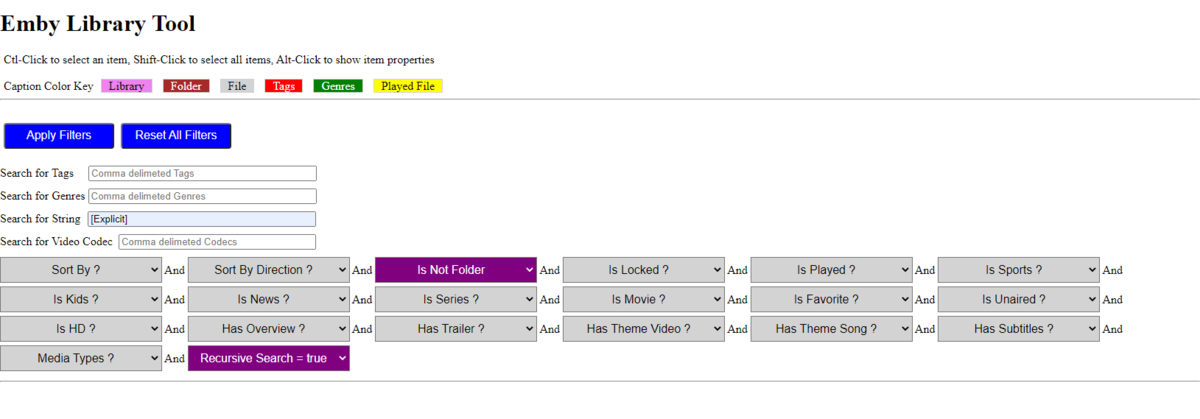
@VicMoore @mbarylski I figured it out looking at the query. From library level filter it has "Filters=IsFolder" and from Artist it does not. music library query query within Artist folder So from library you have apply "is not folder" filter also to get what you want.
 1 point
 -
If Synology is on your list, just make sure you get one with an Intel processor and 4K gpu because you transcode. However, I think you may find them underpowered for your needs unless you got a new XS model. Personally, if I transcoded and streamed to that many devices at once I would hook a NUC up to my NAS and install Emby server on the NUC.1 point
-
Let us know how you get on.Thanks.1 point
-
Thanks softworkz for the explanation. Apologies for the delay in response - busy and sick holidays. I thought I did configure quicksync manually correctly to work on the stable release of emby. In fact, quicksync did work properly on stable release for decoding, but failed when trying to encode. I did only install the drivers via the package manager instead of compiling it myself - not sure if that makes a difference. In looking through other forums/docs (plex and jellyfin), it sounds like these JasperLake chips are very picky on ffmpeg version and certain options set for the GPU. Regardless, the fact that it will be working in an upcoming release marks this as solved more or less. I've been running beta and it has been quite stable. A few other notes for folks in a similar boat as me. Getting these Jasper Lake CPUs set up properly in linux is a pain because they are new-ish. The linux kernel isn't as out-of-the-box ready for them. I listed the steps I needed to take below to get this working. I would say that the N5095 chip is a champ with transcoding. Albeit a celeron, it can handle transcoding very well including HDR tone mapping. Update repo sources to include non-free Install intel-media-va-non-free, vainfo See if dev/dri is there. If not: edit "/etc/default/grub" and adding: GRUB_CMDLINE_LINUX="... quiet i915.force_probe=4e55" The 4e55 I found by running: lspci Then update grub: update-grub Add 'options i915 force_probe=1 enable_guc=2' in /etc/modprobe.d/i915.conf1 point
-
If you try sideloading the standard Android app and have issues that one can use external players also. I think they are both using the same version of Exoplayer from last February.1 point
-
Odd, if VLC is loaded on your Shield then it should detect it. I think the first time it asked me if I wanted to give VLC access to my libraries, but after that it just worked. Works with MX player and a few others also1 point
-
Hi, yes, given that the feature is already there for video, we should be able to easily add this. Can you provide a sample file for testing? Thanks.1 point
-
So after a very fast reply from quickmic via PM, the artwork problem could be solved. If this fix doesn't bring other problems he probably will bring a new experimental build. Thanks again quickmic1 point
-
Ok, I'll have a look. Actually I fixed a artwork bug in 6.2.2. Some synced content ignored the fallback artwork which should always be the case. Current mapping table is: ArtMapping = { 'Thumb': "landscape", 'Primary': 'poster', 'Banner': "banner", 'Logo': "clearlogo", 'Art': "clearart", 'Disc': "discart", 'Backdrop': "fanart" } and extra: mapping 'Thumb' - > "thumb" I think what you declare as "landscape" is Kodi "standard" In you example: Emby-Server's "Thumb" not available which means no Kodi "landscape" is available. In this case there is no fallback in next-gen. Kodi-landscape is empty. The question is, how the skin handels fallbacks. Of course, I can use Emby server's Backdrop as a Kodi's landscape fallback. Not sure if this break another skin. The main problem is, the skins are not "following" the "standards". Actually the skin should take care of fallbacks, not the plugin. But I see what I can do.1 point
-
II believe this is an interaction between the Exoplayer and the Nvidia Shield Tube firmware. All applications that use Exoplayer have the same problem. Who is the culprit Google or Nvidia Shield? The culprit is not clear, but what is clear is that the victim is the user.1 point
-
I've updated the Wiki https://github.com/chefbennyj1/Emby.IntroSkip.Release/wiki/Emby-Intro---Credit-Skip1 point
-
Correct - I've tested up to the Max HEVC UHD Spec which is 144Mbit/sec - no issues.1 point
-
+1 for this. @LukeAny news on this?1 point
-
Also related:1 point
-
Hello, So I had an unrelated issue an needed to start from scratch. Yesterday I made a clean debian container on proxmox, installed latest beta and restored a backup emby config. All was good. Today I log in after rebooting my server and noticed the admin settings were gone. I restored the one auto backup that proxmox made an luckily all settings are back. Just another FYI1 point
-
Just use mkvtoolnix (free) to join the files - it will save you time and effort, playback of multi-part files is just plagued with issues in most clients. Simply drag part 1 into the window, then drag part 2 into the same window - choose 'append'. Click save to write to a new single file. That's it.1 point
-
Lend your support here:1 point
-
Would you please upload the recording somewhere, so maybe @softworkzcan have a look if there's something special at the boundaries of the different shows.1 point
-
Actually, this should work also as once "split apart" they should not automatically rejoin (unless you are using the auto grouping plugin). Don't know how playback sequence would work though as S01E01 only has one meaning. But thinking about it, Emby tracks by providerid so any section of the episode would consider all sections watched.1 point
-
Hi there! I was wondering if you would like to come join the conversation over here: A lot has changed with the versions posted over on that thread. (It is not currently in the Emby catalog). We might not have fixed this exact issue (or maybe we have...), but, I'm sure that we can work together to figure out what happened, and move forward with the extended version over on that thread. Hope to see you there1 point
-
New beta version available: BETA VERSION 6.2.4 delta changelog: minor artwork fix and apply sqlite thread save patches fix dbio issue add cinema mode option for movies and episodes This version is published on Emby's Kodi beta repo @embyL0VERreview of artwork still pending @SwanStream delete review still pending1 point
-
Man you got a lot of friends. Glad you got it working.1 point
-
Good evening and congratulations to all of you, if any of you are using Nginx as a reverse proxy, the same thing happened to me that the Emby service stopped or gave an error, I started to check carefully and eliminate the Nginx server and buff the server It is running without any problem, now it is much faster, and it has been a week without problems, this could be the solution to those who are experiencing the same thing as me. Currently I have 651 users and simultaneously I have about 107 users online and the server has not presented any more problems since I did the ones I raised.1 point
-
Please make it stop.1 point
-
Buenos dias. Quiero comprar una licencia Premier Lifetime pero no me importar esperar, sabeis en que epocas suelen hacer descuentos? Gracias y Salu2.1 point
-
Thank you for the reply. I think I've found the fix. For others, there seems to be an issue with Kodi 19.3 and Xbox. There is a patch at Matthusiman.nz (Matt Huisman) that you can download and it fixes an issue with Python and the urllib Library.1 point
-
Yeah basically i just wrote a little command line thing to do it Edit: Actually no I didn't, I did what you did A bat file with this: "c:\Program Files\Silicondust\HDHomeRun\hdhomerun_config.exe" myHDHRid set /sys/restart self1 point
-
Is that using the hdhomerun_config <device id> command with set /sys/restart self I've put that in a batch file to make it easy to use. I have one for each different HDHomeRun I have. Thee are actually a lot of things you can do from the command line with hdhomerun_config program. https://info.hdhomerun.com/info/hdhomerun_config1 point
-
@simoncraddock I guess it's not fixed yet then. Tagging @Luke for comment. If you have a windows machine on your network, I wrote a little app that will reboot your HDHR which at least would keep from needing to restart Emby.1 point
-
I won't be updating this thread. The latest version is available here: https://github.com/m-soltys/Emby.AccountSync/releases1 point
-
Hi, we'll take a look at it. Thanks for reporting.1 point
-
+1 To this, SSO would be a great feature to have. There is a Feature Request for this to upvote? Maybe we need to create one so the devs could get this on his radar.1 point
-
Sorry to revive this old topic, is there any update on this? Maybe some progres, or that is even on the roadmap? Know the pandemic hit everyone hard and priorities shift. But SSO is still a very welcome feature for all of us hosting this instance with alternative frontend's.1 point
-
Hi, If these are music playlists I would try searching your music folders for any m3u files which can create music playlists for you.1 point
-
Often times when I see "Reason for transcodng: Media bitrate exceeds limit." in the info I wonder, what kind of internet connection do they have? I know this can cover multiple scenarios like bandwidth limit set for user, server, client side quality setting, as well as AUTO bandwidth detection... Can you PLEASE add to the dashboard the returned client bandwidth capabilities? The value you are getting from the client that tells emby its bandwidth abilities. While you are at it tighten up the spaces between lines on the transcode items, and align the results to the right instead of center.. MAYBE SOMETHING LIKE THIS :1 point
-
In theory, an option with a disclaimer of the limitations is possible. It could result in constant question and answers though about why certain tracks are not being selected.1 point