Leaderboard




Popular Content
Showing content with the highest reputation on 12/31/21 in Posts
-
Could we get an Overview (Circled "i") icon on Playlist items, same as on episodes in Season view, when used for video items?2 points
-
Just wanted to share my first thoughts and experience with the echo show 15, and a custom emby skill. It is a very nice device, and I'm glad I got my hands on it!2 points
-
Good evening and congratulations to all of you, if any of you are using Nginx as a reverse proxy, the same thing happened to me that the Emby service stopped or gave an error, I started to check carefully and eliminate the Nginx server and buff the server It is running without any problem, now it is much faster, and it has been a week without problems, this could be the solution to those who are experiencing the same thing as me. Currently I have 651 users and simultaneously I have about 107 users online and the server has not presented any more problems since I did the ones I raised.2 points
-
LOL, I think this is one of the stupidest ideas I have ever seen!... "health concerns", that has nothing to do with ratings, what are you guys smoking. If you have the movie/tvshow you should have a good idea what the rating is! @Luke I can't even fathom why you think this is worthy of a future update?2 points
-
There is not yet an option to open the detail page of items, it would be great if this feature could be added.2 points
-
As I'm transitioning from Volumio and Plex to Emby to centralize my usage to one app, the one thing I'm missing the most is gapless playback. This is particulary annoying when listening to albums like "Dark Side of the Moon" by Pink Floyd. I'm experiencing a buffer of about 1 second in between songs, which really ruins the immersion. Would be awesome if this would be implemented in both the Chromecast, and web player.1 point
-
I often want to know the date I last played something but there's no way of finding out in the web interface. I know the date is stored somewhere as you can sort by Date Played. Please make it visible in the metadata or on the itemdetails page.1 point
-
It would be useful if the server (or perhaps clients) could cache most (if not all) content images (posters, backdrops, logos, etc) for movies, TV series and seasons. This would mainly be of benefit when a portion of someone's content is offline but the users would still like to view the content to know what exists. I think caching on the server would be preferable, then all clients could make use of the same cached images. if you think this would be a useful feature, please click the "Like This" button on this post.1 point
-
I have mentioned a few times in the forums I was going to do this to get some basic performance numbers to see how fast the SSD would be via USB3 compared to the RAID volume. Then also try and use the SSD for Transcoding and possible DVR as well to see if it helps or not especially if you already have a read/write cache setup. I have two different types of 2.5" to USB3 adapters so I can test those as well to see if either is better. At present I have the 1 TB Samsung drive hooked up to my 920+ NAS. I formatted the drive in Synology as type ext4 but it's didn't let me choose the sector size. I'll pull it later and connect it up to a Windows computer to see what size it used as well as try changing it to see if that makes any difference for the small TS files written during transcoding. The built in disk benchmark only tests individual drives and not the RAID volume. Worse it doesn't do the tests on external drives. The 920+ only has to 1 Gb Ethernet ports which I have bonded. The SSD seems to be faster then the RAID drive as doing a copy from HDD to SSD didn't seem to hit a max. I can probably do a copy from HDD to SSD while using two computers copying movies to the SSD to see if the two Ethernet ports gets maxed out before the HDD & Ethernet copies max the SSD out. Do any of you guys know of any type of performance test I could get to run on the Synology for a couple of generic disk benchmarks? If not any creative ideas?1 point
-
Can you enable debug logging in the logs section of the server, then reproduce the problem and then attach the server log? Thanks.1 point
-
Mobile app & Google Chromecast1 point
-
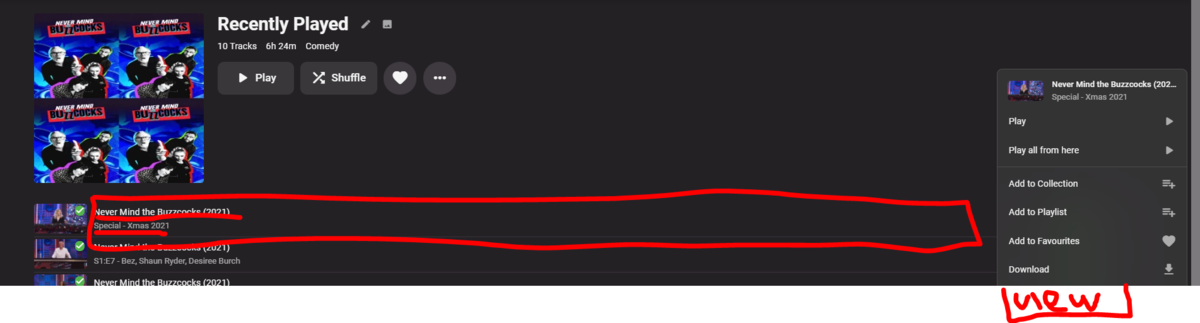
Its currently not possible for the operator to get to the item (episode) details page from a playlist. eg The show and episode are not a hyperlinks The [red pencilled] box to the right of the picture is not a link to the [episode[ details page ala season page the command menu doesnt have 'view object'. one of these would be welcome.
 1 point
 -
Yes it's updated now. Apologies for the delay. Thanks.1 point
-
Please make it stop.1 point
-
It looks like 1.1.06 is still being reviewed by Samsung for 2017 and 2018 models. The update should come, but feel free to jump to the USB version while you wait.1 point
-
We extract the subtitles on the fly, but it looks like for your server this process takes too long. In server transcoding settings you can disable on the fly subtitle transcoding. Please note, this will result in a lot more transcoding, so you might not like that either. Try to use external subtitles for best performance.1 point
-
Good evening and congratulations to all of you, if any of you are using Nginx as a reverse proxy, the same thing happened to me that the Emby service stopped or gave an error, I started to check carefully and eliminate the Nginx server and buff the server It is running without any problem, now it is much faster, and it has been a week without problems, this could be the solution to those who are experiencing the same thing as me. Currently I have 651 users and simultaneously I have about 107 users online and the server has not presented any more problems since I did the ones I raised.1 point
-
i have now tried VLC, tivimate and jellyfin with ersatzTV and can confirm the issue is non existent in those players so must be an isolated emby issue. VLC i tried locally. tivimate and jellyfin i tried remotely.1 point
-
Have you tried adding "ca-uhd" tag to those movies?1 point
-
Will test some more in a few minutes, but I would suspect disabling Album MBZ may work. But assuming overview is coming form MBZ it would disable it unless add overview to track description or comment tag.1 point
-
no, some of those lists with the (20) alter the name already have limits on them so they can not also have page control limits. Latest is a special list, it uses a special API endpoint from the server and it is not configurable for pages.1 point
-
Currently there is not option within Emby to change this path. Other topics talk about creating a symbolic link.1 point
-
I guess that would require custom development for that protocol, it's always possible for the future. Thanks.1 point
-
I think ATV is one of the few clients with an option to hide the mediainfo on clients. To me it's nice on the webclient where I do my admin stuff (can be turned off with css), but when viewing on the TV it is information overload and distracts from the viewing pleasure by my wife who understands nothing that is down there.1 point
-
v_0.0.1.57 Please run the Stats task again Clear browsing data DOWNLOAD: IntroSkip_v0.0.1.57.zip Fixed update thumb image after editing the timestamp and saving Fixed Stat page throws an error if only one episode exists for a season, and no intros have been calculated yet (ie. Book of Boba Fett) We still have no idea why thumb image extraction is broken in Emby Server for Linux beta. Everything should work fine in Linux stable releases, and on Windows (beta).1 point
-
Audio plays fine, but screen is black. Files without Dolby vision display fine, including hdr10 files. I have attached the server log and MediaInfo of the file I was trying to play showing Dolby Vision (which does not show up in Emby's media info section on the movie's page). embyserver.txt Star Wars Episode VIII The Last Jedi (2017) -4k.txt1 point
-
I was able to find a few useful tools that give us what I think we need. At least to start with. iostat is a real time monitor that shows lots of really good information such as: avgqu-sz--The average queue length of the requests that were issued to the device. await--The average time (in milliseconds) for I/O requests issued to the device to be served. r_await--The average time (in milliseconds) for read requests issued to the device to be served. w_await--The average time (in milliseconds) for write requests issued to the device to be served. %util--Percentage of elapsed time during which I/O requests were issued to the device. These will be perfect for watching while doing a recording, then 2, then 3. Then adding a playback, another playback etc... Will be interesting to see how this changes. Some links that show the use of these tools https://www.techrepublic.com/article/how-to-use-the-linux-iostat-command-to-check-on-your-storage-subsystem/ https://linuxhint.com/benchmark_hard_disks_linux/ https://askubuntu.com/questions/87035/how-to-check-hard-disk-performance1 point
-
One thing to add: If you use Chrome to check whether the rules are working correctly, make sure to check the little checkbox "Disable cache" on top of the Network tab in the devtools. Otherwise chrome might just serve you content from its local cache. Other than that: Thanks for the guide1 point
-
There's an Enigma based plugin to export epg data as an xmltv file: https://github.com/leaskovski/EPGExport1 point
-
I helped get it started. Nowadays i mainly just help keep it compatible with newer server releases. I would prefer to improve the sorting and filtering of lists that we have in the main UI as opposed to the reports plugin.1 point
-
This issue is similar to the Android TV app you already fixed and it's present on both the web app and the Android mobile app: When I go back and forth to the "Now Playing" screen and tap on "Next" playlist, the two songs that appear are the first two songs of the list: But it should jump and display the one currently playing and the next one to play:1 point
-
This problem is still present on beta version 3.1.44.1 point
-
Hello, I just wanted to remind you you about this, I thought it was fixed after two months that I reported it. Thanks.1 point