Leaderboard




Popular Content
Showing content with the highest reputation on 12/30/21 in Posts
-
v_0.0.1.57 Please run the Stats task again Clear browsing data DOWNLOAD: IntroSkip_v0.0.1.57.zip Fixed update thumb image after editing the timestamp and saving Fixed Stat page throws an error if only one episode exists for a season, and no intros have been calculated yet (ie. Book of Boba Fett) We still have no idea why thumb image extraction is broken in Emby Server for Linux beta. Everything should work fine in Linux stable releases, and on Windows (beta).5 points
-
I think it would be beneficial to have a field in the movie table called "collection_sort_title" or something to that effect. The reason being, say I want to have a Marvel Cinematic Universe Collection, where the movies need to be sorted other than Title or Release Date. I can put them into the collection and change the Sort Title to "Marvel - 001", etc, but that means they all show up under "M" in the "Movies" library. Same thing could go for a "Middle Earth" collection, for example, where I want to include the three Hobbit movies and the three LoTR movies. I have to change the Sort Title to "Tolkien - 001", etc. If there were a separate field that, when browsing a collection, the collection sort title could be used instead of the library sort title it would solve that. Just my two cents, I think it would be useful.2 points
-
This is horrible. WWE used to do this when presenting 4:3 content on DVDs and Blu-rays of old matches. There's a reason they stopped.2 points
-
Is this doable by some sort of plugin ? Maybe add your imdb credentials and then be able to rate movies here and have them on imdb as well (not talking about sorting here, just rating stuff)1 point
-
I'd imagine this one will probably be a little to tricky to implement any-time soon Heck I'm not even sure if there's a suitable codec available that's opensource/free to use But it would be a really awesome extension to sync if you could transcode into multiple bitrates and then use adaptive streaming between the emby client and the server to pick the highest quality possible at any given moment. I would think this would be especially useful for mobile clients where the network performance can be all over the shop. I thought i'd suggest it on the off chance it was feasible.1 point
-
I am a new user to Emby. I am currently recording with Emby, but watching from another app that honors edl files that I am manually creating after the recording is done. Are there any plans to add comskip EDL file support in the future, or integrated commercial skipping? I actually stream the recordings from offsite, so skipping commercials manually is a pain.1 point
-
Request that Emby server store Dolby Vision (including profile), Dolby Atmos, DTS:X, HDR10+ (smpte2094) and HLG for appropriate video in the db and use it for display in the media info and track selection sections of movie/episode details screen. This information once in the db can then also be used in numerous other areas like: Mediainfo Cover Art, Stats for Nerds, Distinguishing different DV profiles for hardware support and tone mapping Example Mediainfo app display of HDR10+ ffmpeg patch for HDR10+ https://patchwork.ffmpeg.org/patch/11491/ Related requested that may require DV profile information in order to prevent unneeded TM1 point
-
Using current BETA of emby with a library of @200,000 items. I would like to be able to select Genres or anything really and send it to a playlist or play queue - either one and be able to shuffle the play. Currently I can shuffle the albums, (which for my personal taste, isn't really intuitive) - I can shuffle ALL songs.. I cannot shuffle from genre's or folders by selecting them, no after sending them to Queue. The Platlist creation will allow me to come back and shuffle the items on the playlist.. but a playlist must be created first. Hopefully that explains the issue or break in the functionality or usability from my standpoint. Still being able to shuffle these items is fine, but it would seem better to me to simply have the option on the player instead of exacting on only certain types of selection and playback. As from what I can see, currently there is no easy way to do that at the moment. My suggested or feature request would be to add 'SHUFFLE' option to player, like most out there. This is the webui I am referring too. I am not for sure if this exists on the player in the apps but would like to see this feature in the future.1 point
-
Hi there, I know that I can sort my library by the date when I watched a movie least. I think it would be nice if you can show me this information on the detail page of a movie, too. You can add this date simply over the info line which show me when I added a movie to the library. Thx for considering.1 point
-
Thank you so much! Your answer helped me. Live long and prosper.1 point
-
Yes that is correct. I can't work on it for a few days. I have family obligations. I promise I will get to it. Vic1 point
-
Where would this information come from?1 point
-
I personally don't mount a cloud drive. If you mount and try to use it as a source, then Emby will become slow on reading nfos, artowrk etc. And in the case of GDrive you will be 24h banned. But this isn't the only way to use cloud streams in Emby because Emby supports strm files. I create an http server with rclone and add the direct http files rclone creates from the google drive links to strm files. https://rclone.org/commands/rclone_serve_http/ It is so fast and my Emby setup works great. The same can be done with Onedrive too, rclone supports OneDrive. If I was an Apple guy though, I would use Infuse Pro which supports cloud sources internally. I have asked for this feature a week ago, basically about making Emby capable to interact with plugins before playback starts and modify the link (what Kodi can do). If it will be implemented I will personally create a GDrive strm resolver and maybe an OneDrive resolver too. I hope it does1 point
-
HI, yes it's not a bad idea. Thanks for the feedback.1 point
-
Ok, I was comparing the 871 for some reason, I think I got the right one now. The Qnap will of course kick butt which is what I was expecting1 point
-
I think I got the wrong Qnap processor1 point
-
Tizen has a remember last user, but you can only get at it when initially connecting to a server. There is no convenient option in settings like there is in ATV.1 point
-
Updated to latest --- works good after the DB removal. Like the updates...just poking the bear around updates on sub-titles (if even just looking for SRT files that match media name). Cheers and best wishes going into the new year!1 point
-
Another option would be using a NUC for Emby and just use the NAS for media storage.1 point
-
if not idea ...i think take QNPAP TVS-872XT-i5-16G1 point
-
So some reasons why customers would like OneDrive (on Synology in my case): 1. If you have Office 365 Family, you get 6 users (or 6 email addresses) with 1TB storage (paid for OneDrive is much faster than freebie OneDrive). In the UK a one year subscription to the public is as low as £39.99 and you can pre-buy 5 years worth in advance in one go. Cheap online backup solution. 2. My Synology NAS uses cloudsync to backup critical classed content to the cloud in addition to other back up options in place. 3. For a member of my family/specific Emby user account, I may wish to point a library at content in their OneDrive (like photo uploads from their phone to cloud OneDrive) and present that as a library but only to that user account or content in another OneDrive account if they didn't wish to share their login details for their own OneDrive account.1 point
-
Hi. i have been testing it for months with rclone and vfs cache. Its working fine, but, i have much better results with google drive than with onedrive. One drive is ways slower, connectivity and data storing in DC that is closer to you and similar bandwith issues will pop up. If u want to save some time better switch to gdrive. One drive is ok for 720p but anything over that and experience will be questionable. All my testing were from EU, this does not mean someone from USA cpould have similar issues. But as i said, gdrive is much more better.1 point
-
tbh i think thats going to be your only option in the short and medium term. as i say, its not just the lack of a onedrive plugin, its the lack of the functionality you are looking for in the already existing similar plugins1 point
-
rip with makemkv1 point
-
I think it was @alturismo(from xTeVe) that "coined the phrase"1 point
-
No I just meant the name "Ghost Stream". I know the issue, just don't recall it being called that (but appropriate).1 point
-
We have been reporting Emby Ghost Streams for Years, You being sarcastic? Quick search......
 1 point
 -
@turpentine Hi there, let's look at an example: Thanks !1 point
-
We're constantly working on improving it. Thanks for the feedback.1 point
-
it's ok as my epg was able to match most of the channels so i only had a few to do. and yes i did do a restore but the channel mappings to come through. since i get my 2nd synology nas, i wanted to start with a clean install on my existing nas otherwise i would have followed the migration instructions. all good now so we can mark this one as complete. i may have another question but i'll start a new post. thanks!1 point
-
@Luke The beta version seems to handle this situation MUCH better. At least it seems that way, unless there's something else going on with my stable server. I'll know for sure once beta is ready to move to stable.1 point
-
It uses the remote address that is displayed on the front page of the emby server dashboard, which will be https depending on server settings.1 point
-
It's planned for the future. Thanks.1 point
-
Lots of people like it in the picture so that their eyes are more focused on the picture and not way down at the bottom. However, this should be an option like it is with the ATV app because there are people who feel strongly on both sides. Having it split like in your pic isn't good for anyone though.1 point
-
Hi, you don't think that's distracting?1 point
-
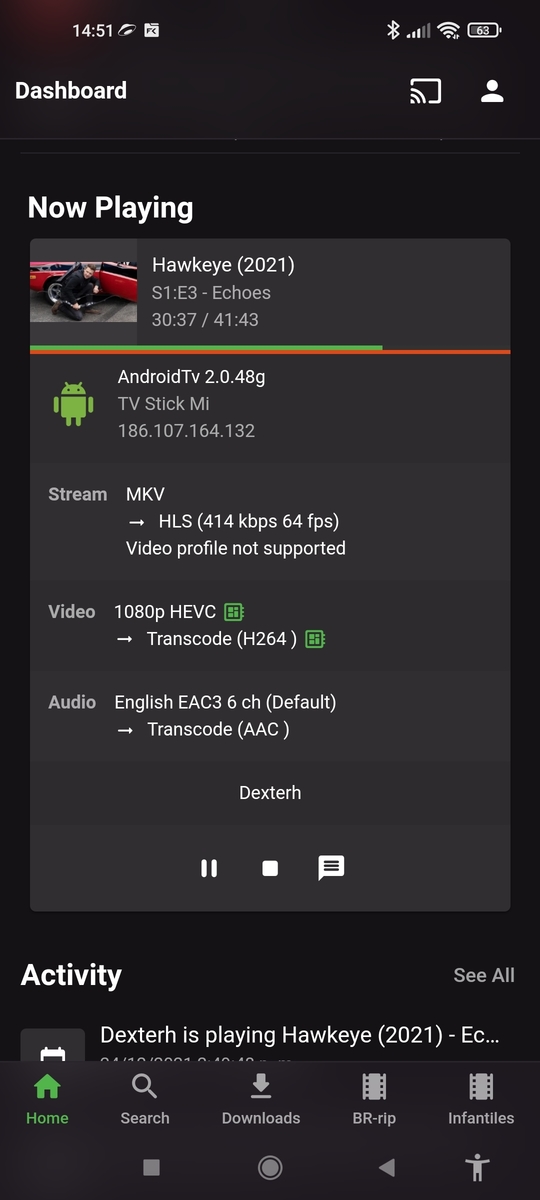
I have a similar problem when I play mkv with coeec hevc, when I play the video for the first time it plays without any problem but if I stop it and press resume from there it is when the video stops and does not play anymore, if I press playback correction it plays a few seconds and it stops again and I can try again until it comes out because it had a lot of errors. it happens with all the hevc if I play the video with out interruption is no problem, the problem occurs when I stop the video at any minute and resume (if I put pause nothing happens). The other thing I noticed is that the orange bar of the transcoding is on the daahboard. fills completely. I use nvidea shield and tvstick
 1 point
 -
FYI Updating to the latest version caused an sqlite exception for me. Removing the fileorganize.db seemed to have solved the issue.1 point
-
I did not notice that option in Emby Theater. Now that you mention it, I found it and it works fine. It switches my TV from 60 Hz to 24 Hz and back to 60 Hz after playback. I think that option should be enabled by default if that is possible!1 point
-
I would like this added in as well, for the same reasons as the rest of the choir.1 point
-
Hi, I currently the extract for this type of subtitles is done on the fly, while this is happening we are unable to control the video (for example pause until the subtitle is fully extracted), at least on Chromecast. What do I do now? go to the mkv file, execute mkvinfo, and then mkvextract, I end up with an srt file that loads instantaneously. It would be nice to have this extraction done when looking for subtitles, It would smooth the UX a lot when watching this kind of file. Thanks!!!1 point
-
At the end of playback instead of displaying the detail screen, a post-playback screen could be displayed. For example, in TV Shows you could offer to play the next episode, in movies, you can offer related movies or if the film is part of a collection, offer to play the next item.1 point
-
Yes, somewhere out here (probably in multiple places) there are discussions of just this issue. The thing stopping us from changing it is just that we've displayed things this way since the beginning and, in the past, when we've tried to change things that have been around that long it is met with a lot of resistance. I do feel we should eventually introduce some options to tailor this a bit better.1 point
-
Hi, yes this is an idea we've liked for video as well but have never been able to get to it, so this sounds like an opportunity to handle it for both together.1 point
-
I mainly use NFS for my DietPI to NAS connection, but when I was using SMB, here was my entry in the fstab file. //xxx.xxx.xxx.xxx/MediaServer /mnt/MediaServer cifs username=nasuser,password=nasuserpassword,iocharset=utf8,uid=emby,gid=emby,file_mode=0770,dir_mode=0770,vers=3.0,_netdev,nofail //xxx.xxx.xxx.xxx/MediaServer - IP Address of NAS and NAS share /mnt/MediaServer - mnt directory on the linux system cifs username=nasuser - Username to connect to the NAS Share; NAS share permisisons must be configured accordingly. password=nasuserpassword - Password of the above NAS user account iocharset=utf8 uid=emby - Sets the owner user ID of the mount folder to the linux "emby" User gid=emby - Sets the owner group ID of the mount folder to the linux "emby" Group. file_mode=0770 - Sets the permissions of the mount files to (user/group/other) Full Access / Full Access / None; in essence, emby user/group has full access. dir_mode=0770 - Sets the permissions of the mount folders to (user/group/other) Full Access / Full Access / None; in essence, emby user/group has full access. vers=3.0 - Sets to SMB version 3; check with your NAS to see if if accepts this. _netdev nofail1 point
-
While your at it, audio needs naming correctly. Always see TrueHD, when it fact it is Dolby Atmos.1 point