Leaderboard




Popular Content
Showing content with the highest reputation on 12/22/21 in Posts
-
I for one want to thank the developers for seeing this through and finally getting an updated version published. It may not be the latest and greatest release as we would all want but could everyone please just stop complaining for a minute and appreciate the update and the fact that Emby did not give up on supporting the platform. Hopefully this also mean that we are going to see further updates down the road that may be little easier to get through the approval process now that LG is more familiar with the application. As for the update, I personally see major improvements. The interface is much more responsive when accessing large collections. DTS transcoding works flawlessly. Recently I started having issues with some of the media files playback that looked like a network throughput not keeping up but it wasn't (other larger / higher bitrate files played perfectly fine) - it appears to be gone. Some small but helpful improvements like a new prompt to delete an episode or the entire folder. Admittedly, my Emby server runs on QNAP so I don't use more advance / premium features and don't have most of the issues people have brought up here. The only peeve I have is the inability to remove the 10 sec nag. I understand it has been removed on other platforms or there is a pay option to remove it (instead of paying for Premium)? I would be more then happy to pay any reasonable one-time amount to have it removed, to support the product development. It's just that it makes no sense to pay for the Premium subscription when this is literally the only feature that would benefit me in my current setup. I'll likely just get the lifetime subscription the next time there is a promotion. Unfortunately I missed the November one. Anyhow, to any administrator that may be reading this... thank you for putting up with us and our sometime testy comments. They were born out of frustration of not seeing any progress for such a long time. I appreciate that you still took time to respond even if those replies were not what we hoped for. It is nice to see that you did not abandon the platform, it often felt that way. We hope to see more progress in the future. Have a wonderful holidays!2 points
-
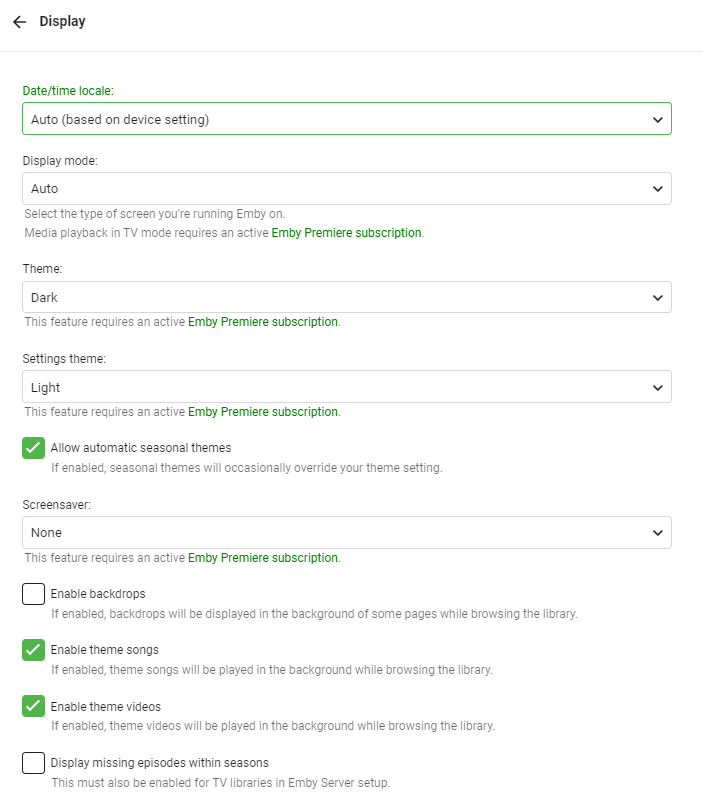
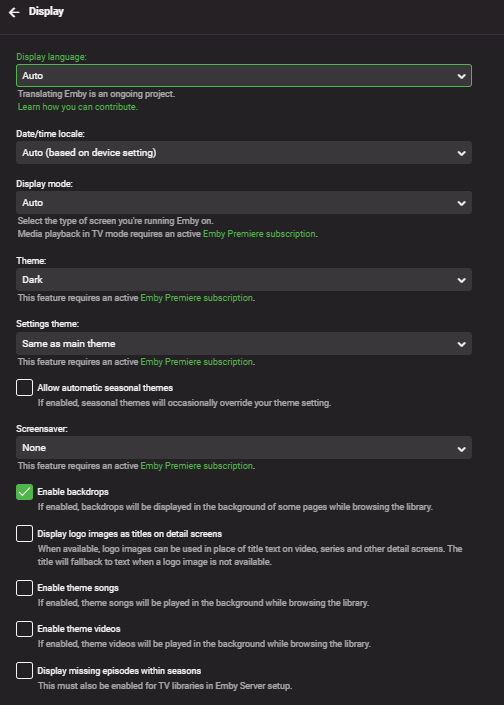
If you have to clear the browser cache for some reason, or you use a new computer, then the Display settings for the Dashboard and Home pages are the default settings. If the settings were saved per user, then no matter what computer or browser you use, then the settings will be the same every time. Thanks.
 2 points
 -
If i KNEW about the unraid dockers that exist..... i would have done unraid MUCH sooner. simplified my life so much, added more functionality that i never knew existed. plus the community app store... so cool2 points
-
ComSkipper ... A Emby Plugin that skips commercials in recordings using output from comskip. This plugin will work with EDL files generated by Comskip, ShowAnalyzer or any other application capable of generating them to automagically skip past commercials when playing back recordings in Emby. A visual localized notification will be presented on the screen when this happens. UNC network mappings are fine - as long as the .EDL file is in the same filename as the media file. A PDF is included in the download that explains all of the details. But one thing should be made clear up front. And that is this plugin does NOT contain comskip, show analyzer, or any other program that detects the commercials and creates the EDL files with the skipping information. Also, the donator version of comskip is required because Emby stores its recordings in .TS format. I'm told the donator version is no longer required. User @vdrovergraciously created a PDF file on how to get this working on Ubuntu. It can be found in the Github repository in the doc folder and will be included in future releases. The PDF file also shows an easy way to configure Emby to automatically run comskip after each recording on a Windows server. Linux server users will need to figure out the best way to do this for their flavor of Linux. I am not a Linux advocate or user, however I did find this information in the NextPVR forum that is encouraging, and I encourage Linux users to help each other out with this as I will be of little to no help in this regard. https://forums.nextpvr.com/showthread.php?tid=60803 Building Comskip is really quick and easy on Ubuntu, so probably the same for any Debian based distro: $ sudo apt-get update $ sudo apt-get install ffmpeg libavcodec-dev libavformat-dev libavutil-dev autoconf automake git libargtable2-dev libtool $ git clone git://github.com/erikkaashoek/Comskip $ cd Comskip $ ./autogen.sh $ ./configure $ make $ sudo make install Once this is out long enough where I am pretty sure it is stable, I'll make its GIT repository public. Git Repo Getting it into the plugin catalog could follow after that, assuming the Emby team approves. I rarely record, my main use case is NFL football games. I record our local teams game, which when complete runs comskip on the recording which takes about 40 minutes. We then watch the game while eating dinner that evening. Skipping halftime (manually) it brings the time from 3-4 hours to 2 to 2.5 hours. Comskip does a very good, remarkable really, job on all of my recordings including the games to date. I have attached the comskip.ini that I use. It works well for me in the US. If you add this to your ini (make sure your system has the processing power to handle it), it will greatly reduce he time comskip takes to process your file (requires donator version). thread_count=2 Have fun and enjoy commercial free recordings Current Release Version 2.2.0.0 - Updated Emby library to latest. Version 2.1.1.0 - Added popular .editorConfig for consistent coding standards. Upgraded to latest Emby library. Version 2.1.0.0 - A change in Emby 4.8 caused a code update to be required in how DL files are read. If the plugin stops working in server 4.8, update to the latest plugin. Version 2.0.0.0 - Allows for chapters to identify commercial points if they exist. PlayOn and perhaps others identify commercials that way. Version 1.6.0.0 - Allows configuration of time message is displayed on the screen. Allows configuration of message displayed on the screen. Optionally displays the skipped time in minutes:seconds. Version 1.5.0.0 - Added optional commercial duration skipped to the on screen message by request. Version 1.4.0.0 - Made a couple log messages info from debug by request. Version 1.2.3.0 - Upgraded to Emby server 4.7. Version 1.2.2.1 - Added German (de) translation. Version 1.2.2.0 - Culture set so EDL file can be parsed everywhere. Version 1.2.1.0 - Real time no longer experimental. Session ID fix for LG (and maybe other) clients. Version 1.2.0.0 - Experimental feature to allow commercial skipping when watching during recording Initial open source release. Version 1.0.0.2 - Initial release. Version 1.0.1.0 - Addition of configuration switch to disable on-screen notifications. **Note** You will need to clear your browser cache due to the config UI change. comskipper.ini1 point
-
Could the way User Settings are handled be changed so that: 1 - Every setting that is changed via the Admin/Server - Users settings page becomes the new default for that particular user (instead of the Emby supplied default). 2 - Any setting that is changed appropriate for an end user to change from within that particular user account being signed in is saved at the local device level, and would be used instead of Server specified defaults. This wouild: A - Allow us to adjust the default behavior when NO local settings exist. B - Still have local device specific settings override what have been set as Server defaults. (Allowing the same User to have different settings per Device - as it is now.) It doesn't seem like the logic would be that much different than it is now. Assuming if no local settings already exist today, the Server has to pass along what it has them as for a starting point. The change wouild just be allowing us to alter what any of those base default settings are.1 point
-
I am switching over from a Win7 box running MBC to Chromecast dongles. With the Win7 box I had a HDMI to Cat6 setup that allowed me to stream to up to 4 displays/TVs simultaneously. It was great while it lasted, but involved stapling cables to the ceiling to run it from room to room - plus it has borked Can there be an option to multi-cast to several receivers at once? i.e. simultaneously play to Chromecast dongles in my office and living room and kitchen simultaneously so i can walk from room to room without stopping and restarting the movie or show all the time? I realize that bandwidth could POTENTIALLY be an issue, but i have a fill gigabit network and a multi-port NAS so that really is the least of my worries... Thank you!1 point
-
Hi, I’d love that audio and subtitles choice would be saved per show, according to what you select on the last episode you watched. The main audio/subtitles parameters is a good point but there are many cases it is not enough and you need to adjust audio and subtitles at the beginning of every episodes. For example i like to watch Casa de Pale in Spanish with french subtitles, The Big Bang Theory in English with french subtitles, French TV shows in french without subtitles, ....1 point
-
Recordings can be limited to a specific channel and a specific time. Adding the ability to also limit to a specific day is helpful for EPG data that may not properly list "New" episodes, or recording an old show that has lots of reruns (and you only want to record one episode per week for example).1 point
-
HI, this will be improved in the upcoming Emby Server 4.7 release. Thanks.1 point
-
I actually made a branch today and coded this up. Mainly because I didn't want to forget how I was going to do it. I probably won't do more with it until the main release gets a little more run time. But after that and I make sure the change at least loads as it should I'll let you test it out if that's OK.1 point
-
1 point
-
Maybe read every minute or something as an option. Possible but not right away.1 point
-
Based off his previous post; He's already removed NPM from his setup. He's only using an SSL Certificate that had been generated by NPM. Which he exported and installed directly to his server. Which, really is no different then using say certbot to generate a SSL certificate. (This is what NPM actually leverages during the registration of the SSL Certificate.) At least, that's my understanding of his last reply.1 point
-
I reinstalled Next PVR then i delete Next PVR then it was removed so its solved thank you1 point
-
Thanks for the reply. Worked a real treat, one more note for others again might help some. I use a account purely as a server admin, the account I used when I first set the system up and registered for the premium account. When I selected mark all as watched before then setting up the conversion trick for only new movies added, I then went on to prove this account to confirm 1, new movies do get converted when add and also 2, whilst still in this account if you then select a single movie and select "mark as unplayed" this moving then automatically gets added to your conversions to take place, (a one click way to add movies to be converted, awesome. One final note:- All my viewing as well as others are setup as separate accounts so I have noted the operation above does not mess up your own selections of what is played or unplayed. Well done for such a great piece of software, hope you have a great festive period.1 point
-
FYI Updating to the latest version caused an sqlite exception for me. Removing the fileorganize.db seemed to have solved the issue.1 point
-
I've backed up and snapshot the VM. Upgraded to latest beta and no issue...Admin options are back.1 point
-
I dunno what I did, but at least I can see the server address at my remote location. I can't sign in as emby rejects users and/or pw's. Even after pw reset. also, it would be very useful to be able to see passwords as entered in Emby/Server/Users/User1 point
-
Yes that sounds right that existing content would not be converted.1 point
-
Edit: Cbers beat me to the reply This is last one I had before restoring a backup from October, which fixed the issue not so surprisingly. I also attempted to install a beta which did not fix.1 point
-
Then modify that first one to: Audio track = (Audio)libraryManager.GetItemById(Entry);1 point
-
Similar, but not identical. I'd like the user settings to be stored on the server so that all browser logins are the same no matter what the device or browser is. That request seems to want the same, but also the ability to override with local changes.1 point
-
was able to find it with some help. /var/lib/emby/plugins So I moved plugins to plugins.old and rebooted, no luck1 point
-
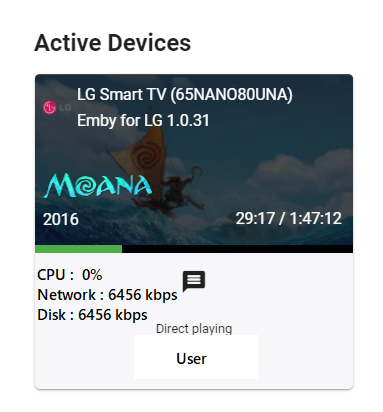
CPU usage, Network Usage, Disk Usage, Need I say more?
 1 point
 -
Hello, I'm having same issue, no admin functions on phone, firefox, chrome...I am looking for the plugin directory but I don't see it, using ubuntu. Thanks1 point
-
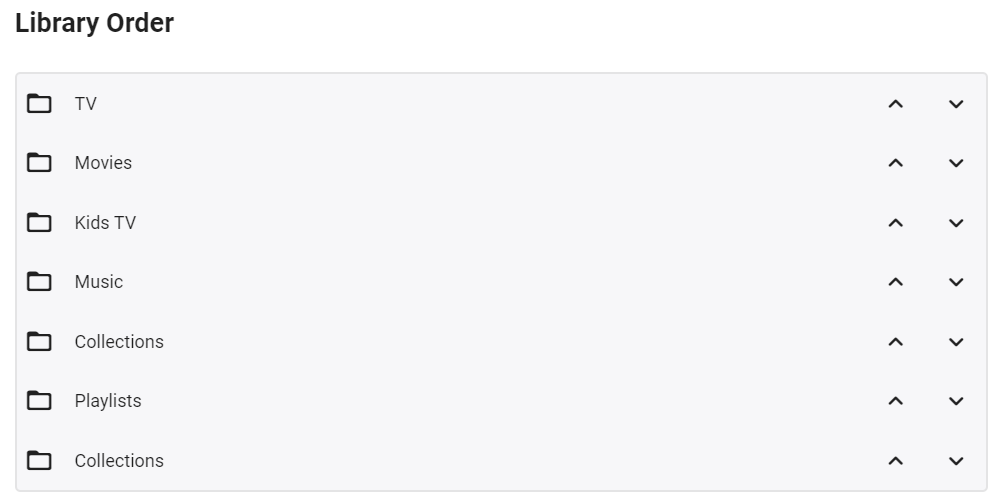
Click on your user profile icon, then Home Screen and use the updown arrows to move your libraries to the order you want. If you are running Emby server Beta, then it's User Profile icon, App Settings, then Home Screen.
 1 point
 -
I can confirm this. I have a test folder containing many audio formats, and in particular there are DTS in .mka, DTS in .wav and DTS in .dts files. These all play correctly in Emby Theatre on Windows, and in the web client. On my Android tablet, the .mka and .dts files play correctly, but the .wav files produces white noise. Playing using the web client in Chrome on Android is OK. On iOS none of these DTS files plays at all; the server dashboard shows them continuing to play on my iPhone, whereas the phone's while-playing screen shows no movement. On my iPad the while-playing screen also shows no progress, but the dashboard says it's stopped playing (yes, the phone and pad have the same versions of both iOS and the Emby client). Playing using the webclient in Safari on iOS also does not work (same symptoms). Some of the tests generated an ffmpeg log file (log files attached). Emby software versions - server: 4.7.0.19; Android: 3.2.32; iOS: 2.1.0 (8) Paul Audio-only DTS play logs.7z1 point
-
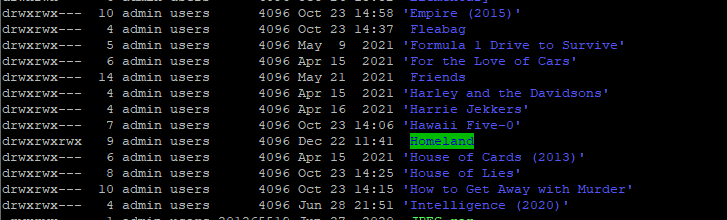
Tried something else... Chmod to 777. Shouldn't be neccesary should it? Guess what folder now shows up in Emby: Strangest thing; because all of these do show up:
 1 point
 -
Installed the plugin on my Windows server (production) and a Linux test box. Only tested from Windows server so far. It is great to have the automatic skip function in Emby! Thanks for making this available.1 point
-
I found a backup made by the Server Configuration backup and that did the trick. Thanks for your help.1 point
-
Programs like filebot or tiny media manager can help with this.1 point
-
Thanks @ebr! The new version looks MUCH better. It appears to be consistent with the other apps to which is a big plus.1 point
-
On windows 10, matrix 19.3, and 6.2.2 beta (possibly before as well) it appears that some music albums with various artists (like some movie/TV soundtrack albums) are not showing all associated songs when viewing the album itself. When viewing the music database from Kodi the entries associated with the album number list all songs entries correctly. The album is shown correctly with all associated songs when using the Emby server or Android app. Repairing or removing/re-adding the library has no impact.1 point
-
Those are per user setting, Settings-Users, select that user then see Media Playback section1 point
-
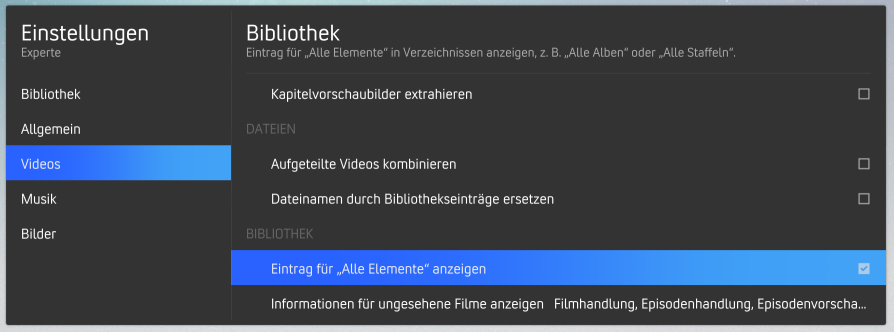
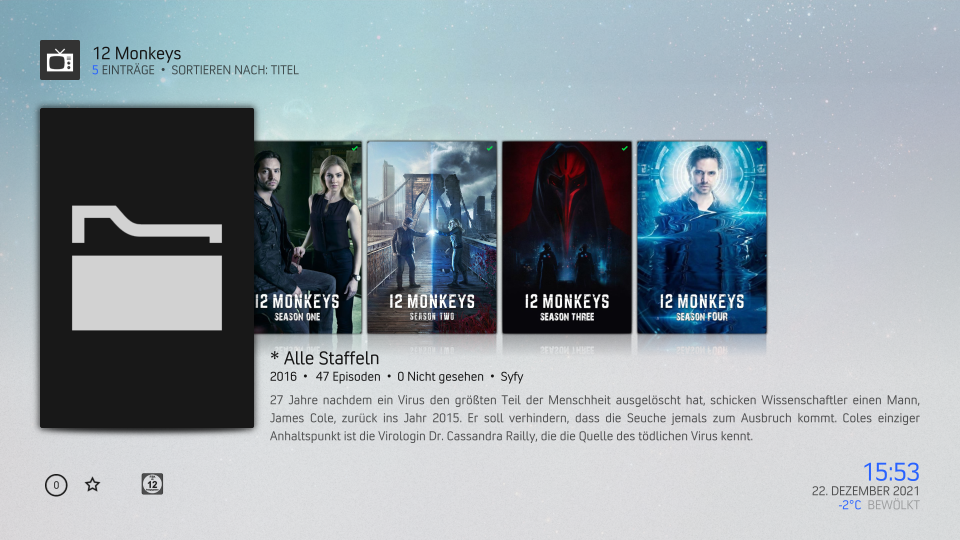
With the lastest v6 from beta Repo when in Kodi the Option to show a Folder for all Episodes in Series this Folder will not show a Cover (normaly it should use the Main Series Cover) With the old Stable v5 Version this is working fine.1 point
-
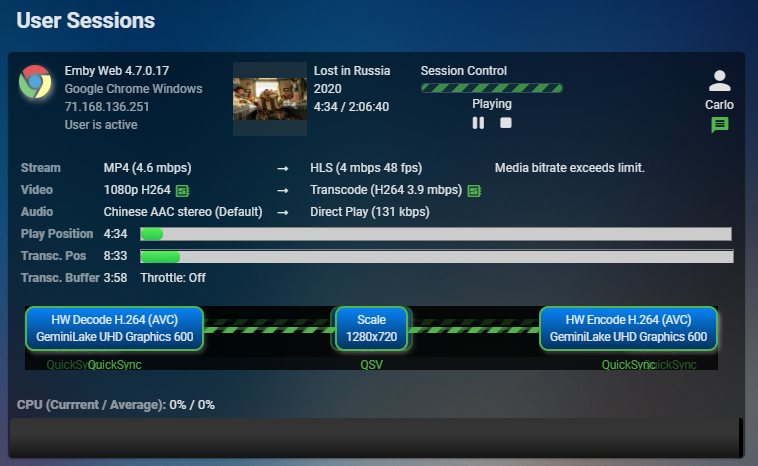
In addition to above, Diagnostics plugin (4.7+) will give you quite a lot of stats:
 1 point
 -
I updated and haven't had any issues...granted we've only watched tv shows which typically aren't an issue...it's more when I got into the 4k hdr /hevc/DTS/subtitle stuff where I had issues in the past. I haven't had a chance to do good testing yet as I had converted the audio for my problem files already.1 point
-
On your Shield: Settings>Apps, scroll to your default player, select, scroll down to "Clear defaults". Next time you play an item, you will have a popup with Player selection and options "Just once" and "Always". Do not select "Always".1 point
-
PM sent. In the future, you can send an email to billingsupport@emby.media. Thanks.1 point
-
Regarding migration I would take a look at this: https://support.emby.media/support/solutions/articles/44001159936-backup Thanks.1 point
-
Under Live TV setup, what tuner sources do you have listed?1 point
-
Emby for LG TV's 1.0.31 has been released. Stay tuned to the blog for the release announcement.1 point
-
I can tell you a far easier method. Setup an account at https://m3u4u.com/ which is free. What you do is add your m3u URL to their system and import it. Then you use their tools to mass remove channels you don't want. You can reorder the channels you keep. You can create groups (will be imported by Emby as tags) and move your remaining channels into those groups such as News, Sports, Entertainment, Kids, etc. You'll get the hang of it. They give you a link to pull the adjusted m3u file back. So what happens is you set the import time they should pull your m3u every day. Then in Emby you setup your tuner with their m3u link about 30 minutes later. So 2am to import for them and 2:30 am for you to pull it. Now Emby gets a nice clean list of channels that you have organized by groups/tags. This will load a lot faster and make searches for things quite faster as well. You can adjust what time Emby imports your TV info from the Schedule Task menu. One word of caution. Do not keep pulling your m3u file from their system to look at it. They will complain and/or ban you for that. Get it exactly how you think it should be before you pull it. If it's not correct or you want to make and adjustment go ahead but wait 30 minutes to an hour before you pull it down again. A little patience is needed with this during your initial setup. Once you're done, you will wonder how you ever handled TV previously.1 point
-
Not that this particularly bothers me, it being visible or not, I can't remember when was the last time I clicked Premiere tab - but protect it from whom? It is only you that has access to that tab (or any user that you grant Admin privileges), so he/she can still see it, regardless is it hidden or not. And I don't think it feasible for anyone to remember that sequence of symbols by a casual glance. Totally pointless.1 point
-
I personally run UNRAID, but I use it more as a smart NAS than anything else, as I have my Emby server on a laptop that is plugged into the network. Pi-Hole runs on my UNRAID server but that's about it. I would have run it in a docker, but I was too lazy to migrate my users over manually as there was no way to automagically do it when I created the server (there may be now, I don't know). But I find having the laptop as a server makes it far easier as I can keep everything nice and compact and not worry about something crashing and having to force reboot the whole lot, and possibly lose data if something goes wrong, and it also prevents any RDP attacks as I can turn off access to anything outside my network. I also haven't really used linux/unix in over 25 years, so I'm not comfortable with re-learning it again haha. Never put all your eggs into one basket.1 point
-
It would be possible to implement a chat on emby or the opportunity to comment on the film?1 point
-
How would this be any different than using a seperate account and a TAG used for parental access. You could for example pick 3 or 4 movies and tag them and then only this very limited choice of movies would show up when logged in as that account.1 point
-
Hi, no this isn't possible. Emby instead uses security permissions where you grant or remove access to libraries or can use tags with parental controls to allow users to access content. When similar then you may be able to do is setup 2 users. One with normal access and one with additional content. Then the user would have to type a password to access using the other account.1 point
-
Emby for Samsung Tizen SmartTV's (2015 J-series to Present) Download: https://emby.media/emby-for-samsung-smart-tv.html 2.3.7 (05/24/2026) Increase size of spotlight 2.3.5 (04/23/2026) Updates related to new home screen features with 4.10 server 2.3.4 (03/24/2026) Fix startup crash regression on older devices 2.3.3 (03/13/2026) Support new home screen features with 4.10 server 2.3.2 (02/11/2026) Fix regression with older devices 2.3.1 (1/29/2026) Improve error handling on audio track changes 2.3.0 (1/1/2026) Fix some dialogs being cut off on older models Fix volume control for youtube player 2.2.9 (12/11/2025) Merge Movies and Shows tab in mixed content libraries 2.2.8 (11/20/2025) Fixes for live tv guide rendering on older devices 2.2.7 (10/31/2025) Fixes for YouTube playback 2.2.6 (10/19/2025) Show person age Improve now playing music background 2.2.4 (09/17/2025) Fixes for horizontal home screen 2.2.1 (09/07/2025) Add new option to hide episode spoiler information Fix video being improperly stretched in some situations 2.2.0 (09/02/2025) Fixes for horizontal home screen 2.1.9 (08/24/2025) Fix detail screen regressions with collections and actors 2.1.8 (08/22/2025) Improve horizontal home screen 2.1.7 (08/21/2025) Support new 4.9 server features Various scroll fixes 2.1.5 (08/01/2025) Background fixes 2.1.4 (07/25/2025) Fix regression in metadata editor 2.1.3 (07/23/2025) General performance improvements 2.1.1 (05/26/2025) Add display option to automatically jump through folders containing single items 2.1.0 (05/01/2025) Fix various display quirks on older models 2.0.6 (04/26/2025) Fix regression causing app to not load on older models 2.0.5 (04/24/2025) Fix regression causing app to not load on older models 2.0.4 (04/21/2025) Add option to control video player long press behavior Improve support for fonts embedded within .ass subtitles (with 4.9 server) 2.0.3 (04/12/2025) Improve performance 2.0.2 (03/25/2025) Fix loss of focus in the video player when seek bar is disabled 2.0.1 (03/20/2025) Support sleep timer in the audio player 1.9.8 (03/03/2025) Add options to force transcoding for certain formats 1.9.7 (02/07/2025) Ensure 16:9 aspect ratio is shown fullscreen 1.9.6 (01/07/2025) Support Remove from Continue Watching under TV -> Suggestions 1.9.5 (12/19/2024) Fix playback settings screen not loading 1.9.4 (12/17/2024) Quality detection fixes 1.9.3 (12/12/2024) Increase default remote quality 1.9.2 (12/05/2024) Support sorting playlists and collections by date added 1.9.1 (11/06/2024) Bug fixes for music video screens 1.9.0 (10/07/2024) Resolve top portion of some screens being cut on specific devices 1.8.8 (08/26/2024) Improve general navigation performance Fix played indicators showing during backdrop screensaver Avoid stream copying interlaced video 1.8.7 (07/27/2024) Live TV Guide fixes for older devices Now playing screen layout fixes 1.8.6 (07/02/2024) Fix header background being lost on older devices 1.8.5 (06/25/2024) Add theme song volume setting 1.8.4 (06/18/2024) Live TV Guide scroll fixes 1.8.3 (06/12/2024) Fix regression in audio play queue screen 1.8.2 (05/30/2024) Support shuffle state in the audio player Support incremental seek speed Improve performance 1.8.1 (05/23/2024) Auto-scroll guide to last played channel Show more rows in video OSD guide Improve performance 1.8.0 (05/13/2024) Make subtitle offset dialog easier by converting to a slider 1.7.9 (04/26/2024) Fix unnecessary transcoding of flac audio files 1.7.8 (04/09/2024) Group collection items by media type 1.7.7 (03/15/2024) Fix add to play queue missing from context menus 1.7.6 (03/06/2024) New screen for music genres 1.7.5 (02/08/2024) Live TV Guide layout fixes 1.7.4 (01/22/2024) Fix seek bar regression 1.7.3 (01/20/2024) Fix seek bar regression 1.7.2 (01/19/2024) Fix regression causing some settings screens to not be reachable 1.7.1 (01/15/2024) Various user interface bug fixes 1.7.0 (12/27/2023) Various user interface bug fixes 1.6.9 (12/21/2023) Various user interface bug fixes Support channel up/down buttons to change channels during live tv playback 1.6.8 (12/11/2023) Improve dialog menus throughout the app 1.6.7 (11/12/2023) Fix startup error on older models 1.6.6 (11/10/2023) Improve Korean subtitle font Add release date to playlist and collection sort orders 1.6.5 (10/11/2023) General performance improvements throughout the application Support the new profile pin feature in conjunction with Emby Server 4.8 1.6.4 (09/14/2023) Make more fields available in lists 1.6.1 (08/14/2023) Fix regression with Emby Connect pin code sign in Fix regression causing home screen settings to display incorrectly 1.5.9 (08/12/2023) Fix regression on older devices causing lists to render with blank text 1.5.8 (08/10/2023) Add option to hide media info from detail screens 1.5.7 (07/12/2023) Various fixes and improvements with back button behavior and left nav menu Various performance improvements 1.5.6 (06/14/2023) Rework app exit menu Support left sidebar by pressing left on the left edge of most screens 1.5.5 (05/16/2023) Add flatten series display option 1.5.3 (04/06/2023) Add View Lyrics context menu option 1.5.2 (03/06/2023) Rework add to collections/playlists user interface 1.5.1 (02/10/2023) Various user interface bug fixes 1.5.0 (01/11/2023) Various user interface bug fixes 1.4.9 (12/13/2022) Support sorting playlists Fixed HLS subtitles not rendering correctly on certain models 1.4.8 (11/17/2022) Add Played filter for audio books 1.4.6 (10/20/2022) Subtitle selection fixes 1.4.5 (10/18/2022) Fix regression when playing H265 1.4.4 (10/17/2022) Various user interface bug fixes 1.4.3 (10/13/2022) Various user interface bug fixes 1.4.2 (10/05/2022) Various user interface bug fixes 1.4.1 (9/28/2022) Fix regression with 2015/2016 devices Various video OSD fixes 1.4.0 (9/28/2022) Various video OSD fixes 1.3.9 (9/20/2022) Fix nested dialog focus regression Various video OSD fixes 1.3.8 Various video OSD fixes 1.3.7 Various video OSD fixes Various subtitle fixes Add option to control rating information display at the start of playback Updated now playing design for music in the background 1.3.6 Various video OSD fixes Various subtitle fixes 1.3.5 Various video OSD fixes 1.3.4 Add home screen focus preview option Make play from beginning always visible Update runtime on detail screen when changing video versions Add ends at directly to video player Update video OSD layout to reduce button clicks Move subtitle offset feature into subtitle menu Update Live TV guide design Various right to left (rtl) fixes 1.3.3 Fix loss of header on certain devices 1.3.2 Updated design for Movie Suggestions and TV Suggestions tabs Various performance improvements Fix blue radiance theme not working on some models 1.3.1 Improved right to left (RTL) support Fix playback progress bar on older models 1.3.0 Initial right to left (RTL) support Various video playback fixes 1.2.9 Add new fields that can be selected for display in lists Improve video detail screens Add new theme options Various improvements to video OSD and audio now playing screens 1.2.8 Improve video detail screens Support new accent color display option (2018 models and newer) Support lyrics Support new manual recordings feature Various improvements to video OSD and audio now playing screens 1.2.7 Improve video OSD menus Improve visual seeking support in video OSD 1.2.6 (29/04/2022) Samsung store version 1.2.6 Improve visual seeking support in video OSD 1.2.5 Improve visual seeking support in video OSD 1.2.4 Improve visual seeking support in video OSD 1.2.3 Fix remote control regressions in certain models 1.1.1 Fix support for play button press on Live TV Guide slots Support keyboard input on search screen 1.1.09 Support A-Z picker with descending sort order 1.1.08 Fix regression with 2015 & 2016 devices 1.1.07 Live TV Guide layout fixes Video OSD layout fixes 1.1.06 Fix regression with playpause remote button Fix regression causing progress bar to not show on audio OSD 1.1.05 Add new option to display logos as titles on detail screens Improve audio book detail screens 1.1.04 Various subtitle fixes 1.1.03 Close chapter menu when selecting a chapter during playback Add workaround for 2022 models that don't support embedded subrip subtitles Add subtitle background color and opacity options Various subtitle rendering improvements 1.1.02 Various fixes with new video OSD features 1.1.01 Various fixes with new video OSD features 1.1.0 Add Info, Chapters, On Now and Guide sections to video OSD Minor adjustment of detail screen buttons Improve performance of playlist detail screen Add sort by track number option to folder views 1.0.99 Update top tabs design to support more than seven tabs 1.0.98 Improve WMC theme 1.0.97 Fix blue radiance theme background color Live tv guide layout fixes 1.0.96 Various subtitle fixes Fix navigational input occasionally skipping over certain form fields 1.0.95 Various fixes with horizontal home screen 1.0.94 Add more field options for display in lists Improve single channel program list display Improve list navigation performance 1.0.93 Various ass/ssa subtitle fixes for 2016 models Fix wrong subtitles being selected in certain situations 1.0.92 Various ass/ssa subtitle fixes for 2015 models Various fixes for new multi-select filters Support for new features in upcoming 4.6 server release such as Live TV channel grouping 1.0.91 Fix regression saving certain settings 1.0.90 Various ass/ssa subtitle fixes Support multi-select filtering 1.0.89 (01/15/2021) Restore preview feature for 2016 models and up Various ass/ssa subtitle fixes 1.0.88 (12/21/2020) Resolve click through problem on certain 2015 devices 1.0.87 (11/18/2020) New: modified Home Screen like web client New: modified Now Playing like web client Fixed: an issue where some TV models couldn't select certain folders 1.0.86 (10/20/2020) New: added new transitions found in other clients Fixed: navigational problem with photo albums 1.0.85 (09/29/2020) New: added feature to change subtitle offset New: added feature to download subtitles during playback' Fixed: navigational problem within settings 1.0.84 (09/10/2020) Various navigation fixes 1.0.83 (08/29/2020) Fixes an error preventing the app from loading on some model TVs 1.0.82 (08/27/2020) Navigation fixes and internal changes 1.0.81 Improve ass/ssa subtitle rendering Improve performance of text-based subtitles (srt, vtt, etc). 1.0.80 (07/01/2020) 1.0.79 (06/01/2020) Improve Live TV Guide 1.0.78 Improve Live TV Guide performance 1.0.77 Various performance and scrolling improvements 1.0.76 Various fixes for rendering ass/ssa format subtitles 1.0.74 Improved performance of navigating large lists 1.0.73 Redesign add to collections & playlists Fixed problem where subtitles weren't selectable when more than one audio track was present 1.0.72 (01/31/2020) Samsung store version 1.0.71 (01/01/2020) Added ability to change font size and color of SRT format subtitles in settings Added remotes with combined Start/Pause button can now start items from Home page Added selecting Info using remote on Home page brings up playback menu for highlighted item Added clicking Back/Return from Home page brings up the Settings/Exit page instead of exiting the app 1.0.70 (12/01/2019) Added support for internal ssa/ass subtitles 1.0.69 (11/01/2019) Updated music OSD Return/Back button on remote will remove OSD while playing movies 1.0.68 (10/3/2019) Fixed an issue on some models where the active poster wasn't being highlighted 1.0.67 (10/01/2019) Restored counts on list screens Added "Are you still watching?" in settings Fixed an issue which caused some models to start with just a black screen 1.0.64 (09/01/2019) 1.0.63 (08/01/2019) Update detail screen buttons to newer design Improve app performance 1.0.62 (06/30/2019) Fix spinning circle when pressing FF/REW on some TV models Fix check boxes not changeable on some TV models Fix a problem where the second video in a series would play shadowed if transcoding occurs Updated playback icons Added support for WMA music 1.0.61 (07/01/2019) Samsung store version 1.0.61 (2019/05/21) Improve app performance Expanded sorting and filtering options Improved subtitle support Support multi-version movies with version selection prior to playback Improved uniform design with other Emby apps 1.0.53 Fixes details pages not fully loading causing endless spinning circle 1.0.43 Fix double subtitles issue 1.0.42 (2018/07/06) Improve navigation performance Various subtitle fixes Update filters and sorting options on all list screens Improve Live TV recording layouts 1.0.34 Add filters and view settings Improve live tv guide layout 1.0.32 Add new theme feature 1.0.25 Improve automatic bitrate detection within local networks Improve navigation performance Announcement 1.0.24 Various subtitle fixes New DVR features - manage series recordings 1.0.23 Improve direct play of high bitrate & 4K content 1.0.22 Improve direct play of high bitrate & 4K content New vertical layouts Full support for Live TV Guide New Live TV features - view series recordings, better suggestions, improved recording layouts, and more 1.0.21 Improve direct play support for high bitrate content, including 4K video Update to latest Emby Theater interface 1.0.20 Resolve issues related to subtitles Improve direct play of high bitrate & 4K content 1.0.18 Fix next episode auto-play crashing the player Use native tizen fast-forward and rewind functions Update to latest Emby Theater interface 1.0.17 Add delete button to video detail screens Improve Live TV program detail screen Always show scenes at bottom of detail screen 1.0.16 Resolve video OSD staying visible permanently on certain models Improve external subtitle support Emby for Samsung Orsay SmartTV's (2014 H-series / 2015 J-series Entry) official app notes 0.122 (2018/10/29) Final release, Samsung is no longer taking inputs for their legacy OS as of Oct 2018 0.120 (2018/09/07) Fixed focus issue on subtitle selection screen 0.116 (2018/07/06) Improve navigation performance Various subtitle fixes Update filters and sorting options on all list screens Improve Live TV recording layouts 0.113 (2018/03/20) Added support for additional subtitle formats 0.112 (2018/02/19) Add new sort feature Fix a couple of issues on the add new server page 0.111 (2018/01/02) Improve navigation performance Add option to switch to vertical home screen 0.110 Add new themes feature 0.105 Initial release Announcement --------------------------------------------------------------------------------------------------------------------------------------------------------------------------------------------------------------------------- Emby for Samsung Orsay SmartTV's (2012 E / 2013 F / 2014 H / 2015 J-series Entry) community app notes 2.2.9 (2021/06/17) Fixed a problem affecting TVs that don't support 60fps Final release, no longer being developed. 2.2.8 (2020/09/18) Fixed a problem with selecting LiveTV channels 2.2.7 (2020/01/23) Fixed a couple navigational errors - thanks ogry 2.2.6a (2020/01/21) Fixed a problem where episodes were not being shown under season folder 2.2.6 (2019/07/05) Remove sha1 password Update authentication to use pw field Removes Genres itemcount from queries and overlays Fix bug preventing IME from showing Server by name will use default port 8096 if not entered 2.2.4 Modified max bitrate for transcodes 2.2.3 Fixed: Unsupported audio codec selected when transcoding. Added Live TV back in (beta) Prefer backdrop images to screenshots for episodes on the home screen. 2.2.2 Minor audio playback change to maintain server compatibility. See here. 2.2.1 Fixed: Menu Screen goes up and down when scrolling after a movie is finished (thanks @shorty1483 ). Corrected codec support for J4300, J5200, J5300, J5500, J6200, J6300, J6400 and K8500 (thanks @Jay204 ) 2.2.0 See here. Emby for Samsung Orsay SmartTV's (2011 D-series) third party app notes 1.0.10 (2019/07/05) Remove sha1 password Update authentication to use pw field Removes Genres itemcount from queries and overlays Fix bug preventing IME from showing Server by name will use default port 8096 if not entered Final release, no longer being developed. 1.0.8 Fixed DTS playback1 point