
Leaderboard




Popular Content
Showing content with the highest reputation on 12/14/21 in Posts
-
If you truly don't want Emby to try and identify anything, and just list them as-is -- then I would create a library with the type of "Home videos & photos" This way there are no external metadata provider lookups involved. When navigating that view, you will have Video or Folder view and nothing else. Try that and see how you go.
 2 points
 -
Ok, so what I did was move the Show to a different Folder, Scan Library to get it out, deleted all the .bif and .nfo files. Then renamed them all with FileBot, and put them back on the directory it should be, scanned the libraries and it's working fine now!2 points
-
Gotcha, I thought you meant "kill camera uploads". LOL Yep. Indeed. I'm on the edge of my seat. REALLY can't wait to try it out.2 points
-
It's close to a release, we just have to fix a couple things, and build a language dictionary.2 points
-
Because what will happen is users will enable things that their devices don't support, and then they'll assume there is some kind of Emby problem and expect us to fix it.2 points
-
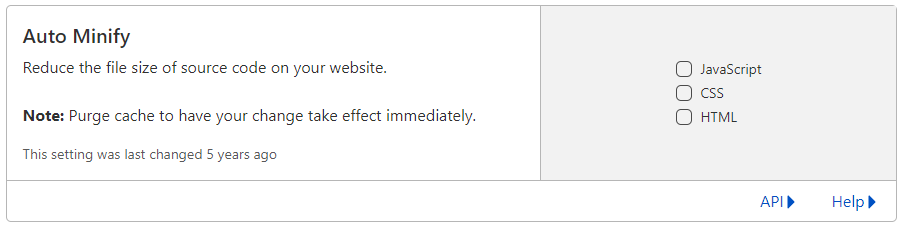
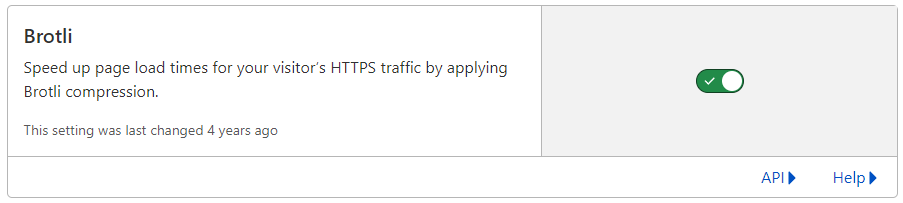
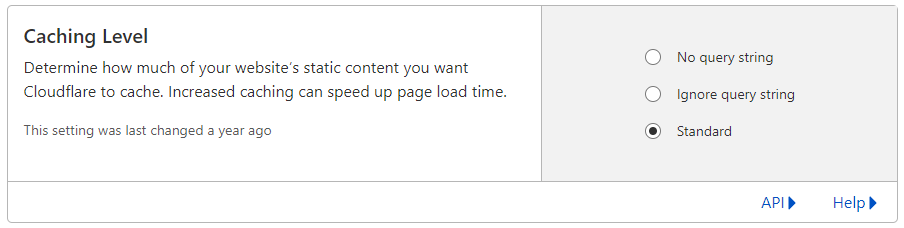
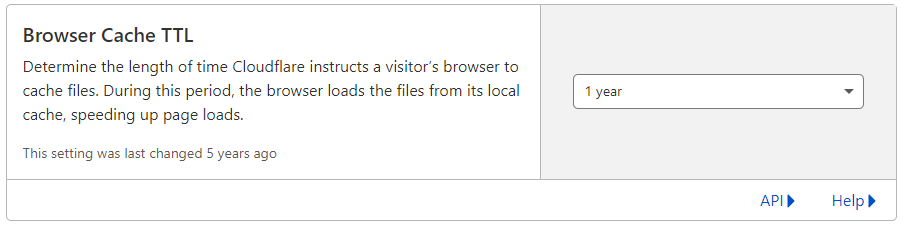
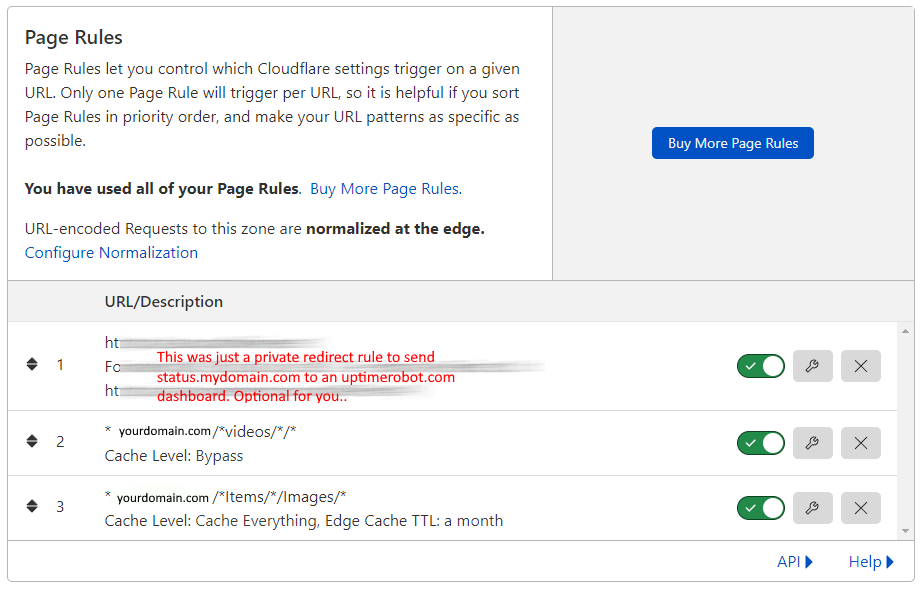
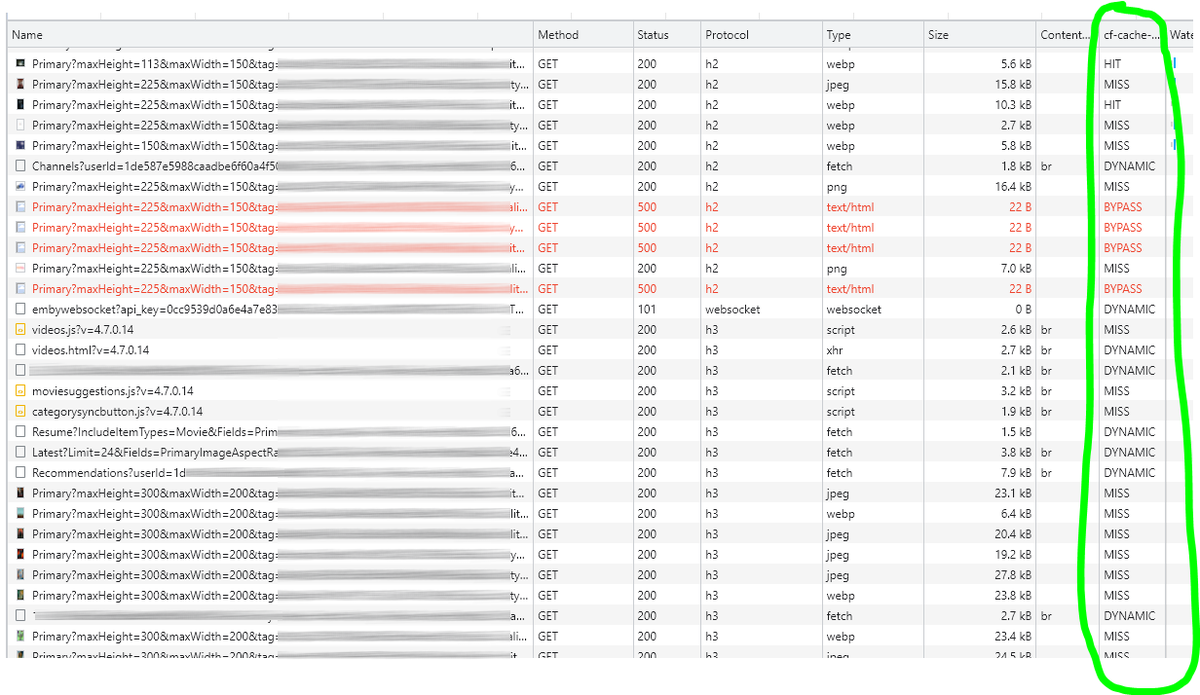
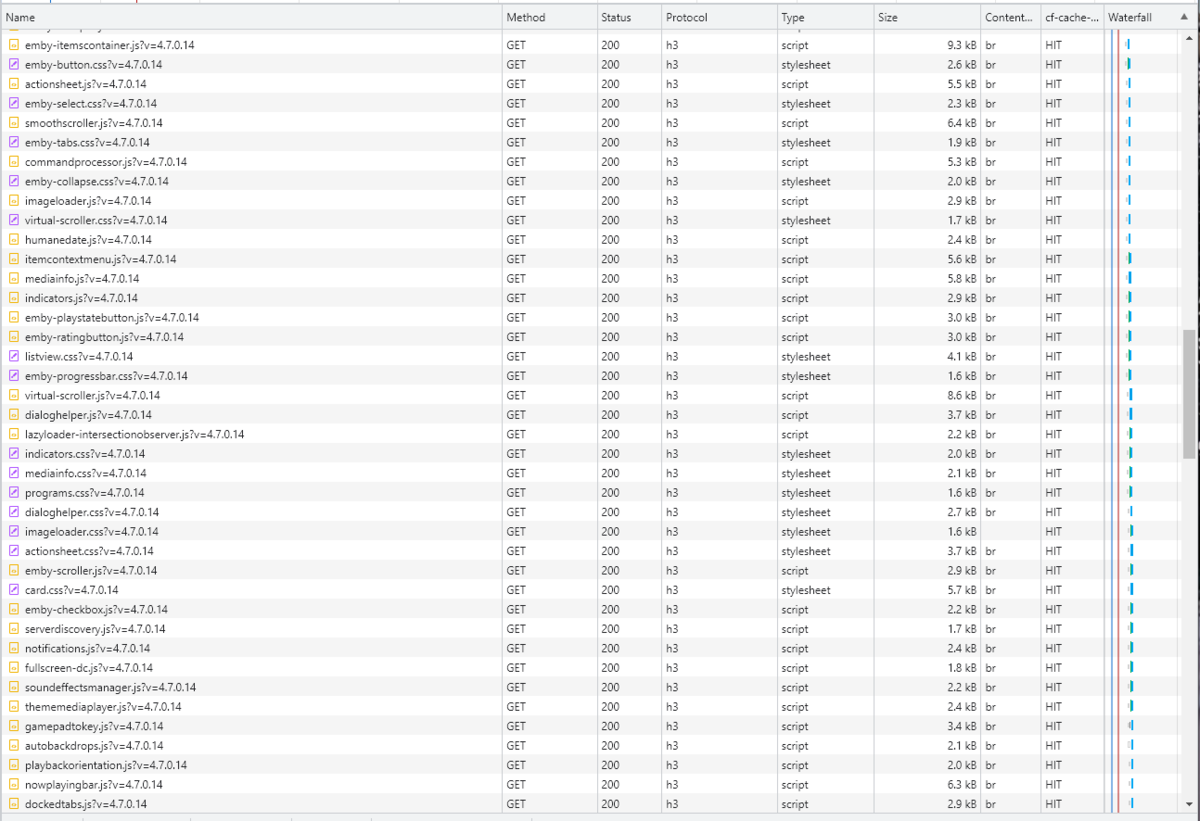
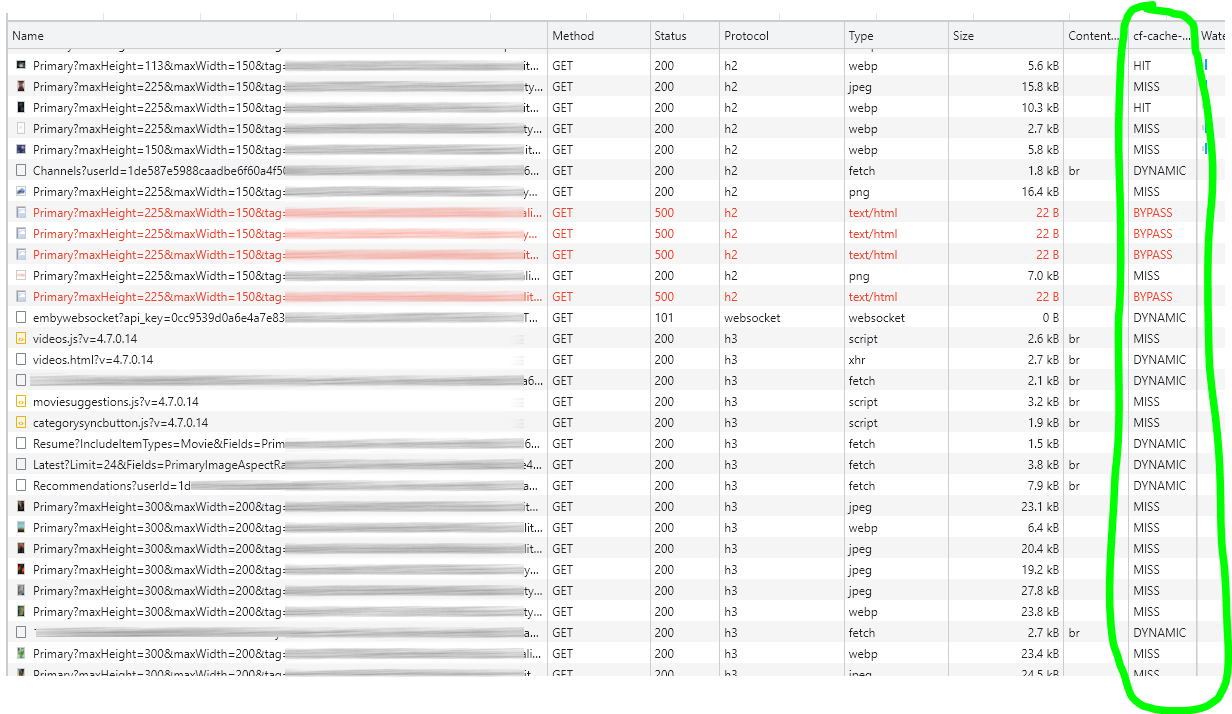
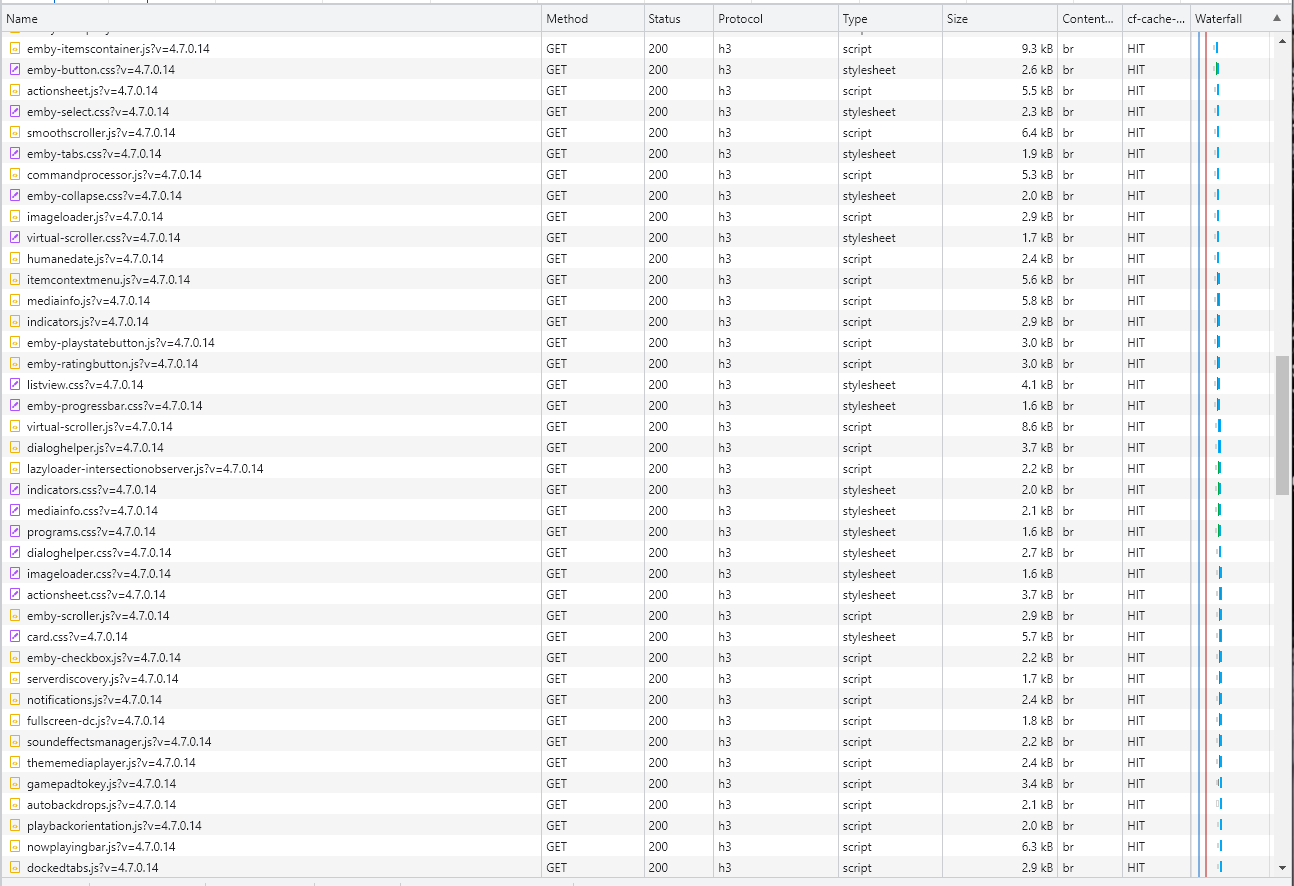
Cloudflare and emby Config Version 1.0.0 Last Update 02-25-2022 Update by Pir8Radio ** UPDATE: I AM HEARING OF EMBY USERS GETTING VIDEO FILES BLOCKED WHEN USING CLOUDFLARE (FREE TIER). IF THIS IS THE CASE, I NO LONGER RECOMMEND USING CLOUDFLARE. Even with the cache bypass rules, your video still passes through their system and is technically against their TOS. Use CloudFlare at your own risk if you choose to continue. I'll update if I get more info. Please post in this thread if you find you have video loading/playing/downloading issues while using cloudflare or have received an email from them about this. MESSAGE FROM CLOUDFLARE: Free, Pro, and Business Plans serving videos or a disproportionate amount of non-HTML content can be in violation of Section 2.8 of the Self-Serve Subscription Agreement (TOS). This will turn into a full Cloudflare how-to. Others are welcome to edit this or PM me with suggestions.. However right now I'm just going to post some recommended settings for people who already have Cloudflare setup. There are a few cloudflare settings that break emby, some break it in obvious ways, some only certain apps in certain situations.. These are the settings I found that work well as of today. I'll try to maintain this post and update the header info should new features come out, or the community discovers better settings than these. As of today, these are the settings available to us in Cloudflare FREE account: First disable the two main things that will break emby, go to the "Speed" tab then "Optimization" sub-tab. DISABLE Auto Minify and Rocket Loader! (screen shots are in the recommended state) Other options on this settings page are optional to enable, I suggest enabling Brotli compression. It's a good thing. Now head over to the "Caching" tab and select the "Configuration" sub-tab. Set your Caching settings as shown below. THIS IS OPTIONAL: Other settings in this settings tab are optional to whatever you like.. I have "Always Online" enabled, its kind of a neat feature that caches as much of your emby server as it can in case your server is down, users will at least see an emby splash screen, that's usually about it.. but its something... kind of useless otherwise.. Handy if you have other websites, it will totally cache normal html websites and users can continue to use your cached site when you have a web server outage. Next head over to the "Rules" tab. Create these two rules: Rule #2 here we will bypass caching 99% of all video. Caching the video will actually slow down the client experience. It screws with the chunks and often times has to fully cache 1 chunk before cloudflare sends it to the client, causing playback delays. Rule #3 here will cache all images on the edge servers for 30 days. We need this rule, because cloudflare only caches known file urls, like picture.jpg or poster.png emby serves up webp images with NO EXTENSION so cloudflare doesn't know to cache these items. But 99% of emby images come from the /items/XXXXXX/images directory so we will just force cache everything that comes from this URL, it should be only images. Keep in mind when you enable this it can take some time to build up cache.. emby serves up different sized images based on browser screen size, apps, etc.. so if you load a page that is minimized to a small window on your desktop emby will serve smaller sized images, if you make your browser full screen, now emby will serve up larger images and those images may load slow the first few times until they get cached too. Go below this screenshot and I'll show you how to check if caching is working. Check to see if Cloudflare Caching is working Well, how do you know Cloudflare is doing its thang'? Use a browser like chrome, or the new Microsoft edge (which is just a rebranded chrome). Open the browser, right click in the browser window and go down to "Inspect" (there is an F key for this too I forget what it is, I should add that here lol). Once the dev window pops up adjust it so you have a good view on the right, click the "Network" tab, hit the reload button on whatever page you are on so some info populates on the right dev screen. You should see something similar to this: Right click on the table header (Name, Method, Status, Protocol) anywhere, just right click the "Name" one. Go down to "Response Headers" then "Manage Header Columns". A little window will pop up hit "Add custom header..." and then add this header: cf-cache-status Now select the little sub tab that says "all" now surf your way to your emby server, and you should see something like the below screenshot. Hit is well..... a hit! this image came from cloudflare and was never requested from your emby server, saving you from sending this image to the client, saving time and bandwidth. MISS is also kind of obvious, it was a miss, either due to never being cached yet (first time Cloudflare has seen this image or document) if you hit refresh a few times, cloudflare will then cache it and it will turn to HIT. BYPASS I'm actually not sure why my server is returning server 500 errors below, this image is being called for by emby clients but the server has no image to serve, but usually you should only see BYPASS on playing video's if your rules above are correct. Or in my case, a server error will not be cached. DYNAMIC this is also a NO HIT response.. this is usually due to Cloudflare knowing this resource changes a lot and doesn't want to cache it so your clients don't get served stale data, or its a video, websocket, or some other format Cloudfare's great automated intelligence deems it should not be cached. That is the basics that will save you a lot of headache and blaming emby for things not working.. There are lots of cool options to enable outside of these basic settings above, ask questions here, send ideas that maybe I have missed that work great for you.. I just wanted to throw this up due to a lot more of you guys using Cloudflare. In the end you should start to see more "HIT" responses... and a noticeably faster loading time for the clients, less bandwidth usage for your emby server, and everyone is happy.. Well..... within reason....




 1 point
 -
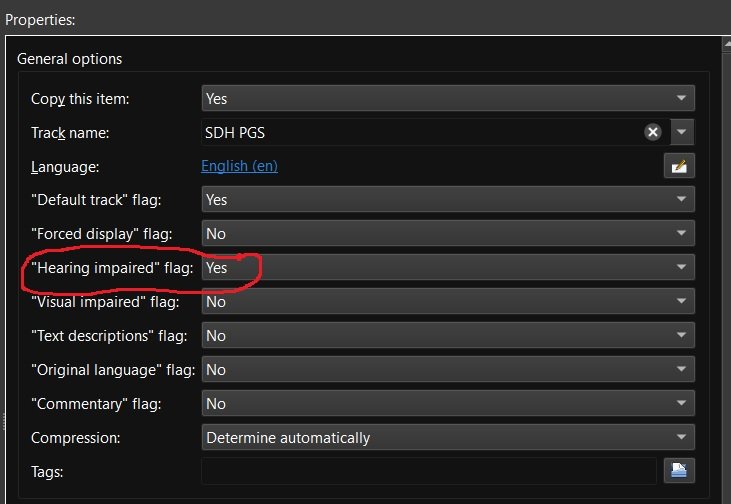
Recently matroska and mkvtoolnix added support for additional subtitle flags including "Hearing impaired" for subtitles for the deaf and hard of hearing (SDH). Request: Emby add some or all of the additional subtitle flags to media info and also as a choice for playback under user user settings. add support for external SDH subtitle naming (ex. moviename.SDH.eng.srt) Reason: my wife and are are getting older and it seems more and more I'm hearing "What did they say" a lot. If I could set certain Emby users to always play the "Hearing impaired" subtitles if available then I wouldn't have to back up and restart playback with SDH subtitles enabled. Other flags like "Commentary" would be nice also as I have several films with those Having this flag would also make it easier to run a script to list which movies have and don't have "Hearing impaired" / SDH subtitles so that I can go out and get the missing ones.
 1 point
 -
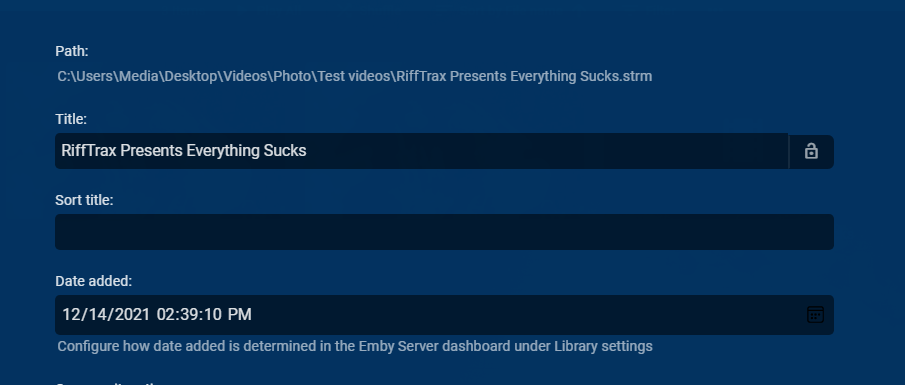
That actually means existing metadata not embedded metadata. So if I add "RiffTrax Presents Everything Sucks" that is what I get, unless other metadata exists. But existing library rules will always apply like Muli-verioning and File Stacking. So it is on your naming scheme avoid these hard coded rules.
 1 point
 -
Hello, (I didn't understand anything with the time zone) User: Serveur I made several attempts over about 5 minutes, then I sent the journal. (Newspaper sent exactly 18 minutes ago). France Time: 21:21 2.0.58 (13 Dec): no wol sent automatically 2.0.59 (14 Dec): same thing In the last attempt I waited, then I selected the WAKE which works manually. Here, I hope that it is clear. Thank you1 point
-
Isn't the Virtual TV plugin doing exactly that? You might wanna read that.1 point
-
I would get rid of NPM and uninstall docker. Make sure Emby is running on the host itself and not in docker. The Pi barely has enough muscle to run Emby Server and you don't want it doing other things (at least until you have a working baseline). I'm really not sure why you would need a reverse proxy on the Pi anyway as hopefully Emby is the only thing running there so you don't have a reason to reroute ports (main reason to use NPM). It's likely you didn't set up NPM for web socket or the stack needs tuning for something like Google Home or Alexa. But since you don't need this just remove it and docker to get those resources back as well as greatly simplify the setup so Home can talk directly to Emby with no middle man involved.1 point
-
If the remote user had to transcode because the bitrate was exceeded that would happen for two reason. The first would be that you set a bitrate limit in Network menu or you set a bitrate limit on this specific person. I'd guess it's neither of those. What I'd bet is the user lowered the client bitrate or it's set on AUTO which doesn't always work correctly and chooses far too low of a setting. Have the user check this on his client by clicking the person icon top right then changing the settings in the Playback menu.1 point
-
The test video shows 2880 x 2160. This is a a little larger than the inbetween size 2K. I thought 4K is recognized when the resolution is, at least, 3840 wide. I assume the label of 4K is pulled from the width in Emby. That seems to be how it works for all the other sizes. I think maybe the situation is the video can play back properly at it's full resolution, depending on your monitor, but it does not get the label of 4K at 2880 width. On a TV, there may be some other issue. Unless it is really 3840 wide, then it snaps back into 1080P because the TV is just not interested in playing back content in between, or it is set to auto upscale and then calls the original content 1080 in the playback info. I hope that makes sense. Ha!1 point
-
Works beautifully!! You have just saved me a bunch of time, thank you!!1 point
-
Android tv clients has an option in Settings that you have to turn on, inorder to play theme music, and video backdrops. The plugin works fine for me. It successfully grabs all the video and music themes and puts them in the appropriate folder in my file system ('backdrops'), under each of my movies and tv episode folders. I am able to have video backdrops and music play successfully on clients that allow this option, after I have turned on the ability. Appreciate all the hard work here. Thank you!1 point
-
Hi. Please provide this info:1 point
-
Demhinds... You asked for the Codec Search field, so you get to test it The code is attached below. Let me know if it works (or not). Vic EmbyTagApp15.html1 point
-
What else comes to mind: In the case of series, he always enters the original title of the series in the case of new ones, which leads to bad titles in the case of anime, for example. He uses the correct German episode name. It all works in the search, but not when naming. It's only been there for a while, unfortunately I didn't pay attention to which version. Maybe you can have a look.1 point
-
Hello @chef, I'm starting to be able to sit at my desk again without the pain knocking me out. I've been trying things out a bit. As far as I can tell, it accepts the existing flags. The following flags need to be added at the moment: "Extra Large" "Special Extended Edition" Has anything actually happened with the subtitles, or is this a sinking ship? Greetings from Wuppertal1 point
-
And it'll be great to add Discogs as an external provider - much more complete cover art than MusicBrainz.1 point
-
Current order of precedence 1. Images with media folder Image Type Supported file names Primary folder.ext poster.ext cover.ext default.ext 2. External Provider 3. extract from track But yes to me it would be more appropriate to switch 2 and 3.1 point
-
An Xbox app that could play 4K while using HD audio and trigger HDR would be at the top of my wish list for 2022 also. As far as highlights go even though I never use transcoding I guess in the big picture of things I would vote TM at the top of things Emby implemented this year.1 point
-
I agree, but it obviously gets presented as such. What's even more interesting is this: Edit: Let OP do all three tests, I'm very curious of the results: 1) rename single episode, rescan 2) remove whole series, scan, re-add, scan 3) move, create new library, scan1 point
-
Don't know how this is possible as metadata would appear to be correct so Season 1 could never be Season 70. All I can suggest is removing the series, scanning, and readding the series. If the same thing happens, can you test creating a new library and copy or move this series to a new library.1 point
-
Or address your query to: billingsupport@emby.media.1 point
-
No, but there is a plugin in development called IntroSkip that determines this.1 point
-
Thanks for sharing the always nice settings.1 point
-
Very clear explanation. Thanks as always!1 point
-
Nothing yet because we hit a two day obstacle when something was changed that I didn't know about. The "solution" was far too hard to implement as is on Synology while super simple to do on Windows or Linux. One little program I need compiled for Synology and we're done. I'm working on setting up the dev environment and tools to compile it now. This will make it simple for anyone to use just as it is on the other OSes.1 point
-
I stumbled on this thread and basically wrote an article on tagging software and how Emby reads tags.. Sorry if this is too much, but it might help someone.. I like the minimalism of Emby a lot. Release Date (of album/remaster/concert/single/compilation..) and Year (for say original recording date/indication of the time in history of a song) is great for sorting, and would even be better if Release Date and Year could be a different value. How Picard, MP3Tag and META use tags and how Emby reads them Disclaimer: I could be wrong. Just sharing what I think I have seen. I use tagging software on a MacBook and Emby Server on WD Ex2Ultra NAS. I switched off all fetching in the 'test' library (except Image Extractor), so Emby reads the tags in the music files. In id3v2.4 several timestamps are available (in id3v2.3 this is a bit more complicated) Release Time Original Release Time Recording Time All of these are 'allowed' to contain a full date and time, in this 24 hour format: yyyy-mm-ddThh:mm:ss (example: 2015-09-26T16:08:22) See here: id3v2.4 Tags (frames): https://id3.org/id3v2.4.0-frames id3v2 Formats (structure): https://id3.org/id3v2.4.0-structure This is how 3 music taggers use them and how Emby reads them, as far as I can tell: 1 - Release Time MP3Tag: releasetime, full date & time Picard: does not use this, it uses its 'date' field (I think?) > see Recording Time META: Release Time, full date & time Written in (you donot notice this as end user)... id3v2.3: does not seem to be used in id3v2.3 by MP3Tag, Picard or META (so if you remove your id3v2.4 tags, Release Time disappears) id3v2.4: TDRL frame (TimeDateReLease.. I guess) - allowed as yyyy-mm-ddThh:mm:ss If Release Time is available as id3v2.4 tag, Emby uses this for Release Date AND for Year. At least that is what I observed so far.. For compilations it would be cool if Emby would use Release Time in their 'Release Date' as the release time of the album itself, like Greatest Christmas Songs, released in 2015-12-05. The cool feature then could be using Recording Time or if not available Original Release Time for 'Year'. So Release Date will sort for the time this version of the album came on the market (Duran Duran - Rio [remastered], 2008). But Year will sort albums and songs for the year of recording or first release (Duran Duran - My Own Way, 1981 (<My Own Way is a song on the Rio album released in 1982). 2 - Original Release Time MP3Tag: origyear - allowed as a date yyyy-mm-dd Picard: originaldate - used as a year only (yyyy) META: Original Release Time - allowed as yyyy-mm-ddThh:mm:ss Written in.. id3v2.3: TORY frame - but only as a year yyyy (not sure if META does this too) id3v2.4: TDOR frame (TimeDateOriginalRelease..) - allowed as yyyy-mm-ddThh:mm:ss At the moment Emby does not seem to use the tag Original Release Time for Release Date or Year. 3 - Recording Time MP3Tag: year - used as yyyy, but can be written as yyyy-mm-ddThh:mm:ss Picard: date - as yyyy-mm-dd as far as I can tell META: Year - only allowed as yyyy Written in.. id3v2.3: TYER + TDAT (< by Picard!, so TYER for the year and TDAT for the date, I guess) id3v2.4: TDRC frame (TimeDateRecorDing.. ) - allowed as yyyy-mm-ddThh:mm:ss Recording Time is an interesting tag. In MP3Tag or META you enter a year. In Picard you will see this year in the field Date, and you can complete it as a full date. In Picard you will see Original Release Time as you entered it in MP3Tag or META, but Picard will save it as a year only. For Picard, Recording Time is the 'date' in general. So it is probably used by a lot of people as a general date of release of the song/or the album. For Picard the original first release of the song is in 'originaldate' (see Original Release Time). For MP3Tag and META Recording Time is 'just' Year - so people will use it either as year of release, or year of first release, or year of first recording. Picard allows a full date yyyy-mm-dd for Recording Time, whereas MP3Tag and META only allow a year yyyy. By the way: APE tags do not seem to be used by Emby for Release Date or Year. Remember I use a MacBook and WD NAS, there may be differences in Windows/Linux.1 point
-
It doesn't work that way right now for the "virtual items" but it should IMHO. I don't think there is any other way to read that page and come away with different thinking.1 point
-
@Luke, if it looks like a duck, swims like a duck, and quacks like a duck, then it probably is a duck. If I untick Playlists in any User setting Access tab, where it is listed alongside other libraries and folders and where unticking means no access, yes, I expect it to do exactly that. Not "Hide from Home Screen". Disable access.1 point
-
Interesting that you went as low as 12 for CRF, but I agree that 23 is definitely not visually lossless for any "normal" source material that I've encountered including 1080p stuff (animation may be fine, but who knows). I find 18/slow (maybe medium depending on source) to be the absolute highest CRF value I'd ever go with, and even then, it requires a lot of other options to make it work. 16 isn't bad for most stuff, in my opinion. Below that is splitting hairs and I've found that introducing some other tuning/analysis options can make a huge difference and allow for some flexibility in CRF choice. You're absolutely on-target with encoding HEVC, though. It's brutal to do on a CPU and even some of the better processors would barely keep up trying to transcode a single 4k source to HEVC at a watchable framerate using software en/decoding. Transcoding performance of 720p/1080p sources to HEVC is better, but it's still a computationally heavy codec to deal with and supporting more than a stream or two would be rough on many processors (again, assuming software en/decoding). Bitrate savings can be nice with HEVC, but the amount of processing required to achieve it in a live-transcoding situation is just disproportionate to the gain at this time unless you have hardware encoding available...and even then, hardware encoders often have limitations that make things like detail/grain preservation more difficult. Side note: HEVC stores 10bit material more efficiently than 8bit, so transcoding 8bit sources to HEVC Main10 files often results in even smaller file sizes/bitrates than if you had just used HEVC Main. If you're doing any library conversions to save space, try it out and see if it helps with your particular files (12-bit storage is more efficient than even 10-bit, but the difference is smaller compared to 8->10 and compatability of the resulting file is reduced even further).1 point
-
Just to add a bit here and to offer my $0.02 or less , HEVC encoding does use quite a bit more resources and really heavily depends on the CRF/VBR settings used and the encoding preset. I did a lot of research on this and the claim that a CRF of 23 when encoding a Blu-Ray source is visually lossless is just not true. If you have a good display, like a 4k with a larger screen, you can certainly see the difference. I ended up going with CRF 12 to get to visually lossless with my setup when encoding my collection to HEVC. CRF 23 with the Ultra Fast preset does encode pretty quickly, but you can see the difference between source and destination material. This is fine for smaller devices, but any larger device that can handle the output will suffer in quality with transcoding. For those with hardware accelerated HEVC support, there won't be much of an issue until the transcode tries to output at a 4k resolution because the device is 4k. The output resolution would need to match the source. Also, some source material encodes much faster than others, depending on CODEC, picture quality, motion, etc. VC-1 for instance normally went at about 15 FPS (some lower and some higher) on my server with 2x E5-2660 Xeons. The 32 logical cores struggled greatly without hardware encoding support. Those titles take nearly twice as long as the source video length to transcode with output being 1920x1080. Titles with HEVC typically ran at about 28 FPS but still very CPU intensive and it would never be able to encode fast enough to handle 2 encodes at once if it were on-the-fly. HEVC is great for reducing the size of your video library, even though at CRF 12 some few files end up being larger than the source. Even at that CRF, the overall size of my library was reduced by slightly more than 50%. However for on-the-fly transcoding, this would not be a viable option for me without some significant hardware assistance.1 point
-
Also, encoding to hevc will require quite a bit more resources on the server end. Most people's setups wouldn't handle it well I imagine. We try to limit the number of options we put in that would only benefit very small audiences and have the potential to cause large audiences to make problems for themselves . Eventually, I'm sure this will be the norm but I'm not sure it is ready yet.1 point
-
Hello, Just saw it 2.0.58 (Dec 13) So I tried and it doesn't work, I had to do it manually. I emptied the cache etc. from the Android TV application (ATV) and tested several times, without result.0 points

















.thumb.webp.91db90a7a38294cb55f296e3c5291885.webp)



