Leaderboard




Popular Content
Showing content with the highest reputation on 11/26/21 in Posts
-
Much like when you click on 'Movies' and you can see the number of movies, I'd like the number of items in each collection. e.g. Collections > Christmas Collection > Items (54) Thanks!2 points
-
That wouldn't stop me from buying an LG G1 on Black Friday I'd just use the flawless Emby app on a Roku Streaming Stick+ in one of the 4 HDMI ports and crack on with 4K HDR content! Who care if it's another remote ? If it gives me the picture and sound quality from my Emby server, that's all that really matters. In fact, you could just use your mobile phone with the Roku app and do it that way if the extra remote bothered you2 points
-
Hey did a little digging and this might be what you are looking for. In VideoBlackDetectionManager.cs: From: //process.PriorityClass = ProcessPriorityClass.BelowNormal; //This changes nothing with regards to high CPU usages process.Start(); To: process.Start(); process.PriorityClass = ProcessPriorityClass.BelowNormal; It's important to set the priority AFTER starting the process. Doing that every time you run ffmpeg might not be a bad idea.2 points
-
Any update on photo/video combined slideshows actually playing the videos too? I have Emby installed and ready, but this missing feature is the reason my wife won't transition from PLEX! 72 points
-
2 points
-
See you all in next year discount forum thread.2 points
-
it would be good to have the option to flip between grouped and ungrouped still though, as was available in WMC. both have their uses2 points
-
I love music visualizations. I was thinking that a unique way to integrate visualizations in Emby would be to encode the audio with the video output of a visualizer like Milkdrop or ProjectM. The mux can then be streamed to clients as video (if the client has enabled music visualizations). Wouldn't that be cool? Sure, you sacrifice a little quality in the transcode but it would still be acceptable and by offloading the visualization to the server, even underpowered clients could potentially support visualizations that would be impossible given their hardware.1 point
-
I'd really like to have 2 Factor Authentication added to the login screen. It's just this (optional) extra layer of security to help secure the server (which, especially if people use camera uploads) contains pretty private data. There are for every type of programming language quite a few libraries available, so implementation on a server shouldn't be too hard to realise1 point
-
Hey Everyone, My journey from Plex to Emby has been pretty smooth with the exception of setting up SSL encryption. There are lots of great posts on this forum and elsewhere on how to do this, and I consider myself pretty computer literate. But I'll be honest, this was a bit overwhelming for me as I have no experience at all in hosting web servers, DNS, or encryption certificates. After many hours, I've got it all working, so I thought I'd share what I've learned. I'm going to try to write this for the newbie, so don't be offended if it seems like I'm explaining lots of simple stuff. That's really what I needed a week ago, so maybe it'll help someone else in my shoes. Also, this is for Windows, although most of it applies to any OS. There's lots of text, but it's really very easy. Let me also say, I understand that a reverse proxy gives you lots of benefits and flexibility for securing your server. But that was a step too far for me. If you want a reverse proxy this post is not for you, but there are many posts in this forum to help you. If you want to access your Emby server from outside your home network you will want to require secure connection mode for all remote connections (see "Network" tab in Emby server configuration). To do this you need an SSL certificate. To get an SSL certificate you must have your own registered domain name. Here's a step-by-step. Domain Name Registration A domain name is the readable text part of a web address. So emby.media, or google.com, or media.yourdomain.net. Most home users don't have one, but you need one to get an encryption certificate. While (Edit:)There are many options for purchasing a domain (godaddy.com being very popular), I chose to buy my domain from domains.google. It cost me $12/year, and this is the only cost to getting your Emby server working with encryption. Go to https://domains.google, pick a domain, pay your money, and you're ready to go. For the rest of this discussion let's say you registered the domain name yourdomain.net. Now you need to associate your new domain with your home IP address. Most home users get their IP address assigned to them by their internet provider and it is "dynamic," meaning it can change. So you need to be able to tell your domain provider what your address is and update it when it changes. This can be done automatically, and is called dynamic DNS (DDNS). (Edit:) Before obtaining a domain, ensure the provider supports Dynamic DNS. Google domains supports this easily, here is the help page explaining how to set it up. Fortunately, my ASUS router has this capability built in so it was easy, but it's easy even if your router doesn't (follow google's directions). (Edit:) In case you have a static IP (obtained from your ISP), DDNS support is not mandatory. That's it for domain name registration. Now yourdomain.net points to your home network IP address. SSL Certificate Now you need to get an SSL certificate. This has the encryption keys you need, and must be issued by a recognized certificate authority or it gets blocked by your browser. Lets Encrypt will give you a free SSL certificate but it has to be renewed every 90 days. This was the part I was most confused by, but it's actually really easy. The part to understand is that Lets Encrypt must have some way of proving you own your domain name before they can issue you a certificate. There are two options, 1) they give you a little text file to place on your web server in a certain location. I don't have a web server so this is a no-go. 2) They give you a text string to add to your DNS registration in what is called a "TXT Record." You do this with google domains, it's very easy. To get a certificate you need an ACME client program that knows how to talk to the lets encrypt server. They recommend certbot, but it doesn't work in windows. Dig enough and you'll find ZeroSSL, they have a nice downloadable program that does it all and is really easy. Download here. Make a directory on your computer (I used c:\ZeroSSL). Put the le64 (or 32) exe in this directory. A single command will create your certificate. I think the easiest way to do this is create a text file in the same folder as the program, call it "get_cert.bat" and put the following three lines of text in the file. Edit the second line to have your actual domain name (instead of "yourdomain.net"), and to have your actual password for your PFX file (whatever you want it to be, just replace "yourpasswordhere" in the code below. @[member="Echo"] off le64 --key account.key --csr domain.csr --csr-key domain.key --crt certificate.csr --domains "yourdomain.net" --generate-missing --handle-as dns --export-pfx “yourpasswordhere” --live pause Save the text file as get_cert.BAT and then double click it to run. This runs the le64 program, creates the public/private key pair, asks lets encrypt to generate a certificate, saves that certificate, and converts it to a PFX file format that Emby requires. All in one command! When you run this, a command window will appear and you can see what it's doing. After a few seconds it'll pause and ask you to place the TXT record in your domain. It gives you a name and value, the name will be something like _acme-challenge.yourdomain.net, and the value will be a bunch of random letters and numbers. The program pauses here for you to put this into your domain. So now you just log in to your google domain again, go to "DNS" on the left menu, scroll all the way down and enter a "Custom Resource Record." The type is TXT, the name and value are what le64 gave you. Put them in, wait a few minutes for the change to take effect (took just a couple of minutes for me). Then go back to the command window where le64 is running and press enter to continue. It'll then verify your TXT record is there and issue your certificate. You'll find a file certificate.pfx in the le64 directory, that's it! Emby Setup Now log in to your Emby server setup. Go to "Network," in the field "External Domain" you put your domain name, so yourdomain.net or whatever you chose. For "Custom SSL certificate path," browse to the .pfx file that was created by the le64 program. In the "Certificate Password" field put whatever password you used in the .BAT file above when you created your certificate. Then for "Secure Connection Mode" I recommend you choose "Required for all remote connections." You also have to log in to your home router and forward port 8920 to the computer running your Emby server. I'm not going to give directions on how to do this, it depends on your router, but it's super easy. That's it. You need to restart your Emby Server, and then you're done! You can now access your server remotely and securely at https://yourdomain.net:8920. Certificate Renewal Now, I mentioned before that the Lets Encrypt certificates are only good for 90 days. So every 90 days you have to renew the certificate. Take that "get_cert.bat" file you made earlier and make a copy of it called renew_cert.bat. At the end of the second line, just add the text "--renew 20" (without the double quotes). When you are within 20 days of your expiration date run this file, it'll renew your certificate. I believe it'll ask you to place a new TXT record in your domain, so certificate renewal cannot be made fully automatic. You'll have to run it manually and add this TXT record into your google domain just like when you created the certificate in the first place. But it takes just a few minutes and then your certificate is renewed. You'll have to restart your Emby server for it to take. The file locations all stay the same, so you don't have to update anything in the Emby setup, just restart Emby. That's it! Well, I hope this helps someone. Sorry for the long post. I would have benefited from this level of detail a week ago, so maybe it'll be good for someone. If anyone sees something wrong here, feel free to correct me.1 point
-
It would be useful if the server (or perhaps clients) could cache most (if not all) content images (posters, backdrops, logos, etc) for movies, TV series and seasons. This would mainly be of benefit when a portion of someone's content is offline but the users would still like to view the content to know what exists. I think caching on the server would be preferable, then all clients could make use of the same cached images. if you think this would be a useful feature, please click the "Like This" button on this post.1 point
-
Please can you add the ability to keep watching the video while you back out to the tv guide? like have the video minimize so you can keep scrolling through the tv guide like a real tv and still see the movie or show playing in a window at the top right of the screen.1 point
-
Did changing the settings solve the problem? Another guess is that Episode 6 is encoded differently. I've noticed that AC3 audio automatically re encodes on my setup. The video have to have AAC audio in order to playback without reencoding. It's easy to miss noticing that the audio codec is different. Another trigger could be variable bit rate versues Fixed bit rate in the media. Variable can perhaps cause a trigger to start reencoding when a heavy use opening scene. If this happens, then the video and audio codec could be H.264 and AAC and still cause an issue. That can be adjusted with your settings. Finally if a user is remote, I think there is a setting for a max bit rate in that case. Remote users are restricted by the upload speed to your host and local users don't have that problem. I think that remote users pulling a variable bit rate can trigger encoding, while a local user will not. The obvioius test is to open the temp encoding director and watch for file creation. Hope that helps.1 point
-
btw, that's why I'm also working on unification of the code so I don't need to fix it in multiple spots.1 point
-
I had about a dozen movies and a couple dozen episodes (all mkv files in Emby). I'm guessing it was because whoever muxed them didn't put the video first. I changed to match what you have in the musicvideos elif block and it seems to work1 point
-
New build is up with the fix. Thanks.1 point
-
In your Movie library, did you enable the import of collection information?1 point
-
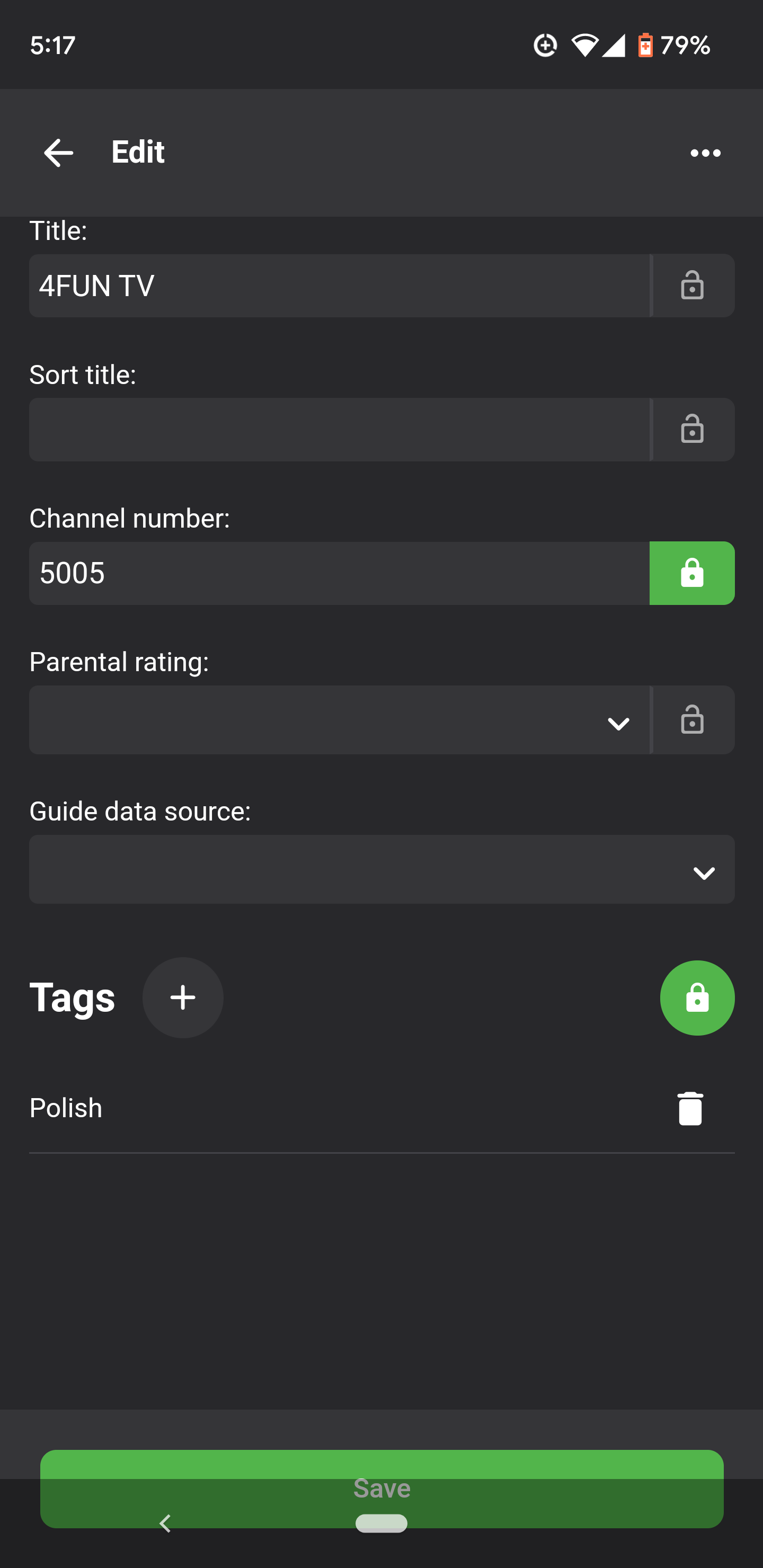
I am on Android 12 and when I use the Emby app, the Save button is partially blocked on certain screens by the Android UI. See screenshots below
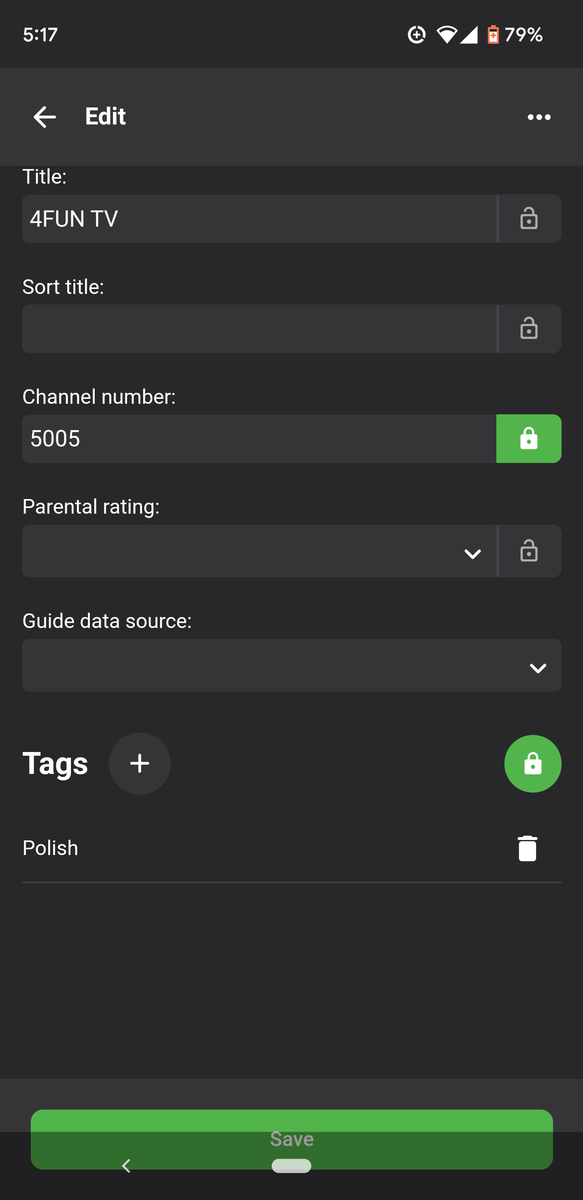 1 point
 -
I logged in via Chrome one time, then had an issue so I used Firefox and logged in. I checked out season 2/Episode 5 of that series and noticed you have 3 versions of that episode. Have you tried manually playing each to see if the problem is with any specific media file? I only played back a couple seconds of each to not use your bandwidth but all three started playing for me. If you could check that it would be helpful. I just wanted to let you know what I found. I'm now going to see if I can figure out why I can't login again using Chrome. What is happening to me in Chrome (after I initially logged in once) is that it's taking me to my server when I clicked your server. It could be some strange browser caching issue, but this shouldn't happen.1 point
-
Checking this topic again as h266 development is progressing..1 point
-
I tested these outside of Emby and in my area most of these channels don't work. The few that do have multiple nested m3u8 files returned.1 point
-
Just a guess. When you switch routers it may assign Emby with a different IP port. I reserve a port only for the Emby server so it doesn't get used up when the server is offline and someone new walks in the house with a new phone and connects as a guest and the router gives the Emby port, because you didn't tell it to reserve that address.1 point
-
Hi there @jaredngo, please attach the information requested in how to report a media playback issue. thanks !1 point
-
Personally I'd would not even look into zip files. Auto-Organize should only look for valid subtitle extensions... (.srt etc.) If that is developed I am a happy camper1 point
-
Thanks for the feedback.1 point
-
Hi, it's always possible for the future, yes. It's just not a typical use case so it's not something we've spent a lot of time on.1 point
-
Hi there, please check out our Quick Start guide to learn how to get started with Emby: https://support.emby.media/support/solutions/articles/44001159034-quick-start Thanks !1 point
-
After upgrading to DSM 7, I installed Emby from the Synology store. But have not performed an update yet. I have no compelling reason to update Emby, so I'll just wait until it's available in the store. -Thanks1 point
-
Thanks for confirming that it can be updated via the Synology package updater when available.1 point
-
I meant, the UI isn't making it obvious enough that it can be expanded.1 point
-
It seems to play the HLS streams fine, recordings are a miserable failure though. They die after less than a minute.1 point
-
Yep I created a folder for just Movies, created a library of type Movie and all the metadata updating correctly1 point
-
Awesome, thank you! Will be checking/fixing that later.1 point
-
i saw the german translations shows as done 100%. Does this mean, work is done and it will be released shortly?1 point
-
The dashboard message isn't referring to the Synology store. If you click on the link in the dashboard it should take you to an updated package on GitHub which can then be manually installed. It's up to you where you want to install from. Either do a manual install from GitHub now, or wait for Synology to test the new version for themselves and upload it to their store. No one really knows how long that could be though as this is the first update since the initial release on Synology.1 point
-
I resolved my issue, sorry for the delayed report. I think I had too many plugins going and it was not working. I've cut out a good chunk of them. Working as expected now.1 point
-
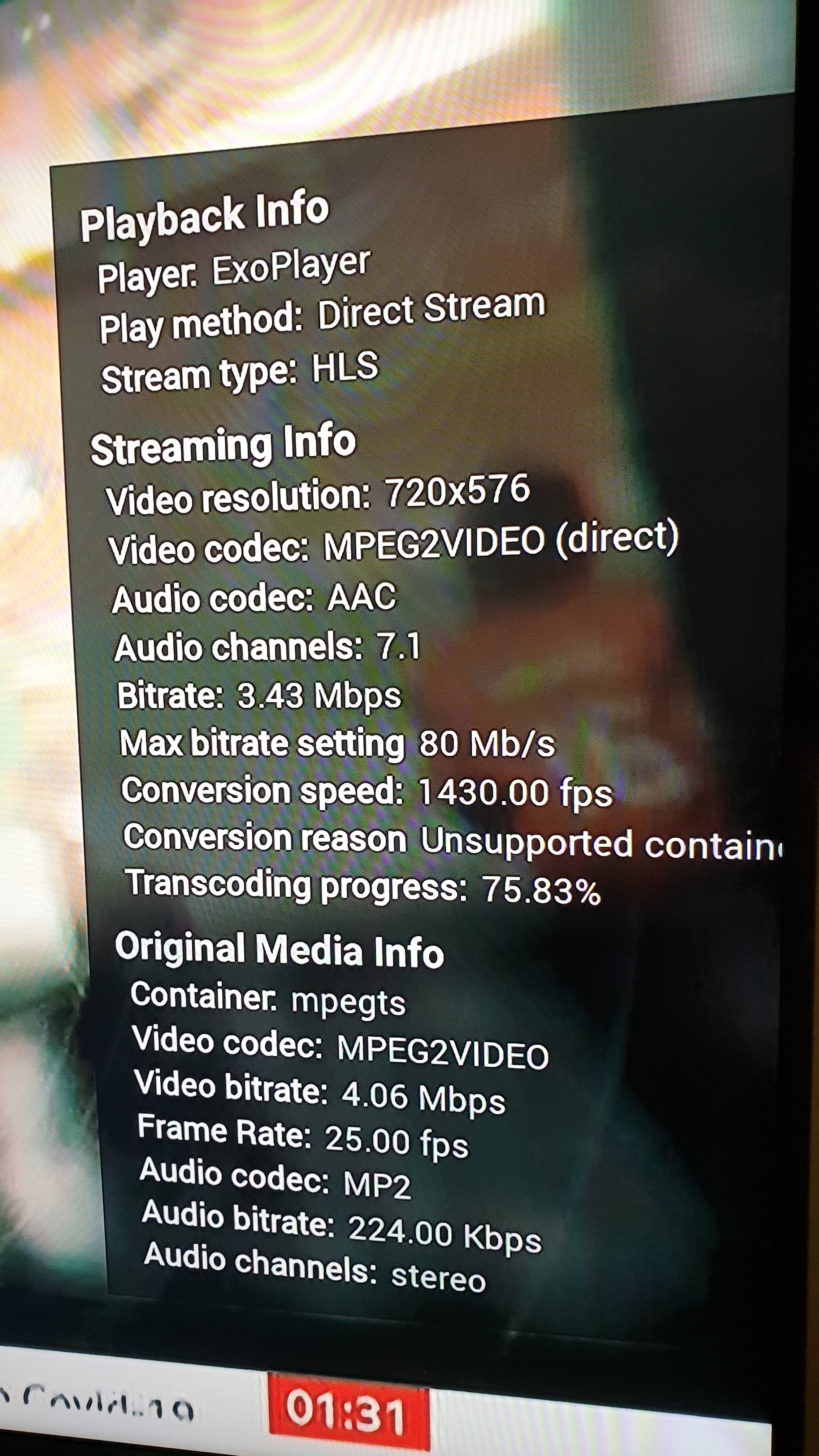
It still appears to transcode (as per my screenshot) but as far as the dashboard is concerned, it's direct streaming. e-charge
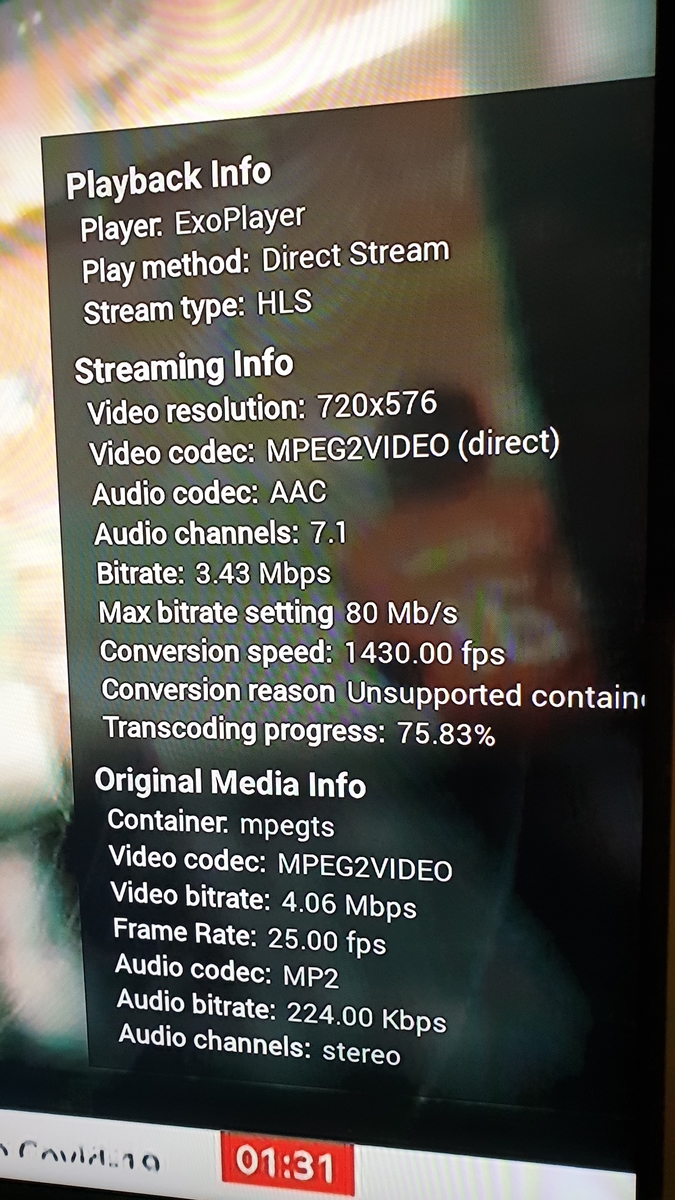 1 point
 -
There may be a Christmas or Thanksgiving sale. There may not be. It's not a consistent annual thing. While I get that everyone's financial situation is different, I have to say that the price of Emby isn't even high if you're pirating your media. Hell, just the hard drives to store enough content to warrant a solution like this cost more than the software that makes that collection useful. I recently crossed 2000 movies on disc, about 2000 CDs, and several hundred TV series. Those discs cost tens of thousands of dollars over the years. To play them back I've got a TV with 5.1 sound in 4 rooms in the house, each with a shield or xbox one. To store the digital files there are two NAS enclosures with 9 drives plus a few drives on my Emby server PC that hold overflow. I spent more on every other element of my collection than Emby costs. I'm pretty sure I've spent more on speaker wire than the piece of software that ties everything together so it's usable. Emby is cheap. Emby is generally the least expensive part of most user's collections so it's hard for me to take price complaints seriously.1 point
-
sorry to bump an old thread, but i found if you go to the file folders, find the "Season" nfo file, and edit it to reflect the correct season, it seems to resolve and split the series back up.1 point
-
What did you go for in the end ? I've now using a UHD 770 in a 12700K - and transcoding performance on it is frankly amazing. Comparing to the Nvidia charts - it's has RTX 4000 performance on 4K Transcodes.... I comfortably hit ten x 4K Remux (70-80Mbit.sec) to 10 Mbit 1080p - PLUS Tonemapping ! I think the UHD 750 in the 11th Gen is way up there too - for an iGPU/trancoding engine - it's a no brainer for a media server. I've yet to try 1080p transcoding in high numbers, but I believe we are talking 40-50 sessions before it will choke - wow .. edit - 1080p 10Mb/sec > SD (480p/1Mb/sec) is over 1020 fps - hahaha..1 point
-
Hi, we are working on it. Thanks for the feedback.1 point
-
Hi Guys, I recently moved from Kodi with MySQL for lack of proper multi user management and server side support, I have to say I'm impressed with Emby. Together with the Kodi Plugin it really takes the solution to a whole new level, count me in among the supporters! One feature I would like to see is the ability to recommend movies or shows to other users: I share my Library with close friends and family but it is a big library so they are always calling me to recommend them a movie to watch. It would be really cool if after watching a movie I can click a Recommend button and choose the users I think would like the movie, then it is displayed on their suggested movies at the top with the name of the user who recommended it... Sorry if there is something like this is already there, I am new to the interface and don't fully know it but could not find such feature... Thanks!1 point
-
It would be very helpful if all downloads are shown regardless of origin1 point
-
What about them? There is no display of a history of those, but it is possible for the future. Thanks.1 point
-
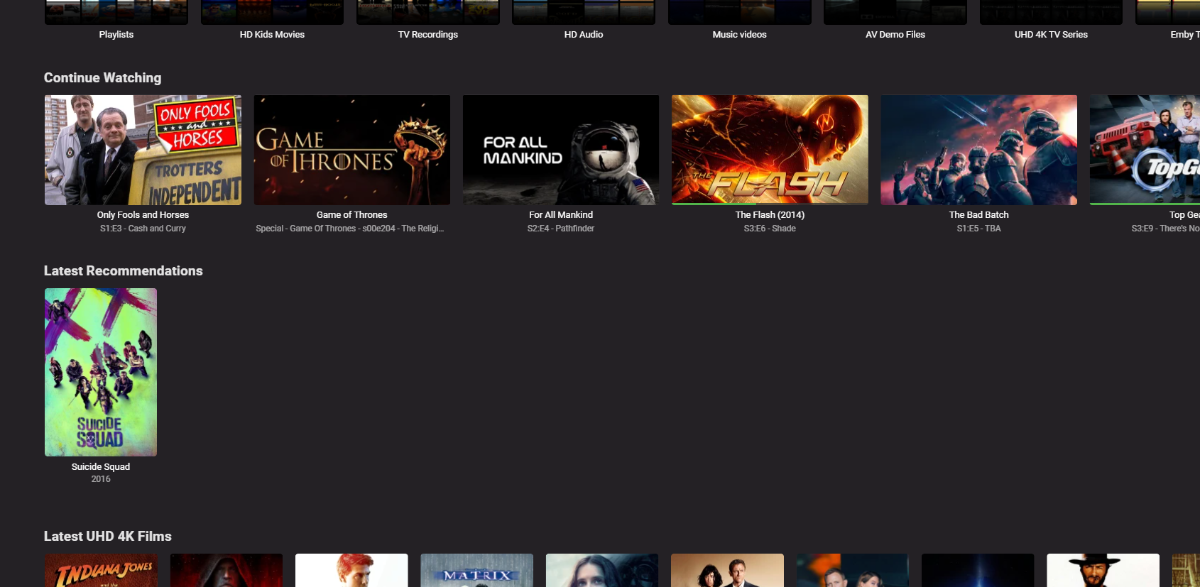
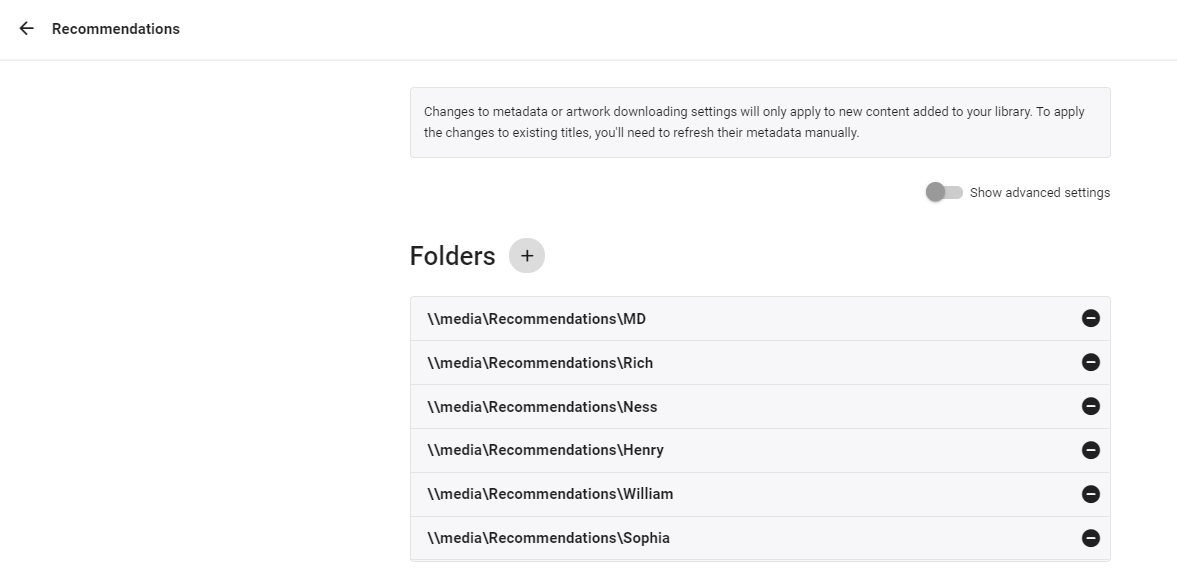
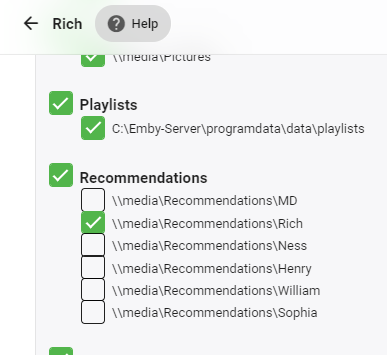
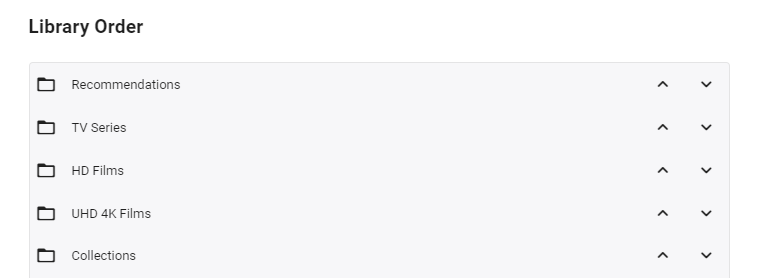
So I've been working on a solution to this in the background as a few weeks ago, my parents asked for recommendations as they say there is too much to choose from haha. Currently my solution is manually but it's working ok - I'm now trying to automate it by reading a defined playlist and building the recommendations from that, as currently there is no way to tag a 'recommendation'. As of now - it uses a 'Recommended' library, with sub folders / permissions - one folder per user. In these folders are strm links to the actual recommendation - be be a movie or tv series. Because the 'Recommended; library acts just like any other library on the 'latest' view - you simply need to put 'Recommended' to the top of the list for each user - and up pops the Recommendations for that user (and only that user).. resulting in ... The strm files are just links to the real video files (+ copies of metadata) - each user having their own folder in the library so they can be individually permissioned .. .. permission for each 'recommendation' folder is configured for each user. There is nothing to stop you having 'Generic' recommendations - simply add to the permissions - or if all are ticked, the user will see all the recommendations across all users .. As the user watches an item in the 'Recommendations' list - then it drops off the list (as it's a played item) which is neat - and of course also tags it as played in the main library. As I said - this is all great, but it's manual as I need to create the STRM files (which is easy enough, but it's not possible to do this via the emby GUI). So my thoughts are to read a predefined users recommend playlist xml file - which can be added to by simply selecting the playlist and 'add' - and use that to auto generate the strm links in that users recommended library. This should be easy enough to do, I just haven't got around to it yet. So it's not perfect by any means - and is a workaround until it's done properly in the db - but instead of tagging a film as 'recommended to user X' - you simply add that film to their 'recommended playlist' instead (or multiple recommended playslists) and it will then show in their 'Latest Recommendation' (library) list following the next schedule. I'll keep you updated on progress - likely in the 'tools' section of the forum.
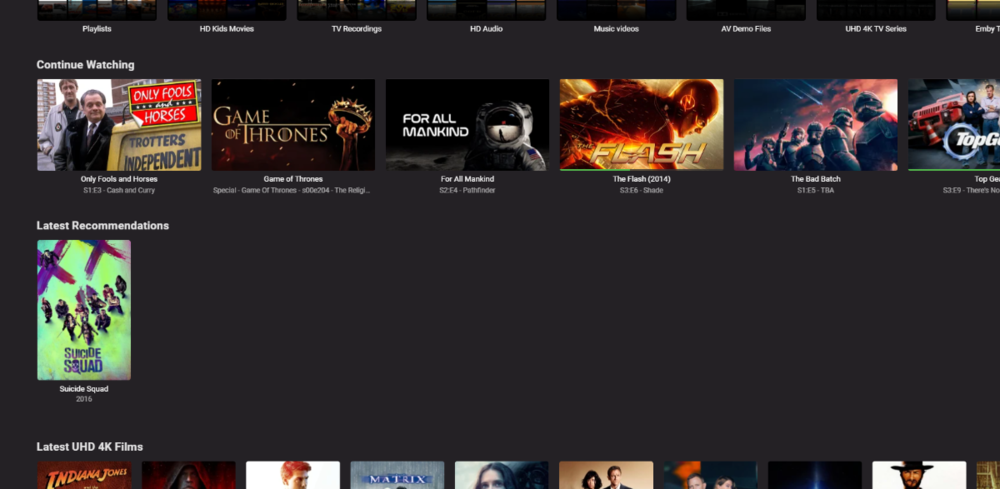
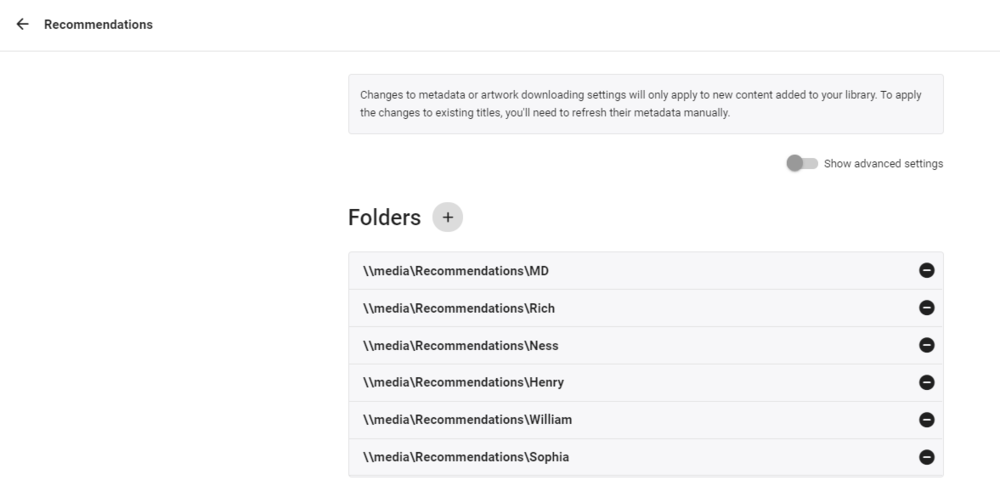
 1 point
 -
Nope, not missing the point at all "Disable on the Server" or "Disable per user". I was just suggesting maybe an alternate way "for now" to achieve this but obviously wasn't a good idea according to Luke.1 point
-
I'm surprised this didn't get responses on it. I second this majorly. Recently I had a user of my server enable this feature on his Android App by mistake. As he did not have access to the folder Camera Upload he did not see that he enabled this. It was not discovered till I was performing some maintenance on my server and noticed he had uploaded his entire phone's photo library to my server. This is a feature I would like to be able to stop the use of. If the feature was more tuned and further developed to include that the uploaded items were only seen by the profile/user that uploaded it, then that might be a reason for me to enable it. Basically offering the ability to use my server as a private cloud backup. But as it is that anyone with access to the Camera Upload photo would see anyone's photos this is not something I want people to be able to accidently enable.1 point
-
@@Spaceboy This doesn't really seem relevant to my feature request, you should open a bug report for that.1 point