Leaderboard




Popular Content
Showing content with the highest reputation on 11/25/21 in Posts
-
It would appear the hardware is just not up to the task as the conversion fps are just not there, you gradually climb to processing at speed. So playback exceeds conversion rate. 14:26:34.630 frame= 2 fps=1.5 q=0.0 size= 9kB time=00:00:00.18 bitrate=N/A throttle=off speed= 0x 14:26:35.116 frame= 18 fps=9.8 q=26.0 size= 46kB time=00:00:00.89 bitrate= 539.7kbits/s throttle=off speed=0.385x 14:26:35.666 frame= 33 fps= 14 q=26.0 size= 8605kB time=00:00:01.43 bitrate=56484.4kbits/s throttle=off speed=0.53x 14:26:36.164 frame= 48 fps= 17 q=26.0 size= 17775kB time=00:00:02.13 bitrate=74598.4kbits/s throttle=off speed=0.678x 14:26:36.739 frame= 65 fps= 19 q=5.0 size= 28163kB time=00:00:02.81 bitrate=87911.0kbits/s throttle=off speed=0.77x 14:26:37.245 frame= 76 fps= 19 q=5.0 size= 34926kB time=00:00:03.29 bitrate=92165.6kbits/s throttle=off speed=0.792x 14:27:34.509 frame= 1459 fps= 24 q=7.0 size= 883087kB time=00:01:01.01 bitrate=118921.8kbits/s throttle=off speed=0.994x 14:27:35.032 frame= 1474 fps= 24 q=7.0 size= 892577kB time=00:01:01.59 bitrate=119072.2kbits/s throttle=off speed=0.995x 14:27:35.532 frame= 1490 fps= 24 q=4.0 size= 898997kB time=00:01:02.23 bitrate=118691.7kbits/s throttle=off speed=0.997x 14:27:36.046 frame= 1508 fps= 24 q=4.0 size= 909997kB time=00:01:02.96 bitrate=118735.5kbits/s throttle=off speed= 1x 14:27:36.521 [segment @ 0x18f48c0] Opening '/var/packages/EmbyServer/var/transcoding-temp/D310E6.m3u8.tmp' for writing 14:27:36.522 SegmentComplete=video:0 Index=20 Start=60.060000 End=63.063000 Duration=3.003000 offset_pts=0 start_pts=60060000 Frames=72 filename=D310E6_20.ts 14:27:36.522 [segment @ 0x18f48c0] Opening '/var/packages/EmbyServer/var/transcoding-temp/D310E6_21.ts.tmp' for writing 14:27:36.525 frame= 1520 fps= 24 q=1.0 size= 920373kB time=00:01:03.51 bitrate=119057.9kbits/s throttle=off speed= 1x 14:27:37.068 frame= 1535 fps= 24 q=12.0 size= 933022kB time=00:01:04.09 bitrate=119605.6kbits/s throttle=off speed= 1x 14:27:37.587 frame= 1549 fps= 24 q=9.0 size= 942530kB time=00:01:04.66 bitrate=119745.8kbits/s throttle=off speed= 1x 14:27:38.060 frame= 1562 fps= 24 q=11.0 size= 950873kB time=00:01:05.27 bitrate=119676.7kbits/s throttle=off speed= 1x 14:27:38.596 frame= 1577 fps= 24 q=9.0 size= 960001kB time=00:01:05.88 bitrate=119709.0kbits/s throttle=off speed=1.01x In the conversion from h265 to h264 there is bandwidth doubling (or client playback set value) to try and maintain quality, so your 64Mbs media is being converted to 120Mbps. Does lowering the client playback bitrate resolve the issue?3 points
-
No I don't, sorry. From what I remember it looks Ok on my shield, but it has been a while,. I tend not to send myself many messages2 points
-
You will probably find your Premiere count goes a lot further then you think it will. PC and Mobile Browsers, Roku, Apple TV as well as Smart TVs (LG and Samsung) do not require a Premiere license for playback. They would only need a Premiere license if they use other Premiere features such as Live TV (refer to matrix) which is easy to control from the Dashboard user access controls. Users with iOS and Android mobile apps, Android TV and Fire TV apps can purchase an app unlock for full playback and then it would be essentially like the above. An unlock via an app is good for all devices on the same store account of the same type. As an example if you had 3 Firesticks all logged in with the same email account one unlock is all that's needed for those 3 devices. The first device unlocks the app while the other devices can restore the license already purchased. We try to be fair overall on how this works. This gives you a bit more freedom in how you can manage users to maximize your Premiere License.2 points
-
HI I would like to add that i have started to work on getting past my Starlinks CGNAT, i have been succesful so far in useing ZeroTier and a cheap VPS from OVH, i have managed to access a basic webpage so far from external to my internal network, next step is for e to setup some reverse proxy stuff and see if i can access my basic services and then onto seeing if i can do emby and cctv I will keep you informed once i have gotten something to share2 points
-
Hi, You can control what each and every user has access to on your server so you could keep them from using specific Premiere features such as Live TV. Doing this you could limit their use to free clients or the couple of clients they can purchase for roughly $5/lifetime to use. That way they would not use any of your Premiere licenses. You can set stream limits on users as well to help stop them from sharing their login credentials as they end up hurting themselves doing that. You can restrict users to specific devices which you already found as well. One of the best methods is to simple rename the device when they login with their name (device menu) so you can see something like "Shield TV - Tom Jones" which makes it easy to see what devices belong to what users. Then go to their access tab in users menu and give them only access on that one device. They will not be able to login on other devices that way using up other licenses. Any device not used in a week will fall off your license count so keep in mind this is a rolling count of active devices and will not match what you see in the device menu which could be far older than that. You can also login with all your own devices using a Premiere feature to ensure your own devices get a proper license before you start sharing your server wildly. As a last resort, just so you know there is an option to upgrade to 45 devices lifetime or 45 or 75 devices monthly so keep that in mind if ever needed. https://emby.media/premiere-ext.html2 points
-
Done.2 points
-
Hi, yes currently that is the only area that displays them ungrouped so we may look at changing this in future updates. Thanks for the feedback.2 points
-
Usually, I visit this forum when I have a problem but this time I just want to tell you (the developers) how much I like Emby. I appreciate the complexity of the overall system behind the curtain while it still remains relatively easy to use. Thank you for your work!1 point
-
Possibly because Emby does not wish to exploit their customers and they may not wish to piss off those that at some point payed full price. Also Emby is not a product in any traditional since. It is a service and maybe they do not wish to cheapen their service. And, as I said earlier, they may wish to avoid some of the negativity they will see when they increase their prices which, it seems, may come sooner rather than later. It has been a very long time since their last increase so it may be that one is coming soon. They may well feel that the current price is a discount. But, who knows? Emby can and will do as they wish and their prices are what they want them to be. So they can offer a discount any time they wish or never. Lastly discounts are generally use to drive revenue and Emby may feel that they are getting enough new purchases. I do not really see that Emby (or Plex for that matter) needs to offer discounts. The value of the service is great and the price is small. Full price lifetime is the best purchase I have ever made but I do not even use the premium features. The only real reason for me to purchase lifetime was/is to support Emby. Emby, please do not cheapen your service by bowing to pressure and providing discounts.1 point
-
And we are still f**ked up from Emby devs... This is so patetic. Sorry but guys from Emby. You are just band of amateurs. Cant be more polite coz I know right now what you are thinking about us. We are only trash for you.1 point
-
That all makes sense — thanks so much for all the info!1 point
-
No simple answer to that unfortunately as every app store is different. Each has different requirements, guidelines and ways to handle payments. Some could make trials available while other can't. Some may allow returns/refunds while others don't. An app store for example could require you have a merchant account setup in different GEO areas in order to do purchases in those areas. If you can't do this you may have to make a choice between all free or only allow distribution in certain countries. There is no rhyme or reason but each store can be vastly different then others. <-- These are not specifics but just examples to give you an idea of the complexities involved. The powers that be look at it as a whole and try to make the best decision on a case by case store basis. Ideally, we would love to have all apps the same but it's just not possible.1 point
-
Thx for the edit and the reply @LukeThats the problem, it doesn't say anything... The installation is without any problems; first it said the emby package installation is started and then a few seconds later that the installation is done. Normaly i can start the app immediately after the installation or an update and it shows the logo for 2-3 seconds and than it shows the overview of the local users. But at the moment it starts with the logo and then nothing happens. I also did it run for 5 and more minutes but there is no message or anything. The last login was a few minutes before the first message come that there is a newer version. I don't know if there is a possibility to show a log or something else. The TV is connected directly with the router, the internet connection is stable and a factory reset doesn't help (it seems so). At the moment I can look over dnla but for my wife its to much complicated to go over an other device and she will be angry... Help, I would not sleep on the couch for the next month.1 point
-
Here is the announcement for 4.6.6 and then there were only a couple things in 4.6.7 Releases · MediaBrowser/Emby.Releases · GitHub1 point
-
Hello @chef, I would argue that it is enough if he takes the subtitles that are accessible. That all files should be unpacked should be normal for everyone to understand. At least I think so. In any case, that would be perfectly enough for me. Important to me is just still the versioning as. eg "Extended Cut" or "Directors Cut" with the possibility of manual intervention. An example, what I mean, I had posted once. What has changed in the update? Habs aufgespielt, but acts as always (admitted, nothing tested yet). Greetings from Wuppertal1 point
-
The future is now....Any Progress @Luke1 point
-
Thanks so much for breaking it down for me. I feel much better now about everything!1 point
-
In the meantime, This is an updated version of Auto organize. But! inorder to use this version, you have to: 1. shut down the server 2. Open "Emby-Server/programdata/data" folder 3. Delete 'fileorganization.db' file 4. Spin up the server. It changes the database Emby.AutoOrganize.zip1 point
-
After playing with the skip intro, that will be the next playground for me: Auto-Downloading subs and sync them automatically if needed.1 point
-
I have been going over how to best handle these subtitles. I was able to add a list of found subtitles to the organization result. But, there is one big problem. Sometimes subtitle files are zipped up in a .rar/.zip files, and they also go 2 compressed files deep. That is a ordeal. It means that we have to extract them, make the connection between the extracted file, and the movie result, keep track of these file so we can successfully copy them, and then remove the extracted files in a file system clean up. It isn't impossible. But then I started thinking about emby's built in ability to download subtitles, and I started to wonder how important it is to organize these files. Most of my .mkv files also have subtitles inside the file. So, what should I do? Should I continue to work on this?1 point
-
@pir8radio and I both came at this differently I guess you could say without a template to work from and have both found all almost identical settings that work. Every once in a while Cloudflare makes some change (documented on not) that requires a tweak but other than that, these settings just flat out work. I'm currently running a couple Emby Servers through Cloudflare both tunneled and not tunneled on the same domain name.1 point
-
The dashboard message isn't referring to the Synology store. If you click on the link in the dashboard it should take you to an updated package on GitHub which can then be manually installed. It's up to you where you want to install from. Either do a manual install from GitHub now, or wait for Synology to test the new version for themselves and upload it to their store. No one really knows how long that could be though as this is the first update since the initial release on Synology.1 point
-
Looks very cool, I currently get my channels from a DM920 and an 800.1 point
-
it would be good to have the option to flip between grouped and ungrouped still though, as was available in WMC. both have their uses1 point
-
that may also explain some of the historical issues i have had with CF and caching, although that was really to do with the 'arr's. i need to look at this advice and implement soon as well, thanks @pir8radio1 point
-
Essaye de suppr les plugins non officiel (anime, iptv, kodi) pour tester ?1 point
-
One of the problems with HEVC to AVC conversion is that HEVC compression/codec is so good it often requires the AVC video to have twice the bitrate to be a similar quality. That's the assumption the transcoder often makes. When you set an upper limit for playback it tells the transcoder the upper limit it's allowed to use, solving the problem for these already high bitrate videos. Ideally, it would be nice if we could set a limit on the server for transcodes only. This way for example anything transcoded could be tamed down to 40Mb as an example while still allowing a 60Mb video to direct play if possible.1 point
-
Just to clarify, this isn't like Plex. Your end users can't buy premiere licenses of their own to use for premiere features on your server. The licensing happens at the server or not at all. Some clients allow purchase of playback licenses but that doesn't grant the client access to any premiere features other than playback.1 point
-
This issue can be closed, updated to newest release and it has been resolved1 point
-
No need to turn on debug mode for logs. You are best leaving this turned off and only use that for very specific situations when you are actively watching it looking for something specific. Otherwise there is so much information written to the logs they become hard to read for general use.1 point
-
Discogs is something we'd like to add support for in future updates, yes.1 point
-
Hi, what is the other one?1 point
-
Can you please try this version? Installed and ran fine on my older Mac: https://www.dropbox.com/s/s7nq9zsqa108k5x/embyserver-osx-x64-4.6.7.0.zip?dl=0 Thanks.1 point
-
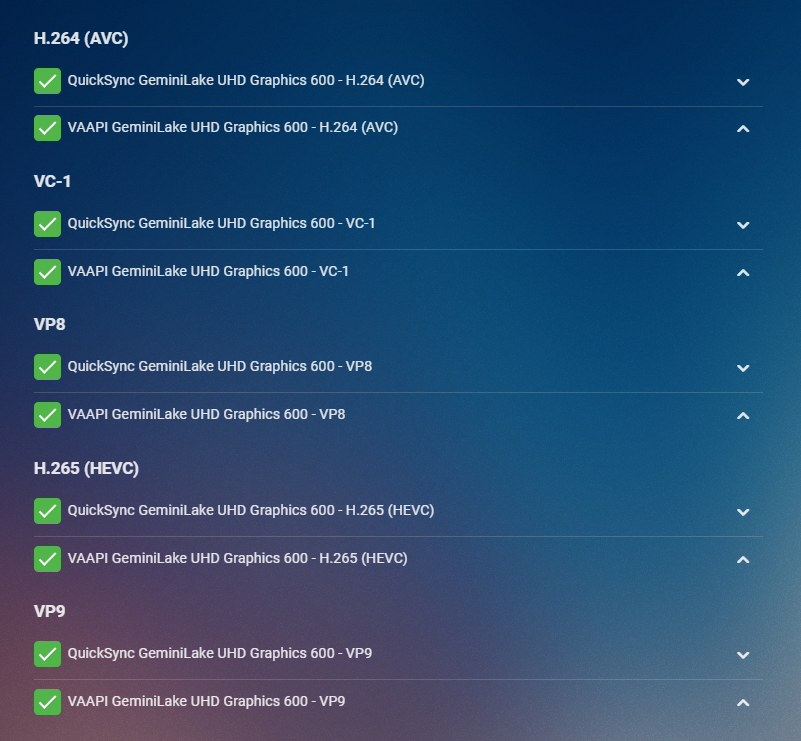
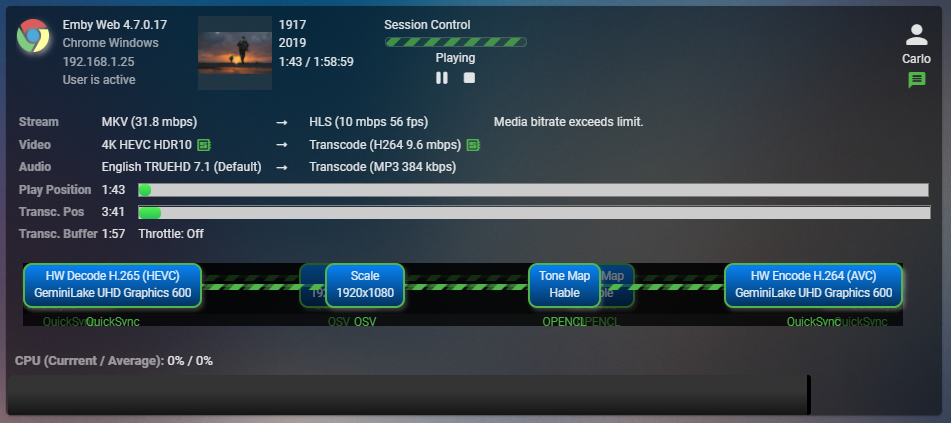
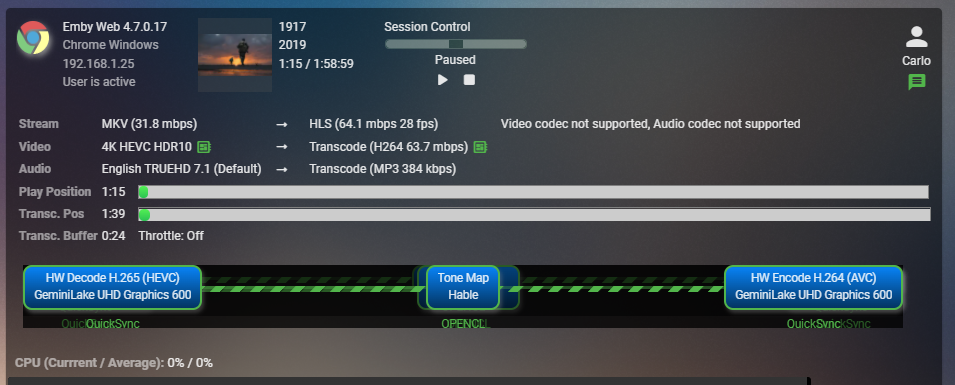
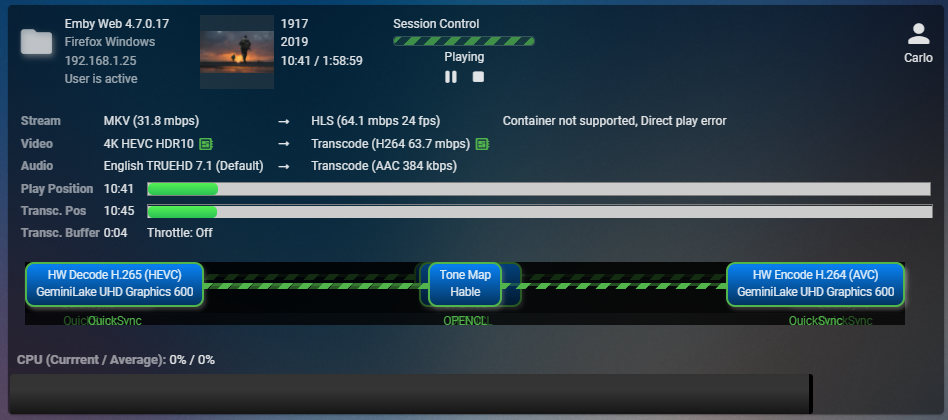
Hi, I have the same NAS as you. I'm using WD 14TB drives in min with Samsung 1 GB nvme set to read/write cache using SHR hybrid RAID with btrs file system. I'm using an aggregated link as well. I also have 8 additional drives direct attached via USB3 pooled and mounted as well as a remote attached storage from a couple Linux servers, Windows Server, WD NASes and storage from my PetaSAN via iSCSI as well. I also have a couple fuse mounted cloud storage providers just for playing around with. I can duplicate this only in chromium browsers. Firefox for example plays fine. So if you're using Chrome or other chromium browser try Firefox and see if this makes a difference. You can also try lowering the bitrate to force 1080p playback as well which I'll show below. I'll suggest setting up the transcode section like this using Advanced. I re-order the QuickSync over VAAPI for both encode and decode sections so it will look similar to this: Click the cog icon in playback and select one of the 1080 bitrate options to force the transcoder to scale the video to 1080 which it may not be doing. If you are playing back on a 1080 screen this is likely what you would likely want anyway. Let me know how that works for you. Here I'll show you a couple things with a likely same result as you at the bottom. Here's a forced transcode lowering the bitrate of 4K HDR media playing back to Chrome. (this is from the User Session menu option when you install the Diagnostic Plugin from the catalog) You can see this is doing a scale to 1920x1080 (2nd blue box). This will play the whole movie for me with no issues. Here is the exact same movie but I changed the bitrate to 4K 120 Mbps. It will start playing but then typically from 30 seconds to 2 minutes will pause itself. It's impossible to restart on the client or server. I believe this is the same thing you are seeing. I have no issues with any other client or non Chromium browsers such as Firefox. So it seems to be a Chrome issue of some kind. Here you can see I'm already 10+ minutes into the movie playing back in Firefox: @softworkz can you take a look at this and see if there is anything we can do to help with this even though it doesn't appear to be an Emby issue?
 1 point
 -
@Abobadershould be able to assist you.1 point
-
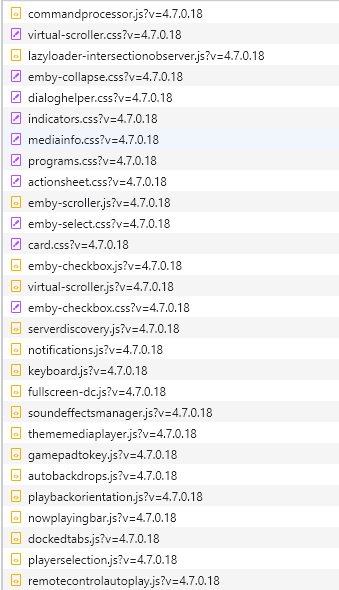
you don't want to use "no query string" see the screen capture below, everything after the ? is a query string.. if you ignore this cloudflare will cache these files as if they never change. so when a new version of emby comes out and that V= version changes, cloudflare wont cache the new files.. and it will serve up the old version files causing other issues. if you are not caching videos and you have the proper rules set, your mp4's shouldnt be getting cached in the first place.
 1 point
 -
Overall yes that would work. I still uses MCM for all my processing. Only minor quick is the "Language" field in the xml is used as Prefered Language in Emby and can potential cause metadata language issues if item is Refreshed in Emby.1 point
-
EDIT - never mind, I'm a tool. I'd been setting the permissions through the file manager, not the shares manager - I'm starting to lose my marbles a bit. I upgraded to DSM 7, but didn't follow these instructions. I was on an older version of Emby, and wasn't too worried about setting things up from scratch again. It updated fine, as a fresh install, and seemed to be all ok. However, I cannot seem to grant Emby access to my media files, no matter what I do. I've deleted the old Emby share and user, the video group, and even went in an removed the new installation folder so Emby was cleaned entirely from the system, then reinstalled it new - but it still won't allow Emby into the folders I need it to get into. I have them set with read/write access for the emby system user, but it's still just not able to access the folders... Help?1 point
-
Hi John, thanks for the feedback. I think, the audio track selection will be much easier than that. Could you please create a new topic for this? Thanks, sw1 point
-
@softworkz I have been using the new ffmpeg build for a couple weeks. I no longer need the extra parameters to get smooth AC4 audio and the quality is much better. Thanks very much. It tends to choose the wrong audio track when utilized inside Emby, so I am continuing to use an external proxy to convert before it gets there.1 point
-
Below is the latest code. Vic EmbyTagApp02.html1 point
-
That would likely only work for direct streamed video as well and I can't see this helping really at all. Not if the proxy is in the same location.1 point
-
Honestly, if you can afford an LG C1 (not a cheap television) then do yourself a favour and pay out £30 for a Roko 4K HDR Streaming Stick which is very well supported and plays flawlessly all my content from Emby. Yes, yes, I know it's another remote and you can say "well, I shouldn't have to" but life moves on and that Roku stick is superb. Do NOT go to Plex for God's sake! I jumped ship to Emby from Plex a year ago and have not had a single problem. I use a Samsung TV and ditched the Samsung Smart TV Emby app because of problems... but the Roku Team at Emby are very good and keep things up-to-date. No, I don't work for Roku1 point
-
What are you calling latest? Looks like a fix has been added to 4.6.7.0 but has not been compiled for all platforms yet. Fix regression with local network multiple subnet detection1 point
-
Hi all, I have started to use Emby as a replacement for multiple Kodi installations (FireTV, Android). Everything works fine except one thing: I am not able to convince my FireTVs to connect to the Emby Server (installed on a Synology NAS) via https. I have already read a lot of posts about this, but most of them are dealing with Let's Encrypt. In my case the situation looks a little bit different. I have my own certificate authority where I am managing certificates for all my devices (Windows, Mac, Linux). I have created a custom DNS name for my Emby Server and am accessing it via a reverse proxy, with a certificate signed by my certificate authority. Access works fine via browser (secure connection), but FireTV tells me "Could not connect to server". I am assuming this is because of the CA as via http it works completely fine. Now I have digged a little bit into that topic and also installed my CA on my FireTV stick. Unfortunately this is not sufficient as stated here: Network Proxy (Developer Tools on Fire TV) | Amazon Fire TV It seems that with Android it is required to tell the app explicitly that it needs to allow user defined certificate authorities. I am aware that this seems to be no optimal solution, as it is considered to be for debugging, but the question is if it is really better to connect via http (unsecured) instead? Wanted to ask if there is any chance that using custom CAs will be possible in the future with the Emby apps for Android? Thanks! Bye1 point
-
@rbjtech these days encryption is becoming more and more important and I decided to use it also internally in my LAN wherever possible. Most likely, as you said, it is not required as it does not give me more security in a sense that I need to protect things, but it simply gives me a better feeling of having a more secure infrastructre and device communication in general . Who knows what the future brings1 point
-
This is ridiculous that a simple change in coding takes a year to change something from emby devs…im a monthly subscriber but i will look probably elsewhere (plex)…this issue with slavic language is affecting ios iphone and apple tv 4k as well…and please stop answering like we will look into this…1 point
-
Yep its not working. Just made sure its turned on and rescanned the library and 3 shows are separated exactly the way the folders are separated.1 point