Leaderboard




Popular Content
Showing content with the highest reputation on 11/02/21 in Posts
-
POSTERS "Posters" is in an Alpha stage of development. (was excited to share with the community, but there will be some fun things to fix) It is an application written in Javascript which will connect to Emby and display the a poster for the media item currently playing on a device. This app is hosted in the web browser. It can be run on Raspberry Pi, stuck to the back of an old computer monitor, mounted on the Wall. It can be opened in Chrome using 'Kiosk' mode, and the display set to portrait. More Raspi integration terminal commands to come. (Anyone with Raspi knowledge? It's time to shine!) It uses https://animate.style/ animations, so there is, literally, an bunch of possibilities in layout, and animations to make the posters app unique to each users tastes... More to come. How to use: Unzip the folder to the desktop (anywhere) Right click "index.html" Open in your favorite browser Discover your server Login Start to play a movie on one of your emby ready devices Watch the posters come alive TODO: A Landscape view Configuration options Terminal Commands for Raspberry Pi (kiosk browser, start in portrait, load html on start) Fix multiple streams cause images to reload. Maybe this is a good thing, we just have to slow it down. Take advantage of all the different animations available in animatecss libraries November 3 1. Added full screen capabilities, 2. landscape mode, 3. hidden fly-out nav for future options. November 2 1. First Upload DOWNLOAD: PosterApp_v0.22.zip7 points
-
We'll add this to the next update to the nfo plugin. Thanks.2 points
-
No this is about adding a person to media that has the same name and not being able to add the correct one to the media. But if one writes nfo files, all they should have to do is manually update the providerid in the media metadata for the person now. As of today's nfo plugin change. @gillmacca012 points
-
For now you better use my scripts. they should fix your problem for now. I would be more than surprised if this is fixed in the next update as i've learned it takes a very long time till something new gets implemented, but i also know this would be a simple edit and could be done in about 2 mins. Simply add index.nfo to the supported files with someting like if movie.nfo or filename.nfo or index.nfo DO SOMETHING.... but we will see2 points
-
Live TV playback went through the first round of testing. This is with the new hardware support, new tuning methods and optimizations. It's a lot faster starting up now. Some changes need to be made to fit better into the current server and to simplify a few things. The UI is different than the current server so there are some things like that to take care of. The team is working out those details meanwhile the devs are catching up on some other work. Once some of this is addressed it will go back out for another round of testing that likely will be expanded to get good coverage for the different broadcast standards and to test the new hardware options. Then it will likely go out to anyone who wants to participate with testing. That is speculative and could change of course. It's going to be a monster release and have some new things you hardly see in any other program. Certainly not all the features this has in one program.2 points
-
You know that cannot go unchallenged. TMM is doing exactly as it should, seeing it follows Kodi conventions/standards - and let's be honest, however much we're all fond of Emby, Kodi IS the standard-maker or trendsetter, however you want to call it. https://kodi.wiki/view/NFO_files/Movies#nfo_Name_and_Location However, in order to make-up for Emby's shortcomings (not Kodi's) - or for it not adhering to Kodi standards - most sensible solution would be for TMM to natively support copying that index.nfo up one level in movie root folder as movie.nfo, hence enabling both Emby and Kodi (and TMM) to make use of those same nfos. Whether that will eventually be implemented or not, remains to be seen. Or - and that would actually by the proper solution - Emby should properly conform to Kodi's file/folder structure and naming. @Luke2 points
-
Not to worry my friend. @kingy444 is going to look over the code, and add his code to the project. It'll be like Avengers Assemble, or Forming Voltron. LOL2 points
-
Gents I have fixed this issue just now, so keep an eye out for an update on your server for Version 1.0.0.6. Interesting you say TV shows as the only logic in Vantage Point is checking if an item is a Movie, if it is then it will allow the code to run, so if it's not, it wont run any code. I did find another error in the code while i was troubleshooting the trailers one, it may have fixed this issue. If you can run give it a go and run a fresh log for me please (enable debug logging).2 points
-
Some text in dark mode needs contrasting colours i noticed this in certain menu areas
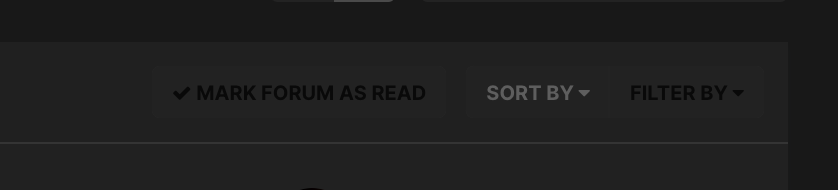 2 points
 -
Wow considering I made the original post in 2019 with BDMV and .nfo issues, I am proud that I didn't give up. Thanks @Luke A special shout-out to @GrimReaper too who provided technical background, fact-checking, context-setting and the fair assessment of the balance between the rights of users and developers. I don't think I alone could have convinced Emby myself to make these changes @Painkiller8818 Thanks for being a part of pushing Emby over the edge too1 point
-
Thanks for the explanation. The problem I was having was the awkward way of entering text with the Roku remote. I found that Roku has a mobile app remote and it works much better. Thank you for your help.1 point
-
Nice one, Luke.1 point
-
Thank you @Painkiller8818and @GrimReaperfor being champions of advocacy on this issue. You have additionally provided much needed technical context and interim solution too. This Emby Community would not be this enriching place without people like you.1 point
-
That fixed it, thanks! Pros/cons for leaving things like that? (QuickSync above VAAPI) Attaching logs just in case you wanted to see the difference. embyserver.txtffmpeg-transcode-5b610f28-cc8f-42f2-9ccf-c375a75d639a_1.txt1 point
-
Sorry this nfo update looks like it many be still only beta 4.7+.1 point
-
Depending on what the dev has to change and how destructive that change will have to be. It may be a issue of having to start over to reindex. But have to what for a comment from Luke.1 point
-
I was being conservative (I have some really old shows where each episode is in its own subfolder), 5 levels is what I know of: TV-shows-parent-folder\Letter-folder\TV-shows-folder\Season-folder\Episode-folder1 point
-
Posted at the same time by yes assuming media nfo has person providerid.1 point
-
If Emby were reading index.nfo as it should, that situation is hypothetical and should not ever happen. However, for the purpose of it being a workaround, seeing Emby is anyway ignorant of index.nfo and unaware of it, it would only read/write movie.nfo. Same as above, that is theoretical and reading/writing index.nfo is the only thing required. If both are present, that's users fault and deliberate breaking of structure - and bearing the consequence for it would be just. Right question there would be Why not? Anyway, capability is already there and implemented, writing NFO 2-3 levels deep: complex folder structure (always think of that guy that has them sorted by years ), TV Shows (episode NFOs). It all comes back to reading/writing index.nfo in BDMV folder. It is particular structure/usage-case. It should be treated as such and get particular logic.1 point
-
To figure out the correct AR on a problem video, sometimes I look for a starting logo for the company / studio. Sometimes if it's a major release the actual title will be styled with a custom font. Just getting the original title in a png and overlaying it to a screen shot can tell you if the AR is stretched. All the large production companies have copies of their logos online just search for [company name] .png logo. Another easy one to check is the rotating earth or stars in a circle banner, or circle path of a flying fairy... recognizable logos that appear at the start of some content. Copy paste a screen shot it to a photo editor and try to draw a square on top of the Earth or other perfect sphere, as a quick way to check if it's round or not. 3 pixels too wide left and right? Then reduce the video width by 6 pixels and rencode a few seconds to test. Looking into someone's eyes in a close up, can often spot the video is too wide or too thin.by the shape of their iris. There is always car wheels in the background if you looking at the car from the side, straight on. Same with a round clock directly facing back wall. Some movies are shot with wide angle lenses that widen people very slightly at the edges. Professional cinematohraphers know this and when they are using an anamorphic lens they try to keep actors away from the extreme sides of the frame. Anyway, check for circles in the middle 3rd of the frame to avoid any slight stretching. Usually just cropping out any black bars and then checking the pixel size against the ratio it should be works most of the time. Sometimes I've seen old content pre -60's that had been slightly cropped and then resized and was still wrong often by around 5%. You can do a screen grab, move it to photo editor and resize it back to what it's suppose to be and see how it looks. Often the skinny faces pop-back to normal people and you know that this copy needs AR adjustment. Hope that helps.1 point
-
I agree with Grim, hence the smiley. It would get rid of the problem however.1 point
-
Hi. According to my research the requirements on the Amazon platform have not changed. In order to use voice search on the Fire devices you actually have to tie in with Alexa which is a centralized service. Our Emby Alexa skill should be able to do this for you and then will be able to control our app on the device once items are found.1 point
-
Or just drop disc based formats like it did ISO since it's not a streaming format.1 point
-
He said besides TMM.1 point
-
This is awesome! I look forward to playing around with it this weekend1 point
-
Emby already pays attention to the provider id that is linked to a person in the database. The problem is the old tvdb api and therefore the tvdb plugin, as tvdb doesn't return a unique person id. So how should Emby know who is who? With the tmdb provider all is fine with different persons with the same name.1 point
-
I will work on the dark theme this weekend, thanks.1 point
-
Thanks to this thread I see, that for my use case stubs will be almost perfect. I want to have 1080p collection under emby, and stream 4k/HDR/Atmos movies from Apple TV (I can buy lot of movies for a price of additional 8TB+ HDD). When I'll buy something on Apple TV I can just add a stub to also know, that 4k ver exists. What would be perfect is some kind of trigger which will open Apple TV on my Shield (or Google Movies) as external player and play this exact movie. Is Android TV/Android/iOS giving tools/API to play exact movie in this external App? If so it would be awesome to implement it for iTunes/Google purchased movies. This way I can buy movies on both platforms and have easy access through Emby even, that play counter, resume etc wont work. Just ability to open a movie in external app would be superb. Maybe Emby client could trigger Siri/Google Assistant command like "play MOVIETITLE on Apple Tv"?1 point
-
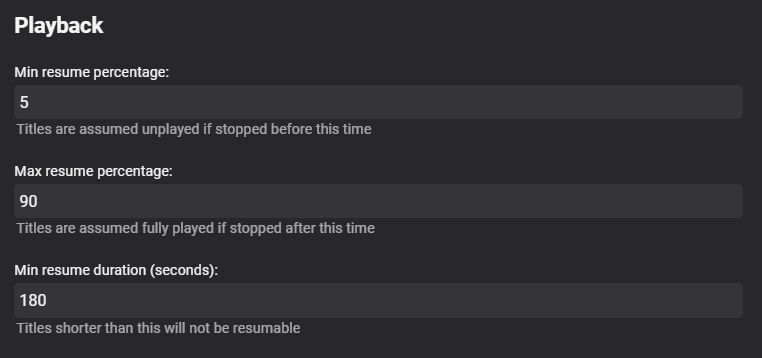
You'll find it in the Library settings of a particular library, when you enable 'Show Advanced Settings' Right down the very bottom

 1 point
 -
Experience has shown over and over again it doesn't help. It's not about the throughput on one disc but the overhead of writing the small files and reading them back from slow media. Switching the transcoding path from one slow disc to another slow disc likely on the SATA bus doesn't help. We already know the answer to the question you asked because I always suggest people pick up a cheap SSD to use for the transcoding folder and their issues go away. Just moving the transcode folder to another HDD offers little or no improvement. Moving it to an SSD helps but it's usually still on the SATA bus which is what I'd like to remove from this by having a ram disc option.1 point
-
I disagree a lot and you can read this over and over in our forums. We see many systems IO bound all the time. Often it's the difference between Live TV working and Live TV not working when recording even sometimes just with one recording. My Synology 920+ wasn't good for DVR and watching at the same until I dropped two 1 TB nvme sticks in and set them up to do read/write caching which acts very similar to a ram disc since I have writes delayed. But it's still only a fast SSD and using a pure RAM disc would still be a lot better and faster if the size was managed. My two i7 computers are the same way. I can't run Live TV well on either of them either without using an SSD as the IO is a problem. It's NOT about the total throughput but the queue management of reading/writing all these files when they can't be written immediately. The slower the write media the worse this becomes even though it's the same IO throughput. This is especially true with SATA vs SCSI or SAS for example as the CPU has to be involved in the process. Ram disc change the way this works as the files don't touch the SATA bus. <cough>the competition has done this a while back removing the oldest files from the transcode folder and you can easily run 5 or 6 transcodes with a small ram disc and things work pretty well. Obviously if you remove older parts of the media being transcoded and the person backs up it might need to get transcoded again but that's a fine trade off on small ram discs and the person can always add more memory and expand the size from 2 or 3 GB to 8 or 16GB. But it does make a huge difference. Even going from HDD to SDD can make a substantial difference to Live TV and recording!1 point
-
Yes, that is what I want (and would have expected) if Episode name pattern is set to %f and “overwrite existing episode files” is checked.1 point
-
Clarifyting here for @chef - you are saying that when sorting a file, and you already have the file in your library - you would want the current file removed and then new file moved in using the naming pattern - is that correct ?1 point
-
Yes we should add this for backdrops. Thanks.1 point
-
-> StreamInfo.MediaSource.LiveStreamId That field is missing if it is not Live TV. Yep. That is "exactly" how the Roku does this except with brightscript instead of python. Same exact evaluation. That is what should be used.1 point
-
Netflix's 4K bitrate is lower than most blu-ray rips and, while more efficient codecs reduce the impact of that, I wouldn't call their 4K quality something to aspire to if you're starting with discs. To answer your question though, there is no one answer. It depends on your playback devices, server horsepower, number of remote users storage limits/budget, bandwidth, etc. For me the optimal size is whatever the disc rip is. My playback devices are shields which can handle that output just fine, I'm not worried about storage, and I have zero users outside my house. Change some of those factors and storing or playing back 70-100Mb/s 4K videos wouldn't make a heck of a lot of sense.1 point
-
No worries! The app is soo close to perfect in my eyes. Amazing work1 point
-
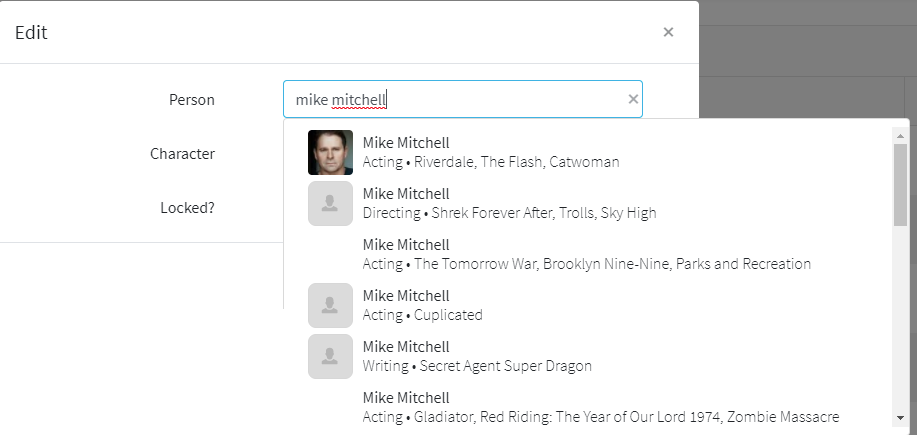
Luke would have to implement something similar to this for manually adding People to items in this same named people environment with a New person option that is further down the list in this example. But pünktchen's method is what I did in the past. But in the end if you could add this person to the provider sites this would/should resolve the Emby issue as the item would return the person with properid.
 1 point
 -
You have to rename every occurence of the new "John Bishop" in the Cast & Crew metadata of every episode, show or movie to something like "John Bishop 2". Then you have to identify "John Bishop 2" with either the tmdb or imdb id. After that you can rename the person "John Bishop 2" (not the cast) back to "John Bishop". The cast names will be adjusted automatically by Emby.1 point
-
Damn. TWO verys?? I mean it's not like Vegas with your parents, right? It can't be that bad.1 point
-
I'll continue to try and find a workaround. Right now, increasing the timeout on the backdrops has a very bad side-effect that I'm not willing to live with so I have to see if there is any other way.1 point
-
1 point
-
Right, this is what I was driving at - just having display values. I've been the IT field for over 20 years, so I fully understand regarding not opening up the user confusion can of worms. As rbjtech mentioned, perhaps a plugin is the better workaround. Then OCD nuts like me can willingly deal with the duplication/discrepancies and it's not forced on the masses. Thanks for your time!1 point
-
I am happy to hear that So yes I'm already using %fn so the file name keeps as it is. I hope you really understand. I just do not want the new file to be named like the old file. So first upload is e.g. NCIS - Los Angeles (2009) - S12E08 - Love Kills 1 [WEBDL-1080p][8bit][h264][EAC3 5.1]-NTb.strm This episode is English yet, as soon as it gets replaced, the new episode title would look like NCIS - Los Angeles (2009) - S12E08 - Love Kills 1 [WEBDL-1080p][8bit][x264][EAC3 5.1][DE+EN]-wayne.strm So basically I need the prefixes at the end to keep intact1 point
-
So you are saying it was totally hidden :).1 point
-
Hi. The limitation is the fact that we use this information to make playback decisions so it must be accurate. Therefore, we can't make it editable nor rely on simple header information that can also be edited/inaccurate. Now, you'll then likely say - then just give us some display values - but then the issue becomes what happens when the display values conflict with the ones we derive from the actual media? Now we've got not only duplicates but also possible conflicts and we spend more time troubleshooting and trying to help people understand the differences and/or why they aren't seeing what they expect.1 point
-
I completely understand that point - what I was attempting to convey (rather poorly it seems) is that I, and perhaps others, would love to see this implemented via another mechanism if necessary. It's a shame it can't all be done by a single toolset, but it would seem ffprobe is lagging in this regard. Clearly it's programmatically doable - MediaInfo does it, MakeMKV does it (at least to some degree), pretty sure DVDFab can do it, and I'm sure there are others. Now maybe there's a technical limitation that prevents using other methods to do this in Emby. Perhaps there are licensing or other constraints. Perhaps not enough people care about it like I do or it would require too large a time investment for the relatively small payout of simply displaying some extra metadata. All of those are valid reasons for not implementing a software feature, but there seems to be a sense of, "ffmpeg/ffprobe can't do it, therefore it cannot be done in Emby." Perhaps that wasn't the intended message; perhaps the intended message was, "ffmpeg can't do it, and ffmpeg is our tool of choice, therefore we're not implementing a new mechanism just to satisfy your OCD. You'll just have to wait to see if/when they implement this." Of course that's disappointing, but totally understandable - Emby is a business and business decisions must be made. Agreed - I have enough of that in my life. Keeping up with an 80TB DIY fiber channel SAN, backing a 2-node Hyper-V cluster with two dozen VMs, keeps me doing more than enough mundane maintenance.1 point
-
Does this help? https://en.wikipedia.org/wiki/Rec._20201 point
-
I'll check that. How did you add the Genre? Usually I use the Emby server metadata manager, but there I cannot "add" movies to a Genre. I can add a Genre to a movie but seems you are doing something different.1 point