Leaderboard




Popular Content
Showing content with the highest reputation on 10/31/21 in Posts
-
I found the solution ssh var / packages / embyserver / var / passwordreset.txt Link and pincode to reset my admin account in passwordreset.txt2 points
-
@mbguy As you are using Windows i can help you out with a little script. Open PowerShell ISE on your Windows and paste this code and run it after editing Root Path or save this script as a .ps1 File and run it with PowerShell You only need to edit the first line where your movies root path should in. EG: E:\MOVIES\ What it does. It enters your movies main path and crawls recursively through all your sub folders finding a .NFO file inside a BDMV Directory and moves it one level higher It first lists all found NFO and asks for confirmation before starting to move anything. $Root = 'YOUR-ROOT-MOVIE-Folder' #this is really your root folder holding all the movies in sub folders $ItemsToMove = @() $Parents = Get-ChildItem $Root -Directory foreach($Parent in $Parents) { $Children = Get-ChildItem $Parent.FullName -Directory -Recurse | Where { $_.Name.EndsWith("BDMV")} foreach($Child in $Children) { $ItemsToMove += Get-ChildItem $Child.FullName -Recurse -Include *.nfo } } Clear-Host Write-Host "`n--------------------------------------`n" -ForegroundColor Green Write-Host "Item(s) to be moved up a level...`n" -ForegroundColor Green $ItemsToMove | ForEach-Object { "`t{0}" -f $_.FullName } Write-Host "`n--------------------------------------`n" -ForegroundColor Green $Response = Read-Host -Prompt "Ok to proceed? Y/N" if($Response -match "Y") { Write-Host "Processing request..." foreach($Item in $ItemsToMove) { if($Item.Attributes -match "Directory") { Move-Item -Path $Item.FullName -Destination ($Item.PSParentPath -replace $Item.Parent, '') } else { Move-Item -Path $Item.FullName -Destination $Item.Directory.Parent.FullName } } } else{ Write-Host "Cancelling request" } ONLY edit this Variable --> $Root = 'YOUR-ROOT-MOVIE-Folder' hope this helps you out.2 points
-
Hi Guys, I recently moved from Kodi with MySQL for lack of proper multi user management and server side support, I have to say I'm impressed with Emby. Together with the Kodi Plugin it really takes the solution to a whole new level, count me in among the supporters! One feature I would like to see is the ability to recommend movies or shows to other users: I share my Library with close friends and family but it is a big library so they are always calling me to recommend them a movie to watch. It would be really cool if after watching a movie I can click a Recommend button and choose the users I think would like the movie, then it is displayed on their suggested movies at the top with the name of the user who recommended it... Sorry if there is something like this is already there, I am new to the interface and don't fully know it but could not find such feature... Thanks!2 points
-
Hello, I have observed that all the content that I am seeing, that has been downloaded to the mobile, the progress of the viewing point or indicating that it has been viewed, only saves it in the local version (downloaded) and that information is not communicates it to the server. Therefore, if I am viewing a movie (downloaded to a device) and I leave it halfway, and then I want to continue watching that movie on the server, it does not save me at the point where I left it halfway. As if I have downloaded a series and have seen 3 chapters, for example, these in my library then appear without viewing. I think that once the device connects to the server, it should synchronize that information between the mobile device, tablet, etc. and the server.1 point
-
Please go here for info, bugs, issues and feature requests Been working on a plugin that bring the big screen experience and is user driven. Introducing Vantage Point Plugin for Emby. It can be downloaded in the Emby Server Plugin Catalogue. the order is pretty much set at the minute, But so far I’m happy with how it works. At the minute these are the following sections Personal Bumper Trivia Section intros, funnies and adds, select upto a max of 50 intros from your selected folder - good to use while your movie guests get drinks, popcorn, hotdogs etc, Personal Bumper Coming Soon Bumper coming attractions, select number of trailers to play from various sources. Courtesy intro - be quiet or mobile phones off. Only 1 is selected Personal Bumper audio codec intro matched to feature presentation audio track, only 1 is selected Feature Presentation Bumper countdown to feature presentation, only one is selected MPAA, BBFC, etc - certification screen which is matched to the MPAA rating tag in the nfo file. Feature Presentation Starts. For Bugs and Issues, please post them in the below thread Vantage Point - Big Screen Experience Intros - Plugins - Emby Community1 point
-
Okay so this idea has come from a cpl of queries i got from my old mother when having issues. As techy people the current app install and setup is second nature but to those who expect a netflix open and forget experience will be sorely dissapointed. It would be great if upon first install of the app a sort of mini setup guide would step page by page on a couple of essential items: Maximum Streaming Bitrate One screen to either do a broadband speedtest and set this variable or just allow a manual selection with a header like " What is the maximum broadband speed available?" Reason - The auto setting which is default has proved a pain in the backside incorrectly detecting broadband speed and then resulting in a file rated at 3mbps transcoding on a 100mbps line due to alleged insufficient bandwidth. As soon as i explained to se this, the file played correctly. Startup Behaviour Again a simple setting which is hidden away and causes confusion, especially as the default is in my view the wrong one A simple screen asking them to select the default. As most are probably single user accounts the default should be "Login as this user automatically" explaining this option is best for single users or "Let me chose each time i open the app" which would then be set to the current default select user/server screen. I forgot to set this screen and then got a "what the hell is this message" when she next logged on. What was the end result of this? Her words " this is too much faffing around im going back to netflix" Which to be fair was fine by me as saves me getting support requests and means im back to having my media to myself lol Anyways just a thought1 point
-
Yes 5g may make a difference but at the same time will get just as saturated when everyone is doing the same thing as providers will always be throttling traffic.1 point
-
That's interesting, thanks for the info.1 point
-
Just replace the Move-Item with Copy-Item in the first script.1 point
-
On your screenshot i see you checked both movie.nfo and filename.nfo. As i don't use TMM, what happens if you only select the filename.nfo. I don't know where these index.nfo files are from. I've never seen any mediaplayer i used to create those. To rename all index.nfo to movie.nfo execute this in PowerShell ISE: Set-Location "YOUR-MOVIES-ROOT-PATH" Get-ChildItem -Recurse -Include index.nfo | Rename-Item -NewName { $_.Name.replace("index.nfo","movie.nfo") } Forget about managing your movies with TMM with this kind of limitations. Just execute this script and let Emby create and manage your NFO files from now. You don't wanna feck around with 2 different NFO files because Emby will always just edit/update 1 of them so you will have 2 different for the same movie just to keep TMM seeing them. Forget this. Rename them so Emby can use and handle them and throw away TMM. I use MediaCenters for years, Kodi, Emby, Plex and i NEVER needed an external tool to identify my movies and create NFO files for them. This is what emby is for, to be a MediaCenter and creating and managing NFO files is a part of it.1 point
-
Actually I haven't verified this yet but will. I can only reproduce this on my production system and it's busy recording NFL games today so I need to wait until it's done recording to be able to get a copy of the database for me to look at and then trace it back to the guide itself.1 point
-
Only devs can answer that but it obviously is not as easy as is sounds with your home server. But that question has two different answers depending on whether you are talking about Transcoding or Direct Play per the adaptive streaming topic you have already commented in. Online services could bounce between dozens of versions to give you adaptive quality. You will not likely have dozens of versions on your media server.1 point
-
Hi All, I have been playing around with some enhancements to music metadata. Two areas of interest for me are capturing performer credits and original release year. The classical fans seem pretty keen on getting performer credits, but I think it is of value to a broader audience as well. I particularly like it for my jazz collection. The other "Original Year" in Picard speak makes sense to me. It is of more interest to me to know when an album was released rather than the cd etc. I know you can change the tags via scripts etc, but I would prefer to keep the tags correct and capture the original year and then have Time Lord or somebody give folks the option. Being fearless (sure others would say reckless or clueless ) I made some changes and have been running a mod version of the server for sometime. So I thought I would throw the concept out there to see if there was any interest. Some obvious issues aside. This has been working pretty well for me. Anyway thoughts comments. Maybe we can get a coherent request together for a feature request. Thanks -Vicpa @@ginjaninja,@FrostByte,@gcoupe, and the emby community at large!!1 point
-
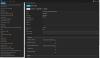
Just tried to link a soundtrack to a movie using the TMDb number and I can't find it in the metadata editor anymore. The soundtracks I already linked are still linked, but I can't find where I would even modify the data for them either. Sorry, looked in the release notes and didn't see anything about this moving or going away. It used to be under "External ID's" Thanks FB
 1 point
 -
I also think that this would be cool!1 point
-
I did what you just said and I works @CassTG Thank you1 point
-
I use Windows, not Linux.1 point
-
I would Remove Docker as per their instructions then execute the comand above Reboot and check the netstat command again before reinstalling1 point
-
New version available 6.1.6-build 95 (ex9) delta changelog: - improve stability - some minor bugfixes - fix movie specials This version is not very well tested! Keep an eye on cpu load.1 point
-
This should be improved with the 3.2.36 app update that will be rolling out in the coming days. You can also get the apk from our website: https://emby.media/emby-for-android.html Thanks.1 point
-
Ho disinstallato e reinstallato il programma e si è collegato1 point
-
OK Sounds good then.1 point
-
Do you have NFO files saved to your media folders? If so you want to check the NFO files as it sounds like to me that the NFO still have the wrong collections in it. If for example you go into the Collections and delete the collection it's probably not removing the entry from the NFO file and will come back. If you go into the collection, highlight the movies you want to remove, click the 3 dot menu and choose the remove from collection menu item this will update the NFO file and stop it from coming back. So could you check on that?1 point
-
If you can sacrifice drive bays on your NAS to use for SSD that a volume directly on that is going to be ideal. But I would not even think of doing that on anything with 5 or less drive bays as you'll later be kicking yourself in the but when you want to add another HDD but can't because of a 1TB or so SSD using the drive bay.1 point
-
same experience. hopefully there's a way to adjust the thickness of the outline. I ended up adding background to the subtitle (looks bad but easier to read)1 point
-
I have the same. I have my Christmas movies in in there own folder but added to both Holiday/Seasonal Library and Movies folder. At Christmas time they only show in the Holiday Library but I turn that off after the holidays so then depending on user (I give them a choice) I either add back to Movies or not. Give me a bit of flexibility. My Holiday/Seasonal library also has Easter, Halloween, Valentines, etc Movies as well that get used the same way.1 point
-
That’s how it works for me on emby using only Continue Watching. it shows partially played episodes/movies and the next up episode everything ordered by last played entry.1 point
-
Seeing that repeated under every single item, IMO, would be ugly and a waste of vertical space.1 point
-
Thank you, everybody. Problem solved. DDNS service provider problem, changed a service provide, No problem1 point
-
GrimReaper, Folder view is what I needed. Thanks for your help!1 point
-
Sorry. I am away for the weekend. I will check when i get home1 point
-
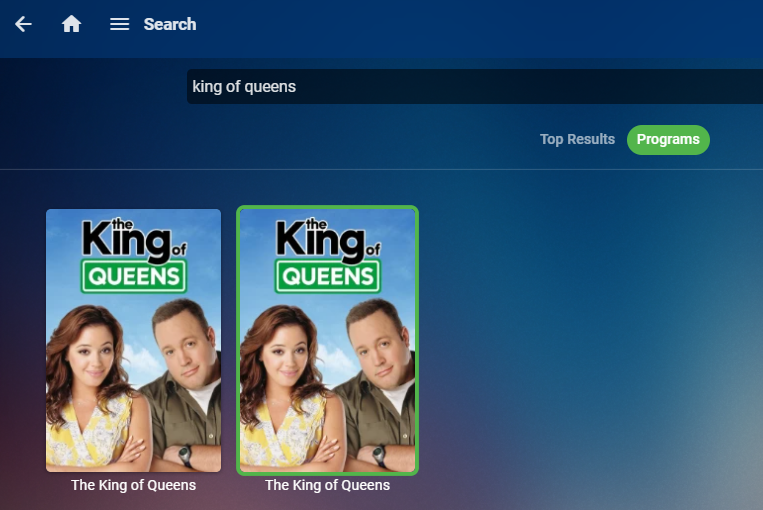
Do a search and then click on Programs. Do you get something like this? If so you're getting two different IDs back for the same show and this will cause and issue when recording. First box on my system id=2110064 Second box on my system id=2103151
 1 point
 -
Yea the issue is that the previous design was dependent on artist backdrops, which not everyone will have. Without an artist backdrop, you'd essentially get a blank screen. So that's the reason for bringing in the album art. But options are always possible.1 point
-
I believe you can just use Read but then you can't write NFO files or store images with media. So if you make any meta-data changes, re-identify bad matched move/show or anything like that you would loose those changes if you ever had to reload a library. Saving the NFO and having all the graphics stored with the media can make a library reload much faster. Choice is yours of course.1 point
-
@CassTG Thank you for taking the time to put those together... it's greatly apricated truly.1 point
-
It is a matter of what generates the UserDataKeyId to make them unique as that appears to what is used in the UserDatas table when favorited.1 point
-
Did you set System internal users on your shares? example1 point
-
I was just going to offer remote support to do exactly what you just did. Glad you got it worked out!1 point
-
Ok done! thanks for support1 point
-
Click on your User top-right, 'Unlock app' should be the last option in the dropdown, IIRC.1 point
-
Hi, if you are referring to the trailer plugin that cinema mode can optionally use I believe they are only in English at this time. The trailers are mostly 480 but many can be used as 720 with a database hack to change the URL. (replace 480 with 720 in the URL). Cinema mode can use trailers you have on your system which would allow you to use any language you desire.1 point
-
It is absolutely impossible to cut a 20-50GB BR or 50-100GB UHDBR to 2-5GB without significant loss of video quality. The results may be 'fine' but they are not indistinguishable from the original material. If you find them visually identical then one or more of these is true: Your TV is of very poor quality Your TV is too small for your viewing distance Your TV is very badly calibrated You aren't paying attention Your eyesight is poor I generally don't see good video quality at HALF the original bitrate, especially in dark scenes, let alone after eliminating 90% of the source data.1 point
-
Yeah, I reckon that was what the OP was referring to, as client apps don't expose port once connected anyway.1 point
-
I really dislike mrmc, always has way too many bugs and it looks terrible imho. I try it every 6 months or so. But since I rarely use livetv, and, timers are a rare thing and I do it while watching a recording anyway on iPad, I don't miss those functions at all in Infuse. For me, it is (in essence) all in one. With Infuse, I am not missing a thing afaiak.1 point
-
Hi, I tried all brightness settings and eventually I ended with the medium one. It did help a bit but, as I told, in front of bright backgrounds it still hard to read. Recently I discovered the shadow option in the mobile app and was totally excited about it.1 point
-
Check out xTeVe. It presents m3u's as a HDHomerun tuner to Plex or Emby. You would probably need to run 2 instances of xTeVe, one for each account, and then let Emby combine them as it does a HD Homerun tuner. https://xteve.de/ If you need to jump in the Discord, the developer is actually really helpful!1 point
.thumb.JPEG.d5a658e8d3047d1416039cf12d6c3955.JPEG)