Leaderboard




Popular Content
Showing content with the highest reputation on 10/28/21 in Posts
-
It would be nice to allow non-Admin users to have the option to refresh the metadata for their own content. For example, my daughter has her own libraries (TV and Movies), but when she's watching something and say the synopsis is missing, she has to ask me to update it, as she doesn't have the Refresh Metadata options. Obviously this would be set on a per-user basis. Thanks.3 points
-
I didn't even know that was the jellyfin logo lol I only know plex as evil3 points
-
In the future it will be there! We are still working on it. Stay tuned!3 points
-
User authentication. Since the server was running on Windows we mounted the remote folder to a windows drive letter specifying a specific user/password and set it to auto remount so it's always available.2 points
-
@CBers @Happy2Play @Spaceboy I add back "back to top" let me know if it ok now.2 points
-
Is it possible to vote against feature requests? If so, I would like to vote against this one. If the development team for Emby is as small as I think it is, I would hate for their time to be spent on implementing such a terrible idea. Why on Earth would anyone ever intentionally distort a picture to fit some arbitrary piece of hardware.2 points
-
Please PM our mod's team @Happy2Play @CBers about the replacement image link and they will do it for you, thanks.2 points
-
It is really cool that Emby has the ability to support multiple versions of the same movie. It would be nice to have a setting on the client side to allow the user to set which version should be selected by default. This could be as simple a user-entered string, or it could be a list of detected strings to choose from. It could allow multiple entries and it would choose them in the order entered. On the Kodi side, it would also be nice to get the "Choose the Best Version for Me" option that the Emby app has.1 point
-
It would be great if i could set the server to delete certain shows after a user has watched it. I happen to watch "The Daily Show with Jon Stewart" and "The Colbert Report", everyday, and with "News"ish type shows, there is no need to keep the episodes around. So i would like to set MB to auto delete those 2 shows, 3 days after one user has watched it.1 point
-
Hi. Can you please add an option in the settings to hide the "Media Info" section? When using emby on my phone, it pretty much takes more then half of the page. On top of that, not having it be showing, it would clean up the page. At least gives us that option to hide it. Thanks.1 point
-
As I mention in a related post, I love the additional subfolders for Movie Extras (eg, Shorts, Scenes, Interviews, etc.)! It would be awesome to extend this functionality to TV Series as well. Specifically to add support for many/all of the same folders supported for Movie Extras, eg, extras specials shorts scenes featurettes behind the scenes deleted scenes interviews trailers As well as any additional folders that get added in the future (eg, hopefully Galleries). Support Placement of "Extras" Folders Within Each Season Folder, Plus A Naming Scheme to Link A Particular Extras Folder with a Specific Episode (eg, "\Season 1\E1 - Deleted Scenes\" for episode 1 deleted scenes): I want to clarify that it would be great if these various "extras" folder types could reside within each Season folder. So for example, within a Season 1 folder we could then have an "Extras" folder, a "Deleted Scenes" folder, a "Featurettes" folder, etc. And furthermore, that we could designate a particular folder to refer to a specific episode (eg, "\Season 1\E1 - Deleted Scenes\" for episode 1 deleted scenes). See more below, particularly why I think this would be so useful: https://emby.media/community/index.php?/topic/55915-emby-server-theater-additional-extrasspecial-folder-types-for-tv-series-similar-to-movies/&do=findComment&comment=587195 Thanks for your consideration! PS - If this is something you might like to see implemented, be sure to "Like" this top/first post (as well as any subsequent posts in this thread that highlight particular aspects of what you are interested in) -- "Liking" the top/first post helps the Devs to know how much interest there is in a given Feature Request.1 point
-
Hello. Would be great to be able to adjust subitiles delay in Emby Theatre or Web client like we can in VLC with "H" and "J" shortcuts (up and down). Thanks !1 point
-
Okay the trailer plugin Archive, as I was wondering were this 2014 trailer was coming from but I do not have that enabled. But I can say I can not reproduce this behavior though, unless there is something specific to Cinema Intros, but have not notice this in any trailer I have tested.1 point
-
It ain't. There are number of topics being reported with "Auto" being too conservative (with somewhat increasing frequency lately, likely due to general available bandwidth increase (and/or increased-media bitrate) and it becoming more noticeable) resulting in certain playback issues by proxy. Just set it to some fixed numerical value, as per above example anything above 56 Mbps should do.1 point
-
So technically without knowing folder content Emby is treating a Trailer as a Movie (do to not having media) and Resume settings are not being honored in your situation. But I would assume this would be resolved if your media was treated as a trailer instead of a Movie.1 point
-
Very cool fella!!1 point
-
Just knocked up a draft MPAA version a cpl of minor tweaks as they dont have decent enough pngs to use, so had to bodge it manually, text and colour from trusty ole wikipedia, colours as close to those on their also but not being from the states these could be well wrong lol1 point
-
Great thanks! So if anyone is having connectivity issues when using Cloudflare, my advice would be to try the reverse proxy option. That's what worked for me.1 point
-
Hi, a normal install is fine. I think the main point of this topic was automatic SSL renewal.1 point
-
You have a logo of me??? Epic1 point
-
@Cayars, came through again. Problem was not knowing what I was doing. Cayars, added the camera recordings into my Emby server............... Working perfectly, now...........1 point
-
from thread RenameExtrasAsSpecials v0.0.0.1.zip Purpose Prefix "extras" with S00E1000+ to ensure extras show in ui, do not incorrectly match against tvdb and do not clog up "continue watching" Requirements Powershell Core / path to pwsh.exe Windows (could be tweaked for other platforms supporting powershell core) minor powershell understanding to tweak to your environment backup of content prior to use and caution as the script renames files and has had very limited testing Installation Copy script to preferred location Edit Path to script in .reg and install .reg tweak script to your preferences / environment, remove wait states post testing Usage Right click folder (Season 00/Specials or below) - choose 'Rename Extras' issues welcome1 point
-
Thanks, that helped, now they are displayed to me.1 point
-
@CassTG not sure if these are of interest to you1 point
-
emby logo is great and you can download any format and scaleable vectors if required of the logo to use if you want, that's how i created the emby logo into in after effects1 point
-
Eh, for some files in my collection, the web player works with subs but for some others it does not. external players do not have any problem with the same files. Unfortunately, I have not had the time to really go through different variations in my collection mp4 + ass, mp4 + srt, mkv + srt, mkv + pgssub and so on to find out what combinations result in this buggy behavior and for now I plan to stick to mpv since I need tone-mapping for windows devices. A part of me think that forcing direct play / direct stream has something to do with this, maybe, but who knows. If things change and I will need the web player, then I will do the formal bug reporting. Thanks again for your help.1 point
-
Try running a library scan in case it hadn't completed after setting up the library. Beyond that we'd have to look at how files are named and organized. Thanks.1 point
-
Hi, this should be improved with the next release of the server thanks.1 point
-
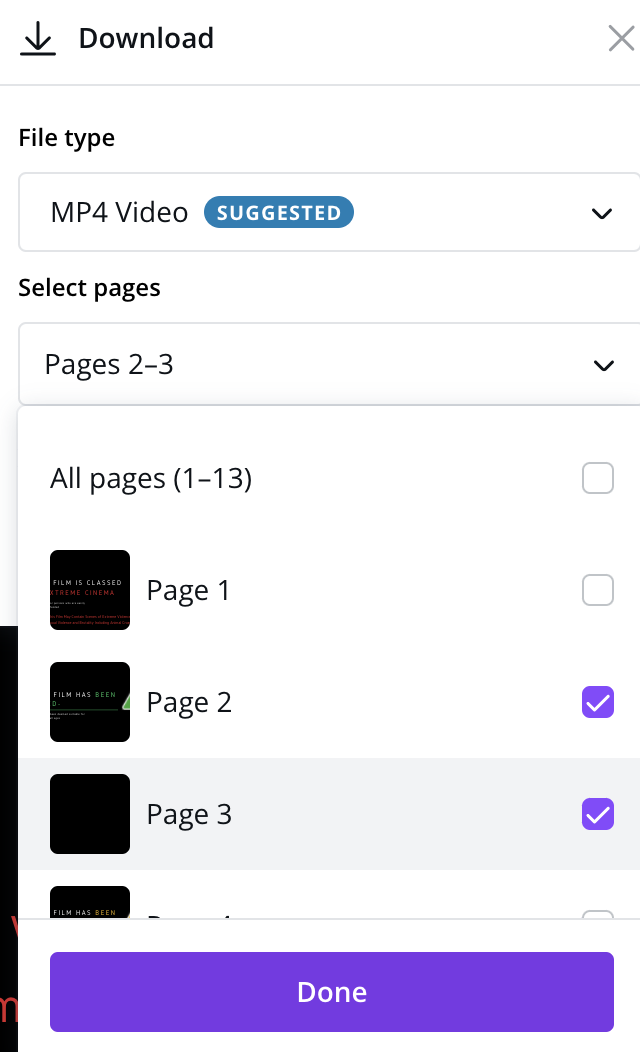
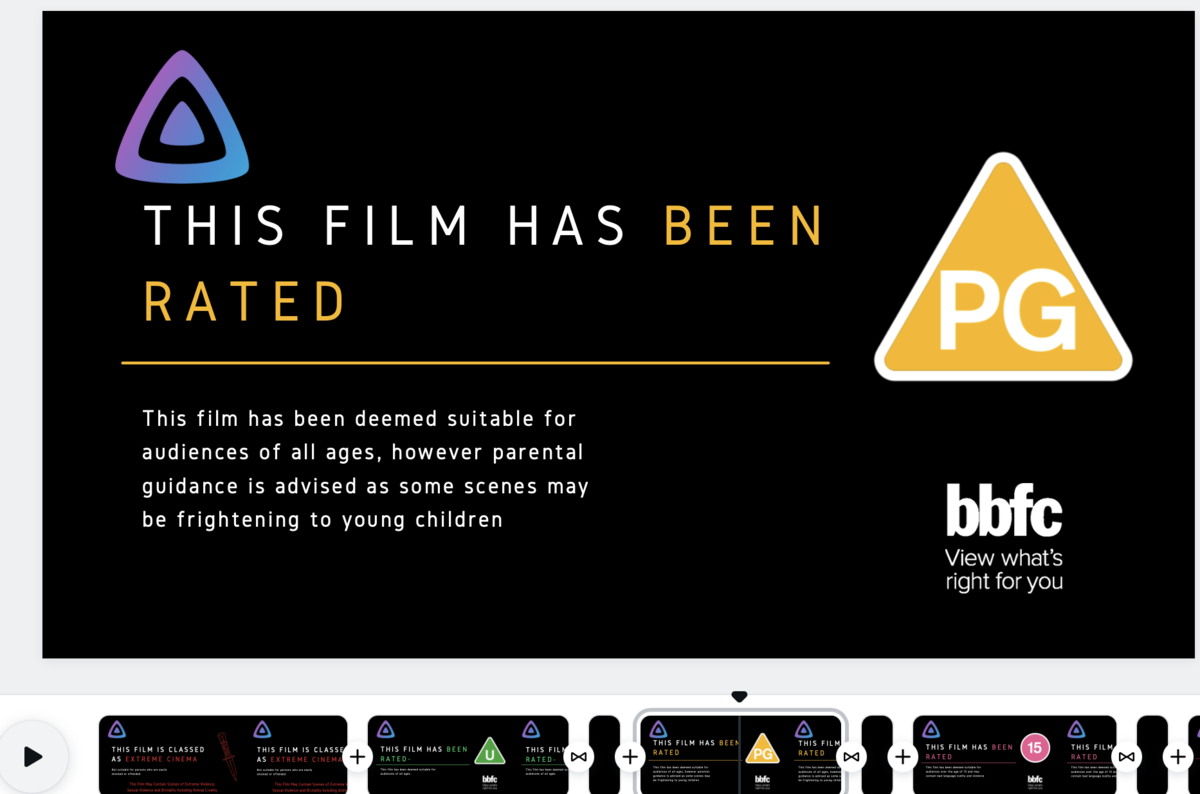
Yeah i normally work in AE (badly) and pro but these were done for free on canva so i will send you the template link and you can download them individually from there direct, signing up only needs a throw away email address no personal details for free account Then to export them one at a time just click the download button And select the Pages so for example the extreme warning is just page 1 then each other complete file is a pair for example page 2 and page 3 (title page and blank 1 sec black page) Then you can do what you like with them All though i do then run the files through Handbrake using fast1080p30 preset and tick web optimised for faster streaming, i know it sounds stupid but i like the files under 1MB lol which they are lol. On the TV they do look spot on

 1 point
 -
I did mention that i didnt use the emby logo as i didnt want someone going all copyright on my ass lol hence i just through in jellyfins logo cos i dont care about them lol, in my copy i have my own logo but as these are editable in the template on canva that way users could see how and where to upload their own logo1 point
-
Thanks for that great post. I think you nailed this pretty well and actually know from running Emby offline for great periods of time. I agree with you on using a good web client if at all possible with HEVC and MKV support as that opens up a lot more possibilities then was available say 2 years ago. Being careful to have your media in a format that doesn't require transcoding is also a plus.1 point
-
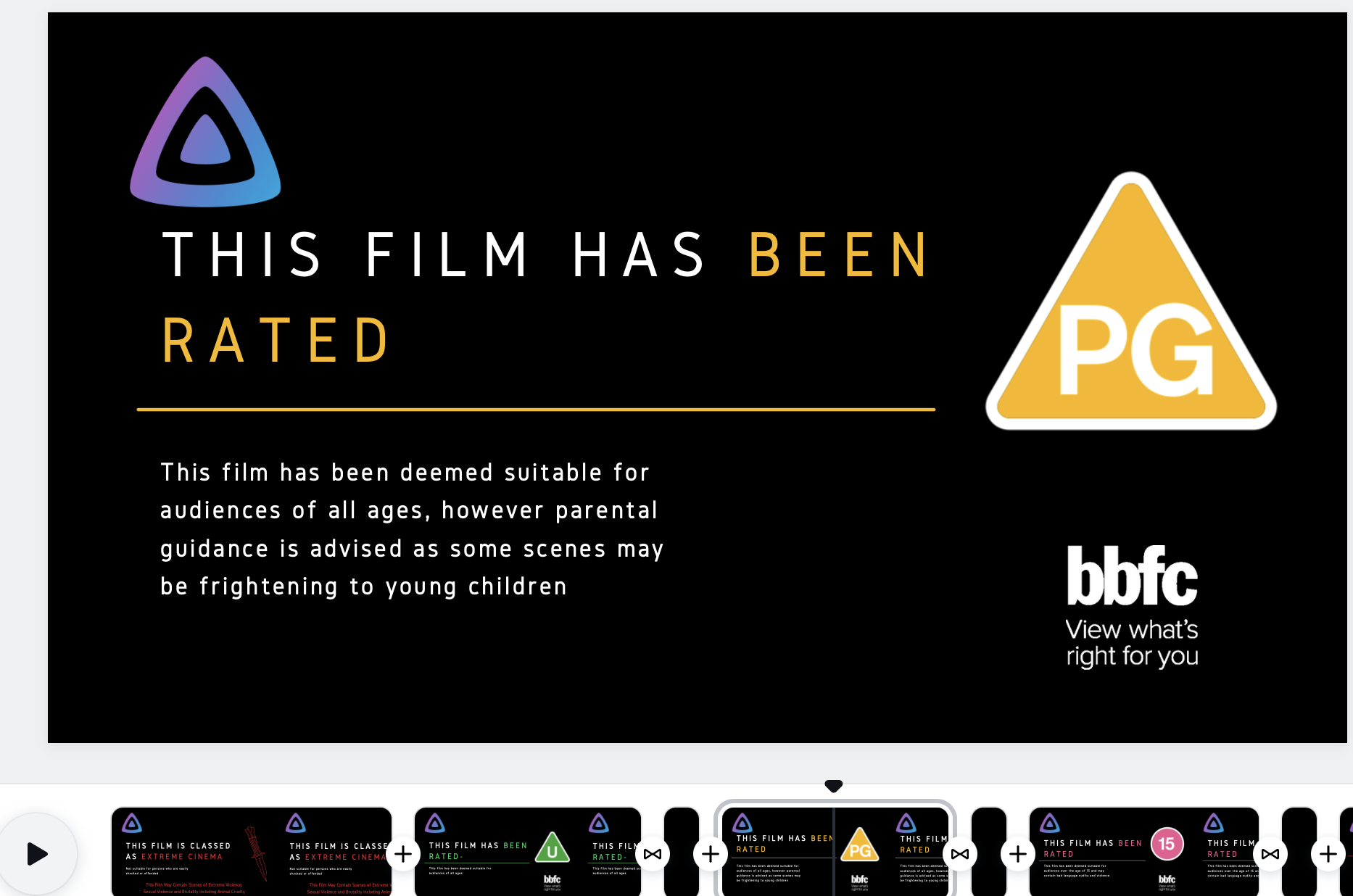
For those that would like some modern BBFC ratings cards i created these below. BBFC ones are hard to replicate as normally the films titles are present so these are more generic, however i also create these for warnings before films based on tags, so the first is an example which plays on films tagged as extreme. However if anyone is interested i will explain the tool used. I am normally working in premiere pro but its overkill for this so i actually have started using CANVA, which is free and so easy to use. All my info cards certs and also trailer intros like Film of the week are created here. They have loads of video intro templates to work with. Anyway i have created a shareable link which after you have signed up for a free account it will import this template with all animations etc into project page so you can edit. For this example i just chucked in the JF logo top left as didn't want to use Emby logo in public forum without permission lol but here i actually have my logo i created and you can replace with your own. The great thing is although it appears as one long timeline at the bottom, when you click Download you can select which "pages" you want to render in 1080p, so you can export one page at a time for each cert. I have amended them today to add a 1 sec blank page after each as Emby sometimes whilst loading up the main feature shows reminents of the actual cert page so i added this so it displays black whilst loading the film. There's loads of free assets you can use which can be coloured to your liking to match your theme. Anyways heres some clean modern examples And this is how simple the timeline is, absolutely anyone can use this tool
 1 point
 -
I, for one, can confirm that it takes longer than that (not much, though), albeit staring at the spinning circle does subjectively make it much more so. And I'm unclear why would it go roundabout way with external address if several last logins were done locally and offline? Edit: To append, even manual IP:port login while offline results in wait... wait... wait... stand up and go about doing something else for a minute or two hoping it'll be logged in once you return, so you better take your time.1 point
-
I move it here.1 point
-
That's their prerogative though isn't it? It may incur more work for the Moderators to go round changing posts, but we'll see how it goes. Thanks for the information Abo1 point
-
Yas thank you for help1 point
-
OK so this hasn't made it into the Roku app yet, but yes, ultimately it will catch up.1 point
-
I had some issues (because my understanding of how proxy servers is very limited) but I'm happy to report that I was able to fix the issue. Should I post what is it that I did?1 point
-
I installed 6.1.6 build 56 and it seems like this is working again. It did seem like this position tracker just wasn't even running. Not sure how that's possible.1 point
-
Follow the Emby naming convention for TV extras and you shouldn't have any problems with misidentification. '\Twin Peaks\Season 00\S00E10 - The Log Lady 03.mkv' should work. https://emby.freshdesk.com/support/solutions/articles/44001904299 If you don't want to follow the existing convention, then a feature request it is.1 point
-
Yes, it will be awhile, so looking into alternatives is a good idea.1 point
-
The easiest fix from Emby would be to have TV shows officially recognize folders labeled "Behind the Scenes" "Featurettes" "Deleted Scenes" etc, and then keep those folders from counted towards the episode total. Alas, that has not happened. However, there are a few unsupported tricks. Any folder labeled "Extras" automatically is combined with the "Specials" folder. If you name the folder something else it will pop up within the tv show page, there is just no guarantee that it will continue to show up with each time Emby is updated (but I've never had an issue with this yet): The next thing is how to name the individual file. If you use any numbers then Emby will try to attach that to the nearest episode matching that number. Therefore, you have to spell out each number to avoid that: So your pathway would work better as Twin Peaks\Bonus Materials\Season One - The Log Lady Three.mkv Again, this is technically all unsupported, but it's a workaround.

 1 point
 -
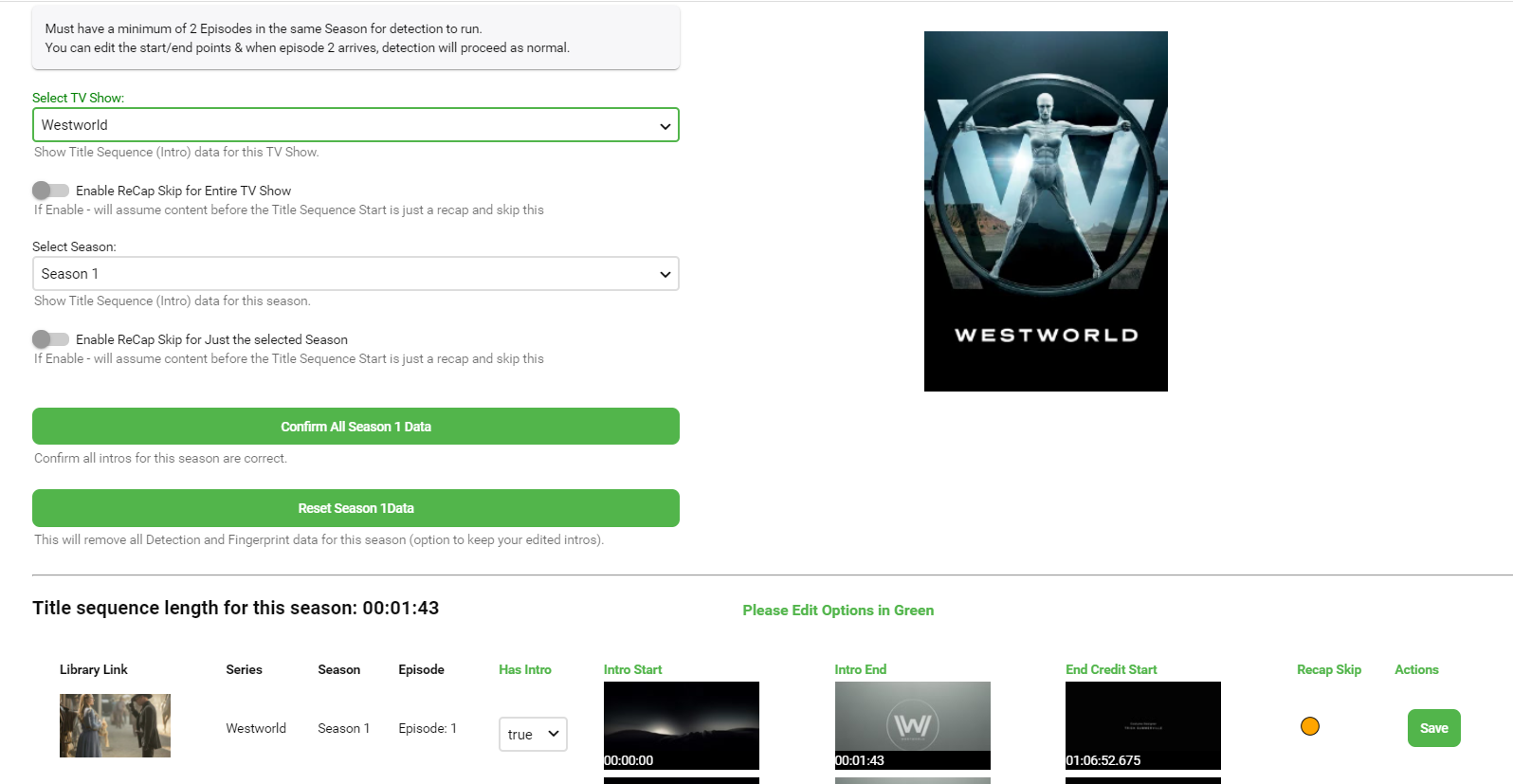
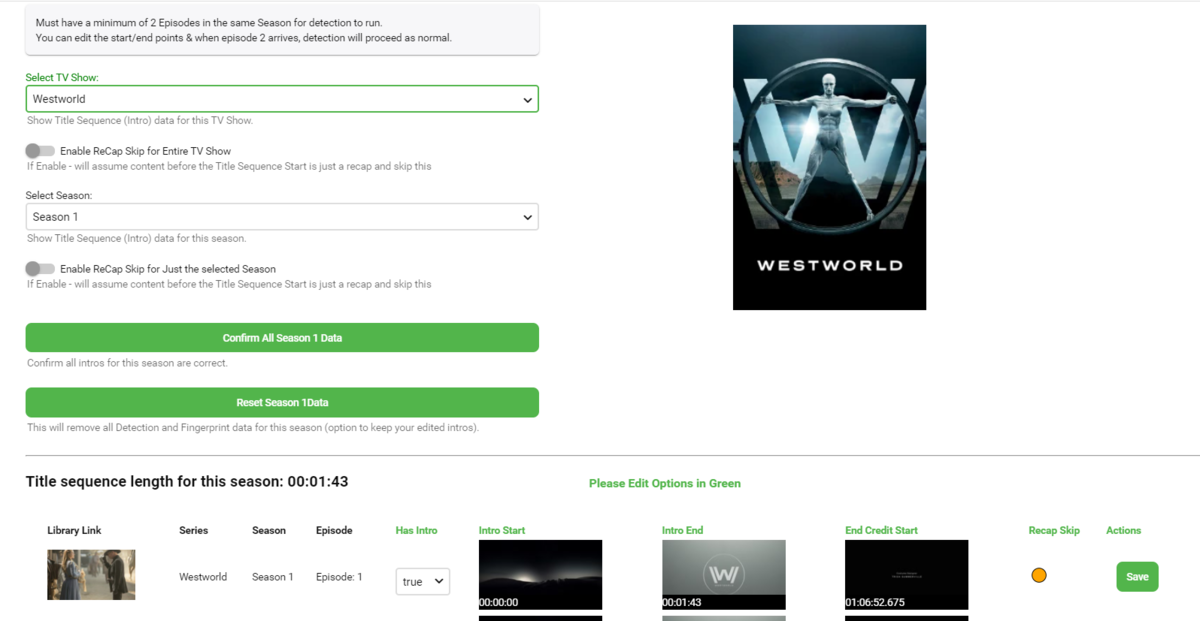
Hello all, sorry that we've been very quiet on this side of things but as you will see we have been very busy improving IntroSkip even more to bring a full featured and rounded plugin. I'll let you see if you can spot the upgrades We are still testing at the moment and then will do some polishing of the UI and performance improvements and then we will let it lose to you lot for a grueling testing phase before hopefully a final release.

 1 point
 -
I have the script set to run once a month. It's been trouble free for the most part, I actually forgot about the script until the update.1 point
-
I am one of these that had a total messed up music library. I spent a day on MP3Tag to correct all tags and then refreshed the library and everything slipped into place with correct albums artists covers ect. It worth the time for the end result in my opinion1 point
-
I understand that. But, it doesn't change the fact the PLEX is almost flawless in that department. Every digital download I own PLEX was able to successfully discover tags and fill the appropriate covers (with the exception of really obscure music, but that's fine I expect that). I don't know who else I can compare it to, as companies such as Apple and Windows Media have their own database I'm sure they're using to match albums. I'm not even sure if you guys pay a license to use these music databases, but it is somewhat of a problem if I have to correct too many. My collection is too massive to be burdened with correcting tags, where the techniques today are almost flawless. A PLEX rep has told me that they don't override the ID3 tags, so that means they keep a copy of that information on their server. Perhaps I'll install iTunes again and see what I need to work with as far as tags go. This will be clearly the easiest and quickest route when it comes to editing. Yeah, Jellyfinn is pretty bare bone. I kept it around temporarily because some codecs work better on others. Thank goodness it was only rarely that I needed it. I did try Kodi... I'm not sure what word to use for them, I guess the word I'll use now is "cumbersome." I also felt like I had to go a bit out of my way to install something/make something work. Not that I'm lazy or anything, but...... I've grown accustomed to the "plug and play" world we're now living in, and to not have that ease is just now worth it. I just don't want to do more than I have to. Interesting how we've improved soooo much with technology in many areas, while still manage to be more labor intense in other areas.1 point
-
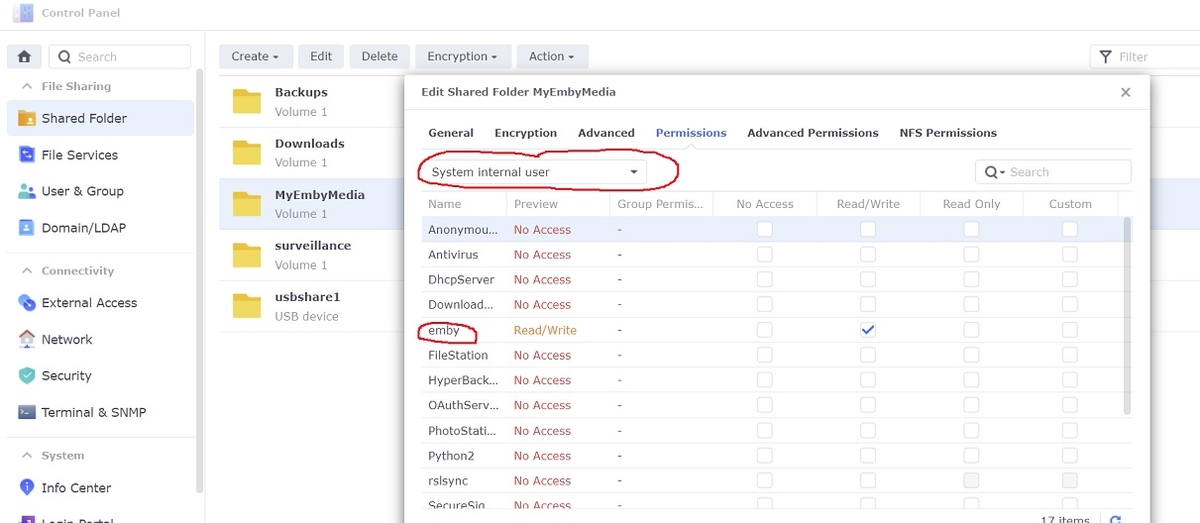
The only permissions you should have to set for emby when switching to DSM 7 are the Shared Folder permissions with read/write access. However, emby is now a "System internal user" so make sure you click the drop down box first before changing. Any old emby local users can be deleted under DSM 7
 1 point
 -
As an ex-emby premium user, I grew tired of paying monthly just to use Emby Theater to watch my own content on my TV. That's all i really did, sometimes using the mobile app as a remote control but usually not. My usage case did not warrant £4 a month for that when there are numerous free options that we could have used. I like Emby, but my God the development at times is slow. Some of the basic bugs and features I experienced and reported never got fixed or added, and I think you'll find, that of you go onto the Jellyfin forum, or now reddit page, you'll find this was one of the many complaints about Emby. I tried Jellyfin last year, it was a waste of time. I tried Jellyfin 2 months ago and have now dropped Emby and moved over to Jellyfin permanently. Maybe much has changed since the OP created his post, in fact I know it has. The speed at which Jellyfin devs are implementing features and fixes bugs is bizarrely fast and in a different league to Emby devs. Is Jellyfin as good as envy? Not at the moment, but in the space of a year they have gone from unusable (for me) to very usable and comparable to Emby. There are still lots TV s of bugs, but they get fixed. They have just released Jellyfin Media Player which replaces Emby Theater just fine for me, and thank God it gets rid of that horrid Electron crap which I always had issues with. The android Jellyfin app is working fine 95% of the time for me, but once in a while certain media crashes it and I need to restart the app. Library scanning works fine for me and is equally as capable as Emby I have found. Everything else is much the same as Emby but with a few more bugs. Jellyfin devs seem more than capable of writing and developing their own software and are not just blagging their way through. If I were Emby devs, I'd be very worried about Jellyfin to be honest, another year and I really can't see what Emby will have to offer over Jellyfin. I will say this, Emby is a bit more polished and I rarely had an issue with it other than the horrid electron and the windows 10 theater app which was a crash waiting to happen, again, and again, and again. I still prefer Emby, but not at £48 per year.1 point
-
Personally my only reason to still use Kodi with the Emby plugin and not the Emby App is the lack of the ability to select "download subtitle" during playback. This is a killer feature in Kodi, and I hope you guys can consider bringing it to Emby, I do have my Admin area set to automatically download subtitles, but many times (even so I have the option to only download exact matches) the subtitle is not the right one to the video file version, and the ability to just download a new subtitle on the fly is very welcome. Hope you guys can consider this Null1 point
-
When I have multiple versions of the same film in different resolutions, I'd like to be able to set the default resolution that it will play. Example: I have both the 4k and 1080p version of Film X If I play Film X through the web browser it will default to the 4k version which the server will try and fail to transcode (4K HDR content to a 720p 2mb web stream) I'd rather be able to set 1080p version as the default so that when users unknowingly press play the server does not die from trying to transcode something that is meant for direct playing only. Alternatively give me the option to mark a version of Film X as direct stream only.1 point