Leaderboard




Popular Content
Showing content with the highest reputation on 10/26/21 in Posts
-
I would like this for my video Playlists such as the Marvel Cinematic Universe one where movies and TV series episodes are in chronological order and is very long so a way to track where I'm at when replaying would be very helpful.3 points
-
Yes. Its fully resolved for me . Thanks for all your help2 points
-
New experimental version available: 6.1.6-build 44 (ex4) Changelog: - improve threading - fix German translation - fix progress updates - fix mark as watched/unwatched The reason why experimental, progress updates and are quite modified. I hope it fixed all the progress update issues, but not very well tested yet. Also removed several unnecessary threading.2 points
-
It would be nice to be able to specify default options for library creation. I have to add a lot of libraries and on every single library, I have to manually set all the checkbox. This could either be solved by: Globally defined default options for new libraries Template libraries which could be used to clone from2 points
-
Without going into too much detail, latency over WAN's has a massive impact on download speed depending on the packet size and 'chatty' nature of the protocol used. Emby is going to be using the same TCP packet based protocols for a download as it does for streaming - for streaming, this may work well - it only needs to pass the data in 'real-time' for it to be effective - but during a 'download' you want it to use as much bandwidth as you have available. As @cayars has allude to your ISP does not appear to have the best WAN infrastructure - If you do a search, I did a fair bit of research on WAN based streaming for another user - and at a certain point (I think it was ~300ms latency) then performance dropped off a cliff. If you have the ability to do a tracert (trace route) to/from the client to your emby host - then this will provide a much better indication of problem areas than a generic speedtest that may be using jumbo frames and local caches to provide a false result. You could also try using a proper file transfer protocol such as SFTP or SSH - which are designed to accommodate WAN/latency.2 points
-
I wholly agree with this. Just yesterday I was reconnecting a friends LG TV. She tested a TV episode and I noticed it was transcoding due to bitrate exceeds bandwidth. The bit rate was about 5mb and her bandwidth was 100mb App was set to auto, we switched it to 4k 100mb and it direct played as it should The auto setting is woefully inadequate and it would be great if we could set this in the user UI like the other settings2 points
-
I moved from Plex to Emby and even though I think Emby is superior in its flexibility there are some things I like better with Plex, especially in terms of its looks. This theme is trying to fix that by making it a bit more similar to Plex but with some, in my opinion, improvements. The CSS is attached to this post for anyone interested and below are some screens to show it off Good to know I only use Chrome so I can't guarantee this CSS works as expected in other browsers. If you want the sidebar menu to look like in the screens, make sure to pin the sidebar. Watched badge/banderoll is inverted which means that the badge will not be shown if media have been watched, like in Plex. For desired look, please use the "Dark" theme for both Theme & Settings theme in the display settings. Emby-Stable-style-v3.6.txt





 1 point
 -
I hit "play all" on a collection and it doesn't show the next film in "Next Up" after I quit out of it. This is apparently intended behaviour, and the same applies to playlists. This is absurd. Why even have the "play all" option? Who's sitting down to watch a full collection's worth of films, or a full playlist? I have playlists for The Prisoner for its various episode orders, and there's no way I'm getting through them in one sitting. I was going to make that my next show to watch but if I'm going to have to keep track manually of my progress through the playlist it makes the playlist fairly pointless TBH. There's no reason playlists or collections shouldn't show up in Next Up.1 point
-
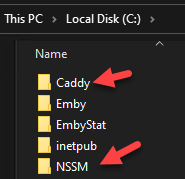
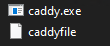
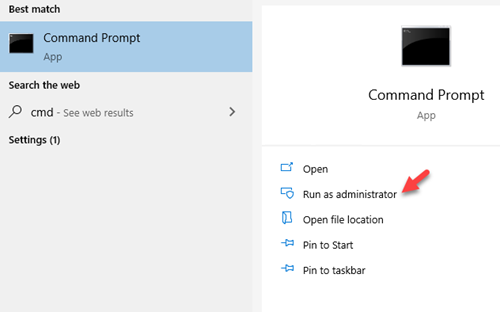
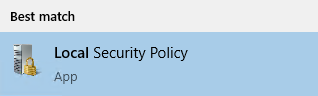
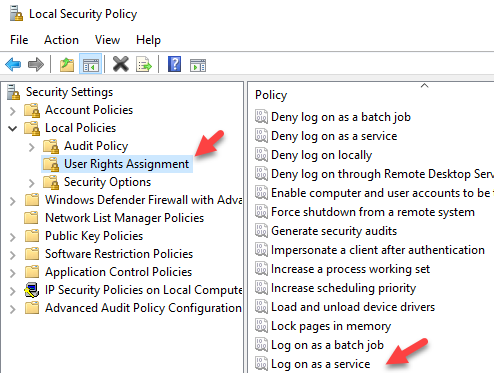
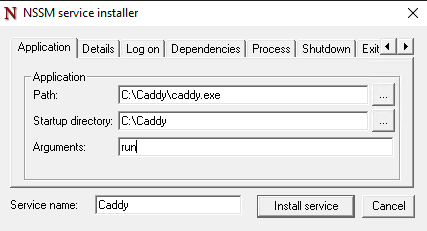
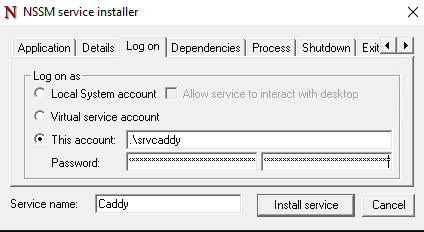
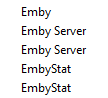
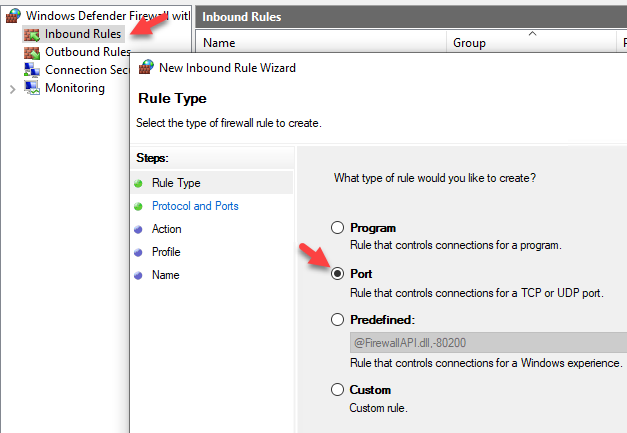
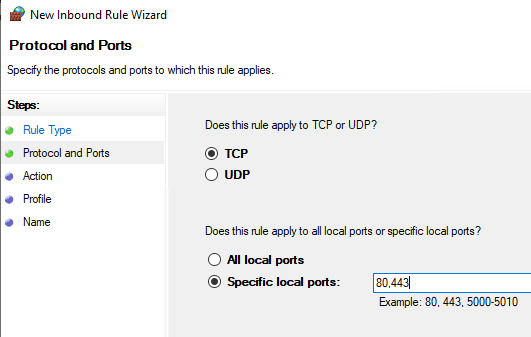
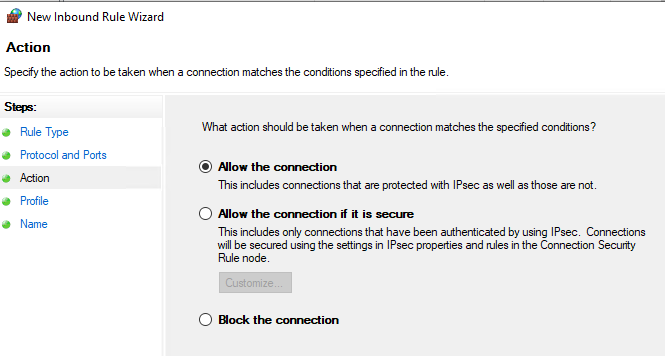
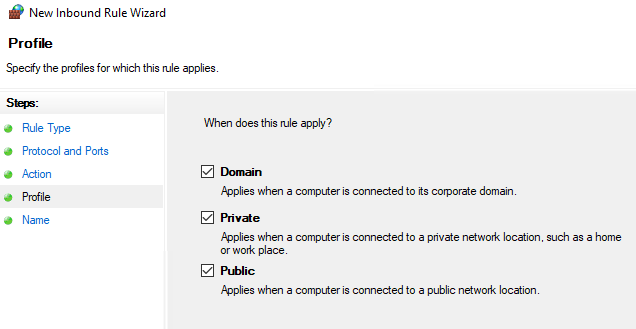
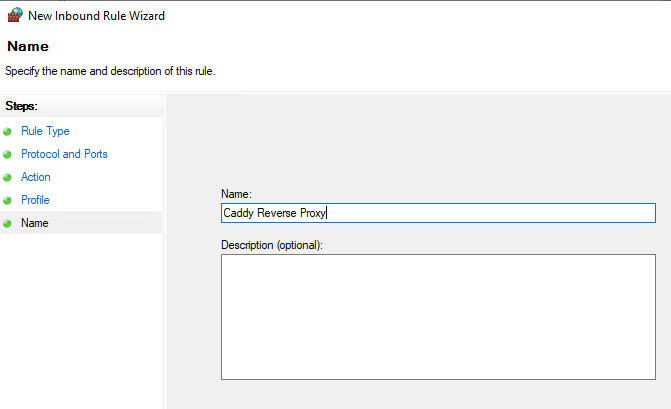
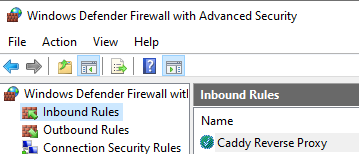
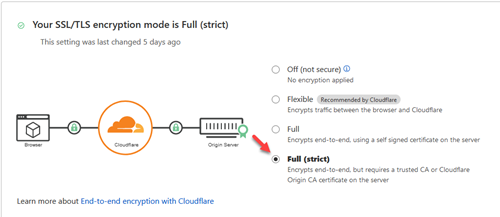
It took me a while to get Caddy v2 setup and working by itself. Then there were some struggles with getting it to work with Cloudflare. I thought I would share a guide to assist those who want to go that route. Prerequisites: Have your own domain Have the DNS of your domain setup with Cloudflare Have your Cloudflare API key/token "For this checkout my other article on setting up DNS updates via API" Have your Emby server set with a static internal IP Step 1: Download Caddy Visit https://caddyserver.com/download to download your binary. You will need to add a couple plugins for this to work. You will want to select 'caddy-dns/cloudflare' and 'kirsch33/realip' Review at the top that it shows "Extra features = 2' and select 'Download' Step 2: Download NSSM from https://nssm.cc/download "We will use this to run Caddy as a service" Step 3: Create folders for NSSM and Caddy on the root of the C:\ drive Step 4: Rename the caddy binary to just caddy.exe and put it in C:\Caddy\. Extract NSSM so you just have the nssm.exe and put that in your NSSM folder. Step 5: Create your caddyfile The caddyfile has no extension. You can open this with your favorite text editor. I use Notepad++. Below is the a sample caddyfile. The first email is the email address that you want to use to receive notifications if there are issues with the cert Adjust your domain to what you are using for Emby. Either 'domain.com', 'login.domain.com' or 'emby.domain.com' etc. The second email address is your email address for your Cloudflare account This also sets up logging for the reverse proxy which is really handy I choose to use the actual IP address of the server instead of localhost. Either will work. { email email@gmail.com } yourdomain.com { tls email@gmail.com { dns cloudflare 'Your Cloudflare API Key No Quotes' } log { output file C:\caddy\logs\emby_access.log { roll true # Rotate logs, enabled by default roll_size_mb 10 # Set max size X MB roll_gzip true # Whether to compress rolled files roll_local_time true # Use localhost time roll_keep 3 # Keep at most X log files roll_keep_days 7 # Keep log files for X days } } encode gzip reverse_proxy http://10.0.0.5:8096 { header_up X-Real-IP {remote_host} } } If you wanted to run any of the arr's as subsites to your main reverse proxy you can add the following to your caddyfile If you are running it on the same box instead of using the full domain name you would just use http://yourip:port You need to login to each of the arr applications and setup the base URL Login go to settings/general/base url Add the correct subsite. So for Radarr you would add /movies save and restart. { email email@gmail.com } yourdomain.com { tls email@gmail.com { dns cloudflare 'Your Cloudflare API Key No Quotes' } log { output file C:\caddy\logs\emby_access.log { roll true # Rotate logs, enabled by default roll_size_mb 10 # Set max size X MB roll_gzip true # Whether to compress rolled files roll_local_time true # Use localhost time roll_keep 3 # Keep at most X log files roll_keep_days 7 # Keep log files for X days } } encode gzip reverse_proxy http://10.0.0.5:8096 { header_up X-Real-IP {remote_host} } reverse_proxy /movies/* https://radarr.domain.com { header_up Host {upstream_hostport} header_up X-Forwarded-Host {host} } redir /movies /movies/ reverse_proxy /tv/* https://sonarr.domain.com { header_up Host {upstream_hostport} header_up X-Forwarded-Host {host} } redir /tv /tv/ reverse_proxy /music/* https://lidarr.domain.com { header_up Host {upstream_hostport} header_up X-Forwarded-Host {host} } redir /music /music/ reverse_proxy /audiobooks/* https://readarr.domain.com { header_up Host {upstream_hostport} header_up X-Forwarded-Host {host} } redir /audiobooks /audiobooks/ } Step 6: Create a user for caddy to run as and set password. You will need this password later down when we setup the service. I'm going to use srvcaddy. Step 7: Allow srvcaddy user to run as service You want to open up Local Security Policy Go to 'Local Policies/User Rights Assignment/Log on as a service' and add our new user srvcaddy Step 8: Add your domain under Emby network settings Login go to settings/network/external domain and add your domain name Step 9 : Launch cmd prompt as administrator Step 10: Install Caddy as a service We will need to type cd "C:\NSSM" in cmd prompt. Then you will need to type nssm install Caddy We will want to edit Log on to our service account Then select 'Install service' Now you can open up services and start caddy The first time this runs it will take a few minutes to generate your certificate on the computer. Step 11: Adjust firewall rules You now only want the local computer to talk on Emby's port 8096. All other devices you will want to have it connect via ports 80,443. Open up windows firewall Make sure all of Emby's rules are disabled Create a new rule Step 12: Create a port forward in your router/firewall from external port 443 to your server port 443. Do to the differences in every router/firewall you will need to refer to manual or Google on this step. For even more security you can lock down only Cloudflare's IP addresses to be able to route to your server. Since we are updating the cert via API you only need port 443 open to Cloudflare. No need for port 80 to be open external. Step 13: Create a DNS entry in your router/firewall for your server. Again do to to many differences you will need to consult your device's manual or google on how to accomplish this. You will want to create an internal record that takes your domain name for your Emby server and points it to the local IP. This way you can take advantage of local login with pin. Step 14: Set Cloudflare's SSL/TLS Encryption Login to Cloudflare, select your domain, and go to SSL/TLS You want to set this to Full/Strict That's it... you should now have a fully encrypted connection to your Emby server internal and external. You will now be connecting to your server via port 443 instead of 8096. Hope this helps anyone struggling with setting this up.




 1 point
 -
Could you please add a Webhook for the New content added notification?1 point
-
When you try to watch a show that's currently recording from the begining it constantly freezes. This has been a problem for years. I've come to the conclusion. When you try to watch the show from the begining while it's recording it should say. You have to wait till it's done. This will prevent people from attempting to start the show before it's done recording. I constantly hope there was a update to fix this. But in the meantime just notify people this feature doesn't work yet..1 point
-
Recent backup. Probably worth noting the modified date on options.xml is 2019 and the other 2 files is 2017. Just for some history. I migrated to DSM 7.0, the emby app said it needed to be repaired so I clicked that and then opening emby gave me a screen as if it was a new installation. So I restored from a backup that was made with DSM 6.0 and whatever version of Emby I had. It wasn't the most up to date version but would have been close. That's when I found the migration thread but by then my old data was already gone, I think because I clicked the repair option in DSM.1 point
-
Please try restarting the app and it should be resolved now. Thanks.1 point
-
Emby Server 4.7 will support negative padding values. Thanks.1 point
-
Thank you so much @CassTG, will try it for sure.1 point
-
Look at the complete structure and naming. /TOWN/TOWN-HRES_[BLURAY] - 1080.mkv will not work as it does not follow the rules. If you do not uses proper structure/naming scheme you have to manually group or use the plugin to auto group.1 point
-
I will try with second *.nfo But I renamed my movie, like @cayars wrote: TOWN-HRES_[BLURAY] - 1080.mkv TOWN-HRES_[BLURAY] - Extended Edition.mkv1 point
-
You folder/file naming ain't correct, if you followed KB article @cayars linked, note: As you have no accompanying nfo for second version, I assume it remains unidentified, i.e. not linked to that movie due to naming difference (might be an extra or anything). Either rename your folder/movie or try three-dot menu Identify on EE, that might link it to correct TMDBId.1 point
-
yes permission problem...I thought everything will be same after the update to DSM7 ...LOL...1 point
-
Yep, did the restore, it restarted and it all worked! I changed the library locations to the local "/volume1/.." instead of the network UNC. Seems to work great now.1 point
-
Just clearing the guide data now. Will report back once guide has been reloaded in, and the show re-scheduled1 point
-
Thanks! That worked! That's what I needed to know. I didn't realize each Synology app created it's own user, it makes sense now! Awesome!1 point
-
I think anyone who has used TiviMate or similar has gotten used to the way you can quickly switch groups to get just the channels of that group. I would love to see something like that implemented in Emby.1 point
-
OK, please go through this and let us know if it helps: https://support.emby.media/support/solutions/articles/44002210894-corrupt-database Thanks.1 point
-
New build is up. Thanks guys.1 point
-
Sure I can give you some examples for both video and music playlists being added to a Next Up which I think are kind of related from a user perspective Video Playlist Next Up: I would want the next movie or show after movie/show X in the playlist to be displayed in a Next up. Just like the next episode in a series shows up after you watch episode X. So Emby would index the Playlist to know where you're at in order to know which is next movie/Show. IF Item #X in Playlist is complete then add Item #X +1 to Next Up Right now my MCU playlist is 100+ items long between the shows which are cannon and the movies so there is no way I could possibly binge watch all of that. This would allow me to watch them in order and track where I'm at when I can get back to it. I do realize with video I could go mark all 100+ combined shows and episodes as unplayed and then return to the playlist scrolling down 100+ items in order to find the Next Up. However, that's a lot of videos to change the play status and scroll down through and the list is getting bigger and bigger as Disney keeps pumping these out. Music Playlist Next Up: I could also use something like this with a music playlist or album. I have some huge music playlists that I shuffle on my own using a PowerShell script so that I can just hit play and listen to music all day. If Emby could remember where I left off in the music playlist then technically I would never hear the same song for 1000+ items which could be a week sometimes. Here's an example using a music album which is sort of a playlist by itself, but doesn't have a way to track where you're at either. This music boxset is 100 discs and 1,455 items long. I would like to listen to the whole Beethoven Works without having to remember where I left off and then scroll 1000+ items to resume playing. It takes a very long time to scroll through 1400+ items btw.
 1 point
 -
Hi. This is a generally good idea but the reason it hasn't made it to the top of the list yet is because it is an operation that is usually done once and then very rarely if ever again. So many other features bring benefits much more often that they end up taking priority. Still a good idea though.1 point
-
I feel stupid talking about this problem and describing the solution, because I should have known better and you'll be thinking to yourself, 'duh!'. But I imagine that there is someone else who is suffering with this who might be helped. If there is, then my suffering wasn't in vain. Here goes: Are you getting a red ribbon error message when trying to play video files that says something like "too many errors...moving on"? I was too. I automatically assumed there was some file compatibility problem with the media files I was trying to play. Since most of my movies are in HEVC format, I initially thought that was the culprit. But that wasn't it. I realize now that the error message would have been much more helpful if it had said instead: "file not found" because that's what was really happening, but it doesn't say that. Plus, the thumbnail of the missing file was still there leading me to believe the file was, when it wasn't. The file had been moved. The solution is simple. Make sure Emby is pointing to your files. Open each Emby library in Windows Explorer, and make sure all media files you want to play are present. I realize that this is old school to the majority of you, but sometimes, the simplest things can cause the most grief.1 point
-
Hi First take a look at a post on Fail2Ban guide i did Friday for someone else, especially the section at the bottom if you are using UFW on host machine F2B Guide And then here is my Swag Docker setup (i use command line but you can work out whats what) Swag Proxy Yes Swag uses one of two providers LetsEncrypt or ZEROSSL You will see in my example i use ZeroSSL, which i advise you to use instead of LE. Reason being due to the expiration of LE Intermediate cert a lot of devices fail 2 work such as LG and Samsung TV's which aren't getting updates. ZeroSSL is free and all you do is register an account (you manage certs online) and enter the email address you used into the Docker setup variable. Requests made from the Swag Docker via Zerossl Acme are unlimited, so ignore the zerossl premium features as they are not relevant here, you can do as many subdomains via acme as you wish. However if you wish to see the LE setup you can see LinuxServer.io Docker Compose here Linuxserver Swag Section 8 of the swag guide shows you what you need to do to setup your proxy files, its dead simple and takes a few seconds in Nano editor. But as Summary So make sure you have all your domain/subdomains ready for docker compose Start container up, if you have done it right it will get the zero ssl cert Enter Swag Container shell Make the changes to the proxy's you need Reboot swag and win win The beauty with Swag is in each proxy template if there are special steps you need to do, it lists them at the top for you, Emby proxy.conf is an example as within the config file it explains how to setup Emby Network settings. Anyways any issues feel free to dm me1 point
-
What device are you trying to run Emby Server on? What version of android does it run?1 point
-
The Sinner-S0401.mkv is not a supported naming convention. If you instead were to do : The Sinner-S04E01.mkv Then that should be fine without a season folder.1 point
-
Are those HEVC encodes you're trying to play?1 point
-
It's listed as mixed content. I couldn't find anywhere in the settings to change it the other day but I just clicked the 3 dots and I can see there is an option to change the content type. But clicking that it says to remove the library and rebuild it with the correct content type. I'm pretty certain I would have set them correctly when initially setting up Emby so maybe restoring from backup didn't set the content correctly? That would explain why I'm suddenly having issues. I'm a bit hesitant selecting the remove option. Will that just remove the library and not remove the content on the NAS? Will it remove any played information? I don't want it to lose track of what episode I'm up to. If you do not want to remove and readd the library your can follow this how to. (paths will vary across different platforms) How to Change the Content Type for a Library - Tutorials and Guides - Emby Community All watched/Played statuses are tracked by providerid (IMDB, TMDB, TVDB ids) so only items that do not have providerid can loose this status. The Sinner-S0401.mkv The Sinner-S0402.mkv Was identified as https://www.imdb.com/title/tt1800757/ Episode 2 was added as a version. This was the show where I tried adding the ID into the folder and filenames, nothing would work. Once I added a "Season 4" folder into the path it worked perfectly. But this probably doesn't matter now, it's most likely related to my TV Shows folder being listed as mixed content. Technically that naming scheme could be considered Season 401 and 402. There is no episode indicator in that naming scheme. Since there is no season/episode identifier in Mixed content it is considered a movie.1 point
-
I'm getting closer to dying also, but I'm hoping the new Xbox app will get here first1 point
-
Yes it is in your system.xml <LibraryMonitorDelay>60</LibraryMonitorDelay> But yes other active processes can cause the process to be queued.1 point
-
Yes you need to adjust permissions System.UnauthorizedAccessException: System.UnauthorizedAccessException: Access to the path '/volume1/Backups' is denied. ---> System.IO.IOException: Permission denied1 point
-
Thanks for the awesome guide cayars. My migration went smoothly. I did run into an issue with my SSL cert which I was able to resolve. I had a task set up that used openssl to convert the default Let's Encrypt Synology certs to a pfx file however the pem file names changed under DSM7. I also had to save the pfx file somewhere else Emby kept complaining that it didn't have access to /usr/syno/etc/certificate/system/default/ anymore. Figured I would just mention it here in case anyone else runs into the same issue. Ended up with a command like this for the task: openssl pkcs12 -export -out /volume1/wherever-you-want-the-cert-to-go/cert.pfx -inkey RSA-privkey.pem -in RSA-cert.pem -certfile RSA-fullchain.pem -passout pass: Your-Password1 point
-
Yes you were spot on. I had to force port 8096 open and tell McAfee to make it a home network port. If you forward the port as Ronstang suggested earlier my TP-Link Mesh network crashed so that was either a coincidence or a no go situation. I got one of my Samsungs and one fire stick to select the server and both were able to play movies. Not sure what's going on with my other TVs but I have the server functioning and watchable, ill work the rest out later. Thanks for the help.1 point
-
Hi yes got it working now. Thanks for your help in fixing this1 point
-
Hi, yes we're looking into improving this. Thanks for reporting.1 point
-
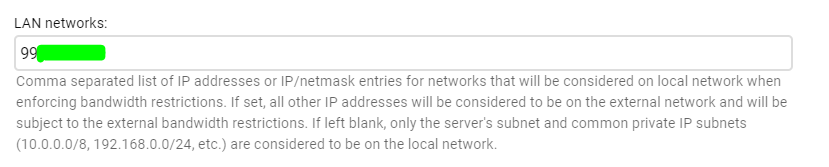
make sure your real "LOCAL" network addresses are specified in the emby server network settings. Often times when running in a docker emby just grabs the docker address and assumes thats the actual local network, when sometimes dockers are setup for nat and other crap..
 1 point
 -
Since I lost my section moderator badge in the shuffle I was wondering if I could get a Plex badge in its place?1 point
-
I think it's more secure because people can't login to your computer from the outside using the internal user. Glad you got it working.1 point
-
Hi, can't give a timeline but the unified version of Theater for Windows is getting closer.1 point
-
It would be cool to allow Emby server users to comment what they think about a media piece. This could be shown on the top portion of a media info's page. Perhaps right under description, to encourage more user engagement.1 point
-
هلا اخى الكريم مشكور مقدما واذا احتجت اى مساعدة عطنى خبر بارك الله فيك1 point
-
@Abobader1 point
-
Yes it's something that can be added. Thanks.1 point
-
Really need to add this feature. Scrolling large collections with Emby on AppleTV now is absolutely archaic. Has it been prioritized for the next AppleTV release?1 point