Leaderboard




Popular Content
Showing content with the highest reputation on 10/11/21 in Posts
-
Hey everyone as promised. Here is the link to the new dll. Please follow the instructions in the download post. You all need to start from fresh for this release. Give @chef lots of love!! he's pulled the rabbit out of the hat with detection. You'll love the UI and intuitive interface. Anyways.... here is the link for the download https://emby.media/community/index.php?/topic/101687-introskip-instructions-beta-releases/&do=findComment&comment=10675015 points
-
Would testers be so kind, as too enable debug logging in emby, while try the plugin out? This will help locate problems should they arise. Perhaps, if possible (not necessary) testers wouldn't mind waiting for some quiet time on the server to run the task? Not a lot of (or no) open steaming sessions. For two reasons really, 1. The initial, long running, fingerprinting task will run much better if it doesn't have to share resources. (It's like a kid on the school yard, who doesn't like to share. But he's cool, so we're friends anyway...) 2. Locating a specific error is much faster in a debug log, if there isn't a large amount of extra stream data to sift through. Not a huge deal either way.3 points
-
Most hospitals with guest WiFis will have connections capped, I think 1-1.5Mbps is the "standard". You can force downmix the files in the app. I've done that when I travel often. As far as "do they allow it", they get around having to police the users by just limiting the bandwidth. I know our big hospital here has two of the same connections I have at my home (800Mbps) and their WiFi is horrendous. The ONLY time I use it is if I have ZERO cell connection. Even a bad cell connection is better than their WiFi. They have it capped, but so many people are on it that you are LUCKY to get 0.25Mbps!2 points
-
That’s 40 clicks for you about 3-5mins of effort or 1-2hrs of coding plus another 1hr of testing just so we can cater for one of the extreme cases. This plugin is designed for TV shows not recorded sports events just saying and for 2 episodes out of 40yrs im sure you can fast fwd2 points
-
We are going to use a default thumb for the end thumb nail if no sequence is detected. Thought we would get you guys something to test. What do you think of the new UI. This needs to be wired up.. it’s on our radar2 points
-
Everyone else (including Plex) is loading a wrapper into LG TV's to then download the actual app from the internet. Everyone is doing it. The question begs why not Emby. Leave the old app as it is. Release a new app in parallel and use a wrapper to load your code. Almost EVERYONE has internet. Your target market have INTERNET. Stop catering to the 1%. 18 Months. Crazy stuff indeed1 point
-
Probably should be in the WD section but currently not that I am aware of..1 point
-
@ebr Trailer plugin notes The Catalog plugin itself, the catalog descriptions page also
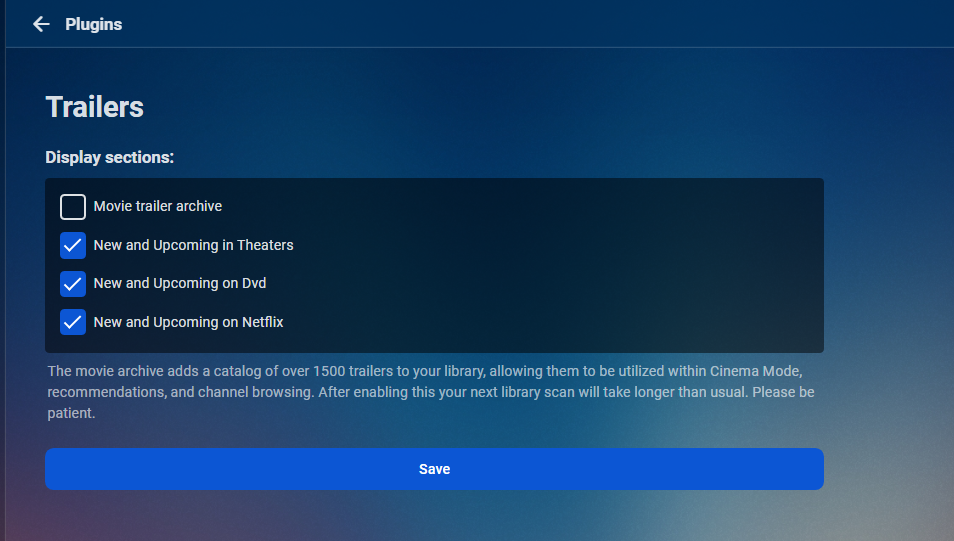
 1 point
 -
well after 2 weeks, it all seems to be working fine now, there are a couple of times it fails to play direct play but this is on some of the other channels which we don't watch often, but the main channels seem to all be fine1 point
-
You have to use the 'cp' command to copy the SkipIntro.dll from wherever it is currently to the Emby plugins directory. For example, if it was in the NAS's download folder, navigate to the folder where it is and type: cp SkipIntro.dll /volume1/@appstore/EmbyServer/system/plugins/ these are simple SSH commands, so please be very careful if you are not sure what you are doing. Please do some basic research to help you understand better https://betterprogramming.pub/10-basic-cli-commands-every-junior-software-engineer-should-know-67e827e51f891 point
-
VPN on WIFI doesn't make the connection better than it is. All that does is keep the ISP and/or hot spot owner from knowing what you're doing or what sites you're using, nothing more.1 point
-
Hi, we're probably having a terminology issue. It is a RAID50 array of 8 physical drives. If it was a single hard drive, I would then utilize the terminology of "drive partition". However, in this RAID configuration, it would not be an actual drive partition. The drive controller manual refers each multiple drive "partition" as a "virtual drive". My path definition is exactly the same as a physical drive. I migrated back to beta on 9/22/21 and that was a "remove all traces" install (and I manually removed the traces it did not). I believe that install was beta 4.7.0.11. On 9/30/21, I updated to 4.7.0.13 and that remains in place at this time. Which version was the "fix", to delete temp transcoding files, initiated? The files I deleted may have been created under beta 4.7.0.11, but anything before that would have been deleted with the move from stable to beta on 9/22/21. I just tested it, with a live program transcoding 1080i to 1080p, and it did delete the transcoded files immediately upon exiting the program.1 point
-
We'll be looking at it this week. Thanks guys.1 point
-
It would be nice if we had some additional features with the Podcast plugin. For instance it would be nice for us to set a download location and have it setup as a library. This way you can pick a file path for the episodes along with choosing who had access to it or not.1 point
-
Hi, yes these are good ideas for future updates. Thanks for the feedback.1 point
-
Yup makes sense. Thanks.1 point
-
Actually, that's all a bit mish-mash, with TMDB throwing a wrench there with "languaged" backdrops, as fanart should have no text (as that makes it a landscape): IMHO backdrops should always be text-less (and I prefer none rather then texted when not available), but since they are offered as high-res texted backdrops, means should be provided to accommodate as such. Including them as thumbs makes sense, as they can be re-applied as backdrops if one chooses so.1 point
-
As of the update, it now filters them out of backdrops, but we can do another update to have them show up as downloadable thumbs.1 point
-
I can also recommend to use the "Server Configuration Backup" Plugin. it will back up the users and all settings. I also moved to another Server (same OS) but it worked for me. If you are afraid you can additionally save the "Collections" Folder manually and copy back to the new system but i think the collections were kept when i switched.1 point
-
The KB article was named Cinema Intros but some of the pics were outdated with the old verbage. I've replaced all pics and updated some of the info. Should be good now.1 point
-
I have numerous 4K movies placed in their own library apart from my standard HD/SD movies. I'd like to tag them by HDR, SDR etc. Easy their a fast way to identify and tag them? I'd hate to have to go through these 1 by 1 to do this. Perhaps the HDR/SDR filter idea's time has come.1 point
-
Thanks for the log. The problem is we don't know the duration of the item so the skip operation cannot properly calculate where to seek to. We can try to improve that so that it won't send you back.1 point
-
No. Plex can change quality settings on the fly *when transcoding*, but it won’t switch from one file to another.1 point
-
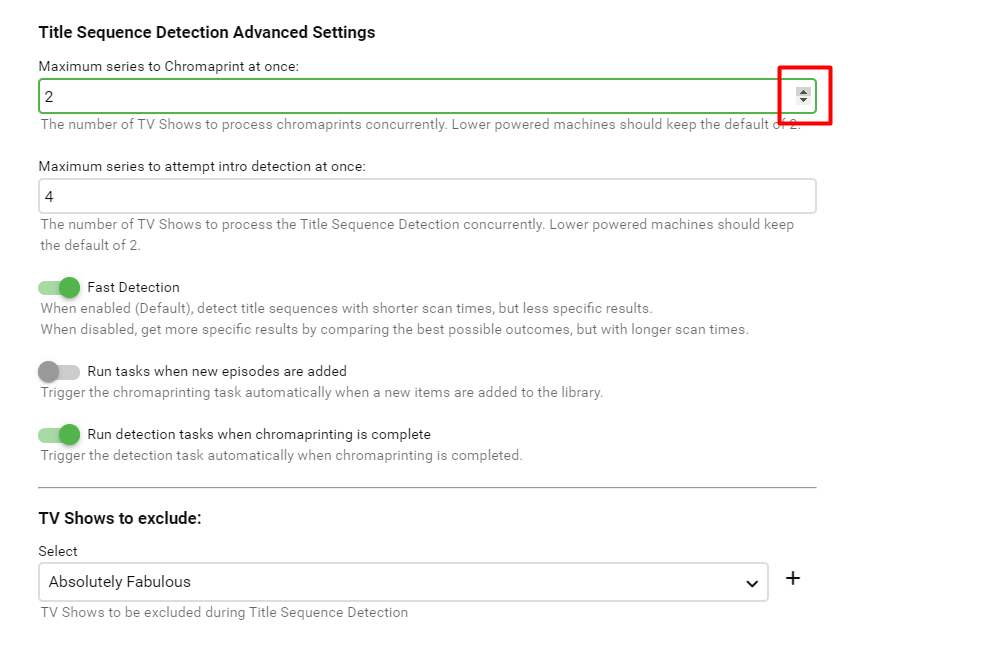
Oh @neik, you are correct. I'll add validation right away. We can't have that number less then 2. It is best when the number is not odd, and a multiple of 2. But it can never be less then 2. I'll make the changes. Nice catch!1 point
-
Hi. Cinema Intros does not provide trailers. That plug-in provides the functionality to automatically play intros and trailers before your movies. You still need a source of the content it will use. So, they work together.1 point
-
I just tested it myself and using the arrow scrollers, the step is 2. Have you cleared your browser cache? See below
 1 point
 -
Yep, that worked! Thanks!1 point
-
You'll have to do it manually from within client app that allows you to arrange Home Screen libraries order, like Web App, and AndroidTV app will reflect those settings.1 point
-
Oh thank goodness! I was reading the logs, and I thought... uh oh why is the plugin not listing the episode name??? but, funny enough... it is currently working on an episode of Episodes LOL! The logs look good. So far. Awesome.1 point
-
I have two servers that I manage, one at my place and another at my parent's place. I have a Norco 4224 Case (24bay) Gigabyte Z270X with i7-7700k 64GB 1066Mhz ram 2x Adaptec 71605 Controllers 250GB Samsung Pro SSD (OS) 1TB Samsung Pro SSD (Download Landing Drive) 250GB Samsung Pro NVMe (PrimoCache) 250GB Samsung Pro NVMe (125GB for Drivepool Cache/SSD Swap, 125GB for Emby Cache) 4x 18TB Seagate Exos 3x 16GB Exos 3x 10TB IronWolf 3x 3TB WD Red 3x 4TB WD Gold I use Drivepool and Scanner as well. I'm recovering from a bad PSU that blew up half my equipment. I don't think I lost any data. If I did, I haven't figured out what's missing yet :D I use duplication for most of our important things, but I'd need about 5x more 18TB drives to duplicate all my videos.1 point
-
@Tim40Split to new topic in Live TV forum to get proper visibility and more feedback. Please click follow to get updates on this topic.1 point
-
You're welcome - I've used servercase and they were good for me...ounds like you are going to bve having fun when everything arrives, lucky you!1 point
-
Thanks. I will get the logs. In the meantime the cpu runs hot because I am testing blu ray movies in H264 format and running the Emby app on my LG TV, and the server is transcoding, although the app on my phone does this also and both are on same LAN as the server. So I am not sure why transcoding is required. Thanks1 point
-
I have made the changes to not send position and runtime if there is no Kodi duration to the latest betas.1 point
-
I’m not upto speed with nas, you’ll need to wait for a NAS guy to help you. Really sorry.1 point
-
Try a simple restart of Emby first, and let us know if the issue remains.1 point
-
this issue is only on kodi 18.9 with emby non- next gen its an SSL issue i fixed it with: disable verify connection.. and it works again1 point
-
Hi, try installing the IPTV plugin from the catalog if you don't have it setup already. I was able to add this link https://radios.rtbf.be/classic21-64.aac to it and it would playback just fine in Emby. Let me know how you make out.1 point
-
I'm very interested as well, I'm sure that there will lots of great data from that as well as some things that might not be as effective as they would seem.1 point
-
I'm very curious to see what you come up with1 point
-
Hello, Luke, I tested version 3.2.19 today. There is still a problem with the video of rmvb container.1 point
-
Hopefully we'll have something soon. Best thing to do is follow the testing area of the community: https://emby.media/community/index.php?/forum/160-windows-xbox/ Thanks.1 point
-
@Dizzy491 point
-
Hi, I'm really interested in having this feature. I would like to add some suggestions. I recently developed a flussonic catchup proxy for my ISP provider, so that I can consume my 7 catchup days with clients like Android TV's TiviMate IPTV Player. Having done that I learned about Flussonic specifics, and I'm confident it's the easiest cacthup system to implement. The only changes needed for the m3u channel list is adding two fields to the EXTM3U header: For instance, with my proxy, a live tv channel url could be: A corresponding Flussonic catchup url would be: Where 1616516358 is the timestamp which defines what instant to start playback at, and 2100 is the time length. In my case the latter has no effect, so it is needed but the value does not matter, it can be a 0. The rationale TiviMate applies here is replacing the last part of the channel url with /video-{timestamp}-{duration}.m3u8 Again, with my proxy the extension does not matter, it can matter to the client, though. For instance, while mpv can play a url like that, vlc fails, yet changing the extension to .mpeg makes it work. I can't provide more details about a real Flussonic server since I only implemented what was needed to make TiviMate work. Now I miss being able to access that from my laptop or mobile, which Emby could do beautifully.1 point
-
I think there is some confusion in this thread. Firstly the OP @@Florux was referring to a displayed "release" date on a details page. @@spikemixture the release date you are referring to is only used within NFO files and should not reflect how any date is 'displayed' in the UI. (And contrary to what you think, yyyy-MM-dd is not a US date format, it's more of a Korean or Chinese one in fact.) So the date used here should not bother you, unless you are manually opening NFO files and viewing their content. @@Luke the field that spikemixture is talking about is not a browser date input box, but rather a hard-coded format presumably based on Kodi NFO date format standards once upon a time. Back to the original topic, I also raised this as an issue here: https://emby.media/community/index.php?/topic/80930-added-does-not-respect-machine-locale-whereas-metadata-does/ @@SamES explained the problem well. @@Luke seems there is some work to be done for other English speaking countries outside of the US and UK. tl;dr - as SamES explained in the other thread, until @@Luke comes up with a more permanent solution - the current workaround here is to set your 'Preferred Display Language' in Emby to 'English (United Kingdom)'1 point
-
I have the 4TB version of this drive and getting Emby on to it would be simply amazing! Since I stopped using Plex I've been been wondering if its worth using it anymore as its bulkier than a pure 4TB external drive could be for travel. Getting Emby on this would make me really happy! So, +1 I guess.1 point
-
+1 A visualizer could definitely be a nice addition to embys music playback1 point
-
Old thread but is only thing missing from Emby in my opinion.... Project M with options for lyrics, artist images, etc.... I noticed that Kodi now has Project M for Android options, would be a nice addition.1 point
-
How about enabling ProjectM as an option? This one has very good compatibility across platforms and could be integrated to clients.1 point
-
Hi Florux, did you figure this one out? I'm having the same problem. -- Martijn1 point