Leaderboard




Popular Content
Showing content with the highest reputation on 10/08/21 in Posts
-
It appears that any playlist that any user creates is public--all other users can see it. I can appreciate the benefit of a public playlist. I could create a playlist called "Harv's Favorite Horror Films" for example, in case other users are interested in checking out what I like. However, the way most of my users are using playlists is to keep track of things they want to watch in the future. They are typically things that the user has not watched yet, so it's not meant as a recommendation to others, just as a way of them personally keeping track of what they want to watch. Having that kind of playlist be public is of questionable benefit to other users. Additionally, it is not clear when you create a playlist that other users will be able to see it. That has the potential to cause some embarrassment. He hasn't created one yet, but I wouldn't want to see my nephew's "movies to fap to" playlist, for example. If I could make a suggestion, I would suggest associating each playlist with the user who created it, and giving that user the ability to make the playlist private or public. For example, the following two checkboxes could be shown when creating or editing a playlist: Allow other users to see this playlist Allow other users to edit this playlist Initially, both checkboxes would be unchecked. Since another user cannot edit a playlist they cannot see, the second would be allowed to be checked only if the first were also checked. (You could grey it out to make that clear.) Depending on your UI preference, it could also be a drop-down menu. Playlist visibility: (Only me | all users can view | all users can view and edit) Thanks for considering this.2 points
-
yeah, the tower cases I;ve seen are generally deep - my server chassis is big, but thats not a probalem for me - I wanted something to house my 17 HDD's more easily...thye do have shorter cases, but you are sacrificing quantity of disks for space, hence why I went with the bigger one. The backplane is Mini SAS so I got some external cables to connect my external HBA cards (as they are much cheaper than internal ones) and my cables connect in the rear if the chassis then come back in again to connect to the backplane miniSAS to miniSAS (different form factors I would have to look up)2 points
-
I don't believe so. But similar discussion over here the other day.2 points
-
If you're not in a hurry and can wait a couple of weeks I'm going to do some testing again of various setups using the 2 TB NVMe I have in the Synology 920+. This test will use the conventional Synology setups which can include 1TB read/write cache 2 TB read only cache I'm also going to retest mounting the NVMe(s) as storage volumes instead of cache using SSH and the command line as Synology DSM is built on Linux Then I'm also going to try something a bit different and take a 2.5 Samsung Pro SATA drive and attach it to the Synology 920+ by SATA and by USB3. For the last two configurations mentioned (being their own volume) I'll manually configure different Emby features to store content on the mounted volume. This could include: Cache Folder Meta-Data Transcoding Conversions Path Depending on how that goes I could possibly add in using Symbolic links to actually move the whole Emby Server folder to the NVMe/SDD volume. I can already do all the above but what I'm trying to think of is how to test/measure performance for real-world Emby use to see how much each of these helps. I have a few ideas for some tests but I'd like to hear other's feedback on what to test. Some things could be subjective like how fast graphics load so while that will be observed it would be nice to be able to time this in some fashion (maybe using API). With the different caching methods it would be interesting to see how each would do for transcoding. Would one method support more transcodes? Another test might be to see how many DVR recordings can be done simultaneously maybe with one or two live viewing going on as well. So if you have any ideas let me know.2 points
-
Hi, would you cosider the option to change the quantity of unwatched episodes/specials for a tv-show to a total of existing ? May be both together and as a further enhancement the quantity of missing episodes/specials (if available)? I know there is not so much space for all this informations, but at least to have the choice in admin panel to choose which info I will see. Thank you.2 points
-
1 point
-
Is there anyway to get the Apple TV app to display the movie Trailers section in with the associated movie and not a completely different section. The Web Browser and iOS have the trailers in the movie selection. Why can't the Apple TV app? Having the movie library trailers in a different area than the movies itself is self defeating and makes movie selection awkward.1 point
-
Both affect quality: one by increased file size and the other one by increased CPU usage I agree that these settings are confusing. It's not even clear that these apply to software encoding only, but not when hw acceleration is used.1 point
-
Emby's interface on Apple TV Date, and no evolution of design conference to Android box. Will there be a version 2.0 on Apple TV? Because this box also deserves a more modern evolution like the Team Plex I use Emby since a year because I can find it intuitive now with the evolutions of Plex, Squire and infuse applications, I find it less attractive. Your team is Great but think of the apple user who would like their favorite app to modernize on their box THANKS1 point
-
I originally asked because everything was set to defaults. It seems now, for whatever reason, the size shape and colour are being re-used when I enable it on a new library.? I need to add the tag and choose the icon, but the colour, shape, and size are the same as all the others, so it's not nearly as tedious as I expected. I'm only creating six genres for TV and three for Movies. I was just being lazy. Thanks for your help.1 point
-
Sorry over looked and went off title. No a Restart should never change this option but the update will (depending on how you update) so there server restart does. Okay how do you update your server?1 point
-
My solution to this sort of problem is to avoid having it. That is I use a tool (FreeMake) to join the two halves of the movie and then name the movie just like I would if it were originally in one piece. I even use the same tool for some old movie serials. The reason I use FreeMake is I am comfortable with it and I run it on a "utility" computer so the fact that it is not as fast as some others does not matter. There are tools that do the joining more directly and are much faster (Mainly for MKV files) but just having one file to deal with is much easier for me.1 point
-
That is the problem with high bitrate media as it was technically never designed to be streamed at that rate, it was for HDMI. Some have got it to work and others have not. There are several topics on this but in the end you have to list your entire setup and how they are linked as there are a lot of variables.1 point
-
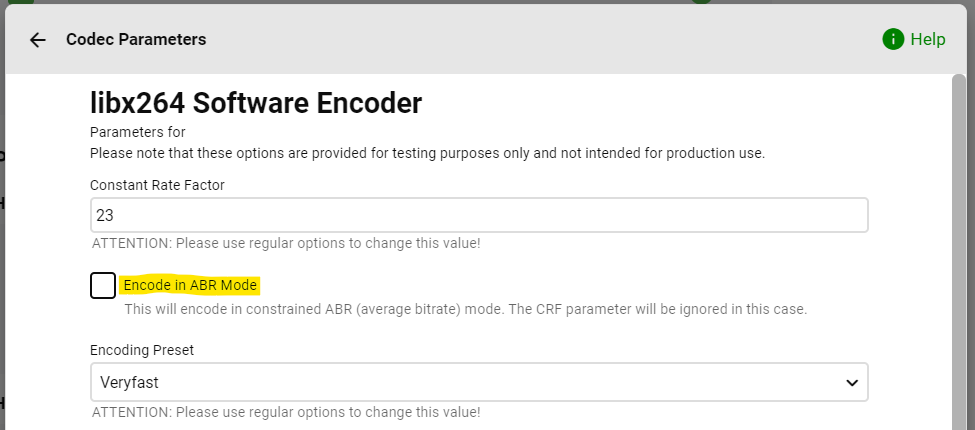
Yes, this is something we haven't come to work on yet. For libx264, we're using the CRF (constant rate factor) mode which isn't working in a way to hit the desired bit rate. The options for getting closer are: 1. Use lower CRF Values Means lower than the default (23), e.g. 16-22 2. Try ABR Mode To activate, you need to install the "Emby Diagnostics" plugin and adjust the encoding parameters of the libx264 encoder under "Advanced Transcoding": We've documented this a number of times, but received just minimal feedback so far. (which might explain the prioritization) As I always said: feedback on playing around with this is welcome! softworkz
 1 point
 -
1 point
-
I'm very curious to see what you come up with1 point
-
Never mind. Out of desperation, after observing some weirdness with items reporting missing from the database in the debug log, I decided to reset and recreate the local database. After which, it has come good again!1 point
-
Ok, if people have different tastes then probably this needs to be a preference setting. As for the punctuation issues, I hope you resolve them soon.1 point
-
I reckon that implementing such would introduce unnecessary complexity both for inept users and troubleshooting purposes, as it is already quite convoluted enough with several places that bitrate restriction can be enforced. IMHO more sensible approach would be a settings toggle to NOT remember quality selection between playback sessions, i.e. always default to selections in Settings>Playback, do not automatically change if changed in OSD during playback.1 point
-
So why don't you just lower in-app quality while playing 10-bit files (OSD cog icon)? That is effectively same as restricting the bitrate server-side. That way you'll retain higher bitrate settings for 8-bit files.1 point
-
Not exactly sure what you're trying to achieve there, as transcoding decision isn't (and can't) be based only on color depth but numerous factors based on device format support. Link you gave doesn't list 10-bit profile support anywhere so it gets transcoded in any case, whatever you're playing, so your device settings play no part there, it's all server side, your can only restrict bitrate in client app. Your 8-bit files would be DirectPlayed/DirectStreamed/Transcoded, based on number of factors (container, audio, bitrate...), so again, not quite clear about your desired usage-case.1 point
-
I'm on the lookout for a 'short' (~500mm deep) rack mounted 'disk only' version of the chassis you linked above. 'short' chassis for the CPU etc are easy enough to find - my plan is to 'link' the disk chassis with the server chassis using external SAS as you've said above. Then you can 'stack' disk trays in a 'short/~600mm' rack (which is what I have) and this also of course means you can add entire disk trays as required.1 point
-
No id folders can't go as that is the only way to have same named people.1 point
-
Thanks for the feedback.1 point
-
It all depends on the policy of the hospital. They may see the media consumption as excessive and "abuse" and not allow it. Otherwise, it SHOULD work. Worse case you may have to force transcode to a lower bandwidth. Using a VPN may be ideal as well as it could hide the traffic from them as well. As for the TV, I know here in Canada you rent the TV at a stupid price. You would need to use a firestick or something and then put it on their wifi. If they say "we block external devices" all you need to do is unplug the coax cable from the back of the TV (if you can) power off the tv and power it back on and it will be a normal TV without any of their preprogrammed stuff (same thing with hotels that do this) If not, then I would suggest you get a usb lightning drive for the ipad and load it with movies and shows for her, though an older laptop would have more space and be easier to access? Hope your mom has a speedy recovery and that she is not in there for long.1 point
-
You were correct. Thanks1 point
-
Thanks for the feedback.1 point
-
It doesn't apply. It's mostly there by accident.1 point
-
No. It's only looking for new, deleted or changed files.1 point
-
Hi, you may want to try installing it again as all of our Theater packages have been rebuilt, except for the dedicated Pi image, and a revamp of that will also be coming in the near future.1 point
-
Done. I DM'ed it to you here. What I did find was in testing it through the addon itself, "Emby Options" is actually missing from the context menu there. So it appears in native mode but not in addon mode.1 point
-
IMHO the Access control tab could use a revamping. If a user isn't given access to any component on that page then they have zero access to that content! Maybe there should be another section between Library Access and Channel Access. This would be for "virtual libraries". The following 3 items could be part of that group: Playlists Collections Recording Library If a user doesn't have the option enabled then they don't every see the library or it's contents just like Movies & TV Show libraries. It's strictly access control vs arrangement of home screen items. This way we have Library Access - true libraries Virtual Libraries - virtual libraries built off of data for items in real libraries. Playlists, Collections and DVR Recording library. Channel Access - The different plugins installed on Emby that provide content.1 point
-
OK, I'm not going to do a migration, but I can add a hidden config switch to activate this if that's what you guys want. You'll need to move the files manually after activating it and then run the scheduled task to scan the server metadata folder. This can also be default behavior for new installations.1 point
-
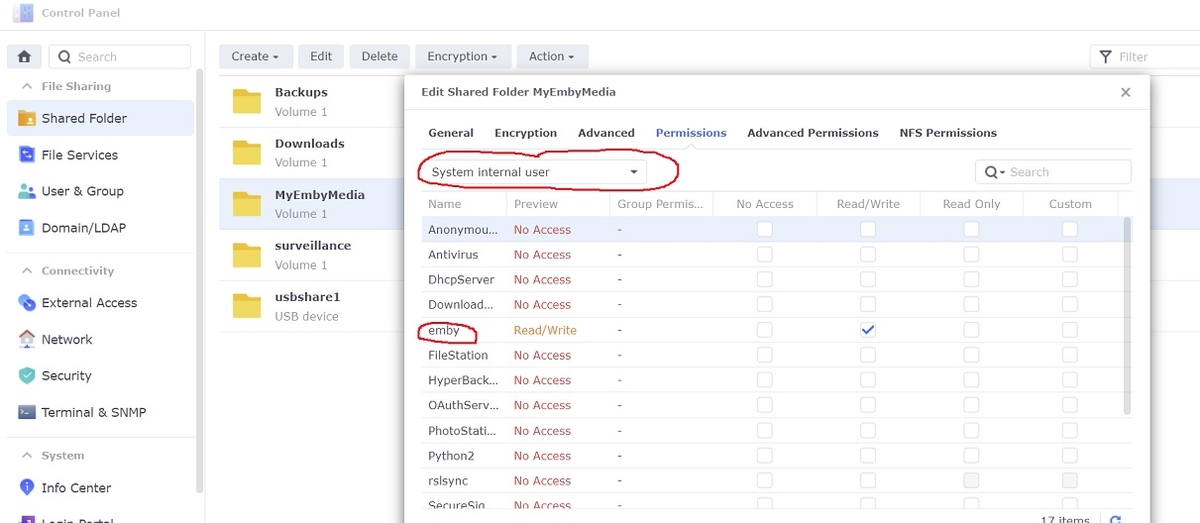
The only permissions you should have to set for emby when switching to DSM 7 are the Shared Folder permissions with read/write access. However, emby is now a "System internal user" so make sure you click the drop down box first before changing. Any old emby local users can be deleted under DSM 7
 1 point
 -
The issue is the Samsung player which we utilise in this app. So I would say this is Samsung specific, but not something we can change in the app.1 point
-
hi friends, how are you? I just came back to give you feedback. After using these settings, I can greatly improve the cache of pages. Go from 50 megs of cache per day to 17GB of cache per day. Thanks again my friends!
 1 point
 -
Alternate orders only come from TVDB, since you have TVDB as a secondary provider the order, metadata and images come from TMDB and TVDB is backup. You would have to set TVDB as first provider, ensure Display Order is set on Series to DVD, refresh w/replace images. Then I would lock the series. Now you can change the order back to TMDB first if you wish. Note Emby has v4 api access so we will be migrating eventually, plugin is in testing as there are api deficiencies and server core needs updating for changes also..1 point
-
I figured this out. it took a lot of time and more snapshot restores than I would like to admit to. I am running the "mainline" NGINX branch for Ubuntu 20.04 so I have version 1.21.3 which is much newer than what is available from ubuntu's dristros. in that version there are still two ways to configure the reverse proxy A. split .conf file (now in /etc/nginx/conf.d/xxx.conf) B. Unified in the main .conf file (/etc/nginx/nginx.conf). All the instructions I found were for older versions of nginx that use /etc/nginx/sites-enabled/xx.conf location for the split conf file locations. The cloud services I use are: cloudflare for domain registrar/public DNS and let's encrypt for SSL. I am using an ubuntu 20.04 VM server to host the proxy. As soon as I would try to switch Nginx over to the /etc/nginx/nginx.conf with the configuration you graciously put together it wouldn't pass a nginx test or reload because it was missing: 1. The SSL full chain (public cert) 2. the private cert 3. The log file directory/file not being created. I was able to fix the log directory/file easily enough by pre-populating them. I would get stuck because I was trying to also use certbot and integrate the let's encrypt certificates and automatic renewal with nginx at the same time so it would all work seamlessly and reload the nginx as soon as a let's encrypt cert was renewed. Nginx wouldn't load because the config was missing the certificates and Certbot didn't know to put its settings in /etc/nginx/nginx.conf. stand alone I could get certbot to register the domain and pickup the right certs on its own but I couldn't figure out what syntax was needed to replace the named /etc/nginx/ssl/xx.pem stuff. I ended up using the OEM /etc/nginx/nginx.conf, unlinking the /etc/nginx/conf.d/default.conf and creating a new /etc/nginx/conf.d/<mydomain>.conf file. I configured the file as: server { listen 80; server_name <mysubdomain>; location / { proxy_pass http://<internal IP>:8096; } } At that point was able to get the reverse proxy working on port 80 no SSL. I then reinstalled certbot and the nginx integration for it and was able to get it to update the /etc/nginx/conf.d/<mydomain>.conf file. server { server_name <my public subdomain>; location / { proxy_pass http://<internal IP of emby server>:8096; } listen 443 ssl; # managed by Certbot ssl_certificate /etc/letsencrypt/live/<my subdomain>/fullchain.pem; # managed by Certbot ssl_certificate_key /etc/letsencrypt/live/<my Subdomain>/privkey.pem; # managed by Certbot include /etc/letsencrypt/options-ssl-nginx.conf; # managed by Certbot ssl_dhparam /etc/letsencrypt/ssl-dhparams.pem; # managed by Certbot } server { if ($host = <my subdomain>) { return 301 https://$host$request_uri; } # managed by Certbot listen 80; server_name <my subdomain>; return 404; # managed by Certbot I copied the contents of the /etc/nginx/conf.d/<my subdomain>.conf file. I then switched the file /etc/nginx/nginx.conf back to the one you developed for us that had my environmental variables. commented out the defined certificate locations, and encryption variables and added the ones that certbot defined in the /etc/nginx/conf.d/<mydomain>.conf file : ##SSL SETTINGS## ## ssl_session_timeout 30m; ##10.3.21-removing to allow cert bot to handle ## ssl_protocols TLSv1.2 TLSv1.1 TLSv1; ##10.3.21-removing to allow cert bot to handle ## ssl_certificate ssl/pub.pem; ## Location of your public PEM file. ##10.3.21-removing to allow cert bot to handle ## ssl_certificate_key ssl/pvt.pem; ## Location of your private PEM file. ##10.3.21-removing to allow cert bot to handle ## ssl_session_cache shared:SSL:10m; ##10.3.21-removing to allow cert bot to handle ssl_certificate /etc/letsencrypt/live/<my subdomain>/fullchain.pem; # managed by Certbot ssl_certificate_key /etc/letsencrypt/live/<my Subdomain>/privkey.pem; # managed by Certbot include /etc/letsencrypt/options-ssl-nginx.conf; # managed by Certbot ssl_dhparam /etc/letsencrypt/ssl-dhparams.pem; # managed by Certbot now my NGINX install will pass a self test and reload the config. It proxy's as expected and handles SSL offloading. Additionally, I get an A+ rating instead of a B rating on SSL labs (https://www.ssllabs.com/ssltest/analyze.html?d=<mydomain>). I am just about finished figuring out how to add DDclient to my nginx/certbot VM so I will have DDNS to my public DNS provider. how do I add other back end servers and subdomains to the /etc/nginx/nginx.conf file? is there a way to only allow access to them from my internal subnets on the Nginx config? thank you for setting up the nginx.conf file and for your assistance with all of our issues. I appreciate it.1 point
-
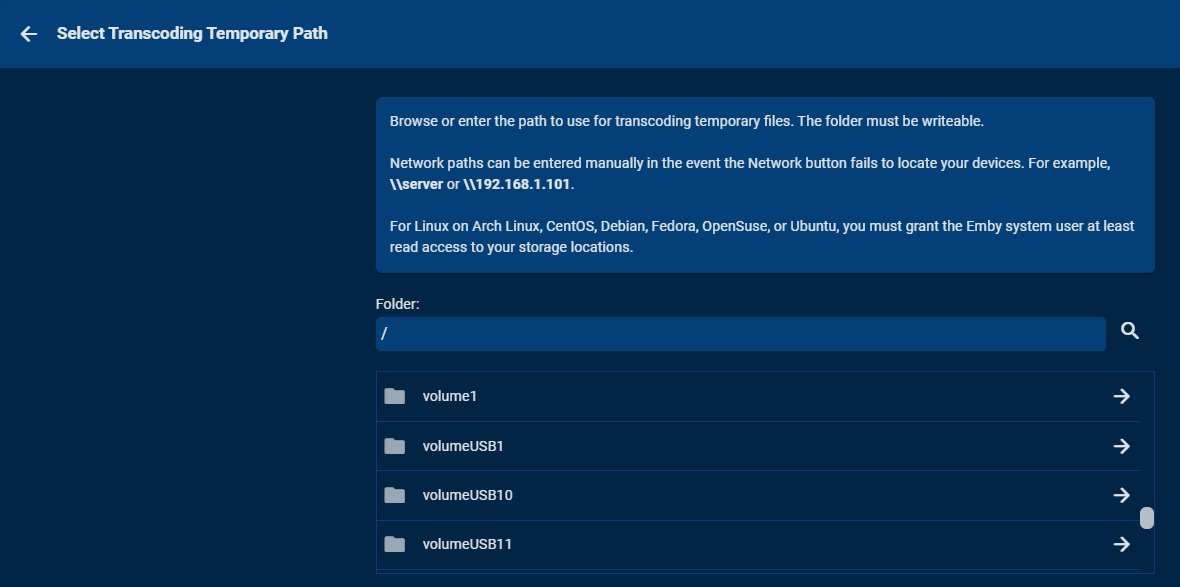
I don't know if this applies to all Synology boxes or not but you can attach an external drive via eSATA or USB3 to the NAS. These show up as External devices. Each drive can be setup as a shared folder. At that point these drives are fully available to Emby to use. I've got 8 bay StarTech cases that do nothing fancy (no disc combining or RAID) but provide 8 drives to Synology this way. In Emby you can use these drives for Transcoding, Cache, Metadata, DVR, etv like this: You can name the USB/eSATA shares anything you want but I use numbers representing the bay they are located in. So you could attach a 2.5 SSD via USB3 or eSATA to the NAS and use it this way without having to give up an internal drive bay. These external drives can even use NTFS formatting and work just fine. They can be read by both Windows and Synology with no problem depending on what box you plug it into. Via DSM you can't create pools using these drives but can access each drive just fine. There are probably two downsides to this as you have no type of RAID protection against a failed disc (backup) and some apps can't make use of this space such as Storage Manager, SAN Manager (iSCSI support) or VM Manager as they will only want to use or manage a storage pool. But by being able to move content from an internal pool to the external drives allows you to free up internal drive space for those apps. You can even use the mount command to take the contents of an external drive and mount it to an internal pool if you want.
 1 point
 -
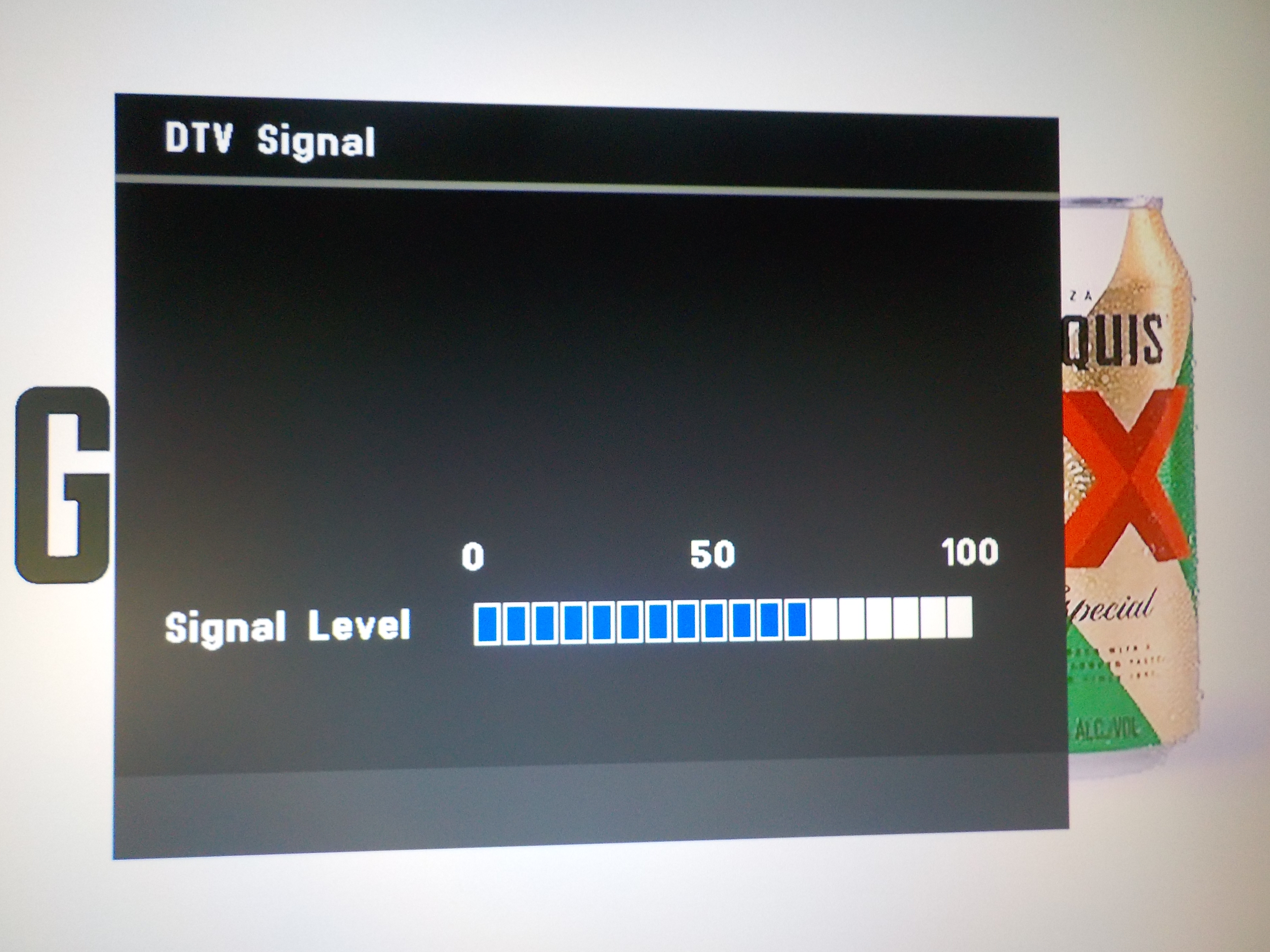
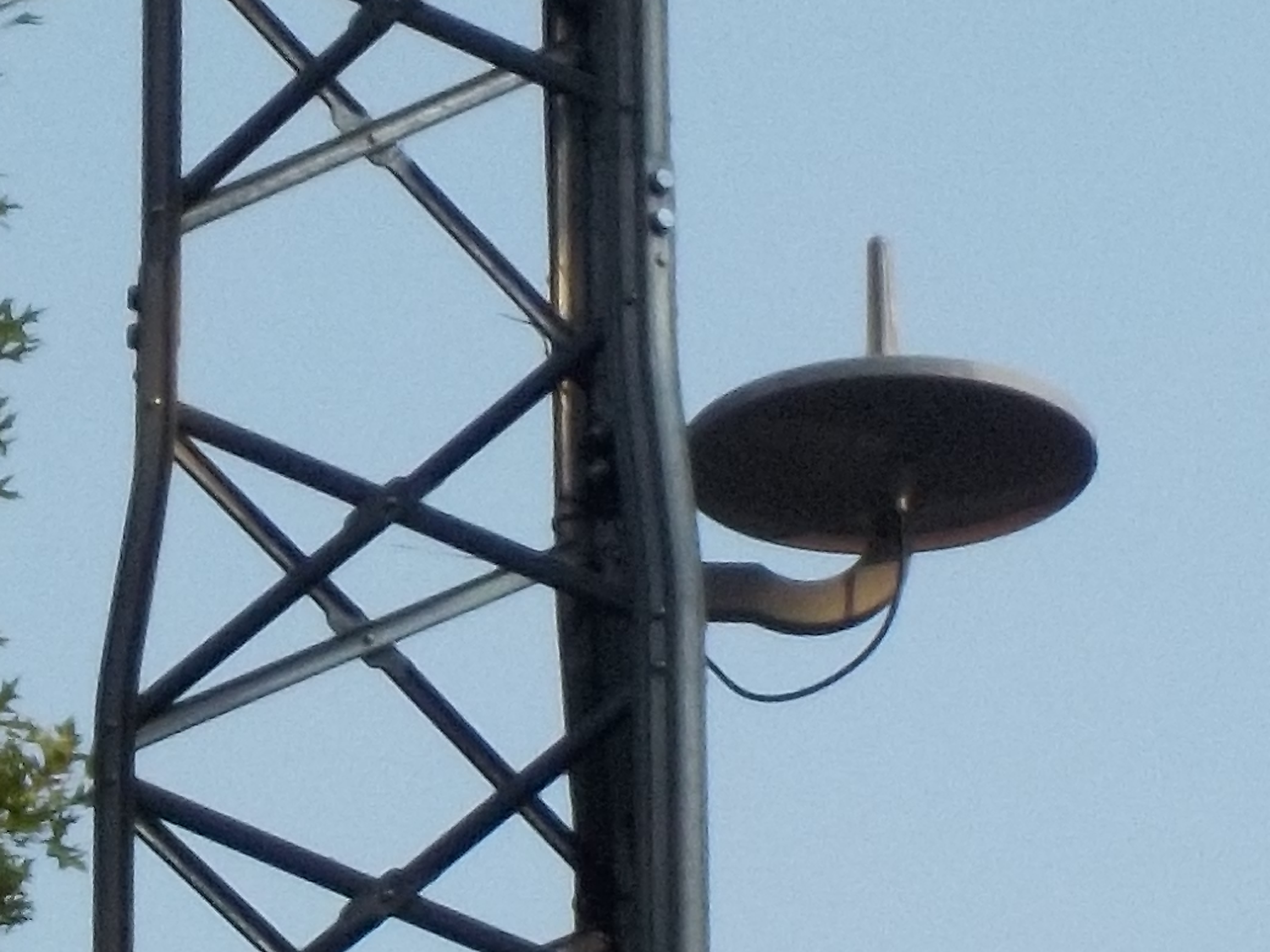
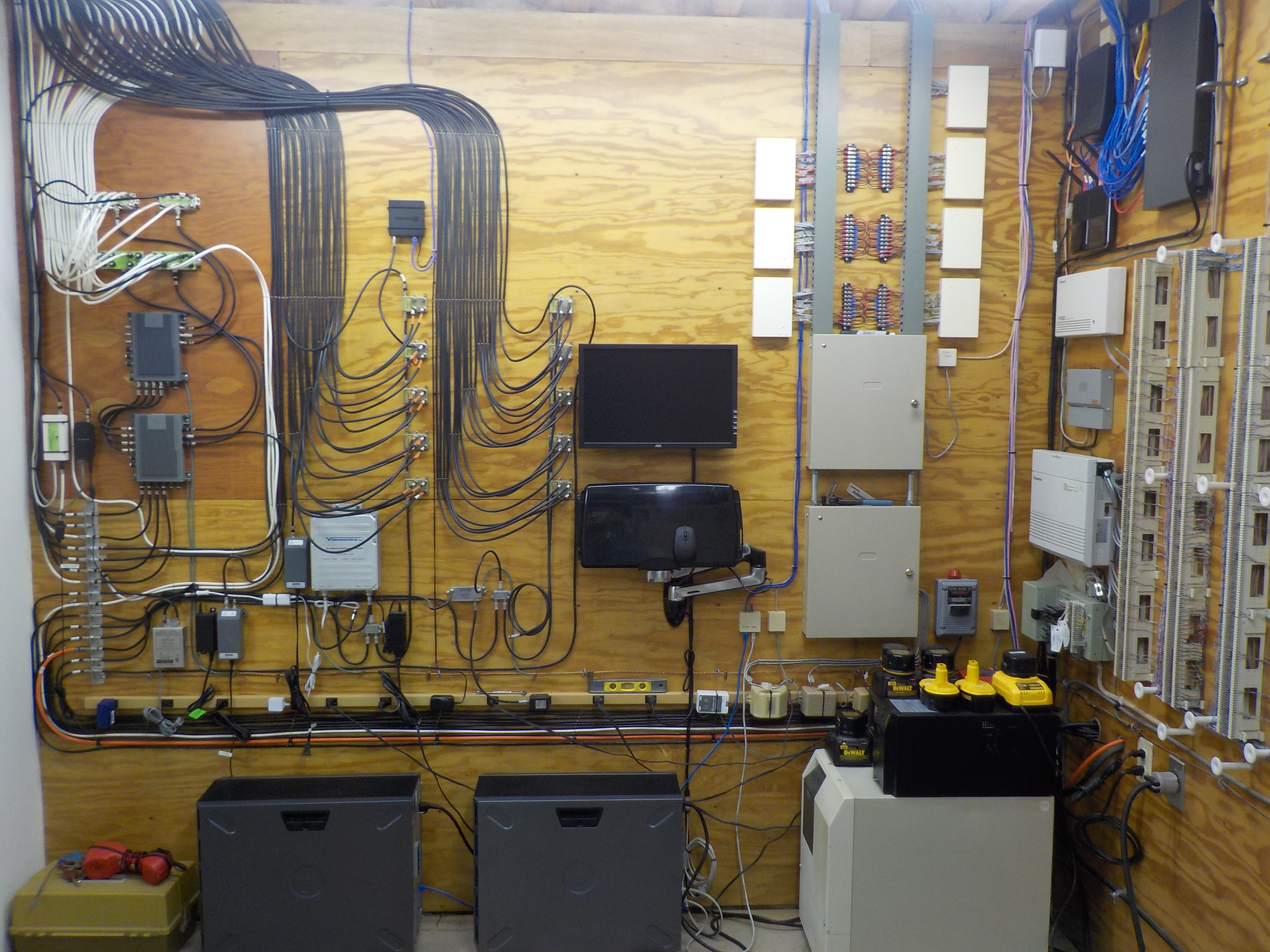
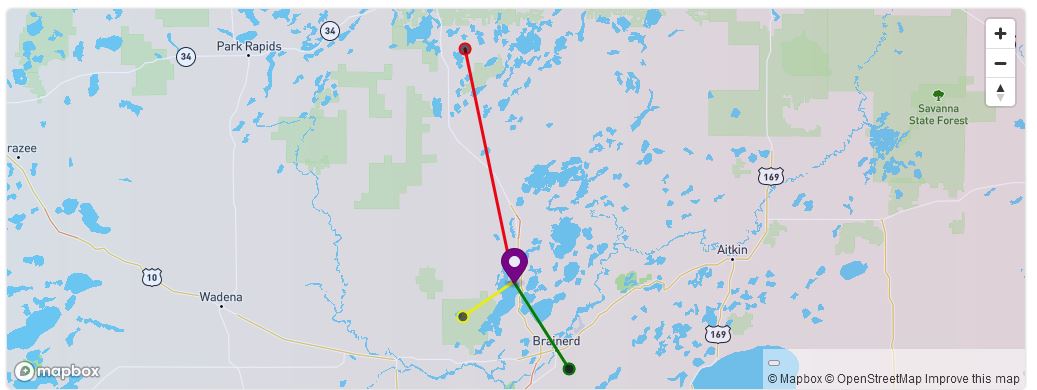
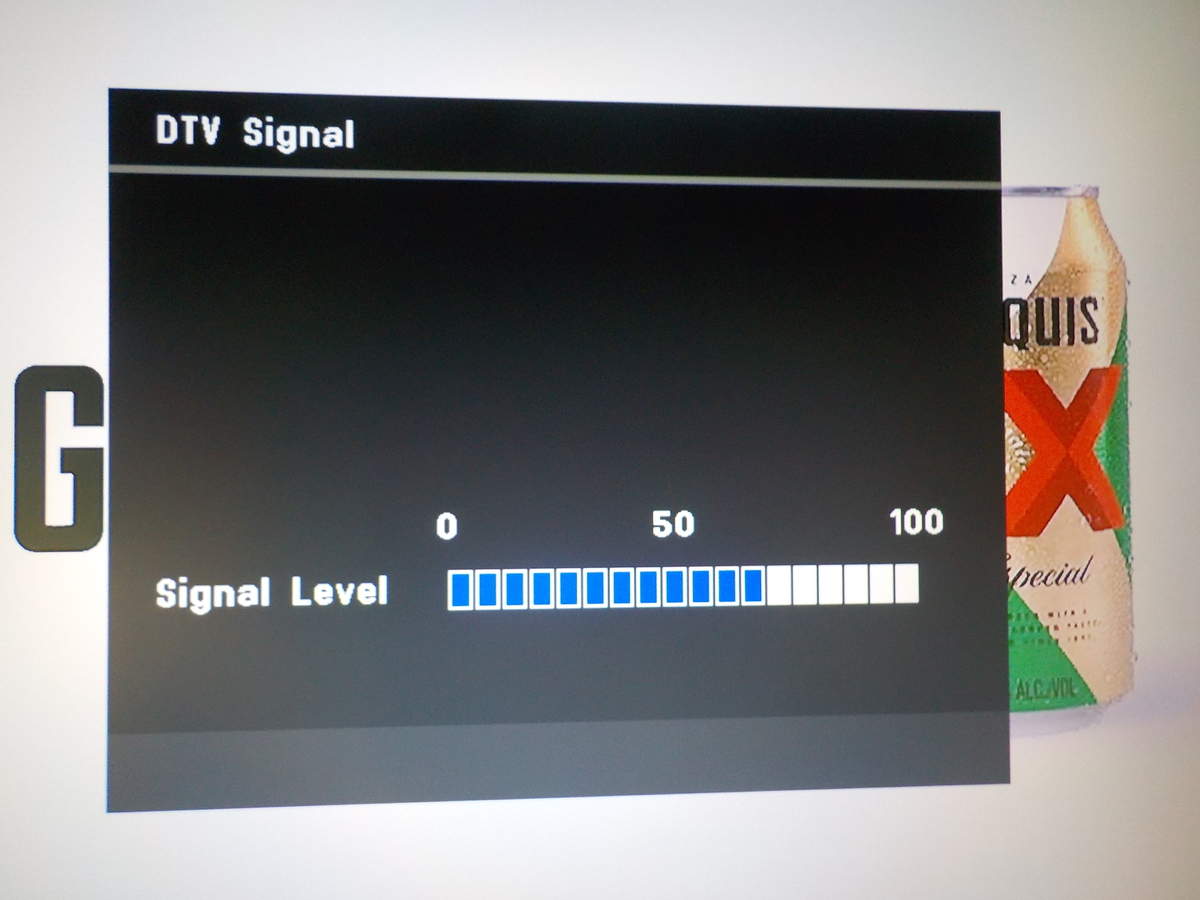
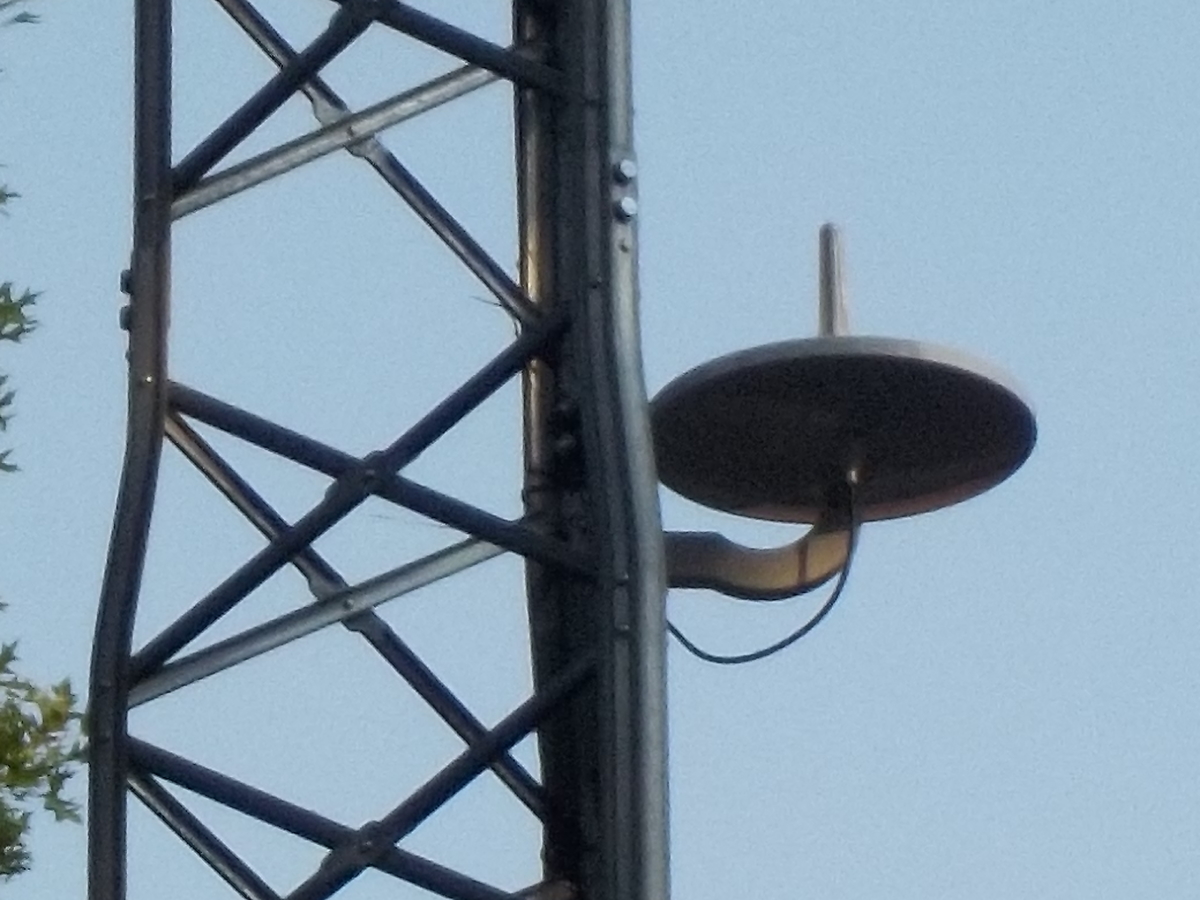
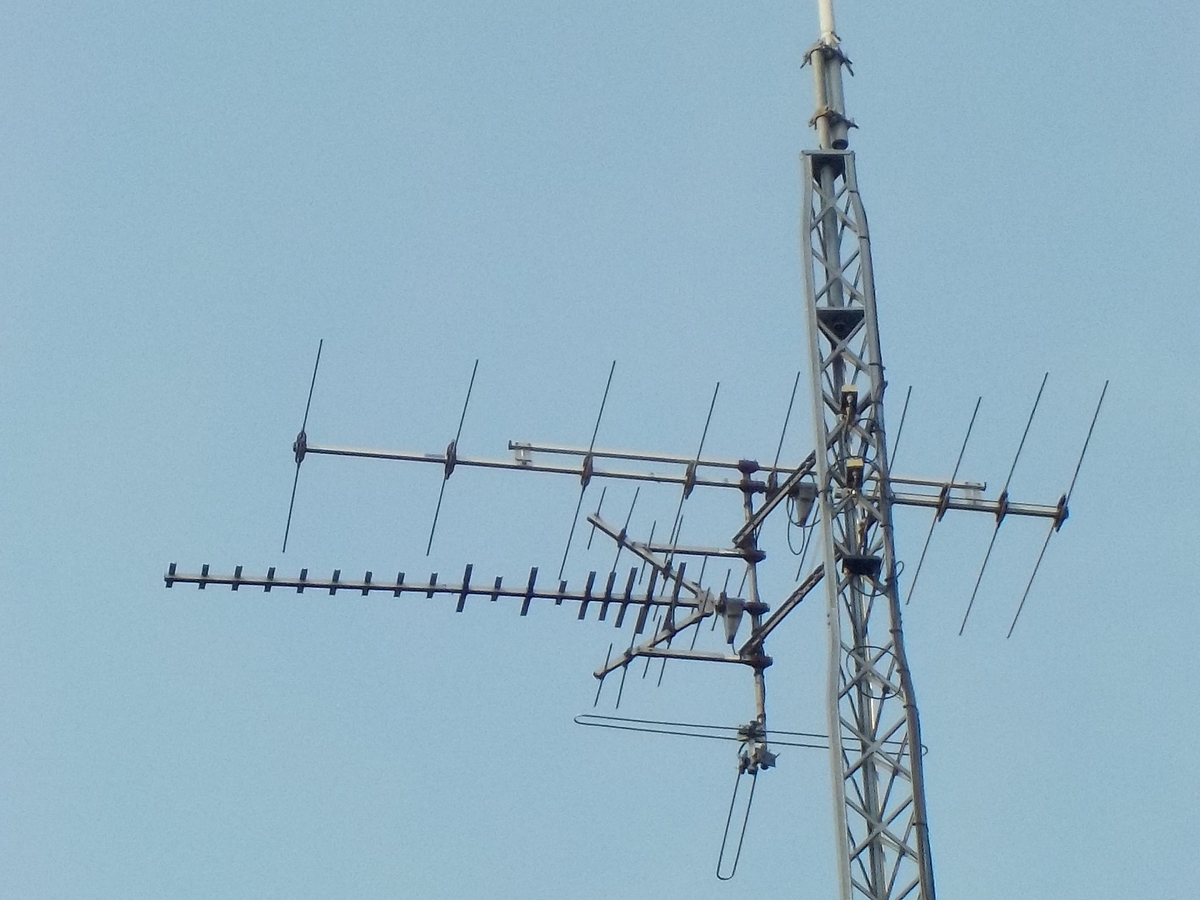
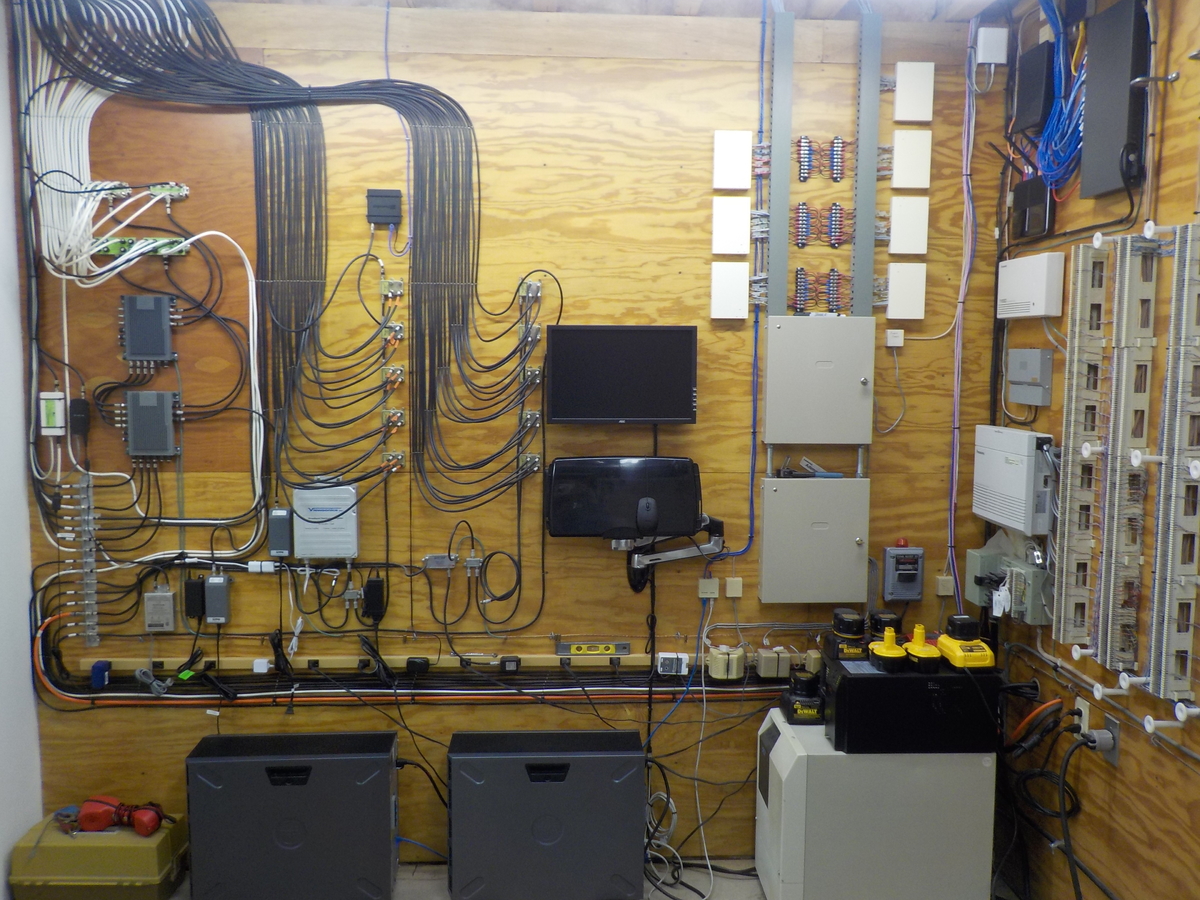
Thanks for the link! My speculation as to their meaning was very close. Signal strength would be the RF carrier. Signal quality would likely be how well the demodulated data is defined, voltage level, slope, etc Symbol quality would likely be bit error. I erected my antenna on the side of a 64' self supporting tower. I utilized an omnidirectional antenna as the two primary broadcast towers were near 180 degrees apart and the third was near 90 degrees between. A directional antenna would have yielded a stronger signal. However, it would have required a rotor or the non-aligned stations would have much weaker signals that would also have multipath issues. In the old days of NTSC, multipath would have resulted in picture ghosting as the analog signal was AM modulated. Today, with ATSC, multipath would likely impact the "Signal Quality" measurement. Still, it is much forgiving than NTSC. When I erected the antenna, I actually setup a small TV that had a signal strength meter screen at the base of the tower. In this manner, I could test the signal strength at various elevations. The transmitter of primary concern, channel 26.1, was only 10 miles away, but only a 100 watt. Also, at its operating frequency of 509MHz, multipath would likely be an issue. The signal strength bar graph of the television likely corresponds to the "Signal Quality" of the HDHomerun. It indicated a stronger signal on channel 26.1 than 12.1, as depicted in the above HDHomerun tuner status screen shots. I clamped the antenna to tower members with quick release clamps and used binoculars at the higher elevations so I could see the TV signal strength screen. The best signal strength was not at the top of the tower, 64', but actually quite a bit lower, at 24', for channel 26.1. Once I found the approximate strong signal elevation, I moved the antenna up down on the tower to determine where the signal began to decline and then mounted the antenna in the center of that band. I'm speculating the round disc portion of the antenna is the UHF section and the vertical element is VHF. In the past, all television antenna were horizontally polarized (elements being horizontal). If I am indeed correct that the vertical element is VHF, this would be a vertical polarization. This could also be a factor in why I'm only achieving a 76% "Signal Quality", on channel 12.1, when I have 100% signal strength, again likely due to multipath. Back in the day, when FM broadcast radio was first coming to be, the broadcast transmitter antennas were all horizontally polarized, as FM radio was just in the home. Once FM radio began to be installed in autos in a greater number, the broadcasters began changing their transmitter antenna to circular polarization, as auto antennas are, obviously, vertically polarized. The disc portion of the antenna would be horizontally polarized. I'm going to further speculate that is why I'm achieving a 88% signal quality with only an 88% signal strength on channel 26.1 There was a similar model of antenna that had the same UHF disc, but had a horizontal dipole for VHF. This would have likely improved the Signal Quality on channel 12.1. However, being a horizontally polarized antenna, it would have been directional. The UHF channel signal;s would have also been received through it, especially with the lowered numbered (frequency) channels. This would have likely created multipath issues with them, which would have degraded the signal quality. As such, why I went with the model that had the vertical, omnidirectional, VHF element. I did have a significantly higher signal strength on the other channels when I had the antenna at a higher elevation, on the tower. However, the channel 26.1 signal strength was quite a bit less. The signals from the two 180 degree apart transmitters are now near equal. Of course, the tower at 90 degrees between the two is at 100% for all measurement categories, as it is only 5 miles away, on a high elevation hill, 500+ foot tower, and a 10kw transmitter. It's always a compromise when choosing an antenna for multiple transmitter locations/frequency bands. Elevation and antenna do make a difference. When I erected the tower 20+ years ago, I installed a UHF antenna on a sidearm to receive a translator that was co-located on the tower at the 90 degree point. It operated on channel 54, which is quite a bit higher in frequency. Star Trek Next Generation was not carried by the networks, but syndicated. The channel 54 translator was an independent who carried the program. So the antenna I chose was a high gain directional cut with an emphasis for the higher UHF channels. When we cut the cord with DirecTV, I climbed the tower and swung the antenna around to the direction of the channel 26.1 transmitter. We rarely ever had enough signal on channel 26.1 for a TV tuner to detect it. The co-located channel 16 transmitter was usually a solid signal, but it had a larger antenna (the top 33' of the tower was the antenna) and a 1kw transmitter. The channel 22 tower is at the antenna's side. Though it was less than 5 miles away, the picture was always pixelated. Surprisingly, the channel 12 signal was almost always watchable with minor pixelation, off the back side of that antenna. The antenna directly above it, on the sidearm, is for FM broadcast. The dipole below is a FM omni. The top mounted antenna is for two-way radio. Climbing that tower was a stark reminder that I am no longer the man I once was. It wiped me out. I am in my mid-60s and dragging along some extra ballast above the waist line. When I erected the tower 20+ years ago, I also installed the antenna distribution system. This was back in the days of NTSC, so picturing ghosting could easily become an issue in the distribution system. So the bulk of the distribution system utilizes line drop taps, rather than splitters. Of course, the insertion loss from the trunk line to the set is quite a bit higher. Thus, I have a 33db gain amplifier. This is overkill for ATSC, but it was in place, paid for, and works well. In the photo below, the far left, white, coax cables was the DirecTV distribution system. I still utilized a portion of this as a means to extend my LAN, over coax, to televisions. It is limited to 100mbs, but is better than wifi and keeps the bandwidth load off the wifi. The center black coaxes are the distribution system for the OTA TV antenna. The right group of black coaxes are the distribution system for the FM broadcast antenna.
 1 point
 -
What this is asking is do you want Emby Server to download images when it's scanning in new files or to just wait until the media is being looked at the first time. If that is not enabled it will make the GUI seem slower at first because it's got to download the media, process it to the size needed, copied to the cache folder, handed off to the client. Different apps/systems will need the image in different sizes so even after you have the image it can seem a tad slower until the different client/apps all have the sizes they will need. The above is mostly for the show/movie images. Then there is the cast/people, studios,, program info/pictures that also go through somethings similar on first use. So even a really fast server has some additional overhead on new systems as this info is built up. I'm running my system on a 920+ at the moment right now and did upgrade memory and installed two 1 TB SSD chips used for read/write caching and I do think they make a difference. I also bonded the two 1 Gb Ethernet ports. Part of your overall speed of the NAS itself is going to be determined by what software you have loaded and what is active using resources. Synology specs say this box can be upgraded to 8 GB memory but you can find a lot of online YouTube videos of people pushing way past this. I've added a 16 GB chip and it worked without issue. You likely don't need to add this much memory and it's mostly only useful if you run VMs on the NAS. However a memory upgrade to 8 GB total is going to be beneficial. A memory upgrade is pretty cheap. https://smile.amazon.com/gp/product/B08MTFHKT7/ref=ppx_yo_dt_b_search_asin_title?ie=UTF8&psc=1 is a 4 GB chip for $32 that will bring the system up to 8 GB and works well from my own testing. A much more expensive upgrade is the two 1 TB SAMSUNG M.2 NVMe drives I added at $129/each. I configured these as RAID 1 using both READ/WRITE. This helps to cache the Emby meta-data/cache as well as transcode information. It speeds up writes as well so makes the system feel a bit faster. The number and speed of the actual HDDs you installed as well as RAID type they are setup in DSM makes a difference as well. A NAS built using 7200 RPM drives is likely going to be faster than a NAS built using 5400 RPM drives. I can tell you with the hardware/setup I just mentioned, mainly running only Emby on the box, my setup it's pretty fast loading screens in Emby. I could remote in and take a quick look at your setup & get an idea of your speed watching using your own computer on the LAN. Hope some of this might help, Carlo1 point
-
Any plan to add the tv (and movies as well) theme songs? I have them working on ios and desktop web but not on the apple tv. Currently using the beta version1 point
-
Many are waiting for the trailers to be integrated on Apple TV1 point
-
Because "IMDB" also works and maybe some day also "TVDB".1 point