Leaderboard




Popular Content
Showing content with the highest reputation on 09/30/21 in Posts
-
You will not have to purchase an api key. Our tvdb support will just work like it always has. We're being told that old api's will not be shut off just yet tomorrow (but soon), so that gives us a little more time to get the update released. The work is largely done and I expect to have a test build of the new tvdb plugin up today for those that are interested in trying it out.3 points
-
New beta version available: 6.0.11 delta changelog: - fix remove item issue - fix recording issue - fix native tvshow path @RaptorCentauri Those are using native mode, must resync the database due to a path issue.3 points
-
I thought this might be useful if someone else comes across the same issue. I'm a bit of an edge case since I use docker and I create a pkcs12 cert bundle from certs and keys extracted from traefik, but the issue I had was not related to that. Since Lets Encrypt intermediate expired my emby server has been presenting an expired intermediate, but the `p12` file I'm generating has the correct new intermediate, I narrowed it down to the x509stores in the docker image had cached the intermediates, so since the issuer hadn't actually changed it never refreshed the intermediates and just kept on trucking with the invalid certs. Long story short, if you run docker and have some kind of lets encrypt certificate and you're getting `NET::ERR_CERT_DATE_INVALID` from chrome (Firefox ignores the bad certs, so I think the only affected browser is edge/chrome on macOS) then either remove and recreate the docker container (it uses `/tmp` for home so that will clear it) or docker exec -ti emby-server sh -c 'rm -rf /tmp/.dotnet/corefx/cryptography/x509stores' docker restart emby-server2 points
-
And if you can't find a good subtitle match, a free program called SubtitleEdit will scan the PGS subs in your file, perform OCR and create an exact srt match. It takes a bit of manual effort as it will prompt you for corrections if the OCR can't determine specific words but it is pretty good and hasn't ever taken me more than 10 minutes to create a sub file for a movie.2 points
-
@swroger Any idea how often this cache is invalidated? If it's not that often we will need to find a way to automate this task in emby itself.2 points
-
In this case the PGS subtitles are causing the transcode, DTS will cause it to stream. PGS subtitles aren't supported by the TV so they need to be burned in during playback by the server, this is done by transcoding. From the log, your server can't keep up with the transcoding, speed falls to <1.0x so playback isn't possible. Is this a Raspberry PI server? Try it without any subtitles, this will eliminate the need to transcode and it should playback with fewer/no issues. It's better to find an srt version of the subtitles, then you can avoid transcoding. If you had alternative audio tracks you could select something other than DTS to avoid the need to convert audio and allow DirectPlay, but it should play OK with audio conversion. Alternatively, you can manually add an AC3 track converted from the DTS track. Having said that, I'm not sure which rpi model this is but I don't think you'll be able to push it very hard before it struggles with bitrates and conversions.2 points
-
NM, I see the model number TU7000 in your log now . Check the link below for supported codecs for 2020 Smart TV - Build | Samsung Developers There should also be a similar chart in your users guide. For best results always choose an audio codec which your TV supports like AC3 before clicking Play. Otherwise Emby will have to convert the audio and yes it is very slow with all Samsung TVs when converting audio which is why I always have a compatible audio track in all my movies.2 points
-
Neik, This has been fixed, but by doing so we have broken some other stuff, however, last night while us brits were asleep, chef was busy and may have found a really cool fix for this issue. So once he pushes it, we will test, and hopefully have a release. Unfortunately until we are happy with the new upgrades and reliability, it's probably worth just shelving the plugin until the next release. Thanks for your support with testing, it really is appreciated.2 points
-
As of this morning, I've been un-admined from own server. policy.xml for own User still lists Administrator=true. Tried changing <IsAdministrator> tag on another user from 'false' to 'true', same result, no admin sidebar in Settings. Restarted both server and server machine. Tried from several browsers, Theatre Store and Android client app. Out of ideas. Edit: And just like that, everything reverted to normal, literally with no other intervention as I was busy for an hour, upon re-login everything shows as usual. Hopefully it won't reoccur.2 points
-
You can try installing Theater Desktop on server machine and enable Deinterlacing in Video settings, see how does that compare.2 points
-
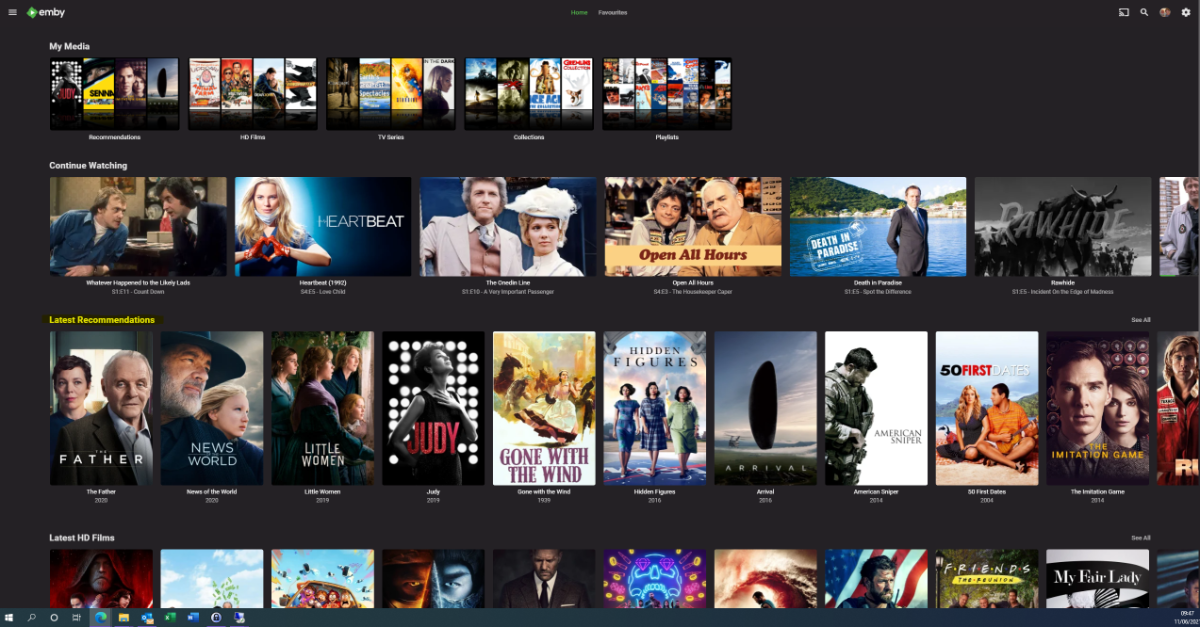
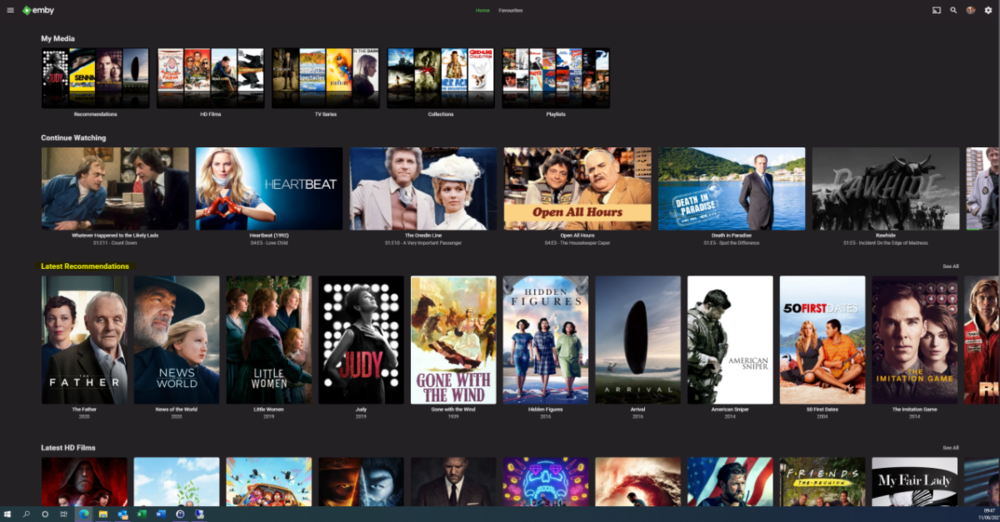
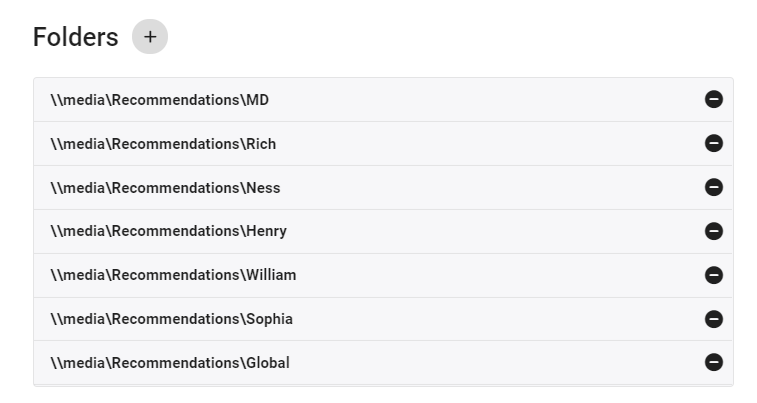
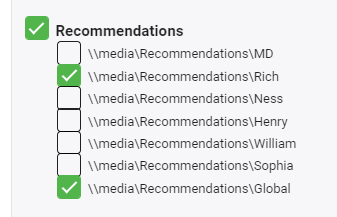
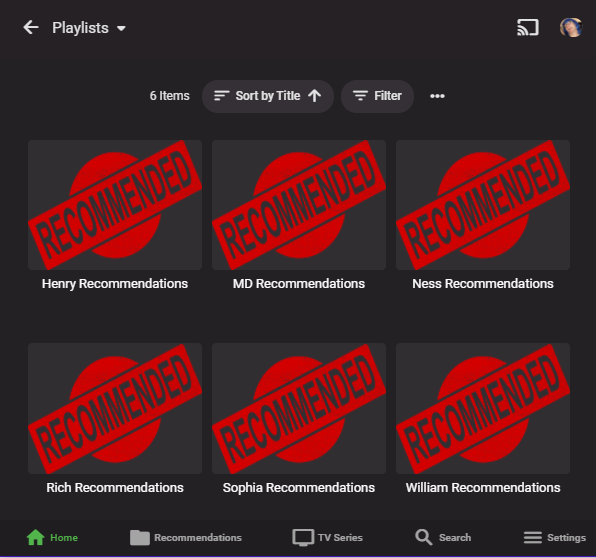
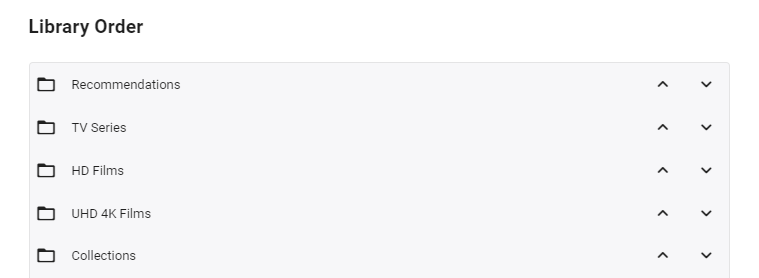
I'm posting here to gauge interest in this potential tool/utility - I use it for my parents and it works really well - but to be useful for the masses, it will need some more time spent on developing the code to make it more universal. However, before doing that, I wanted to see if this is useful as I don't want to waste my time.. What does it do ? It creates a 'Recommendations' library for each user based on items added to a Recommendations playlist. This library is then displayed in the usual 'Latest' list. As items are watched, they disappear off the list. Example (Actual) screen grab - (note 'Recommendations Row') How does it work ? A new library is setup and each user plus a global entry is given their own folder :- In these folders will be links (STRM files) to the real media. These are automatically created on a schedule via a standard playlist file (see below). Individual user based permissions can be applied to these folders - therefore, personalised recommendation lists can be created or globally set if added to the global recommendation playlist. So for this user - they will just see Recommendations for Rich and Global. The Recommendations 'library' needs to go to the top of the list for it to be easily visible :- Note - if there is nothing in the Recommendation library for that user (ie it is empty) - then the Row will not be shown. How do I flag an item as a Recommendation and to whom ? The script pulls the recommendation file locations from the XML playlist - thus you can just use the normal emby playlist functions to add or remove recommendations and add them to the relevant playlist. Anybody can add any entry to any playlist (as playlists are not permissioned), so be wary of that.. If you want everybody to see the Recommendation - then just add it to the Global Recommendation playlist. How often does it update ? Currently my script just runs every night and automatically creates any new entries added to the playlists. Now the initial library and playlist setup is done, this is now fully automated for me - I just add recommendations to the playlist and the following day it appears on those users screens. ... Of course, if emby allowed a playlist to have permissions and allowed it to be shown on the main screen in a row, then there would be no need for these scripts to hack a 'virtual' library... Any thoughts ? Is this worth progressing to make the initial setup more automated ?
 1 point
 -
I really miss this capability in WMC and even Uverse.. Pause Live TV on one TV and pick up the stream on another TV. Currently, I hit record then pause and pick up the recording in the other room. Can this be made to work in Emby?1 point
-
INTRO SKIP PLUGIN Current Status - Beta Release - Awaiting MB Admin to merge this into the Core ADVISORY: It is advisable to test these DEV/Beta releases on a small test library with a few TV shows that have a good amount of content. About 300-500 episodes. DISCLAIMER: The following has been analysed & tested this now: If your audio varies(pitch & loudness) between episodes in a season, the plugin will have difficulty in detection. There is nothing we can do about it, we tried changing the sensitivity of the detection and it yields weird results. THANKS: @chef @samuelqwe @rbjtech @Cheesegeezer for all their hardwork to get this where it is today, especially chef and Sam who did all the hard work with the Fingerprinting and Detection methods. Also to the all the testers for putting up with us. FFMPEG VERSION - Current Release version of Emby Server NOT contain the correct ffmpeg version that facilitates Chromaprint. You will either have to upgrade to the latest beta version 4.7.0.11 minimum or copy over the FFmpeg Binaries from a beta version to your Release version. INTROSKIP WIKI PAGE - PLEASE CLICK HERE FOR INSTRUCTIONS
 1 point
 -
Emby's interface on Apple TV Date, and no evolution of design conference to Android box. Will there be a version 2.0 on Apple TV? Because this box also deserves a more modern evolution like the Team Plex I use Emby since a year because I can find it intuitive now with the evolutions of Plex, Squire and infuse applications, I find it less attractive. Your team is Great but think of the apple user who would like their favorite app to modernize on their box THANKS1 point
-
Seems to be working now. Thanks!1 point
-
Would have to test but that appears to be linked to DVD per hover url. So it should work now set to DVD. @Bigmack3000yes setting series display order to DVD will pull that extended version metadata from TVDB with the new plugin.1 point
-
Would have to test but that appears to be linked to DVD per hover url. So it should work now set to DVD.1 point
-
Hi. If you bring up the browser console, are there errors there?1 point
-
We are looking into it. Thanks for reporting.1 point
-
You will have to keep on Luke's radar, but would put in in the testing topic.1 point
-
For those who would like to help test and report issues: Thanks.1 point
-
Seeing SSL errors related to fanart as well in the logs. Whatever Let's Encrypt did there it seems to have quite an impact on many homepages.1 point
-
how to do this on a non docker linux server? thanks1 point
-
There is a fix but you would have to find the location on your server as it would be different between platforms. It is a server side fix. Removing the cached certs (pfx) from the directory forces the download of the updated certs. Might have to restart the server, I haven't tested without restart.1 point
-
@Luke, I tried sending you PM but it's not allowing me. I've PM'd @ebr with some details about this and the .dotnet crypto cache workaround posted in another thread.1 point
-
Hi, yes they should.1 point
-
InsecurePrivateNetworkRequestsAllowed is a browser policy that you'd have to set to allow it. The best answer is to use https and that means setting up https on your server as well. You might be able to use localhost if you use the https version of our swagger docs.1 point
-
Hi, there's currently no way to do this, although I can see the use case to be able to reset it without knowing the original.1 point
-
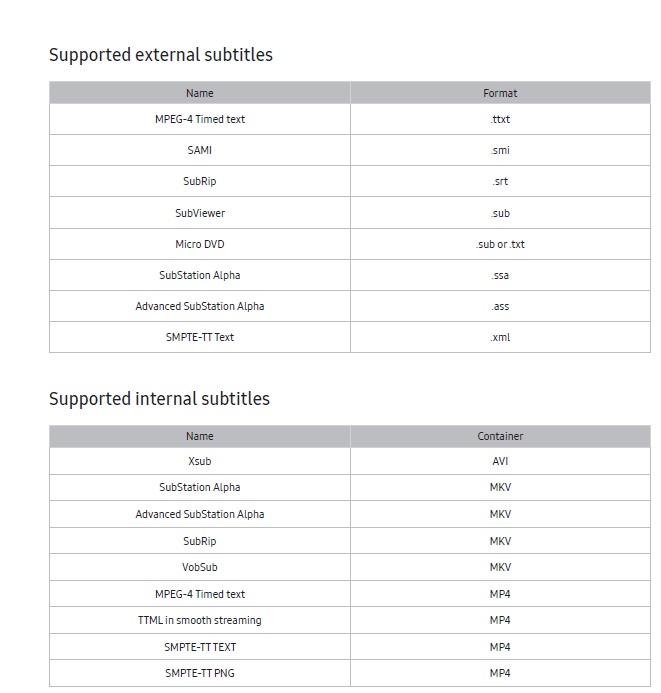
Thanks SamES. So in order to direct play this video you would need to change both audio and subtitle formats before playing. The external SubRip (srt) format will probably be the most common and can be downloaded using the open subtitles plug-in if you want. Any internal subtitles will add processing time to extract so I prefer external srt (or ass/ssa) when using Samsung Here is the chart for subtitles (again should be in your users manual) for supported subtitles for your TV
 1 point
 -
I just renewed my cert to test and I think this might be an Emby problem, @Luke. The new full chain from LetsEncrypt includes the ISGR Root X1 cert used in cross signing but Emby is not presenting the full chain depth during the authentication handshake. So the client is trying to complete the chain using the DST Root CA X3. It appears the browsers are able to handle the expired root properly but not the Android clients if the chain cert is missing. subject=/CN=myembycn issuer=/C=US/O=Let's Encrypt/CN=R3 subject=/C=US/O=Let's Encrypt/CN=R3 issuer=/C=US/O=Internet Security Research Group/CN=ISRG Root X1 subject=/C=US/O=Internet Security Research Group/CN=ISRG Root X1 issuer=/O=Digital Signature Trust Co./CN=DST Root CA X3 My cert store has the full chain of three certs but Emby is only presenting two (depth=1). $ openssl s_client -connect myembycn:8920 CONNECTED(00000003) depth=1 C = US, O = Let's Encrypt, CN = R3 verify error:num=20:unable to get local issuer certificate --- Certificate chain 0 s:/CN=myembycn i:/C=US/O=Let's Encrypt/CN=R3 1 s:/C=US/O=Let's Encrypt/CN=R3 i:/O=Digital Signature Trust Co./CN=DST Root CA X3 ---1 point
-
interesting - mine updates the Continue Watching as well. I know this as my other half has a tendency to move to one room to another leaving all the TV's on - all playing the same episode 30 seconds behind each other lol as she picks up the show from 'Continue Watching' .. I don't use Live TV so can't comment on that.1 point
-
Yes it's in early testing. We released a version about a week ago and are now continuing with fixes and further development. I would wait until the next release before testing. If you want to try it....1 point
-
the plugin simply helps with obtaining theme videos. Any queries regarding use of those videos by apps should be taken up with the app developer, for android tv this is ebr1 point
-
Tu te trompes completement sur le fonctionnement des Users et des droits.1 point
-
I've mentioned it to Cheese and Chef in the dev channel, so hopefully once they're online, they will respond.1 point
-
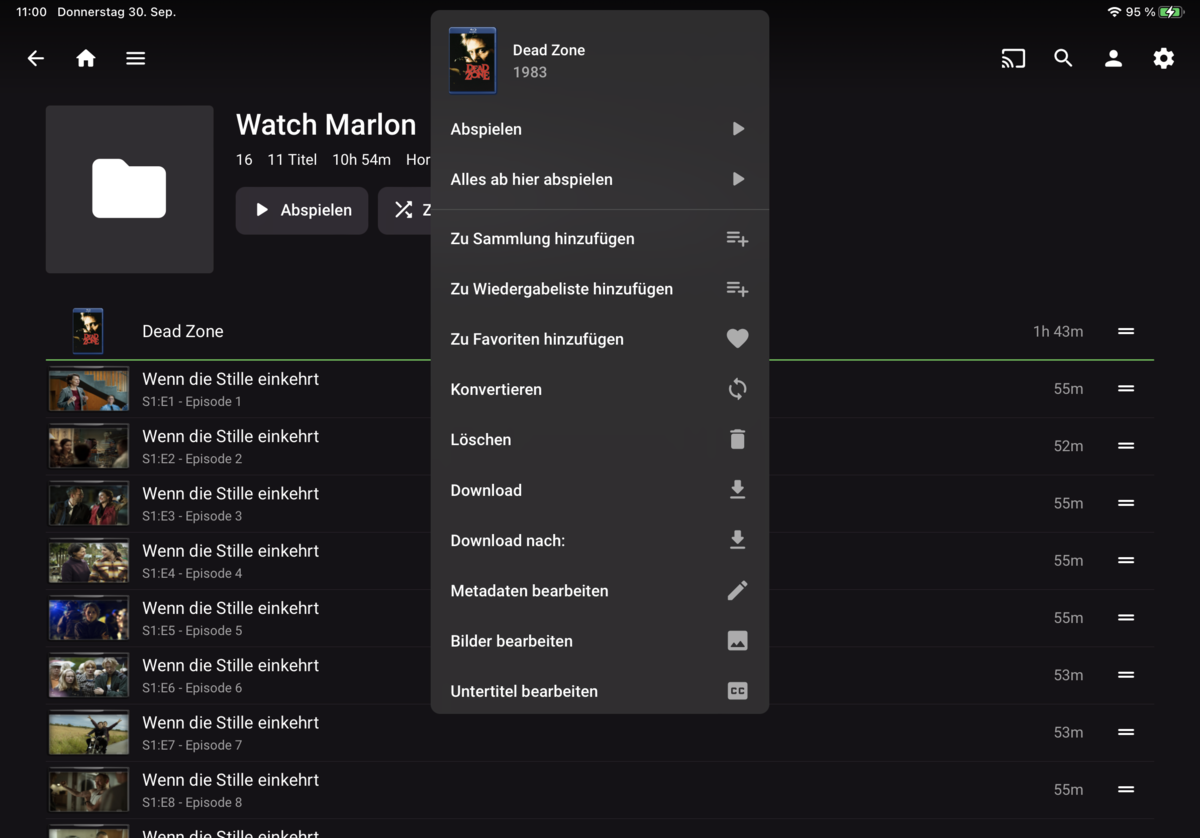
Thank you for your immediate help, enclosed screenshot of "long-press" - didn't know it's the same result like the three dots - I tried before, but didn't resolve my goal:) And as you described, unfortunately there's no way to jump to the movie page or directly watch the trailer....
 1 point
 -
The latest one will be a good start for you. The guys are working on improving the speed and efficiency, so it might be a while before it's released.1 point
-
With respect, YOU sorted it out. All I had to do was follow your excellent instructions. Best JN1 point
-
Thank you. I was using the latest stable versions. I updated to betas (4.7.0.12 and 2.0.44g) and external subtitles show perfectly in android tv. Thank you so much for your help.1 point
-
Never mind. Sorry. I figured out what I was doing wrong. Instead of naming the file say "Archer 12-01.mkv", it should be in this format "Archer S12E01.mkv". That brings in all the info correctly.1 point
-
You should update that to latest beta .44, with those being strm files.1 point
-
Devs will have to comment more But will guess do to one being interlaced and the other is not. "DisplayTitle":"1080i H264" "IsInterlaced":true (Transcoded) "DisplayTitle":"1080p H264" "IsInterlaced":false (Direct Stream) playback problem. So the question is is the problem episode actual reporting correctly? But the image above shows the same thing interlaced true vs false.1 point
-
That makes sense, fix it on the actual tracks. Thank you!1 point
-
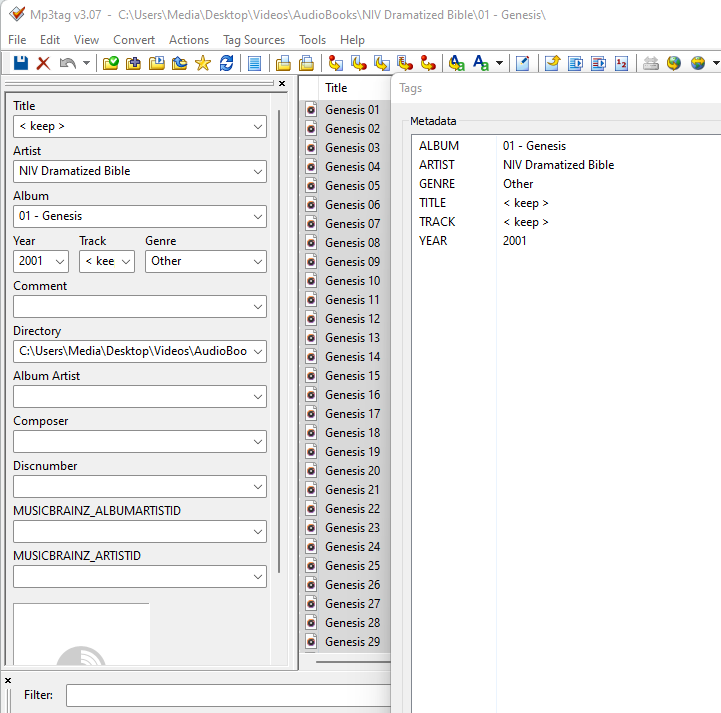
Yes since these are different discs they will be separated as they each have a different Album/Book tag. But can you show the embedded tags. Example these are merged do to same album and Artist tags. My guess is you can use disc number metadata and change the name removing disc number.
 1 point
 -
HI, check the embedded metadata of the tracks. You need to ensure the album tags and albumartist tags are the same for each track. Please let us know if this helps. Thanks.1 point
-
Emby for macOS 2.0.9 has been released to the macOS app store. Enjoy.1 point
-
I ended up using Caddy. Thanks for the suggestions.1 point
-
Those are AVC video files so shouldn't need transcoding because of the codec. Please play back something and then post the server log as well as the ffmpeg log file if it transcodes or remuxs.1 point
-
This really is the one thing that keeps driving me back to Plex sadly. Being able to skip commercials (without having to use another program, scripts etc) is a great and useful feature. Plex and Channels DVR both do it natively and I really wish Emby would implement this feature. Sometimes it's not just the server admin that needs to be pleased.... I call this the Wife Effect lol.1 point
-
The Apple TV has to follow Apple's UI design guidelines and QA rules. I think you mean functionality inside the app to match what the Android version has? The Apple TV shows so much promise, its 85% there. Frame rate match, de-interlacing properly and a few other annoyances need addressing though.1 point