Leaderboard




Popular Content
Showing content with the highest reputation on 09/28/21 in Posts
-
ffprobe does not see the album artist, so what we can do as a last resort, when the album artist is empty, if you have library structure option configured to artist/album folders, then we can take the artist folder name as the name of the album artist.2 points
-
It's not just WAV files which ffprobe has problems with. I ripped a Beatles Bluray music cd to individual MKA tracks and ffprobe can't see the disc# field so it throws it all in Disc #1. I used MKA because FLAC and the other lossless containers won't hold and retain a TrueHD Atmos 7.1.4 audio track which sounds awesome btw. I ended up manually adding the disc# for each track Anyhow, I just put a couple wav tracks from the same VA album up on OneDrive and sent PM now2 points
-
Unless you realign the drive letters you will have this issue as your data is in the database with a specific path. All of your copied configs will have your original drive letters also. So your options are reassigning drive letters or removing all libraries and readding them with the new path. Or doing database mods to change existing drive letters and editing the library options.xml with new info also.2 points
-
I'd like to request that the Playlist library have a displayed category and, "widget" on the homescreen in the similar fashion that movies, TV shows, music are shown. I create topical/seasonal playlists that I'd like my family members to see displayed from the homescreen with "recently added" carousel style. Currently, to the best of my knowledge, playlists are only accessible via their shortcut in the, "My Media" section. Thanks for your consideration!1 point
-
im thinking a way to capture video and send it to hyperion and drive the led strip, which creates ambilight effect however, my tv which runs tizen has no app support like kodi, or other app can capture video, emby is my only hope... can emby team add a new feature/plugin which can talk to hyperion server? or opens up the api for what's currently playing something like https://libreelec.wiki/configuration/hypercon1 point
-
Yes, the older 3D models have limited processing capability, but this should be improved in the next update1 point
-
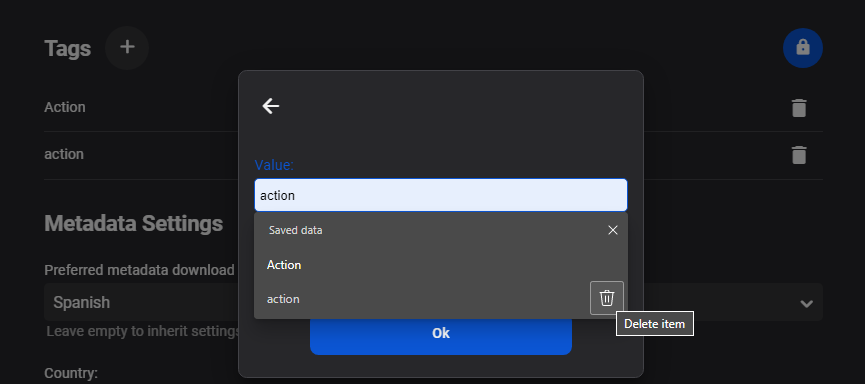
Possibly if you do not write nfo files as the tag would have to changed in nfo if you do, to update the database. But they are technically two different tags do to case. And Edge has a delete button in for this AutoFill.
 1 point
 -
That's right, that autocomplete is coming from the browser. Ultimately we should change these inputs to allow you to select from existing tags, but we haven't gotten there yet.1 point
-
Okay, so that points strongly to the proxy stripping headers. We've seen this before and I'm pretty sure that the settings created by @pir8radio solve that problem. Search in the server section of the forum for those settings...1 point
-
Hi. Also, if the proxy is stripping headers, that could manifest differently in the different apps as I indicated above. Please try connecting directly to the local IP address as a test. Thanks.1 point
-
No, that's not necessarily true. For example, if you setup https, each device will have it's own rules in terms of what SSL certificates it will trust.1 point
-
I've seen this pop up a couple of times in some older threads but wanted to start a new topic on the matter. It would be nice to have another metadata field for collection sort title. This way you can have the original sort title in your main movie/music library, and then sort the media the way you would like within your collection. For instance Marvel movies in chronological order. If you sort them now naming wise it effects the collection and the main movie library.1 point
-
Yes, beta build 37 is working for me now too. Thank you!1 point
-
I've never used this before so I don't know. What I'd suggest is try searching both drives for library.db which is the main Emby library. If you find that file it will be in a data folder which is part of an Emby Server folder. That Emby Server folder and everything in it you would want to back up.1 point
-
i got frustrated last week messing around with this, so i decided to leave it alone for a while...surprisingly, when i started Kodi up today i saw the update/syncing progress status bar showing my Music and TV Shows being added...everything seems back to working normal now1 point
-
Yes, v1.1.04 appears to have fixed the issue for me1 point
-
Thanks @cayars - fully successful migration on a my buddies DS218J with no issues whatsoever, including pulling Emby from Synology Package Center. Will migrate my DS220+ later today and will report back. Well done fellas. Jeff1 point
-
Great thanks I'll follow through your instructions and if I need help I'll let you know thanks!1 point
-
I've published an update to the USB build. Please try that and see if it helps. Thanks.1 point
-
Yes, plain 5.1 DTS can.1 point
-
Hi. Some of the other apps put auth information on the actual url instead of in the headers so may mask this issue. I would check your nginx config to be sure it is correct. @pir8radio may be able to help with that. As a test, can you enter the local IP address manually in the app and see if that works?1 point
-
Can you try going into your Library Settings and ensuring all the paths per library are reflecting the new locations (new drive letters)? ...already done, and EMBY *HAS* re-scraped all content, all of which is displaying correctly "on the server"...1 point
-
Glad you got it worked out.1 point
-
Just shut down Emby on the NAS and start the migration steps skipping the upgrade to DSM 7 as you've already done this. As long as you don't delete /volume1/Emby volume (your DSM 6 version of Emby) you can do the migration steps over and over. So if you hit a problem just send me a PM and I can remote in and help. I've done about 75 of these upgrades remotely now to assist people.1 point
-
Have you customized any emby server network settings?1 point
-
We're looking into it. Thanks for reporting.1 point
-
yes this is more of a Kodi thing, working with subs in Kodi is tricky and a little limited for some things.1 point
-
I think this is key here. Because you restored you backup server configuration, Emby is looking for your media (and images if they were stored there too) in those old locations. Can you try going into your Library Settings and ensuring all the paths per library are reflecting the new locations (new drive letters)? Alternatively, can you modify the drive letters to match the previous set?1 point
-
Yep, I've PMed to Luke some files and logs. I'll send you the same. Thank you!1 point
-
Hi, NFO's or the xml saver are used to backup and restore (written and read) for all media types except music. Music is only written never read. The changes to music primarily relying on actual tag values, is great but does not capture all the rich metadata emby provides or allows users to enter. Rather than kludge around with nfo etc. which are used by and can be created by other programs. A simple approach would be for emby to create and read as needed, it own metadata file, of only the elements that are not derived from the tags in music files. A small xml or json file designed and controlled by the emby team, saved with the media would provide recoverability, ability to rebuild the main library.db. Thanks -vicpa1 point
-
Thank you again cayars1 point
-
@cayars, Neither JellyFin nor Emby were in docker. I solved by manually deleting the folder /volume1/@appdata$/EmbyServer Next time I would go to /usr/local/etc/services.d Emby run very fast in display. I do not regret my choice.1 point
-
@ebr Im pretty sure this has been requested so my apologies but I cant find it so I am requesting this again here. Please move if you feel the need. What are the chance of getting the ability to bring up the guide when using the excellent Virtual TV plugin in Playlist mode? Really ruins the experience to have to stop playback just to see what else is on "TV". Thanks!1 point
-
We'll add support for the shortcut. Thanks.1 point
-
Makes sense. To stay in that boundary, and not introduce high cost queries every time the similarTo parameter is passed, thinking we would need a staging table. A scheduled task (after a library run?) can run the model and populate a staging table of all items. Record count would end up being #Items * #Items * #Users . Just 4 columns (UserId, ItemId, RelatedItemId, SimilaryScore) QueryBuilder then just needs to join to the this table to get the similarity score, the rest of the query builder remains intact. Any issues with this approach? 1st pass I will stick with just the local dataset already available in the user libraries. Enhancements over the current algorithm that I hope to accomplish: Make some personalized tunning available to admin user:, allowing them to select which features, and how much weight to give to each feature Create Term Frequency-Inverse Document Frequency vectors from Plot summary and taglines Incorporate recent user watch activity to personalize results Determine similarity using cosine similarity method (and perhaps other methods like Manhattan distance)1 point
-
Emby for iOS 2.0.9 has been released and now includes Apple Watch support! Enjoy the following features directly on your Apple Watch: Play music on your Apple Watch Control playback of your iOS device from Apple Watch The new release also includes improved CarPlay support, new options for control of subtitle appearance, and more. View the full article1 point
-
Hi. The next server release (current beta) should have improvements here.1 point
-
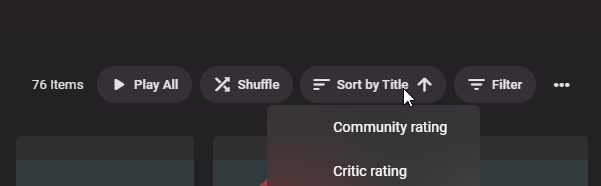
Please add sorting by channel number in Tags categories.
 1 point
 -
I'm adding a copy to clipboard context menu command to help with this.1 point
-
Currently the info provided is, Title Subtitle Runtime I would like to request that the network also be included in this information for a quick reference.1 point
-
@Luke Since your last response to this topic, another one and a half year passed away and we get no information about a release or available beta for german yet. You have also not said whether and how you can be supported in this. This is very frustrating. This topic was opened in October 2017. Nothing happens in the last 3 and a half years!1 point
-
FYI here is the previous topic. @MarcusJ https://emby.media/community/index.php?/topic/89807-movie-grouping-does-not-work-for-more-than-8-versions1 point
-
I have, and the only options for playlists I can see are to display them in the "My Media" section, and what order they are displayed. I'm talking more so along the lines of, "Display in home screen sections such as latest media and continue watching" that can be found in the home screen settings. I would like a horizontal section with the latest playlists in the same fashion that latest movies, TV shows, music and similar get a scrollable section.1 point