Leaderboard




Popular Content
Showing content with the highest reputation on 09/21/21 in Posts
-
With that amount of data if you have a fast upload Internet connection you could use something like Google Drive with rclone. But as your local storage increase the online backup usefulness decreases due to the time it would take to do a restore (if no other reason). IMHO, it's best to "double purchase" HDDs so that one is part of your main storage used for Emby and the other is used strictly for backup and then moved off site. This could be a detached garage, relative house, bank vault, etc. Ideally you want the data outside the house in case of fire/flood or theft.3 points
-
This is much better I believe:3 points
-
That's interesting, thanks for the info.2 points
-
a BIG W for team IntroSkip lol2 points
-
I still think the "tmdbcolid" for provider collections needs to be exposed in metadata UI. This would alleviate most of this troubleshooting. @Luke2 points
-
Right, if a user removes a whole season from emby, we have to also remove the whole season from ours. The reason we have to remove seasons at a time from our table for rescanning is because, we scan fingerprints for all the episodes per seasons (intros may change per season, and we want to make sure we get all the similar ones), if we remove the entire season, we can re-fringerprint the entire season and rescan it. Then the fringerprints are removed from our database again. It was a toss up between smaller database file size/memory, and the ability to remove one episode and rescan (keeping fingerprint arrays). We decided file size and memory trumped.2 points
-
For those running the Emby Server stable release, now you can install directly from Synology Package Center: This is the easiest possible method of installation. Please note the Synology Package Center version of Emby Server may sometimes run a little behind due to the Synology review process. For this reason we'll still be making downloads available on our website for manual installation: https://emby.media/download View the full article2 points
-
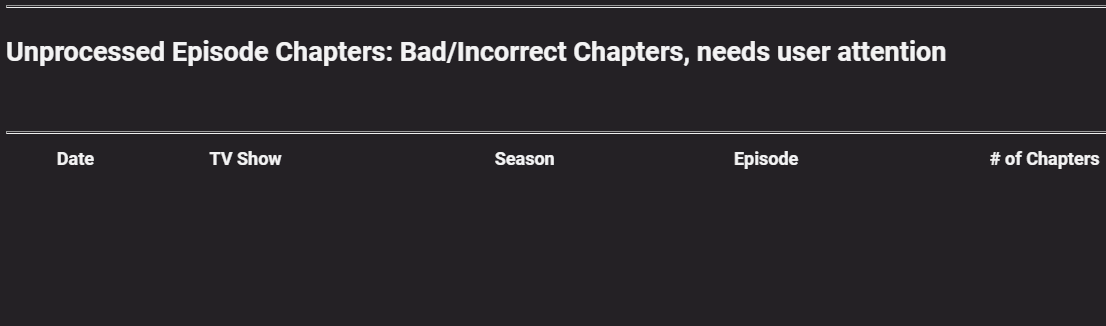
Got my "Bad/Incorrect Chapters" down to ZERO
 2 points
 -
OK, that did the trick. The metadata is arriving! yeah at last...2 points
-
if you really want to do this the best way is rclone encrypted up to a unlimited Gdrive business account. people will tell you that this is not within the TOS of GDrive and you are at risk of google unilaterally closing your account but these people have been saying this for the last 5 years + and its still fine. other than this there is no cost effective online backup and you are better taking local backups and moving them to a different location2 points
-
Definitely go with StableBit Drivepool. You won't regret it. I used Windows built in tools for awhile, but suffered too many crashes and completely lost the drive the last time. StableBit allows you to mix and match drives and duplicate files. You can even see all the files on the individual drives. I have about 10 drives in my setup from 6 to 18 tb and they all work great together. I'd get StableBit Drive Scanner too. I've probably warrantied half the drives because StableBit told me there was a problem. If I didn't have the scanner to warn me, the drives would've gone bad without me knowing and I might have lost data. To sum up... StableBit DrivePool for sure.2 points
-
I really can't remember but I too thought it used more memory until I re-read softworkz's post which I linked to above. If I remember correctly certain implementations can use a lot more memory such as VAAPI and maybe DX11VA, but QuickSync & NVENC use less. Something like that seems to ring a bell. @softworkz can you help us out on this and how important the memory is on the GPU? Also how this memory compares on QuickSync.2 points
-
Could you please add a Webhook for the New content added notification?1 point
-
Another option is using mkvpropedit and then you can script the entire thing. This was actually one of my original thoughts on saving the chapters.xml - maybe saving it out for the 'bad' items might be useful down the line - rather than manually using mkvtoolnix ... ? mkvpropedit movie.mkv --chapters new-chapters.xml1 point
-
Fantabulous! Exactly what I was looking for Thanks man1 point
-
Thanks Bill, I will take a look Blazor. WinForms Rule... I write a lot of my work utilities in Winforms but my biggest bugbear is when others do a GUI in it and never change the application icon!!!! GRRRRR1 point
-
Not a book, and not sure if it would work in the Emby ecosystem, but have you looked at Blazor? Makes HTML *almost* palatable Plus I can tell you are a quality person ... WinForms is where it's at!1 point
-
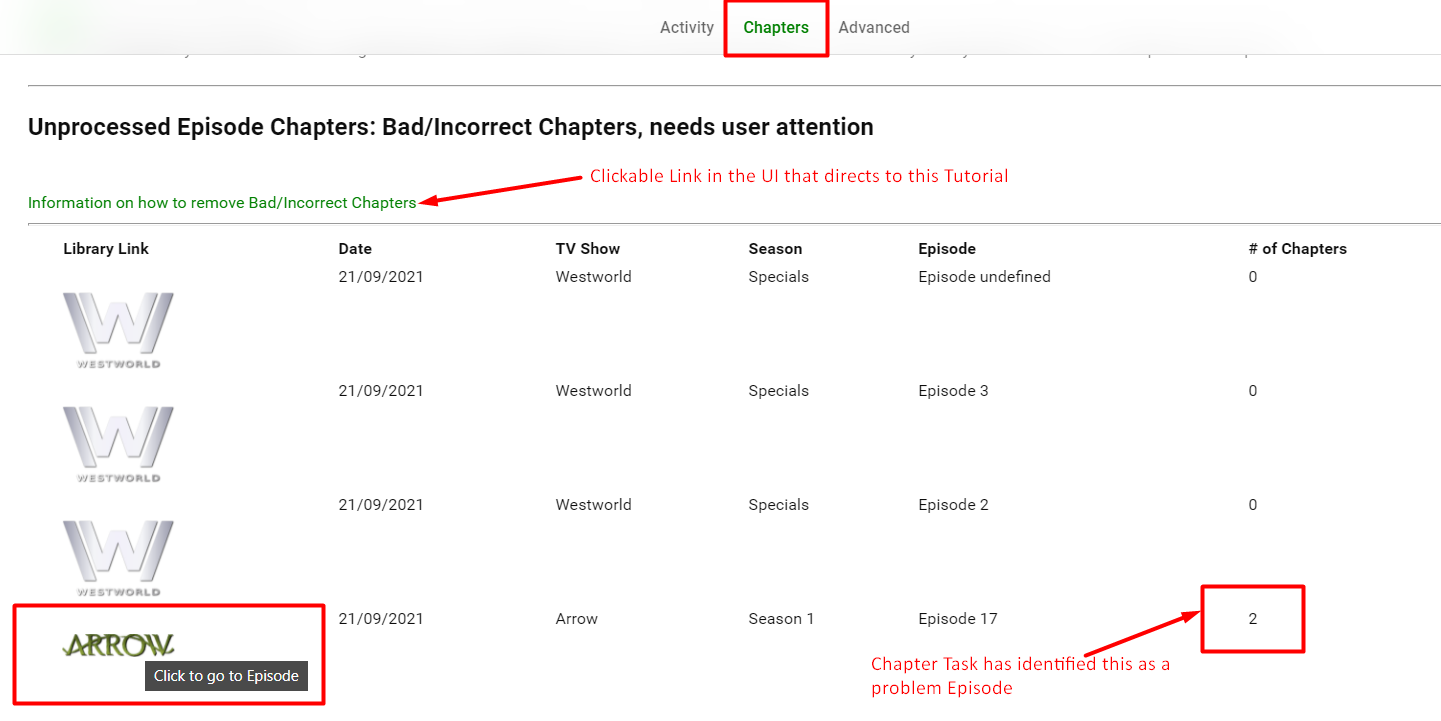
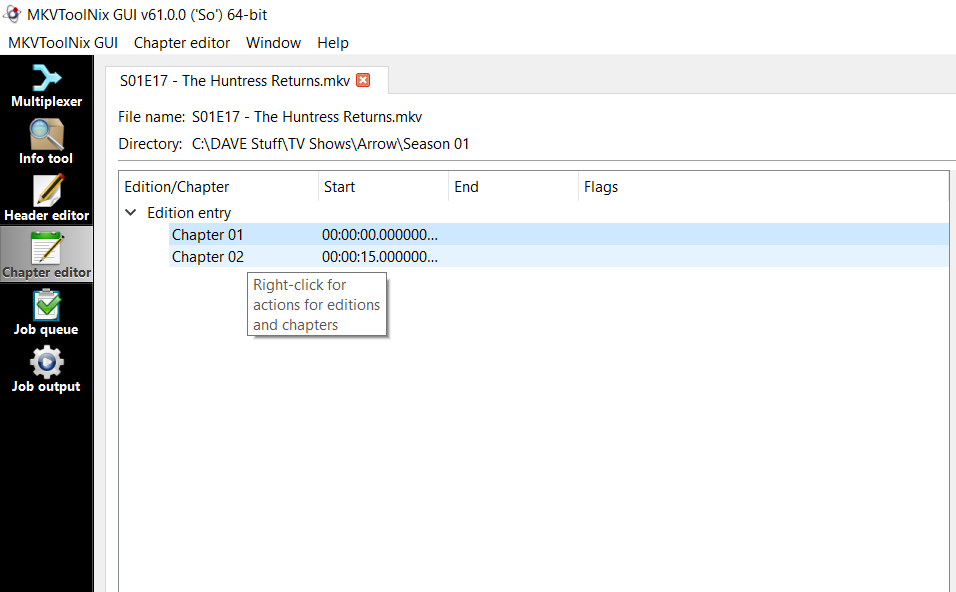
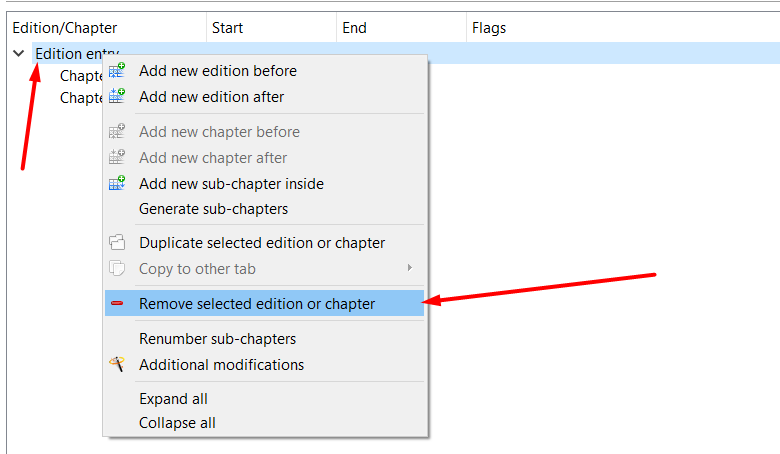
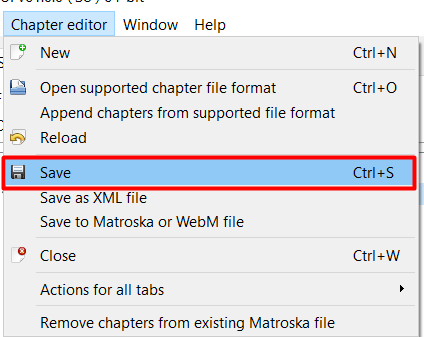
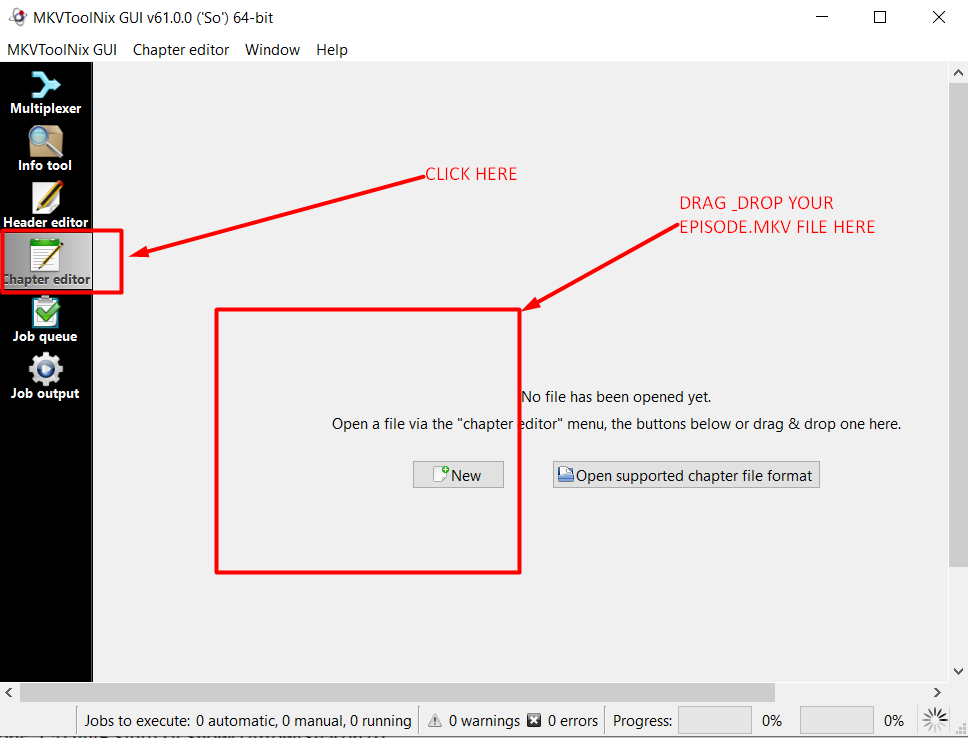
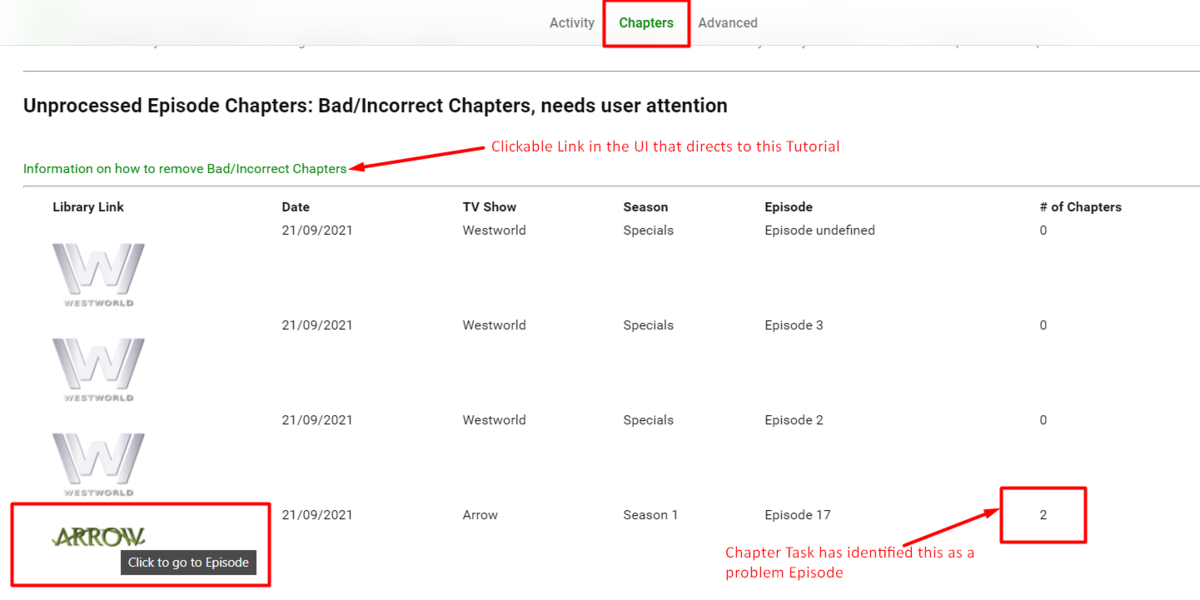
REMOVING BAD/INCORRECT CHAPTERS This only works with mkv video containers. THE WHY There are 2 scenerios in Emby for creating the chapters... There are no chapters inside the container - Emby will create default chapters at 5 minute intervals The ARE chapters written(embedded) into the mkv video container at the time of creation - Emby will automatically use the embedded chapters - regardless of how many there are in there. So why would we need to remove the bad chapters. Well.... if the video container only has 1 or 2 chapters embedded and we run the chapter Task for IntroSkip, sometimes, if the intro start time falls beyond where the last chapter ends, we can't insert the Title Sequence chapter Marker. It's entirely upto the user if they want to remove the chapters embedded in the mkv container as this is a permanent fixture, however by removing them you will allow emby to use scenario 1 above and have the title sequence chapter marker inserted. THE HOW After the Chapter Task has been run, Go to the "Chapters" Section of the UI and you may have a list of problematic chapters. The # of Chapters Column will be useful as you can see how many chapters are being used. If the count is Zero then it is likely that the Runtime is less than 5 mins, however a title sequence is still present. You can also click on the Logo image to take you directly to the episode in question to do some self analysis. To remove the non-useful embedded chapters You will need to install MkvToolNix After installation, Run MKVToolNix and Select the chapter Editor. Then drag and drop your episode.mkv in the window. Your chapters are now loaded into the Chapter editor. Select the Edition Entry and then Right Click and Choose the Remove option shown below. Then Go to ChapterEditor top menu and save (this will overwrite the container immediately) - as easy as that, the refresh metadata for the show/season/episode and run the chapter task ..... Boom you're done
 1 point
 -
Okay, yes that makes sense. It needs to not mark items as processed if the totalRecordCount is 1, no matter the season or episode index numbers. That is a good catch!1 point
-
My backup system is read-only from the main. The backup software runs there and pulls changes; also old files are not overwritten but accumulated. I figure this should help in the unlikely event of anyone trying to get a ransom out of me... Paul1 point
-
Ah I see what's happening... When you removed the item from the library, the intro skip should have seen that using the LibraryManager ItemRemoved event and also removed it from our data table. The event is there, however, it hadn't actually been tested that the table would sync... Until now. Let me do that this morning.1 point
-
It's not just pilot episodes, but single episodes in a season. In my instance, it was Season 19 Episode 1. I don't have Seasons 1-18.1 point
-
Is that sort of like "I hate you because you just work out of the box?" LOL1 point
-
It had been brought up before about pilot episodes. It can be printed, but we wouldn't get a detection on it until the second episode airs. That being said, I will change the code to not mark pilot episode as processed (S1E1, and of the totalRecordCount is only 1). Then it won't get missed when the second episode airs. Excellent!1 point
-
Try checking the meta-data provider site to see if they have the collection listed. If so try a meta-refresh on Attraction 2 again and then check the NFO.1 point
-
Good catch actually. So we need to check if the episode or season or show is in the physical library against the database. thanks for breaking it again hehehe1 point
-
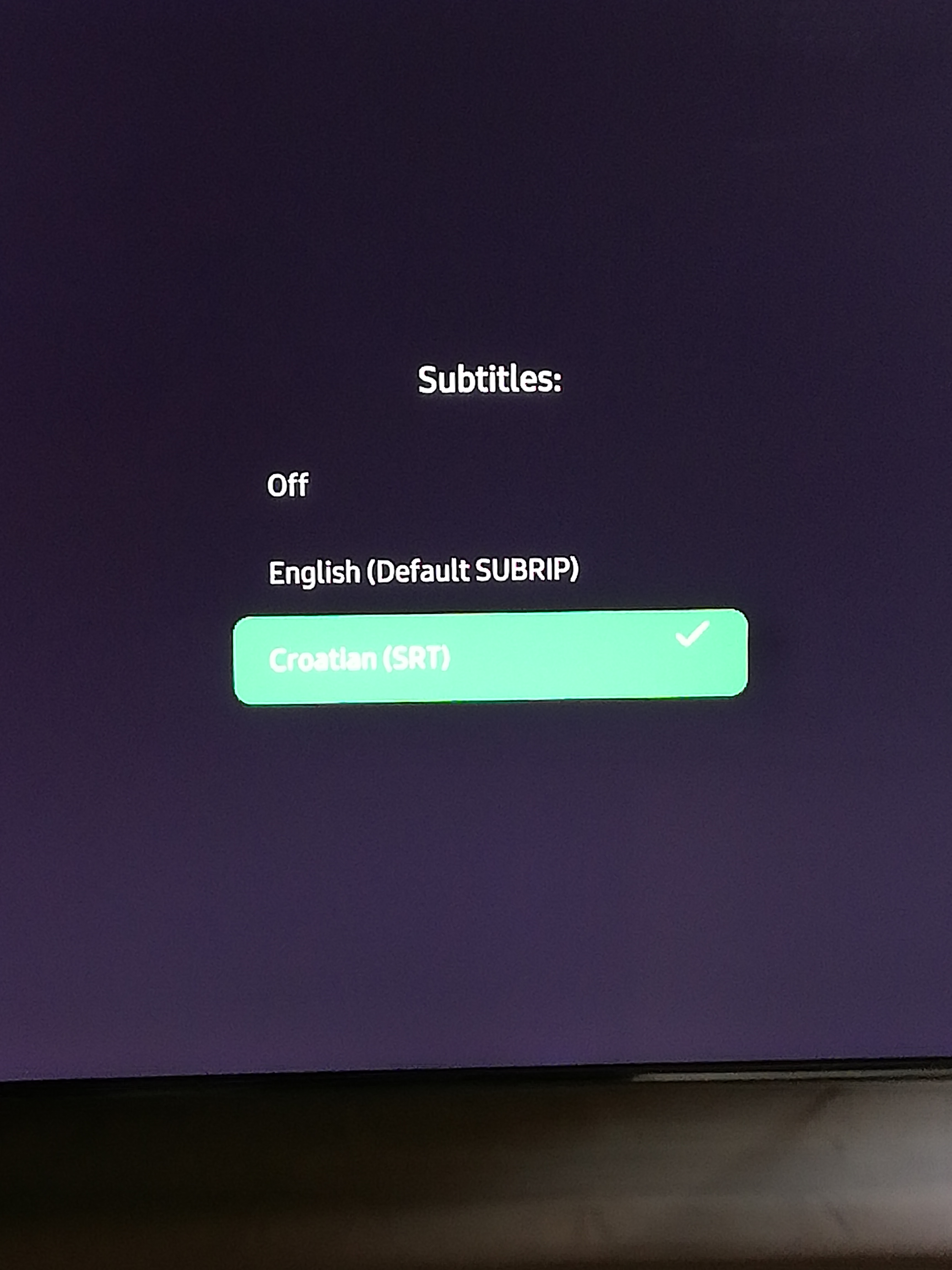
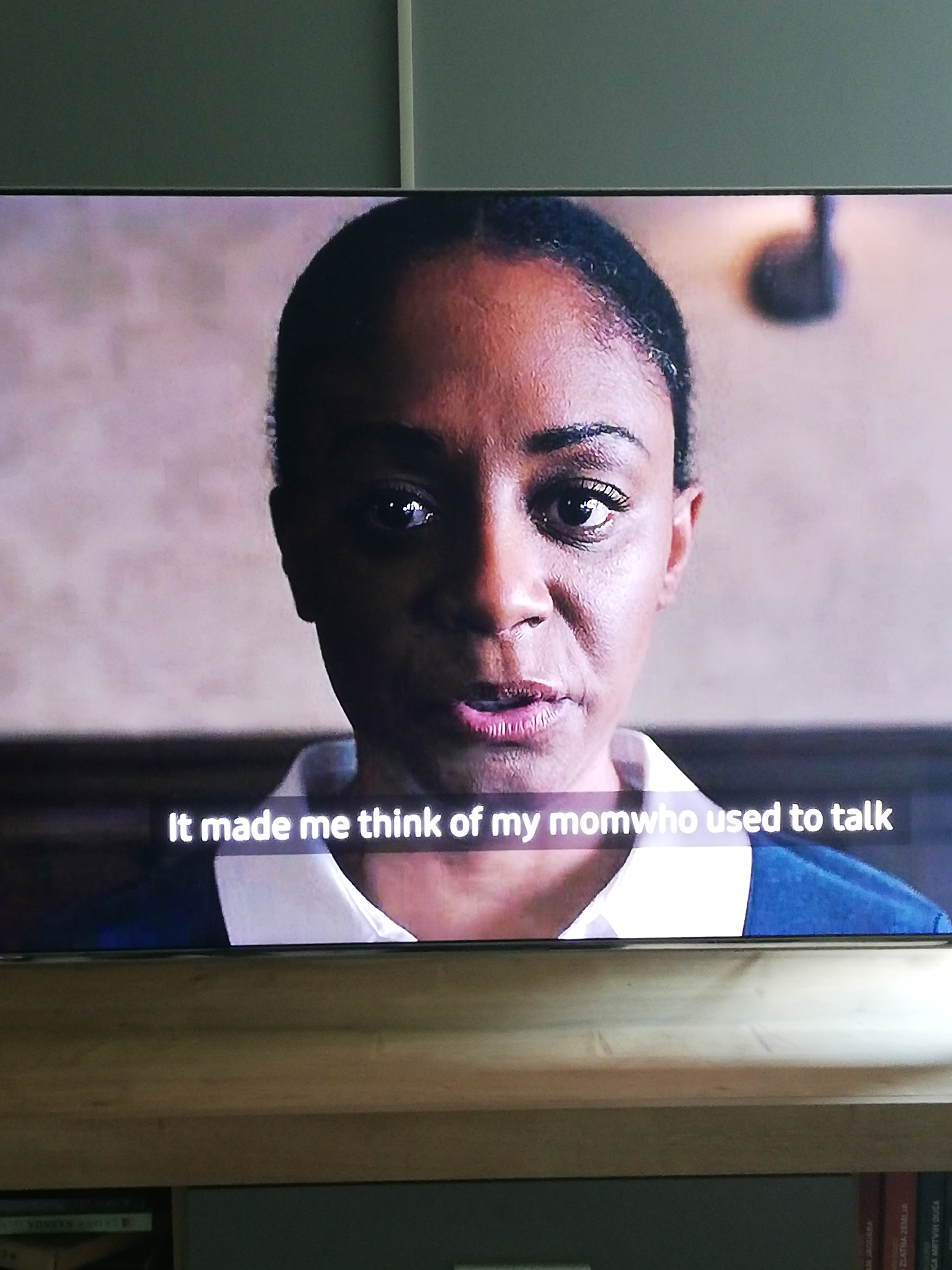
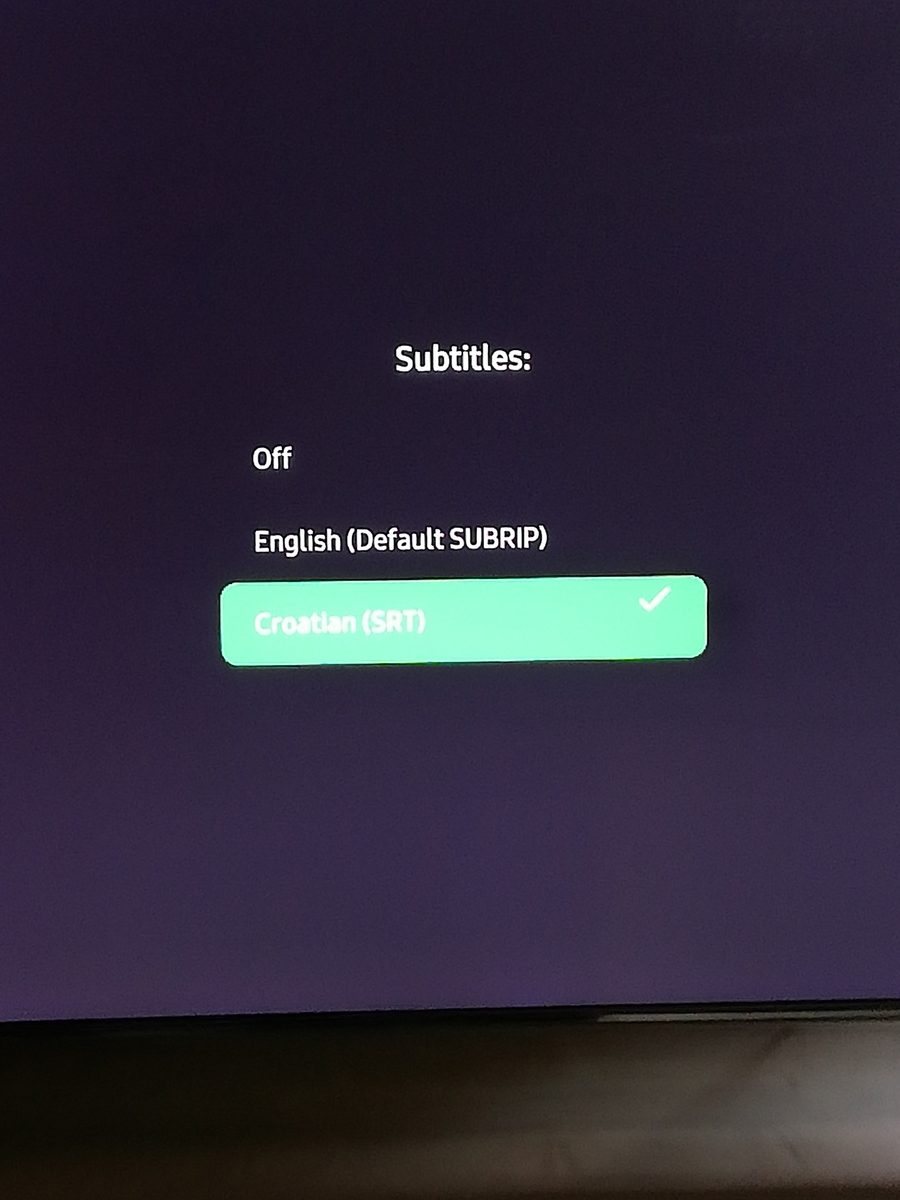
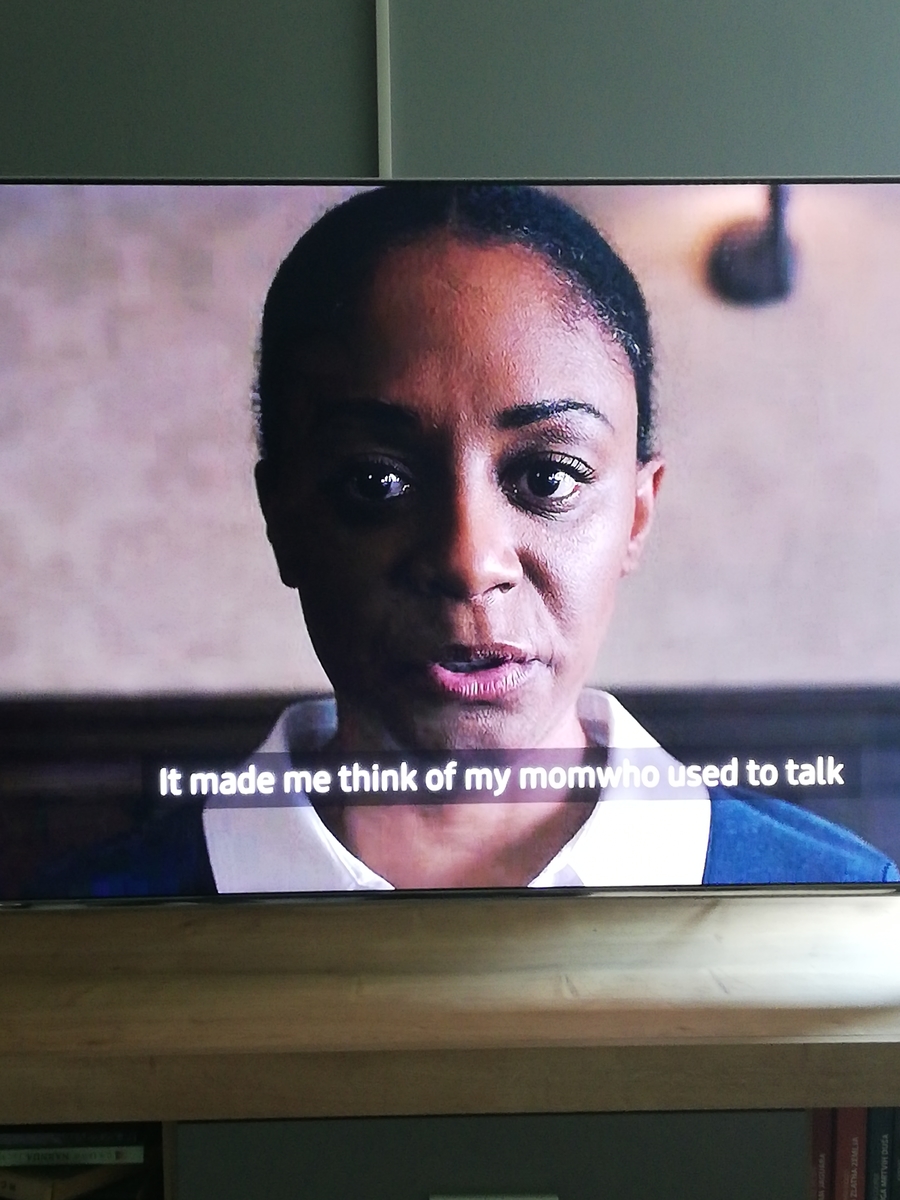
Video have 2 subtitles english is in mkv file and croatian is external and what you add background for subtitle that is awesome tnx

 1 point
 -
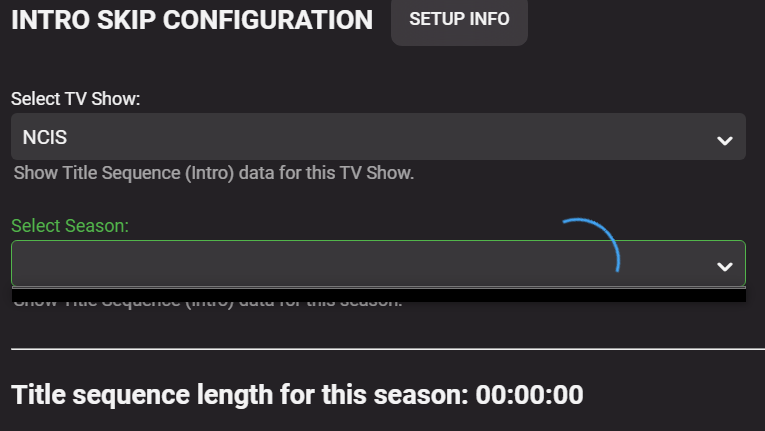
Thanks. I think I've broken something now When selecting the show NCIS, I get a the SPINNING BLUE CIRCLE. I have deleted an old empty season for this show, which now doesn't exist. Can't see anything in the logs, other than this. 2021-09-21 10:39:26.163 Info Intro Skip: NCIS - Season 0 chromaprint profile is up to date. 2021-09-21 10:39:27.064 Debug Intro Skip: NCIS - S:19 - E:1: Extracting chunks from binary chroma-print. 2021-09-21 10:39:27.065 Warn Intro Skip: NCIS - S:19 - E:1 .bin file doesn't exist. Thanks. EDIT: Looks like I deleted the Season 19 folder and the episode within it, so perhaps this is a blessing in disguise, as I always delete watched seasons when the finish, so how will the Intro Skip plugin deal with missing episodes/season?
 1 point
 -
yup, just click the green "Rescan Season xx" and this will remove the detection from the db. Then just leave it to do it's thing when E02 is automatically added. I will have a chat with the guys, but i'm feeling that after first "BIG" scan, we should be able to run all tasks sequentially. So the user doesn't have to figure out when to start each interval for each task. Cheers.1 point
-
Agree with @Gilgamesh_48 and this is effectively what I do. I utilise all my 'upgraded' HDD's to form a 'backup' storage system in my outbuilding (encrypted disks) - and then periodically power it up and replicate my on-line storage. You should never keep your 'backup' on-line (and it shouldn't have internet access either), as any form of Ransomware, virus or human error could wipe it. Also always set your backup method to backup - not 'Mirror'.1 point
-
I will get this added to the instructions We need to use the same season for the comparison and the thoughts behind it are this Seasons are likely to keep the same intro throughout if the studio decides to change the intro music for that season, we need to compare against those episodes. (For example White Collar (wife's favourite show) did it for one season) If just one episode has been added to a new season, i wouldn't manually add it's intro start & end times in the UI --- because when episode 2 is released and Episode 1 has been processed by the user, the detection will have set a flag to HasSequence for episode 1 and will not be processed nor used for comparison. Can't think of a fourth1 point
-
Check the NFO files to see if they both have the "set" parameter with the collection name. If so, run a full library scan and see if they get created.1 point
-
Scroll down about half way https://support.emby.media/support/solutions/articles/44001159936-configuration-backup You can copy the whole Emby Setup from one machine to another. As long as your mapping as the same you are in business.1 point
-
That IS excessive...1 point
-
Looks like it processed the file ok but I noticed you have around 28 embedded subtitles in the media file. That's a huge amount of subs it has to handle. Try doing a remux and only select the subs you must have in the file. Hopefully you'll only have a couple at that point. Try again with the new file and see if this solves your problem.1 point
-
hi, done there : regards1 point
-
Let's see if I can try to make this simpler to understand at a high level. Keep in mind Emby listens on 2 ports. One is the non-SSL port and one is the SSL port (http vs https). There are no different ports for local vs remote. Emby will always listen to the ports defined as local. The ports setup as remote are used to modify the URL handed back to the remote client (based on IP). So when you setup port forwarding on the router of 8097 to Emby 8096 it's functional because Emby is listening on 8096. If the IP is local the URL returned will use 8096 but if the IP is remote the URL will be returned with a port of 8097. This of course is the port the router is listening to but forwards it to Emby on port 8096. It's just a little trick to allow you to run Emby with default ports (8096 & 8920) on multiple computers on your network while being able to setup multiple port forwards all with different WAN ports. Does that help?1 point
-
I hope that is just an example as 1920x1088 will/could cause problems. But there are several topics on none 16x9 resolution detection but usually on the lower side. Any thing above 1920X1080 is no longer HD same applies for 1280X720.1 point
-
Actually no, because it looks like your local port is 8096, so you should forward 8097 to 8096.1 point
-
Yeah I was looking at the scanner too, that makes great sense. I like your warranty idea, catch a problem early enough and get a new drive. Works for me. Thanks1 point
-
I'm re-running on the beta with 100 shows/4700 episodes (FP db size=500Mb) and thus far I have not seen the db errr @chef - it's 30% through the detect. So it may be db size related .. I'll have more info in the morning .. but for the moment, I don't have a repeat of the error ...1 point
-
Hi, the default channel order in Emby Server will be the same order that they're listed in the m3u.1 point
-
Try refreshing the metadata on both movies. Let us know if that helps. Thanks.1 point
-
Try something that direct plays. I think that's when this issue is most experienced.1 point
-
We are looking into the original issue here. Thanks for reporting.1 point
-
@Lukeor maybe @softworkzwill have to comment on this as the process is failing. 2021-09-21 09:40:02.065 Info App: ProcessRun 'extract-imageseries' Execute: /var/packages/EmbyServer/target/bin/ffmpeg -analyzeduration 200M -probesize 1G -threads 1 -i concat:"/volume1/Media/Fabulous 50s/14 DAY SUMMER BODY CHALLENGE/DAY 02/01-5 Minute Fat Burning Walk | 700 Steps!.mp4" -an -sn -threads 0 -vf "fps=fps=1/10,,scale=min(iw\,320):trunc(ow/dar/2)*2" -f image2 "/var/packages/EmbyServer/var/cache/temp/c3eb2b32cb1142f3a930e87734c7635f/img_%05d.jpg" 2021-09-21 09:40:02.084 Info App: ProcessRun 'extract-imageseries' Process exited with code 1 2021-09-21 09:40:02.568 Error ChapterImagesTask: Error creating thumbnails for /volume1/Media/Fabulous 50s/14 DAY SUMMER BODY CHALLENGE/DAY 02/01-5 Minute Fat Burning Walk | 700 Steps!.mp4 *** Error Report *** Version: 4.6.4.0 Command line: /volume1/@appstore/EmbyServer/system/EmbyServer.dll -programdata /var/packages/EmbyServer/var -ffdetect /var/packages/EmbyServer/target/bin/ffdetect -ffmpeg /var/packages/EmbyServer/target/bin/ffmpeg -ffprobe /var/packages/EmbyServer/target/bin/ffprobe -nolocalportconfig -ignore_vaapi_enabled_flag -pidfile /var/packages/EmbyServer/var/EmbyServer.pid -updatepackage emby-server-synology7_{version}_x86_64.spk -noautorunwebapp Operating system: Linux version 4.4.180+ (root@build15) (gcc version 7.5.0 (GCC) ) #42214 SMP Sat Aug 28 02:41:15 CST 2021 Framework: .NET Core 3.1.13 OS/Process: x64/x64 Runtime: volume1/@appstore/EmbyServer/system/System.Private.CoreLib.dll Processor count: 4 Data path: /var/packages/EmbyServer/var Application path: /volume1/@appstore/EmbyServer/system System.Exception: System.Exception: No thumbnails created for /volume1/Media/Fabulous 50s/14 DAY SUMMER BODY CHALLENGE/DAY 02/01-5 Minute Fat Burning Walk | 700 Steps!.mp4 320 at MediaBrowser.Providers.MediaInfo.ThumbnailGenerator.CreateThumbnailSet(Video item, LibraryOptions libraryOptions, Int32 width, CancellationToken cancellationToken) at MediaBrowser.Providers.MediaInfo.ThumbnailGenerator.CreateThumbnailSets(Video item, LibraryOptions libraryOptions, CancellationToken cancellationToken) at MediaBrowser.Providers.MediaInfo.ThumbnailGenerator.RefreshThumbnailImages(Video item, LibraryOptions libraryOptions, IDirectoryService directoryService, List`1 chapters, Boolean extractImages, Boolean saveChapters, CancellationToken cancellationToken) Source: Emby.Providers TargetSite: Void MoveNext()1 point
-
yea I recall some memory getting eaten up on my 10bit 4k testing. GPU memory was the first to max out before GPU processing %.1 point
-
Hello, is there any easy tutorial on how to do this for a newcomer? Thanks!1 point
-
Hi, it looks like GBR-1000450 is having trouble loading. Try removing that guide source and see if the channels load.1 point
-
i would disagree, move simply means you want to copy and then remove. as i am already copying and then manually removing surely it would be easier to addthis option??? if i have 50 items in one collection and i want to move them to another. eg watch later, or watch now top rated, then i have to manually add and then remove. .. if you have the add and remove why not add the option for 2 operations into one?1 point