Leaderboard




Popular Content
Showing content with the highest reputation on 09/14/21 in Posts
-
@Luke @ebr Little over two weeks out, there needs to be an Blog/Announcement on what Emby is going to do.5 points
-
v2.0.3.2 IntroSkip_v2.0.3.2.zip4 points
-
i'm heading home now! Be back online in an hour or so. @chef @samuelqwe @rbjtech Great work everyone, should give a massive pat on your backs for all your great efforts everyone just stand by and wait for chef to release 2.0.3.24 points
-
v 2.0.3.1 Major changes to Chapter integration Fixes to API request data for speedy responses Fixes to title sequence detection task (should limit memory usage) Configuration changes (clear browsing data) IntroSkip_v2.0.3.1.zip4 points
-
Done. It was requested by Ebr to only we allow it in "Feature request" forum, but I add it now to this forum section.3 points
-
On the SSD wear, unless you are constantly writing Tb's worth of temp data to the SSD every week, the drive will become obsolete through tech advances (ie you can buy a new one with 3 or 4 times the capacity for half the price..) well before it wears to a state of becoming unusable. So personally, if you have an SSD, you may as well use it and gain the performance it gives.. To add - any decent disk toolset will also tell you the wear level - so you can keep an eye on it and if you do see wear more than to your liking, then you can take action to reduce the wear.3 points
-
That is super cool! Man, we did that guys! Congratulations to us all for a good job! Seriously cool stuff there. It is unique to emby, which makes it good, even if we get some imprecise results, the bulk of it is good.3 points
-
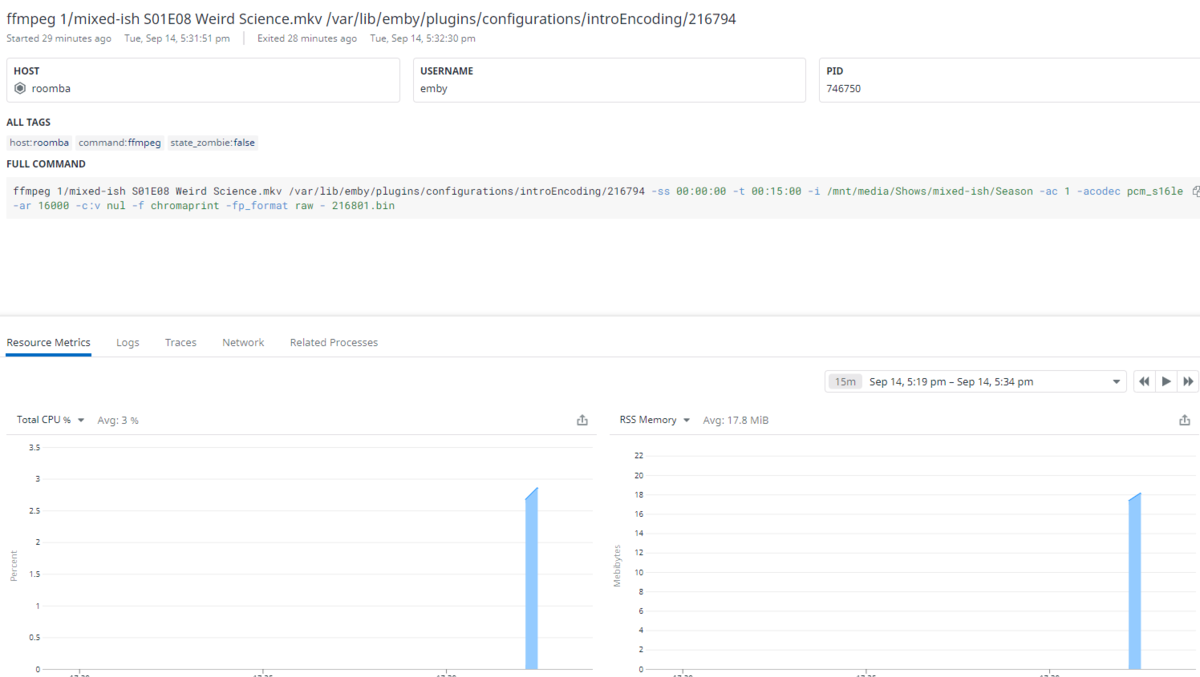
I'm running the latest release against my library, performing the initial finger print. I have process monitoring working through datadog, and you can see here that a 30 minute show took 20 seconds to run through and didn't consume much in the way of proc or memory. Granted, that's a simple 720p OTA recording done over an rclone mount, but it shows efficient it can be. Good job guys. I'm impressed by everything you've done in this thread.
 2 points
 -
Hi, yes please try it again. The issue was related to an update I pushed late last night to our Chromecast receiver. Thanks.2 points
-
Thanks Abo.2 points
-
ok cool - so a couple of things I would do as it's early Beta. a) turn off the three 'IntroSkip' schedules in 'Scheduled Tasks' - they are set to run every 24 hours - but my advice is to run manually for the time being. b) in the plugin itself - in Advanced Settings - set detection to 2 - you can always increase it later. c) Run the Fingerprinting Task in the Scheduler .. (could take hours, could take days ...) when completed .. d) Run the Title Sequence Detection .. (could take hours, could take days ...) At this point, you have a titlesequence database with all the IntroStart/End points in it - linked to your main emby dB e) The optional step is to insert all the titlesequence into the existing episode chapters. If you want to do this - then go back into the plugin, and turn on the two sliders. Back in the scheduler, now run the final Chapter task. This also automatically runs the Thumbs generation task. This should be very quick. A 'Title Sequence' chapter entry should now be shown in every episode. .. and you have a database of all this info, ready for an 'Intro Skip' button to appear in the UI down the road - date tbd.2 points
-
Chapters have changed a bit from when you may have seen them last @crusher11 There is now just a 'Title Sequence' which starts at the previous 'Intro Start' and ends at the previous 'IntroEnd' Therefore, any existing Chapter marker marking the end of the Intro - is not changed as it has no need to be. An example - This is from my Emby release system - Chapter 2 is the 'end of the Intro' and I could have used this before to skip the Intro - BUT of course I have no way of knowing when the Intro starts - but nor do I need to if doing it manually. This is from my Emby Beta system with the SkipIntro plugin. Chapter 2 has remained - but I now have a 'Title Sequence' inserted at the Start of the Title Sequence. You could debate that it is not needed (as you are never likely to intentionally skip to and watch the Intro..) - but it is being consistent with all the other possible chapter scenerio's where it is important to show the Title Sequence (ie Auto chapters, or chapters that are not at end of the Intro). Remember - chapters are not the method that is being used for the UI 'Introskip' button - therefore, if 'Title Sequence' is wrong - so will the UI 'Introskip' button - as they use the same reference dB.

 2 points
 -
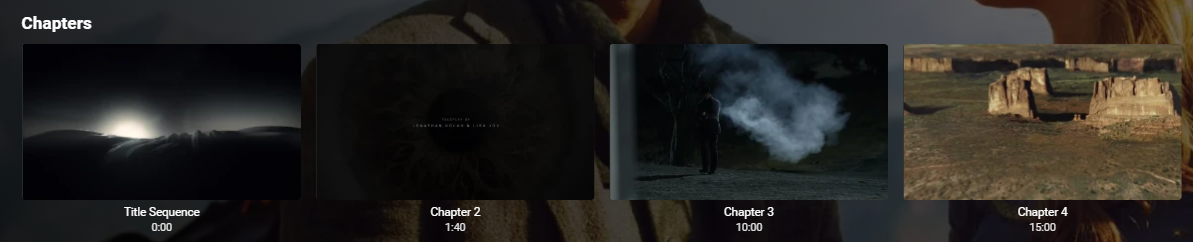
no thats fine was just curious, i have just pushed a little update to chapters. Basically if the Intro starts at 0 then chapter 1 is replaced with title sequence. Looks very neat now. and everything else works like before, but we don't get duplicate Chapter 1 0:00 then Title Sequence 0:00

 2 points
 -
He's busy getting his blenders ready ...2 points
-
Sweet! I found the memory problem guys! @Cheesegeezer do I need to pull the newest version before I update the memory fix?2 points
-
@Cheesegeezer, when you create the log. Send in (ILogManager logManager). Then in the constructor use: 'ILogger Log = logManager.GetLogger(Plugin.Instance.Name)' This will use the name in the log entry2 points
-
Yep 8 year and still only Life used 22%.
 2 points
 -
Hey thank you sooo much. that was the problem. I now used rsync -a and permissions and ownerships where preserved correctly, emby is working great now. Thanks again.2 points
-
When you copy/move/relocate the emby config path you MUST preserve ownership and permissions. Your log is full of access errors.2 points
-
Hi, I found the problem. We'll be getting an update out to resolve this. Thanks for reporting.2 points
-
You've grown up with watching live tv but on television only runs garbage? You have a big library but don't know what to watch next? Then this for you: "VirtualTV" - my new live tv plugin that allows you to create custom channels based on conditions of your Emby library content. What's missing: Maybe codec conditions Known problems: Needs Emby Premier to work (Playback) Emby's live tv and playback api is very limited, so i've had to make some detours to get things working. The plugin has two general playback modes: "continous" and "playlist" playback. With "continous" mode you can also choose between "live", which bahaves like real live tv or "archive", which plays the videos from the start. In "Continuous" mode multiple videos are queued and concatenated to one big file with the help of ffmpeg. To make this happen every video in the queue has to have some common features (video and audio codec). That's why it often happens that the video also has to be transcoded by ffmpeg. For transcoding the plugin relies on Emby's internal transcoding engine. If there's a problem, not uncommon with hardware acceleration enabled, the plugin also has a problem. Nothing i can do about it. The availability of subtitle tracks is mostly dependant of the Emby user playback settings. In continous playback mode only one (the default) subtitle track can be used and this one has to be burnded into the video (transcoding takes place). In "Playlist" playback mode the videos are pushed as a playlist to the Emby clients. It's like you would play your videos directly from your libraries. This way you get all the features you are used to. Audio and subtitle selection, pause, skipping around and similar things. "Native" playback method was created by the Emby Devs. Similar to Playlist playback it will play the real library videos, but with the big difference that playback is purely initiated by the client app, without any remote command execution. This is why it also works for Roku devices on a WAN network. And although the real videos are played, the whole thing is treated like live TV. This means that channel zapping is possible and no dialogs for playing the next episode are displayed. Unfortunately, the new playback method does not yet support all features. As the name "Archive" suggests, it will currently always start all videos from the beginning. In addition, only very few Emby apps automatically advance to the next video. If you want it to be improved even further, each of you should raise your voice in this thread. To get things started install the plugin via Emby's plugin catalog and restart Emby. Setup your channels with a name and number and choose your playback mode. In the channel conditions you'll have to select an Emby account. This account is used to get library access, respect parental rating, reading watched states and selecting the stream language. At least one textual input field of the conditions has to be filled to get some program data. Fields with an asterisk are either evaluated with an "AND" or "OR" condition among each other. Finally, if you've chosen "Continous Playback" for one of you channels, take a look at the transcoding settings. Save your channel line up and manually trigger a "Guide Refresh". Now have fun! Version History: After a plugin update, always clear your browser cache. If your settings still don't load in the config screen, you have to move the "VirtualTV.xml" out of ...\plugins\configurations and restart Emby. Start from scratch. 2.0.0.0 Unlimited number of channels; New playback method "Native (Archive)"; New security concept for the Export API 2.0.2.0 Performance improvements to Guide Refresh; Preview for Add/Edit Channels; Option to disable Program indicators 2.0.3.0 Fixed missing Playlist sort order for some Content Types; Added support for Seasons with Content Source Collections 2.1.0.0 Selectively enable channels for specific users; Create copies of existing channels; Ordered unwatched episode playback 2.1.5.0 Added option to (auto)enable channels on a specific date range; Bug fixing1 point
-
RMVB is kind of a dead container these days. It's been years since I last even heard/read RMVB. You know what's coming next. Your best bet would be to mass convert to mp4 or mkv and update the video codecs to either AVC or HEVC. Maybe convert the audio tracks as well depending on what they are. You might be able to use a tool such as FFmpeg Batch AV Converter. FFmpeg Batch AV Converter download | SourceForge.net If you have a GPU such as Nvidia or Quicksync that supports HEVC encoding you could use that to speed up the process.1 point
-
Hi Chef, i use that xcopy so when i build it just copies from the bin folder to the emby server plugin folder. Saves dicking about with copy and pasting everytime. If your happy I will push my latest changes and we should be good for a release1 point
-
Hi can you explain a bit better what exactly you are trying to do?1 point
-
I also fixed this in the logger:1 point
-
Awesome - we are getting to the nice to have's - cool ! The last item on the above list - was that the item which I was referring to in the response to @Micael456 re memory usage ?1 point
-
Hey @Cheesegeezer here is what I just pushed to git. Fixed weirdness in title sequence task progress reporting Fixed Log reporting plugin name in ChapterManager Added GetBaseTitleSequenceResults from Database (get the entire season worth of BaseTitleSequence, instead of the entire result including duration and fingerprint) I hope I did right things syncing the project.1 point
-
Ok, i will fix the logging to produce a single ine in debug mode only1 point
-
You always come to the rescue @cayars. Removing the plugin, refreshing and installing it again did it. Thanks a million :)1 point
-
If the item contains chapters that are correct for this then this is already there. Otherwise, I have no idea how we'd know where these time points are. For what you want, splitting them is the best course of action.1 point
-
Which version are you on @Micael456? I think Dave and I have something new today. Let's see what happens today, and if we still see high memory usage like that, then @rbjtech is right, we have no choice but to snag a season, process it fully and move on. But that will mean writing a hefty rework of the two main tasks.1 point
-
ahh that's nice, thank you for explanation!1 point
-
AFAIK you can only have one sub per language per sub type (using same ISO-code schema), each subsequent download overwrites previous one, nothing to delete.1 point
-
Don't think you can restrict, when manually downloading all will be listed with hash-matches flagged and usually on top of the list.1 point
-
Yeah, all your media will retain their rating, you would only apply Custom ratings to those selected few items you explicitly want to allow (or block, as it works either way), and that will be considered that item's "rating" until/if you decide to remove it, upon which original rating will apply again. It's basically same as if you tagged an item, you're just doing it on a different metadata field.1 point
-
Hi, If you wiped the volume you likely have to adjust the INOTIFY events properties again on the Synology as it's set to a low number and most people blow past it and have to increase the number of events. This is how Emby Server knows a file was changed because it receives this INOTIFY event from the NAS OS. https://docs.syncthing.net/users/faq.html#inotify-limits I'm running 4.7.0.11 on my Synology NAS and just tested add a tag to a movie and it did update the NFO file properly. Have you checked to make sure you have writing NFO files enabled for this library? I'm not sure I follow you on the manual scan media files. Unless a file date/time was updated on the file Emby won't touch it. Yes if you want to edit metadata of multi-version movies you need to split them apart first. You can find a button to split them on the detail page of the movie right at the top of the Media Info Section. Once done editing you can join them back together again.1 point
-
Please try restarting the app and see if that helps. Thanks.1 point
-
If you navigate up to the folder level where the download link is by removing the filename you can see the exact date Luke uploaded the file Emby.Releases/tizen at master · MediaBrowser/Emby.Releases · GitHub So ~5 hours ago as of right now Edit: and if you want you can follow the release notes pinned post then you should get a notification depending on your forum settings1 point
-
It is still there TMDB is usually faster then TVDB as TVDB is 24 hour. Now whether their v4 api changes anything is another story (but we would need a v4 plugin to check). When will my updates be posted? Edits are posted immediately on the website. They can take up to 12 hours to propagate to the API. Request and discussion here https://emby.media/community/index.php?/topic/57907-refresh-episode-metadata-after-added-to-library But I had no issue with your example, Not likely but you could have a cache issue. A test would select identify on the series and reidentify with replace images.

 1 point
 -
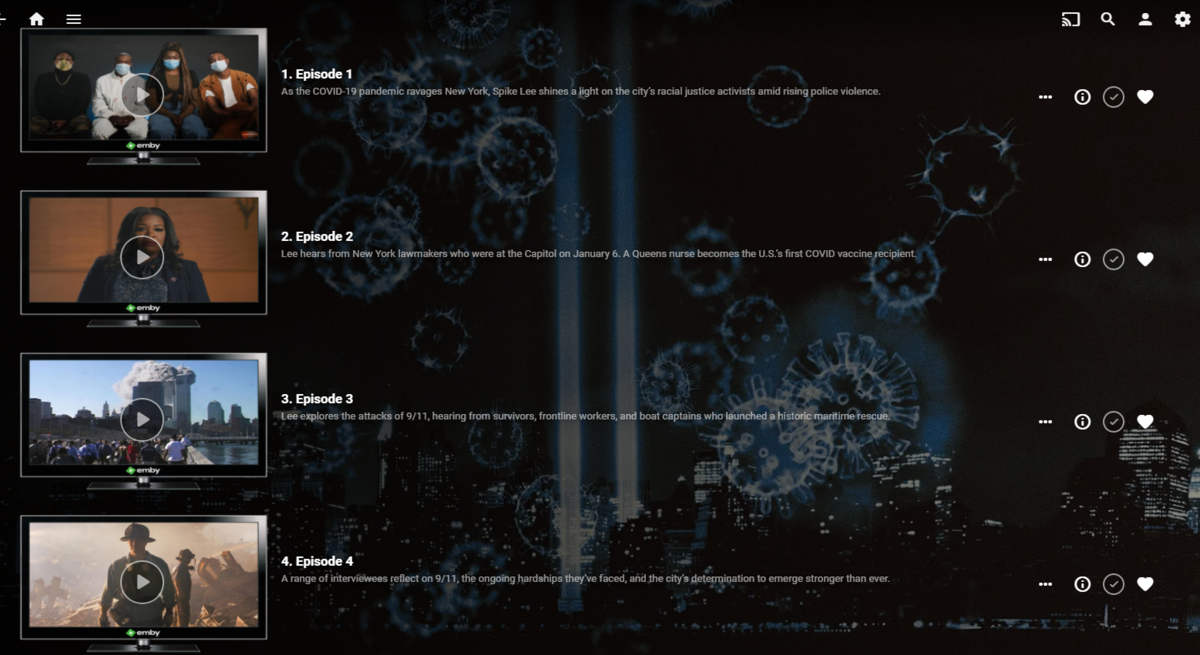
While we wait for the outcome on the real 'Intro Skip' button - the 'Title Sequence' being inserted into the existing chapters is working well. There are a couple of issues still to resolve, but the majority of my test shows had perfect placement of the sequence. Some examples below - 1. 'Title Sequence' added for episodes with 'Real' chapters. Original chapter points are untouched. 2. 'Title Sequence' added for episodes with 'Auto' chapters. Auto chapter points are trimmed accordingly, resorting back to the Original 5 minute chapters after. 3. 'Title Sequence' added late into the show (after Chapter 3).. again, Original chapter points are untouched.


 1 point
 -
But since these are actually sequential episodes per TVDB you could just name them like this S01E01-E4. and S01E05-E8. Now if they were none sequential episode like most toons are then splitting them would be required1 point
-
Long names will always be a issue. At least for the web client I just add some custom css. div.cardText.cardTextCentered.cardText-first { white-space: pre-wrap; }
 1 point
 -
I would not recommend moving the metadata folder as you are required to maintain default and new location as all previous stuff has database entries looking in a specific location and new stuff will look in new location. So this can be problematic and require you to manually move everything and manually update the database to new location.1 point
-
Try a guide refresh. If that doesn't work try removing any tuners that are loaded and remove the NextPVR plug and then do a guide refresh which should remove all channels. Then add back the plugin.1 point
-
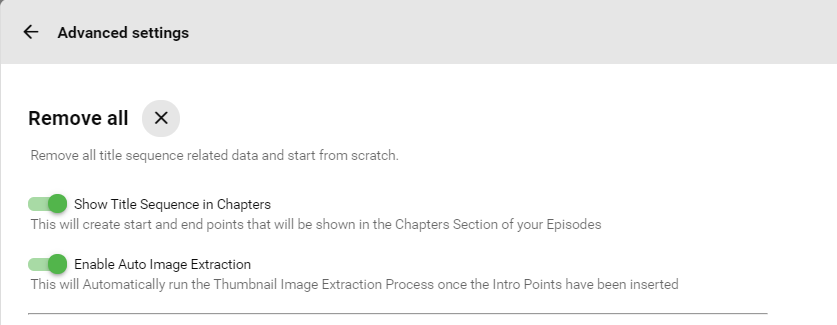
Oh and I added in the user options everyone is banging on about
 1 point
 -
I decided not to distribute the pdb file, since it hasn't ever reported anything I needed. It shouldn't have the temp though, I guess my updated script was wrong and I will fix that but the SHA256 checksum will be the same if you are concerned 3C99E90053EFAAC6DEBFF1E92BD2916D4453EC43487E7BB6E069801B229119ED To calculate In Windows certutil -hashfile LiveTV.Plugins.NextPvr.dll SHA256 and in linux sha256sum LiveTV.Plugins.NextPvr.dll Martin1 point
-
here you go @neik I think I grabbed the correct color, and it should change with the different themes correctly. You'll want to clear browser data to show the changes. Emby.AutoOrganize_v1.6.0.2.zip Let me know if you still have an issue with that movie not showing up.1 point
-
Been watching a few content creators about Windows 11. Sounds like there could be significant performance improvements for Graphics driven apps and gaming, however none of this has been tested yet and it will rely on having a dedicated GFX card, which as we all know is like try to find some Rocking Horse Poo!!! Interface is moving towards an IOS style MAC book look. One of my pet hates with moving from Win7 to Win10 is the fact that they managed to introduce way more clicks in Win10 to get to the same menu in Win7 and this isn't gonna get better in Win11 as there will be even more clicks to get to the advanced menus. Especially the Right Click context menus. Lets say you wanna unzip with 7zip or winrar... now you have to right click and go to "more options" to get to the same menu. GRRRRR. The system will require a min of 4GB RAM now, which generally isn't an issue for most but it will still eat more RAM which means you will need at least 8GB of RAM to cover the OS and other apps running concurrently. I would say a min of 32GB would be ideal for running Emby. I'm looking forward to seeing more info on this, but wondering what others opinions are.1 point
-
My interests in Win 11 are around the power management and thread director. When the Alder-Lake CPU's become available (Nov?) I'm finally going to upgrade my main rig (an i5 750 with 12Gb RAM running Emby on 4Gb and 2 x 4Gb VM's.. haha) with an i7 12700K - I was tempted by Gen11 but glad I skipped it now. Plan to use the iGPU as well for transcoding if required. Should be a big improvement in CPU (24 'threads'), but I'm intrigued how these 'E-Cores' will work with Win 11 - presumably pushing all the 'background' tasks to them - I'm not sure how that will work. Emby itself is pretty light on memory ? On my current Win10 setup, its about 300-500Meg depending on what it's doing.1 point
-
Are you asking for a feature request to use Posters instead of Landscape/Thumb/Backdrops for Continue Watching?1 point