Leaderboard




Popular Content
Showing content with the highest reputation on 09/12/21 in Posts
-
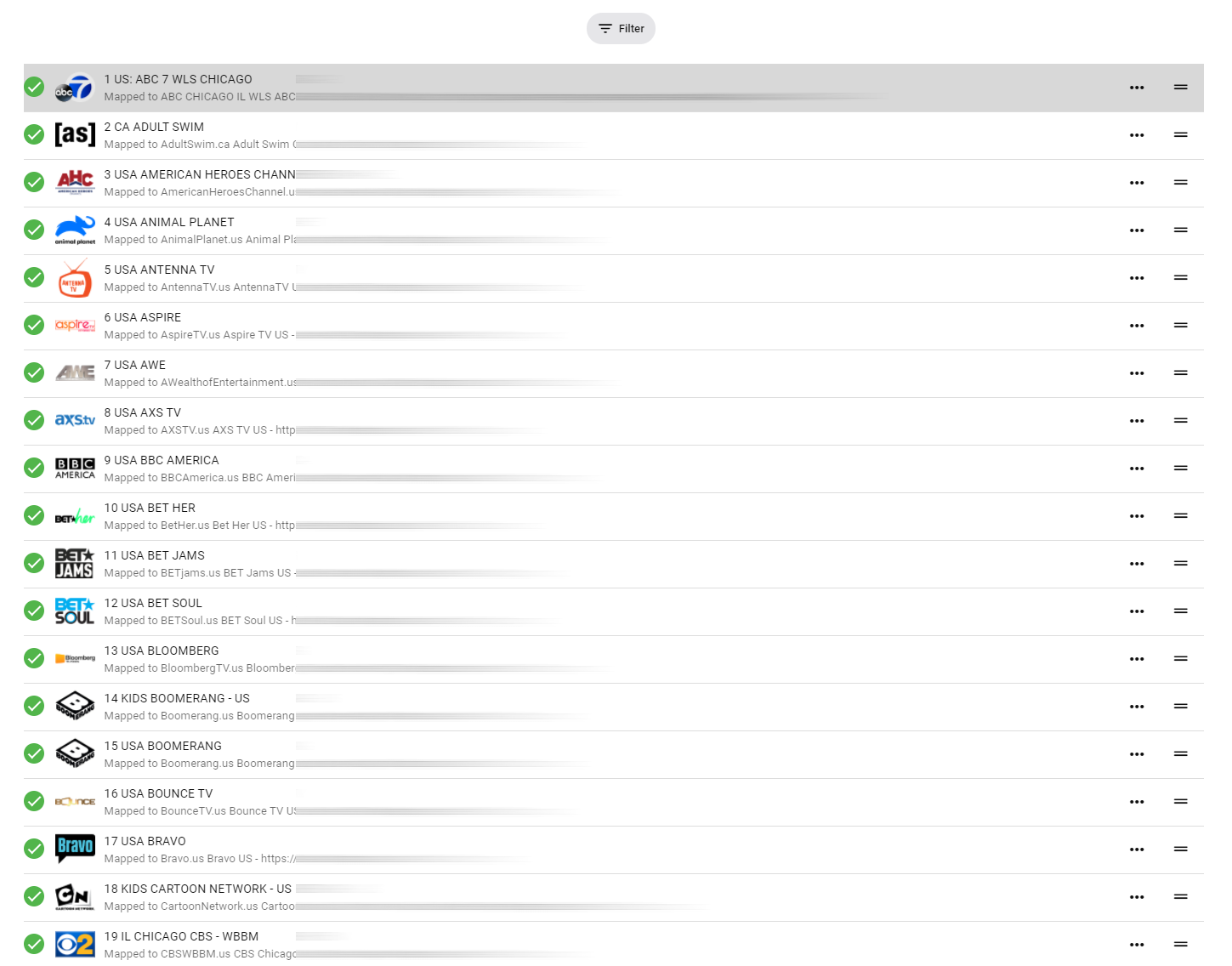
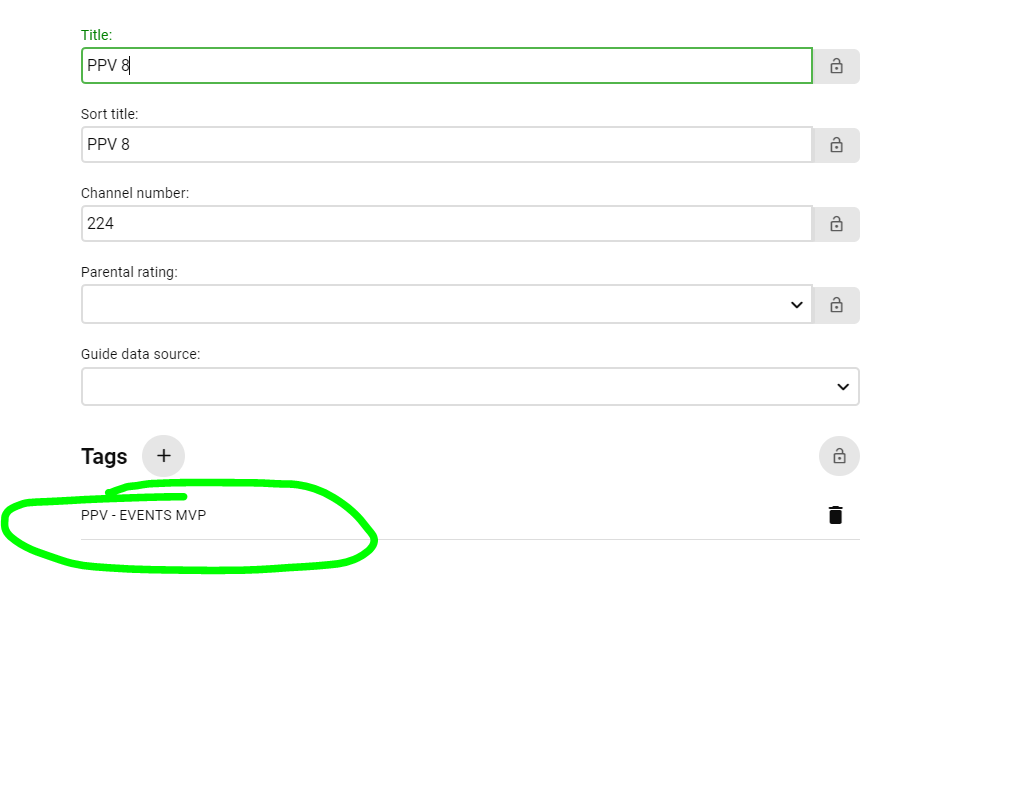
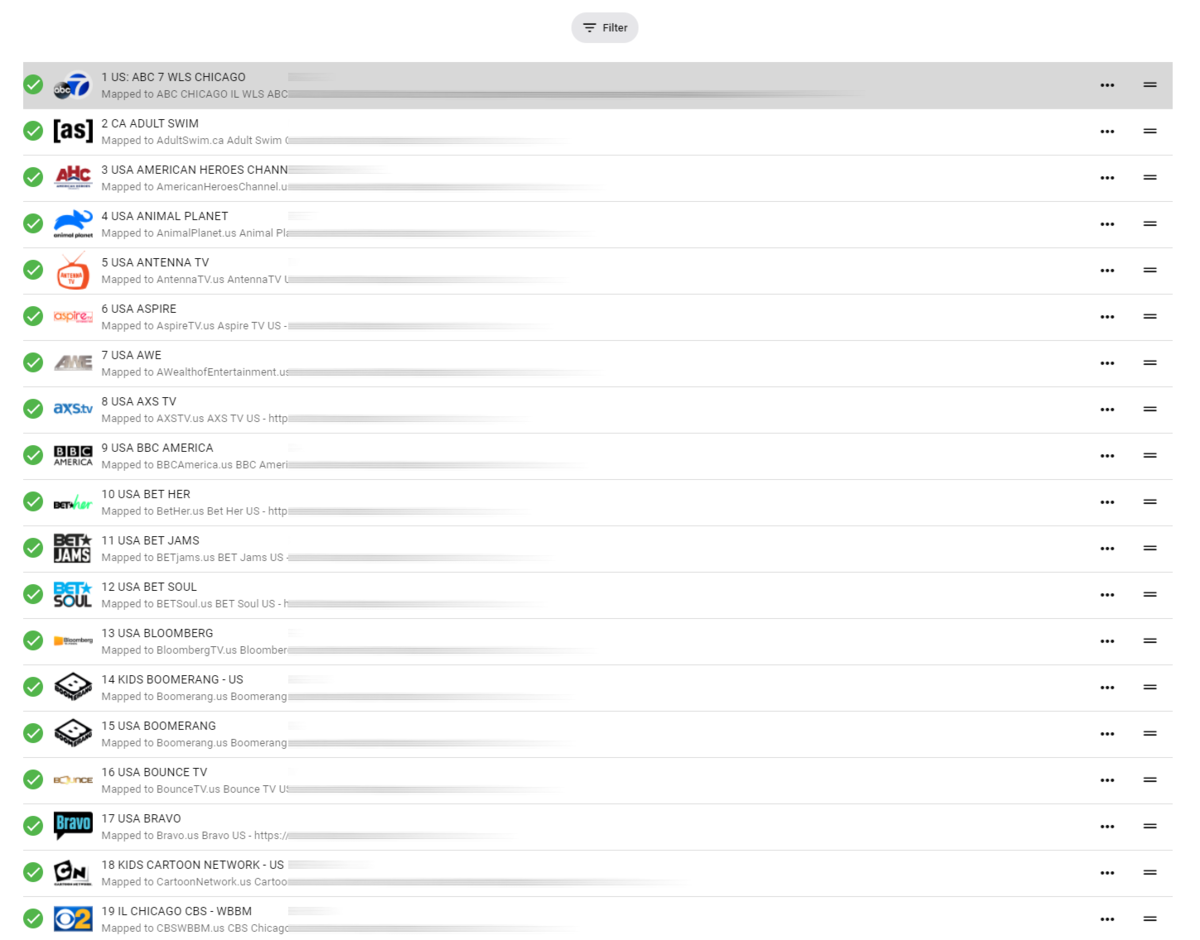
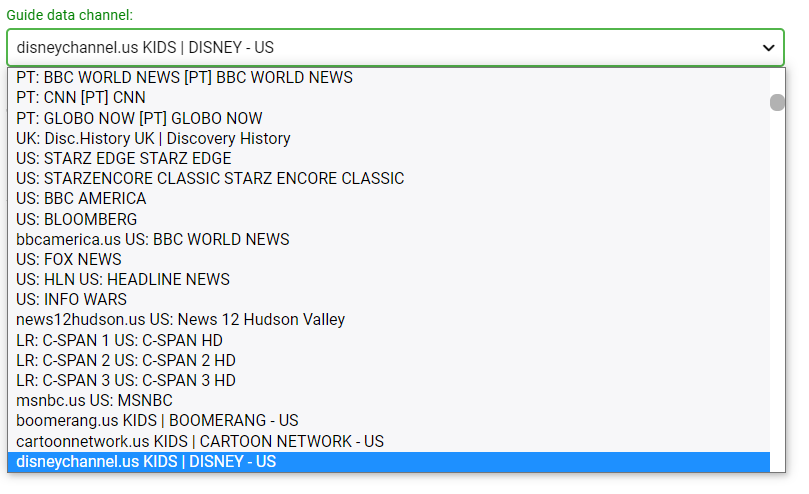
Emby is getting closer to having useable iptv channel setup... can you please add the following features. after channels are assigned, named etc.. allow us to sort the list by TVG-ID aka "Guide data channel" (and/or channel title), then once sorted by alphabetical order (or whatever order we choose) also have a one button re-channel based on order.. for example, i have sorted all of my channels by TVG-ID even though the channel title may start with US or CA (us Canada) the channels are still in alphabetical order based on network or TVG-ID. then all channels are numbered 1-XXX automatically (re-channel based on order button) Its horrible to do this by hand... so what I'm requesting is sort list, and one button re-channel based on order. see how i have the channels below. these were all in a crazy order, but i sorted by network name or TVG-ID then i re-channeled them 1-XXX so its neat and tidy in emby. Still typing lol, The second part, the ability to "HIDE" complete "tag" groups. this may already be a feature, maybe i just don't know how to use it.. But i want to be able to hide all adult channels based on the default m3u group, the group shows up (as shown in below screenshot) i just want to be able to hide full groups/tags from being displayed in emby at all.... This includes other countries channels etc. And lastly, the list of "XML Guide Data" what order is this even in? can you make it so this is searchable? my XMLTV data is in no particular order, so it's REALLY hard to find a channel i have to scroll and read every line to find my matching channel.. So having a small search box to search for a string or something would help ALOT!!
 2 points
 -
Thanks! I ordered the shield pro this morning; will be delivered tomorrow. sounds very promising!2 points
-
I don't know how easy that is to code as I have never delved into ffmpeg. The bottom line is we are actually interested in "Actual TV Shows", so i think the way to approach this is to allow the user to "ignore" folders or libraries that are still included in TV Shows. A "Sports" options would be nice to include as a library option, however I can't see that happening anytime this side of 2030.
 2 points
 -
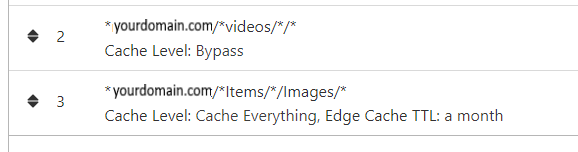
NGINX and emby Config Version 1.0.4 Last Update 1-1-2024 Update by Pir8Radio Why Use NGINX reverse proxy ahead of my application servers like emby? With NGINX or any reverse proxy ahead of an application server you have more control over your setup. You can do things the application servers were not built to handle, have better control over your security and logging, replace lines of code without editing the application server code, better control of caching, etc, etc.... One of the main reasons is so that you don't have to open a new port on your firewall for every application server you host, all you really need to open is 80 & 443 and the internet can reach all of your different servers through one entrance. Will NGINX work on my OS? Most likely, you can find various versions of NGINX for most OS's and they come in different flavors, with options baked in, or just the bare NGINX that you need to compile. See below for download links to get you started. Will NGINX break things on emby? Absolutely if you don't configure it correctly! I HIGHLY suggest when choosing a scheme to setup your domain URL you choose SUB-DOMAIN and NOT sub-directory, more below. Also if you come to the emby forum with things not working, or issues you have and you use a Reverse Proxy, PLEASE make sure that is one of the first things you mention in your forum post. ESPECIALLY if emby works on one platform or client, but not another. So many times people complain "but it works on chrome, so I didn't think it was the reverse proxy". Mention you have a Reverse Proxy please. If the reverse proxy is setup correctly it should be totally transparent to the user and the application server (emby). I'm not going to go into how to purchase and setup a domain name. Lots of how-to's on that out there. Once you have a domain name and its pointed to your IP address, you can go to that domain name and hit your server then continue on.... Sub-Domain vs Sub-Directory: Lets say your domain name is: domain.com there are two main ways you can direct traffic from the internet to your backend application servers like emby. One is sub-directory, something like domain.com/emby or domain.com/other-server This is doable in nginx, but there are some catches and you need to know how your reverse proxy and application server work in detail.. This often breaks different features in emby and other application servers.. To keep with our "Totally Transparent" goal sub-directory doesn't work well, it requires a lot of rewriting and work-arounds to make it work smoothly, if you choose sub-directory you will run into issues you will need to address. The other option is Sub-Domain, this is the cleanest, most transparent, easiest to setup and maintain, it's also what I highly suggest you setup. A sub-domain looks like: emby.domain.com or other-server.domain.com The below config is based on Sub-Domain I will include a sub-directory example as well. NGINX Downloads: Official nginx downloads(LINUX): nginx.org Official nginx downloads(Windows): nginx.org WINDOWS users I suggest this version: nginx-win.ecsds.eu download links are at the bottom of the page. This Windows version has lots of cool features compiled into it already, and is optimized for windows. They keep up with updates, its a FREE (for non-commercial) third party build that I highly recommend. Additional Links: Content Security Policy info (CSP) (For Advanced Users): A CSP WILL break your server if you don't know what you are doing, I suggest reading up, lots of googleing, and understand what a CSP's function is and is not prior to venturing into this area Example NGINX Reverse Proxy Config: 3-29-2020 - ADDED A LINE FOR CLOUDFLARE USERS SO THAT THE X-REAL-IP HEADER IS CORRECTED. THIS ONLY EFFECTS Cloudflare USERS. 4-11-2020 (V1.0.1) - MOVED proxy_buffering off; FROM LOCATION BLOCK TO SERVER BLOCK 12-18-2020 (V1.0.2) - ADDED 301 SERVER SECTION TO FORCE ALL TRAFFIC TO SSL. 9-23-2021 no nginx config change, but cloudflare changed how they cache video files, so emby users that use Cloudflare now need to add a rule like below to make sure video is seekable and playable. 8-18-2022 - added a line for photo sync to cover large uploads of videos and images. (client_max_body_size 1000M;) 1-1-2024 - changed http2 setting per @weblesuggestion in this thread post # 1309363. ** The below "Page Rules" are only needed for Cloudflare CDN users, otherwise ignore. worker_processes auto; error_log logs/error.log; events { worker_connections 8192; } http { include mime.types; default_type application/octet-stream; server_names_hash_bucket_size 64; server_tokens off; ## The below will create a separate log file for your emby server which includes ## userId's and other emby specific info, handy for external log viewers. ## Cloudflare users will want to swap $remote_addr in first line below to $http_CF_Connecting_IP ## to log the real client IP address log_format emby '$remote_addr - $remote_user [$time_local] "$request" ' '$status $body_bytes_sent "$http_referer" ' '"$http_user_agent" "$http_x_forwarded_for" $request_time $server_port "$http_x_emby_authorization"'; log_format default '$remote_addr - $remote_user [$time_local] "$request" ' '$status $body_bytes_sent "$http_referer" ' '"$http_user_agent" "$http_x_forwarded_for" $request_time $server_port'; sendfile off; ## Sendfile not used in a proxy environment. gzip on; ## Compresses the content to the client, speeds up client browsing. gzip_disable "msie6"; gzip_comp_level 6; gzip_min_length 1100; gzip_buffers 16 8k; gzip_proxied any; gzip_types text/plain text/css text/js text/xml text/javascript application/javascript application/x-javascript application/json application/xml application/rss+xml image/svg+xml; proxy_connect_timeout 1h; proxy_send_timeout 1h; proxy_read_timeout 1h; tcp_nodelay on; ## Sends data as fast as it can not buffering large chunks, saves about 200ms per request. ## The below will force all nginx traffic to SSL, make sure all other server blocks only listen on 443 server { listen 80 default_server; server_name _; return 301 https://$host$request_uri; } ## Start of actual server blocks server { listen [::]:443 ssl; ## Listens on port 443 IPv6 ssl enabled listen 443 ssl; ## Listens on port 443 IPv4 ssl enabled http2 on; ## Enables HTTP2 proxy_buffering off; ## Sends data as fast as it can not buffering large chunks. server_name emby.domainname.com; ## enter your service name and domain name here example emby.domainname.com access_log logs/emby.log emby; ## Creates a log file with this name and the log info above. ## SSL SETTINGS ## ssl_session_timeout 30m; ssl_protocols TLSv1.2 TLSv1.1 TLSv1; ssl_certificate ssl/pub.pem; ## Location of your public PEM file. ssl_certificate_key ssl/pvt.pem; ## Location of your private PEM file. ssl_session_cache shared:SSL:10m; location ^~ /swagger { ## Disables access to swagger interface return 404; } location / { proxy_pass http://127.0.0.1:8096; ## Enter the IP and port of the backend emby server here. client_max_body_size 1000M; ## Allows for mobile device large photo uploads. proxy_hide_header X-Powered-By; ## Hides nginx server version from bad guys. proxy_set_header Range $http_range; ## Allows specific chunks of a file to be requested. proxy_set_header If-Range $http_if_range; ## Allows specific chunks of a file to be requested. proxy_set_header X-Real-IP $remote_addr; ## Passes the real client IP to the backend server. #proxy_set_header X-Real-IP $http_CF_Connecting_IP; ## if you use cloudflare un-comment this line and comment out above line. proxy_set_header Host $host; ## Passes the requested domain name to the backend server. proxy_set_header X-Forwarded-For $proxy_add_x_forwarded_for; ## Adds forwarded IP to the list of IPs that were forwarded to the backend server. ## ADDITIONAL SECURITY SETTINGS ## ## Optional settings to improve security ## ## add these after you have completed your testing and ssl setup ## ## NOTICE: For the Strict-Transport-Security setting below, I would recommend ramping up to this value ## ## See https://hstspreload.org/ read through the "Deployment Recommendations" section first! ## add_header 'Referrer-Policy' 'origin-when-cross-origin'; add_header Strict-Transport-Security "max-age=15552000; preload" always; add_header X-Frame-Options "SAMEORIGIN" always; add_header X-Content-Type-Options "nosniff" always; add_header X-XSS-Protection "1; mode=block" always; ## WEBSOCKET SETTINGS ## Used to pass two way real time info to and from emby and the client. proxy_http_version 1.1; proxy_set_header Upgrade $http_upgrade; proxy_set_header Connection $http_connection; } } }

 1 point
 -
As I'm transitioning from Volumio and Plex to Emby to centralize my usage to one app, the one thing I'm missing the most is gapless playback. This is particulary annoying when listening to albums like "Dark Side of the Moon" by Pink Floyd. I'm experiencing a buffer of about 1 second in between songs, which really ruins the immersion. Would be awesome if this would be implemented in both the Chromecast, and web player.1 point
-
As I mention in a related post, I love the additional subfolders for Movie Extras (eg, Shorts, Scenes, Interviews, etc.)! It would be awesome to extend this functionality to TV Series as well. Specifically to add support for many/all of the same folders supported for Movie Extras, eg, extras specials shorts scenes featurettes behind the scenes deleted scenes interviews trailers As well as any additional folders that get added in the future (eg, hopefully Galleries). Support Placement of "Extras" Folders Within Each Season Folder, Plus A Naming Scheme to Link A Particular Extras Folder with a Specific Episode (eg, "\Season 1\E1 - Deleted Scenes\" for episode 1 deleted scenes): I want to clarify that it would be great if these various "extras" folder types could reside within each Season folder. So for example, within a Season 1 folder we could then have an "Extras" folder, a "Deleted Scenes" folder, a "Featurettes" folder, etc. And furthermore, that we could designate a particular folder to refer to a specific episode (eg, "\Season 1\E1 - Deleted Scenes\" for episode 1 deleted scenes). See more below, particularly why I think this would be so useful: https://emby.media/community/index.php?/topic/55915-emby-server-theater-additional-extrasspecial-folder-types-for-tv-series-similar-to-movies/&do=findComment&comment=587195 Thanks for your consideration! PS - If this is something you might like to see implemented, be sure to "Like" this top/first post (as well as any subsequent posts in this thread that highlight particular aspects of what you are interested in) -- "Liking" the top/first post helps the Devs to know how much interest there is in a given Feature Request.1 point
-
I have been using the finamp app for jellyfin and I think emby needs to create its own or even clone this as jellyfin comes from emby's code so should not be too hard I believe. The reason I am writing this is because emby needs a separate music app which me and others have been requesting for a long time and even though finamp is not complete it has been great for daily use compared to the full emby and jellyfin apps. Thanks1 point
-
You should have a dot (.) between 2 and EN. Edit: To clarify, "1 Chance Sur 2 EN" is NOT equal to "1 Chance Sur 2". Subs must be named exactly as video file plus optional language code (and/or other flags).1 point
-
The IntroStart time for the button (and IntroEnd) is being got from the Intro dB - not the chapter dB. That is what Luke is alluding to. If emby gets it from the IntrodB (or copies it into a Core dB), then there is no need for an IntroStart chapter. IntroEnd chapter is required only when there is not one already - and even then, it should be optional.1 point
-
my dad fixed it. thanks guys for the help have a good day1 point
-
I believe that’s the duration in ISO 8601 format. I believe P stands for "period" and T would just be "time", since ISO 8601 also supports dates prefixed before the T instead of the P. Fairly standard way of storing date & time.1 point
-
I reckon appending the first folder with year (1999) would have yielded desired result. Or alternatively, import one series, scrape, disable all meta-fetchers, import second series, enable meta-fetchers, use Identify on the second unknown one.1 point
-
Instructions for doing this are in the link above.1 point
-
At the same time there is a topic like this where there is more then one child and what is appropriate for one but not the other, so custom rating would fail the desired result.1 point
-
This is only my opinion, but like Luke said, chapters don’t seem like a great way to store this information. A database for this specific purpose seems much better, because chapters could be laid out in so many different ways and be named differently, so we likely don’t want to mess too much with them. As an intermediary step, it’s probably fine, but it shouldn’t be the final solution.1 point
-
Agreed, I use custom rating for both blocking and allowing overrides and it works just fine.1 point
-
You need to use multi-versioning feature, in either of three ways: 1) Put all different files in same folder and follow naming convention for multi-version movies https://support.emby.media/support/solutions/articles/44001159102-movie-naming 2) Multi-select and select "Group Versions" in three-dot menu 3) Use community-made Auto-Grouping plugin which works across folders1 point
-
That would surely be useful, but in OP case, assigning Custom Rating on related movies should produce desired result, as that should take precedence over default rating?1 point
-
Please try the new app update going out today. Thanks.1 point
-
I think I see what is happening, you are just adding IMDBid to trakt url to provide a link. From the link button href="https://trakt.tv/movies/tt8371236" So @roakuif your example above has IMDBid "tt0778759" it should show trakt link. And now TMDB has that externalid added.1 point
-
Logs sent at 1310 EDT user Rick Started play "Notorious" Turned on SFN Clicked Pause Clicked Back until the app asked if I wanted to Exit Clicked Yes Restarted app Started the movie "The Kid" SFN was still on1 point
-
To add to what Luke just said, it is available to use for scripting and DVR Post Processing. Making use of comskip and cutting commercials automatically is something we would like to do in the future.1 point
-
Hi, it's not yet used at this point.1 point
-
What?? I just tested it out again as I did before I posted. Turned it on, clicked STOP and exited the app and when I restarted the app it was still ON the next time I played something else. As I mentioned this is not how the other apps behave. In other apps clicking STOP or exiting the app turns SFN off the next time you play something. The problem you get with this is what the OP posted. Someone obviously accidently turned it ON and it stayed ON forever and he didn't know how to turn it OFF. However, if that's the way you want it really doesn't matter to me. It's the OP who didn't know how to turn it off the next time he played something.1 point
-
With current releases this is not possible but is keep an eye on upcoming beta and next normal Server release as it will likely have this feature. Most likely there will still be parental control tag blocking but we are trying to decide to keep the existing "Only allow" or switch it to doing essentially what you're asking for. Another option is to keep the 2 existing choices and add this as a third option. When said and done it will basically use the parental rating restrictions you have setup then allow you to add other media on top of this filter using tags. This will make parental restrictions much more powerful and useful.1 point
-
1 point
-
Yes, thank you very much.1 point
-
well figured it out. There was an episode in there that had a space in the name Exit.S01 E01 which made it fail all the time. Took the space out and it completed the sync. A bit surprised that something like that could make it fail. and only on this one machine, the rest ran straight over that issue.1 point
-
I think he is talking about a "Newest Media" (like sorting by year or premiere date) option on the homescreen, it would be a good addition to the Homescreen IMHO.1 point
-
Hi, I would prefer not to run a remote session if that’s ok. From my end everything is working as needed I.e where subs exist they are being downloaded.1 point
-
Hi, yes it is safe to close.1 point
-
It should be fairly simple to code in, you'd just run ffmpeg with the video disabled, copy the audio, and set start and end times to whatever was detected. I think the sports issue is a distraction. Most of them failed to find any intro at all, as expected. And there's at least one episode of The Alfred Hitchcock Hour that also has a random snippet incorrectly identified as the intro. The sports just happened to be the most obvious thing, is all, absent the time to really go through the results.1 point
-
For the one that's on here: I've also sent you a PM. There are other projects and forks off Emby. I really love it, and even though I have both Plex and Emby lifetime - I much rather Emby. It's just a bit annoying that even a fork off Emby has the feature now native. I'm still waiting.1 point
-
Thanks all, I just ordered a Shield pro to be done with it1 point
-
Your nfo should be like this or these field blank to honor library settings. <language>fr</language> <countrycode>FR</countrycode> Don't believe Emby uses the info at all, and xml only with the plugin installed and ordered to use.1 point
-
For shows with Genre "Sport", add a button in the UI to explicitly invalidate an audio segment? i.e. not just "this is false", but "everything that matches with this is also false".1 point
-
Likewise with '13.6em'.1 point
-
Yes that is correct.1 point
-
Try removing the xml metadata plugin, then restart the server and try refreshing metadata again, and see if that helps. thanks.1 point
-
I've deleted it for you.1 point
-
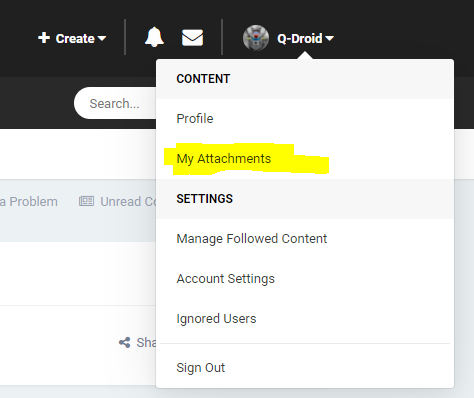
You edit your post to remove the attachment and can delete your uploaded attachments from your profile menu on the top right of the screen.
 1 point
 -
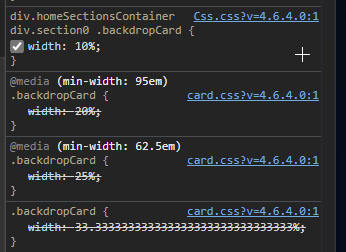
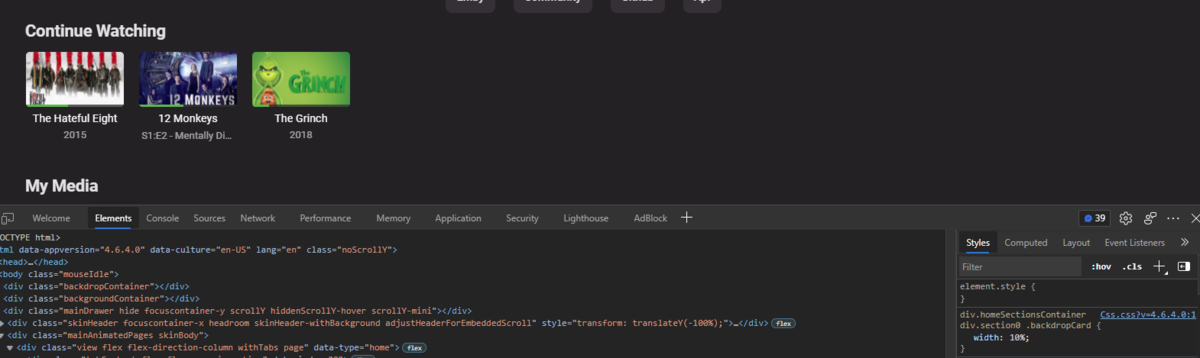
Not sure as I can not reproduce this and that is what Emby uses to control the sizes depending on width. But just use a something different then "%". (10em, 150px, 10vh, 25ex) there are many units to choose from.
 1 point
 -
Hi, +1 for private playlists!! It is really a must! thanks thomas1 point
-
This just isn't the same thing at all. "within emby" is inside your own personal system - so it is secured in that systems access. We don't have a central place where this information is stored such that it could be accessed by anyone other than the users of your own system. In that way we are completely different from something like Netflix. But, if you think your viewing habits are private on Netflix, you've got another thing coming... as that is not considered "personal" information. The bottom line is nothing like GDPR applies to this issue in any conceivable way.1 point