Leaderboard




Popular Content
Showing content with the highest reputation on 09/10/21 in Posts
-
Buttons will require development on our side. There's nothing you can do to influence the UI. Also I realize it is convenient, but I don't think chapters is the appropriate storage mechanism. I can review all of this soon and look at what the best possible integration method would be.6 points
-
@chef @rbjtech @ebr @Luke Anyone know how to trigger another Scheduled Task in code. I can't seem to find the task in Emby for running the ThumbnailImageExtract Task. It used to be here... Emby/Emby.Server.Implementations/ScheduledTasks/ChapterImagesTask.cs / Chapters is pretty much complete. Chef I have switched the GetResult(string id) back now in my code and can pass the Episode Id to the ChapterEdit Method, so when running the Chapter Insertion Task, it will ONLY select your sequenced episodes to process. You will have to then run the thumbnailImageExtract task after running the chapter Insertion task I have just done a full test on my small Test library and everything is working as expected. Attached is 2.0.2.9 This build has been set as a pull request in Git, I'll let you check it and merge the request. You may also notice a new design for the Plugin Icon -- Sorry chef the old one just looked like it was from an 80's video game lol IntroSkip 2.0.2.9.zip

 3 points
 -
In your Emby settings for the library, make sure you have nfo as both a Metatdata saver and reader and 'save artwork into media folders' options enabled. This will put the metadata and images in the same directory as your video files in cross system compatible formats.2 points
-
Thanks for all your (testing) feedback, much appreciated!2 points
-
Thanks for the kind words. I did edit the op post and added this at the bottom: Notes: You can now disable the default admin account as well as SSH. You may also want to rename /volume/Emby to /volume/Emby6 as well. This will help make sure you don't have anything referencing the old directory. If you don't notice any issues in a week or two you can delete this old folder/share to free up space.2 points
-
Good thanks. You? Don't forget us on Discord2 points
-
It's been fascinating reading this thread as it has evolved. Congrats to you guys for putting this together2 points
-
Hi! I'm new to Emby, and I'm currently testing it. For us people who love to listen to classical music, we need to be able to sort the music by composer and not album or interpreter. See, if I want to listen to Schumann 4th Symphony played by Kleiber/VPO I search at first after Schumann, not Kleiber. It's just a tag, shouldn't be too hard to implement, right? iTunes does this like since forever. Thanks!1 point
-
This is what we keep saying though, you CAN'T direct play with Emby as it fails 97%+ of the time and just shows black screen with spinning circle, you can only get Emby to work with direct strean and then have audio sync problems, so Emby remuxing LiveTV is not providing the best Live TV media experience. I don't think it is your setup, it's the Emby app, on Android it does not perform as you would expect it to work for Live TV. If you're running Android clients from my experience Emby is not the product to watch Live TV satisfactorily1 point
-
Absolutely. Also, let's put the API endpoints behind admin , or user privileges. Then they have to be logged in inorder to get access to the data. Then we won't have to worry about other {nameless} projects utilizing the data... At least not right away Ahhrmmm ....1 point
-
You mean like the Tune In plugin.1 point
-
Alright, next time I have to shut it down, I'll check Emby afterwards.1 point
-
Yes, I can make them the theme colour. Won't take long.1 point
-
Thanks will try the arm8 when I get chance, will let you know the outcome.1 point
-
This is from IntroSkip code public class TitleSequenceResult { public int? IndexNumber { get; set; } public long InternalId { get; set; } public bool HasSequence { get; set; } = false; public TimeSpan TitleSequenceStart { get; set; } public TimeSpan TitleSequenceEnd { get; set; } public List<uint> Fingerprint {get; set;} public double Duration { get; set; } public long SeriesId { get; set; } public long SeasonId { get; set; } public bool Confirmed { get; set; } public bool Processed { get; set; } = false; } I'm about to test the plugin on my main library once the detection finishes. In my test version it will also test the automatic chapter image extraction as well, so lets see how that goes. At least the finger printing and detection will already be done. Thanks for the roadmap list also mate!!1 point
-
The widgets issue is fixed. Thanks.1 point
-
Cool ! - I wasn''t aware of this .. Thanks for explaining @samuelqwe { "IndexNumber": 2, "InternalId": 1082, "HasSequence": true, "TitleSequenceStart": "PT3M49S", "TitleSequenceEnd": "PT5M13S", "Duration": 20, "SeriesId": 1078, "SeasonId": 1079, "Confirmed": false, "Processed": true }1 point
-
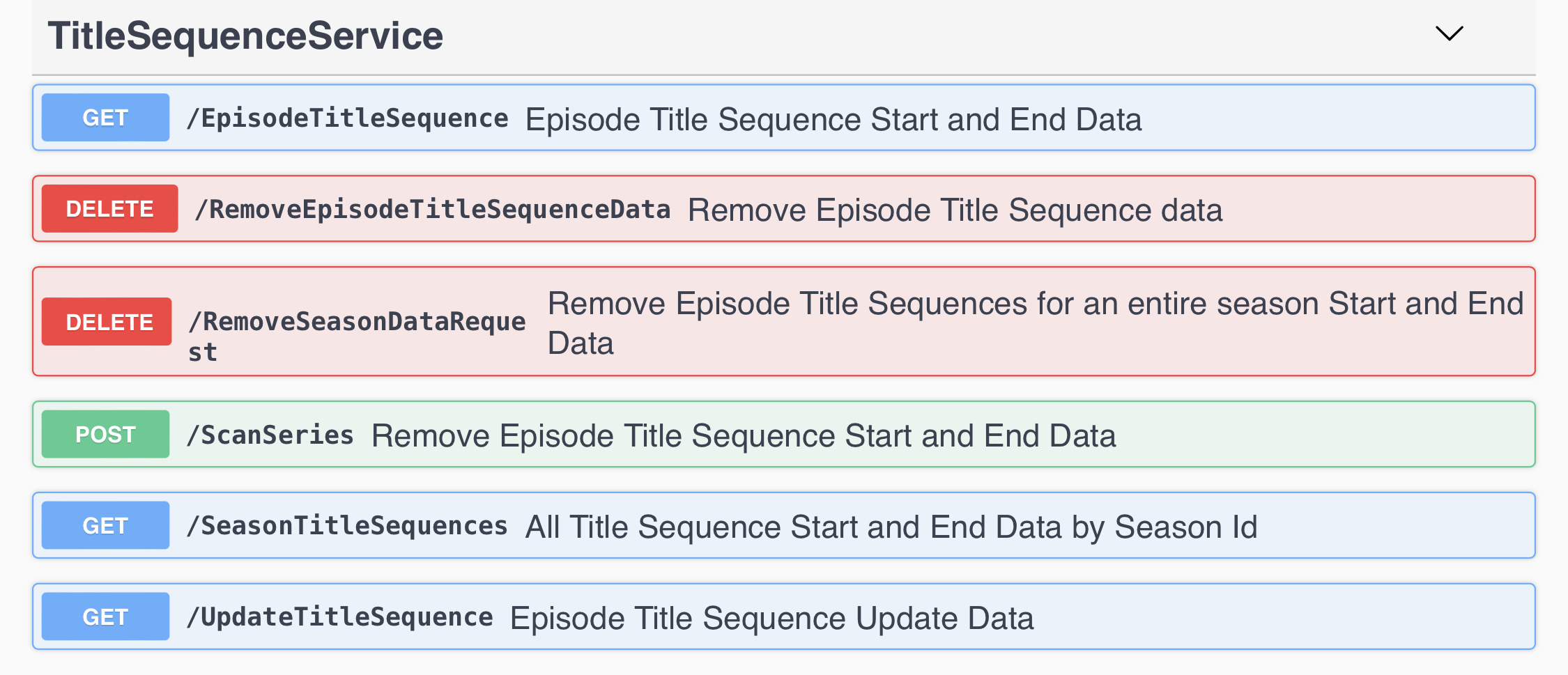
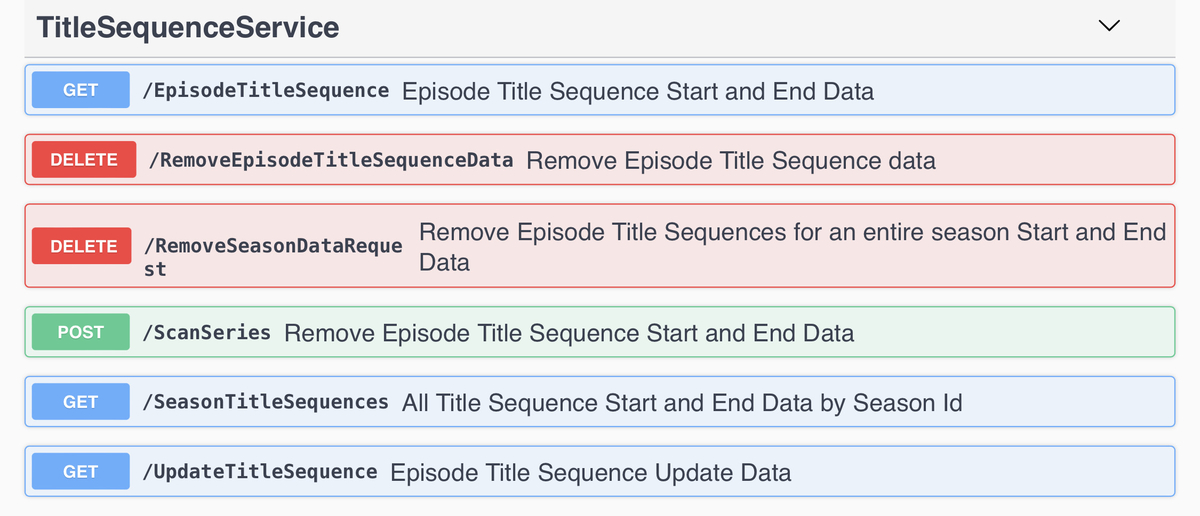
By sequence, he means intros. It’s not new, but there have been API endpoints to lookup the intro data for quite a while now.
 1 point
 -
Ahhh yeah sure, if i can remember how to do it lol1 point
-
@all Let me know if you experience any major flaws. Currently I try to stabilize this version to become beta... Beta version will be tagged as 6.0.7 (x)....1 point
-
That is absolutely correct. You can do it via the context menu. Unfortunately not via "i". And really only for the series or TV shows.1 point
-
Hi there, have you setup your own Emby Server? I would suggest checking out our quick start guide: https://support.emby.media/support/solutions/articles/44001159034-quick-start Please let us know if this helps. Thanks.1 point
-
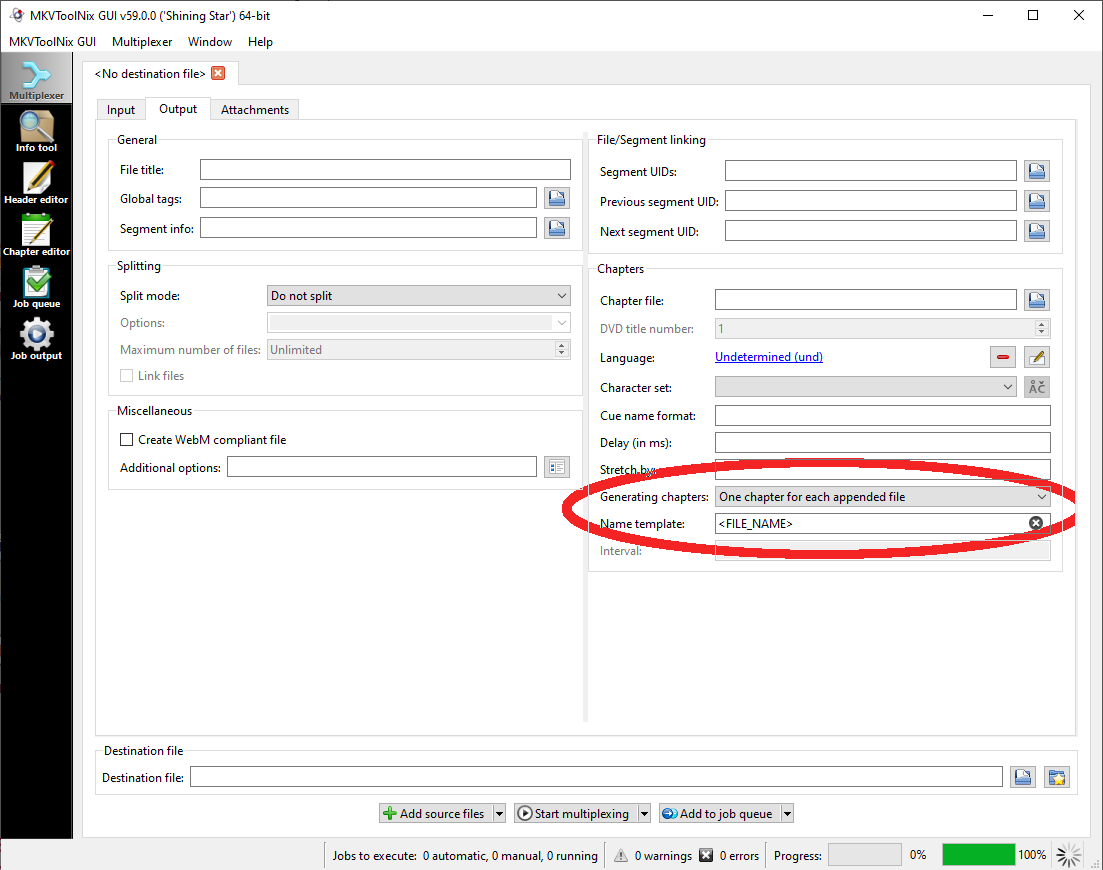
Yep. Name the individual files with the desired title for each one, then set the Output tab to have the circled chapter settings. toolnix will turn each filename (without extension) into a chapter title with the correct timeline for its spot in the aggregated video.
 1 point
 -
Latest updates below - Amazing work from @chef and @Cheesegeezer to get #5 out the door so quickly. (added Required Version Number - as development is happening fast, many testers are on older versions..) # Item Description Stage Latest Update Version Required Needs Core Updates ? ETA 1 FingerPrint(Chroma) Creates a template based on a percentage of the Audio runtime. Ready More efficient use of dB but good enough for release when used with scheduler 2.0.2.8 No Complete 2 Detection Detects the 'repeating Audio' vs other episodes and calculates the IntroStart and IntroEnd Ready Possibly more accuracy but certainly good enough at the moment with 90-95% 2.0.2.8 No Complete 3 Schedule Due to the Detection needing the FP database, a schedule needs to be run to ensure the data is available. Ready but needs work Working now but needs manual config 2.0.2.8 No ? 4 Scaling Depending on library size, these tasks can take days, even weeks - so it's important it's broken into manageable chunks. Ready but needs work Needs more testing on low powered NAS devices 2.0.2.8 No ? 5 Manual Skip The IntroStart/IntroEnd can be added into the existing chapter points without needing Core development work Testing 2.0.2.9 No Complete 6 IntroSkip - Manual Detection of an 'IntroStart/IntroEnd (in emby Chapters?) should bring a 'Skip Intro?' button to the front of the playback screen. Design Yes ? 7 IntroSkip - Auto Assuming accuracy is good enough, then #6 could also be automatic if given the option. Concept Yes ? 8 Community dB A community dB of existing IntroStart/End points Concept No ? 9 Specials Handling of Special Episodes - both In Season and Out of Season Concept No ? 10 Meta-Data Refresh What happens when Metadata is refreshed - do we keep chapter points ? Design No ? 11 External chapter file Write all chapters (incl new Intro) to an external XML or Text File Concept No ? ?1 point
-
For a lot of these types of short videos that are related, I've used MKVToolNix to combine them into one long video, and used its chapter capabilities to give each chapter the title from its original short video. I can then use Emby's chapter list under the movie view to select the chapter to start playback from. For a P90x type workout disc set, I've used the TV series approach like rbjtech mentioned above.1 point
-
No, it is incorect. Each library has its own metadata/artwork fetchers for you to enable/disable and sort order. Since you use TMM, just disable all fetchers. Also disable NFO saver for TMM-created ones to not get overwritten.1 point
-
new version available: 6.0.6 build 74 (ex8) delta changelog: - fix cast tvshows - fix music progress for native content - mixed content libs -> added music support - podcasts syncable (no realtime updates available, on sync on Kodi restart -> seems to be a Emby server limitation) - some nodes fixes - music sync is now working even if artist info not available - removed local trailers from library sync options (even technically possible, makes no sense to me). Anyway, still available via info screen as it should be. Comments: database resync is mandatory -> will be automatically initiated due to music sync content modifications, no performance measurements are performed yet. I hope, it has no impact.1 point
-
/volume1/Emby I'll make a copy on an external drive1 point
-
Thanks, fixed!1 point
-
Correct. There is no actual limit on devices in general. Only for Premiere features.1 point
-
Checked this morning, my fireTV had been in standby for approx 48h. Everything including this mornings tmm metadata update was still in sync. Looking rock solid to me1 point
-
With the new Version plugin.video.emby-next-gen-6.0.6-build 45 (ex6).zip strms are working again. Many Thanks1 point
-
Yes, I am glad, too However, an error message in the log showing me which folder is was not able to enter would have made it much easier to understand the problem. The log is on debug level, so it should not be a problem to be a bit more talkative. Thanks!1 point
-
Agree with the OP - while it might look a bit more modern (v1.1.0.2 via USB) - it's appalling for navigation - infact, you need to look REALLY hard to see what is 'highlighted' - especially on 'dark' posters as they simply blend in with the black background - sometimes I needed to scroll to a 'light' poster to see where I was .. Not a good user experience imo. The thicker Green border is much better imo (on the Release version 1.0.9.7) - maybe do both like you do on the Android App ?1 point
-
The Extras section on the video detail screen in the web app.1 point
-
Tizen 4.0 (2018) appears to be the first which supports the scale up. I kind of prefer the scale up over the green, but can live with it either way.1 point
-
Hi, Yes emails were sent and it's been posted on Emby for about a year at this point. A couple of very active threads on the forum here as well. You may not have received any emails about this if you weren't pulling the data from Emby.1 point
-
There is no true answer to this question as you can use as many clients that do not require premiere/unlock as your hardware can handle. So it really depends on the features you will be using and the client/apps used. Emby Premiere Feature Matrix : Emby1 point
-
Standard Premiere subscription has 25 devices cap. You can opt for Extended Premiere options which would carry higher device limits. https://emby.media/premiere-ext.html1 point
-
yes exactly, but there was a green border so you could better see what item is selected, this was on the home screen and in the movies/shows view etc. this has gone, they are expanding but its sometimes still hard to see where you are with the navigation1 point
-
Hi, want to report that with Version 6.0.6 build 45 (ex6) the following is working for me again: > browsing movies and selecting one movie now brings me to the info, like I have setup KODI. The releases before the setting seemed to be ignored and started the movie directly > the cast now seems loaded directly with the first sync and is shown for all movies and series. But now the short delay for changing the cast when switching between movies is delayed around 3-5 seconds. This is not only for new movies were the cast was never downloaded before. This is all the time. The cast of the last movie stays for around 3-5 seconds and than switches to the right one of the selected movie. If this was downloaded before all show up together, if not you see that one after the other gets loaded. In the last 6.0.6 xxx versions, I don't know when the cast was loaded, but when it happened the behaviour was different. When I was selecting an other movie the cast of the next movie was shown faster, so without this 3-5 second delay.1 point
-
Hi, yes I see what's going on here and it's resolved for the next release of Emby Server. A temporary workaround in the meantime would be to enable this user option for every single one of your users: This means they'll have to manually enter their username when logging in rather than being able to see it and click on it.1 point
-
Since Locast shut down I switched over to an antenna and a Homerun and Emby detects CC properly with it.1 point
-
Yes this is something we can look at adding. Thanks.1 point
-
Thanks for the feedback! Intel driver version numbering is a mystery. If it would be straightforward and follow a pattern that makes sense to normal human beings, we would have already included a check for this in Emby...1 point
-
@softworkz pretty sure that resolved it. I haven't been able to reproduce the issue at all on my older Roku since, and acceleration has been enabled and the system restarted before I tried any HEVC files, so it's a clean run. Honestly embarrassed I didn't check that in the first place. Thanks for the solution!1 point
-
Here are our options currently: Oculus Browser: Pros: Let's you access the Emby UI with metadata as intended, Streams Smoothly. Cons: The Oculus Browser cannot be freely resized (although you can select 3 different sizes) and you can't adjust the viewing angle. Skybox VR App: Pros: This works with Emby's DLNA feature and works well. Video quality is top notch and it's a smooth streaming experience. Let's you view Emby content from within a realistic and well-done Movie Theater. Cons: Because this works over DLNA, you don't get any metadata or custom sorting, so it can be a bit of a pain to browse through. With that said, this is currently the best looking option out of this list. Oculus TV App: Pros: You can sideload the official Emby Android App to your headset and enjoy the full Emby Android experience. This includes the UI, Sorting, Accounts, etc. Cons: You have to register as an Oculus developer to sideload, and there's a small learning curve to installing Android content on your headset. The Oculus TV App is also a bit limited and it does not allow you to adjust the size of your screen, the viewing angle, or to even setup a flat screen (the default is curved). Virtual Desktop App: Pros: Virtual Desktop allows you to stream the screen of your PC to your headset. It also allows you to view that PC in a variety of environments from an office setting to a virtual movie theater. The screen is extremely customizable and can be moved, resized, tilted, and curved to your liking. Cons: This App streams from your PC, so you do need a fairly capable PC in order to use it. You'll need to deal with remotely controlling your PC using the Oculus Touch Controller which can take some getting used to. You are also reliant on the quality of your network, so your mileage may vary. Bigscreen VR App: Pros: This App allows you to view DLNA content in various virtual environments. There is also support for watching content remotely with a friend. The virtual environments are lush and awesome, probably the best out of all of the Apps in this list. Cons: Technically Emby is not currently working on Bigscreen. It might seem silly to put it in this list, but it is something that the Bigscreen team is working on. They do intend for DLNA content to stream smoothly, so it's one to keep an eye on. It's also worth noting that because you're accessing via DLNA, you'll be restricted to selecting content from a list and you won't get any metadata or rich sorting. With all of this said, it may appear that there are many ways to view Emby through your Oculus Headset. This is somewhat true, but all of the current options are limited in some way. Some are hard to setup, and some are hampered in some significant way. None of these would be as good as a dedicated Emby App that supports the UI, Sorting, and Accounts experience. If Emby can release an App that let's you easily access content in a variety of high-quality environments and that let's you customize the size, angle, and distance of your screen, then it would beat everything that I listed hands-down.1 point
-
I was referring to this part: That is not possible yet, right? It would be nice to have this option to keep transcodes to a minimum. As of now admins don't really have a control on what quality the clients can pick. In the worst case a client would pick a high bitrate 4k file and concert it to 1080 with 40mbit only to watch it on a smartphone. For this usecase a 720 version would be enough as they surely won't notice a difference. Hope it's clear now what I meant. Thanks, ebr.1 point
-
No, not at this time, although it's not a bad idea.1 point