Leaderboard




Popular Content
Showing content with the highest reputation on 08/25/21 in Posts
-
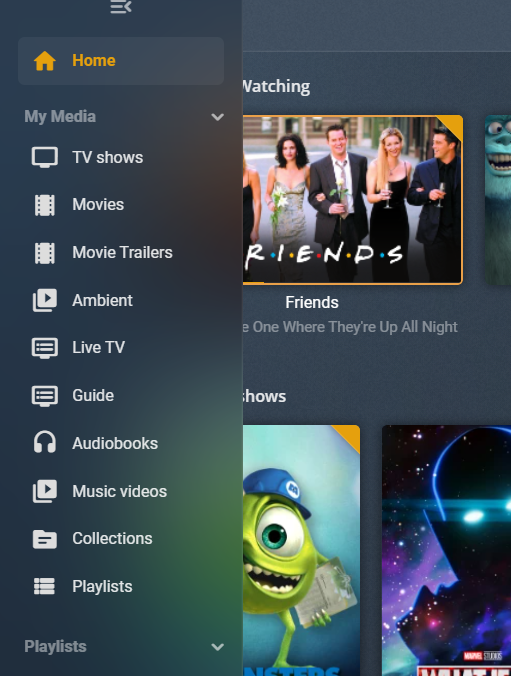
I moved from Plex to Emby and even though I think Emby is superior in its flexibility there are some things I like better with Plex, especially in terms of its looks. This theme is trying to fix that by making it a bit more similar to Plex but with some, in my opinion, improvements. The CSS is attached to this post for anyone interested and below are some screens to show it off Good to know I only use Chrome so I can't guarantee this CSS works as expected in other browsers. If you want the sidebar menu to look like in the screens, make sure to pin the sidebar. Watched badge/banderoll is inverted which means that the badge will not be shown if media have been watched, like in Plex. For desired look, please use the "Dark" theme for both Theme & Settings theme in the display settings. Emby-Stable-style-v3.6.txt





 4 points
 -
Whaaaat! How did I not see that! Now I feel embarrased... Thanks!2 points
-
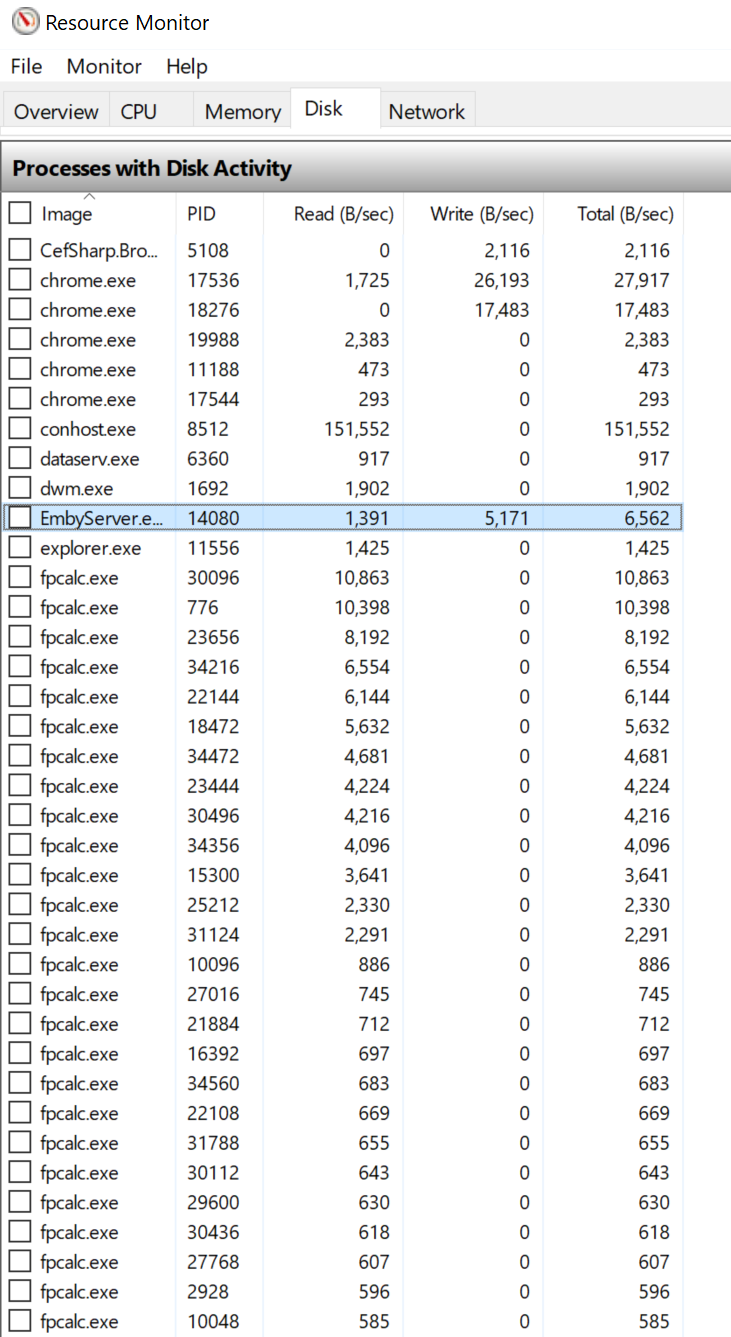
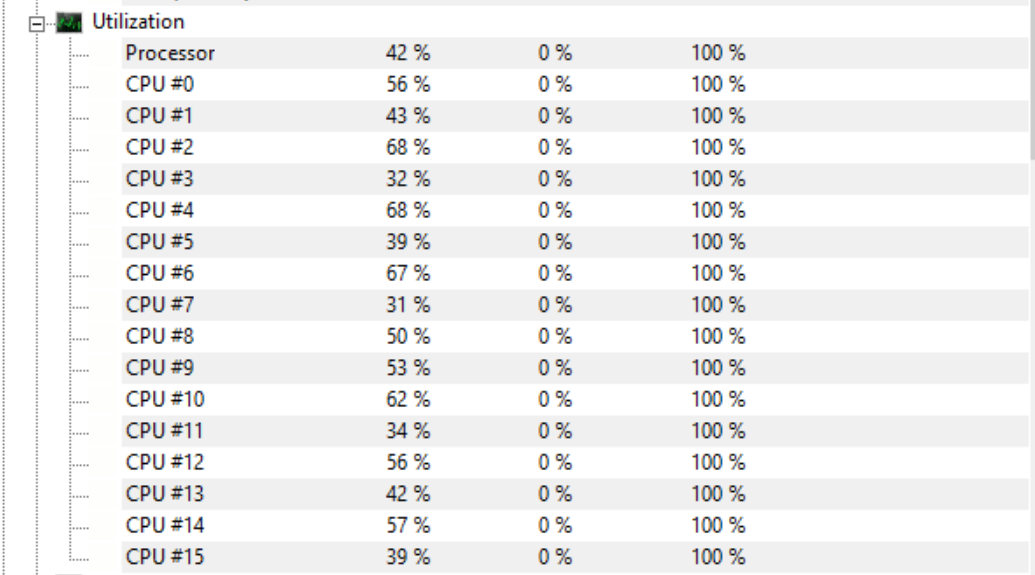
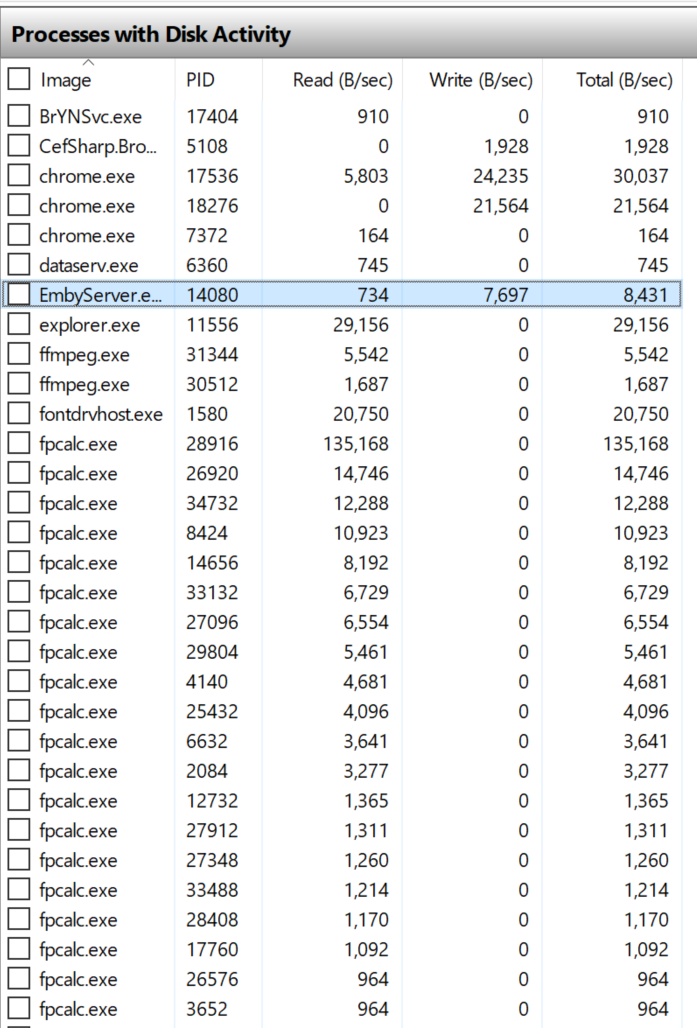
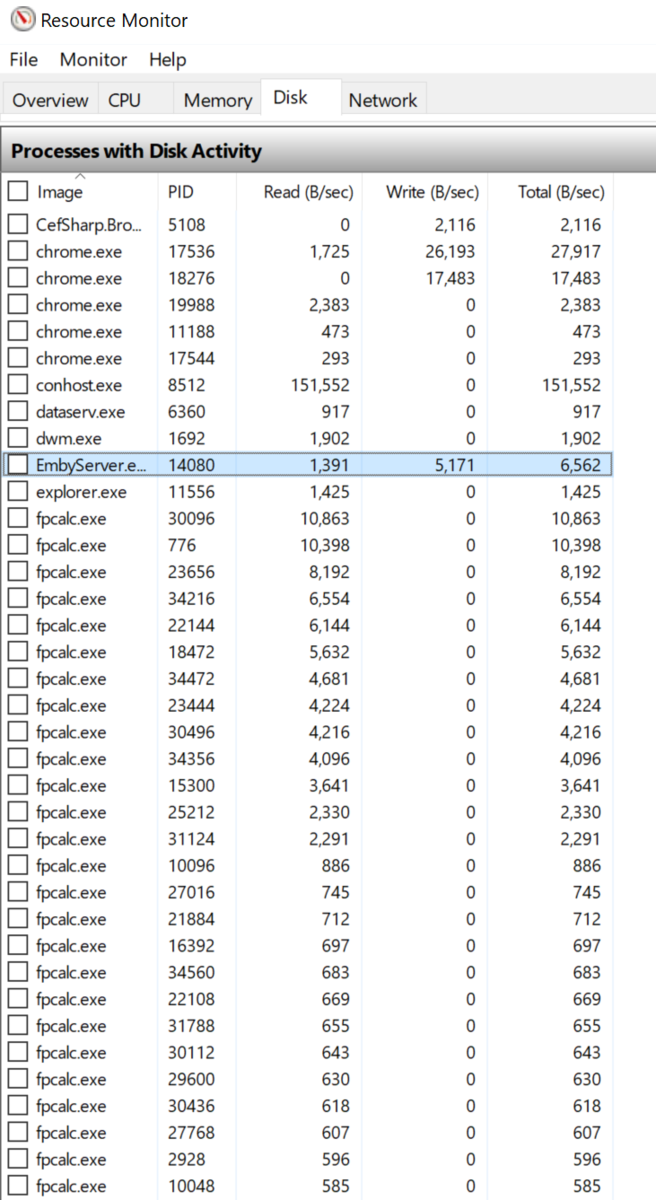
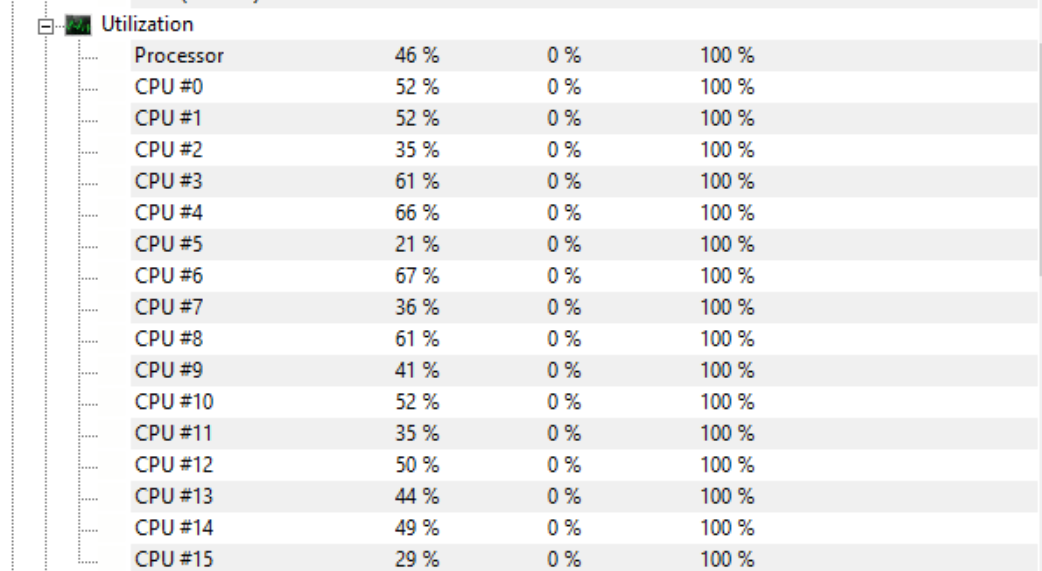
This is a 65Tb Drive Pool with most drives being harvested WD "White" Drives running on a Ryzen 3700x. Does this help? Fingerprinting CPU: Disk: Title Sequencing CPU: Disk:
 2 points
 -
I subscribed to a library and everything is fine, but sometimes I face a problem with the translation, which is late or advanced. Why can't I adjust its speed?1 point
-
hey what I'm really missing is support for audiobooks. Simply saving the resume point for those mp3s would be absolutely enough, no need to fetch metadata etc.1 point
-
Emby's interface on Apple TV Date, and no evolution of design conference to Android box. Will there be a version 2.0 on Apple TV? Because this box also deserves a more modern evolution like the Team Plex I use Emby since a year because I can find it intuitive now with the evolutions of Plex, Squire and infuse applications, I find it less attractive. Your team is Great but think of the apple user who would like their favorite app to modernize on their box THANKS1 point
-
Welp! I have tried everything I know to get ffmpeg to output to stream. I can obtain the stream from ffmpeg by using "pipe:" Then I can get the pipped stream through the "process.StandardOutput.BaseStream" in c# However, I can't get that stream to "CopyTo" a memory stream. When I finally got it into a memory stream object, I wasn't able to read it back in a BinaryReader because my buffers seemed all messed up. I need to talk to someone with some background in ffmpeg, who knows how to collect the stream in c# properly.1 point
-
Hi there, have you explored your emby user home screen options?1 point
-
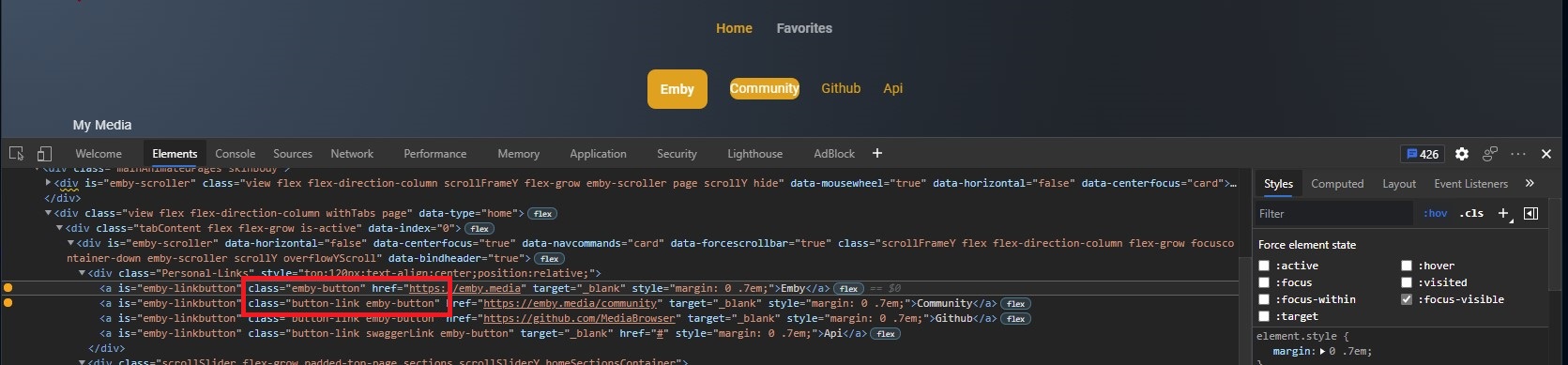
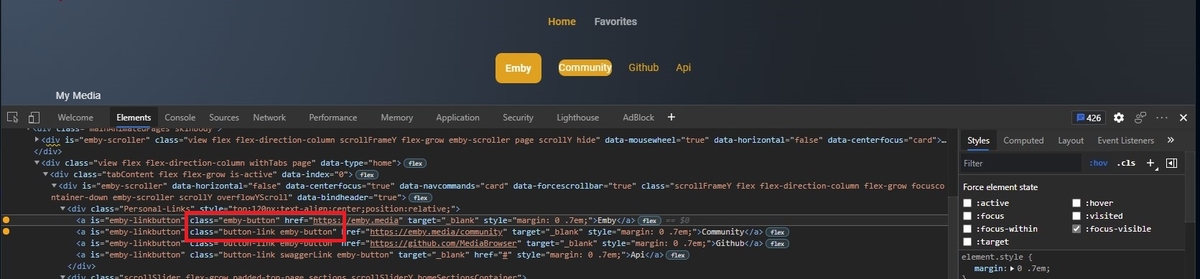
Okay yes this would appear to from where we are putting the "Personal-Links" as Home is normal focus on a refresh. So you would have to move "Personal-Links" up out of "index=0". Hmm have to test some more as it has to be in index=0 to scroll.1 point
-
Correct but I still can not replicate focus always, I occasionally get focus on multiple items and just click anywhere to remove it. But I did just notice focus on these added custom links as a page refresh focuses on first item (but still random depending on where I am in the debug console). Now if I remove these links I do not see any focus. But your examples are mixed buttons and links, just like if you make that custom link only a button it is treated differently.
 1 point
 -
New packages on our website: https://emby.media/download.html1 point
-
That is with the docked navdrawer on home. The undocked navdrawer is the normal click to open.1 point
-
Thanks! If orange is not your thing you can easily change it by doing a search and replace for below to the color of your choice! rgb(229, 160, 13) e5a00d Thanks a lot If you hover with the mouse cursor it will expand and get larger displaying the text and such.
 1 point
 -
Wow! That's cool! Is the navbar always closed or does it open on hover?1 point
-
Unless you have a really old installations these paths are a token in the database to make this move possible. Since you don't have any Custom paths you should not have issue. Library paths may be your only issue if they change in this move.1 point
-
So you're not short on CPU threads then It's actually ffmpeg that does all the disk I/O - so if you could find the activity for that process when Fingerprinting is going on that that would be very useful. If Drivepool has spread the 'show/seasons' across all the physical disks (which I presume it has), then this may explain why you are not seeing performance I/O issues.1 point
-
Although not a fan of Team Orange, that seriously looks good. Well done.1 point
-
There's the "Downloads" folder shortcut on your Select Server screen (very last button), it is intentionally designed so that no session is required to access those (as you're offline, how could you be logged-in). Disable both your WiFi and Mobile data, start Emby app, wait for timeout (wait... wait...) for Select Server screen to show. Scroll all the way for down.1 point
-
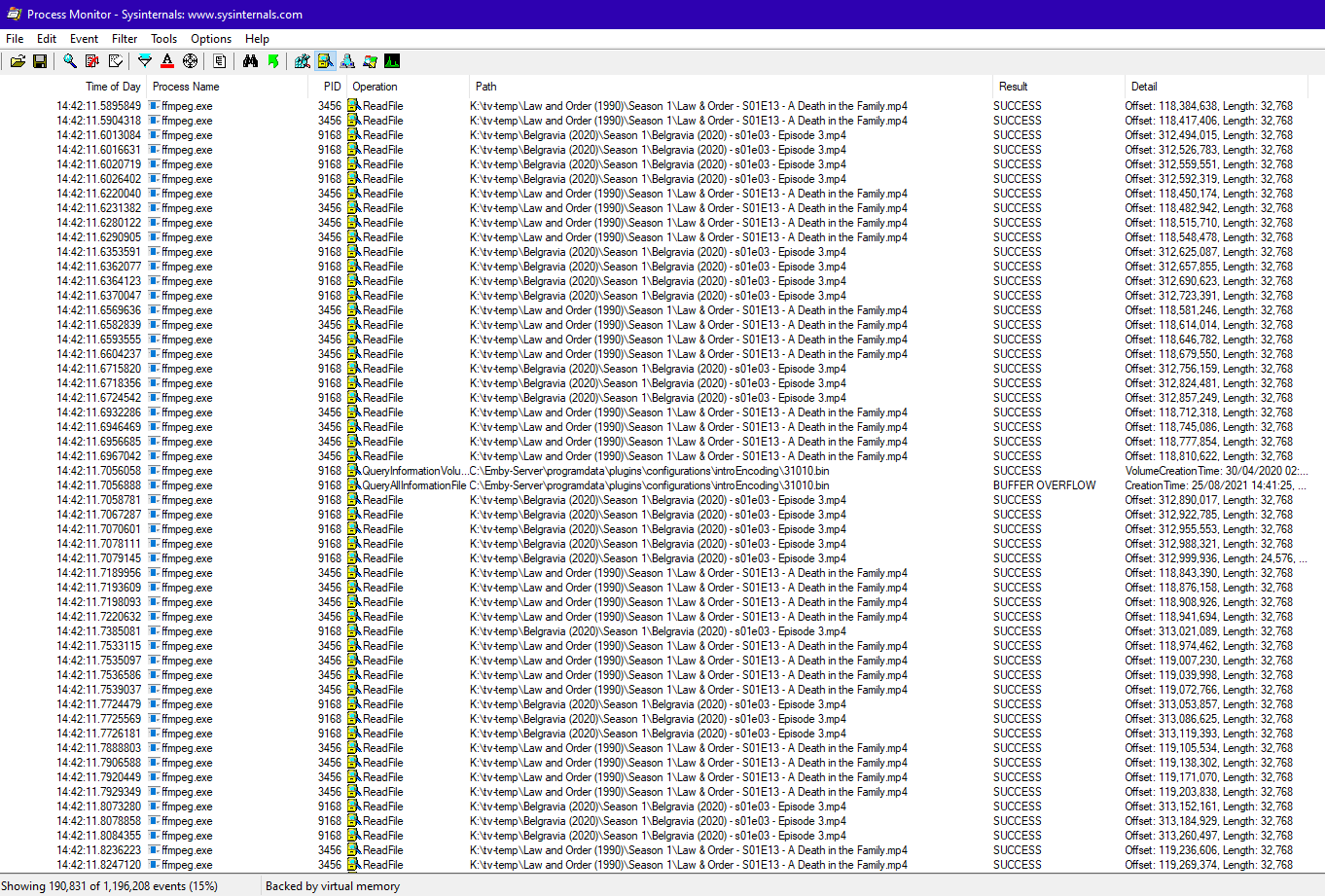
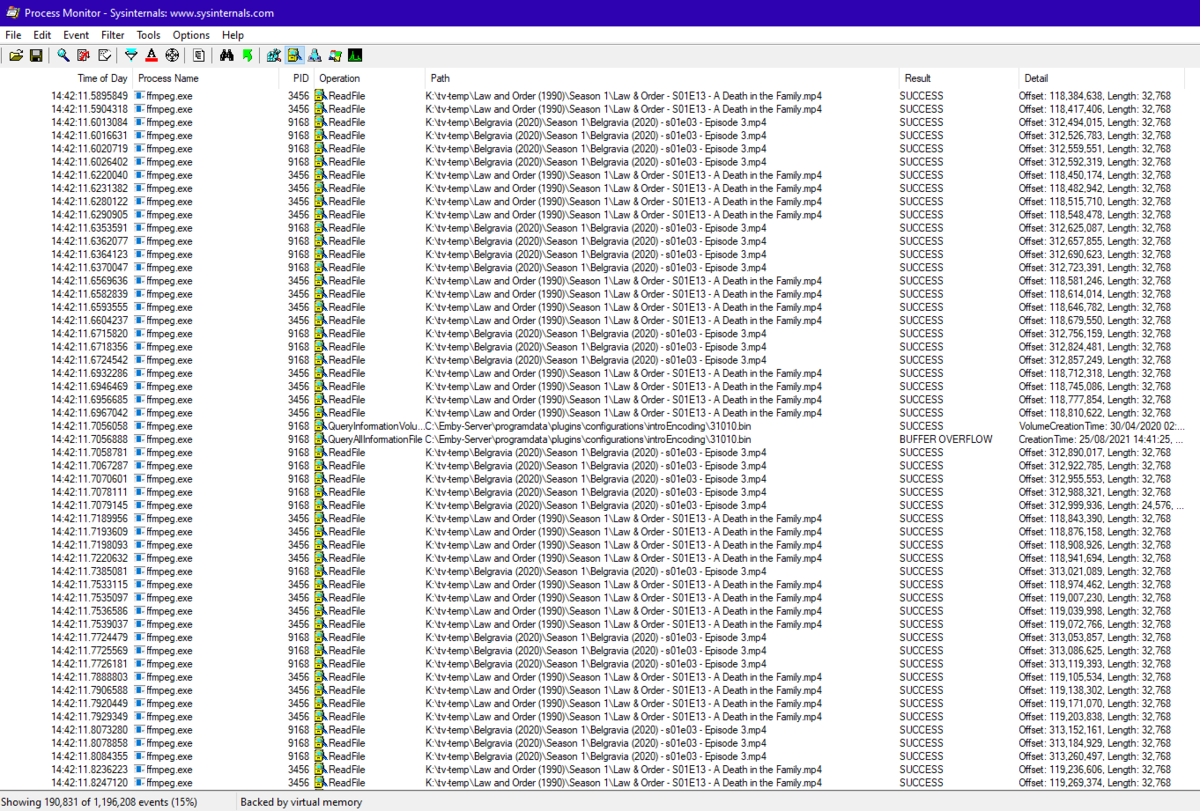
It's from sys internals (Microsoft) - an essential tool if you want to know what is going on in your system in real time. It's a complex tool though, you'll need to apply filters - otherwise you will just be bombarded with information during the capture ..1 point
-
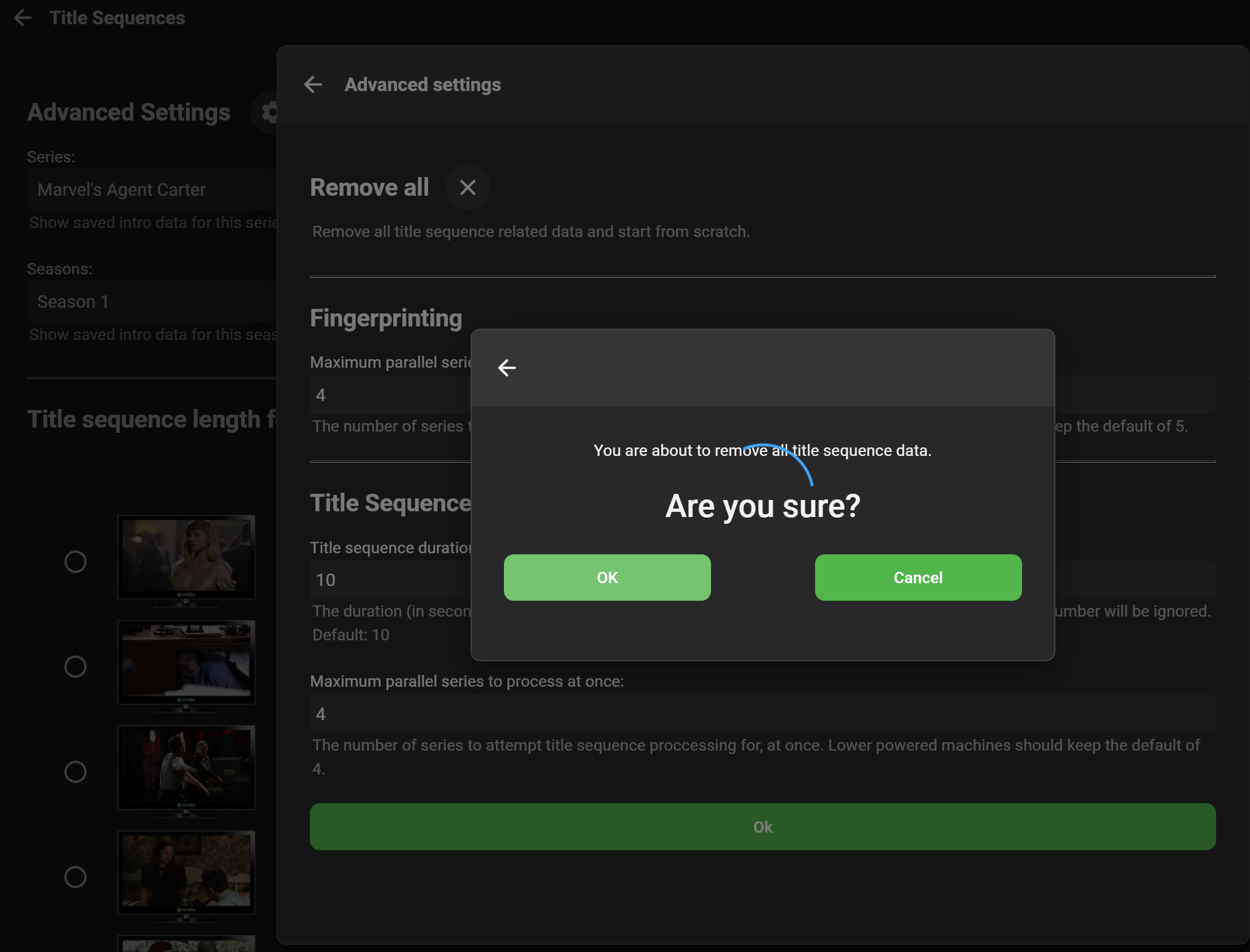
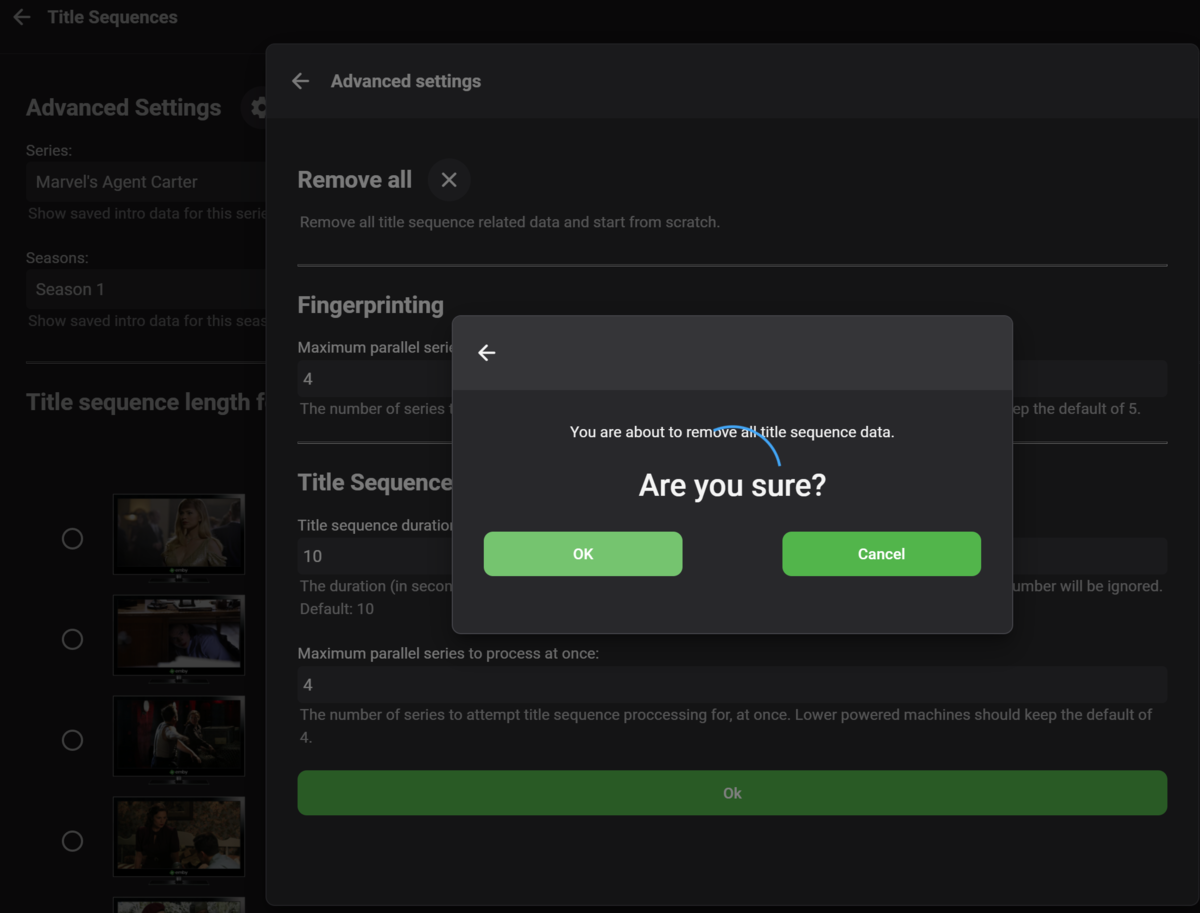
This process seems lengthy and there's no real way to know if it properly completed or not: Spinner spins and spins then stops but this dialog screen still shows.
 1 point
 -
yep, great job1 point
-
Not if the xmltv image option would silently also change what the internal Emby guide data receives. Gracenote provides both image formats.1 point
-
Nice work. That totally makes sense. There is quite a bit of disk I/O in that task. Let me see if I can pipe the ffmpeg result to memory stream instead of writing to disk. I'll try this: https://stackoverflow.com/questions/19634749/can-i-use-ffmpeg-to-output-jpegs-to-a-memory-stream-instead-of-a-file1 point
-
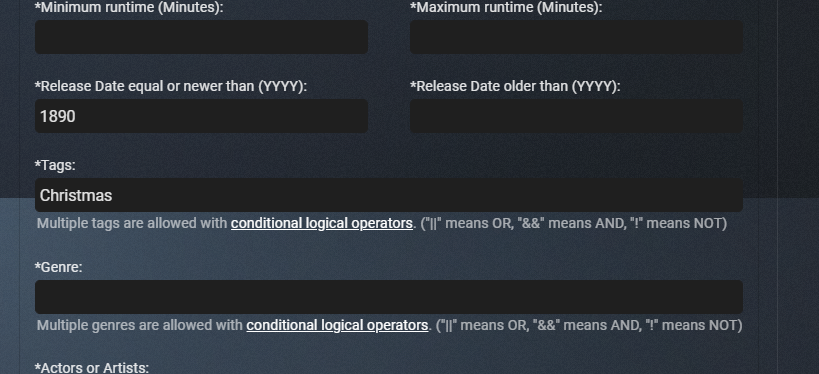
I would recommend using a tag instead of an actor to point to specific content. I for example have a Christmas channel and each movie I want in it have the tag "Christmas". Then create a channel with below. Do not forget to add the Release date as it seems to be needed at least for me.
 1 point
 -
I like this idea alot.... I can maybe add this. I'll have to figure out a good way to do this. Do your downloaded Trailers in the folder get a played marker on them if you have watched them? Do you get genre classification and age rating classification? Can you share your script with me in PM so i can test this? Thanks1 point
-
Hi. There are a couple of recent threads on this issue of shows without unique season and episode numbers. The short answer is it should be improved for the next release of the server. Thanks.1 point
-
Hi. Yes, because that's exactly what that (epg-ID) is . More flexibility is possible for the future. Recent releases of the server have included channel grouping (via tags) that works automatically with most m3u tuners and much better mapping and channel management features. These were the absolute top-priority parts of the things you are thinking of as "IPTV features". While this thread gets a lot of activity, Emby is not an IPTV client per se - it is an entire personal media server and management system. So, while we still want to continue to improve features in this area, the overall media playback and management features always take priority because they impact a much larger percentage of Emby users. We will get there eventually...1 point
-
I don't believe it's the .bin that has the problem - that's saved on the SSD in my case, so separate I/O channel. I'm actually wondering if this is simply a case of the limitations of a mechanical HDD.. If I used 2 HDD's (two 'spindles') - half the shows one one, half on the other - I suspect, it would halve the fingerprinting time ...1 point
-
So it's pretty easy to see why the I/O is getting hammered ! This was just running with 2 threads, and the reads are flipping between the two files with what looks to be 32K chunks ? Thus the HDD is seeking each time. Is there any way to read larger file chunks / increase the buffer size on the ffmpeg reads perhaps ?
 1 point
 -
Hi. Do you have two copies of those movies?1 point
-
Thanks Chef - will try that version in a sec. So on the previous versions - my findings are : if I try and run more than 1 (I tried 2..) for finger printing - the HDD goes ballistic and hits 100% IO - resulting it it actually becoming slower to complete the task. I cancelled it after 10 mins (vs 5 to complete previously). However, detection is much better with 5 (I only have 5 shows to test with..) - this is still interesting though as watching the CPU graph, it peaked at 60% and then stepped down 10% as each show completed (I presume), multiple times as the number of show episodes differ - then levelled out at 10% for another minute or so. Total time 6 mins vs the previous 15 minutes. Logs show the parallelism here as opposed to sequential list. So - couple of things for me to try a) put the test shows on the SSD and re-test. If this speeds up substantially, then this is going to be an issue - as all my media is on HDD as I suspect is most peoples. Haven't tried on a NAS yet - but suspect that will swamp the I/O pretty quick... b) I'm going to graph the CPU and match with the detection logs. c) I'm going to run procmon to see what is being read/written to - maybe there are some efficiencies to be had somewhere for the fingerprinting ... d) I'll try the new binary once I've concluded the above - I don't want to keep moving the goalposts1 point
-
I guess I'm trying to understand what the workload is here - if running the detection threads in parallel speeds up the entire process - then what is causing the 'bottleneck' ? I'm just testing on a 80 'episode' emby test instance - Fingerprinting took 5 mins, 3 secs - the resulting dB is tiny with 80 rows. Detection took 15 mins, 33 secs .. CPU was 6-12% (i7 6700K) during the detection. Media on local SATA Physical disk. Emby on an SSD. ps - I think I've also found a potential bug in the process - If there is no 'Season X' folder - then the detection appears to hang ? This was my mistake when setting up my test instance - ie used \tv-test\showname\showfile.mkv instead of \tv-test\showname\season 1\showfile.mkv. Of course emby worked ok with that, but looking at the logs - it was listing the show in the SkipIntro log as \tv-test ... it had no mention of \tv-test\showname\ - all other shows used the full folder name. Unfortunately, I deleted the logs and started fresh to get it to work again (after adding a season folder in the show) - but I should be able to re-create easily enough. -- Let me get some stats on how the parallel processes impact things - I'm going to put it back to 5 for starters ..1 point
-
The detection is basically just a bunch of complex math, so it should be able to use up quite a bit of CPU. I’m not sure why it doesn’t use that much, although I’ve noticed similar behaviour. Maybe the CPU can’t calculate faster than that? ¯\_(ツ)_/¯1 point
-
Or go with your preferred TV of choice - Samsung, and obtain streaming stick (Chromecast with Google TV, FireTV, Roku), so you're not restricted either way? You can always find use for it on some other TV later on.1 point
-
Yes, thank you very much @cayars for the remote session and the great assistance1 point
-
Is this what your looking for embyserver.txt1 point
-
Yep that’s a good alternative too.1 point
-
Or convert to a streaming-friendly, lower-bitrate format, so it'll DirectPlay. Money vs. time.1 point
-
@Sammy This will handle adding the extra row. I'm looking at your log, and the database is still erring on load. This will fix that. IntroSkip_v2.zip Be sure to clear browser cache. Thank you sir.1 point
-
I've made a GitHub repo with instructions and Windows/Linux builds of my wrapper through GitHub actions so that it's verifiably legit. Let me know if you need help. https://github.com/makitsune/emby-custom-ac3-bitrate1 point
-
One other thing. If the fingerprinting task is running, and the title sequence task kicks off, the title sequence task will stop untill the fingerprint task is complete. This also happens the other way around. The two tasks will never over lap each other.1 point
-
Looking at the log it looks like Emby mis-identified it as "The Last Hit Man" so if you selected edit metadata on "The Last Hit Man" you see a path for "Hit Man" correct? 2021-08-24 14:30:37.923 Info App: MovieDbProvider: Finding id for item: Hit Man 2021-08-24 14:30:37.923 Info HttpClient: GET https://api.themoviedb.org/3/search/movie?api_key=f6bd687ffa63cd282b6ff2c6877f2669&query=Hit+Man&language=en 2021-08-24 14:30:38.237 Info HttpClient: GET https://api.themoviedb.org/3/movie/41341?api_key=f6bd687ffa63cd282b6ff2c6877f2669&append_to_response=casts,releases,images,keywords,trailers&language=en&include_image_language=en,null 2021-08-24 14:30:38.381 Info HttpClient: GET https://private.omdbapi.com?apikey=fe53f97e&i=tt1124379&plot=short&tomatoes=true&r=json 2021-08-24 14:30:39.206 Info HttpClient: GET https://api.themoviedb.org/3/movie/41341?api_key=f6bd687ffa63cd282b6ff2c6877f2669&append_to_response=casts,releases,images,keywords,trailers1 point
-
The log that contained the SQL error would show "Corrupt: database disk image is malformed" or "Busy: database is locked".1 point
-
You shouldn't have needed to delete the library.db unless the server log said you had a Corrupt database. As for scans you can click on the task in Scheduled Tasks to see the triggers, default every 12 hours. If your setup supports Real Time Monitoring Emby should automatically see new items after about 2 minutes.1 point
-
Very cool. I'll echo the Flatpak request (as opposed to snap or appimage). The Kodi Addon experience isn't quite the same as having a native Emby Theater application. Edit: Running Fedora here, I can't get Alien to cooperate with the existing .deb.1 point
-
@VincentVanGozer - I apologize for replying late. It's your drivers being age-old. Please install the latest graphics drivers from the Intel Website and you should be fine. Otherwise, please post the hw detection log (after updating drivers and restarting the system). Thanks.1 point
-
Please post a server log to determine the exact error but more then likely a Locked database and you will need to follow the steps in the KB for Removed DB locks. https://support.emby.media/support/solutions/articles/440022108941 point
-
Restarted the whole computer and now it is going fine and syncing perfectly. Maybe build 30 ex 5 did fix something1 point
-
It's always our pleasure to help like this when we can! Happy Streaming!1 point
-
OK, the next update to our LG app will have the subtitle offset feature.1 point